

LATONYA 8

12346

Comments

  • LindaBLindaB Posts: 193
    sapat said:
    LindaB said:
    Cybersox said:
    5) As for the included HDs in pro-packages, they’ve only been a part of the releases of males. When we do get a male release, the number of male figures that come with a release is generally lower when compared to the female releases. As such, I think DAZ has added the HDs to those releases to balance the number of figures one gets with those packages. 

    Just thoughts.

    Jason 

    The Alexandra, Edie and Mabel Pro Bundles all came with the HD Add On free at the time of their release.  


    I susepct the Alexandra, Edie and Mabel pro bundles included the HD because they are older characters and require a lot more facial detail in order to look believable. That's been my assumption of why they're doing it. I could be wrong.

    LOL, are you saying us old broads need more work to help us along? cheeky

    Myself included!

  • 3Diva3Diva Posts: 11,982
    edited September 2018
    sapat said:
    xyer0 said:
     

    Well, what, if anything, would you do to Zelara, Divamakeup? I, too, think Daz absolutely nailed the Iray implementation and details on Zelara. It was so surrealistically good and far beyond anything other than bluejaunte's variations on a skin (but I could not abide the eye bag marks for my purposes) that I had to change my main character's skin to Zelara's. I was hoping that Zelara was a new standard, but I suspect that her level of quality may show up once or twice more (at most) in the Daz Core stable.

    While I think her default skin is awesome, I still prefer her skin with Altern8 and a few tweaks:

     https://www.daz3d.com/forums/discussion/comment/3858546/#Comment_3858546

    I think Altern8 brings out more of the skin's details and it also reduces the render times vs her default skin settings.

    I own Altern8, and would like to know how you tweak the shaders to bring out details, and you say it also reduces render times.  What is the method?

    Thank you.

    The method is just using the Altern8 presets. :) If you render Zelara 8 "out of the box" then note the render time, then apply Altern8 and then render again - you'll see reduced render time. The last time I tested it the Zelara 8 "out of the box" with no changes to her settings rendered in 34 minutes, after I applied Altern8 (I think it was Charlotte 8 "no maps" with a few other tweaks with the Altern8 settings) and then rendered - it rendered in 26 minutes. It was 8 minutes faster with Altern8 vs her default settings.

    If you want the shader/materials preset I made for Zelara 8 send me screenshot of your purchase of Altern8 in your product library (that way I know you have the maps and stuff that you need for the shader to work properly) and I'll send you a link to the materials preset I made for her.


    Post edited by 3Diva on
  • barbult said:

    Have any of you installed Panthera Outfit Textures with Daz Connect (install from inside Daz Studio)? It is all corrupted and unusable for me. I submitted a help request, but I wondered if it is only me or a system wide problem.

    Same here. I will also submit a help request.

  • LosingSignalLosingSignal Posts: 409
    edited September 2018

    A few people have been comparing LaTonya to Bethany, and since I've been kind of waiting on a Bethany character (not as much as a Lilith or Arabella stand in, but hey, it's not October yet...), I thought I'd give it a try.  Here's Bethany 7 at 100% and Genesis 8 Base with LaTonya Body at 100%, LaTonya Head at 50%, and Olympia Head at 50%.  Same outfit, same hair, and same texture to minimize the difference to see how close they are.  And... not bad!  She could definitely be a stand in for ole' Beth, if one was needed.

    BethanyGen8.png
    800 x 1300 - 945K
    Post edited by LosingSignal on
  • barbultbarbult Posts: 26,424

    Amazingly close!

  • StingerStinger Posts: 324
    edited September 2018

    Latonya test render with a little fantasy makeup.

    Latonya 8 test.png
    873 x 896 - 1M
    Post edited by Stinger on
  • DkgooseDkgoose Posts: 1,451
    sapat said:
    xyer0 said:
    Well, what, if anything, would you do to Zelara, Divamakeup? I, too, think Daz absolutely nailed the Iray implementation and details on Zelara. It was so surrealistically good and far beyond anything other than bluejaunte's variations on a skin (but I could not abide the eye bag marks for my purposes) that I had to change my main character's skin to Zelara's. I was hoping that Zelara was a new standard, but I suspect that her level of quality may show up once or twice more (at most) in the DazWhile I think her default skin is awesome, I still prefer her skin with Altern8 and a few tweaks:

     https://www.daz3d.com/forums/discussion/comment/3858546/#Comment_3858546

    I think Altern8 brings out more of the skin's details and it also reduces the render times vs her default skin settings.

    I own Altern8, and would like to know how you tweak the shaders to bring out details, and you say it also reduces render times.  What is the method?

    Thank you.

    The method is just using the Altern8 presets. :) If you render Zelara 8 "out of the box" then note the render time, then apply Altern8 and then render again - you'll see reduced render time. The last time I tested it the Zelara 8 "out of the box" with no changes to her settings rendered in 34 minutes, after I applied Altern8 (I think it was Charlotte 8 "no maps" with a few other tweaks with the Altern8 settings) and then rendered - it rendered in 26 minutes. It was 8 minutes faster with Altern8 vs her default settings.

    If you want the shader/materials preset I made for Zelara 8 send me screenshot of your purchase of Altern8 in your product library (that way I know you have the maps and stuff that you need for the shader to work properly) and I'll send you a link to the materials preset I made for her.


    Please tell me you are releasing the new character settings as addons in the store  :)

  • 3Diva3Diva Posts: 11,982
    dkgoose said:
    sapat said:
    xyer0 said:
    Well, what, if anything, would you do to Zelara, Divamakeup? I, too, think Daz absolutely nailed the Iray implementation and details on Zelara. It was so surrealistically good and far beyond anything other than bluejaunte's variations on a skin (but I could not abide the eye bag marks for my purposes) that I had to change my main character's skin to Zelara's. I was hoping that Zelara was a new standard, but I suspect that her level of quality may show up once or twice more (at most) in the DazWhile I think her default skin is awesome, I still prefer her skin with Altern8 and a few tweaks:

     https://www.daz3d.com/forums/discussion/comment/3858546/#Comment_3858546

    I think Altern8 brings out more of the skin's details and it also reduces the render times vs her default skin settings.

    I own Altern8, and would like to know how you tweak the shaders to bring out details, and you say it also reduces render times.  What is the method?

    Thank you.

    The method is just using the Altern8 presets. :) If you render Zelara 8 "out of the box" then note the render time, then apply Altern8 and then render again - you'll see reduced render time. The last time I tested it the Zelara 8 "out of the box" with no changes to her settings rendered in 34 minutes, after I applied Altern8 (I think it was Charlotte 8 "no maps" with a few other tweaks with the Altern8 settings) and then rendered - it rendered in 26 minutes. It was 8 minutes faster with Altern8 vs her default settings.

    If you want the shader/materials preset I made for Zelara 8 send me screenshot of your purchase of Altern8 in your product library (that way I know you have the maps and stuff that you need for the shader to work properly) and I'll send you a link to the materials preset I made for her.


    Please tell me you are releasing the new character settings as addons in the store  :)

    That's the plan, as long as Daz accepts them. :) There have been quite a few characters released over the past few months so I'm going to try and get an add-on out for many of the other "Official 8" characters. :)

  • StingerStinger Posts: 324
    edited September 2018

    LaHagred anyone?

    LaHagred.png
    873 x 896 - 1M
    Post edited by Stinger on
  • EJWorksEJWorks Posts: 483
    edited September 2018

    Monique 7, using FWSA Tisha HD textures. Latonya 8, using Shangrila textures (I was going to use her base material, but her eyebrows weren't showing up). Bethany 7, using her base material and makeup, but the nails are FWSA Camile. I was wanting a simple group shot to show they're friends.

    Friends for life.jpg
    1371 x 878 - 578K
    Post edited by EJWorks on
  • Stinger said:

    LaHagred anyone?

    yeah, no

  • Here are some shots using altern8 shader.  I hope Diva adds some more presets for black skin.


    I must admit I prefer Latonya's original textures


    LATONYA 3.png
    937 x 901 - 809K
    LATONYA 2.png
    937 x 901 - 791K
    LATONYA 1.png
    937 x 901 - 612K
  • StingerStinger Posts: 324


    I must admit I prefer Latonya's original textures


    yes


  • sapatsapat Posts: 1,735
    sapat said:
    xyer0 said:
     

    Well, what, if anything, would you do to Zelara, Divamakeup? I, too, think Daz absolutely nailed the Iray implementation and details on Zelara. It was so surrealistically good and far beyond anything other than bluejaunte's variations on a skin (but I could not abide the eye bag marks for my purposes) that I had to change my main character's skin to Zelara's. I was hoping that Zelara was a new standard, but I suspect that her level of quality may show up once or twice more (at most) in the Daz Core stable.

    While I think her default skin is awesome, I still prefer her skin with Altern8 and a few tweaks:

     https://www.daz3d.com/forums/discussion/comment/3858546/#Comment_3858546

    I think Altern8 brings out more of the skin's details and it also reduces the render times vs her default skin settings.

    I own Altern8, and would like to know how you tweak the shaders to bring out details, and you say it also reduces render times.  What is the method?

    Thank you.

    The method is just using the Altern8 presets. :) If you render Zelara 8 "out of the box" then note the render time, then apply Altern8 and then render again - you'll see reduced render time. The last time I tested it the Zelara 8 "out of the box" with no changes to her settings rendered in 34 minutes, after I applied Altern8 (I think it was Charlotte 8 "no maps" with a few other tweaks with the Altern8 settings) and then rendered - it rendered in 26 minutes. It was 8 minutes faster with Altern8 vs her default settings.

    If you want the shader/materials preset I made for Zelara 8 send me screenshot of your purchase of Altern8 in your product library (that way I know you have the maps and stuff that you need for the shader to work properly) and I'll send you a link to the materials preset I made for her.


    Wow, thank you!  I'll send it over the weekend!!

  • sapatsapat Posts: 1,735
    sapat said:
    xyer0 said:
     

    I own Altern8, and would like to know how you tweak the shaders to bring out details, and you say it also reduces render times.  What is the method?

    Thank you.

    The method is just using the Altern8 presets. :) If you render Zelara 8 "out of the box" then note the render time, then apply Altern8 and then render again - you'll see reduced render time. The last time I tested it the Zelara 8 "out of the box" with no changes to her settings rendered in 34 minutes, after I applied Altern8 (I think it was Charlotte 8 "no maps" with a few other tweaks with the Altern8 settings) and then rendered - it rendered in 26 minutes. It was 8 minutes faster with Altern8 vs her default settings.

    If you want the shader/materials preset I made for Zelara 8 send me screenshot of your purchase of Altern8 in your product library (that way I know you have the maps and stuff that you need for the shader to work properly) and I'll send you a link to the materials preset I made for her.


    I went to message you and there's a spot to add an image, but it's wanting a URL which I don't have.  I thought I could just add the jpg screenshot I took and add it to the message.  How can I get it to you?  Can you help?

    Thx

  • 3Diva3Diva Posts: 11,982
    sapat said:
    sapat said:
    xyer0 said:
     

    I own Altern8, and would like to know how you tweak the shaders to bring out details, and you say it also reduces render times.  What is the method?

    Thank you.

    The method is just using the Altern8 presets. :) If you render Zelara 8 "out of the box" then note the render time, then apply Altern8 and then render again - you'll see reduced render time. The last time I tested it the Zelara 8 "out of the box" with no changes to her settings rendered in 34 minutes, after I applied Altern8 (I think it was Charlotte 8 "no maps" with a few other tweaks with the Altern8 settings) and then rendered - it rendered in 26 minutes. It was 8 minutes faster with Altern8 vs her default settings.

    If you want the shader/materials preset I made for Zelara 8 send me screenshot of your purchase of Altern8 in your product library (that way I know you have the maps and stuff that you need for the shader to work properly) and I'll send you a link to the materials preset I made for her.


    I went to message you and there's a spot to add an image, but it's wanting a URL which I don't have.  I thought I could just add the jpg screenshot I took and add it to the message.  How can I get it to you?  Can you help?

    Thx

    I sent you a PM. :)

  • 3Diva3Diva Posts: 11,982

    Here are some shots using altern8 shader.  I hope Diva adds some more presets for black skin.

    I did, did you not download the update?

  • 3Diva3Diva Posts: 11,982
    edited September 2018

    Here are some shots using altern8 shader.  I hope Diva adds some more presets for black skin.

    I must admit I prefer Latonya's original textures

    Altern8 comes with adjustment settings - a lot of them. :) 

    Things like the look of skin and what different people think looks best is highly subjective and subject to personal taste and preference. Personally, I think that the default Latonya 8 skin is good, but to me (and this is just my personal taste and opinion) her default settings are a bit too "red" and too shiny for my personal taste. :) I prefer her with Altern8 - she also renders faster (in my tests at least) with Altern8.

    Here she is with her default skin settings. Render time 3 minutes and 49 seconds:

    And here she is with Altern8 ("Olympia 8 A - No Maps" + "SSS Tint C"). Render time 2 minutes 46 seconds:

    Personally, I prefer her with Altern8, but that's just my personal taste. If you like her with her default settings better that's 100% valid too. :D We're all subject to our own personal preferences and tastes. :) Humans come in such a wide variety of skin tones and skin types and there is no right or wrong way to like one look of skin over another look. :)


    Latonya w default settings - 3 minutes 49 seconds.png
    910 x 910 - 630K
    Latonya w Altern8 - 2 minutes 46 seconds.png
    910 x 910 - 651K
    Post edited by 3Diva on
  • MollytabbyMollytabby Posts: 1,163

    Thank you for the 'Latonya Recipe' @DivaMakeup, I'll try it out later smiley

  • 3Diva3Diva Posts: 11,982

    Thank you for the 'Latonya Recipe' @DivaMakeup, I'll try it out later smiley

    You're welcome, I hope you find it helpful - it's just a "quick and dirty" formula as I haven't had the time to really dive into her settings, you can further customize her settings to your personal preferences of course. :) But, hopefully, that's a good starting off point for people who might want to play with adjusting her skin settings. :)

  • MollytabbyMollytabby Posts: 1,163
    edited September 2018

    I always find your recipes helpful @DivaMakeup, I don't really know what I'm doing as far as skin is concerned smiley. I need every little bit of help I can get!

    I've done two renders with the Altern8 renders, the first using your lighting and the second using the new Luminosity Black lighting set on a twilight setting. Your light set definately renders a lot faster on my Mac. I rendered 'figure only' and created the backdrops in postwork.
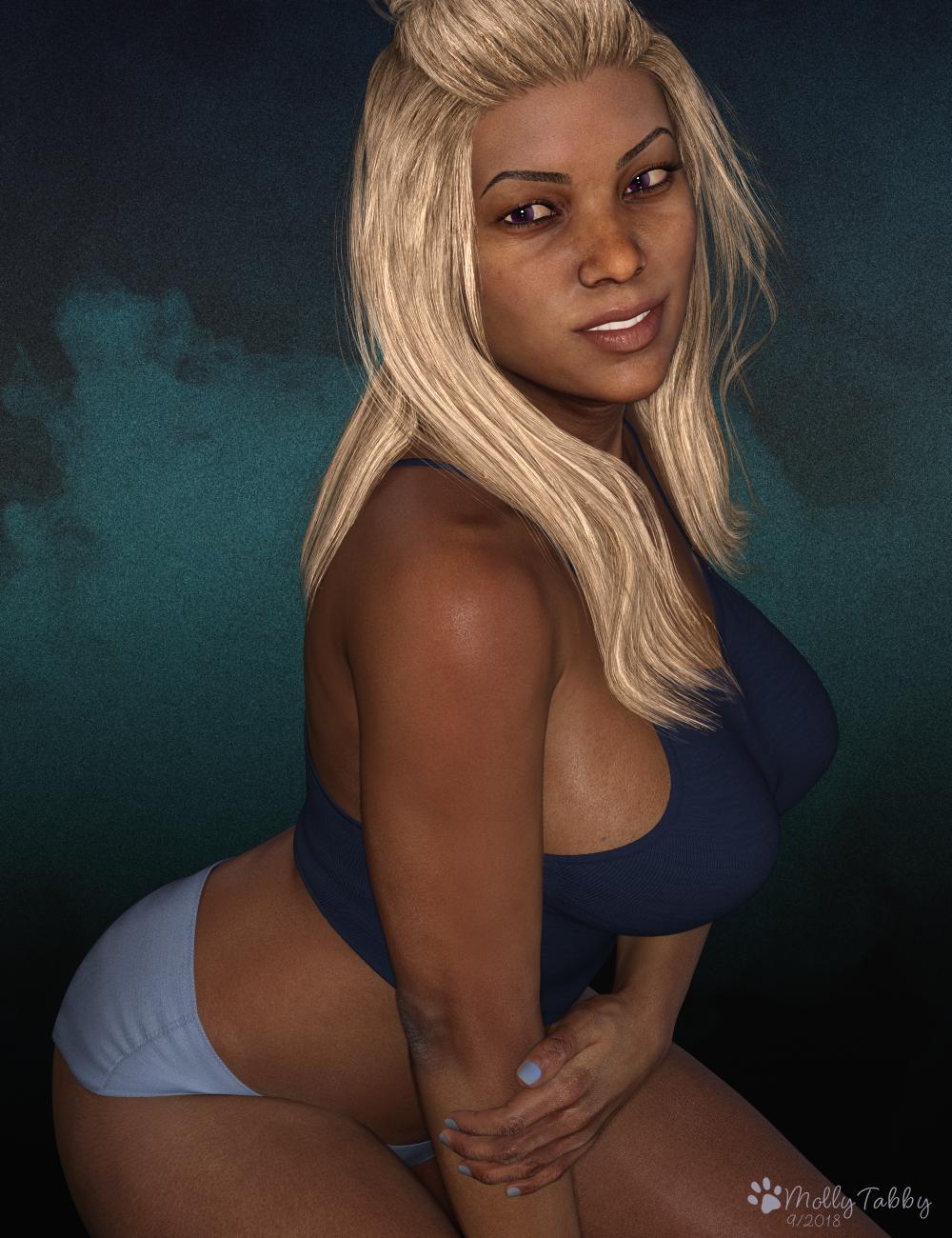
    Altern8 recipe and light/render settings

    Altern8 recipe and Luminosity Black lighting.

    Latonya-Altern8WEB.jpg
    1000 x 1300 - 1M
    Latonya-Altern8-Twilight-renderWEB.jpg
    1000 x 1300 - 1M
    Post edited by Mollytabby on
  • Twilight76Twilight76 Posts: 318
    edited September 2018

    ok, here a short Render with Latonya

    With a little postwork

    Latonya-Exposure.jpg
    618 x 1000 - 487K
    Post edited by Twilight76 on
  • barbultbarbult Posts: 26,424

    ok, here a short Render with Latonya

    With a little postwork

    Oh, I lke that. You did a beautiful job on the clothing, too.

  • nonesuch00nonesuch00 Posts: 18,789

    ok, here a short Render with Latonya

    With a little postwork

    awesome render

  • ArtiniArtini Posts: 10,421
    edited September 2018

    Different patterns can be quite easily added with the new Oso Shader Pack 1 for Iray - https://www.daz3d.com/oso-shader-pack-1-for-iray

    image

    Latonya12pic01.jpg
    1280 x 1080 - 368K
    Post edited by Artini on
  • scorpioscorpio Posts: 8,533

    This one could have done with a bit longer rendering.

  • MollytabbyMollytabby Posts: 1,163

    Nice image @scorpio!

  • One last go around to get it out of my system... :)

    The night is here, the city is alive... Time for her to test her limits.

    FWSA Viola in this one.  No real mods to speak of, save the bit of post work I had to do to clean up poke-through on the Gn3F outfit.

  • Nice image @scorpio!

    +1

    The outfit and pose really jump out at me!

  • sapatsapat Posts: 1,735

    Everone's renders are so gorgeous!  I haven't gotten any of it downloaded yet.  Maybe tomorrow. yes

Sign In or Register to comment.