Immortal Elegance by Elele
 abiflash
Posts: 108
abiflash
Posts: 108
in The Commons
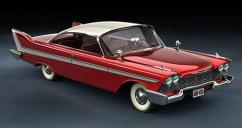
Does anyone know what lighting has been used on this product to make the car's headlights reflect this? In my render they are black or very dark. By the age of the product I assume no Iray lighting has been used.
main_51_7.jpg
500 x 264 - 42K

Daz 3D is part of 
Connect
DAZ Productions, Inc.
7533 S Center View Ct #4664
West Jordan, UT 84084
Licensing Agreement | Terms of Service | Privacy Policy | EULA
© 2026 Daz Productions Inc. All Rights Reserved.
Comments
It has 3DL materials so if you render in IRay you have to adjust materials settings. Don't know what lighting was used but I recall it comes with a 3DL skydome that is supposed to create nice reflections in the metal. If you render in 3DL you need that (or some other) skydome or you will get dark spots instead of reflections.
I render in 3DL using the Skydome that comes with the product. The reflections in the bodywork are very good, but only the headlights are dark.
Ok, can't remember if they use a reflection map or raytraced reflections, (have to check), but you possibly have the raytrace depth set too low in render settings. There is the reflector which needs trace depth and probably transparent glass, so trace depth should be atleast 2.
My trace depth is 2, that's not the problem. I guess the brightness of the headlights is photoshopped.
Trace depth of 2 will only let the light in through the glass and bounce once, it can't get out again. Try Trace Depth of 3, 4, and higher to see the difference. Zoom in close and you'll be surprised.
ETA: Actually, I added a distant light to my scene, the skydome just isn't bright enough on its own.
Here's two renders, Trace Depth 2 and 5.
Thank you very much for your advice. But I attach the product demo and your result with Trace Depth 5 is nothing like the advertising that sells.
It was released in 2013. The promos could have been rendered in poser since it says it comes with poser materials also.
Or maybe another rendering machine. But I still think it's postwork.
Why? That's a really typical nothing-special render.
Not sure but the reflections in the attached img look like the promo is using a totally different HDR, which could explain the brighter reflections. Not at my DS comp right now, so can't check, but you could try some other sky dome, increasing ray trace depth, playing with specular settings, setting limits off for reflection strength and turning it up, experimenting with refraction index, and of course lighting will have a great impact on the way highlights and reflections render.
It's a beautiful car model;)
I agree it's a very beautiful model car. But I don't think it's right to sell a product in which it's so difficult to get a render with the properties shown in the demos. Other sellers say they have used credits or attach an instruction guide.
What it is being reflected and how it is reflected are two separate considerations. The headlights can only reflect what is in front of the car, so I don't think the promo is using just the included skydome. If it did, it would show what I rendered, which is an inverted version of it since it is coming off a curved concave surface (the light's reflector). Also, I mentioned that the included skydome doesn't give off enough light by itself. It is not an uberenvironment2 light source, just ambient. In my first try the car was almost black, so there is different lighting for the promos, and maybe a different background, or at least more to it.
Put any brightly lit surface in front of the car (out of sight) and it will be reflected in in the lights. Don't forget that it will also reflect the ground not just the sky, so something bright down low in front will be needed, too, to get that kind of reflection.
You also have to allow the reflections to happen using sufficient trace depth. If not, it doesn't matter how bright the scene background is, the headlights just won't reflect anything.
Ok made a render with pretty much out of the box mats. Tweaked the head light glass a bit, set the lighting model to glossy plastic and glossiness to 55%, I thougth the specular highlights were a bit too tight. Also darkened the tyres and put the tyres bump map into the displacement slot. Ray trace depth at 4, rendered in progressive mode:
Sweet. (BTW, it's a '58 Plymouth Belvedere, give or take a year)
Not all products are "ready to render" and promo work isn't always done by the PA, and, well, you know, marketing. You'll have to do some work more often than not to get the look you want. You'll get the hang of it soon enough.
Lol, tks! Yup it's a quality model, things are properly rigged and so on. There's a a nice add-on too;)
Great job! Can I know which product you used for the floor and the background? And what lights? I'd also like to know exactly what you've modified on the glass. Thank you!
Hmm let's see... The road is from https://www.daz3d.com/worldbase-xtreme-kit, it has a number of morphs and material presets so it's pretty versatile, the rest of the product is pretty dated, though.
Lighting is https://www.daz3d.com/ibl-master-for-daz-studio, this is great stuff and highly recommended both for IRay and 3DL. It comes with a new light shader for 3DL that renders fast and gives you the option to use IRay HDRI's as a light source, well actually any jpeg can be used, and that's what I did here, I just don't remember where it came from, picked it up free.Basically you could put the included skydome texture into IBLM and it would light your scene. As for the headlights, as I said I just changed the lighting model to glossy plastic and turned down glossiness to 55%, lower values create bigger highlights. But I also pointed out that lighting is crucial for how highlights and reflections behave. You need lights in your scene that have a specular output, or you won't get any highlights. IBL-Master has a very good specular output, also the AoA advanced lights give you that. Or you can use the DS standard lights, of course, there's always the option to add lights and set them to specular only. Hope this helps!
ETA Here is the IBLM commercial thread https://www.daz3d.com/forums/discussion/215066/released-ibl-master-image-based-lighting-control-for-both-renderers-a-new-ibl-for-3delight/p1, lot of useful information in here;)
Thank you so much for your help. I hope your information will help me learn more.
No problem;) Happy rendering!