how can i get render like these.
 shweatkishor
Posts: 2
shweatkishor
Posts: 2
in The Commons
Hello gyz
Well, I was new to Daz like 4 or 5 months ago.
Now I can make render good enough good.
But I have a question.
When I was Surfing the net I just see 2 games and like those renders.
Game Names Big Brother, Dream of Desire
I m attaching sample pics.
Plz help me and tell me how can I get render Like these.
Tell me PLZ

wakeup 4.jpg
1920 x 1080 - 1M

car mom 2.jpg
1920 x 1080 - 2M
2.jpg
1600 x 900 - 217K
32770_32656_Pic.jpg
1600 x 900 - 150K

Daz 3D is part of 
Connect
DAZ Productions, Inc.
7533 S Center View Ct #4664
West Jordan, UT 84084
Licensing Agreement | Terms of Service | Privacy Policy | EULA
© 2026 Daz Productions Inc. All Rights Reserved.
Comments
Practise?
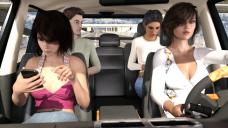
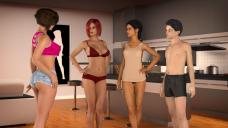
But seriously, the question to you is, have you tried to recreate one of the images with the content that you have? And what problems did you run into?
You write you can make good enough renders, so please tell me what you have done so far in making your images?
I mean, the first image of the lady bowing forward, or the last one, you can try to recreate easily. Select characters, put clothes and hair on them. Pose them, tweak the poses until they look rught. Set up light, adjust the light. Test render. Make more adjustments to light and poses. Repeat test render and adjustments until you are satisfied with the result....
lots of practice on setting up believable scenes and then lighting, lighting, lighting. No telling what renderer they used or lighting, but you could come close with iray.
Lights, getting clothes to fit right (problem with oversized chest is that most content creators don't add morphs for this) Enter deforms and all the other tools in daz. Each of these scenes was alot of work. get your scenes created first with good lighting for your particular render engine. Next setup characters with clothes and make sure they fit. Next posing and camera positioning (make sure you point the eyes in the right direction. Posing is a artform in itself, see how people interact for ideas. Render scene and post where it is appropriate.
I think this is doable. Several of these just look like stock poses, without even expressions being applied. You can probably do this, the best way to learn something is emulation.
I'd start with the car one. Place your characters in various poses in the vehicle. Get the right camera angle. Put a texture for the background in the environmental tab, and apply the sun and sky settings to emulate this light.
Yeah I would say other than lighting, posing/expressions is the next most important part, for if the pose/expression does not look right it can throw off the whole scenes believeability especially if the eye position is all wrong for what the scene is trying to convey.. There are so many factors in scene creation it can get very mind numbing indeed.. :)
I'm not really seeing anything special about the renders - they look pretty standard and average to me. I think what would help more is if you posted a couple of your renders and we could give you tips on improving them. :)
Yeah I m doing THat.
Could u tell me some good render setting of Iray.
I am Mesiing Around and get a normal render quality.
But not superb.
Thank All of You GYZ ...
I m gona try it Now.
Gona Buy Cloth Morph.
Some Enviroment.
Some New Dome and Lights.
Make sure to start an art studio thread. You'll probably get more artistic feedback there.
Lol I see what are you trying to make bro :))
Actually the above pictures are basic at best. If you want some challenges, try searching for "Anna Exciting Affection". That's a good aim for what we're trying to do. (Yeah I'm making it too :D)
Honestly, before you start throwing out money, maybe go and have a look at these threads here: https://www.daz3d.com/forums/categories/new-user-contests-and-events
I'd also recommend you join the contests, because that is the best way to actually learn how to improve your renders. There's so much freat advice in these threads, and if you share your WIPs in one of the open contests, you'll get direct feedback on what to improve.
That said, as someone pointed out, the pictures you posted are nothing really special, if you compare them to some of the stuff in the galleries. They are basically just post, light and render. There is nothing magic about it, and even if you buy all the light sets in the world, you won't make any real progress unless you understand what and why you are doing things, and how to move the lights to fit your particular situation. Often, a light set will help you take quick care of the basic light, but the pose you use will leave the face in the shadow. What are you doing then? What is your solution?
Well i can get good render with daz in outside.
But in Inside I get Not good enought ligiting.
And My Render Didn't Look That HD and real Like those.
So i tried to ask some frnd .
They told Big Brother Creator use some octane [application] to render that good.
And i don't Think Lighting thing can make they look At much good.
Well i m doing loats of Parctice and I finaaly can use Plane Lighting at my will.
And getting Good Render .
But My render are not good enought to compare to those.
AND I don't Know how they put DSLR Camera effect On the Render.
I m sure they didn't use PS.
Edited for profanity
Sure I will
Ohhh Cool I will cheak that game too.
Hmm,
Ok i just bought some poses and Hd addons.
and I m going ti cheak that too.
Well Yeah You are right.'
They are noot that good .
But after cheaking galleries.
I think i just started using DAZ
Can Last can u suggest me some modle with great figure.
Well all of modle i have Has Small In some areas.
Well if u Find Something Plz tell me.
And can u suggest me some teen modle like Bordie 6(I have Pro Bundle OF it.)
If I understand what you mean by "has small in some areas" correctly, based on the images you posted, sounds like you need the Female Body Morphs for the version you're using (Genesis 3 versus Genesis 8). Lots of options in there for making, umm, over-inflated women.
Regarding interior lighting, the first thing to remember is that you can usually hide the ceiling and some walls of a room, thereby letting in the same light as you set up for exterior renders. That's the quick-but-limited way. You can also use Kindred Art's Ghost Lights for a very easy to use diffuse lighting kit for interiors.
Have fun!
Okay... here are some threads that might help you:
As for characters, a word of advice: Teenage characters come without genital textures. So if you are planning treenage "interaction" (I'll assume that from the hints you have given so far), you will not find the skin sets here at DAZ store that have genital material, unless you use an adult skin. Also, if you need the genitals, you will need to buy a Pro pack for the Generation that you want to render. Only the Adult Pro packs come with Gens, but you can use Michael 6 Pro assets on Brodie 6, minus of course the skin.
As Colin French pointed out, you'll need the morph packs to make the boobs increase beyong what is in the defaul shaping tab, but a quick solution would be to remove the limits at the existing boob morph in the shaping tab slider. There are also nice shaping packages like this PA's https://www.daz3d.com/zev0
Be careful, when you have Genesis 2 (Brodie 6), Genesis 8 controls will not work on him.
thnx, For Suggestion https://www.daz3d.com/forums/profile/2642567/ColinFrench
well, i have ghost light.
I will check morphs.
And tnx for forums link.https://www.daz3d.com/forums/profile/2307133/BeeMKay
Well yeah genesis 2 modle are bit diffrent.
and i m serching for mat of bordie 6 gen mat.
but i can't able to find.
if u can help me with that that will be nice,
Brodie is a teenager, teenagers do not have genital textures.
As BeeMKay and Zombietaggerung mentioned, there is no gen mat specifically for Brodie since that character is a teen. However, I assume you have bought the "Pro" version of some Genesis2 male character (like Michael 6) in order to get the gens geo-graft itself. So what you can try is using the adult textures of that character, both main skin and gen mat, on Brodie. Whether that will look OK is unknown, you'll just have to try it and find out. There may be a difference in the UV mapping that could mess things up or other issues. Experimenting is the only way to find out.
I remember reading a comment from darksilver that said he spends a lot of time in photoshop. Idk if his great photoshop skills allows him to fill in gaps that daz/iray can not do or what he simply doesn't know how to achieve with advanced lighting, or [what I think is more likely] allows him to avoid super technical advanced lighing in daz and just make up for it in photoshop
I'm pretty certain that a couple of those renders weren't rendered in one go, but as layers. Inconsistent shadows indicate that such might be the case.
For example, the fourth image is probably first rendered similar to how you see it, but the figures came out too dark, so next, the figures were rendered seperately again by maintaining the exact same camera position, but hiding everything around the figures (and making sure ground shadow is turned OFF), and increasing the lighting on them. Layer the "improved lighted character" render on top of the first render, and the image you see is the result. Maybe tweak the lightness and colorbalance, etc, of the character layer a little, to make sure it doesn't stand out too much, but this is more or less how I know some people go around things like these.
Image 2 and 3 are cases where the light doesn't just come from the HDRI in the background (I'm just guessing those are HDRI images), but also from strong spotlights outside the car. Most notably in Image 3, where bright light enters the car from 3 directions.
So, it's largely a matter of lighting. And if the scene doesn't allow for ideal lighting: trick it.