To Daz Officials- About dForce
 Angel
Posts: 1,204
Angel
Posts: 1,204
I just thought I would bring this up, now, before it gets too out of hand. Please for the sake of orginization and proper catigorization, make your dforce compatiable clothing seperate from the normal clothing. Please, lets tackle this now, before it gets completly messy. This is how it should be properly filepathed...
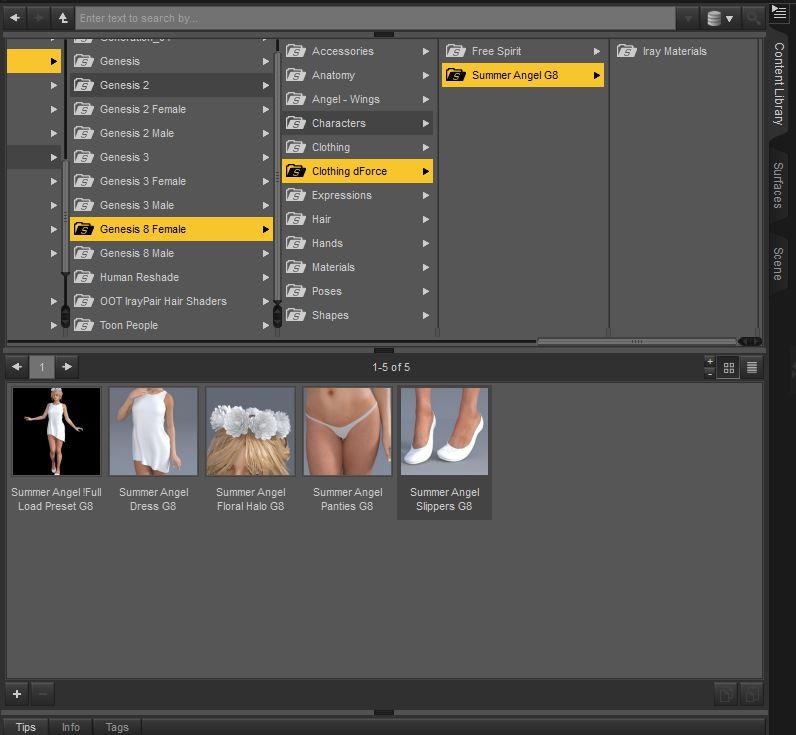
Capture.JPG
796 x 735 - 69K
Post edited by Angel on

Daz 3D is part of 
Connect
DAZ Productions, Inc.
7533 S Center View Ct #4664
West Jordan, UT 84084
Licensing Agreement | Terms of Service | Privacy Policy | EULA
© 2026 Daz Productions Inc. All Rights Reserved.
Comments
Or maybe just append DF to the end of the folder name if it's setup?
It's best if it has its own folder... And not the end of the folder name. You'd at least want it at the beguining of the folder name i.e
DF_Summer Angel G8
Otherwise you end up with dforce clothing spread out all over your clothing listing because its arranged alphabetically.
But I'm in favor of a new folder, because this is a whole new toy with all new rules. Yes, its clothing, but its a particular kind of clothing and therefor needs to have a particular folder.
I'm not saying this way is wrong, but ... I'm also not seeing a problem with dForce clothing being mixed in with the normal conforming clothing. After all, it's not like Poser Dynamics, which are props. dForce clothing works like conforming clothing, mostly. It just has some extra very nice features.
I second this recommendation. Daz does not seem to be big on logical organisation. OT- PC+ textures should have the name of the base product first in their product names.
I don't leave it to vendors or daz to organize things the way I like. I just place content myself these days. Saves time.
Ah yeah, I can see the value in having them all in one spot instead of having them all throughout a huge collection of clothing sets many people have lol.
This would be best discussed with Daz because Daz has a specific way they want stuff saved and the vendors have to follow it. I suggest putting in a ticket as a suggestion.
Or better yet just put them inside the folder of the item being textured lol. It annoys me to no end when texture vendors do things like dump all their textures in a folder with their name and things like that lol. It's why I end up spending so much time reorganizing everything before it touches my library.
The Zips have dForce in the name... Why catigorize the installation zip, and the promotional selling point being "dForce Compatiable", but not have a speciific folder? just... Duh... lol
You could also create a new Group for dForce items, or assign a tag (I'm slightly surprised daz hasn't already done that). Then you could easily filter the content to show only dForce.
Granted, if I ever got around to properly recagorizing all my stuff this would be less of an issue, but if something isn't in the folder where i expect it, I tend to forget about it. So if I'm looking for an evening gown, I'm going to look though my clothing folder and only after I'm done with that look through this hypothetical dforce folder. I almost never use the base character materials, because their materials aren't in the characters folder, etc.
So, for me, putting the dforce stuff in a different folder - especially one that came after the regular clothing folder - would greatly decrease how often I would remember to use it.
Again, I'm not saying this way is wrong, I'm just pointing out that it isn't something that everyone is going to feel is better.
Well I submitted a ticket. I hope they read it and at least consider it. I know the most common excuse people will use is, "Well isnt it so nice that you can do it yourself" Thats no way to treat a paying customer... That should not be the attitude of a professional company.
Technically anything can be adapted to dForce, older items as well so it becomes harder to make it a separate category. What if vendors go back and make older items dForce compatible, where would the item go then, you'll end up with duplicate items in different folders. Not sure what would be the perfect solution, maybe add a tag to the item in the database so you can filter by dForce items, or adding a DF in the folder name. Just my 2 cents :)
You have to look at the majority not a few. Which is unknown at this time so early in the game.
All the dForce stuff at Daz isn't necessarily *only* dForce.
The last time I opened a ticket about content being in the wrong path technical support told me as long as it loads without error they don't consider content in the wrong folders as being a defect.
And all the stuff that isn't dForce isn't necessarily not usable with dForce. In the end I'll be rearranging content anyway, but a separate clothing folder as suggested would not be my preference either, for what it's worth. The tagging or another option to visually identify and sort the clothing would likely be a better choice to accomodate more users preferences.
That's why you tell them its just a ticket about a suggestion and not a problem. Being in the wrong folder isn't a technical problem.
I see no use for it and the need for DAZ/PAs to do more work when I can do it myself easily, I am not that lazy.
Ditto on this. I often forget that I even have the extra textures when they aren't placed in the same folder as the clothes.
Considering all the varied PAs, base generations, and various props and support items, I'm actually impressed with how well things are handled in Content Manager. I would like an easier way to auto reorganize and update everything so that in this day and age of AutoFit and Wear Them All, that I could have a "clothes closet" so when I go to look for "fantasy armor" I can see ALL of the content from every generation at once, then have some sort of check boxes to narrow selections by generation, m/f, ..etc. I believe that I have quite a hoard of good clothing and props that I never use simply because they aren't easy to find - particularly all the old V4 M4 items in the "Pose" folder. Some sort of non destructive drag and drop organizer would be great, so you could make up all of your separate closets without actually messing with the basic Content Manager directories. A right click option to open a large sample image of each item and full outfit would be great as well for guys like me who have some trouble making out the tiny PNG thumbnails.
How about this for an idea? - "Clothes Closet / Mix N Match Outfit Creator." The idea is you could pull up a graphic menu of everything in your "clothing warehouse" and drag selected items from any individual outfit into your shopping bag. Then, when you have all you want in the bag,, the new outfit is autofit to your character and saved as a new oufit clothing item. You could even save outfit material presets within the folder so the matching presets would be handy instead of hunting them down in a list of clothing presets.
Just a thought.
We take our directions from Daz QA so what ever they say goes !
And what of clothing that is both? See, one of the dforce requirements, is that its also rigged. So nothing in the store is *only* dforce. Segretating it into a dforce folder wouldnt be right either, coz it also functions as normal clothing.
I would vote for a tag, so smart content can tell it apart. Apart from that, maybe the EU moving it around to their liking, coz what works for some sadly doesnt work for all.
I don't think I'd want it in a seperate folder from clothing, personally. I generally do a lot of mixing and matching so having to go back and forth between 2 higher level folders would be really annoying for me.
However, I definitely agree something to indicate dforce somewhere in the filename or what have you would be a good call
No, it's not.
People that worry about DF being labelled, probably won't care if it is rigged. Autofollow/autofit is hell, and once clothes and hair are dforce, I will be very happy. All I care about is wether it is DF or not, and will likely skip all that is not DF once it catches on. Most autofit is useless to me, as it breaks with youngins. Hair gets stupid distortion around the neck, and the rest of the clothes gets bad distortion around the chest area due to boobs.
So far, all the dForce products have names that begin with "dForce," so I'll just use Content Library >> Products >> D to look for them.
Well, the download zip file starts with "dForce", but once installed in your contents, that word does not appear as part of the clothing name.
I have found that Fit Control works really well, but I will probably use dForce for most kids clothes as well.
As for the original topic, it wouldn't be too bad an idea if there was a seperate folder for dForce clothes or a dF in front of the name. I do rearrange my content library anyway, so it wouldn't have much affect on me.
I know your pain all too well. I have to have Zbrush to fix hair and clothing. There is just no other way. Fit control is nice, but its hardly the best solution. Altho I am glad Kids 5, or 6 or 7 dont exist...
If they did create Kids 8, the content listing would be as short as my attention span. It's a double Edged sword but at the end of the day I'm glad they dont have Kids 8.
I would rather have 1000 outfits to choose from and get a few distortions. Then have 4 outfits that fit proper.
As stated previously, PAs do not create categories nor package products. That's left to DAZ and their QA department. So it will be up them to accept the suggestion in the ticket. Dforce will encompass more than clothing, the suggestion isn't as simple at face value. I would suggest changing the title of this thread to reflect that.