Sales: Tired of browsing
 daveso
Posts: 8,251
daveso
Posts: 8,251
so many sales..its good, but I've seen so many products... so many over and over and over. One day 40% off, another time 50% off...sometimes in a bundle, sometimes not, 75%, 80%, FREE, on and on.
Everyday ... special sales, PC+ sales, bundle sales, PA sales, FLASH sales. WOW .. not sure I can take browing through all these categories over and over anymore. ... pages and pages to choose from, but a lot the same... V 2-4, G, 2,3, etc etc... same products new model. Overload and getting too saturated.

Daz 3D is part of 
Connect
DAZ Productions, Inc.
7533 S Center View Ct #4664
West Jordan, UT 84084
Licensing Agreement | Terms of Service | Privacy Policy | EULA
© 2026 Daz Productions Inc. All Rights Reserved.
Comments
Wishlist the items you would like, and only list he wishlisted items in each sale. It takes a while to set up (look through everything once to see what to put on the wishlist), but saves LOTS of time later when you can very easily see what's on sale from the items you want.
Exactly my impression. It got so aggressive, that it is no fun to participate - if you have a life besides DAZ.
Even less, when you have to very very careful not to purchase something and find out afterwards, you could have combo'ed it like this and that and get X% off. You either spend a lot of time on your purchases, or you spend too much. I know I spent way too much because I often missed those combos and it really put me off. Or after purchasing something I got an orange banner like "Hey! You now get 50% off of what you have purchased a minute ago and here's another 50% off of the other thing you also purchased a minute ago. So you lost quite some money. Have fun with it!". That really ruined my day back then.
That's why I frequently need a break from the shop, because it just consumes too much of my precious time and sooner or later I get frustrated because I missed a special combo and lost money. Where it's not about the money itself, but more because I feel cheated upon.
It does not help at all that it is still very tedious to browse products without having some more clever filters. I completely passed on the big freebie thing in december, because it drove me mad to filter out the products I might want, out of godonlyknows how many pages. :(
I like DAZ and the products they sell, I really do, but I have a problem with that overly aggressive marketing. I hope they can improve on this, starting with better methods to browse products.
It'd also be a good start if I wouldn't need to do a force-refresh every day to see the new products. ;)
Put the items you want in your wishlist, and during the sale, you only need to look through your wishlisted items.
Listen to Ati; the Daz Deals thingy saves me so much time. But you have to go through the site first so that you've seen what's here. As far as figuring out optimum product coordination for lower prices: Put EVERYTHING you want into your cart; you may be shocked at the low prices. Then, open your cart; and in a new tab, go through your cart and remove those things that are marginal until you reach your desired bottom line. If you lose some discounts, go to the first cart tab and suss out which product triggered/lost the discount. If you find an outrageous discount, purchase quickly, it may be a site glitch or secret flash sale.
but if yoo rush it, end up buying armor with high heels
This. I put anything that I might be interested in on my wishlist as soon as it's released or if I stumble upon something I MIGHT want if the price is right and throw it on my wish list. When sales come up I just filter by "Only Show Wishlist". This is a huge help and saves a lot of time and I don't have to wade through pages and pages of stuff I've no interest in.
xyer0 also has given great advice and that's something I do as well - load the cart and then open a new window with the cart and weed it down :)
great advice here. i think part of the problem, it all looks pretty cool :)
ATI browser thing, is the thing.
I also know 'a look' that comes up that - means anything older than this is.....no.
So once I scroll to a certain point, I know to stop. lol
It's annoying when you want to look at Daz Originals and sort by price or % off and have to scroll through the same 300 super-old items first.
I've also taken to hiding certain items becuase I find myself buying things twice. Sometimes the Genesis version and the Genesis 2 version.
I just saw an orange suit plus gu outfit called ArtemisX. I own both the V3 version and a Genesis update.
https://www.daz3d.com/artemisx
https://www.daz3d.com/artemisx-for-genesis
Gotta be careful.
Here's what I do to pinpoint stacking- and it honestly only takes a minute or two- Write down the vendors in each sale, load some of those in the cart (along with qualifying purchases, if you have to buy something, put it in your cart and jot down which product triggers for that group. See which vendors overlap. Bingo, there's where your stacking will be. Example:
Dog Sale: Bought new product Collie
Vendors: A, D, F, N, P
Cat Sale: Bought Siamese
Vendors: D, H, K, N, R
Then let's say that there's a Daz Original section that's on sale. Easy.
When I am in D and N stores, (and I pick the price that goes lowest to highest) I get what I've wishlisted or want and see if they stack, THEN in Vendor, I select Daz Originals. If some of those prices are amazing with stacking AND the DO discount too, I give those a second look. Always put things in your cart, NEVER go by what the page says.
So that's just me, but I look for stacking and use the vendor comparison then filter- and scoop up some great deals.
...and then consider how often you never used items you have bought and thought its a must have
You had to say that @Ruphuss I don't believe I have used more than 5% of my purchased items, yet here I am, always checking what new shiny thing is on sale. Perhaps it is time to find a Dazaholics anon meeting or something.
The "New DAZ promo" email can give you a good starting point for this. At the end, the email lists the vendors that are in multiple sales. Of course, it doesn't mean the sales are stacking, but it's worth checking out.
Ahh, 21st Century 1st World problems. Soooo much choice.
[in totally flat voice]
DAZ. . Stop.
.
I view my wishlist every afternoon but I make sure to view it in "Low to High Cost" mode. That way I find the real deals near the top of my huge wishlist and don't have to search it all.
As for the new products that flood the store..., I am not interested in them (for the most part), it's 80% rehashed same-old-same-old female characters, female poses, female textures and female clothing styles, and I have enough of them. Which works out because I gave up buying for females 5 years ago.
As for the other 20% of new products I do take the time to very quickly scan them to find the latest environment sets and Stonemason architectures, and male or creature stuff and put them on my wishlist until they're a year or two old at which point they start showing up in a damn good sale at which point I wait until they cycle around again to a better deal as indicated by my "Low to High" scan of the wishlist. My policy is to rarely look any farther than the $12 point. Although I rarely buy anything higher than $9 and wait with bated breath for the $5 or $6 items.
Yeah, I do have to check every day, but I've taken the sting out of it. It's no worse than checking my bank and credit card accounts every day. In fact, much easier.
And the best thing of all is that I stopped worrying about missing a sale item. It won't kill me and the world won't explode.
You could also do a sort by % off on them (after hiding the PC+ items), that will bring the items with the most discount to top. You'll immediately see if there are any big discounts to start with.
Of course, this does not calculate stacking, and other criteria that adds a bigger discount, but you'll quickly have a short list of items to work with.
at least now RDNA is integrated here, so my shopping choices have been reduced. Too bad that, actually. but I had purchased all I wanted previously from there, so i dont even look at that category anymore.
it was mentioned up above on not using the purchases. I always have an idea in my mind when I buy something, but the ideas are fleeting. It is more shop than create.
I don't think they have a choice.
Cool! I didn't know that capability existed. Thanks!
Oops, spoke too soon. How do you sort them by percent off? I can't find an option for that in the "Sort By" dropdown menu.
the current pc sale doesn't even stack? put 4 products in cart, stayed 50% chagrinemoji
cut my browsing short lol
It's not supposed to stack. You get the 50% even with just a single qualifying item.
To quote Sun Tzu from his book 'The Art of War', "If you wait on the riverbank long enough, the item you wanted will become a freebie."
but the males sales last week stacked.
made me browse and browse to find 10 things.
for naught cause it was over by Friday and my cart essploded.
but then i was like, there'll be another stacking sale.
and then it didn't stack. no tantalizing male stackers
the other week the base figures were like 15 moolas, but this week they 22 >.<
+1
I think he's refering to his browser plugin...
Indeed.
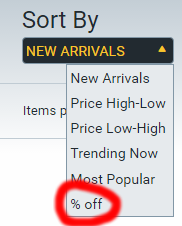
Sorry, didn't see the original addition to the message, forum doesn't show edits as new.
The addon will add the "% off" sort filter:
where to get the browser plugin?
Also, I see people using different filters to sort ... like DAZ originals without PC+ or whatever.
https://www.daz3d.com/forums/discussion/106296/announcing-daz-deals-browser-add-on/p1
It also adds a "hide PC+" to your wishlist. And a whole load of other features.
very nice..thanks. Is there a hide PC+ category ? I saw the one in Wishlist ... but not main shopping area.
Which browser plugin? What am I missing?