

MEC4D

1910111315

Comments

  • MEC4DMEC4D Posts: 5,249

    Thank you ! that really means a lot to me, thank you for the support really appreciate it!  

    stuthurso said:
    SimonJM said:

    ps loving the beach HDRI's Cath!  Your best yet, and that's really saying something!


  • PhilWPhilW Posts: 5,160
    SimonJM said:
    PhilW said:

    I have created a few Matte Objects for my own use and am happy share these - see attached. Let me know if they don't work, I don't think there should be any external references so I think they should, but experience has taught never to take these things totally for granted!  Simply move and scale them into position, these shapes should cover most common situations.

    Thanks, however ...

    2017-08-15 17:10:54.483 Could not resolve : "/data/phil.wilkes2/Product/Matte Plane/Morphs/phil.wilkes2/Base/Enable Iray Matte.dsf"
    2017-08-15 17:10:54.483 Could not resolve : "/data/phil.wilkes2/Product/Matte Plane/UV Sets/phil.wilkes2/Base/default.dsf"
    2017-08-15 17:10:54.483 Could not resolve : "/data/phil.wilkes2/Product/Matte Plane/plane.dsf"
    2017-08-15 17:10:54.487 WARNING: fileinput\dzassetdaz.cpp(1904): Could not find geometry definition: /data/phil.wilkes2/Product/Matte%20Plane/plane.dsf#geometry.
    2017-08-15 17:10:54.487 WARNING: fileinput\dzassetdaz.cpp(4789): Could not find geometry for the material instance.m_uri.
    2017-08-15 17:10:54.488 WARNING: fileinput\dzassetdaz.cpp(1368): Failed to create material!
    2017-08-15 17:10:54.488 WARNING: fileinput\dzassetdaz.cpp(4838): Could not find modifier definition.
    2017-08-15 17:10:54.488 WARNING: fileinput\dzassetdaz.cpp(1427): Failed to prepare modifier: Enable Iray Matte!
    2017-08-15 17:10:54.488 WARNING: fileinput\dzassetdaz.cpp(1438): Failed to create modifier: Enable Iray Matte!
    2017-08-15 17:10:54.488 File loaded in 0 min 0.0 sec.
    2017-08-15 17:10:54.489 Loaded file: Matte Plane.duf
    2017-08-15 17:10:54.545 Could not resolve : "/data/phil.wilkes2/Product/Matte Plane/Morphs/phil.wilkes2/Base/Enable Iray Matte.dsf"
    2017-08-15 17:10:54.546 Could not resolve : "/data/phil.wilkes2/Product/Matte Plane/plane.dsf"


    But apart from that it was fine....!  I'll see about saving them differently and post again.

  • SimonJMSimonJM Posts: 6,067
    PhilW said:
    SimonJM said:
    PhilW said:

    I have created a few Matte Objects for my own use and am happy share these - see attached. Let me know if they don't work, I don't think there should be any external references so I think they should, but experience has taught never to take these things totally for granted!  Simply move and scale them into position, these shapes should cover most common situations.

    Thanks, however ...

    2017-08-15 17:10:54.483 Could not resolve : "/data/phil.wilkes2/Product/Matte Plane/Morphs/phil.wilkes2/Base/Enable Iray Matte.dsf"
    2017-08-15 17:10:54.483 Could not resolve : "/data/phil.wilkes2/Product/Matte Plane/UV Sets/phil.wilkes2/Base/default.dsf"
    2017-08-15 17:10:54.483 Could not resolve : "/data/phil.wilkes2/Product/Matte Plane/plane.dsf"
    2017-08-15 17:10:54.487 WARNING: fileinput\dzassetdaz.cpp(1904): Could not find geometry definition: /data/phil.wilkes2/Product/Matte%20Plane/plane.dsf#geometry.
    2017-08-15 17:10:54.487 WARNING: fileinput\dzassetdaz.cpp(4789): Could not find geometry for the material instance.m_uri.
    2017-08-15 17:10:54.488 WARNING: fileinput\dzassetdaz.cpp(1368): Failed to create material!
    2017-08-15 17:10:54.488 WARNING: fileinput\dzassetdaz.cpp(4838): Could not find modifier definition.
    2017-08-15 17:10:54.488 WARNING: fileinput\dzassetdaz.cpp(1427): Failed to prepare modifier: Enable Iray Matte!
    2017-08-15 17:10:54.488 WARNING: fileinput\dzassetdaz.cpp(1438): Failed to create modifier: Enable Iray Matte!
    2017-08-15 17:10:54.488 File loaded in 0 min 0.0 sec.
    2017-08-15 17:10:54.489 Loaded file: Matte Plane.duf
    2017-08-15 17:10:54.545 Could not resolve : "/data/phil.wilkes2/Product/Matte Plane/Morphs/phil.wilkes2/Base/Enable Iray Matte.dsf"
    2017-08-15 17:10:54.546 Could not resolve : "/data/phil.wilkes2/Product/Matte Plane/plane.dsf"


    But apart from that it was fine....!  I'll see about saving them differently and post again.

    LMAO, yes - absolutely perfect ...  expecially the strawberry sprinkles cheeky

  • SimonJMSimonJM Posts: 6,067

    I don't usually look at videos for help as I tend to just not like them, but had a quick look and ... well, it's a script hidden away without 'matte' in the name that doesn't affect the surafces - yeah, I'm stunned i neevr found it! surprise  Right, now I have a basic idea of how to set them up I can have a play!.  Thanks for all the help, everyone!

  • MEC4DMEC4D Posts: 5,249
    edited August 2017

    JUST RELEASED: MEC4D HDRI Antique China Super-Megapack https://www.daz3d.com/mec4d-hdri-antique-china-super-megapack

    also, all product 40% OFF not including new releases

    thank you for your support!

    xoxo

    Cath


    00-main-mec4d-hdri-antique-china-super-megapack-daz3d.jpg
    960 x 1248 - 310K
    Post edited by MEC4D on
  • I just bought the beach HDRIs. Super happy here, super happy! I can't wait to see those crisp indoor scenes, great work!

  • MEC4DMEC4D Posts: 5,249

    Thank you for the support ! 

    I just bought the beach HDRIs. Super happy here, super happy! I can't wait to see those crisp indoor scenes, great work!


  • MEC4DMEC4D Posts: 5,249

    Since M8 is finally out, here some shots with Unshaven8 ready for you at the end of September, BTW M8 have so far best skin settings, working great with HDRI light maps just the way it should ..finally not need any adjustments 

    Below M8 + U8 at Columbus Circle NYC and Upper West street

    0ad4fcba-6e1f-4bc6-b508-253e8c71a03a.jpg
    1920 x 1080 - 151K
    f9227504-2885-4423-9944-3f3ca81fd1b8.jpg
    1920 x 1080 - 340K
  • RAMWolffRAMWolff Posts: 10,343

    Quite expressive!  lol

  • SorelSorel Posts: 1,412

    awesome can't wait!

  • IceDragonArtIceDragonArt Posts: 12,740
    MEC4D said:

    Awwww, thank you so much, everyone! the love found me finally after long 10 years of not even searching or wanting but when the universe set a plan you can't get against it, but just accept and enjoy the beauty of it's meaning , with the most gentle and supporting soul on my side I will be only stronger, I must admit that my fiance helping me a lot with HDRI shots I made for you, driving me around and protect me and my equipment while shootings , finding special places and covering the trips and everything on top of his own job so a really great supporter and my right hand . We plan our wedding for the Spring 2018, it will be the second time for both of us but he wants to be my last ever ;) as Richard mentioned, the last Knight !  We are not perfect, but perfect for each other and I feel blessed.

    Now time to get even harder at work and saving for our little wedding! 

    Below memory flyer of yesterday's unexpected ( so soon ) event smiley

    XOXO

    I have no idea how I missed this but congratulations!  So exciting! 

  • MEC4DMEC4D Posts: 5,249

    And so are the New Yorkers lol

    RAMWolff said:

    Quite expressive!  lol


  • RAMWolffRAMWolff Posts: 10,343

    HAHAHAHA  I'm quite sure you are right there hon!  Never been.  No desire.  Too noisy for me! 

  • MEC4DMEC4D Posts: 5,249

    Thank you! 

    Sorel said:

    awesome can't wait!

    Thank you so much !

    MEC4D said:


    I have no idea how I missed this but congratulations!  So exciting! 


  • MEC4DMEC4D Posts: 5,249

    Very noisy on all scales and direction in public and private you feeling like living in a small town lol  you fart on one side and on the other side they complain that it stink lol 

    I dream about a farm house with a big porch by the lake and nobody to see for 10 miles lol

    RAMWolff said:

    HAHAHAHA  I'm quite sure you are right there hon!  Never been.  No desire.  Too noisy for me! 


  • RAMWolffRAMWolff Posts: 10,343

    You can have the farmhouse, I'll take the shack in the back!  lmao

  • MEC4DMEC4D Posts: 5,249

    Awww Richard you too sweet my friend ! haha 

    RAMWolff said:

    You can have the farmhouse, I'll take the shack in the back!  lmao


  • Orpheus13Orpheus13 Posts: 274

    Since M8 is finally out, here some shots with Unshaven8 ready for you at the end of September, BTW M8 have so far best skin settings, working great with HDRI light maps just the way it should ..finally not need any adjustments 

    That's great news !

    Will Unshaven 8 include shaven hair ? That would be great !

    Any idea of the price range ?

  • I purchased the HDRI Antique China Mega-Pack and it is an absolute winner!  Thanks Mec4D for producing some outstanding images to work with. Love your shaders as well (Only have Volume 2 so far but I'm sure that will change over time)!
    Here is a render I did with your new HDRI's. I Added the DOF in Photoshop (layered a non DOF background and background with DOF and masked it out) as I am not sure how or if it is possible to get correct DOF with HDRI environments from within Daz?
    Keep up the great work :)
    Oh... and if you are able to let me know which outfit was used on the female in the promo images for this product, that would be great. Thanks!

    DS Furisode Ancient China 1.jpg
    1179 x 1200 - 553K
  • MEC4DMEC4D Posts: 5,249

    Shaven hair ? you mean like very very short stubles ? there is always a morphs to do that in every version of Unshaven ,  

    thanks !

    Orpheus13 said:

    Since M8 is finally out, here some shots with Unshaven8 ready for you at the end of September, BTW M8 have so far best skin settings, working great with HDRI light maps just the way it should ..finally not need any adjustments 

    That's great news !

    Will Unshaven 8 include shaven hair ? That would be great !

    Any idea of the price range ?


  • MEC4DMEC4D Posts: 5,249

    very well done , love it .. there is many options to do DOF also you can render DOF layer Depth maps and use with Photoshop to make exact the effect you need, with tight spaces the DOF will be not easy in DS if you want to use ground with it as the China hdri has very tight spaces , with gardens you can do 

    The female autfit was Manchurian chinese traditional aoutfit of the last dynasty not yet on sale , her hubby is long time in my store here but she need to catch up with him soon as I just recovered the lost files from long time ago. 

    Thank you for the support

    Cath

    I purchased the HDRI Antique China Mega-Pack and it is an absolute winner!  Thanks Mec4D for producing some outstanding images to work with. Love your shaders as well (Only have Volume 2 so far but I'm sure that will change over time)!
    Here is a render I did with your new HDRI's. I Added the DOF in Photoshop (layered a non DOF background and background with DOF and masked it out) as I am not sure how or if it is possible to get correct DOF with HDRI environments from within Daz?
    Keep up the great work :)
    Oh... and if you are able to let me know which outfit was used on the female in the promo images for this product, that would be great. Thanks!


  • AlexLOAlexLO Posts: 193
    edited August 2017

    Michael 8 + Beach HDRI Megapak = Summer fun! 
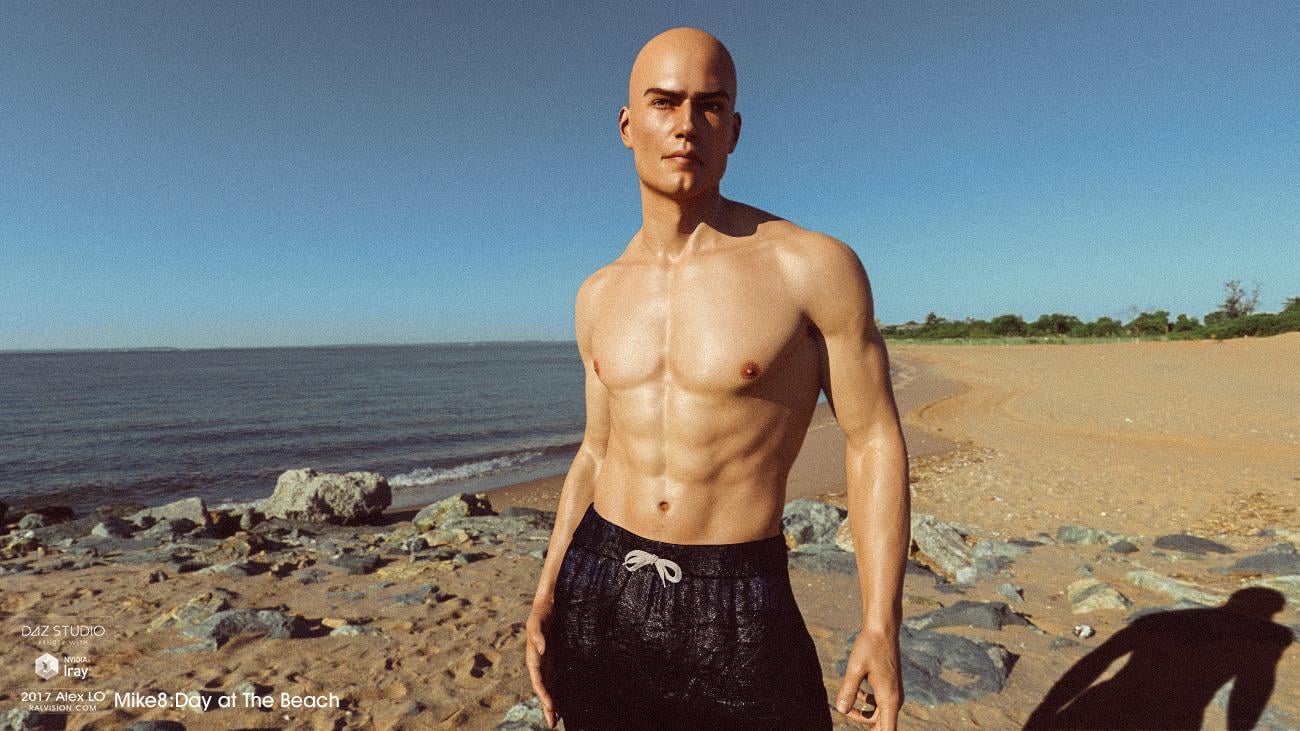
    Mike8-Day at The Beach- Iray 2017 w / MEC4D HDRI  photo by Alex LO

    Post edited by AlexLO on
  • MEC4DMEC4D Posts: 5,249

    looking great Alex

    thanks for sharing


    AlexLO said:

    Michael 8 + Beach HDRI Megapak = Summer fun! 
    Mike8-Day at The Beach- Iray 2017 w / MEC4D HDRI  photo by Alex LO


  • will.barger.artswill.barger.arts Posts: 60
    edited August 2017

    Not sure this is the kind of thing you look for in this Discussion, but ...

    I picked up the Antique China set earlier this week to use in testing the possiblilities for using HDRI in some fashion-illustration methods we have in mind.

    Attached are some resulting images, which focus on "realism" -- which for our purposes is in terms of a sense of "visual plausibility/accebtability" as "real", rather than "simulating a photo" (which inherently varies from real-world vision).

    We'll definitely be pursuing broad use of HDRI tools, and we're very impressed with the quality of the MEC4D imagery.
    Thanks much for putting out a good product.

    DougGirlClean_01.jpg
    2400 x 2400 - 4M
    HDRI-A_Scan+Fig_270adj-Int250_Single_01.png
    1280 x 720 - 2M
    Production_Dual_06.png
    1920 x 1080 - 5M
    Production_Dual_03.png
    1920 x 1080 - 4M
    Production_Dual_01.png
    1920 x 1080 - 3M
    Post edited by will.barger.arts on
  • MEC4DMEC4D Posts: 5,249

    Thank you for the good word and support! I like how you used the backlighting in the render #3 since the scene did not include the sun as lighting, anyway backlighting is always good  and even better if it reflects the sun from HDRI in place to set the HDRI so high that it brightened the image too much. 

    Thanks for sharing the examples 

    Cath

    Not sure this is the kind of thing you look for in this Discussion, but ...

    I picked up the Antique China set earlier this week to use in testing the possiblilities for using HDRI in some fashion-illustration methods we have in mind.

    Attached are some resulting images, which focus on "realism" -- which for our purposes is in terms of a sense of "visual plausibility/accebtability" as "real", rather than "simulating a photo" (which inherently varies from real-world vision).

    We'll definitely be pursuing broad use of HDRI tools, and we're very impressed with the quality of the MEC4D imagery.
    Thanks much for putting out a good product.


  • will.barger.artswill.barger.arts Posts: 60
    edited August 2017


    I always have a problem with the hard-edged shadows generated by HDRIs.  Does anyone know of a way of making them softer? 

    Cheers,

    Alex.

    In my experience as a photographer, shadows seem "harsh" because of two main factors:

    1. Areas that are noticeably darker because they receive substantailly less light; and
    2. A "crisp"/"sharp" line between lighter- and darker-lit areas. 

    If you use an HDRI that was taken in bright/direct light (e.g., unclouded sunlight), you're going to get "harsh" shadows in your rendered image.  They'll be nastier if the HDRI was created around mid-day, and probably much less so as you move toward dawn or dusk.  So if you want "soft, caressing" light, you probably should consider using such an HDRI created in such softer light, rather than trying to "fix" shadows from a noon-time HDRI, for example.
    The exception is if you set up your figure(s) in a shaded area of the HDRI environment (assuming the HDRI was constructedt to allow that).  If you place your characters in "open shade", you'll often get a very pleasing look -- much "softer", but potentially also much "flatter".  If it's too flat for your tastes, you can add one or more Scene light(s) on your figure(s) to "restore" some contouring.  SEE ATTACHED IMAGES. from some testing I did recently using the MEC4D Ancient China package.

    But if you're using the HDRI not only as the primary light source but also as a scene-backplate to the image, you might not be able to place your figure(s) "in the shade".  In that case, you'd have to add Scene lights to "fill" the harsh shadows.  Often, a "line" between HDRI-shadowed areas and HDRI-brighter areas will still be there -- adding realism -- but it will seem much less "harsh" because the differences in brightness across the image will be much "softer".  
    If you "over-do" it, however, your figures may look too "flat" and/or seem like they don't "belong" in the overall scene because their shadowing is now so much different than the background.  
    In any case, maintaining a pleasing balance between your background (HDRI) and foreground (figures) can be tricky, especially since the HDRI backplate generally will not get brighter or darker as you add/substract Scene lights on your figure(s) -- as a Scene consisting of modelled objects in your background generally would.  Using the Canvas function of Iray can make (re-)lighting your figures and keeping/re-setting a balance between figures and HDRI background much easier, faster, and better.  In many cases, just using the Beauty canvas is sufficient, since that allows you to select and render only the modelled figure(s)/object(s) you choose on a transparent backround (be sure to check the "Alpha" box get that transparency rather than a black background).  The Canvas functions can be found (i think) on the Render | Render Settings | Advanced | Canvases panes/tab.
    The Environment Intensity parameter (for the HDRI lighting) and Tone Mapping | EV parameter (for both HDRI and Scene lighting) are probably your primary tools for achieving a balance in birghtness between the HDRI background and your modelled-figure foreground objects.  (For example, if you use Environment Intensity to bring the HDRI lighting up or down to "match" your Scene-supplemented figure lighting, the overall scene may then be balanced, but too dark or bright overall  If so, you could then use changes in EV to adjust the overall (and now balanced-parts) render back to a proper ovearll exposure.)

    Hope this helps ...

    PS -- The second set of images uses the same Ancient China HDRI, but only for lighting the overall scene.  The modelled setting is from the Quel Bazaar product.  Also, these are unfinished, mid-stage results.  The final test results should look much better, as they include a form a "bracketing" and post-work to lighten the shadows in the overall background image, too.

    HDRI-A_Scan+Fig_270adj-Int250_Single_01.png
    1280 x 720 - 2M
    WBA_SEPR_China_Cam-01adj2_01.png
    1280 x 720 - 2M
    Production_Dual_06.png
    1920 x 1080 - 5M
    Production_Dual_01.png
    1920 x 1080 - 3M
    WBA_QuelBazaar_Relite_New-326_02b.png
    800 x 800 - 1M
    WBA_QuelBazaar_Relite_New-326_02a.png
    800 x 800 - 2M
    WBA_QuelBazaar_Relite_New-326_02c.png
    800 x 800 - 2M
    Post edited by will.barger.arts on
  • MEC4DMEC4D Posts: 5,249

    Mostly if possible I always try to shot between morning hours, sadly not always possible, or the area is closed or the sun is in the wrong position at the time, the Chinese HDR was shot around 10-11am , as it was not possible to enter early, however, the sun in the morning hours is on the wrong side and with the tight space and long shadows it would not works well, afternoon hours are impossible due to so many people and paying very high exclusive license prices for the access was not worth the effort as I would never make it back. I said to myself , If you don't have what you like, you have to like what you have ;)  to get the shot there without people was already a big success so I was very content about especially after 3 attempts to capture the area. I may return there in the fall when the leaves change color and the sun is in lower position for even better session .

    Just a general note : Also pay attention to the skin shaders in iray , generation 8 has the right skin reflections level and better SSS to catch better the ambient light ( shadows ) Bad skin shaders create the clay look in the shadow area in place of a smooth transition between the light and shadow (ambient light )  and of course HDRI with direct sun light are not for perfect portrait shots but if you learn a little bit of photography you can do amazing stuff with and harvest the power from it . I am still in busy schedule did not have the time to get into workflow videos  as I am moving tomorrow for another amazing location before the fall change the fauna and flora . But that will be my last session before fall and it is so worth to do it.


  • nonesuch00nonesuch00 Posts: 18,714
    MEC4D said:

    Mostly if possible I always try to shot between morning hours, sadly not always possible, or the area is closed or the sun is in the wrong position at the time, the Chinese HDR was shot around 10-11am , as it was not possible to enter early, however, the sun in the morning hours is on the wrong side and with the tight space and long shadows it would not works well, afternoon hours are impossible due to so many people and paying very high exclusive license prices for the access was not worth the effort as I would never make it back. I said to myself , If you don't have what you like, you have to like what you have ;)  to get the shot there without people was already a big success so I was very content about especially after 3 attempts to capture the area. I may return there in the fall when the leaves change color and the sun is in lower position for even better session .

    Just a general note : Also pay attention to the skin shaders in iray , generation 8 has the right skin reflections level and better SSS to catch better the ambient light ( shadows ) Bad skin shaders create the clay look in the shadow area in place of a smooth transition between the light and shadow (ambient light )  and of course HDRI with direct sun light are not for perfect portrait shots but if you learn a little bit of photography you can do amazing stuff with and harvest the power from it . I am still in busy schedule did not have the time to get into workflow videos  as I am moving tomorrow for another amazing location before the fall change the fauna and flora . But that will be my last session before fall and it is so worth to do it.


    Is it possible for you to do a nighttime HRDi on a boat in the sound between Jersey & NYC so we'd have a great nighttime skyline of NYC - Jersey? Or on small island peer or penisula? Not sure of trying to shoot an HRDi on a boat and at night too with the longer exposures.

    Also Montreal is not too far and approaching the skyline from the flat farming planes south of it you can see it for miles. It feels almost like Dorothy & the gang approaching Oz in the Wizard of Oz movie.

  • stuthursostuthurso Posts: 192
    MEC4D said:

    Mostly if possible I always try to shot between morning hours, sadly not always possible, or the area is closed or the sun is in the wrong position at the time, the Chinese HDR was shot around 10-11am , as it was not possible to enter early, however, the sun in the morning hours is on the wrong side and with the tight space and long shadows it would not works well, afternoon hours are impossible due to so many people and paying very high exclusive license prices for the access was not worth the effort as I would never make it back. I said to myself , If you don't have what you like, you have to like what you have ;)  to get the shot there without people was already a big success so I was very content about especially after 3 attempts to capture the area. I may return there in the fall when the leaves change color and the sun is in lower position for even better session .

    Just a general note : Also pay attention to the skin shaders in iray , generation 8 has the right skin reflections level and better SSS to catch better the ambient light ( shadows ) Bad skin shaders create the clay look in the shadow area in place of a smooth transition between the light and shadow (ambient light )  and of course HDRI with direct sun light are not for perfect portrait shots but if you learn a little bit of photography you can do amazing stuff with and harvest the power from it . I am still in busy schedule did not have the time to get into workflow videos  as I am moving tomorrow for another amazing location before the fall change the fauna and flora . But that will be my last session before fall and it is so worth to do it.


    Oh wow, your move is this weekend?  Hope it's a smooth and stress free move and the best of luck with it.  We'll see you on the other side when you're all settled.  wink

  • chachah said:
    MEC4D said:

    Mostly if possible I always try to shot between morning hours, sadly not always possible, or the area is closed or the sun is in the wrong position at the time ...

    "Anybody who wants to be a photographer or cinematographer but isn't willing to get up regularly by 4:30 a.m. should consider some other way of making a living."
    Advice from an award-winning movie director, circa 1976. 

Sign In or Register to comment.