3Delight Question.
 Blackbirdx61
Posts: 300
Blackbirdx61
Posts: 300
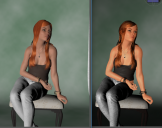
Been trying to get Mary Anne working in DAZ, while she supposedly has a3DL skin, it comes out so Flat and Lifeless compared to the Preview window.
If anyone knows of a script or some basic setting suggestions. I'm not trying to get some super photo realism, just as close to the preview window as possible. but as her pants, like so many recent products, dont even render in the OpenGL I do have to stack layers in post that way.
The GAMA is set at 2.2 and As the Set I am using is a lil pin-up studio set I recently down loaded. She is setting right in the beam of a spot at 100%; not that you could tell by the image on the left at all. I cant remember the channel; because I could not reproduce it; but it seemed to me her flesh tone was flat, and orange which turned out to be the tone of one of the underlying layers, like the engine was ignoring her surface skin completely. And just presenting this gross, flat, underpainting.
A script the mimics the Intermediate Open GL is I think what Im Ultimately aiming for here; that would produce an image I could port to MS5 for work.

Daz 3D is part of 
Connect
DAZ Productions, Inc.
7533 S Center View Ct #4664
West Jordan, UT 84084
Licensing Agreement | Terms of Service | Privacy Policy | EULA
© 2026 Daz Productions Inc. All Rights Reserved.
Comments
This may be a better thread to post your question, as this is where the 3DL experts hang out.
https://www.daz3d.com/forums/discussion/55128/3delight-laboratory-thread-tips-questions-experiments
Thanks D.
Foud your portrait studio tutorial this morning, going to have to have a good long look at that, might well help with a set I recently downloaded.
https://www.daz3d.com/forums/discussion/comment/2252741/#Comment_2252741
Thanks again, BB.
Glad to help.
I also had some very good luck with the portrait light setting in Reflective Radiance for 3DL.
https://www.daz3d.com/reflective-radiance-for-3delight
I used the render studio and added a wood floor texture.
I also make use of AoA's Advanced Lighting.
https://www.daz3d.com/advanced-daz-studio-light-bundle
It's composed of a distant light, ambient light and spot light. What I like the best is that it renders very fast in 3DL. Keep in mind that you need more than 2 sources of light for depth, i.e. more than just distant and ambient.
My favorite quality is the lighting controls, specifically the ability to light or not light objects. You set it to illuminate or not illuminate any object with a Diffuse of 99%. I used it extensively in my "Mandala - Mermaids," with a spotlight on each mermaid which illuminated that mermaid only. I.e., there was no light spilling onto the adjacent mermaids. I wanted this to create rim lights with colors that were complementary to the mermaid's color. In this case, I set the diffuse to 99.1, 99.2, etc. Upgrades to Daz Studio broke the ability to set these values on anything but diffuse, but it is still very usefull.
I also used it to cast a bright light on an object (Arki's Rose Vial) to create the illusion of emissive light.
See the link in my signature block for the render diary for Mandala Mermaids.
Oh thats very cool, love the Delicate glass work. : )
Thanks for the tips on the lights, wishlisted both of them, till I can do just a lil more research. The Geisha is excellent as well, very in line with what the sort of Noir Look Im generally looking for, ty much. BB.