3D Print
 MarcCCTx
Posts: 947
MarcCCTx
Posts: 947
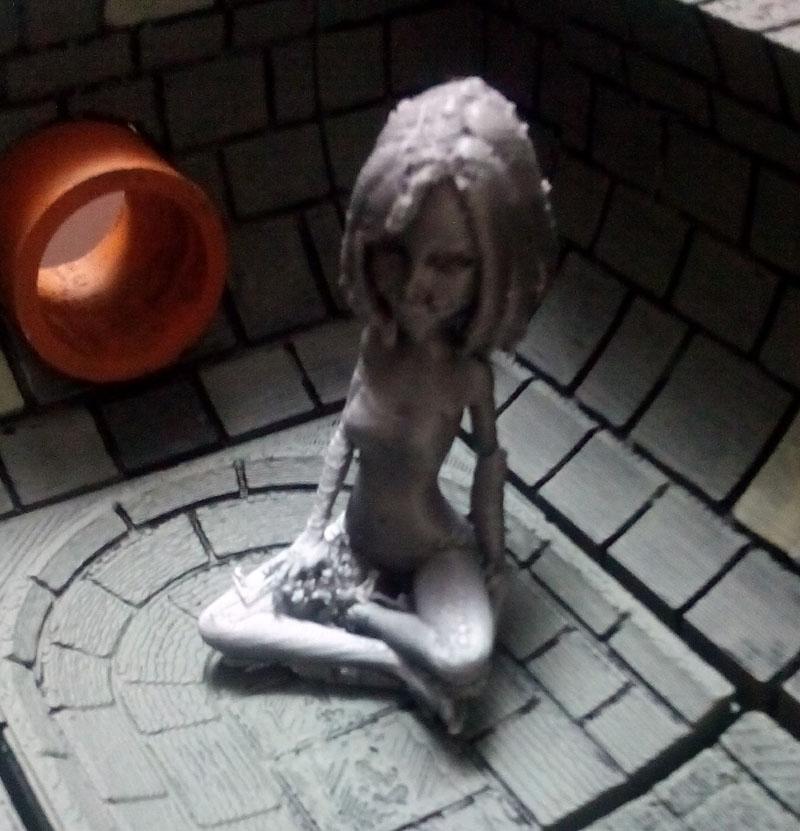
I bought a 3d Printer and to test it...
1) Set up figure, clothes, cartoon hair, pose in DAZ Studio
2) I exported a figure as an .OBJ file
3) Imported it to Blender
4) Exported as as a .STL file
5) Imported to Cura ( a Slicing program)
6) Exported as a .gcode file
7) Printed on my Monoprice Mini Select 3D Printer
8) Trimmed a lot of flash off (not quite done with that)
I am quite pleased with the results. (I broke her arm while cleaning it up that's why the poses don't quite match.)



Daz 3D is part of 
Connect
DAZ Productions, Inc.
7533 S Center View Ct #4664
West Jordan, UT 84084
Licensing Agreement | Terms of Service | Privacy Policy | EULA
© 2026 Daz Productions Inc. All Rights Reserved.
Comments
They have 3d print services, but I'm really nervous about making something and getting it back as a bunch of pieces, particularly if I'm paying $50 or something crazy for it. Heh.
(You can even get stuff 3d printed in stainless steel!)
The 3D Printer that I bought was only $200, already assembled, worked first time.
She (along with 2 other figures) were the first people I have printed.
The D&D scenery she's sitting in was printed earlier. It took a few tries to get those right. The ones that went wrong weren't bad, but they felt squishy.
My main problem with the people was breakage when I cleaning the support material (a.k.a flash) off the figures.
Actually, looking at prices, it might only be a few bucks for small stuff (Shapeways). Lots of cool stuff in their store, and you can use OBJ format. Hmm.
I've thought about getting a 3D printer, my son is really keen on it, but the cost plus the space plus the trying to make it work right is daunting. Heh.
I picked up a Qidi X-One, huge learning curve getting all the settings for each print just right but fun.
My workflow is to pose in Daz and thicken any parts that may be too thin, export to Hexagon and weld all the parts together then export as an OBJ, finally loading the OBJ into Qidi Tech and adjusting the settings, platform and rafters, finally saving it to gcode for the printer.
It may be that your pieces are breaking easily because there is not a good bond between layers. You could either try reducing the abount of minimum time spent on a layer, or slightliy increasing the nozzle temp but don't go too far with either as then you will start to get edges that curl up
That's the weird thing, I didn't do any prep work (though I should have thickened her arms). The STL exporter in Blender did most the work.
No the breakage is because it was teeny tiny and I am a bit ham-fisted when I am trimming.
My problem is the model sticking to the bed, I was replacing the tape every print. Lowering the bed temp actually is helping with that.
A good spatula helps with prying the print from the bed (like a paint scrapper)
I've gone with using hairspray on my printbed and I've grown to prefer prints that are almost glued onto the printbed as I've had too many that have curled and caught the printnozzle which then knocked the whole print loose.
I'm still trying to find a good setting for the rafter supports and have started using grid rather than lines.
While line supports are a heck of a lot easier to remove, they tend to be too flexable and move around when getting printed on top of.
Grid supports, while much sturdier and don't move and break durring print, are a lot harder to remove. I've tried increasing the space from the actual print but they are still tough to remove so I guess next I'll try reducing the fill amount and see if that helps.
So if you own your own 3D printer, are you allowed to sell the finish product like at Comic-Cons and stuff?
NO. The EULA says it is for personal use only.
Personal Use: I mainly bought this for my gaming use (you can see the figure sitting on the sewer tiles I printed earlier.). The printing of figures was just to see if I could do it.
Spatulas: The spatula I bought kept tearing the tape, I found one of the rounded X-acto Blades (not #11) worked better.
Grid supports: The people I got the terrain figures from have recomended settings , but they are fairly specifice to that architectural style.
Reproduction: If the printers can stay this cheap, I could see your becoming part of you household equipment, like an inkjet printer. DAZ might consider a "Print 3D" command (with associated "Prep for 3D") in some not too far future. The EULA may have to change, but it's already changed beore due to 3D Printing when it was expensive and had to be sent out.
I can understand the EULA currently not allowing selling of 3d prints as 3d printers aren't a common household item yet. Therefore most people would need to send files to print companies which falls into the sharing of the mesh, a big no-no.
I would think that once the home 3d printer becomes widely enough used, the EULA would change
but that's just my opinion
They did actually make some "watertight" morphs for one of the Genesis figures in order to make it 3d print ready. That is the main problem with the sort of 3D figures we buy and use, they are not designed for 3d printing,
No, but from what I've found, they don't need to be watertight. The software coming with 3d printers now account for openings like that automagically :)
Chohole, have I ever mentioned how often your Avatar gif makes me chuckle? It's like your are the fun police sometimes!
When i was first umm volunteered for upgrading to forum mod I decided that I needed a new avatar, did that one as a joke and asked some on line friends, who thought it was grand, but needed a handbag. I am not the hadnbag type so added the club. got instant thumbs up all round and Daz_Ann offered to animate it for me, and I have had it ever since. They won't let me change my name, although we moved out of Chohole Gate Lodge more than 8 years ago, and they tell me I mustn't change the avatar either.
I really want to see the finished project. Its looking great so far. 200 bucks for a printer is not bad. About how much is the cost for the printer plastic? What amount do you need to make a figure like that? I used to do alot of modelling some time ago and this has always kept me interested. One of the things that saddens me about making renders is that unless they are printed out, if there is a pc malfunction all the hard work that went into a good render is gone. If I could make actual physical models and dioramas with daz graphics I would be tremendously happy.
Wait, we can use Daz to render 2D stuff that we sell, but we can't print out 3D figures to sell?
That's... weird.
As I mentioned above, I believe the reason for that currently is because right now home 3d printers are still pretty nitche. Which means if someone wanted to create a 3d print, they would have to share the mesh with someone in order to get it printed.
I believe that once there's a 3d printer is as common as an inkjet printer, then we may see that EULA change.
It really depends on the size of the model being printed but usually a model uses a very negligeble amount. For my 3d printer, I can get a rather large spool (about 2.2 pounds) of plastic for about $23 + shipping
Kaot: I can totally appreciate the second clause, not sharing content files with others for any reason.
I just am baffled why it would exclude 3d printers that you actually own.
(Mind you, the commercial prospects of doing your own printing... yeah, not so hot)
Makes sense to me and I can't see it changing unless they sell specific meshes for 3D printing at higher prices, kinda like the all inclusive gaming license you see at Rendo or Turbosquid to compensate .
Thanks for sharing your results Marc, look forward to getting a printer sooner than later
That sounds just fine. Lets say I wanted to create a 1/32 scale figure (I think thats the size I use to model in). And lets also say that the pose these figures were in was essentially an upright standing pose. About how many figures do think I could get out of a 2.2 lbs spool of plastic. Also, are there varying degrees of quality in 3d print plastic or are they more or less the same?
Something else ive been thinking about is undercuts. Im assuming that an average 3d printer cuts on a vertical and horizontal axis. I imagine that if you have a 3d printer that is accurate enought to cut out the upper palate on a models open mouth(if possible), your probably paying a vast amount of money for a maintenance high machine. So im just going to consider horizontal and vertical cut planes. When considering flash and undercuts, is it good practice to create your own surfaces as to avoid severe undercuts? For example, an open mouth. Would it be practical to place a sphere in an open mouth that is more or less flush with the back of the teeth? That way its less intensive a cut for the machine? Then you can just cut away the sphere or paint it black or whatever serves your purpose.
When daz first started advertising 3d print, I noticed that gen 2 was usually listed as 3d print ready. What makes g2f/m 3d print ready and what do you have to do in order to make g3f/m 3d print ready. Can you make any of dazs models 3d print ready? What does that process involve? More software? Sorry, im really excited about this prospect!
The figures need to be made watertight, which they aren't normally. I believe that the figures that were made watertight had either morphs, or more likely geografts to seal the holes, as 3d figures are hollow.
Thats strange. Im having difficulties wrapping my brain around that. You have to make a hollow 3d figure read as solid? Thats just peculiar. Is there an example of this that I can see in daz Chohole? Or do I need something else to see it in action?
game models are the best example of this. In DS we have multiple layers of mesh, base figure, shoes, clothing, hair, etc. Many game models have all this modeled into one mesh. Your model can be hollow, just with all the holes plugged.
As said above, it can be hollow, but no holes... watertight like a submarine is fine.
The EULA issue is that each VENDOR needs to sign off/sell a license for 3D Printing because we are duplicating their work. On a 2D render we are not KEEPING their work in a 3D form.
Ok, now I get it. How is that done? MarcCCTx exported his model as an .obj. Do you parent all the clothing/hair and then convert the whole figure into a prop or something like that?
Having done enough Postscript stuff, I can tell you that when you print, your compouter takes a file, "cooks" it i.e... creates another file that contains info to tell the printer what to print, and the printer decodes the pritable file so you are never sending the actual file to the printer. When you 3d print, you are sending a replica of the 3d info and. like giving people Daz's 3d geometry, that is forbidden. In biology, we call it the difference between transciption and translation.
But if it's your printer, why would that matter? I mean, I can copy content from one of my pcs to another.
I've used up almost a full spool of PLA with my 3d printer and I've never made any figures watertight. I'm guessing that watertight is true with say resin printing or other such powder type comercial printing techniques but with the extruding printers it's not a neccessity.
Using the free terminator model over at rendo (which is only slightly larger than a daz figure) it uses only 7 grams of PLA to print, a 2.2 lb spool holds 1kg of PLA so you would be able to print approximately 143 figures
*edit* I should mention that to get the figure to about the right size for warhammer (28mm size which is what the calculation above is for) I scaled the model to 200% in Daz first.
Alright so this is something I printed earlier. See that grid? That was generated by the slicing software. If it sees a hollow, it draws around it first; you set the thickness by default, but you can change it; then fills the hollow pard\t with a light grid; again you can change how much grid as a percentage 0%-hollow - 100%-solid. I think the picture is about 15%.