Missing Icons
 Geoffrey_Woodget
Posts: 98
Geoffrey_Woodget
Posts: 98
in New Users
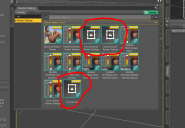
I just installed DAZ Studio 4.9 new with all the 4.9 bundle items on a brand new systerm. Why do I get this (attached)?
Thank you
Capture.PNG
938 x 650 - 135K

Daz 3D is part of 
Connect
DAZ Productions, Inc.
7533 S Center View Ct #4664
West Jordan, UT 84084
Licensing Agreement | Terms of Service | Privacy Policy | EULA
© 2026 Daz Productions Inc. All Rights Reserved.
Comments
Those are from the Default resources package - are other parts of it also missing their thumbnails (check in Smart Content >Product tab, or in the Products list in the Content Library pane)?
Richard-
They weren't even in the Smart Content at all that I could find. They were in Content Library- icons missing there too.
I uninstalled and reinstalled the Default Resources Package through DIM, closed and reoprned Daz Studio, still nothing. I re-imported MetaData, no change.
Regards
Richard-
So I uninstalled/Re-installed everything. Now I get an icon in Smart, but still none in Content.
Hey! Where's the delete post dialog!?
I just checked and after installing via Connect I lack any thumbnail for those items - it shouldn't affect their use.