Iray is Really... REALLY... FAST
 Nyghtfall3D
Posts: 817
Nyghtfall3D
Posts: 817
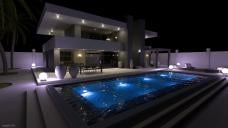
A couple days ago, I switched back to Reality because I was tired of seeing Iray environments with preconfigured mesh lights. The Modern Villa is what prompted that decision.
The attachments below were supposed to be a lighting exercise with Reality. 21 hours into the render, it was nowhere close to what I would call finished. CPU-Accelerated with Extra Boost disabled (because it can introduce bias) on my 3.5 GHz Core i7-4770K. I tried switching to OpenCL, but Lux crashed, twice. I thought, "Screw this. Let's see what I can do with Iray".
The villa comes with 12 pre-configured Iray mesh lights, all of which I completely reconfigured - only I know how I want my scenes lit, thank you. It rendered in 51 minutes with my GTX 980 Ti and GTX 780, and my CPU disabled.
In... credible...
As a point of note, I keep my CPU unchecked in the Advanced render options so I can multitask while Iray renders in the background. Otherwise, my PC slows to a crawl.

Daz 3D is part of 
Connect
DAZ Productions, Inc.
7533 S Center View Ct #4664
West Jordan, UT 84084
Licensing Agreement | Terms of Service | Privacy Policy | EULA
© 2026 Daz Productions Inc. All Rights Reserved.
Comments
That looks great.
That said, I don't really see the problem with preconfigured lights - It's handy for many of us to have them there and ready, whereas anyone who wants to do their own can delete them/turn them off and put their own in.
Yep, they often make a nice starting point. I love the lit scene- looks very nice!
Thanks.
The issue has already been discussed here, but my principle complaint stems from having to find and reconfigure them all. I know an add-on is available to make it easier, but I'd rather not have to buy it. Considering the speed and render quality Iray just produced for this exercise, I'm willing to deal with preconfigured lighting.
Ohh I see (having just read the thread.) Yeah, the solution isn't to stop putting in lights, it's to add an option to turn them off in one click for users that don't want them (or not load them or whatever the point is most Daz products come with a load of one click presets for people who don't want to go find individual settings, so put one in for lights on/off.)
I love Iray! And your Iray render turned out beautifully! :) I agree with Ix - I really like when PAs include the lighting. I find it extremely helpful and would hate to have to go in and track down all the objects that are meant to be light sources and create my own lights - that's a pain in the bottom that I'm thankful many PAs save us from. lol
Thank you. :)
What about objects that aren't meant to be light sources? ;)
Actually not surprising, that GPU rendering is much faster than CPU rendering, is it? ;-)
By reading the topic I thought there might be a special trick to make it render faster.
I love Lux, but unfortunately it's a PITA for me to convert the scenes using Reality. You might want to check out a newer version of Lux, which you can find on their forums. The newer versions are more stable in my case (Linux). Can't tell if it is the same for the windows version. I only know that I had quite a couple of system hangups using the version that comes along with Reality, which is why I prefer the Linux version (which I had to build, because the build on their forum is pretty old).
I though LuxRender can also utilize the GPU? Something about hybrid rendering? Or is that still to come?
Did you not see the script I posted to that thread for selecting the emissive surfacves, or did it not work for you?
I totally appreciate your frustration with regard to the issue with mesh lights being enabled in a scene it hour a simple, convenient way to disable them, especially as the number of such emissive surfaces increases. Hunting them all down can be a royal PITA.
Gven that, why would you rather not have to buy the add-on tool that would make the process so much easier? I'm certainly not trying to provoke an argument, or suggest you shouldn't feel a certain way, I'm just curious.
It does, plus you can use it along with AMD GPUs. You can render using GPU, CPU, or both.
If you chose GPU rendering and want it to render using the GPU only (by default it will also use the CPU), you need to edit the exported .lxs file and set the render device from like "11" to "10" or "01" (toggle for the individual render devices, in my case GPU and then CPU). It does not get slower that much with GPU only and you can actually use your PC for something else meanwhile, though not for sophisticated 3D games, of course.
As for preconfigured things in scenes, like lights:
It's always nice to have a toggle for something like this. Some have it, some dont have it - unfortunately.
Edit: rephrase.
Yeah, I had poked at Reality a year or so ago and immediately returned it. This was even pre-Iray, I think, and I just thought 'PBR might be 'better' but I can't just wait 13 hours for a terribly staticy image, I just don't have the hardware.'
Iray does an amazing job, IMO.
I had also been unimpressed with the majority of PBR renders I seen pre-iray aswell, a lot just looked like poor photos taken with a very high ISO (hence the noise). The few that were not, looked good, but like Will I did not have the patience to wait that long. When iRay was first announced I had assumed it would be a nice toy to play with, but 3DL would remain my default renderer, however things turned out quite differently after using iRay for a while, and now I barely use 3DL at all.
Free script to shut down all emissive: http://www.daz3d.com/forums/discussion/comment/1546991/#Comment_1546991
I just took a closer look at Light Manager Pro. In retrospect, I may have been a little... obtuse. I've added it to my wish list.
I saw your post, but haven't tried it yet. I'm going to buy a copy of LMP as soon as I'm able.
Thanks for the feedback, everyone. I appreciate it.
...Iray is fast, if you have a GPU with enough memory to support the scenes you are rendering.
If you have an old card (like I do, a 1 GB 460) you are stuck rendering with CPU and Physical Memory and if the latter is exceeded, swap mode which slows things down to a crawl. At that point Reality/Lux just is almost as good as I can run it in background with the scene and Daz closed which frees up about 5 - 6 more GBs of memory for rendering (based on the typical size scene I create).
I'm still hugely entertained by watching, in real time, a figure (with transmapping), softly lit by multiple area lights, just rendering into high quality output within a few minutes. Coming from Bryce (where such a scene would take overnight just to see if it was probably going to render ok by Thursday), the novelty hasn't worn off.
Iray makes stumbling around in Studio worth it. Maybe next year I'll get the time to explore and learn more. Maybe...
When I attempted to run Reality, it took me 13 hours to render a small (like 500x400 pixel) image of a candle. And after 13 hours there was so much noise it was hard to make out what the image was.
I'll take Iray in CPU mode over THAT.
Absolutely true. If your system can't handle the scene in physical memory, much less the GPU, you're toast.
Greetings,
Yeah...my wife just got a gaming rig, and it's really gorgeous. It's packing a GTX 970, and I so...so want to do some renders on it, but...nope. I have to wait a few months and get my own. Hopefully I'll be able to get a system with a 1080 and Iray will work with it by then, because I'm dying to do GPU renders fast enough to be a decent preview mode.
I currently do scene setup on a system with only CPU rendering (Mac) and 'final' rendering on a system with a 4GB GTX 740, so Iray's not that fast...but it's still faster than Reality and Luxus.
Although I miss network distributed rendering. Oh wow, if I could set up my Windows box as an Iray slave that used its GPU, and sync the scene via a direct API, where it then rendered it and sent the framebuffer back to my Mac, I'd be in hog heaven. Preview rendering wouldn't bog down my scene setup anymore... (And maybe I could run a render slave app on my wife's computer, and...NO HONEY, I WASN'T SUGGESTING ANYTHING LIKE STEALING SOME OF YOUR GPU POWER! I wouldn't do that!)
;)
-- Morgan
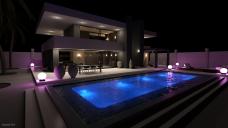
Earlier today, I learned what caustics are used for, and re-rendered the Villa with the Caustics Sampler enabled. Someone on my DA page suggested I try rendering with just my GTX 980 Ti and no CPU. This version took 4 hours and 15 minutes.
You can actually see the water reflected on the Villa's roof and subtle variations in its shadow.
I read that you ran that with just the GTX 980 Ti and no CPU at all. Then, you also turned off your second video card as well, the 780 and completed your Iray emissions scene in 4 hrs and some change with just one card?
I'm asking because I'm still very new to Iray, and was curious about disabling my CPU in DAZ, leaving only my GPU to render. I want to give the new card a true test and feel that my system keeps defaulting back to the CPU after a mere 80 iterations, With the GPU and CPU option checked.
The 51-minute version used both my 980 Ti and 780, with no CPU. The 4-hour version I just posted only used my 980 Ti, no CPU, with the Caustics Sampler enabled.
Speed is relative for sure. Back in my 3delight days I tended to use SSS + Bounce lighting + Hairs with lots of transmaps or Garibaldi... Unless you're really clever with optimizing (and I'm definitely not) It gets positively glacial (like, 24 hours for an unclothed figure with hair in a cube, glacial). I switched to exporting to blender and cycles and manually setting up all my materials to render there, because it was honestly faster that way.
So, yeah the advent of Iray represented a massive boost in rendering efficiency for me, even though plenty of my scenes dump to cpu
My card is a GTX970, which is better than some, but worse than others mentioned in this thread. I always render on GPU alone, as I find the speed up when using CPU aswell is between 0 and next to nothing. I would rather have the CPU processors working on what I am doing whilst waiting for the render.
I'm a GTX 960 SC 4gb, so my card probably is slower than yours – but I still might give that CPU disable a try despite that factoid. I won't know till I try it.
Thank you for clarifying that for me! I'm going to try disabling my CPU next Iray render and see how it goes, even though I only have one card.
I stayed on the fence about buying Light Manager Pro for days, until almost the end of the introductory discount. Then I re-read the feature list and decided to jump on it.
It is INCREDIBLY useful. Because I can't reliably use GPU rendering on my Mac (thank you, Apple CUDA bugs), once I make my first best guess on light placement, I open a very small aux viewport in Nvidia mode and then pop up the script UI. While it's not as instantaneous as if I had GPU on, I'm able to get very quick feedback about what lights need to be tweaked.
Since the script is modal, I have to close it to do actual repositioning of emitters, but that's a small price to pay for the ability to tune all the wattage levels and colors with such quick feedback.
I'm actually OK with LuxRender's output. My big thing with Reality is, sometimes I pull up an old scene to repurpose, swap some new props and actors in, and then realize that they simply failed to register in the reality scene data. They're totally invisible to Lux. And once the file gets in that state, there's apparently no help for it but rebuilding the scene from scratch.
A related problem: Marking items as invisible in the Studio hierarchy panel doesn't actually make them invisible to Reality. You have to go through the material tab and turn all of the surfaces invisible, one by one. It shouldn't take me that effort.
I went back and forth about Light Manager Pro.
I think it was one or two rounds with Winterblack Halls that convinced me. ;)
Greetings,
Actually, I think it was @Nyghtfall's thread on his frustration with pre-packaged emissive lights that convinced me to pick it up. I think I was like, 'Oh yeah, that's right, that's a really cool tool, and it's just recently left it's 60 day no-discount period...' and a day later it was on sale.
  Timing is everything...
-- Morgan
I managed this on GPU only in 20 minutes. (It's standard pre-packaged lighting with the set and a quickly thrown together character with Iray shaders everywhere -- don't expect awesome).
I was impressed after I unchecked CPU in DAZ - and discovered that the time is EXACTLY the same as when I have both GPU & CPU checked. With CPU, my computer just chugs really hard and nothing gained, basically.
Card: EVGA GTX 960 SC 4GB. Nothing special, but (mentioned earlier) it is what I could afford at this time.
** This is only my third Iray render ever since I received my video card last week. I'm still new to it. Really new.
This is a great thread. Thank you!