how can I get an underwater blue scene for a daz render?

I am trying to to do an underwater scene of a woman swimming but am having difficulty finding an actual light blue underwater setting.
So far I have the sea bed done with this which is good http://www.daz3d.com/with-the-fishes but I don't know how to actually have the underwater environment so its all blue. I am not sure what the proper word for it is lol but you probably know what I mean. Can anyone recommend a product for this? thx.

Comments

  • DestinysGardenDestinysGarden Posts: 2,553
    edited September 2016

    Iray or 3Delight or Poser?

    Edit for more info: if you want Poser or 3Delight, I know just the things. If you want Iray, I'd like to know too.

    Edit again: Water caustics is what you are looking for.

    Poser: http://www.daz3d.com/underwater-ambiance-for-poser

    http://www.daz3d.com/ultrumarine-for-poser

    3Delight:http://www.daz3d.com/underwater-ambiance-for-daz-studio

    http://www.daz3d.com/ultrumarine-ocean

    Iray: http://www.daz3d.com/laguna-underwater-lights-for-iray


    Post edited by DestinysGarden on
  • ToobisToobis Posts: 993
    edited September 2016

    Iray or 3Delight or Poser?

    Edit for more info: if you want Poser or 3Delight, I know just the things. If you want Iray, I'd like to know too.

    Edit again: Water caustics is what you are looking for.

    Poser: http://www.daz3d.com/underwater-ambiance-for-poser

    http://www.daz3d.com/ultrumarine-for-poser

    3Delight:http://www.daz3d.com/underwater-ambiance-for-daz-studio

    http://www.daz3d.com/ultrumarine-ocean

    Iray: http://www.daz3d.com/laguna-underwater-lights-for-iray


    No I don't think you get what I mean. I mean just the basic blue water that engulfs the screen (for 3Delight or Iray) and NOT the lighting effects.

    Post edited by Toobis on
  • DaWaterRatDaWaterRat Posts: 2,885
    edited September 2016

    For Iray, try creating a cube primative large enough to cover the whole scene (including the camera), and then adjusting the shader settings.

    I just threw this together as a test of concept, with Translucency weight at 1 (color white), Refraction Weight 1, share glossy inputs off, Refraction color is a cyan, Refraction index is 1 (you can mess with that to get something better, I'm sure) and refraction roughness is .35.  Also Thin Wall is off.

    Under Water Iray.png
    667 x 500 - 532K
    Post edited by DaWaterRat on
  • For Iray there is also a volumetric water included with TerraDome 3

  • DestinysGardenDestinysGarden Posts: 2,553
    edited September 2016
    Toobis said:

    Iray or 3Delight or Poser?

    Edit for more info: if you want Poser or 3Delight, I know just the things. If you want Iray, I'd like to know too.

    Edit again: Water caustics is what you are looking for.

    Poser: http://www.daz3d.com/underwater-ambiance-for-poser

    http://www.daz3d.com/ultrumarine-for-poser

    3Delight:http://www.daz3d.com/underwater-ambiance-for-daz-studio

    http://www.daz3d.com/ultrumarine-ocean

    Iray: http://www.daz3d.com/laguna-underwater-lights-for-iray


    No I don't think you get what I mean. I mean just the basic blue water that engulfs the screen (for 3Delight or Iray) and NOT the lighting effects.

    Yeah, no, I still think Ultrumarine is a good set for what you are looking for. It is a volumetric underwater environment, but the DaWaterRat gave good tips too.

    Post edited by DestinysGarden on
  • pdspds Posts: 593

    If you go the volumetric cube route, I think Mec4D has a few different volumetric water shaders in her Volume 2 set.

    http://www.daz3d.com/mec4d-pbs-shaders-vol-2-for-iray

  • dracorndracorn Posts: 2,363
    edited September 2016

    I found an underwater photo from Pixabay which I used as a backdrop for my underwater scene:

    01 Mermaid Background.jpg
    900 x 600 - 195K
    Revealed in the Deep 1_91.jpg
    1700 x 1133 - 2M
    Post edited by dracorn on
  • Oso3DOso3D Posts: 15,100

    One of the simplest approaches is to get a distance mask and overlay a blurring blue mask.


  • DaWaterRatDaWaterRat Posts: 2,885

    My first impulse was to suggest the Atmosphereic Effects cameras by Age of Armor, but I wasn't sure if they were still working in 4.9 or not.

  • Oso3DOso3D Posts: 15,100

    Yeah, they work.

    I'm not positive the 'set diffuse to 99%' flagging works, but 'category: foglight' does.


  • pdspds Posts: 593

    One of the simplest approaches is to get a distance mask and overlay a blurring blue mask.


    Hi Will,

    When you say, "get a distance mask..." do you mean create one inside Daz somehow so that it corresponds to the relative distance between the camera and each object in the scene or did you mean use a generic distance mask that simulates some sort of two-point perspective distancing? I'm assuming you would apply the mask in post to achieve the effect. This reminds me of the approach used by PixelSquid when using their pre-rendered 3D objects in Photoshop.

  • Oso3DOso3D Posts: 15,100

    Yes.

    With Iray, if you go to Render Settings, Advanced tab, Canvases.

    There's a checkbox for 'Canvases,' click it, hit +. You then get a Beauty canvas. Hit + again, and click on teh second Beauty canvas, switch to Distance canvas.

    Now, when you render and save file Bloo, you end up with:

    Bloo.png
    Bloo/Bloo_Beauty.exr
    Bloo/Bloo_Distance.exr

    The first file is a regular 8 bit render. The second is a 32 bit render, which can be great for fine-tuning tone and lighting without artifacts. The third file is a 32 bit grayscale image based on distance to the camera -- you can manipulate the range of values (with Levels) or the relative distribution of values (with Curves) in Photoshop and use directly as a layer, or as a mask.


    In 3DL AoA's Atmospheric cameras includes a Distance camera to do something similar.


  • pdspds Posts: 593

    Yes.

    With Iray, if you go to Render Settings, Advanced tab, Canvases.

    There's a checkbox for 'Canvases,' click it, hit +. You then get a Beauty canvas. Hit + again, and click on teh second Beauty canvas, switch to Distance canvas.

    Now, when you render and save file Bloo, you end up with:

    Bloo.png
    Bloo/Bloo_Beauty.exr
    Bloo/Bloo_Distance.exr

    The first file is a regular 8 bit render. The second is a 32 bit render, which can be great for fine-tuning tone and lighting without artifacts. The third file is a 32 bit grayscale image based on distance to the camera -- you can manipulate the range of values (with Levels) or the relative distribution of values (with Curves) in Photoshop and use directly as a layer, or as a mask.


    In 3DL AoA's Atmospheric cameras includes a Distance camera to do something similar.


    I was wondering if there was a way to use Canvases to do that; I didn't know the option was directly a feature. That's pretty handy. I need to experiment with that. Do you use the Otoy plugin to open the .exr files in PS or is there another option?

  • Oso3DOso3D Posts: 15,100

    The version of Photoshop I have opens exr files without a problem. It needs to have HDR toning or converted to 16 bit to really be usable, but once you get the hang of it it's not hard. It defaults to some funky 'local adjustment' method, which is useful but tricky. If you switch to Exposure method, adjusting it to -13 exposure works in 90% of the cases.


  • For any GIMP users out there, the newest beta version of GIMP will also open .exr files.  I've found a couple of filter glitches with that version of GIMP, but it seems pretty stable for everything else so far.

  • DaWaterRatDaWaterRat Posts: 2,885
    edited September 2016

    Yes.

    With Iray, if you go to Render Settings, Advanced tab, Canvases.

    There's a checkbox for 'Canvases,' click it, hit +. You then get a Beauty canvas. Hit + again, and click on teh second Beauty canvas, switch to Distance canvas.

    Now, when you render and save file Bloo, you end up with:

    Bloo.png
    Bloo/Bloo_Beauty.exr
    Bloo/Bloo_Distance.exr

    The first file is a regular 8 bit render. The second is a 32 bit render, which can be great for fine-tuning tone and lighting without artifacts. The third file is a 32 bit grayscale image based on distance to the camera -- you can manipulate the range of values (with Levels) or the relative distribution of values (with Curves) in Photoshop and use directly as a layer, or as a mask.


    In 3DL AoA's Atmospheric cameras includes a Distance camera to do something similar.


    Not to hijack, but ... any idea how to import canvases into GIMP?  I keep getting errors.

    Post edited by DaWaterRat on
  • Yes.

    With Iray, if you go to Render Settings, Advanced tab, Canvases.

    There's a checkbox for 'Canvases,' click it, hit +. You then get a Beauty canvas. Hit + again, and click on teh second Beauty canvas, switch to Distance canvas.

    Now, when you render and save file Bloo, you end up with:

    Bloo.png
    Bloo/Bloo_Beauty.exr
    Bloo/Bloo_Distance.exr

    The first file is a regular 8 bit render. The second is a 32 bit render, which can be great for fine-tuning tone and lighting without artifacts. The third file is a 32 bit grayscale image based on distance to the camera -- you can manipulate the range of values (with Levels) or the relative distribution of values (with Curves) in Photoshop and use directly as a layer, or as a mask.


    In 3DL AoA's Atmospheric cameras includes a Distance camera to do something similar.


    Not to hijack, but ... any idea how to import canvases into GIMP?  I keep getting errors.

    Which version of GIMP are you using?

  • DaWaterRatDaWaterRat Posts: 2,885

    Yes.

    With Iray, if you go to Render Settings, Advanced tab, Canvases.

    There's a checkbox for 'Canvases,' click it, hit +. You then get a Beauty canvas. Hit + again, and click on teh second Beauty canvas, switch to Distance canvas.

    Now, when you render and save file Bloo, you end up with:

    Bloo.png
    Bloo/Bloo_Beauty.exr
    Bloo/Bloo_Distance.exr

    The first file is a regular 8 bit render. The second is a 32 bit render, which can be great for fine-tuning tone and lighting without artifacts. The third file is a 32 bit grayscale image based on distance to the camera -- you can manipulate the range of values (with Levels) or the relative distribution of values (with Curves) in Photoshop and use directly as a layer, or as a mask.


    In 3DL AoA's Atmospheric cameras includes a Distance camera to do something similar.


    Not to hijack, but ... any idea how to import canvases into GIMP?  I keep getting errors.

    Which version of GIMP are you using?

    2.8.14

  • GIMP 2.8.14 doesn't accept .exr files.  You need to use the GIMP beta 2.9 which you can get from the main GIMP.org site.  I got my version of the beta 4.9 from Partha's site as he has it set up so that you can use the NIK filters that were recently released which I wanted to try out.  The only problem I've notice so far with the beta as far as stability issues have been a couple of filters have notes and don't actually load.  I haven't had anything crash on me yet.  I, also, haven't gotten rid of 4.8 yet either as I like to keep the last stable version that I'm familiar with around.

  • DaWaterRatDaWaterRat Posts: 2,885

    GIMP 2.8.14 doesn't accept .exr files.  You need to use the GIMP beta 2.9 which you can get from the main GIMP.org site.  I got my version of the beta 4.9 from Partha's site as he has it set up so that you can use the NIK filters that were recently released which I wanted to try out.  The only problem I've notice so far with the beta as far as stability issues have been a couple of filters have notes and don't actually load.  I haven't had anything crash on me yet.  I, also, haven't gotten rid of 4.8 yet either as I like to keep the last stable version that I'm familiar with around.

    Ah.  Okay.  Thanks. :)  (I can also always drop back to 3DL and use the AoA depth camera. :))

  • GIMP 2.8.14 doesn't accept .exr files.  You need to use the GIMP beta 2.9 which you can get from the main GIMP.org site.  I got my version of the beta 4.9 from Partha's site as he has it set up so that you can use the NIK filters that were recently released which I wanted to try out.  The only problem I've notice so far with the beta as far as stability issues have been a couple of filters have notes and don't actually load.  I haven't had anything crash on me yet.  I, also, haven't gotten rid of 4.8 yet either as I like to keep the last stable version that I'm familiar with around.

    Ah.  Okay.  Thanks. :)  (I can also always drop back to 3DL and use the AoA depth camera. :))

    I still struggle with 3DL so I'm no help there.

  • AJ2112AJ2112 Posts: 1,417
    edited September 2016

    Actually a very good question, I've wondered the same myself.  Very challenging to achieve beautiful blue water like ocean scenes of coral reefs.  What I have discovered is converting ground planes to blue color helps.  Hopefully someone can chime in on some under water material settings. 

    Post edited by AJ2112 on
  • srieschsriesch Posts: 4,243
    edited September 2016

      I was recently struggling with this myself.  I first tried to use the AtmoSphere from http://www.daz3d.com/aquatica-reef which worked great for hazy water, but needed a different lighting effect. 
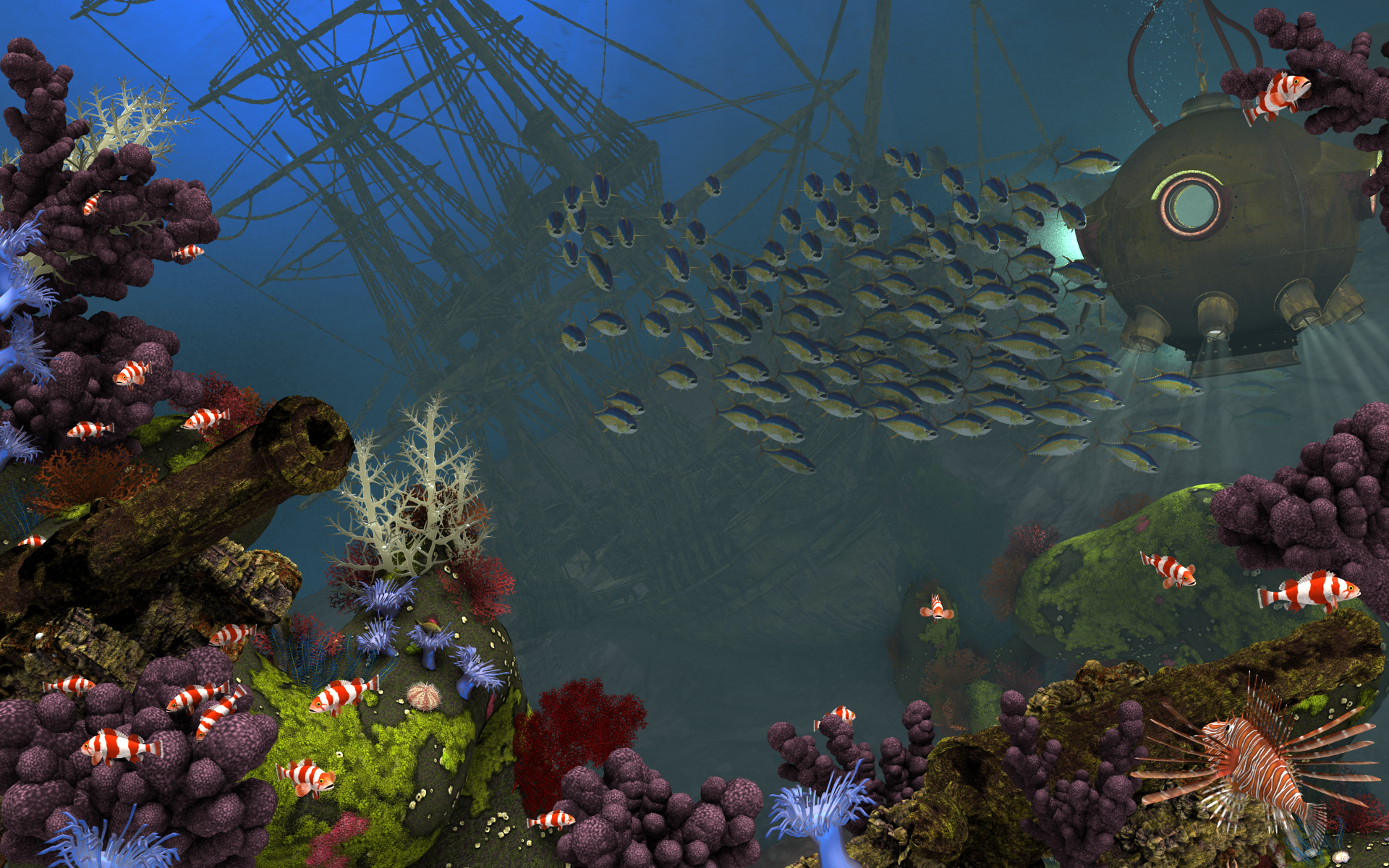
     

    I briefly tried creating a sphere with some haze material on it (I forget what materials I tried) but it wasn't working out well and you could see shadows on the edge which had to be in front of the camera because the camera cannot be inside of it or the material wouldn't work.  Due to a time crunch I then abandoned that, changed lighting, replaced the haze with a pair of nested spheres that were partly transparent, stuck a plane in the background and put a spotlight on it, essentially just creating a backdrop. Not a very elegant way to do it, but it got the job done.

    the deep.png
    1920 x 1200 - 4M
    Post edited by sriesch on
  • AJ2112AJ2112 Posts: 1,417

    Fantastic ocean scene yes

  • ToobisToobis Posts: 993

    Iray or 3Delight or Poser?

    Edit for more info: if you want Poser or 3Delight, I know just the things. If you want Iray, I'd like to know too.

    Edit again: Water caustics is what you are looking for.

    Poser: http://www.daz3d.com/underwater-ambiance-for-poser

    http://www.daz3d.com/ultrumarine-for-poser

    3Delight:http://www.daz3d.com/underwater-ambiance-for-daz-studio

    http://www.daz3d.com/ultrumarine-ocean

    Iray: http://www.daz3d.com/laguna-underwater-lights-for-iray


    Nice work hehehe I like that image. Thanks everyone I think I get the hang of it for now anyway.

Sign In or Register to comment.
