-
How does this work
FSMCDesigns said:
The link posted shows it is a complete figure, morphs, skin, hair and clothing. If the OP just got a head morph, they need to contact the seller
The description says it's a head morph.
March 19: First Ever HeadShopPRO at DAZ! (Commercial)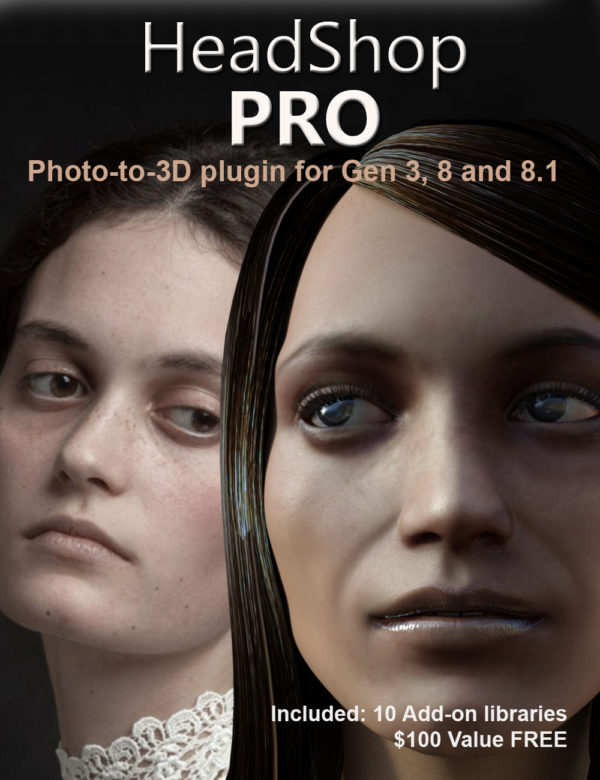
Abalone is proud to publish its first-ever PRO product, HeadShopPRO, a plugin to convert a single photo into a 3D head morph and texture. HeadShopPRO works inside DAZ Studio and automatically finds 50 points on the photo, auto-finds the gender, and automatically applies changes to Genesis 3, 8 and 8.1 Base Figures! This release includes 10 full libraries of AutoSculpt Add-ons (a $100.00 value) including Lips, Teeth, Schnoz, Creases, Chins, Celebrities (male and female), Huminals and more.
As we announce the release of our PRO product, let me mention the three biggest milestones of the 15 years of development of the product:
#1. Rotated Heads
#2. Open Smile
#3. Face Topography
To learn more about this milestone release, please preview the following short video: https://youtu.be/qAn3ehnMhio?t=6
 How does this work
The link posted shows it is a complete figure, morphs, skin, hair and clothing. If the OP just got a head morph, they need to contact the seller
How does this work17 bucks for a head morph does seem a bit steep.
How does this workDaz sells body morphs. They adjust and fine tune various parts. You can purchase other morph packs.
How to make Simple Morph creation workflow just like we have when using Hexagon Bridge ?I'm working on it, but it won't be a 'live' bridge like the Hexagon one.
However, it does circumvent using manual OBJ import/export, and Morph Loader Pro -- It utilizes straight vertex (point cloud) return files with delta changes from a simplified facet mesh export through an exchange folder with Blender.
First gen prototype :
https://www.daz3d.com/forums/discussion/comment/6389836/#Comment_6389836
Autofitting G8F eyelashes to G8M issueOne thing to consider is that the UV map for lashes on male and female is nearly identical. So instead of trying to fit female lashes to males, you can simply copy the surface materials of the female lashes you want and paste this onto the male lashes. The males actually have pretty large lashes by default, so changing the opacity map to one of a female's will instantly make the male have longer lashes. If you have any male lash morphs, you can use them as well. So while you might not have your female lash morphs, you should be able to make lashes that look just like most females without spending much effort.
If you still want longer lashes and don't have a morph, you can buy buy one or find a free one if there is one. If not, this would be a good time for some Hexagon use. Lashes don't have many polygons at all. Load a base model in default pose, with lashes. Click on the lashes and have them highlighted, send to hexagon. This should send only the lashes to hexagon, we don't need or want the Genesis model in hexagon. Select the X mirroring function so you can work on both at once. Then you can use the vertice selector to pick the fartherest out vertices and move them. It might take a little practice to get used to if you haven't done it before, but it is doable without too much effort. When satisfied send the lashes back to Daz, and save this as a new morph with a unique name. Once saved as a morph the G8M lashes will have the morph available for all your G8M characters.
But I doubt you'll need or want to do that as long as you are not trying to create very large lashes. I think the default will work pretty well, and you probably have at least one morph that will make them bigger.
How does this workAll the characters/models for Genesis 1-8.1 are just morphs that change the appearance of the base figure, which in this case is Genesis 8 Female.
Some characters/morphs are sold with Character presets, which automatically load the required base figure and apply the morph and textures when loaded, some require loading the base figure (G8F in this case) and you need to apply the applicable morphs with the morph presets or using the dials in "Parameters tab" to apply them.
How does this workI purchased this charater thinking that she was a full model...but it happens only to be a head morph.
http://guhzcoituz.com/product/death-stranding-mama-for-g8f/
Two questions:
1. How do i apply the head?...do i choose a random body and apply the head morph afterwards?...
2. I have see many renders with this character with complete bodies...one of which examples below:
https://www.deviantart.com/rdaughter/art/ABOJO-902900955
How are these "complete bodies" achieved if the main character is only a head morph?...
face transfer fail errorI downloaded Genesis 8 Starter Essentials yester day,
But [face transfer] it doesn't work. What should I do? help..
How to make Simple Morph creation workflow just like we have when using Hexagon Bridge ?Lately I`ve been playing with Hexagon Bridge and find it easy for creating simple character morphs
Any special tools or workflow for Blender which works just like that ? (Send to Blender - Move vertex/polygon using Sculpt tools thenn send back into DAZ wihout need/using maual OBJ export - import )
Why do some characters load from the smart content figure window, and others don't?Honzo said:
So some of the figures 'for G2M' are not characters, but shaping and materials presets?
Every character is built upon the specific base genesis generation.
Genesis 8 Female is the base.
Victoria 8 is a morph and texure set for base Genesis 8 Female. Victoria is the flagship figure with a long history of development here at DAZ3D
Victoria 1-4 were the base figures prior to Genesis 1 being introduced. Victoria 5 was a morph and texture set for Base Genesis 1. That figure was introduced about 10 years ago more or less.
Clothing Prop into Normal ClothingThe item is a Stocking created by Powerage: https://www.renderosity.com/rr/mod/bcs/stockings-suspenders-collection-for-g3-females/118637/ ; I tried the Transfer Utility but it doesn't find the stockings
Clothing Prop into Normal ClothingWhat figure is the clothing for? Transfer utility is for weight mapped figures like the Genesis line, for figures using Poser parametric rigging like V4 you'd use different tools.
Clothing Prop into Normal ClothingAll Daz clothing begins life as a static prop. Look for tutorials on the Transfer Utility.
Daz to Maya Update 1.7Hi,
I get this issue on the option "Rig or Re-target Skeleton" - DazToMaya 1.8 with Maya 2020 or 2022 versions. When I click on the option, nothing change on the model. No new rig. The model stay in T position. But these new things appears in the Maya's Outliner (Wich doesn't comes as seen on the DAZ videos with the same hierachie):- Geometry
- ExportSetup
- hip_ctrl_zero
And I get this error message:
"// Error: file: C:/Users/MACPRO03/Documents/maya/modules/DazToMaya/scripts/DAZTools.mel line 1694: Could not add constraint or connections."The Basic Genesis 8 model stay in the T pose. I have tried to reinstall several time the DazToMaya plugin. Doesn't want to work even with the github files...
Is someone to help or get same issue ? Thank you in advance for a help ;-)The complete log error is:
1- For the import sequence:
import maya.cmds as cmds
import DazToMaya
if int(cmds.about(v=True)) > 2020:
import importlib
importlib.reload(DazToMaya)
else:
reload(DazToMaya)
DazToMaya.run()
# pymel.core : Updating pymel with pre-loaded plugins: mayaHIK, invertShape, curveWarp, substanceworkflow, hairPhysicalShader, ATFPlugin, ikSpringSolver, retargeterNodes, RokokoMotionLibrary, sweep, AutodeskPacketFile, lookdevKit, Type, Boss, bifrostGraph, meshReorder, modelingToolkit, MayaMuscle, matrixNodes, bifmeshio, deformerEvaluator, shaderFXPlugin, objExport, bifrostshellnode, ufeSupport, GPUBuiltInDeformer, mayaVnnPlugin, substancemaya, svgFileTranslator, GamePipeline, tiffFloatReader, MASH, poseInterpolator, bifrostvisplugin, cacheEvaluator, mtoh, ik2Bsolver, xgenToolkit, AbcExport, gameFbxExporter, OpenEXRLoader, Unfold3D, mayaCharacterization, mtoa, rotateHelper, AbcImport, autoLoader, sceneAssembly, gpuCache, Substance, mayaUsdPlugin, OneClick, renderSetup, ArubaTessellator, substancelink, quatNodes, fbxmaya #
Daz to Maya, run() method
win32
d2m start
file -f -new;
// Result: untitled //
file -f -new;
// Result: untitled //
Importing Daz...
// Logfile: "C:\Users\MACPRO03\Documents\maya\FBX\Logs\2020.1\maya2022imp.log" //
setAttr -type "string" Genesis8Male.StudioNodeName "Genesis8Male";
setAttr -type "string" Genesis8Male.StudioNodeLabel "Genesis 8 Male";
setAttr -type "string" Genesis8Male.StudioPresentationType "Actor/Character";
setAttr -type "string" Genesis8Male.StudioPresentationAutoFitBase "/Genesis 8/Male";
setAttr -type "string" Genesis8Male.StudioPresentationPreferredBase "";
setAttr -type "string" Genesis8Male.ControllerScales "Youth Morph=-0.445;CTRLGunnar=0;CTRLCaspian=0;CTRLHugren=0.0599999;CTRL-RSC-GarethHD=0.036;FBMRealBodiesJules=-0.0324572;Beast HD=0.17;CTRL-FIYousef=0.03;CTRL-E3DYonni=0.021;CTRL-E3DWalker=0.065;CTRL-E3DTamati=-0.014;CTRL-E3DSeb=-0.025;CTRL-E3DLeonard=0.03;CTRL-E3DLeon=0.02;CTRL-E3DKichiro=-0.0499999;CTRL-E3DGui=-0.025;CTRL-E3DGanaatarDemon=0.026;CTRL-E3DGanaatar=-0.026;CTRL-E3DDonovan=0.012;CTRL-E3DBjarke=0.032;Daniel=0.0650001;CTRLVladimir8=0.056;CTRLValentino8=-0.048;CTRLTheBrute8=0.17;CTRLScar8=0.056;CTRLMrWoo8=-0.105;CTRLMichael8=0.04;CTRLLee8=-0.06;CTRLLandon8=0.04;CTRLKjaer8=-0.02;CTRLJonathan8=0.04;CTRLHolt8=0.068;CTRLDiego8=-0.018;CTRLDasan8=-0.02;CTRLDain8=0.044;FBM_CGI_Miklos_Body=0.03;FBM_CGI_HKClaus_Body=0.02;CCRafael=-0.018;CCMagnus=0.1515;CCJack=-0.0172213;CCDragomir=0.0453";
AutoIK...
namespace fix finished
// Error: line 1: No source attribute was specified. //
// Error: line 1: The source attribute 'm5philliplashes.outColor' cannot be found. //
// Error: line 1: setAttr: No object matches name: Genesis8Female.drawStyle //
------------------------------------
------------------------------------
// Error: line 1: Non-deletable node 'perspShape' cannot be deleted. //
// Error: line 1: Non-deletable node 'persp' cannot be deleted. //
// Error: line 1: Non-deletable node 'topShape' cannot be deleted. //
// Error: line 1: Non-deletable node 'top' cannot be deleted. //
// Error: line 1: Non-deletable node 'frontShape' cannot be deleted. //
// Error: line 1: Non-deletable node 'front' cannot be deleted. //
// Error: line 1: Non-deletable node 'sideShape' cannot be deleted. //
// Error: line 1: Non-deletable node 'side' cannot be deleted. //
// Error: line 1: setAttr: No object matches name: Genesis3Male.drawStyle //
// Error: line 1: setAttr: No object matches name: Genesis3Female.drawStyle //
// New character 'Character1' was created.
parentConstraint -mo -weight 1;
// Result: lBigToe_parentConstraint1 //
parentConstraint -mo -weight 1;
// Result: lSmallToe1_parentConstraint1 //
parentConstraint -mo -weight 1;
// Result: lSmallToe2_parentConstraint1 //
parentConstraint -mo -weight 1;
// Result: lSmallToe3_parentConstraint1 //
parentConstraint -mo -weight 1;
// Result: lSmallToe4_parentConstraint1 //
parentConstraint -mo -weight 1;
// Result: rBigToe_parentConstraint1 //
parentConstraint -mo -weight 1;
// Result: rSmallToe1_parentConstraint1 //
parentConstraint -mo -weight 1;
// Result: rSmallToe2_parentConstraint1 //
parentConstraint -mo -weight 1;
// Result: rSmallToe3_parentConstraint1 //
parentConstraint -mo -weight 1;
// Result: rSmallToe4_parentConstraint1 //
// New Rig: Character1_ControlRig was created.
// Error: line 1: setAttr: No object matches name: Scalp.cosinePower //
// Error: line 1: setAttr: No object matches name: SummerLash_1006.alphaGain //
DazToMaya Complete!
2- For the Retarget Skeleton sequence :
---- Running DAZ Rigger v1.02 ----
// Warning: file: C:/Users/MACPRO03/Documents/maya/modules/DazToMaya/scripts/DAZTools.mel line 491: New name contains invalid characters. Illegal characters were converted to "_". //
---- Geometries grouped ----
// Error: file: C:/Users/MACPRO03/Documents/maya/modules/DazToMaya/scripts/DAZTools.mel line 1694: Connection not made: 'hip_scaleConstraint1.constraintScaleX' -> 'hip.scaleX'. Destination attribute must be writable. //
// Error: file: C:/Users/MACPRO03/Documents/maya/modules/DazToMaya/scripts/DAZTools.mel line 1694: Could not add constraint or connections. //Best hairs for Kiko?@Gordig Yep the Kitsune morph as the ears are part of the base, so they tend to create issues with hair... just trying to work out what products will work well without having to use Dforce for everything (long story but DF is a bad idea for this project)
g8 male elbow distortionLooks like a JCM is firing when it's not supposed to. Have you recently installed any characters or other morph packs?
Why use custom characters?Despite pointing out the goat morph as an example of what people are talking about, I actually really like that morph and am glad that it exists, because it gives me something that otherwise doesn't really exist. There's less need for that kind of thing when we're dealing with human figures, where there are a lot more options available, and obviously it would be better if it were actually a hand-sculpted morph, but I'm still glad I have it.
Why use custom characters?Yes needing multiple characters and/or morph packs to use one new character is definitely a no for me.
I still grumble at descriptions and product info on whether or not textures will work on the base model if you don't have the extra characters or morph packs or both.
I got lucky with Mabel cause she doesn't use a morph or character for her look, so I know it will work on the base model and I now have a texture for when I want an elderly character in my render.
Daz 3D is part of

Connect
DAZ Productions, Inc.
7533 S Center View Ct #4664
West Jordan, UT 84084Licensing Agreement | Terms of Service | Privacy Policy | EULA
© 2026 Daz Productions Inc. All Rights Reserved.