-
Where are the missing files?
I did save them in a different place than the default, but they disappeared. I just created a new figure using Face Transfer and was able to save it and retrieve it. Not sure why the others do not work.
One other question: where is the morphing feature for Gorilla and Hobgoblin on the Genesis 8 figures? I cannot seem to find it in the Parameters tab.
M4 - How to make Morph Injections from Zbrush/etc made morphs?Viper016 said:
All I want to do is get some of my very old character's I created on Michael 4/Freak 4 to Genesis 2/3/8 using GenX.
I know M4 is very dated technology, but some character's shapes I created on M4 cannot be fully converted over to Genesis figures because some moprhs cannot be registered into GenX since they are not injected morphs, let alone being able to find each a every one of the files.
"Create Single Morph" is useless if you cannot find all the correct injection morph files to drag and drop into GenX itself or if you created a custom morph from Blender/Zbrush.
I get that it is now 2022, but I just would prefer to be able utilize some of my old characters on Genesis to update them to do new art work.
Okay I'll ask. Exactly which figure are you trying to make a morph for?
We do not make inj/rem morphs for any of the Genesis clans. We just make morphs that can be dialed it and mix 'n matched with others in what some call 'the gene pool.'
Where are the missing files?If Face Transfer will let you choose a location for the presets I would find a different place to put them.
Just incase Windows decides to "clean" the appdata folders of "temp" files.
Some "PC Cleaners" will delete anything in a folder named temp.
Normally something like that would be saved in your Documents folder under Documents\DAZ 3D\Studio\My Library\Presets
You can make a new folder in the Presets called what ever you like so it's easy to remember that is where you put them.
Something like
This is the Folder I'm going to keep my Face Transfer Material Presets In
or maybe something simpler like
FaceTR
also a folder in it for each one so you can keep the special ones separate from all the others
Where are the missing files?The popup says it's looking for them in "/c:/users/owner/appdata....".
There shouldn't be a "/" at the beginning of that.
also there should be some sort of setting in Face Transfer that allows you to save a material preset/shape preset so you don't lose all your work.
I don't use Face Transfer, so I'm not familiar with the UI sorry.
Does Face Transfer save all of your presets like this, or just this one?
edit: Have you checked that folder it's looking to see if the materials are actually in there?
Deforce clothing go into BlenderExport the dForce item to OBJ, at Base resolution and with no other items loaded, then clear the Simulation and reimport the OBJ as a new morph with Reverse Defortmations on - make sure you use the same preset in the OBJ export and Morph Loader
March 2022 - Daz 3D New User Challenge - Posing and Posing II@perlk, from the look of it, you need to bend her abdomen to the right slightly, then her chest back towards the left so you get a bit of a curve like the model.
As for the dress, maybe this would work?: https://www.daz3d.com/isolabella-dress It's for Genesis 2, but it's got a morph that sort of looks like the skirt in the reference. It was also given out as a weekly freebie not too long ago, so maybe you already have it.
Wondering why there is no proper bridge for Poser-DAZ StudioWandW said:
frank0314 said:
Smith Micro at least worked with Daz on development to a point but when the new owners took over they didn't want anything to do with Daz and wanted to push their own figures.
The split happened long before then; I recall it was around 2015-ish when then Product Manager Charles Taylor made an announcement that Poser would not be persuing Genesis 3 support. Since the SM blog and the RDNA forums are long gone, I can't locate the announcement.
I think the orignal tension came in 2011 when Poser 9 was released without support for animated joint centers (it was added in an SR a few months later, which allowed the DSON Importer to be released). This was about the time Studio 4 and Genesis were released, and both needed to get their products out to make some money (Studio Pro was initially a paid product), so for the first time the primary DAZ figure couldn't be used in Poser.
The Genesis 2 figures were my go-tos in Poser, and since the DSON importer will not run on Poser 12, I did not upgrade, and have been transitioning to Studio. However, I do miss the Poser Material room and the morph brush, and I find lighting easier to set up in Poser...
I made the switch to Studio I think almost two years ago and the one of the things I really miss about Poser is the morph brush. Mesh Grabber can do some of the basic things the morph brush could do but the morph brush is simply on another level of functionality and I miss the versatility it gave me.
Help with rendersHylas said:
The character you're using is toony so she will never look realistic like the one in your example.
Also:
- Use an HD morph and crank up the subD to 5.
- Tighten DOF. Try this set up: https://www.renderosity.com/freestuff/items/85514/freebie-portrait-camera-dof
- More contrast. Your Key Light needs to be brighter, Fill Light and Ambient Lighting might need to be lowered a little.
- Also, your Key Light is pointing right at her hair instead of her face, which is odd.
- Her lips need more gloss. Lower Glossy Roughness and/or increase Glossy Weight.
- Transition from face to lips looks unnaturally sharp. I don't know if this is baked into the texture you're using - in which case there isn't much you can do - or if you adjusted the lips surface settings too much.
- Her brows are too yellow..
- Her eyes are wide open like a doll. Dial in a little bit of blink or squint (G8.1), or eyes closed or eyelids up-down (G8.0).
- Looks like she has no tear. G8.0 has tear as a part of the lashes, make sure opacity is set to 1.0. G8.1 has a separate tear add-on.
- I find that darker eyes sometimes look more alive than bright blue ones.
Good luck!
Holy crap. Thank you for mthe advice. I have never had so much pointers and advice.Thank you. I will maske adjustments.
Her brows were yellowish because I was thinking of trying to match hair color and only had 5 to choose from. lolThe lips have been a issue. I was making adjsutments because the bump map looked horrible as I was adjusting the skin. Just couldn't get it to look right.
I ams til llearning and was trying to get Face Controls to work but every time I clicked it to move the eye lid, it highlighted the face. frustrating but i will get it.
I made camera adjsutments at the end and forgot to fix the lights.
I wil lfix the other issues you pointed out and try again. Thank you
Help with rendersThe character you're using is toony so she will never look realistic like the one in your example.
Also:
- Use an HD morph and crank up the subD to 5.
- Tighten DOF. Try this set up: https://www.renderosity.com/freestuff/items/85514/freebie-portrait-camera-dof
- More contrast. Your Key Light needs to be brighter, Fill Light and Ambient Lighting might need to be lowered a little.
- Also, your Key Light is pointing right at her hair instead of her face, which is odd.
- Her lips need more gloss. Lower Glossy Roughness and/or increase Glossy Weight.
- Transition from face to lips looks unnaturally sharp. I don't know if this is baked into the texture you're using - in which case there isn't much you can do - or if you adjusted the lips surface settings too much.
- Her brows are too yellow..
- Her eyes are wide open like a doll. Dial in a little bit of blink or squint (G8.1), or eyes closed or eyelids up-down (G8.0).
- Looks like she has no tear. G8.0 has tear as a part of the lashes, make sure opacity is set to 1.0. G8.1 has a separate tear add-on.
- I find that darker eyes sometimes look more alive than bright blue ones.
Good luck!
Freebie Challenge March 2022-"Luck of the Draw" -Entries Thread OnlyYour luck has run out (or has it?)
I haven't actually been lurking for more than a day, I've been on an honest to goodness vacation! This I actually did some post work on, hope that's okay. I created an opacity map in Photoshop for the texture but it still didn't look right on the primitives I used. At least, not to my satisfaction. (Original in attachments.) PS: Can anyone guess from this render what Disney movie my kids made me watch on Saturday night?
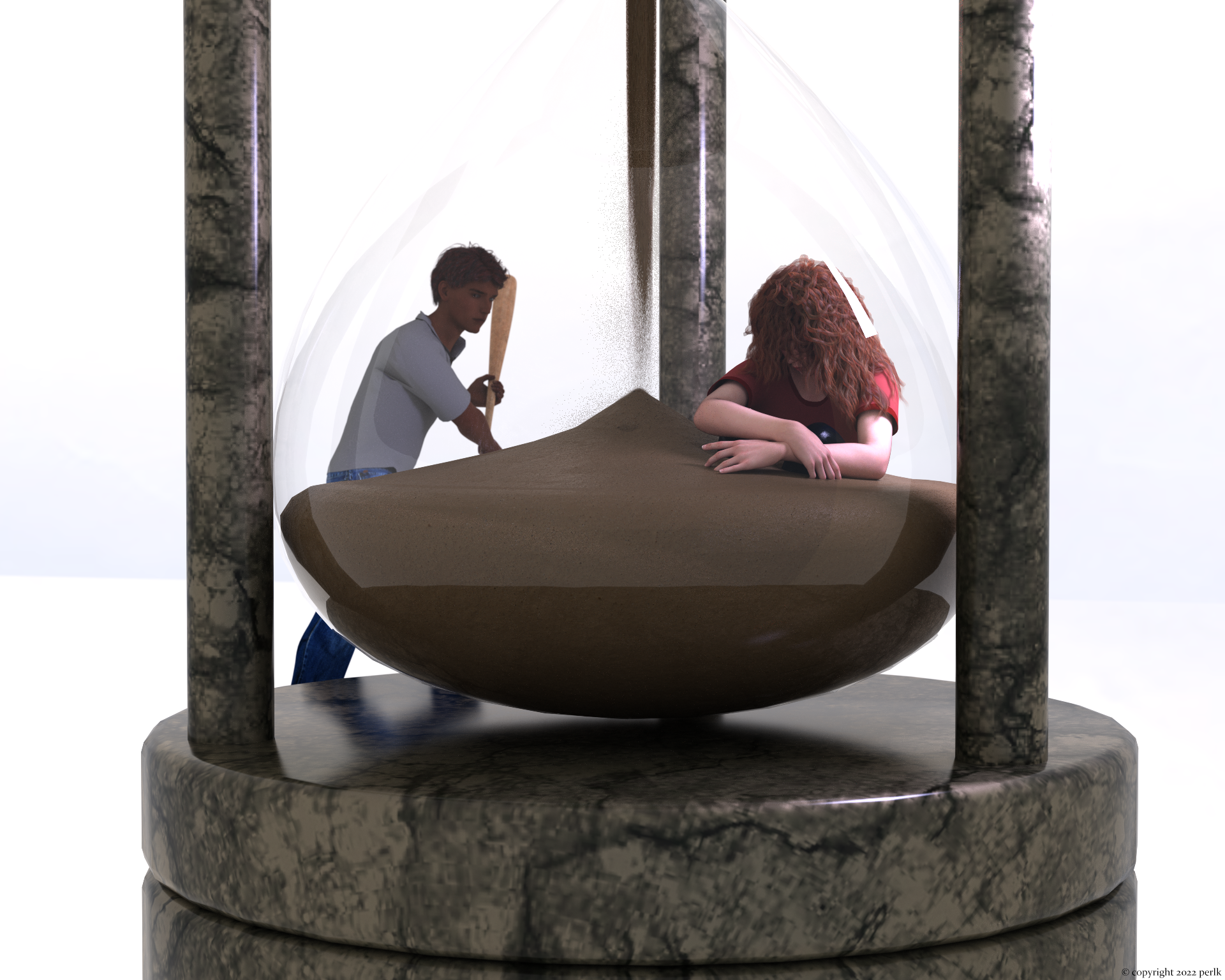
This image has been resized to fit in the page. Click to enlarge.
- DOA Elise for Genesis 8 and 8.1 Female
- Basic t-shirt for G8F
- Dingo's Wild Curls for Genesis 8 Female
- Cyberpunk Outfit 01 for Genesis 8.1 Female (pants)
- Genesis 8 Female Pose - Just Lovely 23 (modified slightly)
- Hourglass - Timer Prop for Daz Studio
- Sokka for G8M (texture for G8M)
- WkD3D G8M Face 01 Anton (morph)
- UV Remapped Jeans for Genesis 8 Males
- Free Casual Clothing for Genesis 8 Males (shirt)
- Sand texture (used in hourglass)
- Jewelry Iray Shaders (marble used in hourglass)
- Cone opacity map (for sand)
- Cotton texture (used in shirt)
- Baseball bat
No count: G8F, G8M, plane primitives, cone primitive (hourglass sand), cylinder primitive (hourglass sand)
Paid: Zoren hair for G8M (I feel like this was a one time freebie?)
Released- MAK79https://www.daz3d.com/mak-79 and Robo Battle had been released! This cool robot have more than 600 morph and many pose controll for easy handle. I originaly wanted a servant bot, but i imagined as kiddos fight with them, so Robo Battle is born. 3djoji was who made the awesome rigging, and his fantastic addon will be soon released too, what gives more opportunity for use them.Okay, this is admittedly random but... has anyone seen a garrote around here?
Daz3d are more strict about direct violence in promos now - mostly we can show a weapon, or a dead body, but not a weapon directly killing someone. A realistic garotte can't really be sold without showing a murder happening in the render. And realism for this really also needs an HD morph for the victim, because the wires dig in. It's quite possible, but they'd never publish it.WendyLuvsCatz said:surprised no dforce garrotte yet TBH and nooses etc
3.21.22_Daz to Blender keep Body morphs?Catherine3678ab said:
Well the sliders in D/S are in D/S. All the gadget buttons in Blender stay in Blender. The two programs are separate, so no, the dials from D/S cannot be made to appear in Blender.
If you make changes in D/S, then you would have to resend the figure back over/into Blender. Actions in D/S are not ever going to affect activity in Blender as live updates. The 2 programs would have to be "one" program to do that, and that is not happening any time soon I'm fairly confident.
Thank you for the reply, not quite sure what you mean
I actually have a non Daz model that has body morph options just like inside daz program, where they used the diffeomorphic addon to get those body morph sliders to work so I know it "can" workAlong with daz brdge showing it can basically do this just with face sliders so far, but the same can easily be applicable to the rest of the body as well
https://i.ibb.co/vX5zThf/2022-03-22-21h07-53.jpg ;Star Trek Builders Unite 8: THE REBOOTFleetAdmiral01 said:
Demonslayer said:
I've been working with XCalpro's Gorn head, retexturing and creating morph targets. :)
For anyone interested, I also have created a fan film called "The Gorn Imperative."
Please enjoy!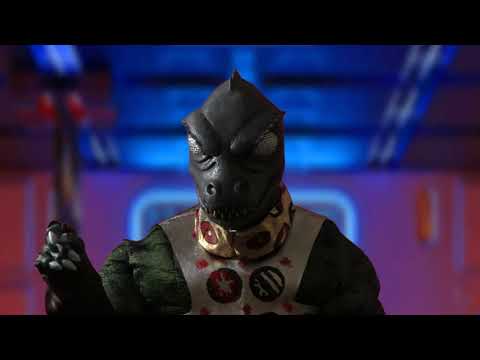
I definitely know I'd be interested in making use of that Gorn model. Presently the only Gorn model I have is the ones from the 2013 game (Kelvin Timeline).
And as you can see by the attached image they look completely different.
Interesting! Did you recreate those models or are they originals? And I do plan to share the Gorn head morphs once I'm done with them. I have to make them work, scale them, etc. first.
Ken
Freebie Challenge March 2022-"Luck of the Draw" - Main Threadperlk said:
Your luck has run out (or has it?)
I haven't actually been lurking for more than a day, I've been on an honest to goodness vacation! This I actually did some post work on, hope that's okay. I created an opacity map in Photoshop for the texture but it still didn't look right on the primitives I used. At least, not to my satisfaction. (Original in attachments.) PS: Can anyone guess from this render what Disney movie my kids made me watch on Saturday night?
- DOA Elise for Genesis 8 and 8.1 Female
- Basic t-shirt for G8F
- Dingo's Wild Curls for Genesis 8 Female
- Cyberpunk Outfit 01 for Genesis 8.1 Female (pants)
- Genesis 8 Female Pose - Just Lovely 23 (modified slightly)
- Hourglass - Timer Prop for Daz Studio
- Sokka for G8M (texture for G8M)
- WkD3D G8M Face 01 Anton (morph)
- UV Remapped Jeans for Genesis 8 Males
- Free Casual Clothing for Genesis 8 Males (shirt)
- Sand texture (used in hourglass)
- Jewelry Iray Shaders (marble used in hourglass)
- Cone opacity map (for sand)
- Cotton texture (used in shirt)
- Baseball bat
No count: G8F, G8M, plane primitives, cone primitive (hourglass sand), cylinder primitive (hourglass sand)
Paid: Zoren hair for G8M (I feel like this was a one time freebie?)
Great idea with the opacity map for the sand. Very cool! Thanks for all your creations!
Your flying carpet awaits! Please move to the Entry Thread.
 Freebie Challenge March 2022-"Luck of the Draw" - Main Thread
Your luck has run out (or has it?)
I haven't actually been lurking for more than a day, I've been on an honest to goodness vacation! This I actually did some post work on, hope that's okay. I created an opacity map in Photoshop for the texture but it still didn't look right on the primitives I used. At least, not to my satisfaction. (Original in attachments.) PS: Can anyone guess from this render what Disney movie my kids made me watch on Saturday night?
- DOA Elise for Genesis 8 and 8.1 Female
- Basic t-shirt for G8F
- Dingo's Wild Curls for Genesis 8 Female
- Cyberpunk Outfit 01 for Genesis 8.1 Female (pants)
- Genesis 8 Female Pose - Just Lovely 23 (modified slightly)
- Hourglass - Timer Prop for Daz Studio
- Sokka for G8M (texture for G8M)
- WkD3D G8M Face 01 Anton (morph)
- UV Remapped Jeans for Genesis 8 Males
- Free Casual Clothing for Genesis 8 Males (shirt)
- Sand texture (used in hourglass)
- Jewelry Iray Shaders (marble used in hourglass)
- Cone opacity map (for sand)
- Cotton texture (used in shirt)
- Baseball bat
No count: G8F, G8M, plane primitives, cone primitive (hourglass sand), cylinder primitive (hourglass sand)
Paid: Zoren hair for G8M (I feel like this was a one time freebie?)
Released - Spindle Fae character + wingsThis character looks awesome! I love how she looks in all the promo images, so many different ideas I'm getting with the various materials, but I also love the body morph because I don't have any characters that look like this. I like to do toon stuff, so she would dial in perfectly. Totally going to pick this character up!
How to get Genesis 8 expressions working on Genesis 8.1Making the G8 base expressions (and any expressions that are using them) work on G8.1 requires removing dummy/placeholder expressions that are installed to G8.1 morph folders - These dummy/placeholder expression files have no other function than to prevent the base G8 expressions from loading.
The dummy/placeholder files are located in;
...\Data\DAZ 3D\Genesis 8\Female 8_1\Morphs\Daz 3D\Base Pose Head\ (255 files)
...\Data\DAZ 3D\Genesis 8\Female 8_1\Morphs\Daz 3D\Expressions\ (24 files)
...\Data\DAZ 3D\Genesis 8\Male 8_1\Morphs\Daz 3D\Base Pose Head\ (255 files)
...\Data\DAZ 3D\Genesis 8\Male 8_1\Morphs\Daz 3D\Expressions\ (24 files)Please make sure you are removing the files from G8.1 morph folders and not G8 morph folders.
Note; If you are logging in to DS and letting DAZ Connect (within DS) to install/update your content, you may have these also in an other location that has "\Data\Cloud\" in it's path
Note2; Do not remove any files from "FACS" or "FACSExpressions" foldersNew! Novica & Forum Members Tips & Product Reviews Pt 14Short review of "Cloth Helper for Genesis 8 Male" and "Cloth Helper for Genesis 8 Female" by biala, discounted by 70% now on Renderosity.
I'm writing this review after experimenting with these products for only a short time, and as someone who knows basically nothing about DAZ content creation, rigging, transfer utility, importing and exporting, and all that.
The Cloth Helper appears to be a kind of invisible figure that mimicks the Genesis 8 figure. It works on G8.1 as well.
Load the Cloth Helper onto your G8. As you change the pose and shape of your G8, the Cloth Helper automatically morphs and moves with it.
I made the Cloth Helper visible for these screen shots, but it's invisible by default:
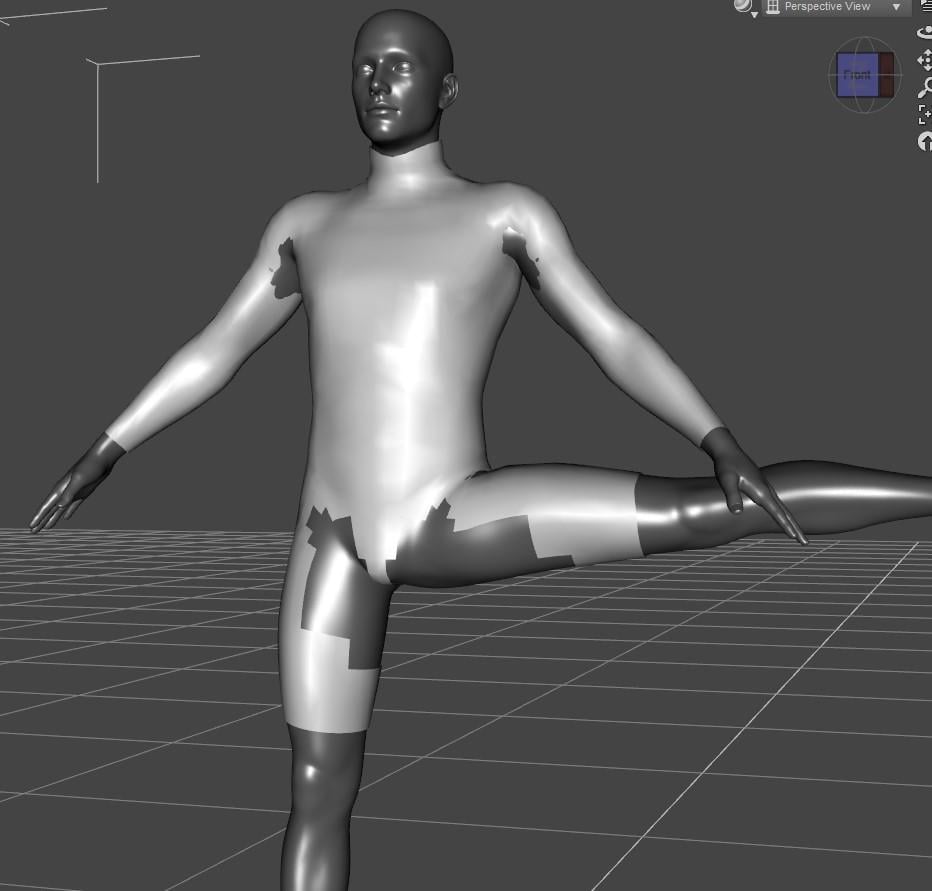
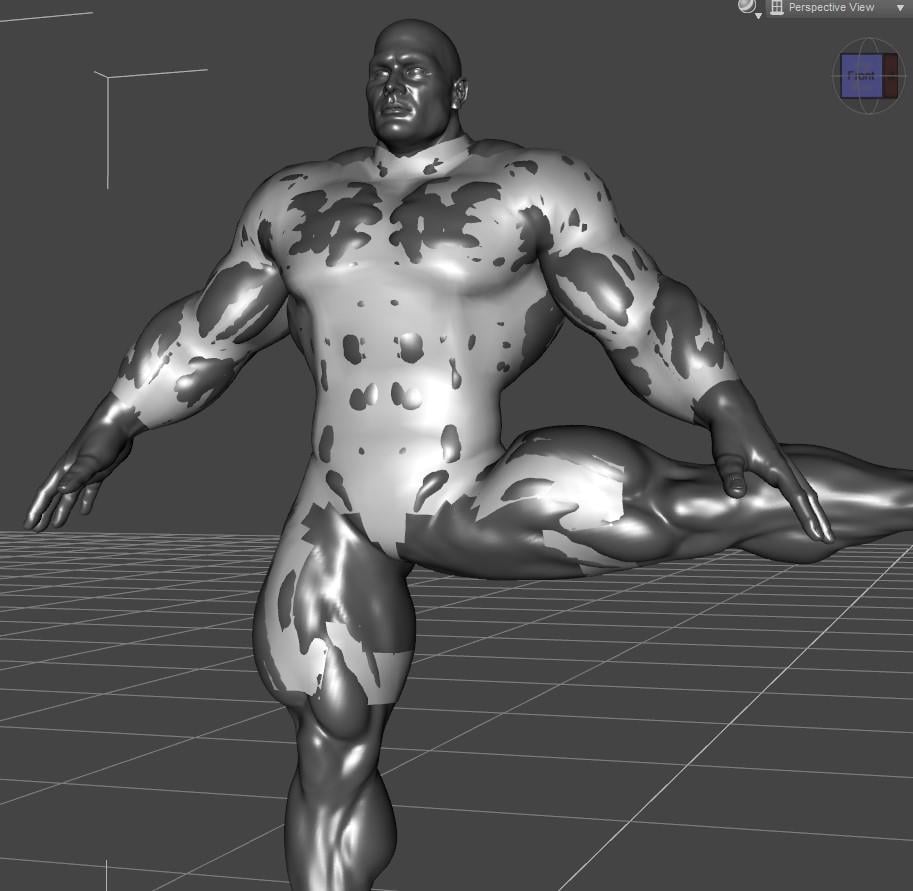
There's a user manual. It's written in broken English and the various steps are explained out of order - the thing that you have to do first is explained last for some reason. Never the less, I was able to figure it out without too much trouble.
Basically, you load the problematic garment into the scene, export it as an OBJ, import it again. Then something something Transfer Utility, this part is explained well enough. Now the garment is fitted to the Cloth Helper (which is invisible, and follows the movements and shapes of your G8)
Here's the thong from Xandra for Genesis, autofitted to G8.1M:
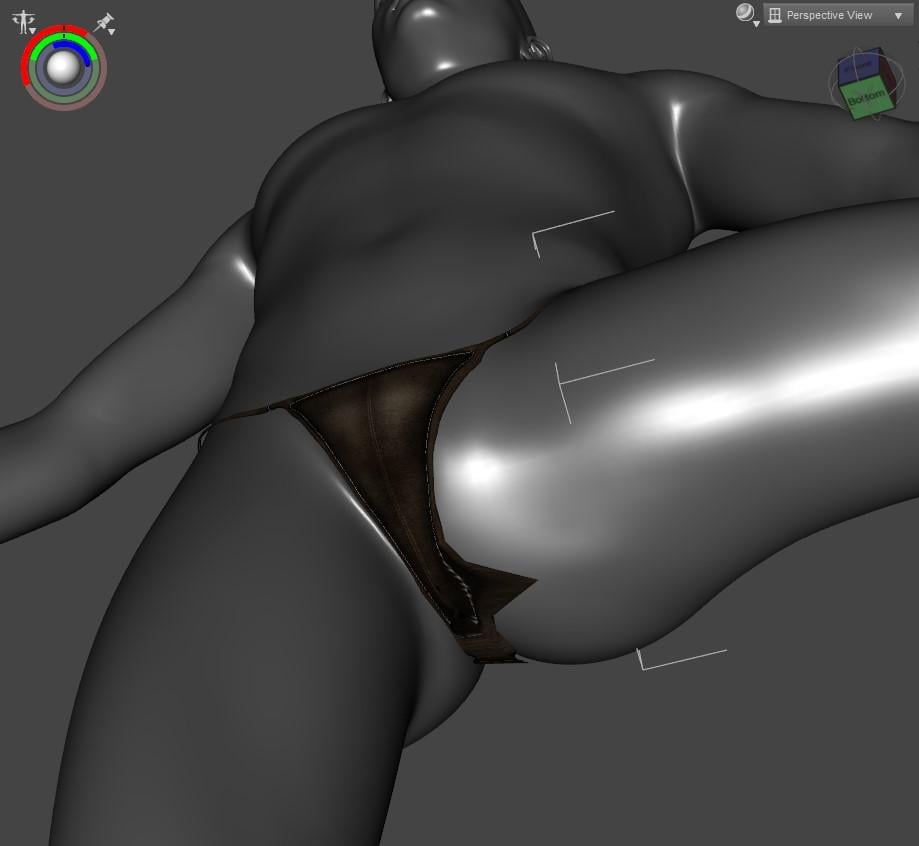
Here is the result after using Cloth Helper:
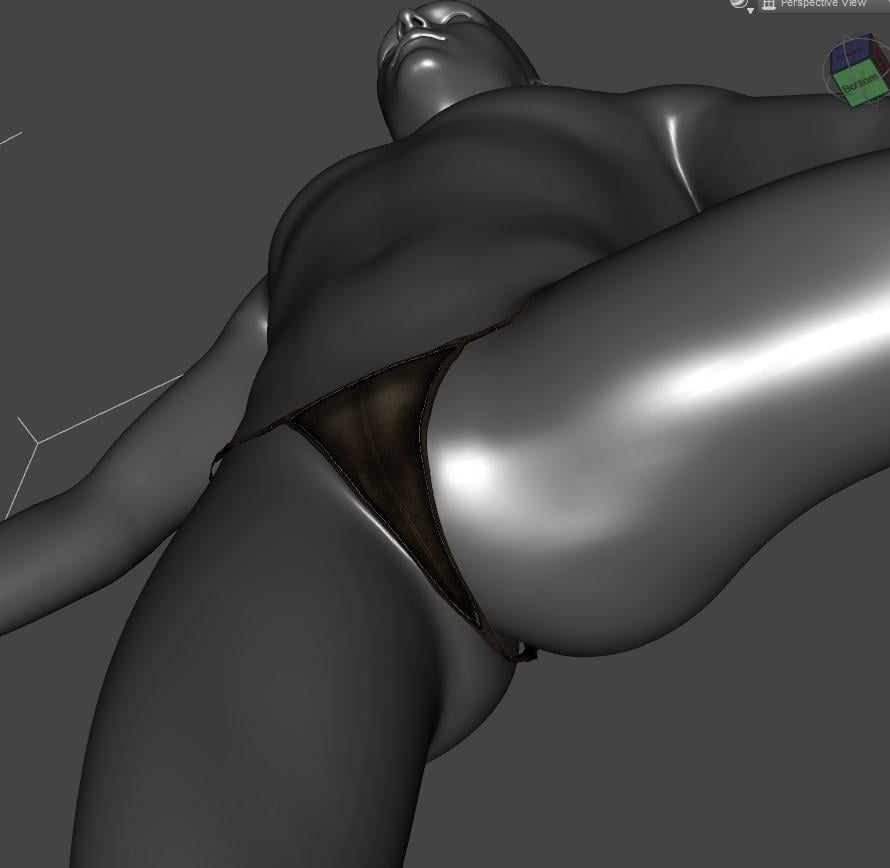
Pretty good, I'd say.
Here's Aeon Soul's AlphaKini for G3F, autofitted to G8.1M:
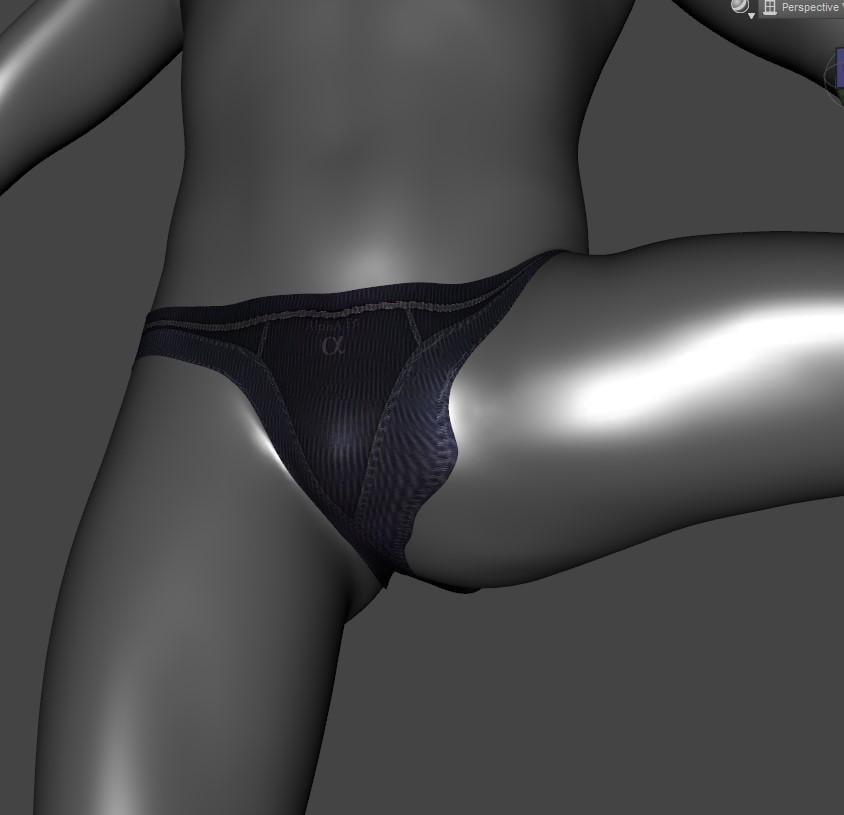
Here is the result after using Cloth Helper:
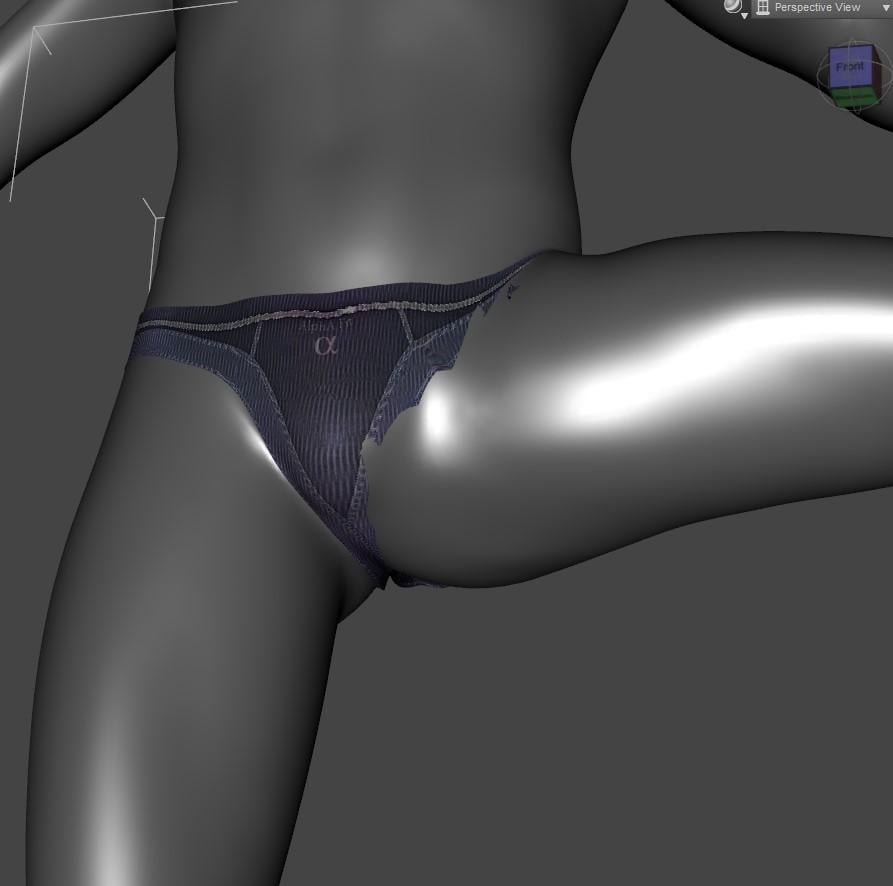
Here is the result after using Cloth Helper, with Mesh Smoothing applied:
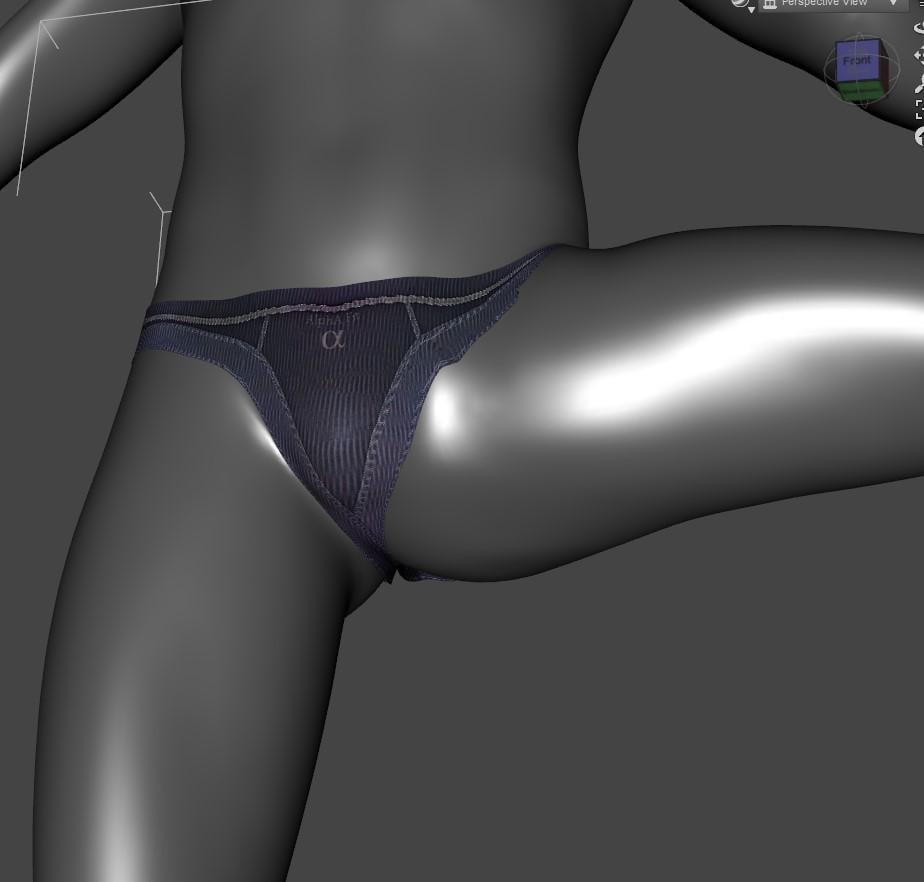
Not as successful, but still an improvement.
The presentation and attention to detail of this product definitely leaves something to be desired. But it seems to help with some of the "funky crotch" issues, even if it doesn't seem to always solve them.
Released - Spindle Fae character + wingsI have lesser gods in Daz.. one of them is Sickleyield.. and she made a new project with me.. please take a look.. and tell how you like :D character concept and texture by me, morph and mesh by Sickleyield..
Also some of promos made by awesome Devon, public kudos to him!!
So happy, it had been released!
https://www.daz3d.com/ssy-spindle-fae-for-genesis-81-female

Daz 3D is part of

Connect
DAZ Productions, Inc.
7533 S Center View Ct #4664
West Jordan, UT 84084Licensing Agreement | Terms of Service | Privacy Policy | EULA
© 2026 Daz Productions Inc. All Rights Reserved.