-
No effect with Dome Scale Multiplier or Dome Radius
Works fine here. If I set the dome radius to 2 meters I can see the dome sphere becomes smaller. Of course you have to to set "draw dome" to on to see it.
While "visualize finite dome" doesn't seem to work, if this is what you mean. But you can see it in iray rendering or iray preview.
Doesn't work for filament.
AI is going to be our biggest game changerwell I seem to have broken my local installation of Stable Diffusion
so might be going back to doing DAZ iray renders
(I was doing renders on my other PC but mostly Carrara and Filament)
KuJ dForce Medieval Dress for Genesis 9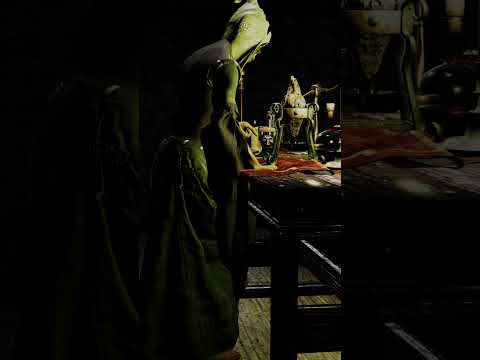
I had issues not related to the skirt

but will share
Filament render hence the odd shading
Released: Placeholder Manager [Commercial]Totte said:
Basically, never work in Iray Preview mode, always work in Open GL Textured Mode or in Filament (If you need to). Bascially, working in Iray Preview is just slowing you down, and, somtimes updates are not correctly propagated to Iray preview, like texture changes. Iray Preview is great to get a "look" of "how will this look rendrered, and also great when adjusting light settings, not so much for anything else.
So, yes, you are right, they are setup to be "boxes" in Open GL Texture Mode and rendered in rendering mode.
Internally, there are flags that says:
- Visible in viewport (which is OpenGL Textured or any other view poet mode)
- Visible in Renderer (which is rendering in 3DL/Iray and that is render or rendered preview like aux viewport in render mode (3DL) or Irey Preview. (Not familiar with what modes Filament is using as I don't have it (I'm on macOS)Thanks much for confirming that I was thinking correctly about this which is not always the case when I delve into Daz Studio. I agree that while Iray preview is nice, it is burdensome on my system.
Released: Placeholder Manager [Commercial]jjoyner said:
@Totte - Hello. I have three of your script products and have a few more on my wishlist. The most recently purchased one was Placeholder Manager two months ago. I began exploring it today and want to make sure that I understand it as fully as possible. The placeholders appear in the viewport when the viewport is in Texture Shaded mode but not when it is in Iray mode. Is this how the product should be used – in Texture Shaded mode until near ready to render?
Basically, never work in Iray Preview mode, always work in Open GL Textured Mode or in Filament (If you need to). Bascially, working in Iray Preview is just slowing you down, and, somtimes updates are not correctly propagated to Iray preview, like texture changes. Iray Preview is great to get a "look" of "how will this look rendrered, and also great when adjusting light settings, not so much for anything else.
So, yes, you are right, they are setup to be "boxes" in Open GL Texture Mode and rendered in rendering mode.
Internally, there are flags that says:
- Visible in viewport (which is OpenGL Textured or any other view poet mode)
- Visible in Renderer (which is rendering in 3DL/Iray and that is render or rendered preview like aux viewport in render mode (3DL) or Irey Preview. (Not familiar with what modes Filament is using as I don't have it (I'm on macOS)
Does anyone have any good tips for a starterWith all due respect but that's way too broad of a question I think. Daz Studio is seriously extensive and things could go into either direction. I mean, is this about Daz Studio itself, the rendering process, the market place?
Meh, but then again.... let's just DO THIS :)
Daz Studio
At the risk of coming across as a fanboy: if you stop to think about all the features which Daz Studio ("DS") provides I think it's very interesting to see his being presented for free. Yah, sure, it's also a sales model (important detail!) but seriously: do not underestimate this environment!
- Make sure to become familiar with both the smart contents pane as well as the so called "Content Library" pane, both are equally important. Trying to apply an accessory meant for Genesis 8 onto Genesis (1)? Impossible with the smart contents pane because of its filtering but no bother at all with the content library. Of course there's more: sometimes stuff doesn't end up in the smart contents section, sometimes you may want to look up all the assets of a product and sometimes... you want to rely on 3rd party contents which you need to install yourself. => content library pane.
- For example: find "Genesis" in the smart contents pane, right click, and check the "Show asset in..." area...
- DS is like elastic: everything can be customized! Press F3 (or use the pulldown menu: Windows => Workspace => Customize) and you can just do it all... keyboard shortcuts, toolbars, even the pulldown menus themselves! Just be careful not to overdo things if you're new, make sure you know what you're messing around with!
- 3rd party contents: Trust me: some day you'll be going here as well. With all due respect to Daz3D but there's more than just their marketplace. If you're going there: don't dump your new stuff into existing places. Instead create a new folder somewhere, then use that as your new 3rd party library. This helps you keep an overview, it will prevent your library from clogging up and keep things manageable.
- Add your own categories! => For example, I do a lot with Genesis base figures, in many cases that's how I start. I mean, when I'm creating poses it doesn't matter what character it's meant for: the Genesis generation is all that matters. As such: Figures => Genesis is a category in my setup (know what? I'll share a screenshot).
- Old doesn't imply obsolete!! => I cannot stress this one out enough: yes, Iray is an amazing render engine and the stuff you can squeeze out of that is sometimes mindblowing. Some of my older sceneries honestly suddenly looked... frickin' amazing, when all I did was change render engines. Thing is though: 3Delight is still an amazing engine and you should not underestimate the things you can learn from using it.
- However... this also applies to the figures in the Daz store. Genesis 9 is the new hot deal but trust me: that doesn't mean older generations suddenly have no value anymore. Even up to this very same date (time of writing but... I don't see this ending soon) I'm still more than often using Genesis; so the first generation? I'll do you one more: some of my renders ("elsewhere") featuring Genesis 3 can sometimes still go through the roof where appreciation is concerned. That's also kinda old stuff ;)
- If you're serious about this stuff: consider getting a "3D editor". Daz provides Hexagon, very dated but also very capable. Even free of charge it seems?. And it's natively supported by DS through a "bridge" => "Send to Hexagon".
- Bias goes into effect here for this item: There's also Blender, also free of charge but with a bit of a learning curve too. To be fully honest I never liked this product myself, but that doesn't mean I can't appreciate it's amazing potential. My personal favorite though is ZBrush. Commercial software, very expensive and I'm not even sure how long it will remain available as a perpetial license vs. a subscription model. I've been using this critter for 3 years now and I'm still learning stuff; there's pretty much nothing I can't do here!
- Much cheaper but also seriously useful: Daz Bryce. This isn't the kind of "3D editor" I had in mind with my main point above, but this critter is priceless when it comes to creating backdrops. Clouds in the sky? This fractal generator can still blow your mind to this very same day, even in combination with Iray (provided that you know how to use the whole shebang and set up proper lighting and all....). I'm serious... My start menu for 3D? => Daz Studio, ZBrush and Bryce 7. Followed by Photoshop organizer.
- Instead of buying texture packs... maybe consider Substance Painter? ;)
Render process
- 3Delight can give you way more freedom and options than you may realize!
- Lighting is a very important part of your rendering process, and 3Delight can help highlight all of this. Because it's a lot easier to apply lighting and then almost immediately showcase their effect. Yah, I'm the nut who actually set up a red, green and blue lightsource ("spotlight"), aimed them in the same general direction of a 3D primiate I placed, just to see what would happen. Then I added a figure in between....
- Don't always accept standard presets: at the very least go over the properties to see if you understand what's happening there.
- Filament is an awesome render engine but ... if you just select it in your viewport you will probably get met with oversaturated objects. Solution: Create => New filament draw options node. (remember my "DS is elastic" comment earlier? Nothing is stopping you from adding this option to, say, your toolbar?).
- If you do go here: pay specific attention to "Environment intensity scale" as well as "distance scene light scale".
- White dots in your Iray render usualy indicate lighting issues. Either go over your render settings or... add more light sources.
Daz marketplace
- Don't trust promo pictures! You more than often do not get what the pictures are showing you, be sure to go over a product contents section and try to veriry that you understand what you're grabbing.
- Daz Central isn't the only option to install stuff... many people rely on the Daz Install Manager for example. Simply put: if you want your software to reside on drive C and your content library on D... you'll want DIM.
- Please keep this in mind: older does not imply worse! When Genesis 8 hit I soon had a field day with several Genesis ("1") assets because they dropped so much in price... And yes, you will come across assets which were build for "RSL" (Renderman Shader Language; used with 3Delight) which may not properly work with the modern MDL ("Material Definition Language", specific for NVidia's Iray). So then there's this thing called Substance Painter, available on the Adobe website for rent but also on Steam for purchase with a perpetual license. Once you got your fingers behind that you'll never bother with a texture pack again. And it can go as simple as to just drag & drop materials to "make it work" towards applying several layers in order to customze stuff into the most detail possible. Maybe even fully converting RSL based assets into MDL.
- Also don't be afraid to experiment... I made some of my best "ghost renders" by simply (ab)using the lack of support for MDL and just put an RSL asset into my scene. It rendered pure white with a bit of variations and... it looked pretty cool despire that it wasn't meant to be used this way.
- With all due respect to Daz3D (<= they deserve it IMO!) => 3rd party marketplaces exist and they also often sell awesome stuff.
- And yes, I am going here: if you're looking for proper / useful anatomy... on the Daz 3D marketplace you need to grab Pro bundles for their Genesis assets (other than Genesis 9 I think, with all due respect I'm ignoring 9 for now). The assets are useful, but you may want to focus on "other places" if you need more detail.
- Speaking of bundles: sometimes it helps to check the individual parts. Are you sure you need all of the items? Maybe you can save money there.
- And speaking of saving money: this hobby isn't cheap, try to build up a pose of your own (no: not using morphs!) and you'll see how much time and effort it'll take. Now imagine building 3D assets yourself! If you're new to Daz3D and want to build up a nice collection then I strongly recommend using Daz+. I also strongly recommend to keep taps on all this and to make sure that you're still in your "buying spree year / moment" when you re-evaluate your subscription. You might notice I don't have such a subscription right now myself but trust me: when I build up my library I had, and put it to good use too! It's definitely worth noting.
- Last but certainly not least: Free doesn't imply useless advertisement junk. But it can be! Always make sure that a freebie doesn't rely on "other items", this often happens on the Daz marketplace. But there are also plenty of freebies up for grabs "out there" on the Internet and yah: all easily implemented into your smart contents pane if you'd want to (there's a reason why I mentioned NOT to underestimate the insane amount of usability of DS despite it being provided free of charge!).
And there you go!
My take on getting started in the wonderful / awesome world of Daz3D / Daz Studio. Thanks for reading, I hope this could be useful!
For context sakes, this is what my setup looks like, I'll bet you don't have a 'Genesis' section ;) =>
All become opaque in viewport in filament mode suddenly ...I work since a long time on daz3d.
But suddenly, all things on my viewport disappear but just in filament mode...
The others modes are ok.
Someone can help me please ?
Remixing your art with AI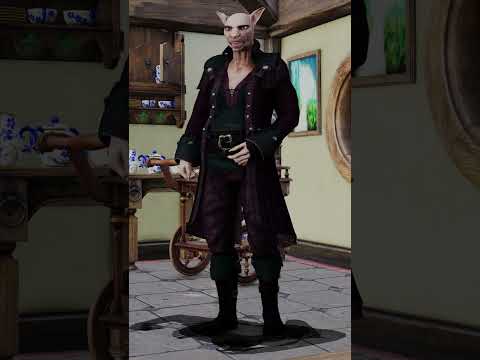
original Filament render video
AI transformation
 Help: Animation Timeline Lags to the point of being unusable. Is there a solution?
shawn_2093844fdb said:
I'm having a similar issue and they can't blame the hardware, not a single core on my system is over 50% and the CUDA's are snoring yet animation in the viewport is garbage on any type.
What DrawStile are you using? If it isn't Iray or Filament the the GPU is not relevant, CPUcore usage doesn't in itself prove anything as the system will distribute taks in a way that means a thread running flat-out is likely to be handled by seveal cores, so none will hit 100%.
Weird Mystery Effect in ViewportCan anyone tell me what is going on in the attached images?
I have this character I set up on my old PC, and when opening the file for the first time on my new PC, after helping Daz locate the custom textures, the viewport was just a blank gray (no terrain grid, no model).
I went through all of the viewport display options (Wireframe, Texture Shaded, etc.) and they were all blank until I reached Filament. What I see on the viewport is what is pictured in the attachments. It is like a water surface tilted at an angle. I cannot for the life of me figure out what is going on here.
There are no other objects in the scene aside from the character, her clothing, weapons, and accessories. I tried hiding them one by one, and the weird plane did not go away. I was able to open another scene file that has the same character in it, so it is not a problem with the model or associated props.
Anyone have a clue what is going on? Is the scene file corrupted or something?
Remixing your art with AIFilament and AI

 AI is going to be our biggest game changer
I do this mostly
as well as photographs
my ai videos are mostly img2img batch processed image series renders using openGL or Filament
Daz only allocate 2Gb whatever the sceneSo, I noticed in my logs after failing to render a scene today that every render I have een doing apparently only allocates 2GB of VRAM...
2023-02-08 21:58:42.434 Iray [INFO] - IRAY:RENDER :: 1.7 IRAY rend info : CUDA device 0 (NVIDIA GeForce RTX 3090): Scene processed in 0.107s
2023-02-08 21:58:42.435 Iray [INFO] - IRAY:RENDER :: 1.8 IRAY rend info : CUDA device 0 (NVIDIA GeForce RTX 3090): Allocated 18.296 MiB for frame buffer
2023-02-08 21:58:42.435 Iray [INFO] - IRAY:RENDER :: 1.7 IRAY rend info : CUDA device 0 (NVIDIA GeForce RTX 3090): Allocated 1.906 GiB of work space (2048k active samples in 0.000s)
I have 24GB of VRAM, I don't understand why I cannot render a simple scene of 1 character with Fiber mesh hair... (that's what I tried to do today)I keep getting a ram allocation error as soon as I use filament hairs
The iray preview has no problem whatsoever
[SOLVED] imported .obj, Texture mode and PBR mode half transparentTexture Sahded has issues with Z-ordering (stacking surfaces in order depending on how far they are from the camera) with surfaces that have an opacity map, even if the map says they should be opaque. Iray (and 3Delight) can of course cope. I was not aware that Filament (if that is what you mean by PBR) but, given that it is a performance issue, I would not be surprised if sacrifices had been made in this respect.
That *^!#^*!#$ Clear Button!Well, even so.
So we're not using aniBlocks. Just put the pose at some frame past 15. Say... 20.
We're only concerned with one frame, right?
Let dForce drape the simulation until you get to a frame you like and cancel the sim. Scrub through and pick the frame you like best (even if it's after you hit cancel!*) and just render that in Iray - then use an image editor or daVinci to combine it with whatever.
I only use filament while I'm working. It would be the same for me with eevee. I just don't want my art to look like an insta-render game.
That *^!#^*!#$ Clear Button!Dartanbeck said:
marble said:
I avoid the timeline because I sometimes want to use that scene as the initial frame for an animation and having a dForce animation in the scene already ruins any chance of using it later for character animation. If DAZ Studio had some kind of multiple timelines or NLA it might be more practical but I don't really understand all these technicalities as I am not an animator - I just like to animate certain scenes as best I can manage.
If I know for sure that the scene will never be used for character animation then I do sometimes use the timeline for dForce but only when Start-from-Memorized doesn't cut it.
For collisions with props (such as the couch) I don't use the actual prop as a collision target - I create primitives and hide them from the render. Props generally don't have enough polygons.
Here's where the magic comes in, my friend:
When we simulate something using dForce, unlike VWD, if we save that, either as a scene or subset, the simulation stays with the save.
My character animations all begin with a Blank aniBlock covering the first 30 frames. I use these first 30 frames for any tweaks that I might want to make before the render starts. However, when we bake the animation to the timeline, these first 30 frames hold the pose all the way through - so in the timeline I delete frames 1-29 for anything and everything in the scene at this early stage.
I've discovered early on that this appears to make no difference at all. Those first thirty frames still hold that same position. Oh... I see... it's because the first keys have ALL been set to "Constant".
I have Animate 2 but don't use it. I have aniblocks but don't use them. Almost everything I animate is quick and dirty manual keyframing from frame 0 to frame 60 (or whatever). Very short loops, generally. I don't have the patience to wait all day for 1200 frames of an aniblock to render. Nor do I like the look of Filament so I render with IRay (I do wish that Filament was more like Eevee in Blender though).
To explain a little further - I like to make stories like the old photo-comic stories that you could see in magazines. Occasionally I will add a quick animation in with the stills which is something those old magazines couldn't do but I bet they wish they could have. The story will typically be 100 - 120 scenes and will take me a couple of weeks to complete. When it is done, I usually go over it for a few days, decide I could have done better with much of it so I then delete it and start a new story (not the same story). That's my hobby - it keeps me occupied and challenges my creativity. Sometimes my stories are actually memories from my youth or childhood that I populate with digital avatars of friends and family. Other time the stories are just pure imagination let loose.
The point I am trying to make is that I am not concerned with making exhibition art - nobody will ever see my stories but myself. But I am concerned with wasting valuable time waiting for dForce over 120 scenes. So that's why I am so keen on DAZ coming up with something that can simulate in seconds rather than minutes. I follow this forum and type these posts while I am waiting for dForce (or renders) so if DAZ gets tired of my constant whining, they can shut me up by giving me a quick cloth simulator.
Before I Start - Can I Do This?I love your DAZ too!
It always used to just be my toolbox for helping me make things work in Carrara, or to make conforming items and such - again... for Carrara! LOL
Just last night I broke out my old Carrara Studio 3 Handbook and perused the wonderful nostalgic gallery images on the disc, along with the (now ancient) free trial software apps. What fun!
Even that old copy of Carrara has a lot going for it - Spline and Vertex modelers with Metaballs too! Carrara 8.5 Pro is AweSome!!!!!
Since I've started this journey into Daz Studio, I've really grown a lot of respect for this amazing 3d environment. Just before Filament and that whole 4.15 (I think it was) release. Now I'm REALLY having fun!!!
Trying to reinstall a fresh version of DS?Dartanbeck said:
One thing that kept giving me that message was having Filament as the workspace viewer. I'd fire DS back up, change to Texture Shaded or Flat shaded and I wouldn't get the message.
The most recent scene I had to do this for was Massive - All five Urban Sprawl City Blocks plus six additional instances of them, over 160 animated LoRez people, a bunch of Polish's Cyberpunk Back Alley signs and buildings (though the Fatal Error came before I added those)
I don't recall the one before that - but it was clearly a Filament related issue. Now every time I get that error and fire DS back up again, sure enough. It was on Filament (which is what I normally use for setting up my character animations)
I have never used filament.
If I had known it was going to be this much of a headache...I wouldnt have tried this. It should be simple. Yet, its not being simple.
Im almost considering doing a factory reset and starting -really- from scratch. I dont have anything else to install other than Daz and content.
Trying to reinstall a fresh version of DS?One thing that kept giving me that message was having Filament as the workspace viewer. I'd fire DS back up, change to Texture Shaded or Flat shaded and I wouldn't get the message.
The most recent scene I had to do this for was Massive - All five Urban Sprawl City Blocks plus six additional instances of them, over 160 animated LoRez people, a bunch of Polish's Cyberpunk Back Alley signs and buildings (though the Fatal Error came before I added those)
I don't recall the one before that - but it was clearly a Filament related issue. Now every time I get that error and fire DS back up again, sure enough. It was on Filament (which is what I normally use for setting up my character animations)
AIUTO...CHI CONOSCE L’ITALIANO? PARTE TREDICIImago said:
devi posizionare tu in ogni caso i punti luce che ti servono, il motore non può immaginarsi che tu vuoi un neon qui e una candela là...
Giusto.
Io pensavo a un Daz Studio dove si possano comprare interi quartieri, paesaggi ecc.interamente esplorabili e pronti all'uso, come nei videogiochi:
Ho bisogno di una scena dove due parlano camminando in centro? Carico i due personaggi, li poso, e li piazzo lungo il corso principale del set "Modern City", e CLICK!
Un po' come se potessi caricare i miei personaggi in un videogioco già pronto, tipo World of Warcraft, o qualsiasi altro.
Oppura mi basterebbe anche un Filament funzionante con qualsiasi set o character dello store: posiziono e PIGIO il tasto di screen shot!
Le luci dovrebbero essere già nel set, insomma.
^_^
Daz 3D is part of

Connect
DAZ Productions, Inc.
7533 S Center View Ct #4664
West Jordan, UT 84084Licensing Agreement | Terms of Service | Privacy Policy | EULA
© 2026 Daz Productions Inc. All Rights Reserved.