-
[Released] Character Converter from Genesis 8 Female to Genesis 3 Female - Conv JCMs too[Commercial]
RiverSoftArt said:
Nekura2000 said:
RiverSoftArt said:
Nekura2000 said:
RiverSoftArt said:
Nekura2000 said:
I had to get a new hard drive so I reinstalled Daz Studio. When trying to convert my Generation 7 female characters to Generation 8, I'm getting a distorted face. I've uninstalled and reinstalled the program, even deleted the RSCloneGenesis3Female.obj file from the folder C:\Users\nekur\AppData\Roaming\DAZ 3D\Studio4\CharacterConverterMorphs, with no change. The Generation 7 character as well as Genesis 8 load without a flaw. Here's what I'm getting, attached or from https://www.deviantart.com/wow-creations/art/Converted-920761392. ; I just looked at the parameters for the character I converted, which was Agnes. It isn't showing an Agnes head or body for 8, just Agnes itself.
The clone is for a different Character Converter. Maybe it is pulling in the converted morphs twice? From your previous conversion on the old hard drive and a new conversion? What directories are specified in the content manager? You should check all the currently used morphs on the character and find the morphs. The Parameter Settings show the Asset File Path of the morph (and the [...] button shows the full path of the morph). Make sure the morphs are coming from where you think they should be coming.
I use two different drives when using software. I have the OS drive which I replaced and the data drive. I renamed the original Daz drive as “Daz 3D2 Old”, before installing the Daz Studio. When installing Daz Studio, I allowed it to keep the “Daz 3D” folder, but also use the new “My DAZ 3D Library” folder. I just remember to look at the Error Log when loading Agnes Genesis 8 and this is what I’m getting:
2022-06-29 07:16:21.449 [WARNING] :: ..\..\..\..\..\src\sdksource\fileinput\dzassetdaz.cpp(6903): Formula output property not found: Genesis8Female:/data/Daz%203D/Genesis%208/Female/Morphs/XTransfer/3D%20Universe/ToonGenerations2/Base/XT_CTRL3duToonGenerations2_AdjustAge.dsf#XTIDCTRL3duToonGenerations2_AdjustAge?value - in file: /data/Daz%203D/Genesis%208/Female/Morphs/Zev0/Shape%20Shift/Arm%20Length.dsf
2022-06-29 07:16:21.506 [WARNING] :: ..\..\..\..\..\src\sdksource\fileinput\dzassetdaz.cpp(6903): Formula output property not found: Genesis8Female:/data/DAZ%203D/Genesis%208/Female/Morphs/DAZ%203D/Head/Old/PHMEyesIrisSize.dsf#PHMEyesIrisSize?value - in file: /data/Daz%203D/Genesis%208/Female/Morphs/vyktohria/Meredith/VYK%20Meredith%20Head.dsf
2022-06-29 07:16:22.060 [WARNING] :: ..\..\..\..\..\src\sdksource\fileinput\dzassetdaz.cpp(6903): Formula output property not found: Genesis8Female:/data/DAZ%203D/Genesis%208/Female/Morphs/SickleYield2017/UniversalBreastHelper/PBMSYUBHGiantAll_proj.dsf#PBMSYUBHGiantAll_proj?value - in file: /data/Daz%203D/Genesis%208/Female/Morphs/SickleYield2017/UniversalBreastHelper/PBMSYUBHGiantAll.dsf
2022-06-29 07:16:22.125 [WARNING] :: ..\..\..\..\..\src\sdksource\fileinput\dzassetdaz.cpp(7134): Unsupported formula: /data/Daz%203D/Genesis%208/Female/Morphs/RiverSoft%20Art/Javeria%20for%20Victoria%207%20and%20Genesis%203/pJCMRSG3FVictoria7ThighBndFwdHDR.dsf
2022-06-29 07:16:22.155 [WARNING] :: ..\..\..\..\..\src\sdksource\fileinput\dzassetdaz.cpp(7134): Unsupported formula: /data/Daz%203D/Genesis%208/Female/Morphs/RiverSoft%20Art/Javeria%20for%20Victoria%207%20and%20Genesis%203/pJCMRSG3FVictoria7ThighBndFwdHDL.dsf
2022-06-29 07:16:22.628 [WARNING] :: ..\..\..\..\..\src\sdksource\fileinput\dzassetdaz.cpp(7134): Unsupported formula: /data/Daz%203D/Genesis%208/Female/Morphs/RiverSoft%20Art/FWSA%20Caterina%20for%20Victoria%207%20and%20Genesis%203/pJCMRSG3FVictoria7ShoulderBndFwd_110_R.dsf
2022-06-29 07:16:22.665 [WARNING] :: ..\..\..\..\..\src\sdksource\fileinput\dzassetdaz.cpp(7134): Unsupported formula: /data/Daz%203D/Genesis%208/Female/Morphs/RiverSoft%20Art/FWSA%20Caterina%20for%20Victoria%207%20and%20Genesis%203/pJCMRSG3FVictoria7ShoulderBndFwd_110_L.dsf
2022-06-29 07:16:22.769 [WARNING] :: ..\..\..\..\..\src\sdksource\fileinput\dzassetdaz.cpp(7134): Unsupported formula: /data/Daz%203D/Genesis%208/Female/Morphs/RiverSoft%20Art/FWSA%20Caterina%20for%20Victoria%207%20and%20Genesis%203/pJCMRSG3FVictoria7ShinBndBck_145_R.dsf
2022-06-29 07:16:22.806 [WARNING] :: ..\..\..\..\..\src\sdksource\fileinput\dzassetdaz.cpp(7134): Unsupported formula: /data/Daz%203D/Genesis%208/Female/Morphs/RiverSoft%20Art/FWSA%20Caterina%20for%20Victoria%207%20and%20Genesis%203/pJCMRSG3FVictoria7ShinBndBck_145_L.dsf
2022-06-29 07:16:22.895 [WARNING] :: ..\..\..\..\..\src\sdksource\fileinput\dzassetdaz.cpp(7134): Unsupported formula: /data/Daz%203D/Genesis%208/Female/Morphs/RiverSoft%20Art/FWSA%20Caterina%20for%20Victoria%207%20and%20Genesis%203/pJCMRSG3FVictoria7ForearmBnd_135_R.dsf
2022-06-29 07:16:22.935 [WARNING] :: ..\..\..\..\..\src\sdksource\fileinput\dzassetdaz.cpp(7134): Unsupported formula: /data/Daz%203D/Genesis%208/Female/Morphs/RiverSoft%20Art/FWSA%20Caterina%20for%20Victoria%207%20and%20Genesis%203/pJCMRSG3FVictoria7ForearmBnd_135_L.dsf
2022-06-29 07:16:31.020 [WARNING] :: ..\..\..\..\..\src\sdksource\fileinput\dzassetdaz.cpp(6903): Formula output property not found: Genesis8Female:/data/DAZ%203D/Genesis%208/Female/Morphs/DAZ%20Originals/data/DAZ%203D/Genesis%208/Female/Morphs/Fred%20Winkler%20Art%2CSabby%2CDAZ%20Originals/FW%20Frankie%20HD%20for%20Victoria%207/CTRL-RSC-Frankie.dsfCFred%20Winkler%20Art/data/DAZ%203D/Genesis%208/Female/Morphs/Fred%20Winkler%20Art%2CSabby%2CDAZ%20Originals/FW%20Frankie%20HD%20for%20Victoria%207/CTRL-RSC-Frankie.dsfCSabby/FWSA%20Agnes%20HD%20for%20Lilith%207/PHMMouthRealismHD.dsf#PHMMouthRealismHD?value - in file: /data/DAZ%203D/Genesis%208/Female/Morphs/Fred%20Winkler%20Art%2CSabby%2CDAZ%20Originals/FW%20Frankie%20HD%20for%20Victoria%207/CTRL-RSC-Frankie.dsf
2022-06-29 07:16:31.020 [WARNING] :: ..\..\..\..\..\src\sdksource\fileinput\dzassetdaz.cpp(6903): Formula output property not found: Genesis8Female:/data/DAZ%203D/Genesis%208/Female/Morphs/DAZ%20Originals/data/DAZ%203D/Genesis%208/Female/Morphs/Fred%20Winkler%20Art%2CSabby%2CDAZ%20Originals/FW%20Frankie%20HD%20for%20Victoria%207/CTRL-RSC-Frankie.dsfCFred%20Winkler%20Art/FW%20Brooke%20HD%20for%20Victoria%207/FHMVictoria7.dsf#FHMVictoria7?value - in file: /data/DAZ%203D/Genesis%208/Female/Morphs/Fred%20Winkler%20Art%2CSabby%2CDAZ%20Originals/FW%20Frankie%20HD%20for%20Victoria%207/CTRL-RSC-Frankie.dsf
2022-06-29 07:16:31.021 [WARNING] :: ..\..\..\..\..\src\sdksource\fileinput\dzassetdaz.cpp(6903): Formula output property not found: Genesis8Female:/data/DAZ%203D/Genesis%208/Female/Morphs/DAZ%20Originals/data/DAZ%203D/Genesis%208/Female/Morphs/Fred%20Winkler%20Art%2CSabby%2CDAZ%20Originals/FW%20Frankie%20HD%20for%20Victoria%207/CTRL-RSC-Frankie.dsfCFred%20Winkler%20Art/FW%20Brooke%20HD%20for%20Victoria%207/FBMVictoria7.dsf#FBMVictoria7?value - in file: /data/DAZ%203D/Genesis%208/Female/Morphs/Fred%20Winkler%20Art%2CSabby%2CDAZ%20Originals/FW%20Frankie%20HD%20for%20Victoria%207/CTRL-RSC-Frankie.dsf
2022-06-29 07:16:32.694 [WARNING] :: ..\..\..\..\..\src\sdksource\fileinput\dzassetdaz.cpp(6969): Formula target property not found: Genesis8Female:/data/DAZ%203D/Genesis%208/Female/Morphs/DAZ%203D/Olympia%208/FBMOlympia8.dsf#FBMOlympia8_Test?value - in file: /data/Daz%203D/Genesis%208/Female/Morphs/fabiana/KillerLegsG8/1FK-Olympia8BaseFix.dsf
2022-06-29 07:16:40.096 [WARNING] :: ..\..\..\..\..\src\sdksource\fileinput\dzassetdaz.cpp(7134): Unsupported formula: /data/Daz%203D/Genesis%208/Female/Morphs/DAZ%203D%2CHeysun%20Oh/Olympia%207%20HD%20Add-On/pJCMRSG3FOlympia7ForeArmBndHD_n100L.dsf
2022-06-29 07:16:40.261 [WARNING] :: ..\..\..\..\..\src\sdksource\fileinput\dzassetdaz.cpp(7134): Unsupported formula: /data/Daz%203D/Genesis%208/Female/Morphs/DAZ%203D%2CHeysun%20Oh/Olympia%207%20HD%20Add-On/pJCMRSG3FOlympia7ForeArmBndHD_100R.dsf
2022-06-29 07:16:40.986 [WARNING] :: ..\..\..\..\..\src\sdksource\fileinput\dzassetdaz.cpp(7134): Unsupported formula: /data/Daz%203D/Genesis%208/Female/Morphs/DAZ%203D%2CHeysun%20Oh/Mei%20Lin%207%20HD%20Add-On/pJCMRSG3FMeiLin7ShinBndBck_95R.dsf
2022-06-29 07:16:41.152 [WARNING] :: ..\..\..\..\..\src\sdksource\fileinput\dzassetdaz.cpp(7134): Unsupported formula: /data/Daz%203D/Genesis%208/Female/Morphs/DAZ%203D%2CHeysun%20Oh/Mei%20Lin%207%20HD%20Add-On/pJCMRSG3FMeiLin7ShinBndBck_95L.dsf
2022-06-29 07:16:41.322 [WARNING] :: ..\..\..\..\..\src\sdksource\fileinput\dzassetdaz.cpp(7134): Unsupported formula: /data/Daz%203D/Genesis%208/Female/Morphs/DAZ%203D%2CHeysun%20Oh/Mei%20Lin%207%20HD%20Add-On/pJCMRSG3FMeiLin7ShinBndBckR.dsf
2022-06-29 07:16:41.494 [WARNING] :: ..\..\..\..\..\src\sdksource\fileinput\dzassetdaz.cpp(7134): Unsupported formula: /data/Daz%203D/Genesis%208/Female/Morphs/DAZ%203D%2CHeysun%20Oh/Mei%20Lin%207%20HD%20Add-On/pJCMRSG3FMeiLin7ShinBndBckL.dsf
2022-06-29 07:16:43.828 [WARNING] :: ..\..\..\..\..\src\sdksource\fileinput\dzassetdaz.cpp(7134): Unsupported formula: /data/Daz%203D/Genesis%208/Female/Morphs/DAZ%203D%2CHeysun%20Oh/Karen%207%20HD%20Add-On/pJCMRSG3FKaren7ShldrFwd_n90L.dsf
2022-06-29 07:16:44.007 [WARNING] :: ..\..\..\..\..\src\sdksource\fileinput\dzassetdaz.cpp(7134): Unsupported formula: /data/Daz%203D/Genesis%208/Female/Morphs/DAZ%203D%2CHeysun%20Oh/Karen%207%20HD%20Add-On/pJCMRSG3FKaren7ShldrFwd_90R.dsf
2022-06-29 07:16:44.191 [WARNING] :: ..\..\..\..\..\src\sdksource\fileinput\dzassetdaz.cpp(7134): Unsupported formula: /data/Daz%203D/Genesis%208/Female/Morphs/DAZ%203D%2CHeysun%20Oh/Karen%207%20HD%20Add-On/pJCMRSG3FKaren7ShinBndBck_90R.dsf
2022-06-29 07:16:44.369 [WARNING] :: ..\..\..\..\..\src\sdksource\fileinput\dzassetdaz.cpp(7134): Unsupported formula: /data/Daz%203D/Genesis%208/Female/Morphs/DAZ%203D%2CHeysun%20Oh/Karen%207%20HD%20Add-On/pJCMRSG3FKaren7ShinBndBck_90L.dsf
2022-06-29 07:16:44.669 [WARNING] :: ..\..\..\..\..\src\sdksource\fileinput\dzassetdaz.cpp(7134): Unsupported formula: /data/Daz%203D/Genesis%208/Female/Morphs/DAZ%203D%2CHeysun%20Oh/Karen%207%20HD%20Add-On/pJCMRSG3FKaren7ForearmBnd_n85L.dsf
2022-06-29 07:16:44.910 [WARNING] :: ..\..\..\..\..\src\sdksource\fileinput\dzassetdaz.cpp(7134): Unsupported formula: /data/Daz%203D/Genesis%208/Female/Morphs/DAZ%203D%2CHeysun%20Oh/Karen%207%20HD%20Add-On/pJCMRSG3FKaren7ForearmBnd_85R.dsf
2022-06-29 07:16:56.769 [WARNING] :: ..\..\..\..\..\src\sdksource\fileinput\dzassetdaz.cpp(7134): Unsupported formula: /data/Daz%203D/Genesis%208/Female/Morphs/-Yannek-%2CDAZ%203D%2CHeysun%20Oh/Gia%207/pJCMRSG3FGia7ForeArmBnd_n135L.dsf
2022-06-29 07:16:57.067 [WARNING] :: ..\..\..\..\..\src\sdksource\fileinput\dzassetdaz.cpp(7134): Unsupported formula: /data/Daz%203D/Genesis%208/Female/Morphs/-Yannek-%2CDAZ%203D%2CHeysun%20Oh/Gia%207/pJCMRSG3FGia7ForeArmBnd_135R.dsf
2022-06-29 07:17:00.107 [WARNING] :: ..\..\..\..\..\src\sdksource\fileinput\dzassetdaz.cpp(7134): Unsupported formula: /data/Daz%203D/Genesis%208/Female/Morphs/-Yannek-%2CDAZ%203D%2CHeysun%20Oh/Arabella%207%20HD%20Add-On/pJCMRSG3FArabella7ForeArmBnd_n135L.dsf
2022-06-29 07:17:00.418 [WARNING] :: ..\..\..\..\..\src\sdksource\fileinput\dzassetdaz.cpp(7134): Unsupported formula: /data/Daz%203D/Genesis%208/Female/Morphs/-Yannek-%2CDAZ%203D%2CHeysun%20Oh/Arabella%207%20HD%20Add-On/pJCMRSG3FArabella7ForeArmBnd_135R.dsf
2022-06-29 07:17:02.981 [WARNING] :: ..\..\..\..\..\src\sdksource\fileinput\dzassetdaz.cpp(5962): Parent for modifier not found: TMLI Lashes 06.
2022-06-29 07:17:02.981 [WARNING] :: ..\..\..\..\..\src\sdksource\fileinput\dzassetdaz.cpp(1712): Modifier not prepared: TMLI Lashes 06!
2022-06-29 07:17:02.981 [WARNING] :: ..\..\..\..\..\src\sdksource\fileinput\dzassetdaz.cpp(1729): Modifier not created: TMLI Lashes 06!
Here’s an image of my Content Directory Manager.
What looks bad in your Content Directory is that you have no user library in the Daz Studio Formats. That means the character converter would be writing morphs (and possibly deleting morphs if the overwrite option is checked) in the Daz content folder. You will get bad/weird results from that. I am afraid you might have hosed your morphs folder at this point. You need something a user content folder as the first folder in the Daz Studio Formats section. Then, this folder would be used to write out morphs from the conversions and would not overwrite your Daz content library.
I'm sorry, but from what I can see I have a Content Directory in the Daz Studio Format. Could you give a step by step solution in solving this problem. I've used Daz Studio for several years, along with Character Converter, but I think I'm missing something based on what you're seeing and I'm trying to interpret.
Usually what you will see in Daz Studio Formats is something like this:
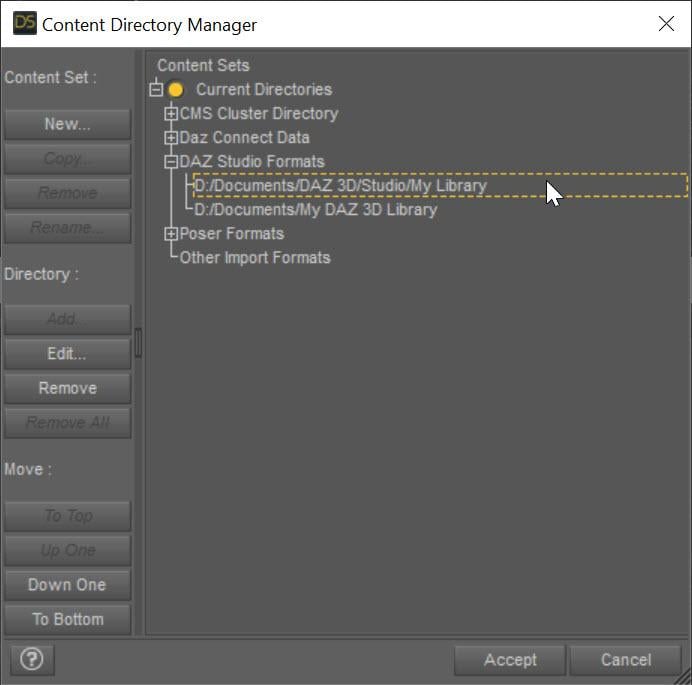
The SECOND entry points to My Daz 3D Library which has all of your installed content. The FIRST entry points to all of YOUR content, whether stuff you create or is created for you by converters. This ensures that everything you create never overwrites the installed content causing problems. Mostly, Daz Studio treats these two content directories as one big content directory, for example the morphs in D:\Documents\My Daz 3D Library\data\DAZ 3D\Genesis 8\Female\Morphs AND in D:\Documents\DAZ 3D\Studio\My Library\data\DAZ 3D\Genesis 8\Female\Morphs are both loaded and available as morphs for Genesis 8 Females. However, Daz Studio saves all the morphs and other data ONLY in the FIRST directory when a conversion occurs, ensuring that converted morphs do not overwrite installed content morphs. However, you are missing that first entry and your converters have been saving into the installed content folder, more than likely corrupting installed content.
I fixed my Daz Studio folders like the image. I even manually downloaded the converter program and copied the files into my "My Daz 3D Library" folder. However, I'm still getting the same result, however the male converter program is working fine. Any other ideas?
Restore morphs settingsHi everyone! If I modify some morphs is there a way to save this configuration? So I can reuse it in other projects too?
A sort of morph preset, or a morph that activates a group of morphs etc ...
Thank youGenesis 8 model without faceHad to have a play.
G8 male head morph.
I would post the morph, but I think not allowed, as it would probably be classed as competing with a store sale.
Another week, another problem with DS (list included)When a morph is causing problems, reinstalling DS and/or starter essentials does not help as the problem is not with DS and/or starter essentials, one needs to identify the morph.
Opossum!!maikdecker said:
FSMCDesigns said:
...and tasty as well

I think I heard they are a part of the famous american dish named "Roadkill Stew"!?! So shouldn't it come with a "flattened" morph and a shovel prop?

My grandmother was from the country here in the US and they ate all kinds of animals. When I was 16 she made a possum stew, which i didn't know at the time and it was really good. I had never really seen one before, so I had no impressions on what i was eating. 2 years later i was with my Dad and 2 of his friends checking raccon traps on a lease. one of the guys was talking about different ways his mother would prepar possum. We came upon a dead, bloated cow and I threw a rock at it. All of a sudden 10-12 possums ran out from inside of it. me and that guy lost out lunch at that moment, LOL
Another week, another problem with DS (list included)Okay. With everyone saying the same thing, I've been looking over my morphs. Everything seems to be fine with the base figures. But when I load in a character there are "CTRL_RIG" and "pjc" morphs listed. Normally, they would be hidden.
The list of the CTRL_RIG morphs is really long, plus they're all locked. But they don't show up with every character/morph that's loaded onto the figure. I've even tried deleting the folder for those morphs, but when I dial in the character they reappear, and the folder returns to the "data" directory.
As for pjc. My rendering computer isn't on at the moment, so I can't check if I've got the letter order right for those morphs. These only show up with Genesis 3 and/or 8. Again, they only appear when certain character morphs are added to the figure (they would also be hidden). I haven't looked at the "data" folder directory, but I imagine that these would behave in the same way as the CTRL_RIG when deleted.
I've tried uninstalling, then (re-)installing all Starter Essentials several times now, but it hasn't solved the problem.
Having said that, I have had installation problems. I've had Iray Shaders disappear. DIM had to be reinstalled, so now it doesn't know what products I've got installed (or where). The installation paths were changed (not by me). I've had to download Genesis 2 Starter Essentials through Daz Connect... There's probably more, but now I've got a headache trying to think about everything that's happened in the past few months.
I hope that all makes sense. I'll edit this when I find out/confirm what the pjc morphs are really called.
Is there anyway to mass unlock (and reset) morphs? Otherwise, it's going to take ages to unlock and reset all of the CTRL_Rig morphs.
Opossum!!FSMCDesigns said:
...and tasty as well
I think I heard they are a part of the famous american dish named "Roadkill Stew"!?! So shouldn't it come with a "flattened" morph and a shovel prop?
Diffeomorphic DAZ Importer version 1.6.0 releasedPadone said:
From the video I understand audio2face exports a mesh animation that you then have to transfer to the figure. I don't see how diffeomorphic could automate that. You may like autolipsync instead that's already supported.
https://www.autolipsync-o-tizer.com/
http://diffeomorphic.blogspot.com/p/morphs-section-version-15.html
I cover the free "Lipsyncotizer" with Diffeo imported characters in this video
 Diffeomorphic DAZ Importer version 1.6.0 released
From the video I understand audio2face exports a mesh animation that you then have to transfer to the figure. I don't see how diffeomorphic could automate that. You may like autolipsync instead that's already supported.
https://www.autolipsync-o-tizer.com/
http://diffeomorphic.blogspot.com/p/morphs-section-version-15.html
Daz to Blender Bridge - Meet the TeamI used the Daz2Blender Bridge to import a commercial character of the Genesis 8 Male into Blender3D version 3.2 (nVidia Omniverse flavour).
I get these distorted hands when the file is transferred.
I know that if the problem occured inside Daz Studio, the fix is to Adjust Rigging To Shape inside DS.
However, the problem exists inside Blender3D, not DS. Inside DS, the morph character is fine.
Is there a setting inside Blender3D that I can use to fix the distorted hands ? Please advise me, thanks.
(Am using latest version of the DazToBelnder bridge with DS Pro 4.2
Why did all my G8 male models make mistakes?Female models have no problem。Make sure you have the current versions of all your male content - that looks to be a corrective morph, that makes a bend look good when there is a very differnt shape applied, applying in the absence of the shape it is meant to correct for.
Please also see Acceptable Ways of Handling Nudity
FaceGen Pro versus Headshop ProActually Headshop does make a full texture set too ... one has to find its storage location and manually apply all the new textures. The one that loads on the face can also be replaced by the better one it saves over in its special location.
FaceGen can apply the same head morph to ALL of the Genesis clan whereas Headshop is geared more for G8 and/or G8.1.
Another week, another problem with DS (list included)Almost all of that, except for the pose conversion issue, sounds like you've got a morph somewhere with a non-zero default value.
Exporting displacement maps to Studio :sigh: How?duckbomb said:
I know this isn't what you are asking for, so maybe it isn't helpful, but I'll share anyway just in case. I have read over and over where people say that displacement maps are a decent replacement for HD morphs, and I just can't agree. I don't know what you are trying to render, but I personally render extremely high-resolution images for a very particular use case, and I absolutely need the quality that simple definition can provide. I've never been able to export displacement maps that meet my expectations, and I've stopped trying.
My "solution" is to simply subdivide the product within DAZ studio, export it out, import it back, export AGAIN, and then use that to create an HD morph. For something like that vase it would probably work just fine. For something like rigged characters it's a little less efficient.
IF you try to use SubD in DAZ and the whole thing falls apart, then I usually change the subdivision settings to "loop" or whatever it is that doesn't actually smooth it out. THen, when I do the HD modeling in ZBrush I simply smooth out the edges as well quickly to give it a more natural look. Doing it this way at least keeps the UVs intact so you don't have to re map it.
I know... not the answer to your question, but it's no fun banging your head against a wall so I at least figured I'd share my own opinion on the whole thing. I'm sure somebody can get high-res displacement to work well, and if that guy put out a tutorial I'd snap it up in a hurry lol.
You can't create an HD morph if the base geometry of the object changes - that is a limitation of the Morph Loader Pro that PA's do not have (they actually can create and import legit HD morphs).
AOBB's Tough Guy based on Robert Mitchum head morph for G8.1M. No materials nor textures.Well, some wishes do come true. I received a request for a Robert Mitchum likeness a while ago from @ShadowBox24 and here he is !
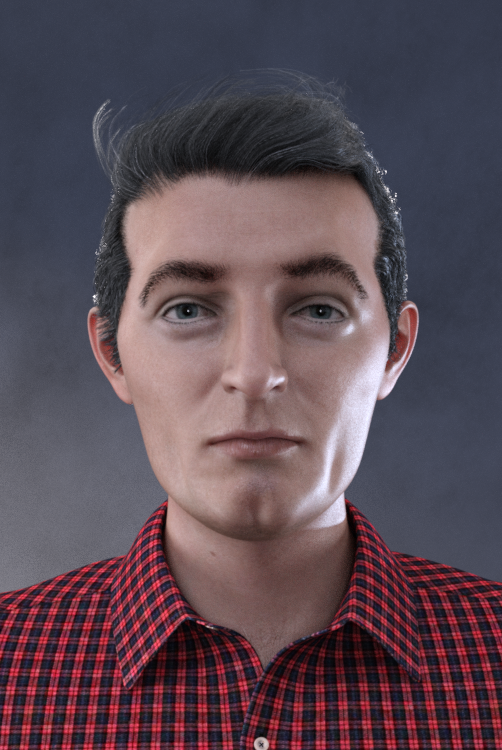

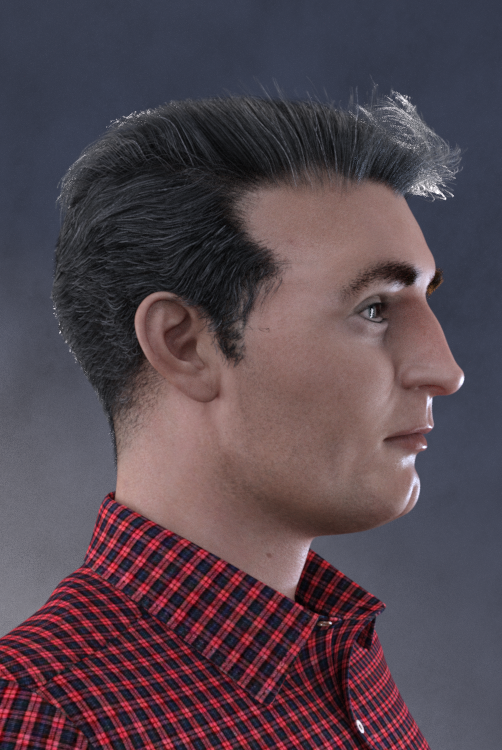
Assets used in promo images:
Vintage Male Hair for G8M
LI Crew Cut hair for G8M
Bold Brows (Avg05, Avg07)
Lashes Utilities for G2,3,8F and M
H&C Checkered Shirt Outfit for G8M
Natural Eyes II for G8.1M
BOSS Pro Light Set
Skin material is the base material and textures that come with G8.1M
Noncommercial use only!
As usual, please post your images with this head morph in this thread - I love to see your work! You guys have such imagination and sense of fun!

Enjoy!
AOBB
Exporting displacement maps to Studio :sigh: How?I know this isn't what you are asking for, so maybe it isn't helpful, but I'll share anyway just in case. I have read over and over where people say that displacement maps are a decent replacement for HD morphs, and I just can't agree. I don't know what you are trying to render, but I personally render extremely high-resolution images for a very particular use case, and I absolutely need the quality that simple definition can provide. I've never been able to export displacement maps that meet my expectations, and I've stopped trying.
My "solution" is to simply subdivide the product within DAZ studio, export it out, import it back, export AGAIN, and then use that to create an HD morph. For something like that vase it would probably work just fine. For something like rigged characters it's a little less efficient.
IF you try to use SubD in DAZ and the whole thing falls apart, then I usually change the subdivision settings to "loop" or whatever it is that doesn't actually smooth it out. THen, when I do the HD modeling in ZBrush I simply smooth out the edges as well quickly to give it a more natural look. Doing it this way at least keeps the UVs intact so you don't have to re map it.
I know... not the answer to your question, but it's no fun banging your head against a wall so I at least figured I'd share my own opinion on the whole thing. I'm sure somebody can get high-res displacement to work well, and if that guy put out a tutorial I'd snap it up in a hurry lol.
[Released] Character Converter from Genesis 8 Female to Genesis 3 Female - Conv JCMs too[Commercial]Nekura2000 said:
RiverSoftArt said:
Nekura2000 said:
RiverSoftArt said:
Nekura2000 said:
I had to get a new hard drive so I reinstalled Daz Studio. When trying to convert my Generation 7 female characters to Generation 8, I'm getting a distorted face. I've uninstalled and reinstalled the program, even deleted the RSCloneGenesis3Female.obj file from the folder C:\Users\nekur\AppData\Roaming\DAZ 3D\Studio4\CharacterConverterMorphs, with no change. The Generation 7 character as well as Genesis 8 load without a flaw. Here's what I'm getting, attached or from https://www.deviantart.com/wow-creations/art/Converted-920761392. ; I just looked at the parameters for the character I converted, which was Agnes. It isn't showing an Agnes head or body for 8, just Agnes itself.
The clone is for a different Character Converter. Maybe it is pulling in the converted morphs twice? From your previous conversion on the old hard drive and a new conversion? What directories are specified in the content manager? You should check all the currently used morphs on the character and find the morphs. The Parameter Settings show the Asset File Path of the morph (and the [...] button shows the full path of the morph). Make sure the morphs are coming from where you think they should be coming.
I use two different drives when using software. I have the OS drive which I replaced and the data drive. I renamed the original Daz drive as “Daz 3D2 Old”, before installing the Daz Studio. When installing Daz Studio, I allowed it to keep the “Daz 3D” folder, but also use the new “My DAZ 3D Library” folder. I just remember to look at the Error Log when loading Agnes Genesis 8 and this is what I’m getting:
2022-06-29 07:16:21.449 [WARNING] :: ..\..\..\..\..\src\sdksource\fileinput\dzassetdaz.cpp(6903): Formula output property not found: Genesis8Female:/data/Daz%203D/Genesis%208/Female/Morphs/XTransfer/3D%20Universe/ToonGenerations2/Base/XT_CTRL3duToonGenerations2_AdjustAge.dsf#XTIDCTRL3duToonGenerations2_AdjustAge?value - in file: /data/Daz%203D/Genesis%208/Female/Morphs/Zev0/Shape%20Shift/Arm%20Length.dsf
2022-06-29 07:16:21.506 [WARNING] :: ..\..\..\..\..\src\sdksource\fileinput\dzassetdaz.cpp(6903): Formula output property not found: Genesis8Female:/data/DAZ%203D/Genesis%208/Female/Morphs/DAZ%203D/Head/Old/PHMEyesIrisSize.dsf#PHMEyesIrisSize?value - in file: /data/Daz%203D/Genesis%208/Female/Morphs/vyktohria/Meredith/VYK%20Meredith%20Head.dsf
2022-06-29 07:16:22.060 [WARNING] :: ..\..\..\..\..\src\sdksource\fileinput\dzassetdaz.cpp(6903): Formula output property not found: Genesis8Female:/data/DAZ%203D/Genesis%208/Female/Morphs/SickleYield2017/UniversalBreastHelper/PBMSYUBHGiantAll_proj.dsf#PBMSYUBHGiantAll_proj?value - in file: /data/Daz%203D/Genesis%208/Female/Morphs/SickleYield2017/UniversalBreastHelper/PBMSYUBHGiantAll.dsf
2022-06-29 07:16:22.125 [WARNING] :: ..\..\..\..\..\src\sdksource\fileinput\dzassetdaz.cpp(7134): Unsupported formula: /data/Daz%203D/Genesis%208/Female/Morphs/RiverSoft%20Art/Javeria%20for%20Victoria%207%20and%20Genesis%203/pJCMRSG3FVictoria7ThighBndFwdHDR.dsf
2022-06-29 07:16:22.155 [WARNING] :: ..\..\..\..\..\src\sdksource\fileinput\dzassetdaz.cpp(7134): Unsupported formula: /data/Daz%203D/Genesis%208/Female/Morphs/RiverSoft%20Art/Javeria%20for%20Victoria%207%20and%20Genesis%203/pJCMRSG3FVictoria7ThighBndFwdHDL.dsf
2022-06-29 07:16:22.628 [WARNING] :: ..\..\..\..\..\src\sdksource\fileinput\dzassetdaz.cpp(7134): Unsupported formula: /data/Daz%203D/Genesis%208/Female/Morphs/RiverSoft%20Art/FWSA%20Caterina%20for%20Victoria%207%20and%20Genesis%203/pJCMRSG3FVictoria7ShoulderBndFwd_110_R.dsf
2022-06-29 07:16:22.665 [WARNING] :: ..\..\..\..\..\src\sdksource\fileinput\dzassetdaz.cpp(7134): Unsupported formula: /data/Daz%203D/Genesis%208/Female/Morphs/RiverSoft%20Art/FWSA%20Caterina%20for%20Victoria%207%20and%20Genesis%203/pJCMRSG3FVictoria7ShoulderBndFwd_110_L.dsf
2022-06-29 07:16:22.769 [WARNING] :: ..\..\..\..\..\src\sdksource\fileinput\dzassetdaz.cpp(7134): Unsupported formula: /data/Daz%203D/Genesis%208/Female/Morphs/RiverSoft%20Art/FWSA%20Caterina%20for%20Victoria%207%20and%20Genesis%203/pJCMRSG3FVictoria7ShinBndBck_145_R.dsf
2022-06-29 07:16:22.806 [WARNING] :: ..\..\..\..\..\src\sdksource\fileinput\dzassetdaz.cpp(7134): Unsupported formula: /data/Daz%203D/Genesis%208/Female/Morphs/RiverSoft%20Art/FWSA%20Caterina%20for%20Victoria%207%20and%20Genesis%203/pJCMRSG3FVictoria7ShinBndBck_145_L.dsf
2022-06-29 07:16:22.895 [WARNING] :: ..\..\..\..\..\src\sdksource\fileinput\dzassetdaz.cpp(7134): Unsupported formula: /data/Daz%203D/Genesis%208/Female/Morphs/RiverSoft%20Art/FWSA%20Caterina%20for%20Victoria%207%20and%20Genesis%203/pJCMRSG3FVictoria7ForearmBnd_135_R.dsf
2022-06-29 07:16:22.935 [WARNING] :: ..\..\..\..\..\src\sdksource\fileinput\dzassetdaz.cpp(7134): Unsupported formula: /data/Daz%203D/Genesis%208/Female/Morphs/RiverSoft%20Art/FWSA%20Caterina%20for%20Victoria%207%20and%20Genesis%203/pJCMRSG3FVictoria7ForearmBnd_135_L.dsf
2022-06-29 07:16:31.020 [WARNING] :: ..\..\..\..\..\src\sdksource\fileinput\dzassetdaz.cpp(6903): Formula output property not found: Genesis8Female:/data/DAZ%203D/Genesis%208/Female/Morphs/DAZ%20Originals/data/DAZ%203D/Genesis%208/Female/Morphs/Fred%20Winkler%20Art%2CSabby%2CDAZ%20Originals/FW%20Frankie%20HD%20for%20Victoria%207/CTRL-RSC-Frankie.dsfCFred%20Winkler%20Art/data/DAZ%203D/Genesis%208/Female/Morphs/Fred%20Winkler%20Art%2CSabby%2CDAZ%20Originals/FW%20Frankie%20HD%20for%20Victoria%207/CTRL-RSC-Frankie.dsfCSabby/FWSA%20Agnes%20HD%20for%20Lilith%207/PHMMouthRealismHD.dsf#PHMMouthRealismHD?value - in file: /data/DAZ%203D/Genesis%208/Female/Morphs/Fred%20Winkler%20Art%2CSabby%2CDAZ%20Originals/FW%20Frankie%20HD%20for%20Victoria%207/CTRL-RSC-Frankie.dsf
2022-06-29 07:16:31.020 [WARNING] :: ..\..\..\..\..\src\sdksource\fileinput\dzassetdaz.cpp(6903): Formula output property not found: Genesis8Female:/data/DAZ%203D/Genesis%208/Female/Morphs/DAZ%20Originals/data/DAZ%203D/Genesis%208/Female/Morphs/Fred%20Winkler%20Art%2CSabby%2CDAZ%20Originals/FW%20Frankie%20HD%20for%20Victoria%207/CTRL-RSC-Frankie.dsfCFred%20Winkler%20Art/FW%20Brooke%20HD%20for%20Victoria%207/FHMVictoria7.dsf#FHMVictoria7?value - in file: /data/DAZ%203D/Genesis%208/Female/Morphs/Fred%20Winkler%20Art%2CSabby%2CDAZ%20Originals/FW%20Frankie%20HD%20for%20Victoria%207/CTRL-RSC-Frankie.dsf
2022-06-29 07:16:31.021 [WARNING] :: ..\..\..\..\..\src\sdksource\fileinput\dzassetdaz.cpp(6903): Formula output property not found: Genesis8Female:/data/DAZ%203D/Genesis%208/Female/Morphs/DAZ%20Originals/data/DAZ%203D/Genesis%208/Female/Morphs/Fred%20Winkler%20Art%2CSabby%2CDAZ%20Originals/FW%20Frankie%20HD%20for%20Victoria%207/CTRL-RSC-Frankie.dsfCFred%20Winkler%20Art/FW%20Brooke%20HD%20for%20Victoria%207/FBMVictoria7.dsf#FBMVictoria7?value - in file: /data/DAZ%203D/Genesis%208/Female/Morphs/Fred%20Winkler%20Art%2CSabby%2CDAZ%20Originals/FW%20Frankie%20HD%20for%20Victoria%207/CTRL-RSC-Frankie.dsf
2022-06-29 07:16:32.694 [WARNING] :: ..\..\..\..\..\src\sdksource\fileinput\dzassetdaz.cpp(6969): Formula target property not found: Genesis8Female:/data/DAZ%203D/Genesis%208/Female/Morphs/DAZ%203D/Olympia%208/FBMOlympia8.dsf#FBMOlympia8_Test?value - in file: /data/Daz%203D/Genesis%208/Female/Morphs/fabiana/KillerLegsG8/1FK-Olympia8BaseFix.dsf
2022-06-29 07:16:40.096 [WARNING] :: ..\..\..\..\..\src\sdksource\fileinput\dzassetdaz.cpp(7134): Unsupported formula: /data/Daz%203D/Genesis%208/Female/Morphs/DAZ%203D%2CHeysun%20Oh/Olympia%207%20HD%20Add-On/pJCMRSG3FOlympia7ForeArmBndHD_n100L.dsf
2022-06-29 07:16:40.261 [WARNING] :: ..\..\..\..\..\src\sdksource\fileinput\dzassetdaz.cpp(7134): Unsupported formula: /data/Daz%203D/Genesis%208/Female/Morphs/DAZ%203D%2CHeysun%20Oh/Olympia%207%20HD%20Add-On/pJCMRSG3FOlympia7ForeArmBndHD_100R.dsf
2022-06-29 07:16:40.986 [WARNING] :: ..\..\..\..\..\src\sdksource\fileinput\dzassetdaz.cpp(7134): Unsupported formula: /data/Daz%203D/Genesis%208/Female/Morphs/DAZ%203D%2CHeysun%20Oh/Mei%20Lin%207%20HD%20Add-On/pJCMRSG3FMeiLin7ShinBndBck_95R.dsf
2022-06-29 07:16:41.152 [WARNING] :: ..\..\..\..\..\src\sdksource\fileinput\dzassetdaz.cpp(7134): Unsupported formula: /data/Daz%203D/Genesis%208/Female/Morphs/DAZ%203D%2CHeysun%20Oh/Mei%20Lin%207%20HD%20Add-On/pJCMRSG3FMeiLin7ShinBndBck_95L.dsf
2022-06-29 07:16:41.322 [WARNING] :: ..\..\..\..\..\src\sdksource\fileinput\dzassetdaz.cpp(7134): Unsupported formula: /data/Daz%203D/Genesis%208/Female/Morphs/DAZ%203D%2CHeysun%20Oh/Mei%20Lin%207%20HD%20Add-On/pJCMRSG3FMeiLin7ShinBndBckR.dsf
2022-06-29 07:16:41.494 [WARNING] :: ..\..\..\..\..\src\sdksource\fileinput\dzassetdaz.cpp(7134): Unsupported formula: /data/Daz%203D/Genesis%208/Female/Morphs/DAZ%203D%2CHeysun%20Oh/Mei%20Lin%207%20HD%20Add-On/pJCMRSG3FMeiLin7ShinBndBckL.dsf
2022-06-29 07:16:43.828 [WARNING] :: ..\..\..\..\..\src\sdksource\fileinput\dzassetdaz.cpp(7134): Unsupported formula: /data/Daz%203D/Genesis%208/Female/Morphs/DAZ%203D%2CHeysun%20Oh/Karen%207%20HD%20Add-On/pJCMRSG3FKaren7ShldrFwd_n90L.dsf
2022-06-29 07:16:44.007 [WARNING] :: ..\..\..\..\..\src\sdksource\fileinput\dzassetdaz.cpp(7134): Unsupported formula: /data/Daz%203D/Genesis%208/Female/Morphs/DAZ%203D%2CHeysun%20Oh/Karen%207%20HD%20Add-On/pJCMRSG3FKaren7ShldrFwd_90R.dsf
2022-06-29 07:16:44.191 [WARNING] :: ..\..\..\..\..\src\sdksource\fileinput\dzassetdaz.cpp(7134): Unsupported formula: /data/Daz%203D/Genesis%208/Female/Morphs/DAZ%203D%2CHeysun%20Oh/Karen%207%20HD%20Add-On/pJCMRSG3FKaren7ShinBndBck_90R.dsf
2022-06-29 07:16:44.369 [WARNING] :: ..\..\..\..\..\src\sdksource\fileinput\dzassetdaz.cpp(7134): Unsupported formula: /data/Daz%203D/Genesis%208/Female/Morphs/DAZ%203D%2CHeysun%20Oh/Karen%207%20HD%20Add-On/pJCMRSG3FKaren7ShinBndBck_90L.dsf
2022-06-29 07:16:44.669 [WARNING] :: ..\..\..\..\..\src\sdksource\fileinput\dzassetdaz.cpp(7134): Unsupported formula: /data/Daz%203D/Genesis%208/Female/Morphs/DAZ%203D%2CHeysun%20Oh/Karen%207%20HD%20Add-On/pJCMRSG3FKaren7ForearmBnd_n85L.dsf
2022-06-29 07:16:44.910 [WARNING] :: ..\..\..\..\..\src\sdksource\fileinput\dzassetdaz.cpp(7134): Unsupported formula: /data/Daz%203D/Genesis%208/Female/Morphs/DAZ%203D%2CHeysun%20Oh/Karen%207%20HD%20Add-On/pJCMRSG3FKaren7ForearmBnd_85R.dsf
2022-06-29 07:16:56.769 [WARNING] :: ..\..\..\..\..\src\sdksource\fileinput\dzassetdaz.cpp(7134): Unsupported formula: /data/Daz%203D/Genesis%208/Female/Morphs/-Yannek-%2CDAZ%203D%2CHeysun%20Oh/Gia%207/pJCMRSG3FGia7ForeArmBnd_n135L.dsf
2022-06-29 07:16:57.067 [WARNING] :: ..\..\..\..\..\src\sdksource\fileinput\dzassetdaz.cpp(7134): Unsupported formula: /data/Daz%203D/Genesis%208/Female/Morphs/-Yannek-%2CDAZ%203D%2CHeysun%20Oh/Gia%207/pJCMRSG3FGia7ForeArmBnd_135R.dsf
2022-06-29 07:17:00.107 [WARNING] :: ..\..\..\..\..\src\sdksource\fileinput\dzassetdaz.cpp(7134): Unsupported formula: /data/Daz%203D/Genesis%208/Female/Morphs/-Yannek-%2CDAZ%203D%2CHeysun%20Oh/Arabella%207%20HD%20Add-On/pJCMRSG3FArabella7ForeArmBnd_n135L.dsf
2022-06-29 07:17:00.418 [WARNING] :: ..\..\..\..\..\src\sdksource\fileinput\dzassetdaz.cpp(7134): Unsupported formula: /data/Daz%203D/Genesis%208/Female/Morphs/-Yannek-%2CDAZ%203D%2CHeysun%20Oh/Arabella%207%20HD%20Add-On/pJCMRSG3FArabella7ForeArmBnd_135R.dsf
2022-06-29 07:17:02.981 [WARNING] :: ..\..\..\..\..\src\sdksource\fileinput\dzassetdaz.cpp(5962): Parent for modifier not found: TMLI Lashes 06.
2022-06-29 07:17:02.981 [WARNING] :: ..\..\..\..\..\src\sdksource\fileinput\dzassetdaz.cpp(1712): Modifier not prepared: TMLI Lashes 06!
2022-06-29 07:17:02.981 [WARNING] :: ..\..\..\..\..\src\sdksource\fileinput\dzassetdaz.cpp(1729): Modifier not created: TMLI Lashes 06!
Here’s an image of my Content Directory Manager.
What looks bad in your Content Directory is that you have no user library in the Daz Studio Formats. That means the character converter would be writing morphs (and possibly deleting morphs if the overwrite option is checked) in the Daz content folder. You will get bad/weird results from that. I am afraid you might have hosed your morphs folder at this point. You need something a user content folder as the first folder in the Daz Studio Formats section. Then, this folder would be used to write out morphs from the conversions and would not overwrite your Daz content library.
I'm sorry, but from what I can see I have a Content Directory in the Daz Studio Format. Could you give a step by step solution in solving this problem. I've used Daz Studio for several years, along with Character Converter, but I think I'm missing something based on what you're seeing and I'm trying to interpret.
Usually what you will see in Daz Studio Formats is something like this:
The SECOND entry points to My Daz 3D Library which has all of your installed content. The FIRST entry points to all of YOUR content, whether stuff you create or is created for you by converters. This ensures that everything you create never overwrites the installed content causing problems. Mostly, Daz Studio treats these two content directories as one big content directory, for example the morphs in D:\Documents\My Daz 3D Library\data\DAZ 3D\Genesis 8\Female\Morphs AND in D:\Documents\DAZ 3D\Studio\My Library\data\DAZ 3D\Genesis 8\Female\Morphs are both loaded and available as morphs for Genesis 8 Females. However, Daz Studio saves all the morphs and other data ONLY in the FIRST directory when a conversion occurs, ensuring that converted morphs do not overwrite installed content morphs. However, you are missing that first entry and your converters have been saving into the installed content folder, more than likely corrupting installed content.
GeoGraft Via Transfer Tool Not WorkingI am making a tail for G8F (and after I am done I will do G8M) I have successfully rigged it with 86 bones and now am attempting to make it a GeoGraft using the Transfer Utility. However, when I run the TU, I lose all custom bones and the meshes don't merge like they're supposed to. The images I have attached show what the hierarchy of the tail looks like before using TU, the TU settings I used and one image containing both the mesh not welded to the G8F and the hierarchy of the tail Post-Transfer.
The Marvelous Bodysuits both have over 160 material zones
Thanks for getting back to me so quickly. I'm sure I can work around it but I understand how it goes. I do love all the material zones though. It's exactly what I've been looking for. If you ever make an updated version I will be the first in line to buy itMada said:ChaosDrgn said:
Question for the group about it, possibly a small complaint.
How do you get rid of the No Mouth selection? I did something yesterday that got rid of the hood and the mouth was still morphed, covered whatever. I ended up having to just kill the figure and restart it again because I couldn't find a Add Mouth or a slider to turn it off in the panels.
I don't remember there being a No Mouth, it sounds like it got hidden in surfaces instead? I used conditional grafts to hide polygons and apply HD morphs at the same time to give it a rounded edge.
solisphotography said:
I just picked up this suit after seeing this thread but I have a question for @Mada; is there a way to smooth the seams between surfaces? Some of the surfaces have a hard edge (like on the torso, arms and legs) that ruins the illusion of a seamless suit. They are almost all at the points where a morph adds detail. Otherwise, it's the exact thing I was looking for.
Sadly yes on shiny shaders that does show up - I would do it a totally different way today - that was in the very early days of HD, the first item I used it on in fact.
Things to try - switch between smoothing modes and see if one of them improves it, or try turning off smoothing completely.The Marvelous Bodysuits both have over 160 material zonesChaosDrgn said:
Question for the group about it, possibly a small complaint.
How do you get rid of the No Mouth selection? I did something yesterday that got rid of the hood and the mouth was still morphed, covered whatever. I ended up having to just kill the figure and restart it again because I couldn't find a Add Mouth or a slider to turn it off in the panels.
I don't remember there being a No Mouth, it sounds like it got hidden in surfaces instead? I used conditional grafts to hide polygons and apply HD morphs at the same time to give it a rounded edge.
solisphotography said:
I just picked up this suit after seeing this thread but I have a question for @Mada; is there a way to smooth the seams between surfaces? Some of the surfaces have a hard edge (like on the torso, arms and legs) that ruins the illusion of a seamless suit. They are almost all at the points where a morph adds detail. Otherwise, it's the exact thing I was looking for.
Sadly yes on shiny shaders that does show up - I would do it a totally different way today - that was in the very early days of HD, the first item I used it on in fact.
Things to try - switch between smoothing modes and see if one of them improves it, or try turning off smoothing completely.Daz 3D is part of

Connect
DAZ Productions, Inc.
7533 S Center View Ct #4664
West Jordan, UT 84084Licensing Agreement | Terms of Service | Privacy Policy | EULA
© 2026 Daz Productions Inc. All Rights Reserved.