-
How to Use dForce: Creating a Blanket, Draping Clothes on Furniture, and Much More [Commercial]Thank you very much, I would create just a morph.Deactivate CBS for specific characters?
It depends how they are set up, if the character CBSs have a master control property for the character's joint correctives (that is a distinct corrective controller and not the character morph itself), you only need to add one controller to that one property.
however, I will operate on assumption that they dont have a single master joint corrective controller, as this is most likely scenario. In this case you need to find all Joe's CBS morphs in the property Hierarchy tab, then from the Paramaters tab while in Edit Mode, drag an appropriate property to act as controller, dragging it over into the Property Heirarchy tab into the Stage 1 (or Stage 2 Controller slots) for the CBS morph(s), one by one for each CBS you want to control.
What is an appropriate controller?
In your example, probably best controller would be to create a new property called "Remove Joe Correctives" which you can manually dial up and down. And use that as a Stage 1 Controller on all Joe's CBS properties, setting to Subtract. Ensure the Controller is set to 'save with' the 'Remove Joe Correctives' property and not any other Property.
These changes will be saved within the Scene.duf file. To have the controller work outside the Scene file, in other scenes, you would need to save out 'Remove Joe Correctives' as a modifier asset into one of your content directories.
SaveGuard: Ultimate Scene Saver for Daz Studio Win 64 v1.2Saxa -- SD said:
Since no Wearables Manager thread, will post this here again :)
Wearables Manager makes sending a character to Hexagon for morph-making an absolute breeze.
Just did it.
Have scripts on toolbar of your choice, select undress script, send figure to Hex, make morph in Hex, back to DAZ and save new morph, click script to dress and Viola!
Before was always a groaner removing all items inorder to send to Hex.
With this and the raw power of Hexagon (it's not perfect but pretty darn good for morphs), that program so tightly bound with DAZ, can't even imagine using DAZ GeomEditor even with it's improvements.
Anyway, just wanted to pass on how much of a time-saver this was.
Been focussed on other 3d things, so this is why just doing & posting now.
Thks Matew.Great to know, that it is working for you.
https://www.daz3d.com/wearables-manager
I was wondering what is the difference between Wearables Manager and personality in Daz Studio.
Another system builderAgitatedRiot said:
nonesuch00 said:
That looks like high end, so I have nothing to add really except my middle of the road desktop built from 2020 parts mostly has two big shortcomings:
a) The MSI Tomahark B550 WiFi MB has known UBS problems, especaillly on the front panel MB connections. Apparentlly these type USB problems are common across all manufacturers. It seems power related, so I guess a higher rated MB and Power supply help alleviate the chances you have trouble. So I think do a thorough investigation of the MB you choose.
b) I didn't realize at the time of purchase that a USB C cable would ever be able to both supply power AND drive data to a computer monitor or a digital tablet with screen but that's exactly the case and some monitors and digital tablets come so equipped now. Given that, 2 USB C combo data/power ports in back and 1 USB C data/power port on the front panel seem a practical must now. That means I need to upgrade my MB and my case to support this on my AM4 based CPU so those original choices were money wasted that I could of avoided had I researched USB power/data perephireals better.
Good Luck
USB-C is a versatile connector that supports power delivery, data transfer, and video output. However, not all cables are designed to carry video signals. A cable must explicitly support DisplayPort Alt Mode (DP Alt Mode), Thunderbolt 3/4, or USB4 to effectively transmit video.
Thanks. I willl remember this. It would be great to ditch 2 monitor power cords.
Show Us Your Bryce Renders Part 14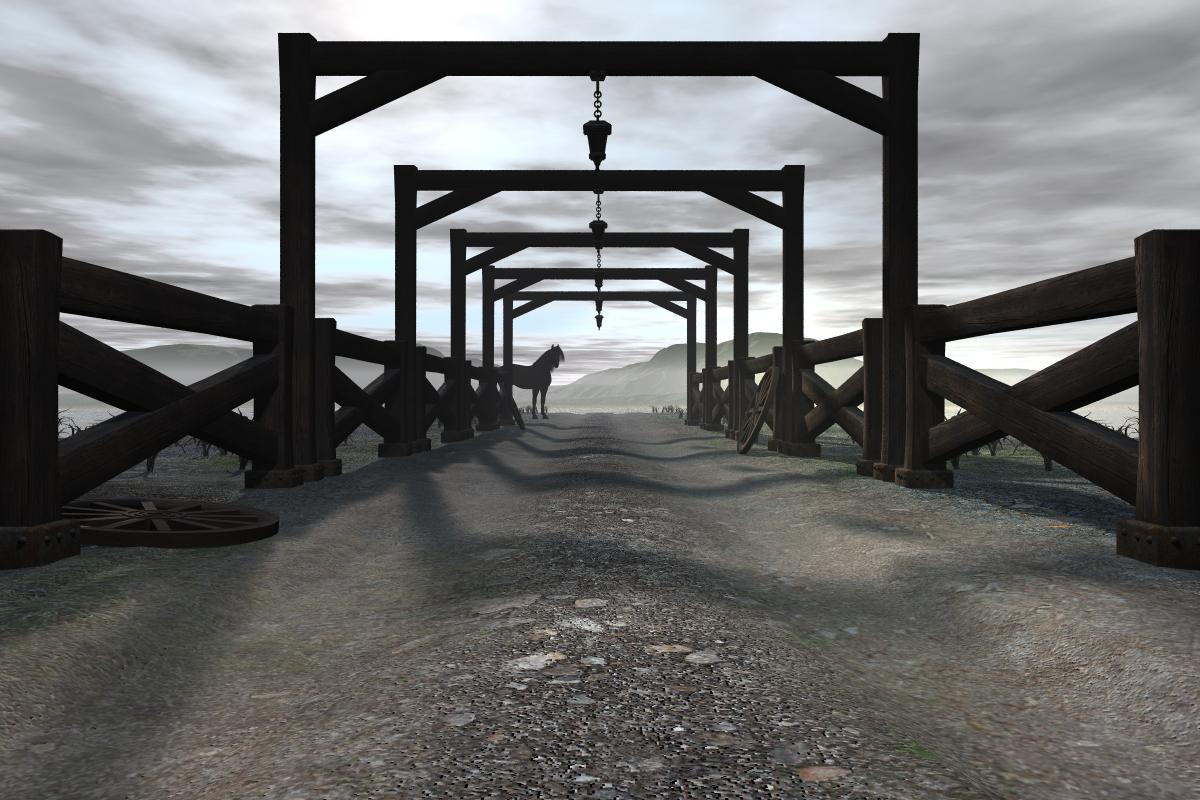
This time I went into DazStudio and brought in the bridge then used the transfer/bridge to move my bridge over to Bryce.
Once I added the horse I got 'out of memory' I saved the image before closing. Why do we get out of memory?
Materials not matching on Geografted Nipples and Navels (G9)richardandtracy said:
So, part of what you're saying is time is needed to be spent improving G8F/M into having a smoother projection morph for clothing.
Not quite.
My general point is that a simpler and more even mesh does have benefits - both for certain kinds of processing (it's easier to smooth, which is an important part of sculpting morphs and creating projection shapes), and because it's also easier to auto-transfer morph shapes from.
While it's not been fully utilised in this respect, G9's base shape and geometry is hugely better for creating this kind of projection morph without needing an intervening mesh like I needed to for G8, at least in part because of the absence of the nipple and navel geometry.
Face or head long morphhttps://www.daz3d.com/p3d-face-builder-for-genesis-9-feminine has a Face Long morph.
The growing up morphs have a head width morph, which will give you a long face. There is also a head width morph in SY set of free morphs. See this thread: https://www.daz3d.com/forums/discussion/611116/200-free-morphs-g9.
Face or head long morphBack in maybe G8 or even 3 days, there was a morph for long face or maybe head. I do not see that at all in G9 morph packages...or am I missing it? It was one of my favorite morphs actually and was a big part of my head morphing proceedure.
Anyone know what, if an, morph packages its in?Another system buildernonesuch00 said:
That looks like high end, so I have nothing to add really except my middle of the road desktop built from 2020 parts mostly has two big shortcomings:
a) The MSI Tomahark B550 WiFi MB has known UBS problems, especaillly on the front panel MB connections. Apparentlly these type USB problems are common across all manufacturers. It seems power related, so I guess a higher rated MB and Power supply help alleviate the chances you have trouble. So I think do a thorough investigation of the MB you choose.
b) I didn't realize at the time of purchase that a USB C cable would ever be able to both supply power AND drive data to a computer monitor or a digital tablet with screen but that's exactly the case and some monitors and digital tablets come so equipped now. Given that, 2 USB C combo data/power ports in back and 1 USB C data/power port on the front panel seem a practical must now. That means I need to upgrade my MB and my case to support this on my AM4 based CPU so those original choices were money wasted that I could of avoided had I researched USB power/data perephireals better.
Good Luck
USB-C is a versatile connector that supports power delivery, data transfer, and video output. However, not all cables are designed to carry video signals. A cable must explicitly support DisplayPort Alt Mode (DP Alt Mode), Thunderbolt 3/4, or USB4 to effectively transmit video.
Face transfer questionI did a face transfer sometimes a while back. I think I accidentally deleted the content folder it was in. I deleted some content folders on the cloud but I think one of Them has the face transfer files.
Is there anyway I can recover it? Or do I need to do it again?
Celebrity Look-a-Likes for 3D figures Part 4RayDAnt said:
KristinF said:
Has anyone ever seen a G8/G9 Nicole Kidman look-a-like?
The only ones I know of are:
- AdamThwaites's Celebrity Series 118 for Genesis 3 and Genesis 8 Female
- TritiumCG's Nicole Kidman - Head Morph for G8F
Thanks so much :)
Materials not matching on Geografted Nipples and Navels (G9)So, part of what you're saying is time is needed to be spent improving G8F/M into having a smoother projection morph for clothing.
I can see that, and my small chested favourite character suffers from excessive clothing bulge over her sternum (as opposed to shrink wrapping), sometimes to the extent that the bulge is a bigger protrusion than her breasts on either side. So possibly a morphable projection morph would help ;) .
Can I ask, are you able to point to somewhere that explains how projection morphs are embodied into a DS character?
Regards,
Richard
Celebrity Look-a-Likes for 3D figures Part 4KristinF said:
Has anyone ever seen a G8/G9 Nicole Kidman look-a-like?
The only ones I know of are:
- AdamThwaites's Celebrity Series 118 for Genesis 3 and Genesis 8 Female
- TritiumCG's Nicole Kidman - Head Morph for G8F
Celebrity Look-a-Likes for 3D figures Part 4Dareshiranu said:
starwarsorivus said:
So I guess other than the other hit and miss attempts, there's def a Zoey Deutch head (not full char) but it's not a native Daz. However it may be ported via unity bridge. https://www.renderhub.com/nammichael/zoey-deutch-head-no-hair-low-poly-head-for-game R hub isn't bad but I bought some Guhzcoituz models that the store took off, and completely out of the customer download area. Their freebies are quite extensive but they limit your adding to DL to 10 per day. Def some nice stuff there.
That's a vendor I wasn't aware of, quite a collection. I'll have to suss out some of them. Thanks for the heads-up.
But this is not for Daz... I don't know if it's possible to adapt it to a Genesis figure (i.e., create a head morph)... Well... There's probably a way, but out of my league... I'm curious if someone knows how to...
Ext3nd Studio Freebies threadSince I'm moving my old freebies from one site to another, and since I'm creating new ones, I decided to create a single thread to post all the freebies, so anyone who wants can follow it and stay updated on new releases.
Let's start with the most recent ones.

Cherry per DAZ Studio


Pikachu X for all Geensis characters


Minun X and Plusie X for all Genesis Characters


 SaveGuard: Ultimate Scene Saver for Daz Studio Win 64 v1.2
Since no Wearables Manager thread, will post this here again :)
Wearables Manager makes sending a character to Hexagon for morph-making an absolute breeze.
Just did it.
Have scripts on toolbar of your choice, select undress script, send figure to Hex, make morph in Hex, back to DAZ and save new morph, click script to dress and Viola!
Before was always a groaner removing all items inorder to send to Hex.
With this and the raw power of Hexagon (it's not perfect but pretty darn good for morphs), that program so tightly bound with DAZ, can't even imagine using DAZ GeomEditor even with it's improvements.
Anyway, just wanted to pass on how much of a time-saver this was.
Been focussed on other 3d things, so this is why just doing & posting now.
Thks Matew.Question about Premier's SHape TransferI would like to ask if there's any chance it will be expanded to bring Genesis 1 and 2 morphs as well?
IMHO Genesis 1 and 2 got some of the best anime and toon morphs and some of them are literally unique, it would be nice to be able to bring them to Genesis 9.
I don't like the shape of G8M chestHi, I'm using this Genesis 8 male body morph. -> https://www.daz3d.com/musculature-hd-morphs-for-genesis-8-male
But if I use that, the G8M's chest is open like in the rendering picture, so it doesn't look very pretty.
I want to make it look like a real picture.
Please let me know if there is a way to solve that problem or if you have any other G8M body morphs.
Thank you.
Bought Nyla for Sadie16, but....Well I got curious as I have both Sadie 16, Nyla, and the Morphs+, and never really used Nyla. Here's how they look - the Nyla Head Morph actually works partially, but you do need Morphs+ to get the full effect. Otherwise no difference, it seems.
Not all weight mapping can be removedLoin cloths usually have their unique designs, but Transfer Utility, as default, transfers that unexpected results as you showed above.
An easiest alternative without deleting bones is to: just fill 100% weight on Pelvis with the lower cloth facets selected (ss1).. then it'll fix other corresponding bones on which you don't need weight (ss2) ~
Then, save the loin cloth as a projection template. Next time when you make another loin cloth, rig it by using the projection template in Transfer Utility... so that you can avoid unnecessary manipulation on weight AMAP ~~
Daz 3D is part of

Connect
DAZ Productions, Inc.
7533 S Center View Ct #4664
West Jordan, UT 84084Licensing Agreement | Terms of Service | Privacy Policy | EULA
© 2026 Daz Productions Inc. All Rights Reserved.