Problem adding morphs to "Idol hair"
 qweretrretet
Posts: 27
qweretrretet
Posts: 27
I bought "Idol Hair for Genesis 8 Females" and I love it because it has a lot of ways to move the hair. I wanted to use it in a scene, but the hair still clips through some clothes somehow, so I tried to add a new morph. I exported the model (default start position, no morphs or transformations applied, every bar is set to the default value, no parenting) end edited it in blender. So far everything is fine, but when I import it again in daz, ANY morph I make changes the whole model. I then tried a simple useless morph to understand the situation:
- I opened the model in blender and moved only a single back hair (I literally pressed L on one face and moved it, nothing else)
- I imported it back in DAZ and apply the morph
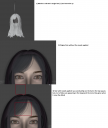
- The single hair moves to the correct position, but everything moves as well. For example, as you can see in the attached image, a lot of holes are appearing in the bang and in other places.
Why? I don't get this kind of problem when I edit clothes or objects. I find it very annoying that a simple morph (yes, I know I made a useless morph in this case, but it was a quick example made to show you my problem) changes everything, even parts I don't want.

Daz 3D is part of 
Connect
DAZ Productions, Inc.
7533 S Center View Ct #4664
West Jordan, UT 84084
Licensing Agreement | Terms of Service | Privacy Policy | EULA
© 2026 Daz Productions Inc. All Rights Reserved.
Comments
This https://www.daz3d.com/idol-hair-for-genesis-8-females ?
I have that and it isn't loading in a zero state - Edit>Figure>Zero>Zero Figure, then confirm that i really mean zero, does cause the hair to change (duplicate the hair before zeroing and then hide/show the duplicate to see the changes). So if you are exporting it as loaded you are getting those minor changes in your morph too. If you have put a lot of work into the current morphs and don't want to have to redo that you could try reloading them through Morph Loader Pro on the default shape (the one that has some deviations from the zero state) with the Reverse Deformations option checked in the options for each morph - that will then subtract the differences, leaving just your own modifications
Thank you very much that the problem. Just out of curiosity, how can I know what was the settings that was set to zero from the menu? The hair now seems a bit more "messy" than before.
If yopu are using the current version of DS click the maginiying glass icon next to the filter field (search box) at the top of the Parameters pane and use its By Used filter - it looks as if the issue was a Smoothing Modifier applied to the ahir model.
Thank you very much for your help, Tomorrow I'll give it a try and see what will happen if I apply these settings again.
Enable Smoothing on this hair is On. You just need to turn it Off before sending the hair to Blender. Then after importing / dialing the morph, you won't get the issue as you mentioned. Then set Enable Smoothing back to On, and set Smoothing Type as Generic.