-
Has Anyone here experimented with Gaussian Splatting?
I did say only bone animations are supported
so any clothes should be rigged to follow the figures or have childbones that move it in DAZ like the old days before Dforce
facial expressions need to use bones, some do
also FBX is usually base resolution, some subdivision possible but HDmorphs wreck it because they use a mysterious encrypted way of applying them not compatible with FBX export, the only way to use HDmorphs is a separate obj export applied as a morph to a subdivided figure but not in Twinmotion or even Unreal AFAIK
it could be done I believe in Blender, also there actually is a Blendshapes to bone modifier for Blender
I tried it once, you get hundreds of tiny animated bones especially with dforce, messy looking rig wise
I use the last 2025 version because the latest apparently is full of bugs but no difference in FBX limitations
Blendshapes (morphs) could still come, Unreal updates their stuff often
or more likely Alembic ,abc a mesh cache format increasingly popular and grooms for hair
if it does, Sagan is the DAZ plugin you need
Has Anyone here experimented with Gaussian Splatting?These are all great insights but I have to ask about the biggest showstopper I've run into...
How can I get Twinmotion to import animated morphs from FBX?
I tried looking this up but the article from 2024 I found made it sound like there used to be a lot more import options in Twinmotion when right now there seems to just be three checkboxes and 1 numeral field.
I also reimported my fbx back into daz studio and imported it into blender and can confirm that the fbx absolutely has the animated morph data in it, for whatever reason twinmotion 2026.1 just isn't bringing it in. Have you had this issue? The epic games launcher appears like it will allows me to painlessly choose an earlier version of Twinmotion that goes all the way back to 2023. Which version are you currently using?Can you guess the Character Morph??Hi guys,
For those with sharper eyes here, I have a quick puzzle.
I'm trying to figure out the exact character morph used in the promo images for SWAM's Athina Hair(Genesis 9) https://www.daz3d.com/swams-athina-hair-for-genesis-9
The skin is defenetely Addy Colette(moles and freckles match perfectly), but the face structure and the FiberMesh brows are not hers.
I've already tried apllied the skin of Colette on multiuple models like Victoria 9, Addy Madeline and more, with no luck. Could be a specific merchant or resource mix.
Any idea which base model or dials could achieve this exact look??Morph MasterDoctorJellybean said:
I guess @matew is too busy with updating his products to read this thread, so I'm hoping someone has an answer.
One can collide a sofa with a single figure sitting down, but has anyone worked out how to collide it with 2 figures sitting on a sofa?
BTW check out 6min into the video tutorial provided in the 1st post
Full video tutorial: Mastering Morph Master: An In-Depth Tutorial for Beginners and ProsMorph MasterDoctorJellybean said:
[...] has anyone worked out how to collide it with 2 figures sitting on a sofa?
I would create the morph from the first figure, dial that morph to 0, then create the one from the second figure separatly if they are sitting far enough to each other because it allows to tweak each of them independantly.
There is also script called 'Morph Master 06 Combine Collision Objects', so select the two figures, use it and you'll have a new object called Joinedobject ready to collide if you prefer to only have one morph or if it's better to have one morph (if the figures are too close to each other).
Let's appreciate/discuss today's new releases - ongoinger still further threadWendyLuvsCatz said:
but yeah, never going to be one size fits all
It's one thing if it's not one size fits all, but putting a single rigidity group over an entire item is more like "one size fits none".
If I try fitting it to Beverly (although my succubus Becky is not exactly base Beverly) without my fixes, then we get this, because this is what happens if DS is trying to average out the morph deltas across entire objects:
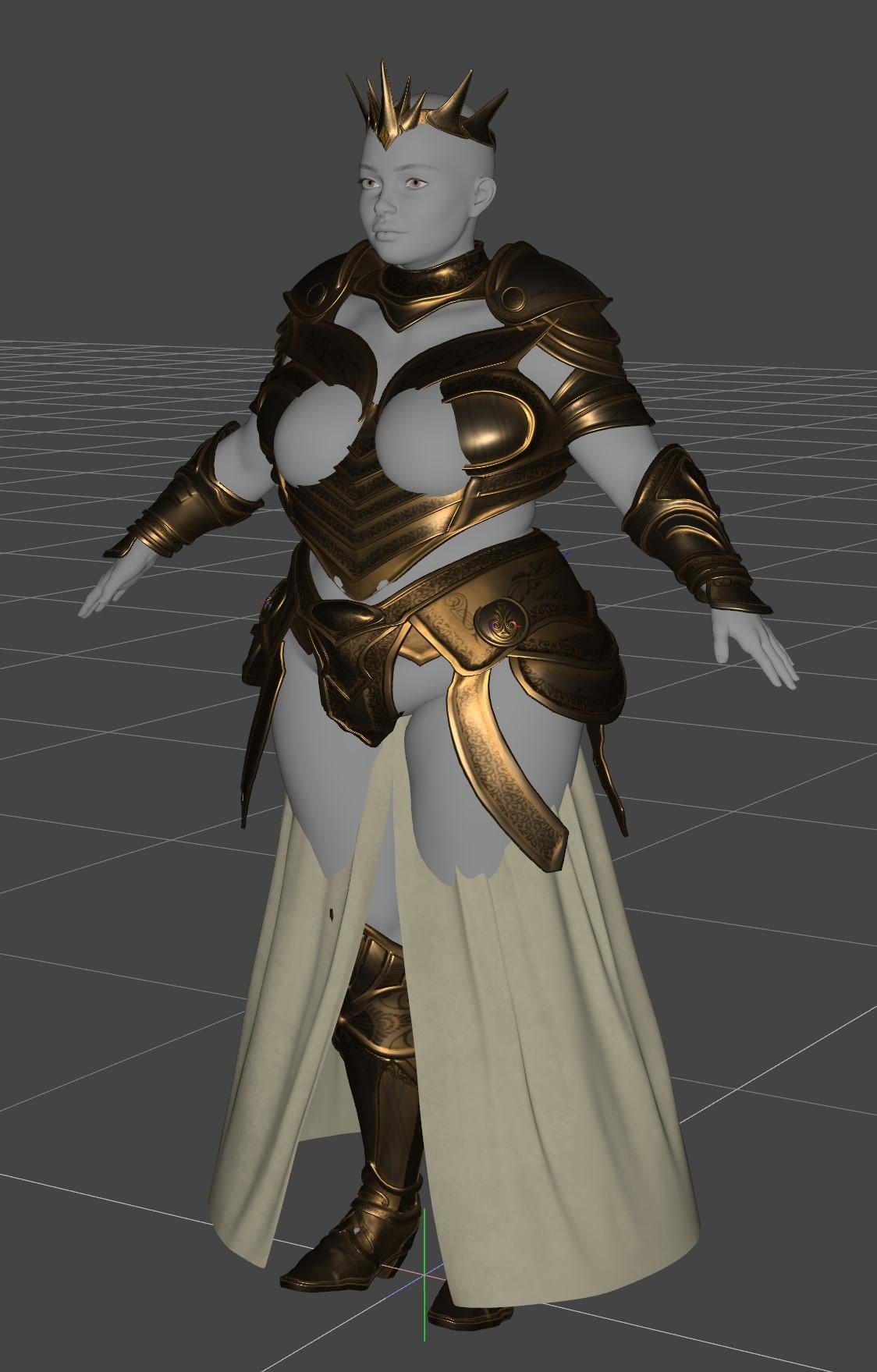
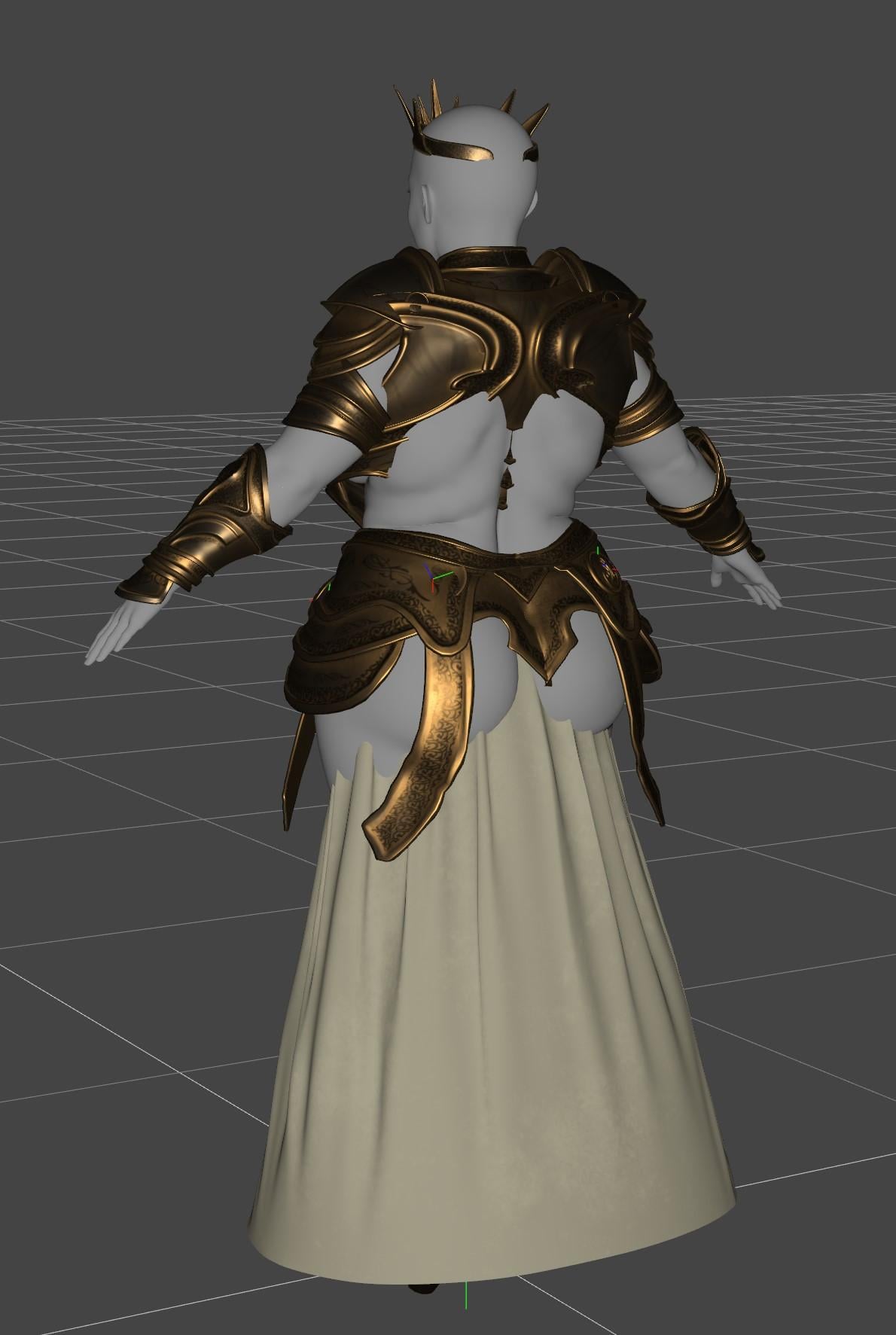
And there's no adjustments on the base outfit to correct this. And the other thing that full mesh rigidity does is completely stop Fit Control being usable either, because that itself relies on auto-follow transfer. I had to do a lot of tedious working-around using custom scripting to be able to get Fit Control morphs onto the outfit (which was not the key part of my fixes, but was a useful supplement to them)
Even if you try to use a fairly standard morph (this one below is "Breasts Large High" from the main DO morph pack), then because of a lack of shape support, you get clipping on both the front and on the back (although it's less noticeable in a still image, but the shape of the back also changes because that's how rigidity works, so it's now clipping through the pauldrons and into the small of the back).
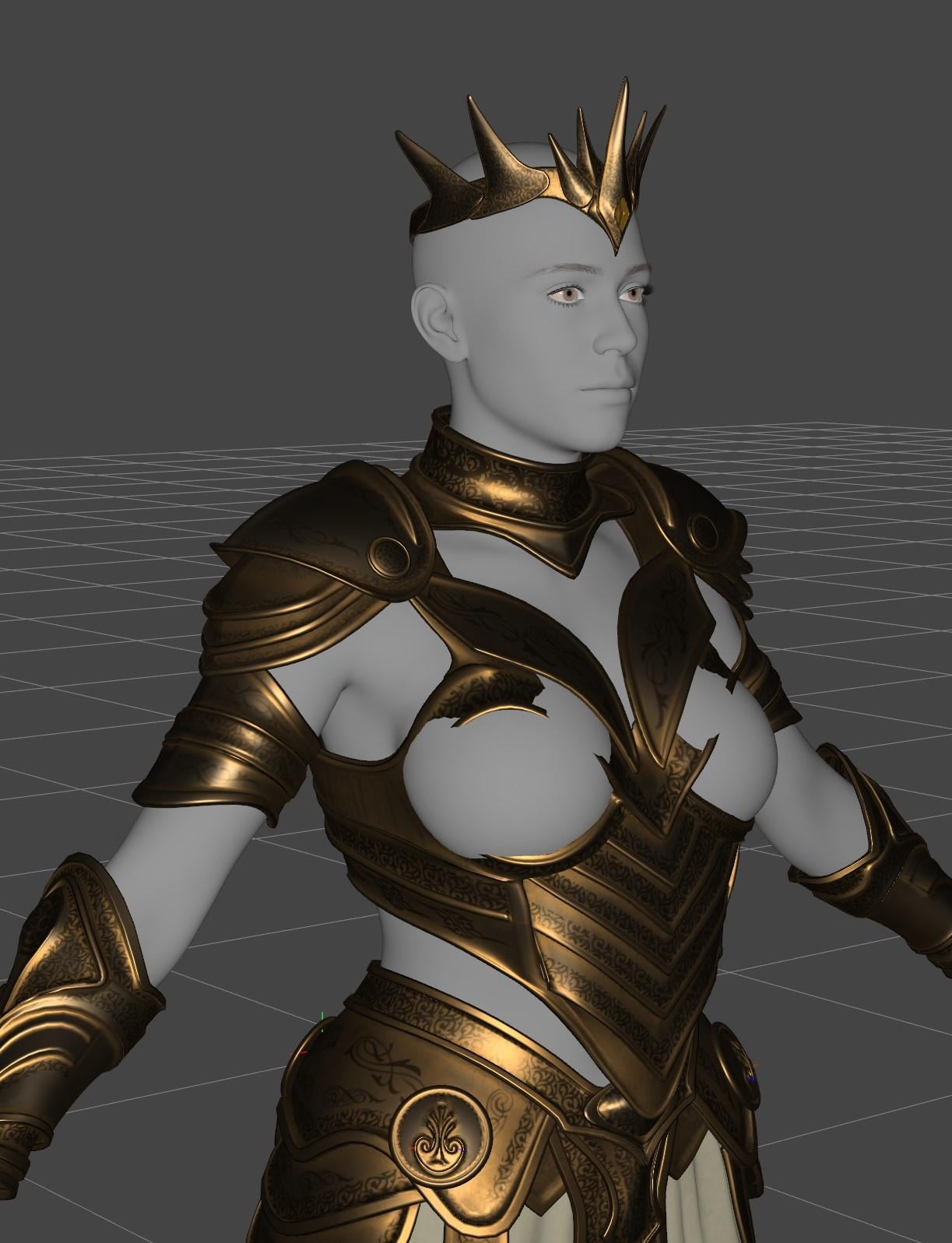
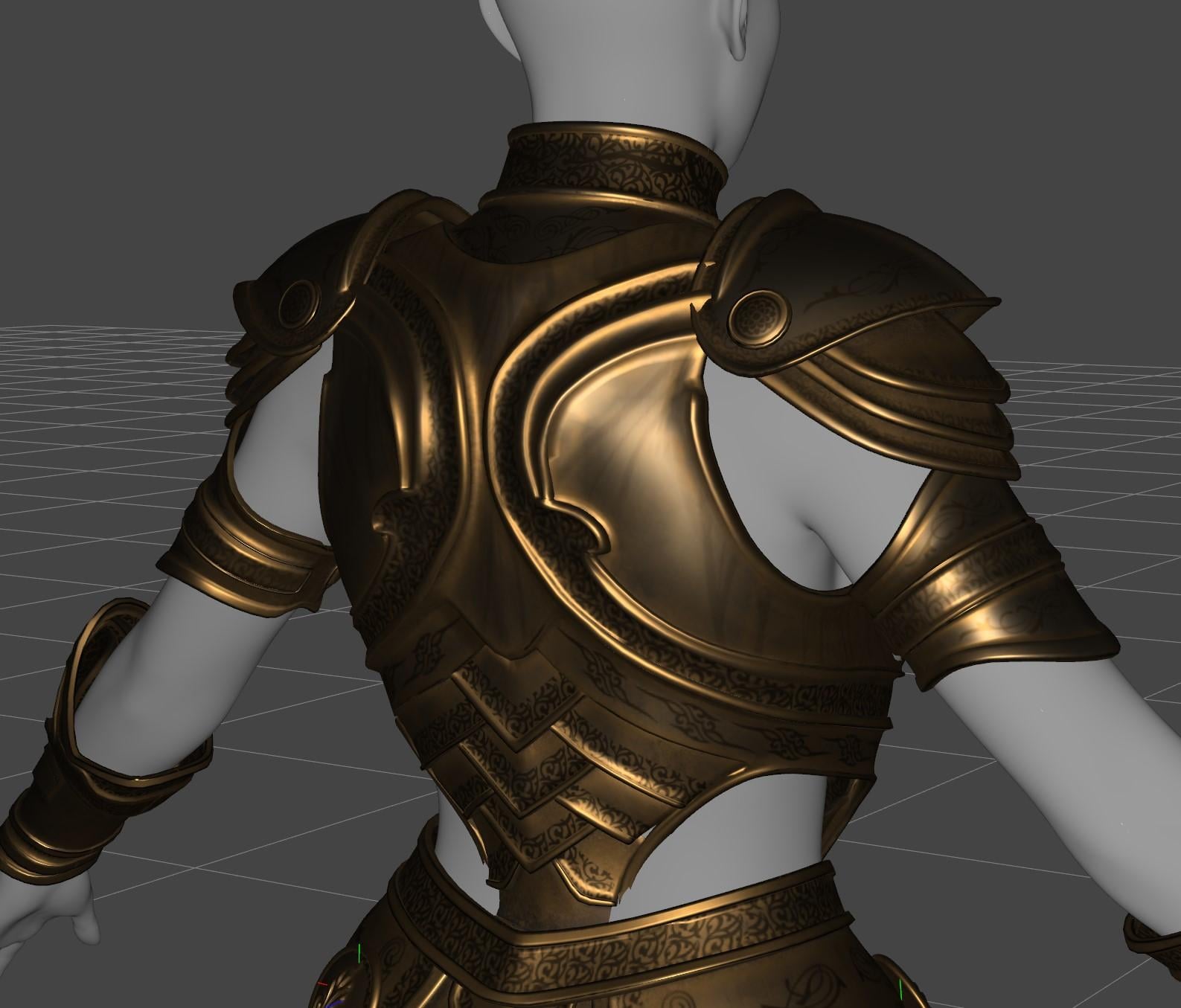
The outfits look good, but they're a nightmare to fit to any morphed shape.
I mean, if you look at the older https://www.daz3d.com/dforce-dark-crusader-knight-armor-for-genesis-9 - this is a comparison between how the rigidity messes up the following (layers in the wrong order, clipping all over the place, the collar being embedded in her neck) compared to how I think people would want it to actually be fitted (which is itself an auto-generated fit, but it's generated by some custom tools I made).
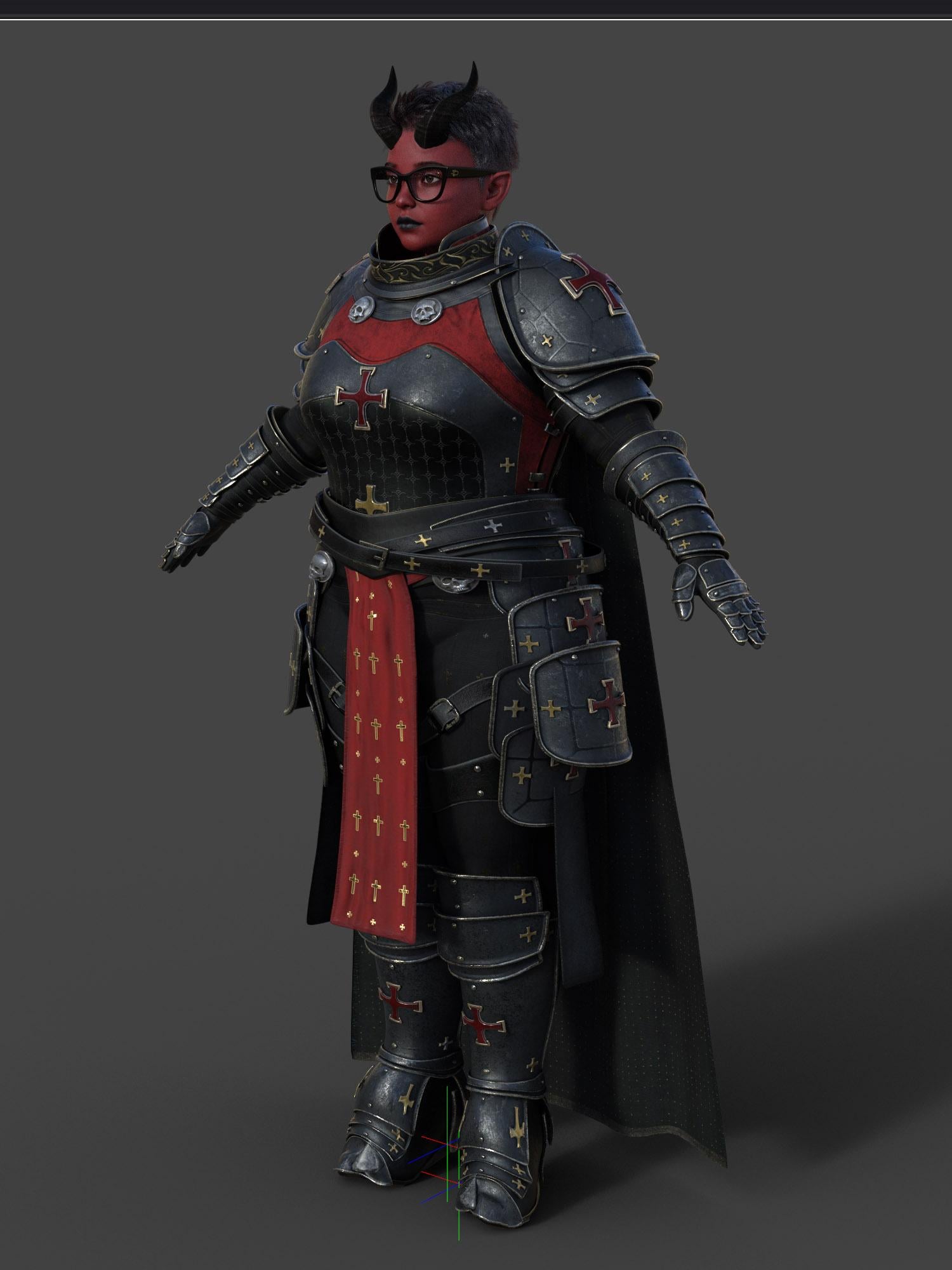
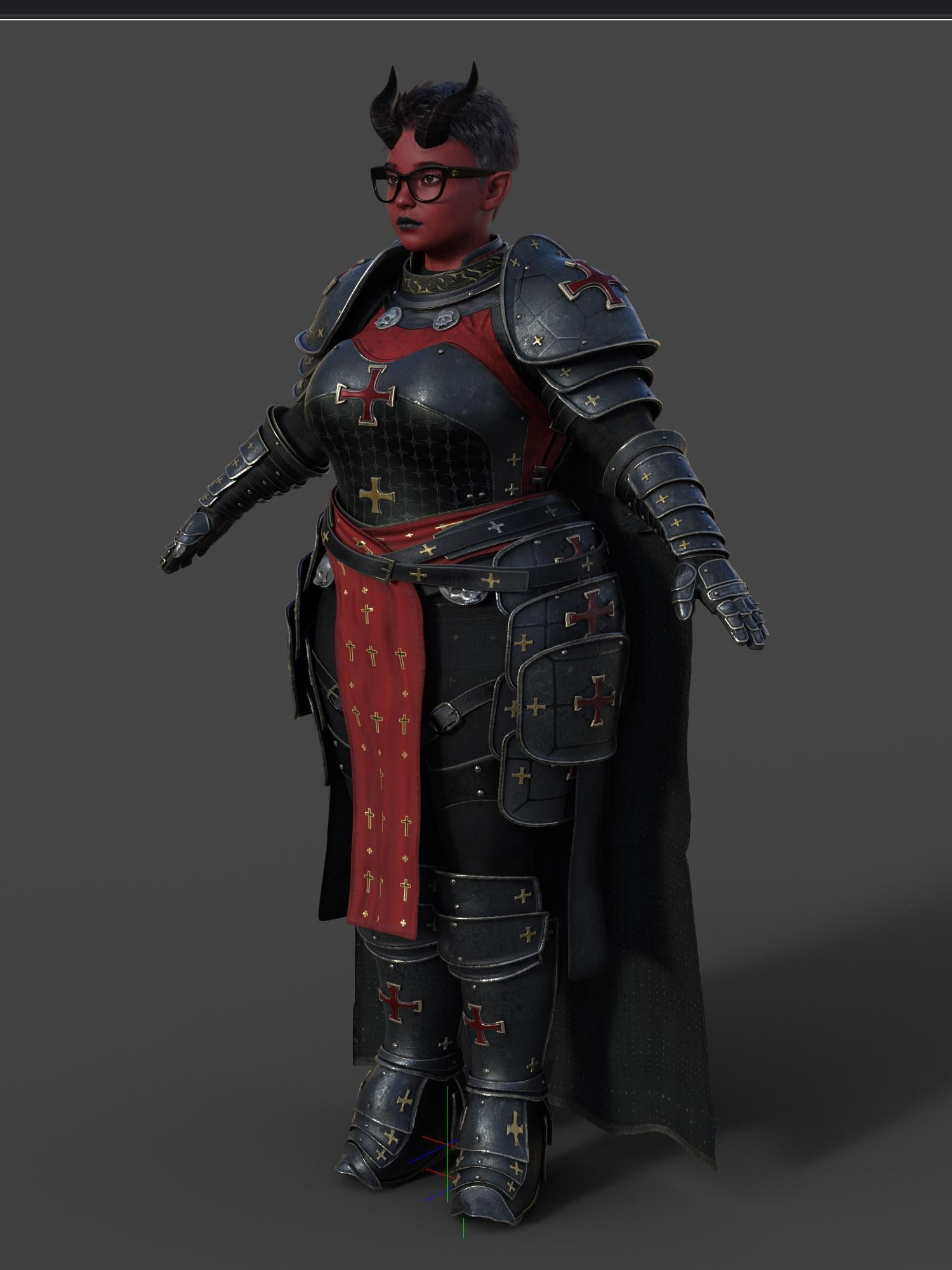 Making an object
Are there any good tutorials because loading the dialog tells me nothing about the purpose of Morph Loader Pro? When is it needed? I don't have anything dynamic going on here.
I've attached a piece of the final render using the bags. If I get bored, I'll create a decal with a big gold colored dollar sign and slap it on the bags. :)
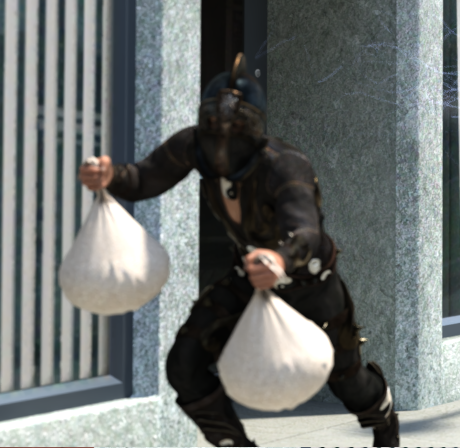 Making an object
No clue what Morph Load Pro is.
Geometry Editor did reveal one tiny polygon at the top of the box. Lassoed it and deleted it. And the box now only encompasses the bag itself.
And FYI, when building that I never hid any polygon. I was just deleting them as my simulation created frayed ends. :)
Brow Remover (Commercial)TaphneM said:
TaphneM said:
Leana said:
A lot of scripts need to be updated to work in DS6.
Thank you very much, Leana!
I wanted to add that after reading a topic: Genesis 3 and 8 to 9 Pose Converter (Commercial) - Page 12 - Daz 3D Forums where Richard and you are assisting someone and Richard mentioned the conversion:
 Richard HaseltinePosts: 110,955
emilynoelle said:
Hi! Very interested in the product, but can only use Daz Studio 6 due to my card; will the products in the bundle work?
Thank you!You could convert the poses in DS 4, then use them in DS 6. It's only GPU acceleration for Iray that is blocked in DS 4 if you have a 50x0 card.
It dawned on me to try that with the Brow Remover. Naturally, it still works in Daz 4 (I'm still learning new things}. I saved the brow results under the Material Preset and Scene Subset. I opened up Daz 6 and this process worked perfectly. One thing though, at first I tried to save as a Character Preset in Daz 4, but I am guessing due to morph reset or temp files, it did not transfer over the face files.
Update: This method no longer works. The Brow Remover package is disabled in Studio 6 as well.
Making an objectYea, even if the vertices (converted polygons) are hidden, they'll be exported so as to preserve the vertex count as well as UV. Then you still can import the exported object with Morph Load Pro.
Let's appreciate/discuss today's new releases - ongoinger still further threadI have found https://www.daz3d.com/dforce-warrior-queen-style-outfit-for-genesis-9 to be very disappointing on close inspection; like many of fjaa3d's other armours, they've just applied single solid rigidity groups across entire pieces of the set without any effort to add in enough shape support and adjustments to account for the fact that this largely disables auto-following (but also not entirely, and can actually cause problems as a result).
It took me a heap of effort to make the set even broadly fuctional on a body shape that deviated more than a minor distance from the base shape...
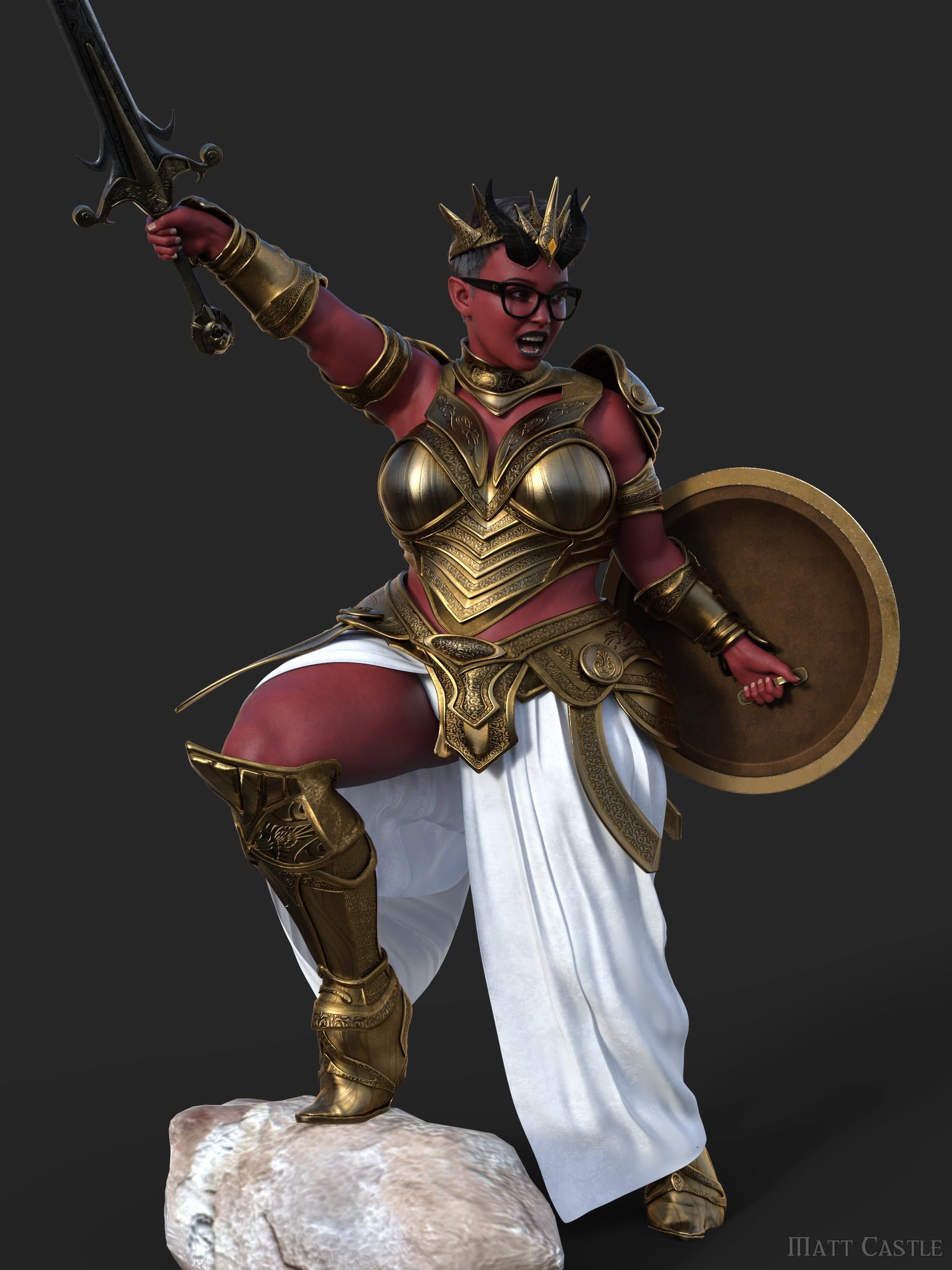
... and to be quite honest, if I'm having trouble getting clothes to fit something, then I'm pretty sure the majority of the userbase are going to have a time ranging betweem miserable to impossible.
I get that getting morph following to look right on a rigid subject like armour is tricky, but an incomplete solution that creates a whole heap of new problems is not a solution.
Ideas For New DO BundlesAnd they'd have to have a sensible projection morph because characters with small (ie ballet dancer size chests) look really silly with their tops bulging out above their sternums like a third breast. Regards, Richard.G8F DistortedThen those corrective morphs are not true culprits ~ so I still don't think your G8F has any issue in terms of its initial shape...
The issue of "missing files" seems coming from wrong ERC formulas defined in certain DSF file(s). If removing X-Transfer folder fixes the issue, that'll be great. But if it doens't fix it, I'm afraid you have to go thru the DSF files by using the exclusive method.
(solved) Incorrect bone rotation (G8)Problem: The last bone of the G8 thumbs does not bend correctly.
What did I do before the problem occurred:
1. morph-loaded a morph to a G8 figure
2. 'adjusted rigging to shape' (result: 1. image)It looked okay but the bending has a faulty result: 2. image.
For a more natural look (image 3) I changed the rotation (image 4).So it works but it looks strange. Maybe it will never cause problems, but... Im not sure.
Has anyone had similar problems? How did you solve that?Thanks in advance!
Prae-Trix Hair's Character...Who is she?I believe Hina for Genesis 9 | Daz 3D is who you are looking for.
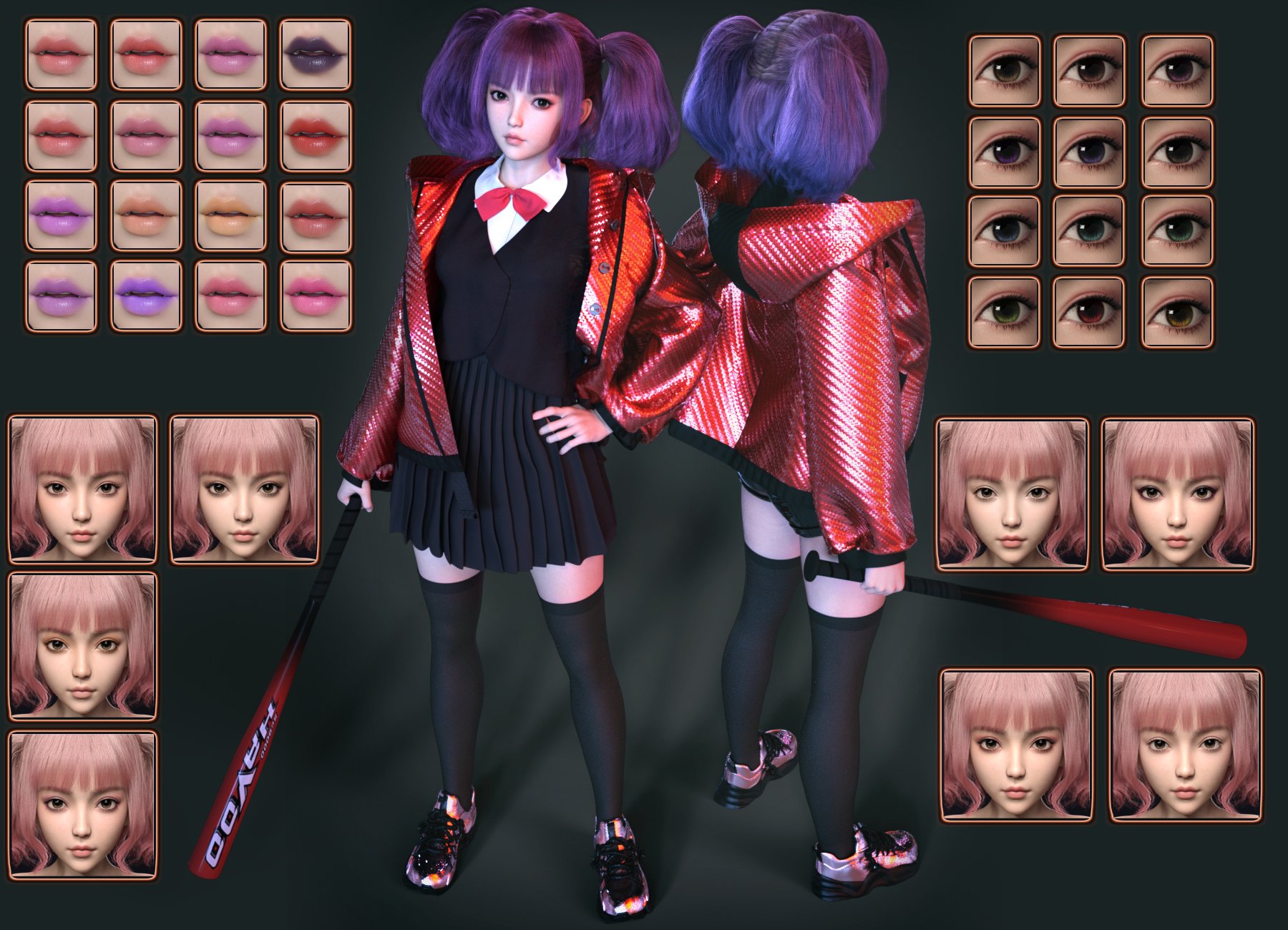
Now Look at the lips, 2nd Row, 4th Column, and there is the lip stick
Now Look at the Eyes, 3rd Row,3rth Column (or could even be 4th row, 3rd Column depending on the lighting used in the scene) and The Eyes are there (100% Certain is one of those two)
She also has the correct lip shape (or very close pre-additional head morph), though it is clear the Chin and Nose shape do not match 100% which means that it is likely blended with another character head, or just morphed with Chin and Nose morphs. Either way, if you have the right packages you should be able to make Hina Look just like that. (or VERY close)
Obviously the Brows do not match at all, but with G9's there are so many availabe variations of Fiber (or Card) Brows, that using them to ID a character is almost useless.
**Edit**(forgot to mention this) The Eyeshadow doesn't match up either. But I would say it is likely one of Hina's With an Eyeliner LIE applied, which could be from a number different PA's that have a "Cat Swoosh" type LIE.
****I take it back, No LIE is needed I loaded her up and that eye shadow is Definitely in there, Hina MU 01,02 or 04, would do it... though MU 05 has the best "Cat Shoosh" so it is probably that one(Need to Magnify your promo and zoom in to see the "Shoosh" better)****
IDing Characters that literally have NO blemishes is also difficult, but I do Feel that this is Hina, with about 99% certaintly. (espcially after finiding the eyeshadow in her Mats)
Also if you like this type of Porcelain skin, I'd have a look at some of These Characters By Noki Saki | Daz 3D .
(solved) Display error or duplicate bonesExactly. It has no geograft, only a morph that defines size, circumference, etc.
(solved) Display error or duplicate bonesIt is a character (G8F) in the zerroed/A pose, with a morph applied and the bones that are visible when activating the Joint Editor. I tarted with a clean scene.
Richard Haseltine said:
[..] What does the actual figure model look like?
Im not quite sure what that means. Humanoid? Female? I didn't cut off any limbs or merged them together.
G8F Distortedcrosswind said:
The G8F base figure in the OP looks normal to me and I don't think those XT properties bring problems to the base figure... Could you see any change on the figure if you zeroed them out?
I don't have X-Transfer but I ever saw quite a few threads showing issues resulting from it... It seems that zev0 gave up fixing / updating their script products... e.g. Camera Magic Plus, My Favorite Script... that I bought still have critical bugs not fixed up to now ~ and they didn't response from a certain time point in their commercial product threads... sigh.
Anyway, you also can test it by: temporarily moving the folder : /data/Daz 3D/Genesis 8/Female/Morphs/XTransfer/ to another location. Clear DSON cache, then load G8F base, see if there's any issue.
"Could you see any change on the figure if you zeroed them out?"
Nope.
(solved) Display error or duplicate bonesI created this – display error or copied bones structure? I'm not sure which of the two.
What I did: I created a morph that doesn't fit the standard bone structure (after some export-imports). So I used the joint editor to "adjust the rigging to shape" – and after that, it looks like this. There is a selectable new bone structure and the original structure that is not selectable, hideable or anything else.
Closing DAZ and reopening the file did not change the effect.
Does anyone have an explanation or suggestion on how to solve this?
Thanks in advance
Isabella 9I like the softness of her face and that she's got something of a fifties pin up about her. Very nice hairs in the bundles, dresses (not the armor, geeee ....) also good. But as others said elsewhere, we've had all of this before, in hundreds of variations, The character bundle went on my WL, basically for the hair and for the character morph.
Daz 3D is part of

Connect
DAZ Productions, Inc.
7533 S Center View Ct #4664
West Jordan, UT 84084Licensing Agreement | Terms of Service | Privacy Policy | EULA
© 2026 Daz Productions Inc. All Rights Reserved.