(solved) Display error or duplicate bones
 lina.catfish
Posts: 84
lina.catfish
Posts: 84
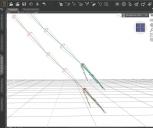
I created this – display error or copied bones structure? I'm not sure which of the two.
What I did: I created a morph that doesn't fit the standard bone structure (after some export-imports). So I used the joint editor to "adjust the rigging to shape" – and after that, it looks like this. There is a selectable new bone structure and the original structure that is not selectable, hideable or anything else.
Closing DAZ and reopening the file did not change the effect.
Does anyone have an explanation or suggestion on how to solve this?
Thanks in advance

Daz 3D is part of 
Connect
DAZ Productions, Inc.
7533 S Center View Ct #4664
West Jordan, UT 84084
Licensing Agreement | Terms of Service | Privacy Policy | EULA
© 2026 Daz Productions Inc. All Rights Reserved.
Comments
It isn't two figures in the same pose? What does the actual figure model look like?
It is a character (G8F) in the zerroed/A pose, with a morph applied and the bones that are visible when activating the Joint Editor. I tarted with a clean scene.
Im not quite sure what that means. Humanoid? Female? I didn't cut off any limbs or merged them together.
We can't see the mesh at all, I assume it hasn't sprouted an extra pair of arms in the geometry? There is a Create>Dupliate Bones command in the right-click menu, but that is nowhere near Adjust Rigging to Shape.
Exactly. It has no geograft, only a morph that defines size, circumference, etc.
Looks like ghost bones, the previous position of the original rigging. Memorize Figure Rigging should get rid of them, since there will no longer be a previous alignment.
If you don't really want to lose the original rigging, you can hide them in Tool Settings while the Joint Editor Tool is active. Look for Bone Ghosting at the very bottom.
If you hit Ctrl + 9 to have Texture Shaded drawstyle, you'll clearly find Bones in red which is Bone Ghosting... Uncheck Bone Ghosting option in Tool Settings if you don't want to see them ~
Yes! Because they disappeared after the ghost bone box was unchecked, I assume they were ghost bones. Thank you all!
Does that mean they're there every time and I just made it invisible? (slightly speculative of course :))
And what is their function? To switch between the original and the new if necessary?
If you uncheck Bone Ghosting option, its status will be saved in Windows Registry, so you don't need to touch it next time unless you want to see them by checking it again ~~
In short, their function is to show you the rigging that was already momorized. So when you tweak the rigging of bones, you can check their original rigging by showing the ghost bones.