(solved) Incorrect bone rotation (G8)
 lina.catfish
Posts: 86
lina.catfish
Posts: 86
Problem: The last bone of the G8 thumbs does not bend correctly.
What did I do before the problem occurred:
1. morph-loaded a morph to a G8 figure
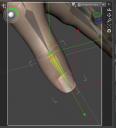
2. 'adjusted rigging to shape' (result: 1. image)
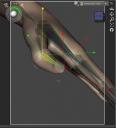
It looked okay but the bending has a faulty result: 2. image.
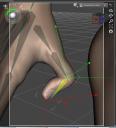
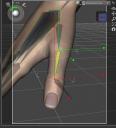
For a more natural look (image 3) I changed the rotation (image 4).
So it works but it looks strange. Maybe it will never cause problems, but... Im not sure.
Has anyone had similar problems? How did you solve that?
Thanks in advance!

Daz 3D is part of 
Connect
DAZ Productions, Inc.
7533 S Center View Ct #4664
West Jordan, UT 84084
Licensing Agreement | Terms of Service | Privacy Policy | EULA
© 2026 Daz Productions Inc. All Rights Reserved.
Comments
In the 1st image you attached, you can see the bounding box in white has a wrong orientation... which means the bone of thumb has a wrong rigging in terms of Orientation ~~
You either can manually tweak Orientation values in Tool Settings with Thumb 3 selected (undo Adjust Rigging to Shape, then you can find the original Orientation values in Tool Settings..)... or do Adjust Rigging to Shape again by just selecting Thumb3 as well as ticking Adjust Orientation option. Then Memorize Rigging after everything looks fine.
Thank you! Good to know where to look for troubleshooting. I hadn't paid attention to the box at all.
... and that's the part where I see: I can't explain. I wanted to say: I manually turned the bone so that it had an acceptable result (picture 3). But the bone itself then looked wrong (Fig. 4). - This information was somehow lost in my private English :) Sorry.
What I did: I started with a comparison original - 'adjusted' in the tool panel - and saw there was a lot of changes in the bone rotation which didn't made sense (in my opinion!). E.g.: Lengthen the forearm should'nt need rotation changes in the hand skeleton...
And really I missed a function like in the parameter tab: reset. Daz *has* the original values and should be able to reset values to the original. But: no option to do this
In short, it looks like I involuntarily changed the bone rotation in the automatic 'adjust'. A few 'new scenes' later, I recognised this as the original mistake.
Thank you for troubleshooting!!