-
Daz Studio 2026 Beta - version 6.25.2026.6423! (Updated March 09, 2026)
Unfortunately, I don't understand any of that. I don't know what avatars and node avatars are, or what Filament has to do with the issue I see in Texture Shaded mode. I think I initially misunderstood the message I responded to. My problem is with cameras, not spot lights. If the camera selected in the viewport has its visibility eye closed (visibility off) the scene is unlit (black). Toggling Show Preview Lights has no effect. Camera visibility did not affect Texture Shaded scene lighting in DS4. Is that an intentional change in DS6? It has been confusing and frustrating to figure out that camera visibility can make the viewport black and impossible to work in.DoctorJellybean said:barbult said:
TromNek said:
I still have a problem with turning off the 'Display in Viewport' in Daz 2025.
When I do that the light does not emit light in my scene (it used to emit in 4.x)
I like a lot of lights to light up small little areas in my scene. But without the ability to 'Display in Viewport'->Off, they clutter up my scene and I can't see to manipulate objects well.
Is there anyway to change the display of the 'white lines' to be invisible ?
Like add a material to the light and then set transparency to zero ?
Yes, I have the same issue. I am interested to hear that I am not the only one unhappy with the change. I believe the developers are aware of it. I don't think it has been determined whether it is a bug in DS6, or a correction to an error in DS4, or something else. We'll have to wait for the developers to investigate it.
It is not a bug in 6.x, it is a correction to a bug (unintentional) in 4.x
What 4.x did would be a feature request (making it intentional) for a "Display Avatar" property that could be used to toggle display of a node's avatar - to align it with the Drawing > Draw Avatars property in the Draw Settings pane for the Filament DrawStyle, and the Drawing > Draw Node Avatars property in the Draw Settings pane for the NVIDIA Iray DrawStyles). So explaining that reveals an inconsistency in the labeling of the Draw Avatars vs Draw Node Avatars properties - the Filament DrawStyle property needs to be relabeled to Draw Node Avatars to be consistent.
Is there any way to see how the character looks in the viewport?The viewport can have different styles: iray preview, texture shaded, Filament/Filatoon, wireframe, etc.
I guess you mean the texture shaded view (in which case no, there are no promos for that as it's meant to be rendered).
Daz Studio 2026 Beta - version 6.25.2026.6423! (Updated March 09, 2026)barbult said:
TromNek said:
I still have a problem with turning off the 'Display in Viewport' in Daz 2025.
When I do that the light does not emit light in my scene (it used to emit in 4.x)
I like a lot of lights to light up small little areas in my scene. But without the ability to 'Display in Viewport'->Off, they clutter up my scene and I can't see to manipulate objects well.
Is there anyway to change the display of the 'white lines' to be invisible ?
Like add a material to the light and then set transparency to zero ?
Yes, I have the same issue. I am interested to hear that I am not the only one unhappy with the change. I believe the developers are aware of it. I don't think it has been determined whether it is a bug in DS6, or a correction to an error in DS4, or something else. We'll have to wait for the developers to investigate it.
It is not a bug in 6.x, it is a correction to a bug (unintentional) in 4.x
What 4.x did would be a feature request (making it intentional) for a "Display Avatar" property that could be used to toggle display of a node's avatar - to align it with the Drawing > Draw Avatars property in the Draw Settings pane for the Filament DrawStyle, and the Drawing > Draw Node Avatars property in the Draw Settings pane for the NVIDIA Iray DrawStyles). So explaining that reveals an inconsistency in the labeling of the Draw Avatars vs Draw Node Avatars properties - the Filament DrawStyle property needs to be relabeled to Draw Node Avatars to be consistent.
My Character and some other in Saved .duf Scenes Shifted UPWARDS by 10-20cm!Fishtales said:
nimonsi said:
And it's not a problem with the height, as I initially thought. If it were the height, she would be floating in the air, but she is standing on the floor. However, her hand is positioned higher!
It looks like the floor has moved as there are no shadows from anything showing and they all look as if they are floating.
no, it's just filament, in iray shadows are the same
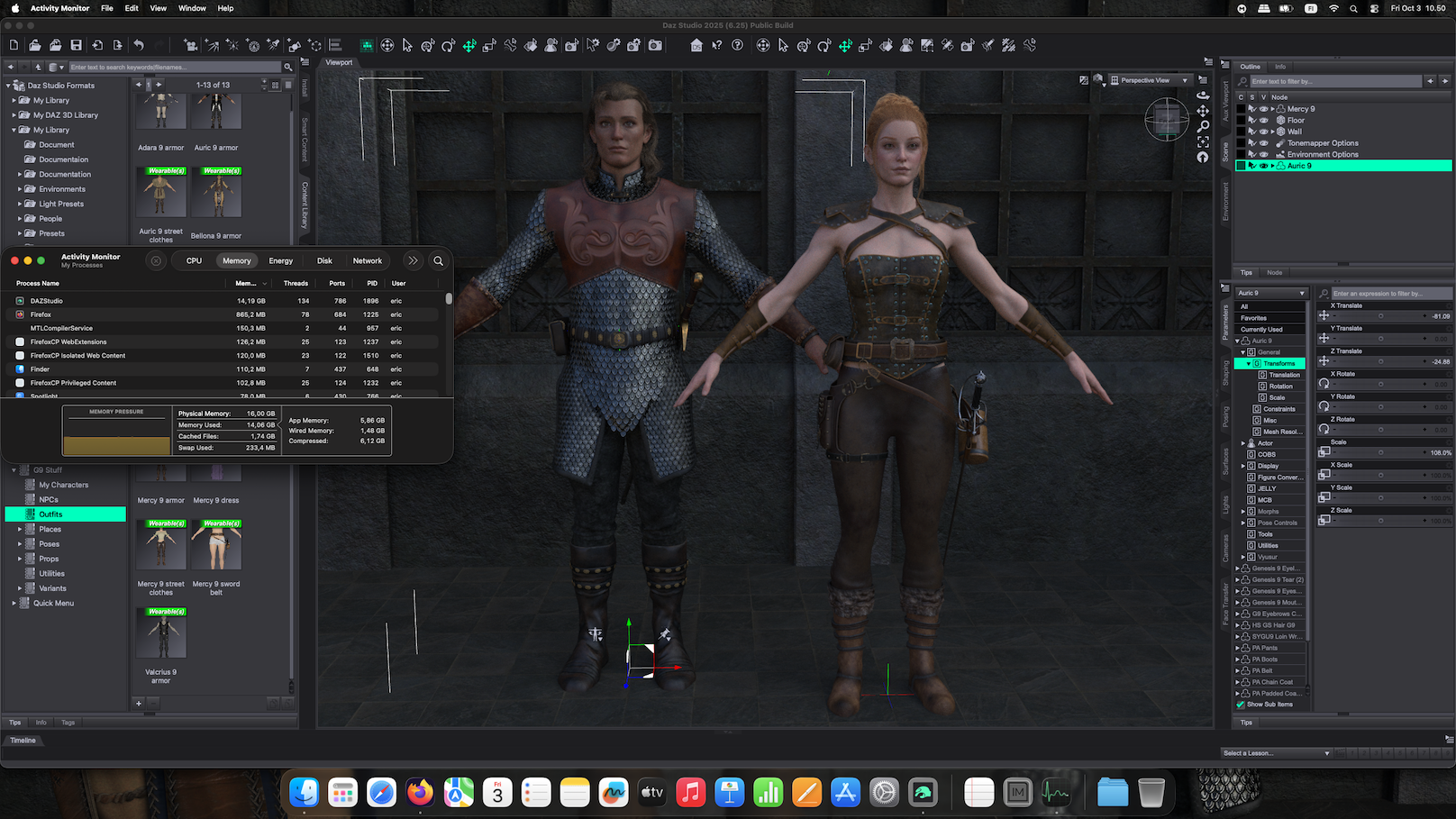
Daz Studio 2026 Beta - version 6.25.2026.6423! (Updated March 09, 2026)I'm using an M4 Macbook Air. I wanted to test if I had the same runaway memory issue mentioned above, so I backed up the September 19 alpha and installed the October 2 alpha. I loaded 2 custom Genesis 9 characters with typical (at least for my renders) clothing and hair in a simple scene with a floor and a wall. I tested with Texture Shaded, Filament and Iray over a period of about 20 minutes (screenshot below is of Iray after the scene was open 20 minutes). The memory usage for Daz leveled out at about 14 GB when in Iray, maybe 12 GB for texture shaded. I saved that scene and tested it in the backed up September 19 alpha. Memory usage there was about a gigabyte lower (13 GB with Iray), but I suppose that's not a huge difference overall. Not sure if specific items, etc. in other people's scenes might trigger a memory leak that I'm not seeing, but at least for my M4 mac, I have not scene it yet.
 Any chance of DAZ supporting AMD or Intel cards for rendering?
Masterstroke said:
While great for previews, Filament is hardly a replacement for propper rendering.
So, I really don't understand, why Filament is even worth mentioning.
BTW
Implementing IRAY has been a mistake, pushing DAZ Studio into a corner, stripping users off choices.
We are limited to Iray and limited to Nvidea.Well, some people aren't fixated on photorealism, and therefore aren't "limited" to iRay and Nvidia. Some people find toon renders and animations to be propper [sic] rendering and even prefer it to iRay. People were doing incredible 3D renders years before iRay was created and have continued doing them without iRay, even now.
Still, nothing stops anyone from moving their DAZ content to Blender (or Maya, or C4D, or Unreal, or Unity) and doing amazing stills and animations, without iRay. DAZ implementing iRay wasn't a "mistake" anymore than it was for any one of us to hang all our hopes and dreams on iRay. I'm not a fan of nor do I normally use Iray but I appreciate the incredible things people are doing with it here every single day, it's inspiring. Not once have I felt stripped of choices.
Any chance of DAZ supporting AMD or Intel cards for rendering?WendyLuvsCatz said:
Filament uses my integrated Intel graphics on one of my computers (confirmed by GPU-Z)
it uses BOTH my Nividia card AND my AMD Vega graphics on my other one (and looks considerably better as a result, no blocky shadows )
While great for previews, Filament is hardly a replacement for propper rendering.
So, I really don't understand, why Filament is even worth mentioning.
BTW
Implementing IRAY has been a mistake, pushing DAZ Studio into a corner, stripping users off choices.
We are limited to Iray and limited to Nvidea.October, 2025 - Daz 3D New User Challenge - Atmosphere, Ghosts and Special EffectsThere are many products in the DAZ store which can be of help. You are not required to purchase any of these products to create your images. They are simply being listed for your convenience and/or inspiration. The promo images are also excellent examples of atmosphere using props and/or lights. Below is just a small sample.
DAZ Studio - Iray
Fast Fog Iray 2: Electric Fogaloo -
IG Iray Dawn to Dusk 2 Atmospheric Lighting
FSL Rigged and Morphing Atmosphere Props and Shaders
Cinematic Light FX plus Atmosphere
Epic Props: Godrays & Volumetric Light for Iray
SY Fast Fog and Atmosphere Iray
DAZ Studio - 3Delight
Above the Fog for Iray and 3Delight
Expanded Godrays - Celestial Bodies
Heavy Rain for 3Delight and Iray
Daz Studio - Filament
Poser
Bryce
Some other items that may be of help in this Challenge:
Composition helpers:
Bryce: http://www.daz3d.com/golden-rules-composition-helpers-for-bryce
DAZ Studio: https://www.daz3d.com/canary-s-composition-helpers
Also, DS has a built in thirds golden rule.
Here are various links to other things that may help you in this month's challenge. Credit is given to Szark for this wonderful thread.
Tutorials by Szark https://www.daz3d.com/forums/discussion/2765/time-for-sharing-what-i-have-no-idea/p1Using Genesis 9 method to practice drawing by handMy primary use of DS is referencing figures for hand drawings. If you're not picky with lighting, viewport renders (doesn't need to be Filament) are sufficient. I sometimes use a clothed figure, usually they're bald. Backgrounds and props are only added, if they’re intended to be part of the drawing.
For poses, you can either use pre-made ones or find/Google pics of the poses you want and pose G9 to match. Since this is DS, you can then move around the viewport to get the angle you want.
When I draw, I lightly sketch (to where it's easy to erase) the basic shapes of the human figure first. Then, slowly add the details afterwards.
When I use PowerPose from time to time the posed character suddenly disappears in filament view modeIt is a known issue that filament has troubles with multiple layers of transmapped geometry, for example hair ribbons. Most geografts also use a transmapped shell to merge materials, this could be the culprit. You may try disabling the geograft shell while animating, then enable it for rendering. Just an idea hope it helps.
p.s. iirc there's also some way to bake the shell so it's not required anymore, but can't find how right now, it's probably using map transfer.
p.p.s. If I understand correctly, texture baking is based on 3delight so this will be removed in DS 4.24 and not available in DS 6.
 When I use PowerPose from time to time the posed character suddenly disappears in filament view mode
Does anyone have a solution to this? I've been waiting patient in the background for a fix. For me its time based. it always happens affter about 30 min of filament maniupulation during animations.. I use grafts and the mesh hand tool a lot. It feels like it fills a buffer then just fails. I ahve to completely close the program and reopen to reset it. all of the other view modes work when this happens. Is there a buffer setting somewhere?! I just changed from a 3080 to a 4090 with a much bigger vram but it didnt help.
Any way to make 3Delight RSL match the viewport when rendering?Using the Headlamp (should be on When No Scene Lights in the General group of Render Settings>Editor tab by default) and no other lights will always look the same, but not ncessarily good. You could also parent lights to a camera that you use for rendering, and then have other cameras set up for each view you want and copy/paste from one of those to the render camera for each switch.
The OpenGL preview is very basic, there are a lot of features (most notable shadows and fall off) that it does not implement so it is very limitied.
If you are on Windows and a recent version of DS you could try Filament, For mac you would need to use the DS 2025 Alpha to get that - it has limits but it is faster (and can use the GPU).
Daz Studio 2026 Beta - version 6.25.2026.6423! (Updated March 09, 2026)IceCrMn said:
With Universal you can set your sofa to a different draw style than your character so it's easier to see both so you can do your posing.
Select one of them, the sofa for example, and on the Parameters" pane look for "DrawStyle Override"
Change that something like "Hidden line" or one of the other drawstyles.
Now when you select "Universal" your sofa will draw with a different drawstyle than the other things in the scene.
Interesting, thanks. I can see that helping during posing, the result is similar to what I've been doing by switching to filament when things look too similar in texture shaded. I'll try it if I ever find a situation where my normal methods aren't working for me. Cheers!
Daz Studio 2026 Beta - version 6.25.2026.6423! (Updated March 09, 2026)Richard Haseltine said:
jjb24 said:
Pickle Renderer said:
Oh. Just looking at this. Texture Shaded is nice. You should remove Filament
 . Not sure what Universal is. Maybe answered in this thread. Somehow does seem to load characters faster.
 I realize you're joking with the smiley face but I find both texture shaded and filament useful because they interpret colors differently. I am currently working on a scene where a character's clothing and the couch they are sitting on are the same color in texture shaded making it hard to pose the character but in filament they look quite different making it much easier to pose the character. I also don't know what universal is and perhaps I'm missing something subtle but to me it looks the same as texture shaded.
For Universal, see https://www.daz3d.com/forums/discussion/comment/9137796/#Comment_9137796
While I appreciate the reference I have to admit I don't understand what it says or how to use it. No need to explain it, I don't think I have the skills or a need to use it anyway. I'm set using texture shaded to build scenes, filament in rare situations when texture shaded makes different objects look too similar, and I render using iray. Cheers!
Daz Studio 2026 Beta - version 6.25.2026.6423! (Updated March 09, 2026)jjb24 said:
Pickle Renderer said:
Oh. Just looking at this. Texture Shaded is nice. You should remove Filament
. Not sure what Universal is. Maybe answered in this thread. Somehow does seem to load characters faster. I realize you're joking with the smiley face but I find both texture shaded and filament useful because they interpret colors differently. I am currently working on a scene where a character's clothing and the couch they are sitting on are the same color in texture shaded making it hard to pose the character but in filament they look quite different making it much easier to pose the character. I also don't know what universal is and perhaps I'm missing something subtle but to me it looks the same as texture shaded.
For Universal, see https://www.daz3d.com/forums/discussion/comment/9137796/#Comment_9137796
Daz Studio 2026 Beta - version 6.25.2026.6423! (Updated March 09, 2026)Pickle Renderer said:
Oh. Just looking at this. Texture Shaded is nice. You should remove Filament
. Not sure what Universal is. Maybe answered in this thread. Somehow does seem to load characters faster. I realize you're joking with the smiley face but I find both texture shaded and filament useful because they interpret colors differently. I am currently working on a scene where a character's clothing and the couch they are sitting on are the same color in texture shaded making it hard to pose the character but in filament they look quite different making it much easier to pose the character. I also don't know what universal is and perhaps I'm missing something subtle but to me it looks the same as texture shaded.
Daz Studio 2026 Beta - version 6.25.2026.6423! (Updated March 09, 2026)Pickle Renderer said:
Oh. Just looking at this. Texture Shaded is nice. You should remove Filament
. Not sure what Universal is. Maybe answered in this thread. Somehow does seem to load characters faster. Filament is not likely to go away, it is a very popular option (Mac users were very happy to get it with DS 2025). Texture Sahded is useful too, and does require fewer system resources. Use the one that suits your needs.
Daz Studio 2026 Beta - version 6.25.2026.6423! (Updated March 09, 2026)Oh. Just looking at this. Texture Shaded is nice. You should remove Filament
. Not sure what Universal is. Maybe answered in this thread. Somehow does seem to load characters faster. Starting Over and Overwhelmedhjake said:
whispers65 said:
hjake said:
If a DAZ product that you own has only iRay (MDL) materials then you could consider these converters:
Please note that 3Delight will not be supported in DAZ Studio 2025.
NOTE: 3Delight materials are RSL.
What will be supported? Thanks for the tip!
I think the focus will be Nvidia Iray and Google Filament. Filament is a fourth method for rendering in DAZ Studio.
https://www.daz3d.com/filament-information-page
https://www.daz3d.com/forums/discussion/690191/what-is-filament
https://google.github.io/filament/dup/intro.html
https://blenderartists.org/t/google-releases-open-source-rendering-engine-filament/1121322
Thanks. Iray is the only thing I have experience with or did have anything. I'll check out filament with the links you gave.
Face Control for Genesis 9 Product IssueYou see black in Viewport because a Script from Face Control (when you load 3DU Face Control ADD with Camera) switches Draw Style to Texture Shaded....
You just need to switch back to Filament draw style...
Daz 3D is part of

Connect
DAZ Productions, Inc.
7533 S Center View Ct #4664
West Jordan, UT 84084Licensing Agreement | Terms of Service | Privacy Policy | EULA
© 2026 Daz Productions Inc. All Rights Reserved.















