-
No Face Transfer Pane
I am on pc 64bit and installed Daz4.20 pro . WHy dont I have the face transfer in windows>panels.I have not purchased the face transfer unlimited yet . But I saw on the internet that it comes by defualt with 3 image limit
FBX morph export rulesOoookay, i'm clueless.,.
made a character with tons of morphs. Now i need to fbx export it.
How mashed chocolate cake do i make/set rules?
Loading Partial MorphsPadone said:
Ok that was to understand things, I'm always very interested in your work. As for automatic smoothing I simply use: weight > smooth, very easy to adjust as desired.
I don't always have anything to say, but I always listen to the info you give to others.
And I've never investigated the weights menu in weight paint mode... I've already got the morph I wanted that started all of this, but just to learn something new, I'll try it your way and see how it compares.
Loading Partial MorphsPadone said:
It's a custom weightmap you can smooth the borders as you wish in weight paint. The geometry density is not a factor. Or I miss what you're meaning so a practical example would help everyone to understand the benefits over the blender tools. You could do a comparison that works with the plugin but it's not possible to do with the standard morphs.
Hi Padone,
No, I'd say you are understanding correctly. There is nothing the addon can do that Blender can't already, so your analusis is fair. I do think there is an advantage over weight painting because the falloff is a simpler, one-dimensional parameter that can be used to smooth the transition. Simply move the slider until it looks right. You don't ever even have to change modes. Weight painting seems like an overwrought approach when the only concern is the transition edge. I'll always take a procedural solution over an artistic one.
As usual your comments are well received, but also appreciate that while I find this tool easier, and it solved my morph problem, I was trying to teach myself how to write an addon as a didactic matter, more than necessarily a practical one.
I've also added x,y, and z biases to nudge the shape key in directions, and still respect the fallof to blend smoothly. Soon, I'll add a "live link" that will get rid of the hassle of exporting from DS to Blender and back, with all the correct settings, using a re-write of Sagan in anticipation of DS5.
Thanks again for your input.
Is there a texture set similar to men-of-the-year for V3?Which view is that screnshot? Looks like a Product view. It will only show the products for Men of the Year. The Expressions, and anything included with M3, are in the Michael 30 Base product. Keep in mind this is a 20-year-old product, and support is quickly dwindling.
Unfortunately, the shapes require that Michael 3.0 Head Morph pack to work. The files inject the needed morphs to get the shape, and there is no way around that. The shape files are anything starting with a "+_", but it is a moot point as you do not have the head morphs. Sorry. Also prevents you from putting Asian eyes on him, needs those head morphs. The requirements on the older products have mostly been lost since the last store shange, not your fault.
The textures should still work, they are all the A_D3M3, A_Hiro, B_D3M3, B_Hiro, etc., up to L_.
ART is lighting, Style and +Sassy are for Sassy Hair 2.
The Expressions actually come pre-loaded with M3, no need to inject them. The INJ files are there for when computing power was primitive and you could REMove morphs if you didn't need them, or add them back again. Anyway, select the Head, and there should be a Morph group on the Parameters tab with all the available Expressions. The "Poser Formats -> [library] -> Pose -> !M3 All Morphs INJ -> ALl Expressions" should be there if you installed normally to your [library]. (That's an "ALL" not "ALI", I let go of the shift key a hair early).
Is there a texture set similar to men-of-the-year for V3?Notrhof45, As for-I am trying to figure it all out for the Men of the year
I took screen shot of all the many icons in the set, can you cirlce the ones that will give me just the shape-which the ones that are for just material
I had the head selected and currectly used in parameters like you suggested but it didnt show any new morph (shown in image)
I couldnt find Poser Formats -> [library] -> Pose -> !M3 All Morphs INJ -> ALl Expressions
the second image shows what I can find
Im having trouble putting an exprerssion on M3's face-sorry I tried to follow what you said but couldn't figure it out
Other question is there a way to put asian eyes onto M3?
thank you for all your help
BTW - I did try a International Beauties Skin Texture on M3 it works on the male version and looks pretty good-thanks for the tip!
Any chance of seeing NEW characters for G3? G2?There are products in store which helping you to use G8 wardrobe on earlier genesis family . For character and morph you better find it in another place and even in freestuff site like Sharecg
DAZ products mostly shipped with hi rez textures, so maybe you can doing manual batch resizing or using some script like Scene optimizer ,if the render time caused the problem
TBH unless for toon render - I tend to render my scene in Blender right now . It takes time to learn it but I believe thats worth your time rather than fight with your hardware limitation when using IRAY
Defect on the joints of the clothesiacoposk8 said:
Catherine3678ab said:
iacoposk8 said:
Catherine3678ab said:
iacoposk8 said:
Catherine3678ab said:
You can use dForce to help make some of the pJCMs morphs. Need to use a modeler though to smooth all the lines to better positions.
By naming the fixer morph the exact same as is the Figure's morph, when the Figure is posed and that morph is triggered, it will automatically load your new morph in the clothing too.
In my video the morph is called test2.obj, if I understand correctly I should call it Genesis 8 Male.obj.
I tried but doesn't work, but it's probably my English's faultOkay I'll try this again.
In my post that I referred to earlier in this thread: https://www.daz3d.com/forums/discussion/comment/7332281/#Comment_7332281
In this sentence: "Making Clothing for Daz Studio, Part Two NEW LINK" -- click on the "NEW LINK" to get the download for the tutorial. I show how to make and save the pJCMs. The tutorial is a .pdf file with illustrations.
A Joint Control Morph does have JCM somewhere in its name, and that is the name that the clothing morph must also be. However D/S will not accept 2 morphs with the same name in the same clothing so there's a little trick to use. I go through the steps in the tutorial. It may seem a little complicated at first, but once you get the workflow, it will happen ;-)
Thanks. When i click on: https://drive.google.com/file/d/1vt7OafJUbnlaIc9ODtbFQ8sgH2jgedV8/view?usp=sharing
I See just a cover of the pdf but not the pdf. I can download the part 3 but not the part 2
Apparently I had the correct links in the 1st post but yes, made a goofy on the other post. Sorry about that.
So I have fixed it and I will put it here for you too:
https://drive.google.com/file/d/1Zga80t9mE8lS2R7XMuYMTM25RtjcVh_N/view?usp=sharing
Hello Sorry I'm late. I was able to solve this problem thanks to you.
Now I have a new problem: The morphs taken individually work, but when I activate two or more, they start to interfere with each other in a destructive / constructive way.
I created these dresses with Marvelous and, for example, when you raise your arm they change the folds on your stomach, if I lift two of them strange things happen that I have put in this video:
https://drive.google.com/file/d/1lUsCcChK-5nHdyARMi-0grZhjLcVsqhi/view?usp=sharing
Another thing, as seen in the first few seconds of the video, I only see one of the 31 loaded morphs.
how can i solve these two problems? Thanks.
Well the good news is seldom do we lift our arms quite like that at the same time lol ... BUT, yes, a similiar situation happens for the leg morphs. Solution is the same, you need to make another morph. In brief, for this morph you would be starting with both of the arms up, make the morph to make that look good. This morph is made into a controller correcting morph so that when both arms go up like that, it gets dialed in. To do this, please read the tutorial with the legs up picture. My tutorial basket at DA is here: Click Here.
pJCMs only show in the clothing once they have been used by the figure. It is the figure's pose that is drawing in the clothing's pJCM. You would have to pose the figure using all 31 poses before they would appear in the clothing's list. So that is not a problem. That is the way it is.
............
About the pJCMs in the clothing, if I recall correctly, if the clothing is not fit to the figure and is selected, and if hidden morphs are toggled on to show, then you should see all the saved pJCMs that you made.
zero pose helpZero pose resets the bone rotations. But if the pose/expression is done by applying a set of morphs, DS has no way to know if the said morph is used to apply a pose/expression or to shape the char, and it does not reset anything. Probably it would be a good thing if these different kinds of morphs where somehow treated differently by DS, but presently it is imposible. As FenixPhoenix said, you need to look at "currrently used" in your parameters.
SereneNight’s Sci-Fi Fun Thread 3nemesis10 said:
Serene Night said:
One thing to note if you really wanted Corvins sig smile, is the morph only works with Corvin. I tried dialing it into Torment and no luck
If you do want to add the smile to another character, you can dial in Corvin's morph at a very low percent such as .0001%, then the morph dials do work. Be alert that the smile is a morph rather
Oh, okay, that makes sense. Thanks for letting me know.
SereneNight’s Sci-Fi Fun Thread 3nemesis10 said:
Serene Night said:
One thing to note if you really wanted Corvins sig smile, is the morph only works with Corvin. I tried dialing it into Torment and no luck
If you do want to add the smile to another character, you can dial in Corvin's morph at a very low percent such as .0001%, then the morph dials do work. Be alert that the smile is a morph rather
Oh, okay, that makes sense. Thanks for letting me know.
"Elora" drives load times up to 10 minutesJason Galterio said:
Elora has / had a conflict with Whimsical Teens for Genesis 8 Female.
I thought this was resolved though; 10-18-2021 - Fixed an issue where the Elora morph was causing a duplicate ID error.
From: http://docs.daz3d.com/doku.php/public/read_me/index/80422/startI recognized the error immediately after seeing the title of your message.
I don't have that package, must be something else.
Suggestion: Joint Corrective BonesRichard Haseltine said:
You really need to explain what you mean - Daz Studio already gives the means to adjust bone centres and orientation to account for changed shapes.
Adding additiional bones to the already existing rig thats has the same vertices controled by the JCM's weighted to the newly added bones. So instead of the elbows/knee joint vertex (and etcetera) corrections being corrected by morph's/ sliders, it's instead handeled by the added bones.
Geograft that works on multiple body parts?Squishy said:
each of the fingers has the same basic topology (i.e., the same arrangement of vertices around the nail for example) so you can certainly just re-use the geometry of the claw, but I suspect it's probably easier to copy the geometry and treat them separately rather than trying to apply a morph to fit different spots even if that technically "works".
Both rigging and grafting are applied to the raw shape, ignoring any morphs or transforms applied to the imported mesh, so the base claw has to be turned into a separate entity for each finger in the modeller anyway.
I would be wary of how that would interact with other morphs and/or scale changes on the character, although maybe that's not a big deal. I dunno how much work that's really going to save you, considering fitting a copy of the geometry is the same basic task as creating a morph, but you can just stop once that is done rather than having to figure out the tech of making it a custom morph.
Defect on the joints of the clothesCatherine3678ab said:
iacoposk8 said:
Catherine3678ab said:
iacoposk8 said:
Catherine3678ab said:
You can use dForce to help make some of the pJCMs morphs. Need to use a modeler though to smooth all the lines to better positions.
By naming the fixer morph the exact same as is the Figure's morph, when the Figure is posed and that morph is triggered, it will automatically load your new morph in the clothing too.
In my video the morph is called test2.obj, if I understand correctly I should call it Genesis 8 Male.obj.
I tried but doesn't work, but it's probably my English's faultOkay I'll try this again.
In my post that I referred to earlier in this thread: https://www.daz3d.com/forums/discussion/comment/7332281/#Comment_7332281
In this sentence: "Making Clothing for Daz Studio, Part Two NEW LINK" -- click on the "NEW LINK" to get the download for the tutorial. I show how to make and save the pJCMs. The tutorial is a .pdf file with illustrations.
A Joint Control Morph does have JCM somewhere in its name, and that is the name that the clothing morph must also be. However D/S will not accept 2 morphs with the same name in the same clothing so there's a little trick to use. I go through the steps in the tutorial. It may seem a little complicated at first, but once you get the workflow, it will happen ;-)
Thanks. When i click on: https://drive.google.com/file/d/1vt7OafJUbnlaIc9ODtbFQ8sgH2jgedV8/view?usp=sharing
I See just a cover of the pdf but not the pdf. I can download the part 3 but not the part 2
Apparently I had the correct links in the 1st post but yes, made a goofy on the other post. Sorry about that.
So I have fixed it and I will put it here for you too:
https://drive.google.com/file/d/1Zga80t9mE8lS2R7XMuYMTM25RtjcVh_N/view?usp=sharing
Hello Sorry I'm late. I was able to solve this problem thanks to you.
Now I have a new problem: The morphs taken individually work, but when I activate two or more, they start to interfere with each other in a destructive / constructive way.
I created these dresses with Marvelous and, for example, when you raise your arm they change the folds on your stomach, if I lift two of them strange things happen that I have put in this video:
https://drive.google.com/file/d/1lUsCcChK-5nHdyARMi-0grZhjLcVsqhi/view?usp=sharing
Another thing, as seen in the first few seconds of the video, I only see one of the 31 loaded morphs.
how can i solve these two problems? Thanks.
Selective Morph LoadingGreetings all,
After creating a custom chacter in daz stduio is it possible to save that figure and tell daz to only load specific morphs with it, such as the base correctives/flexions/expressions? I've been trying ot search google for the answer but it keeps giving me ways to only save custom morphs.
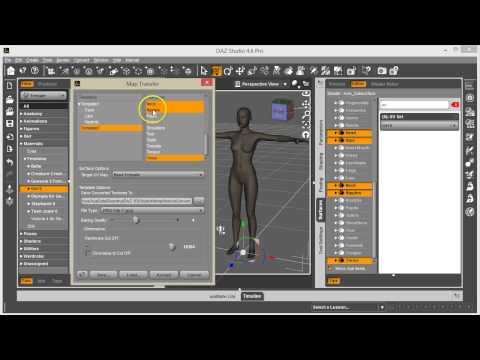
Grasp Helper for Genesis 8 and Genesis 8.1 - ideas?That is a damn shame, though an understandable limitation. I think there are ways to transfer UV maps to figures with a shared UV map, though I'm not sure how to do that. In case you've got an urgent need for this, what you could always do is to use the map transfer utility to make an alternative material set with the available UV.
It's a pretty straightforward, though tedious, process:
 Loading Partial Morphs
Padone said:
If I understand correctly, we can already do that in blender with a morph weightmap. Below an example where I applied the G8F body builder fbm to one arm of the figure.
Yes, I saw that but I needed to get Blender to do as much of the work of moving vertices as possible and create another vertex group based on the one selected, that includes the falloff attentuation. I didn't think it'd be very user-friendly if the addon modified the existing vertex group.
But the most useful thing, I think, is the falloff. Sometimes the shape key doesn't look good around the edges of the vertex group, especially where the mesh is denser and with more curvature, e.g. the lips and nose. I think it works because the mesh is relatively sparse at the transition around the shoulder.
You've made me think of a possible improvement: Create another vg and implement the falloff in vertex colors.
Thanks for your comment.
"Elora" drives load times up to 10 minutesElora has / had a conflict with Whimsical Teens for Genesis 8 Female.
I thought this was resolved though; 10-18-2021 - Fixed an issue where the Elora morph was causing a duplicate ID error.
From: http://docs.daz3d.com/doku.php/public/read_me/index/80422/startI recognized the error immediately after seeing the title of your message.
Unreal engine 5 Official ReleaseThanks it was a pain in the butt and waste of time and ressources to install an UE4 version that works with the original DAZ bridge, creating a UE4 project just to transfer and then migrate to the UE5 project.....
Daz 3D is part of

Connect
DAZ Productions, Inc.
7533 S Center View Ct #4664
West Jordan, UT 84084Licensing Agreement | Terms of Service | Privacy Policy | EULA
© 2026 Daz Productions Inc. All Rights Reserved.