-
RRRR Twisted Lyrics Contest
Tag: luci45 #7
Misheard Lyric: Depictions in an ice
Actual Lyric: Pink Champaigne on Ice
Hotel California - EaglesUsed:
Apprentice Mage in the Tower
Gen 3 Iconic Shapes for Genesis
Ghost Bride Dress for Genesis 3 Female(s)
Lucy for Everyday 1950
Poseable Bonsai Tree (LB)
Red Riding Hood Genesis (Mec4d)(LB)
Sparrow (LB)
Sports Time For Genesis (LB)Also used:
UHT2: Fantasy Colors
UHT2: Ultimate Color
Victoria 7 texture
Various morphs
End of Summer Hair for Genesis and Genesis 2 Female(s)
Wren Hair
Mec4d PBS Shaders vol.2 for Iray
Suite 2101
Extreme Closeup: Makeup for Genesis 3 Female(s)
Effortless Cool shoes
Duke Hair
Aiko 5 texture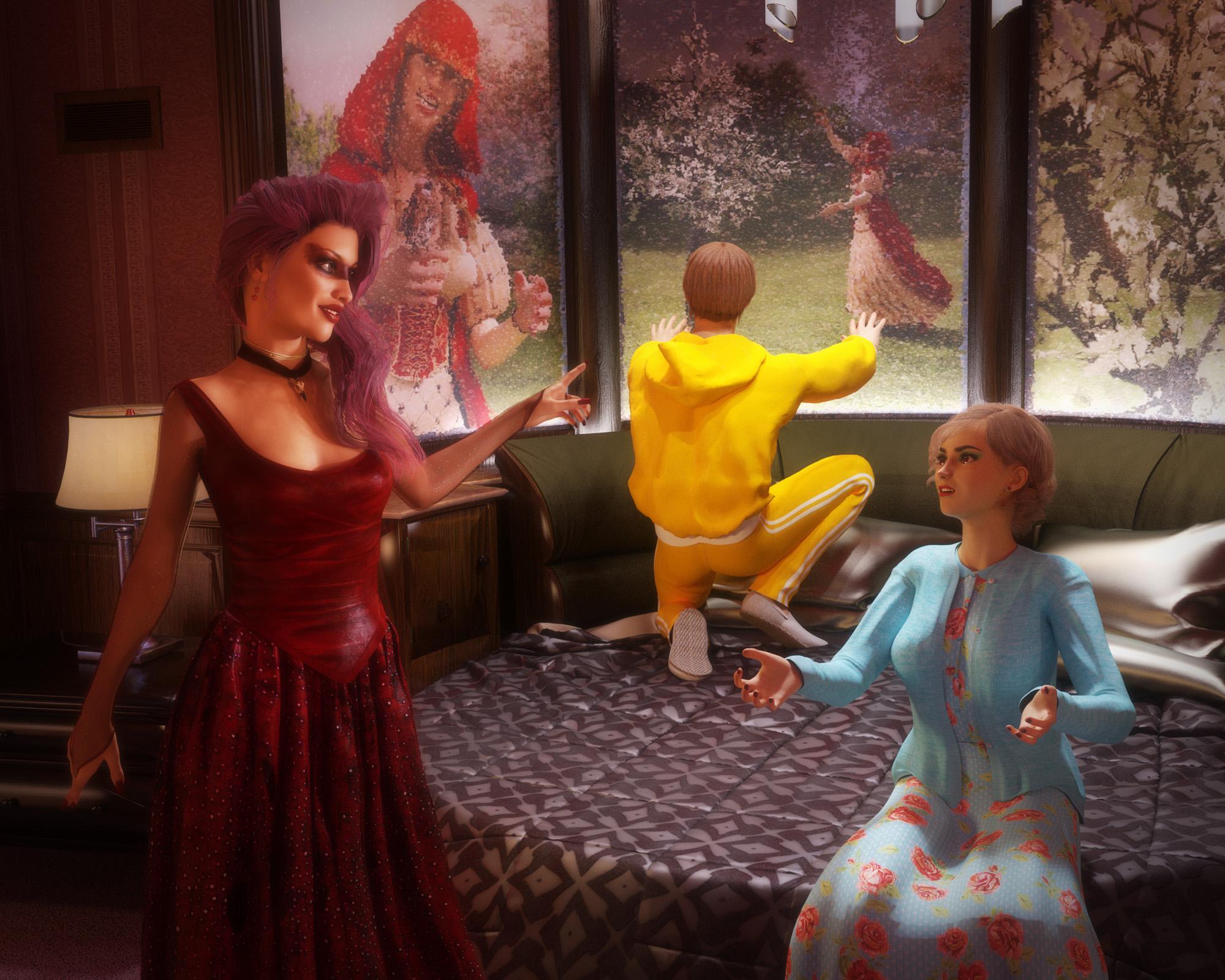 Iray Logos on DAZ Studio Renders
Hi all,
I am almost done with a product I am going to submit for sale and am wondering if there is an official 'Made with Iray' logo decal that you place on promo images or are people just lifting them in GIMP/PS from other people's promo images?
Like the one on the bottom left corner of the main promo image of this item:
http://www.daz3d.com/fwsa-keira-hd-for-victoria-7
Thanks!
Fiddling with Iray skin settings...I tried an experement. And I'm still kind of laughing at the outcome. I tried applying Victoria 7 Iray skin settings to a couple of Victoria 4 skins. ...Yeah. lol They kind of look like they either sayed in the sun for a LONG time or underwent a race change. lol
[...]While I do like that it brings out more of the skin texture's detailing and (at least to me) makes the skin a look a bit more real looking, the "peaches and cream" complexions get lost. I'm trying to figure out how to bring out those details without adding quite so much darkness to the skintones. I'm not having much luck with that though. If you guys have any suggestions or advice on the settings and maintaining the lightness of the skin while bringing out the textures details I'd appreciate it.
If you look in the Gen 3 SSS settings, they rely on a black and white SSS/translucency map plus strong red added into the translucency color. Personally the red is already too strong with the textures its designed with. If your using pre gen3 textures, the only thing you texture you really have to put in translucency color is the diffuse texture again, which is, of course, reddish too. Add the red from the v7 material settings to the red of the diffuse texture in the translucency map location, and things get really red, really quickly.
So solution time. the key is to cancel out some of that red. the simplest way is to set the translucency color from bright red to light cyan (something like RGB 215/243/240) and set the SSS reflectance tint to really light nigh white cyan while your at it. There are other things one could tweak, but that should get the V7 settings to something nicer with older textures.
edit: also make sure there is a texture of some sort in the translucency color slot
Thank you so much, j cade! That was a huge help! :D
Here's Bombshell Beauties Joanie with the original V7 Settings:

And here she is with your suggested changes:
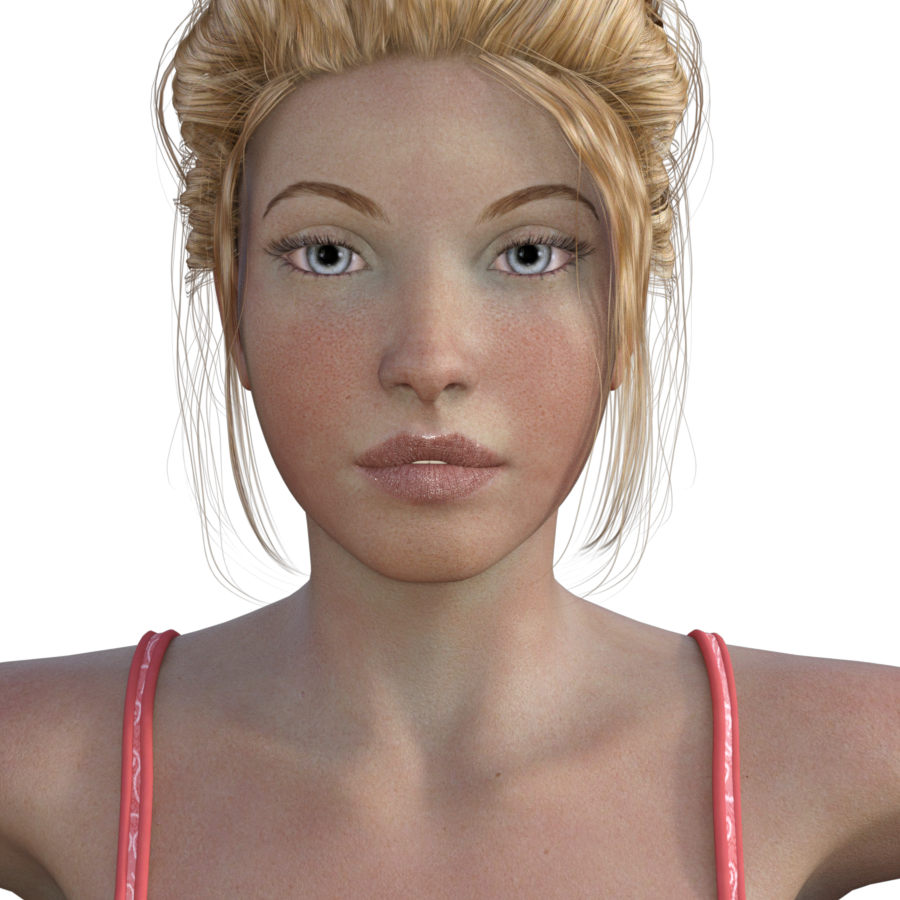
Much better! Thank you!

 Fiddling with Iray skin settings...
I tried an experement. And I'm still kind of laughing at the outcome. I tried applying Victoria 7 Iray skin settings to a couple of Victoria 4 skins. ...Yeah. lol They kind of look like they either sayed in the sun for a LONG time or underwent a race change. lol
[...]While I do like that it brings out more of the skin texture's detailing and (at least to me) makes the skin a look a bit more real looking, the "peaches and cream" complexions get lost. I'm trying to figure out how to bring out those details without adding quite so much darkness to the skintones. I'm not having much luck with that though. If you guys have any suggestions or advice on the settings and maintaining the lightness of the skin while bringing out the textures details I'd appreciate it.
If you look in the Gen 3 SSS settings, they rely on a black and white SSS/translucency map plus strong red added into the translucency color. Personally the red is already too strong with the textures its designed with. If your using pre gen3 textures, the only thing you texture you really have to put in translucency color is the diffuse texture again, which is, of course, reddish too. Add the red from the v7 material settings to the red of the diffuse texture in the translucency map location, and things get really red, really quickly.
So solution time. the key is to cancel out some of that red. the simplest way is to set the translucency color from bright red to light cyan (something like RGB 215/243/240) and set the SSS reflectance tint to really light nigh white cyan while your at it. There are other things one could tweak, but that should get the V7 settings to something nicer with older textures.
edit: also make sure there is a texture of some sort in the translucency color slot
Celebrity Look-a-Likes for 3D figures Part 2Having just picked up the DVD of "Pride and Prejudice and Zombies", I'm now interested in finding a Victoria 4 morph that looks like Lily James or that I can kitbash one from. Does anyone have any suggestions?
Should Ceremonies of the People bundle include the clothes?I was curious since the links for the "Ceremonies of the People" components are not active.
I went to the RDNA store and this product is still there (same promo picture and description)
It says that you need CeremonialGear bundle for Victoria 4 and Michael 4 (or its separate components) to clothe figures.
What you bought is material presets for the "Gear".You can browse around RDNA store if you like, their search function still works.
Hair Conversion System QuestionThe Netherworks Hair conversion system such as this one that is now on sale: http://www.daz3d.com/hair-conversion-system-ii-for-victoria-4 list both DAZ Studio and Poser as compatible software byut the description seems to indicate that it relies on Poser Python scripts. Will it work satisfactorily in DS 4.9?
The OceanQueen Megabundle question - *pose and texture the dragon plus missing files updatehttp://www.runtimedna.com/The-OceanQueen-Megabundle.html
The OceanQueen dragon figure and accessories:
- Base dragon figure
- Conforming headcrest figure
- Conforming headtips figure
- Conforming backspikes figure
- Conforming frontmembranes figure
- Conforming horns figure
- Conforming headmane figure
- Conforming antennae figure
- Conforming legspurs figure
- Conforming necksail figure
- Conforming hair neckmane figure
- Conforming strand neckmane figure
- Smart propped dynamic wing membranes
- Smart propped dynamic tailfin membranes
- Four full color schemes for the base dragon figure and all conforming figures/dynamic props, with or without SSS options; two displacement strengths are included as MAT presets
- Numerous partial material presets for separate material groups
- Poser MATs for all options
DragonGear for Victoria 4:
- Conforming top with or without dynamic fur
- Conforming pants
- Conforming belt
- Conforming helmet
- Conforming goggles
- Conforming facemask
- Conforming gloves with or without dynamic fur
- Conforming boots with or without dynamic fur
- Four full color schemes for for all conforming figures, with and without SSS options; with or without raytraced reflection for the goggles
- Poser MATs for all options
DragonGear for Michael 4:
- Conforming top with or without dynamic fur
- Conforming pants
- Conforming belt
- Conforming helmet
- Conforming goggles
- Conforming facemask
- Conforming gloves with or without dynamic fur
- Conforming boots with or without dynamic fur
- Four full color schemes for for all conforming figures, with and without SSS options; with or without raytraced reflection for the goggles
- Poser MATs for all options
DragonGear Harness and Saddle:
- Conforming riding harness
- Fully articulate saddle figure (to be parented to the harness)
- Presets for size of the Oceanqueen dragon
- Preset poses for the saddle to fit the two different sizes of the dragon
- Preset poses for both V4 and M4 to fit the harness and saddle
- Four full color schemes for the riding outfit/s, harness and saddle, with and without SSS options
- Poser MATs for all options
[Links] Victoria2 / Michael2 V2/M2 freebie listDragonessa has moved here: http://www.daz3d.com/dna-the-dragonessa-for-victoria-2
Transfer Utility distortionJust the one. It wasn't even necessary for me to use the Supermodel morph, but I did.

Hmm, so do you keep running the same collar through the Transfer Utility then? Once to create the conforming clothing item, and twice more for the V5 and Supermodel morphs?
Thanks again for your aid! Really, I was trying to create something I could then open up in Carrara and use on Victoria 5 there. The Supermodel part of it I just saw and applied without thinking much on it.
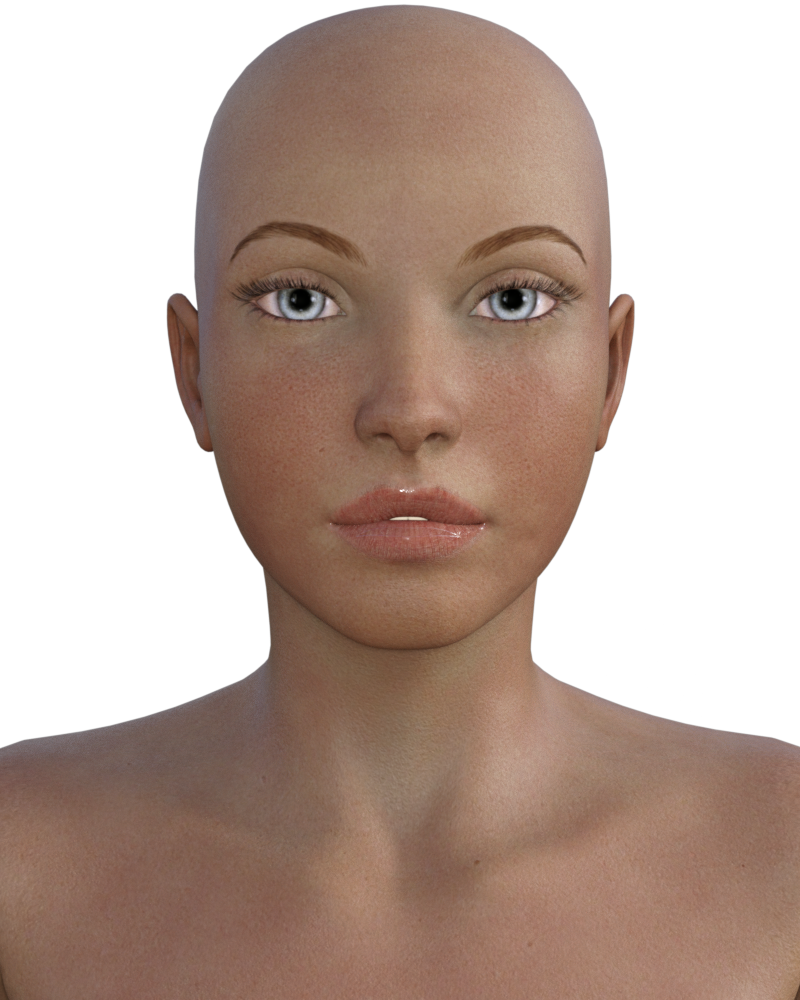
Fiddling with Iray skin settings...I tried an experement. And I'm still kind of laughing at the outcome. I tried applying Victoria 7 Iray skin settings to a couple of Victoria 4 skins. ...Yeah. lol They kind of look like they either sayed in the sun for a LONG time or underwent a race change. lol
Bombshell Beauties Joanie V4 skin - Default
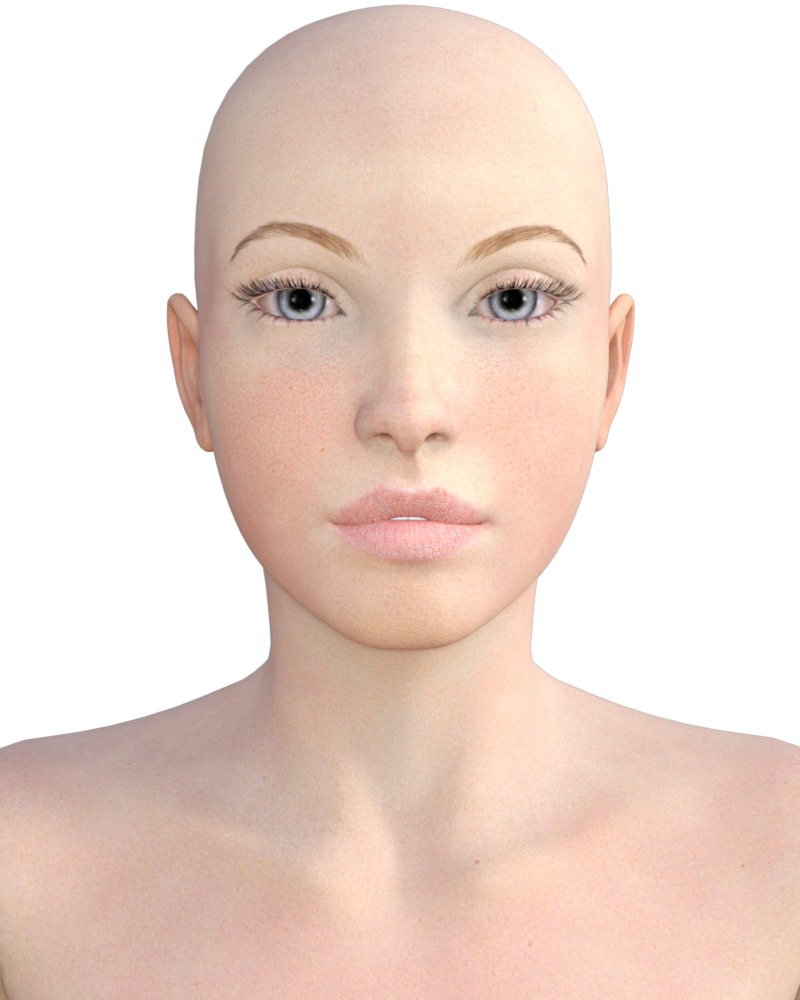
Bombshell Beauties Joanie V4 skin - with V7 skin settings
Stephanie 4 - Default Skin
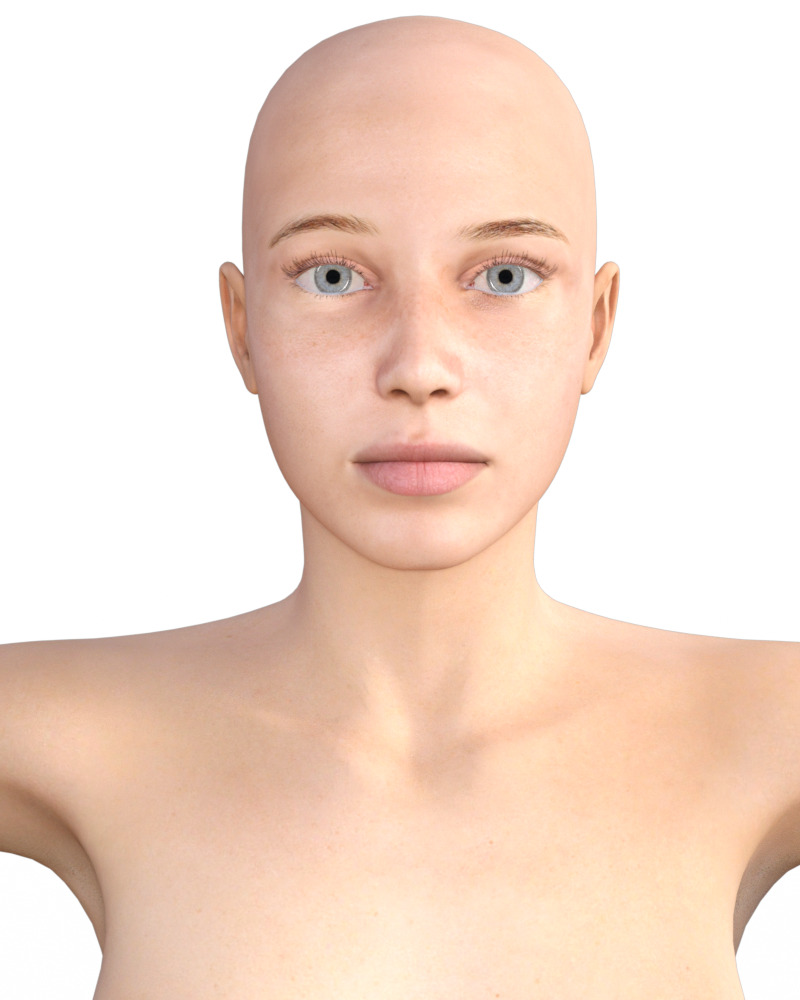
Stephanie 4 - with V7 skin settings
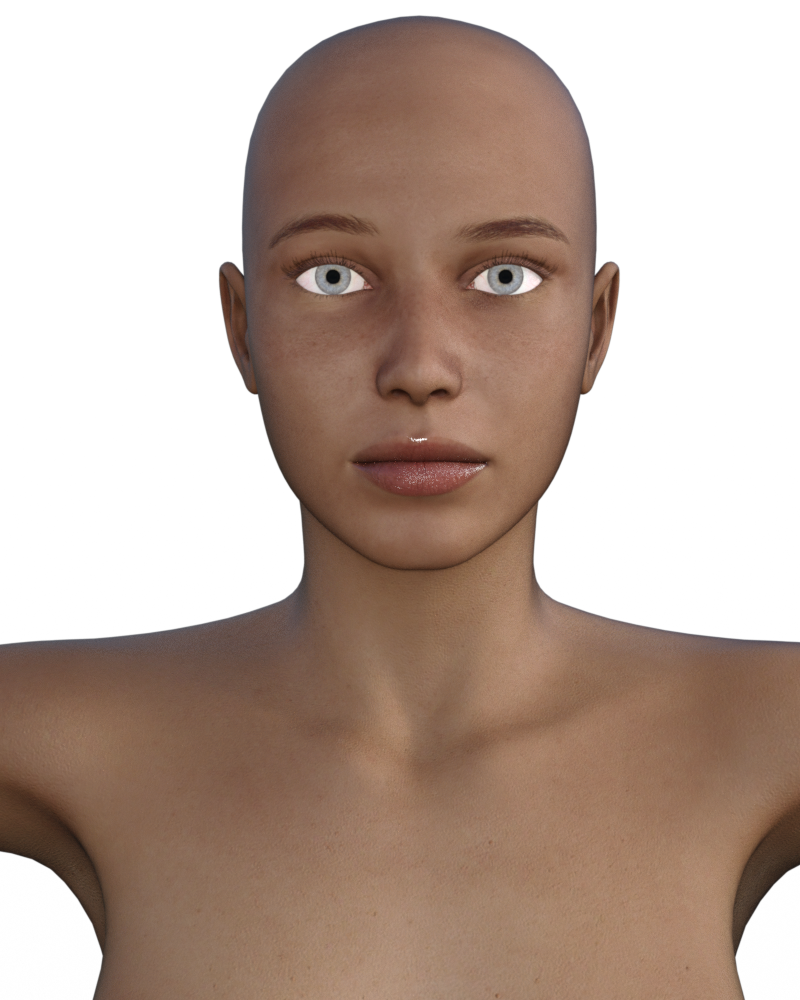
While I do like that it brings out more of the skin texture's detailing and (at least to me) makes the skin a look a bit more real looking, the "peaches and cream" complexions get lost. I'm trying to figure out how to bring out those details without adding quite so much darkness to the skintones. I'm not having much luck with that though. If you guys have any suggestions or advice on the settings and maintaining the lightness of the skin while bringing out the textures details I'd appreciate it.
Mynx Victoria 7 In the store now... (commercial)Mynx Victoria 7, coming soon...
Classic Pin-Up Girl HairProduct Updated: UHT2: Ultimate Color [Commercial Product] with video links... Share your renders!the hair on Rune here is Krayon hair that was in the Victoria 7 Pro bundle didn't have any extra colours other than what came with it the colours are ok but again uht2 just gives that extra to it used some browns and blonds in the mix think the scalp/roots look more lifelike here now
Made with...
- Freya
- Bandit Outfit for Genesis 2 Male(s)
- Succubus Add-Ons
- Alessa and Aloisia Fantasy Outfit Bundle
- Krayon Hair for Genesis 3 Female(s)
- Iray Worlds SkyDome
- Mec4d PBS Shaders vol.2 for Iray
- Rune 7
- Defender Props
- UHT2: Ultimate Color
- Battle Queen Outfit for Genesis 3 Female(s)
- Rune 7 HD Add-On
- Torak for Genesis 3 Male
http://www.daz3d.com/gallery/#images/170316
 Is It A Secret?
What program are you using to make your morphs?
When you export, you will set what scale you export at; it is important that both export and import utilize the same scale (see the image from Tottalou).
It is important that if you work with the base geometry (which is critical) that you do not subdivide or use and tools that add or remove geometry as this will change the vertex order. As Richard mentioned, the Mouth Realism and Navel morphs should be disabled (set to zero). If you're working in ZBrush, you can use most of the brushes. Brushes such as curve brushes will add additional geometry as will working with ZModeler. The numbers you show "Base does not equal target(16828!=67312)" indicate you subdivided.
Take note of the number of polygons in your base. It should be 17K for the female; 16,828 for the male. Occasionally check that the number has not changed.
MLP, Morph Loader Pro, needs you to set the same scale as what you used for export. This is what Richard meant.
If you are working with the base Genesis 3 figure, you will not need to use Reverse Deformation (you will if you begin to make morphs for characters such as Victoria 7 or Michael 7, which are morphs of the base).
Where you place the morph depends on the type of morph it is. You can easily leave it with the default which will place it as a morph in a Morph Loader Pro category in the Parameters tab (this is the easiest place to find it). You can change the location later with parameter settings. For testing, the MLP category will suffice.
Nice sales - but what about folks who bought those pro packs already.The pro pack for $12 is nice, I guess, but I can understand if someone gets frustrated based on the sales of the past 2 days. Here's what might have happened:
Day 1: Get the Victoria 7 base character for $4! (Hey, what a great sale, let's grab it!)
Day 2: Get the Victoria 7 starter pack for $8! (Err, I already have the base pack from yesterday, but what the heck...)
Day 3: Get the Victoria 7 pro pack for $12! (Even more errrrr, as I have the base model AND the starter pack... Okay, *I* don't, but someone might. :))
So if someone follows along the sales, they pay $24 for the pro pack altogether. Plus buy new releases each day. Or I guess you could ask for a refund on the base pack and the starter pack, plus all the new releases you got with them... but ...
The good news is, you can't get a bigger pack then the pro. Okay, they might throw in another pro pack along V7 tomorrow, who knows... :)Get Your Encrypted Daz Connect Content Here Thread - none at the moment 2018-01-30Looks like there is another new one to add to the list:
http://www.daz3d.com/fw-nadine-hd-for-victoria-7
As normal it is heavily discounted, with a price under 4$ if you buy one of today's releases.
Impossible to discount DRMed products enough.
I'll buy it for free.
Still too expensive.
Nice sales - but what about folks who bought those pro packs already.I'd go for the current sale if there was the same offer but on a different 7 series; now admitedly I have Victoria 7, but she is not my favourite of the 7 releases; if that is the case, surely she isn't the favourite of those that haven't also bought into G3, and more options would perhaps benefit Daz more, and may satisfy customer's needs?
Victoria is iconic, but this is mainly due to Victoria 4; next year when Victoria 8 may appear, I will wait - this is in part due to my preferring (at least) three of the later releases.
Perfect imperfectionsYour'e talking about Victoria 6 or 7, right? That modell will never, under no circumstances, be seen somehow less than perfect. Look for a more normal female. :-)
True Victoria's looks are perfect but she is an actress who plays a woman who bites her nails and shops at the local thrift store.
Vicky Arms Behind BackWhich is why it seems so odd that Vicky's limits don't allow it.
just as an fyi it's not a real world limitation, it's a limitation due to the construction and rigging of the victoria 4 model.
As shown in the example by nicstt, the joints deform in strange ways. this is called Mesh Break.
in a lot of cases this can't be overcome without breaking out the deformers or with post work(blech).
a solution available at the renderosity site is called Prefect v4, it creates custom morphs that correct a lot of the joint problems inherent in v4.
While it works within the limits of rotation it's a bit iffy when you exceed those limits.
Also clothing has a major GTH when using it, so you'll probably have to spend time adjusting morph dials, or using smothing modifiers.
Worst case scenario you wind up posing the clothing seperate from the character. It's weird but works.
Daz 3D is part of

Connect
DAZ Productions, Inc.
7533 S Center View Ct #4664
West Jordan, UT 84084Licensing Agreement | Terms of Service | Privacy Policy | EULA
© 2026 Daz Productions Inc. All Rights Reserved.