-
Animation vs Still Art?
I am really enjoying all your animations, Ivy !

I'm happy you enjoyed them.. I have only made one test animation since i started using daz studio to make animations.
I did a Victoria 6 / Genesis 2 Female(s) SKAmotion High Heel Walk aniBlock Test. But I wanted to do something different than just a girl walking on a blank screen like everyone else does. so this was what I came up with trying to be creative.
Involuntary Obedience Training
 Fiddling with Iray skin settings...Some surfaces do have weird glossy colors due to stuff too complex to model. But the problem I run into is that even setting roughness high, it has a tendency to lighten and wash out color. Or is that a good time to start using top coat?
I really had to think about those surfuces you speak of, but the only surfaces that came to mind were... metals.

That could not only depend on your roughness settings alone. Translucency color and - strength as well as the SSS Reflectance Tint has an impact on the overall result. Not to forget the volume distribution function parameters. And/or the use of a not-so-optimal specular map...
For skin I always use Top Coat, for there are two different materials, with different optical properties, directly visible: the outermost stratum corneum tissue layer, and the sebum layer.
I think one of things they could improve on the flow of the surface options is to move the Transmitted Color up under the area that makes more sense since the info that Arnold has imparted to us clearly shows that both are relevent to. Perhaps I'm wrong but don't understand why it's way way down on the list....
The Transmitted Color is a parameter belonging to the Volume Distribution Functions of MDL. So IMO it is located at the best place on the user interface as part of the "Volume" group along it "cousins". And you only need those when Thin Walled is turned to "Off".
It would also be great if someone would make a shader preset that had all the correct values for skin, for nails, for the various eye components and inner mouth and teeth. I'd buy a set like that and not have it geared for any specific figure, it's off putting when it's for say Genesis 3. Not all of us use these figures.
Me personally, I really don't like much the way shaders are used in DS: having to select all the appropriate surfaces, apply the preset, select another set of surfaces, apply another preset... and so on.
But one could develop a set of shader presets and make a one-click material preset from those for each of the DAZ figures. Ideally, such a "General Skin Preset" should be added to the "Starter Essentials" package for each figure (in case of M4/V4 to the "Studio CF" package. One really don't needs it if he/she just only uses Poser). For G2F/G2M we already have one (even if it would need an intense overhaul).

But we would still have a bit of a problem with the specular maps from the older figure lines, which unfortunately come in many different dark and lighter greyscales. The ones for Victoria 6 start to look good at a Glossy Weight of 3.25, the ones for the Genesis 2 Base Female needs even 20.0 to show a convincing effect. Thanks to the bad habit of the "good ole" 3Delight times when everyone tended to cook his/her own soup instead of developing and agreeing to a general method of how things had to be done and stick to that.

(That are those who now put fancy, ridiculous colors into their Glossy Color parameter...
 ).virtual penny 4 yor carrara thoughts ?
- For Poser-style rigged figures, such as Vicky 1-4, Michael 1-4, Aiko 1-4, Star stand alone, etc., Carrara has a lot of great options and functions. First, as mentioned above, you can load the figure in Carrara, edit the mesh directly, and save the result for future use without ever adding morphs. Carrara has the magnet tool and the displacement painting brush for loaded figures. Second, you can load the figure and create and save new dial morphs. A morph zone must aready exist to add a new morph dial. Here, I loaded Aiko 3 and note that under the morph tab of the vertex modeler (model level) there are already morph zones by body part. Third, you can actually make the morphs in another program (such as hexagon) and load them in the appropriate morph channel. The weightzones figure can be edited in the posed position, which is a great help. Similarly, a new morph can be added in the posed position as long as a morph zone already exists.
 Exactly. That all leads to what I was showing Here, is that we may add our own morph zone which covers the entire mesh - whichever "Poser-Stye" figure or conforming figure for any of those figures! ;)
I needed to have these 'new morph zones' for a very good reason. Rosie's hair, for example, has morphs for wind blowing, flowing forward if she leans forward, flowing back if she lays on her back, blowing out in all directions, etc.,
She has a shirt (I haven't shown her in it for a long time) that has various morphs I made for wind, dynamic walking, and other things,
Her Kimono has a lot of morphs to make it look a little dynamic in animations
=====================================================
Adding these morphs was a real pain in the tush before I learned the above technique for adding new morph zones. Victoria 4 was odd in that she allows us to add morphs to the whole figure. Everything else, including everything that's made to conform to her, we'd need to select one of the preset morph zones - "Figure", being the whole mesh, is only available to add morphs to on V4.
So by adding a custom morph zone which contains the entire mesh, this actually adds a whole new selectable morph zone to use, which allows selection of any part of the mesh!
You see, if we only model the morph one body part at a time, it's a real pain to get the abdomen part of the morph to work with the chest part of the morph - and even worse, we'd have to set those morphs on both the abdomen and the chest! I used to go through that! I sucks!
With a new 'whole figure' morph zone, we can make a single morph called "Bend Forward" and we can deform the neck, chest, abdomen, and any other part of the figure we need - without worrying about which zone it crosses - because we're morphing the whole thing!
Even better, one single morph dial controls the whole thing! Bam!
Sorry Misty... aside from, perhaps, opening the model file in Notepad and rearranging the order of morphs that way, I don't know of a way to re-order them after they've been made. However, I think that if we make the morphs using the DS <> Hexagon bridge and export as CR2, it may automatically put them all in alphabetical order. Not sure though.
Legacy UVs for Genesis 3 [Commercial]So, once you pushed past the tedium that you told me about earlier this year, you fell into a groove, or vortex. Does this mean that you may consider Genesis 3 UVs for Victoria 4? That would be a big seller for the Poser people, methinks.
G1 Textures G2It looks as if Deliah uses the Victoria 4 UVs, so you'd want the http://www.daz3d.com/victoria-4-for-genesis-2-female product to giive G2F the V4 UV set. The other two don't specify the UV set used - if it was Victoria 5/Michael 5 then they would work, if not you would need a version of the UV set for the Genesis 2 figure.
V 4.2 Will Not LoadThere is a script that runs when Victoria 4.2 is loaded, but you should be loading the CR2 file to do so. Try going to the Content Library, Poser Formats>My Daz 3D Library>Figures>DAZ People, and loading Victoria 4.2.
Legacy UVs for Genesis 3 [Commercial]3dLux, thank you - much appreciated!

nicsst, yes it is confusing, but both those textures do actually use Victoria 6 UV maps. I think I have said elsewhere that I wish there was a quick and easy way of determining which UV sets a character texture uses, but as it is, to be sure, you just have to load up the original and check in the Surfaces tab.
Didn't you post a chart somewhere of your findings and research of textures and UVs? If so, can you point me to it. BTW, thanks for this essential service you have provided to G3 users. I hope the sale will last until Tuesday when I have some money.
Thanks, xyer0. I think you are referring to this post on the previous page of this thread. That was done just to give me a broad idea of the spread.
Ah yes! That's it. Would you consider doing one more service to our community (me, that is) and publish the list here? This would be the less tedious alternative to loading them up one-by-one.
This is a far from definitive list of Genesis 2 Female character textures which use the Victoria 5 and Victoria 6 UV maps. Bear in mind that Victoria 5 is a Genesis model, and so many Genesis textures are not listed. Also, towards the beginning of the Genesis 2 Female run the UV Sets were often not specified in the product descriptions. In fact there are about 70 unspecified textures which will be split between the Base Female, Victoria 5 and Victoria 6 UVs, all of which were available from the start.
Occasionally the UV sets are wrongly allocated in the MATs. For example, Blake for Victoria 6 sets the UVs to Victoria 6, but the texture actually uses the Genesis 2 Base Female UVs, identified by misalignments in vital areas.
This list only includes textures available in the Daz store.
Victoria 5
Amelie for Keiko 6 HD
Bambi
Burnish and Bright Nails
Calais
Desdemona SoulKiss - Character and Fight Poses
EJ Bellaluna And Moonchild Jewels
EJ Bibi
EJ Brisa
EJ Dolores
EJ Estrella
EJ Guadalupe
EJ Leilani
EJ Minina
EJ Niebla And Claw Rings
EJ Nieves
EJ Olvido
EJ Perla
EJ Rafaga
EJ Xana
FW Cassie
FW Courtney HD
FW Danika
FW Diana
FW Faylinn - Seasons
FW Jennie HD for Belle 6
FW Joanie HD
FW Kyra for Lilith 6
FW Lara HD
FW Lin
FW Lucille
FW Morgan HD
FW Nikki
FW Nita for Lilith 6
FW Phoebe HD
FW Sian
FWF Britany HD - Character and Dress
FWF Janna
FWF Mayuree HD for Mei Lin 6
FWF Sumiko for Mei Lin 6
FWSA Aiyana
FWSA Gingersnap HD
FWSA Keshi
FWSA Pebble HD
FWSA Serena HD
FWSA Tansy
FWSA Wachiwi
FWSA Xiao Mei
Geisha Builder
Genesis 2 Female(s) Wet Body Iray
Instant Makeup for V5 UV Skin Sets
Lanying
LY Brynn
LY Christina
LY Daniela
LY Evie
LY Lennox
LY Mikaella
LY Presley
LY Sabina
LY Sloan
LY Sophie
Macro Skin for Genesis and Genesis 2 Female(s)
Maeki for Mei Lin 6
Mahala for Genesis 2 Female(s)
Nailed It
Neena
Pierrette
Rene for Monique 6
RW Sirena for Victoria 6
Sabby-Bunny for Genesis 2 Female(s)
Sabby-Jamie
Sabby-Tiffany
Skin Builder Basic for Genesis and Genesis 2 Female(s)
Skin Builder Pro for Genesis and Genesis 2 Female(s)
Tatianna
Taylor for Stephanie 6Victoria 6
Ava HD for Lilith 6
Cara HD for Victoria 6
Dione Unicorn Girl HD for Victoria 6
Elene HD for Victoria 6
Estelle HD Character and Hair
Gothic Doll for Aiko 6
Hannah HD for Victoria 6
Imogen V6 and G6 Promo Girl
Ingenue Bettina
Laurie HD for Victoria 6
Lisa Texture for Teen Josie 6
Liu Yan HD for Victoria 6 and Mei Lin 6
Maja Character and Hair
Modern Muses Yzande V6
Nabila for Victoria 6
Nilima for Lilith 6
Pearl - Character and Hair
Precious for Teen Josie
Tattoo Parlor Genesis 2 Female and V6 Vol. 1
Tattoo Parlor Genesis 2 Female and Victoria 6: Volume 2
The Ultimate Merchant Resource Skin Texture Kit for Teen Josie 6
Trinelle for Giselle 6
Valerie
Vianne for Victoria 6
Victoria 6 (Belle)
Victoria 6 HD Add-On (Anna)New Texture info courtesy of MelanieL
Fully V5 UVs
FWSA Riva
Vengeful SpiritV5 UVs for the skin but with some Base Female UV parts (typically eyes, eyelashes,etc)
FW Ashley
FW Caoimhe
FW Merfolk
FW Mirella
FW Naida & Nalin
FW Neomi
FW SassafratFully V6 UVs
BellatrixV6 UVs for the skin with some stray UV parts
Sisters for Zev0's Growing Up Pack (cornea says V4!)Fiddling with Iray skin settings...On the subject of glossy colours, the bog standard iray water shader is mid-grey. Surely that's for a reason and might apply to skin as well?
On a different note, if you have the means to convert/reproject/bake UVs and are looking for high quality displacement and normal maps, I can't recommend these highly enough:
http://www.daz3d.com/macro-skin-for-genesis-and-genesis-2-female-s (8k normal maps - you can basically bin your glossy maps)
Legacy UVs for Genesis 3 [Commercial]3dLux, thank you - much appreciated!
nicsst, yes it is confusing, but both those textures do actually use Victoria 6 UV maps. I think I have said elsewhere that I wish there was a quick and easy way of determining which UV sets a character texture uses, but as it is, to be sure, you just have to load up the original and check in the Surfaces tab.
Ahh that's ok then. :)
Checking surfaces isn't so bad, other than loading time adding a little, but not really a biggy; thx for reply.
Legacy UVs for Genesis 3 [Commercial]3dLux, thank you - much appreciated!
nicsst, yes it is confusing, but both those textures do actually use Victoria 6 UV maps. I think I have said elsewhere that I wish there was a quick and easy way of determining which UV sets a character texture uses, but as it is, to be sure, you just have to load up the original and check in the Surfaces tab.
Didn't you post a chart somewhere of your findings and research of textures and UVs? If so, can you point me to it. BTW, thanks for this essential service you have provided to G3 users. I hope the sale will last until Tuesday when I have some money.
Thanks, xyer0. I think you are referring to this post on the previous page of this thread. That was done just to give me a broad idea of the spread.
Ah yes! That's it. Would you consider doing one more service to our community (me, that is) and publish the list here? This would be the less tedious alternative to loading them up one-by-one.
Legacy UVs for Genesis 3 [Commercial]3dLux, thank you - much appreciated!
nicsst, yes it is confusing, but both those textures do actually use Victoria 6 UV maps. I think I have said elsewhere that I wish there was a quick and easy way of determining which UV sets a character texture uses, but as it is, to be sure, you just have to load up the original and check in the Surfaces tab.
Didn't you post a chart somewhere of your findings and research of textures and UVs? If so, can you point me to it. BTW, thanks for this essential service you have provided to G3 users. I hope the sale will last until Tuesday when I have some money.
Thanks, xyer0. I think you are referring to this post on the previous page of this thread. That was done just to give me a broad idea of the spread.
Legacy UVs for Genesis 3 [Commercial]3dLux, thank you - much appreciated!
nicsst, yes it is confusing, but both those textures do actually use Victoria 6 UV maps. I think I have said elsewhere that I wish there was a quick and easy way of determining which UV sets a character texture uses, but as it is, to be sure, you just have to load up the original and check in the Surfaces tab.
Didn't you post a chart somewhere of your findings and research of textures and UVs? If so, can you point me to it. BTW, thanks for this essential service you have provided to G3 users. I hope the sale will last until Tuesday when I have some money.
Legacy UVs for Genesis 3 [Commercial]3dLux, thank you - much appreciated!
nicsst, yes it is confusing, but both those textures do actually use Victoria 6 UV maps. I think I have said elsewhere that I wish there was a quick and easy way of determining which UV sets a character texture uses, but as it is, to be sure, you just have to load up the original and check in the Surfaces tab.
Legacy UVs for Genesis 3 [Commercial]I was looking at Legacy UVs for G3F: Victoria 6. http://www.daz3d.com/legacy-uvs-for-genesis-3-victoria-6
The promo images show the Lisa Texture for TJ6, and Liu Yan by Raiya on Mei Lin 7; these are different UVs I thought, so why are they shown with the Victoria 6 product?
I've not bought any yet, but am considering due to the number of G2 I have (sadly, far too many G2 are not actually G2, but some other).
My First Freebie!!Hey everyone, I just put up my first freebie ever! It's a small set of poses for Victoria 7 on the Botmoto motorcycle. Nothing massive or fancy, just some basic riding poses.
Let me know what you guys think!
http://www.sharecg.com/v/85835/view/21/DAZ-Studio/Botmoto-Poses
G1 Textures G2Hello,
My apologizes for the newbie questions I've searched high and low for the specific answer if I can convert G1 textures to G2F/G2M. I just find the whole thing confusion (V4 to G2F program, G2F/G2M to G1 program, tutorials on map transfers, etc). I noticed the great sale for Genesis 1 textures, and I was hoping to add to my G2M/G2F collection (using the same five texttures gets old after awhile).
In a nutshell, is there any program I can buy/download so I can convert the textures from G1 to G2F/G2M figures? Is it possible to get Tyrese ( http://www.daz3d.com/tyrese-for-m5), Olivia (http://www.daz3d.com/olivia-for-v5), or Deliah (http://www.daz3d.com/delilah-for-genesis) onto Victoria 6 an
Female face > Fake Twins? Spot the differences...1. Bree is just the arbitrary name given to the default texture set that comes with the base G2F female. It follows the convention of giving female names to characters and textures. Similarly, Victoria 6 uses a default texture set called Belle.
2. Bree All simply applies all the default Bree textures to the selected figure, as opposed to individual nodes (parts). It is probably what you will want most of the time and simply change certain settings such as makeup, eye colour, etc. as desired individually afterwards.
3. Yes. In the Surfaces tab, simply select the figure (i.e. Genesis 2 Female) at the top of the list and that should highlight all the surfaces in the list. Then, right-click on the figure name and select Copy Selected Surface(s). With your second figure selected, repeat the process, but then instead of copying, click on Paste to Selected Surface(s). Both figures should now have the same textures.
4. "Should I save her as a "preset"? How?" Yes. Unless the character has\includes morphs (i.e. if it is only textures that are different), save a material preset, giving it a name logical for you. Edit > Save As > Material(s) Preset. (In the available list you will see many other options depending upon what it is you are trying to save).
V4 Skins Batch Converter to Genesis 2 Female.....Create a new Subfolder in your DAZ Library. Start the Script ( DAZ Studio Formats => My Library => Scripts => Victoria 4 Skins Batch Converter ). Follow these steps:
- Point to the subfolder you created
- Point to the folder where the material presets are located
- Convert the files
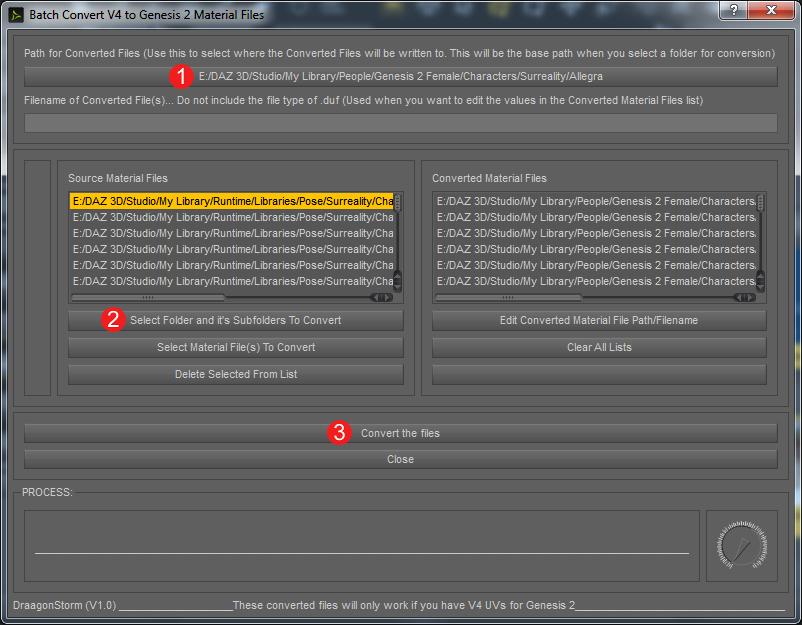
People confused about where to find the relevant pz2 files to import should note the screenshot above. It's showing Runtime>Libraries>Pose. That's where to look. It's a good idea to make a subfolder just for the character you're going to convert. Make this in the Genesis 2 Female>Characters folder. I'm converting one character at a time.
Some of the pz2 files are for injecting morphs. I don't want to convert those. I find it easy to just click on "select material files to convert" instead of "select folders and subfolders." The program shows me PNG files instead of pz2 files. This way I can look at pictures for easy indentification, and I select which materials I want. The program then finds the corresponding pz2 files to convert.
V 4.2 Will Not LoadVictoria 4.2 will no longer load. Is showing up in the content Library as a script. Uninstalling and reinstalling doesn't work, nor does re-importing the meta data.
Creating a custom Carrara character and morphing in posed position@Chickenman - I would never, NEVER, presume to try to supplant Chickenman. Love him. Absolutely love him.
@Wgdjohn - back when Poser was the hobby industry standard, there were naming conventions for figure body parts. If you used those names for body parts, then the saved Poser pose files could be used by your figure. Those names were case sensitive, such as Abdomen was not the same as abdomen. Here I've attached a screenshot of the bodyparts of the original Vicki and Victoria 4. See how similar the names are, although Poser allowed for different "internal" and "external" names. I'm sure there is a list of those old naming conventions somewhere. However, for your own use wholly within Carrara, go ahead and choose names that are meaningful for you. Or, you can rig in Poser or Studio in order to use their pose sets in which case the names might matter to you. Here is a link to Studio's rigging wiki. http://docs.daz3d.com/doku.php/public/software/dazstudio/4/userguide/creating_content/rigging/tutorials/adding_bones_for_rigging/start
Daz 3D is part of

Connect
DAZ Productions, Inc.
7533 S Center View Ct #4664
West Jordan, UT 84084Licensing Agreement | Terms of Service | Privacy Policy | EULA
© 2026 Daz Productions Inc. All Rights Reserved.