-
Star 2.0 for G3F!!! whoot!!
I bought the original Star not so long ago but I couldn't resist genesis 3 Star with all the morphing possibilities and the clothes and hairs avaliable.
Here is my first render, it's Retro Heroine by Fredel (from Renderosity) with 50 % of Star's body and body propotions, and 30 % of Stars head and 15% of The Girl 7s head.

The outfit is Retro Heroine outfit (a freebie) by Fredel.
I used DG Toon Style Hair Shaders for the hair :)
WHAT. That looks 100% like a modern rendition of classic Lara O_O
Love this character.
That is terrifyingly realistic.
But fantastically cool. If you don't mind sharing, which characters did you combine?
The body is 100% Star 2.0
The head is a combination of Teen Josie and Toon Josie Slim (both 36%), Aiko 16%, Anime Head 100%, and scaled the head up and neck down a bit.
I used the skin from the Vanessa character.
Anime Head for Genesis 3 is a freebie morph (with a dial) that you can find on ShareCG.
Vanessa is this one: http://www.daz3d.com/fwsa-vanessa-hd-for-victoria-7-and-her-jewelry
Eric
Excellent, thanks! I didn't know there was a Toon Josie...was that a typo or is there a morph for the Teen Josie character that creates a toon version?
I'd like to know this too. Didn't realize there was a Toon Josie...
Star 2.0 for G3F!!! whoot!!Love this character.
That is terrifyingly realistic.
But fantastically cool. If you don't mind sharing, which characters did you combine?
The body is 100% Star 2.0
The head is a combination of Teen Josie and Toon Josie Slim (both 36%), Aiko 16%, Anime Head 100%, and scaled the head up and neck down a bit.
I used the skin from the Vanessa character.
Anime Head for Genesis 3 is a freebie morph (with a dial) that you can find on ShareCG.
Vanessa is this one: http://www.daz3d.com/fwsa-vanessa-hd-for-victoria-7-and-her-jewelry
Eric
Excellent, thanks! I didn't know there was a Toon Josie...was that a typo or is there a morph for the Teen Josie character that creates a toon version?
Star 2.0 for G3F!!! whoot!!Love this character.
That is terrifyingly realistic.
But fantastically cool. If you don't mind sharing, which characters did you combine?
The body is 100% Star 2.0
The head is a combination of Teen Josie and Toon Josie Slim (both 36%), Aiko 16%, Anime Head 100%, and scaled the head up and neck down a bit.
I used the skin from the Vanessa character.
Anime Head for Genesis 3 is a freebie morph (with a dial) that you can find on ShareCG.
Vanessa is this one: http://www.daz3d.com/fwsa-vanessa-hd-for-victoria-7-and-her-jewelry
Eric
Question for Dartanbeck For example, this is very much the quality of the shots before VFX and final editing. It did take me a long time (a couple years, actually) to decide upon a final decision on this, because I felt it is important to nail down the continuity of everything, so that I can continue to build and store the scenes - basically my production's sound stages.
I have accepted, thought through, respected, etc., much criticism regarding this. That was awesome, because it really got me thinking about whether to keep this HD 720p format, jump up higher, increase individual pixel qualities... there's really a lot to consider. I rendered a lot of test sequences at higher resolutions and some at lower. Lower was completely out of the question, and higher (HD 1080p) looks so much more crisp that I almost made that change - but it takes so much longer at render time, the decision was made. If it ever takes off to where higher resolutions are needed, I can always (with the help of a team) switch up.
 This one (right) has had some of my new vfx skills applied to it - but these techniques (I think) look so much better in action than in stills. And I'm still studying. Visual Effects for Filmmakers is a huge topic and can easily become a life's study, which will certainly be the case for me - along with my animation, music, custom stone work, and other things.
 VFX has saved me from those times when a render is just right, except for one little thing - and that one little thing kills the entire sequence, so I'd go back and fix that one thing and render again. Well sometimes fixing that one thing isn't as simple as poking the object down into the ground - easy peasy. No. Some things that need to be fixed cannot be seen until certain, unknown parts of the sequence take place - invisible in the working environment!
Howler has changed all of that for me. Howler using VFX techniques help me correct these things in a few minutes - perhaps sometimes even a few hours. Much better than blindly rendering over and over again!

Being mostly self-taught, learning by asking questions, reading what other's ask and say... it's really different to start taking occasional online courses on the subjects - learning that there are 'basics' that all animators/filmmakers know, that I had no clue about. I discovered "Iris Gleam" through my own observations, and was always planningon getting my characters fixed to be able to display such a thing without special lighting - at least not a LOT of special lighting. My solution fell in my lap - I didn't need to persue altering the original iris mesh shapes anymore! ;) Funny how that happens!
A forum pal bought and sent to me the latest edition of Jeremy Birn's Digital Lighting and Rendering book, which is a tremendous help. It was Jeremy who has illustrated the common ways that CGI professionals use to create this Iris Gleam, so I immediately went into my V4 Rosie character, saved as a CAR file, and did a quick edit to her Iris shape to make them concave instead of their default convex curve, which was kinda easy, but I did a very quick job of it - so to do a 'saved' version, I'd need to start over.
 It was just that time when Daz3d added Runtime DNA to the store! Arki, an artist for both RDNA and Daz3d, had this great RDNA product (now at Daz3d), EYEdeas 3+ for Victoria 4 and Michael 4, which is modeled just the way Jeremy recommends! What a time saver, I bought them immediately!
 Earlier on than the subject of Iris Gleam, Jeremy was talking about light-linking - the process where a light only affects certain (linked) things in the scene - and that it's common to adjust the mood of a scen by linking to the eyes alone. Well in Carrara, we cannot link to specific bones of a rigged figure. Not a real issue because we could just copy the mesh and paste it in separately - Carrara will let us link lights to items that are parented to specific bones!
 Much better than that (in my opinion), Arki's EYEdeas don't need to parent (but the kit includes models meant for that as well), but actually can be loaded as a single, conforming item, which puts both eyes exactly where they need to be, with a plethora of useful adjustment morphs, which then turn perfectly along with the eyes pose dials on the figure! Parented ones would too... but this makes it super-simple to select for light linking... Handy!
As it turns out, with the special shaders I made and Arki's modeling, I don't need special light linking... they just work with whatever light is already available. Special tweaking of Highlight and Shininess was the real trick - well... along with this nice eye model!
I've just added this to my characters in early August of this year... so you see how I'm still tweaking even my main figures. But I suppose full production still won't change that either. The cool part is that, even though I now render with full refraction and reflection enabled, it hasn't changed my render times! ;) Love that!
Show Us Your Iray Renders. Part VI am going to do 25 renders: In military time from 00:00 - 23:00 and and indoor scene using the Windows Seat Freebie and and Incandescent Bulb at 8' (2700K Point Light) using:
Left to Right:
1) Genesis 3 Female with Victoria 7 iRay texture set and Toulouse hair (black texture set converted with iRay Uber Shaders)
2) The Girl 7 with Girl 7 default iRay texture set and Toulouse hair (blond default texture set converted with iRay Uber Shaders)
3) The Guy 7 with Guy 7 default iRay texture set with G3M Simple Short Haircut (black iRay textures)
4) Genesis 3 Male with Eddie texture set converted to iRay Ueber Shaders and with Keegan Hair (dark red orange texture set)
They will all be wearing the black material Genesis 3 Starter Essentials underwear & also the top in the case of the females so the results can be posted. The female underwear will be converted to iRay Uber Shaders.
I had wanted to use the default iRay texture sets for the Genesis 3 Female & the Genesis 3 Male but somehow now when I load either Genesis 3 character the texture sets are applied to the wrong Surfaces, eg the mouth textures are on their legs!. I think that happen after I installed all the products that were listed as installable in DAZ Connect despite those products already being installed via DIM.
I changed the render settings to by Sun & Sky with the Dome at 0 degrees, the location to be Time Square, NYC, the date is June 21, 2017, and to not render the Dome. I am not trying to create the most flattering lighting but a series of renders that shows how the most popular skin textures react throughout the day to the changing light.
The Windows Seat render with be the same but have one point light at 2700K 8' in the middle of the Window Seat model as you'd expect in a typical room. It has one window with light coming inside at 12:00 at Times Square, NYC on June 21, 2017 since the summer solstice typically falls on that date. The UTC for NYC on Jun 21 is UTC 5 and the sun at high noon should appear as if coming from directly overhead. Perhaps in the future I or someone can make a preset script that you enter the time, date, and click on a world map to correctly set all the DAZ Studio Sun & Sky settings.
It will take a while for me to create these 25 renders since I am CPU rendering and I won't be doing this dedicated so lucky I cand just leave the render run each time. I will create a thread in the 'Art' section of the forums for the renders.
Saving a character presetI followed a tutorial elsewhere in these forums to make a centaur with Horse 2 and Victoria 6. Got a REALLY nice look, I think. Luckily, I saved the scene I was working on, because I also tried saving the figure as a character preset (since this isn't the only work I intend to do with that character), and ended up with an issue. Since Victoria is parented to the chest of the horse, I selected DAZ Horse 2 in the Select pane and chose to Save As a character preset. (First time, I had the amusing error of having selected the hair, so when I reloaded the "character preset", I had hair floating in mid-air. :D) When I went to reload the character preset, I had a horse body, but no Vicki. She is nowehere on the character preset figure. (I expanded the entire listing, just to make sure she wasn't playing Hide-and-Seek with me. :))
I'm hoping that it's possible to save the entire figure (which I can get if I load the scene) as a character preset, and if so, what am I doing wrong currently?
Steps right now are:
1) get centaur looking the way I want
1a) ensure Victoria 6 is parented to DAZ Horse 2 chest
2) select DAZ Horse 2 in Select pane
3) Save As Character Preset
4) Open new file and load just-saved preset
5) Marvel at headless, Vicki-less horse.
What is the real life height of ANY of the models?The store product page sometimes tells the size. For example, this is an excerpt from the Victoria 7 product page..
Victoria 7 measurements courtesy of Measure Metrics for DAZ Studio:
- Height: 5' 10" (179.3 cm)
- Bust Circumference: 35.9" (91.2 cm)
- Waist Circumference: 23.9" (60.7 cm)
- Low Hip Circumference: 37.0" (93.9 cm)
What is the real life height of ANY of the models?I'm looking inches standing of Victoria 4, 5 or 6, or Stephanie. 1/8th inch or 5" is not what I'm looking for. Hard to believe anyone would design a figure that becomes a standard and does not put out the size of the design. I can then gladly open other figures and compare, if this is X then this may be Y. I'm a painter trying to use these in creating a model in a painting. It would be a time saver.
Animation vs Still Art?Renderosity, cannot link, I am still waiting to see more using myself.
me too, its $60 bucks for the standalone and another 15 for th bridge. I am sure its worth every penny but before i shell out $75 bucks for something I too would like to ee more people using it as well.
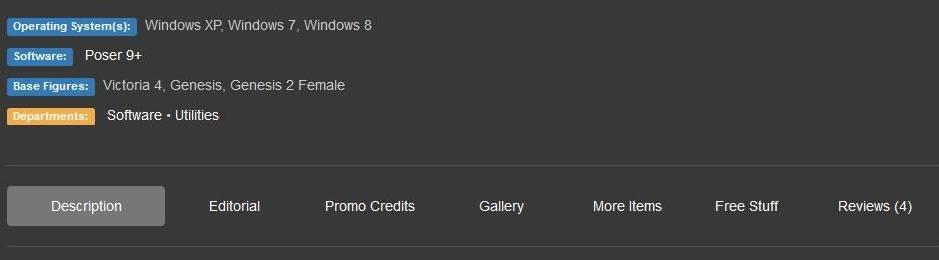
The reviews are great. But if you look on the product page it says only compatible with poser 9 and up and Victoria 4, Genesis, Genesis 2 Female So I contacted VWD at rendo and asked them about compatibility. and they said it will work on almost anything. But they were working on updating it.. Now seeming I am someone that does not own the VWD sim and would like to . I also would like to know as much about it before spending $75 So you may say my comment was unfounded rumors.. But I am only going by what is is written in the product page it self & what I was told by the vender. So you as a owner of the program would know more than someone just learning about it. and going by the product description is not unfounded rumors
 Mimic Pro 3.0 and Victoria 4.2
Ok, never mind. Got it figured out. I just saved a new Victoria figure into my Custom figures folder in Poser of which the morphs are working. I Loaded that cr2 file into Mimic and now it is working like a charm.
Mimic Pro 3.0 and Victoria 4.2Hi, can someone please assist me. I have always used M4 in Mimic 3.0 pro without any problems. Now I wanted to use V4.2 and for some reason I can't get the morphs to work. She nods her head but that's it. No expresions or eye blinks. I have loaded the Victoria4.dmc and 4.2 cr2 files in the Mimic session manager but nothing happens. Any suggestions will be highly appreciated.
Body By Sublime IV Fantasy EditionAs I happen to have all "Body by Sublime"-Packages, some information on those. Only pack III comes with custom morphs, the other packs are only shapes, so from my understanding completely dialed.
Regarding Body by Sublime IV the following figures are dialed in as far as I can see:
01: Gia, Aiko
02: Gia, Aiko
03: Gia, Aiko
04: Aiko
05: Aiko
06: Aiko, Girl
07: Olympia, Victoria, Aiko, Girl
08: Olympia, Victoria, Aiko, Girl
Think you can use shapes 1-3 also without Gia and Aiko.
Thank you for taking the time to list these!
Body By Sublime IV Fantasy EditionAs I happen to have all "Body by Sublime"-Packages, some information on those. Only pack III comes with custom morphs, the other packs are only shapes, so from my understanding completely dialed.
Regarding Body by Sublime IV the following figures are dialed in as far as I can see:
01: Gia, Aiko
02: Gia, Aiko
03: Gia, Aiko
04: Aiko
05: Aiko
06: Aiko, Girl
07: Olympia, Victoria, Aiko, Girl
08: Olympia, Victoria, Aiko, Girl
Think you can use shapes 1-3 also without Gia and Aiko.
G3F Skins render Chocolate....First: Thank you for the time it took for your response.
I am using DS 4.9.
ONE of the skins that is giving me choclate is: http://www.daz3d.com/fwsa-eliya-hd-for-victoria-7
Admittedly it is a skin that is a little tanned. Here is my render (it does not use the character morph included with the skin)
Question regarding Heat Wavewas hoping for a genesis 2 compatible one.
It should autofit, if you have http://www.daz3d.com/victoria-4-for-genesis-2-female
Carrara Sale Email Message Alert threadThis item seems a bit of a bargain at the moment:
http://www.daz3d.com/carrara-8-5-pro
Though only if I'm logged in.
PC+ promotion?
(Hat tip: Overdrawn)
Wow! And it comes with ALL this stuff!!!
-
-
Carrara 8 Native Content (Lots of fun examples)
-
Digital Painters 3D Paint Brushes Sampler (more fun examples!)
-
-
Additional Content
-
Genesis Starter Essentials
-
-
V5 General Poses
-
Genesis Female Geo-Grafted Genitalia
-
-
Michael 5 Genitalia
-
-
Other Installers
-
Carrara Render Node Win 32 Application
-
Carrara Render Node Win 64 Application
-
Carrara Render Node MAC 32 Application
-
Carrara Render Node MAC 64 Application
-
Can POSES Be Used by Different Generations of Figures?Hey all, those are very helpful answers, thank you. Do the same rules apply if you are trying to use poses made for a newer generation on older figures too? Like using Genesis2 poses on V4?
Thanks again!
G1 to V4 sure with former-DAZ now-Rendo PoseMaster. Probably this works for G2 to V4. For G3 backward I believe that Zev0 or Draagonstorm said "No" but can't find the thread. PoserMaster allows create templates between figures, it is probably that templates can be created between figures+shapes in G1, G2, Mill 3, and Mill 4 generations. However, I suspect that if Draagonstorm can't convert G3 to G2, PoserMaster also can't.
Wow!!! Thank you for pointing out PoseMaster! I looked at it and there is a PoseMaster People Pack that will do these conversions:
- Genesis to/from Aiko 4, Hiro 4, Kids 4, Michael 4, Victoria 4
- Genesis to/from Aiko 3, David 3, Hiro 3, Laura, Luke, Maddie, Matt, Michael 3, Stephanie 3 Petite, Victoria 3
- Genesis to/from Stephanie, Millenium Girls and Millenium Boys
- Michael 4 to/from Michael 3
- Victoria 4 to/from Victoria 3
- Kids 4 to/from Matt and Maddie 3
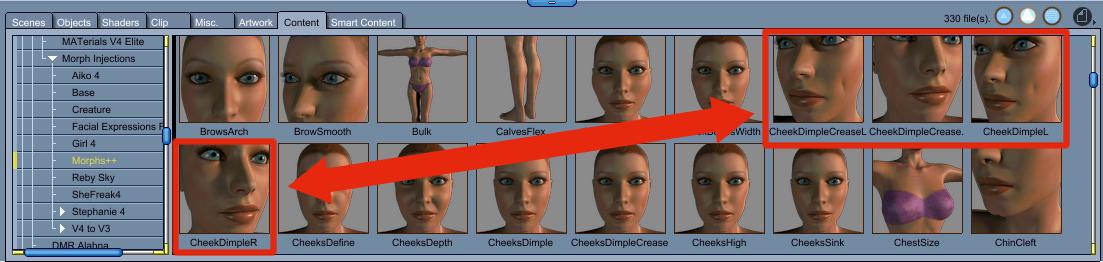
- Generation 2, 3 and 4 poses can be transferred through Genesis e.g. V3 to Genesis to M4Post Your Renders - Happy New Year yall(by the way how could I make dimpled cheecks? is there a morph somewhere to be used?)
Morphs++ for Victoria 4 have two varieties: Cheeks Dimple and Cheeks Dimple Crease.
 Can POSES Be Used by Different Generations of Figures?
Hey all, those are very helpful answers, thank you. Do the same rules apply if you are trying to use poses made for a newer generation on older figures too? Like using Genesis2 poses on V4?
Thanks again!
I've only tried on Victoria 4 - G1 poses work ok on V4 with only minor adjustments needed (mostly in the feet), G2 works somewhat but needs more adjustments. G3 doesn't work at all.
Unwanted effect of shrink-wrapping. Any fix?I've found good success in exporting/re-importing clothing as OBJs then fitting as unsupported items with no projection template. Loss of morphs and rigging can be transferred back in through the transfer utility too.
I'd love to see a tutorial for newbies like me on how to do this! :D
1. Don't export to OBJ yet!
2. Without fitting/parenting the clothing item to your figure, use the built-in morphs, deformers, etc to approximate the fit to the figure. Doesn't matter if it's not exact; some parts can be fixed using mesh smoothing.
3. NOW we export as OBJ. Be sure to hide everything else aside from the clothing item. You can choose DAZ or Poser presets; it doesn't matter.
4. Re-import the OBJ using the same DAZ/Poser preset.
5. Fit the item to the figure in question. Choose unsupported and no projection map since we want to keep the current shape. The clothing item should now inherit the figure's bone structure.
6. Apply mesh smoothing as needed. You may want to re-export the mesh-smoothed version, re-import back as a morph or OBJ, then turn off mesh smoothing as it's not needed anymore.
And now...
- To get back the original morphs, first convert the new clothing OBJ back to a figure (Edit->Object->Rigging->Convert to Figure), then use the transfer utility to transfer the morphs from the original clothing. Be sure to click on Morph Targets and check "All" from Under Source.
- To get the custom bones back, SY has a bunch of tutorials with various methodologies:
http://sickleyield.deviantart.com/journal/Tutorial-Saving-Gen-4-Custom-Bones-on-Conversion-417250347
http://sickleyield.deviantart.com/journal/Tutorial-Custom-Bone-Rigs-G2F-to-Genesis-Convert-398192766
http://sickleyield.deviantart.com/journal/Tutorial-Keeping-Bones-On-TU-Conversion-Fast-Way-449218737
Oh awesome! Thank you! :D I've saved this and added it to my Daz tutorials and will be trying it out - I really appreciate you taking the time to explain how to do it! You rock!
Also keep in mind that this is pretty much the only way to re-use older generation stuff -- like Victoria/Aiko 3 clothing -- without mesh distortion due to the weight-map redistributions and re-projections. The V3 and A3 clones for Genesis don't work very well. There are, of course, 3rd party programs out there but this is my preferred way of doing it since it has a monetary expediture of exactly zero dollars :)
edit: I'll probably post a video of me doing this sometime in the future. Depends on how much time I have in the evenings now that I'm back from my summer break.
Daz 3D is part of

Connect
DAZ Productions, Inc.
7533 S Center View Ct #4664
West Jordan, UT 84084Licensing Agreement | Terms of Service | Privacy Policy | EULA
© 2026 Daz Productions Inc. All Rights Reserved.