-
SOS help.....(Duplicate Formula Error)
It isn't duplicate files, and it isn't a fault with the product you uninstalled. The issue is that theat character/morph uses the same internal name as another - until one, or both, are modified to use a different name you will be able to have only one installed. You need to try to work out which the other character/morph using the name is, check to see if either has been updated to resolve the issue, and if not decide which to keep installed for now and report the clash to Daz and to the other artist, or Daz again if it is also from the store.
Philosophy Behind 8.1 Face Morph Naming?Have to admit it can be a bit frustrating to find G8 face morph equivalents on G8.1 models. For example, on G8 there is a "Brow Inner Up/Down" morph, however on G8.1 it is called "Brow Inner Up" only, even though it can also make it go down. What was the general approach and reasoning for the many naming changes?
fixing stomach bends for genesis 8 m?I have a hard time using the Signs of Pregnancy morph if my character has to bend slightly. I often have to tilt the back an extreme amount to avoid an unsightly fold from appearing in the middle of the stomach and warping it.
Is there any way to fix this?
How do you make two or more JCMs working together?I want to make the cloth morph well.
I made JCM for colar rotation left and right.
Rotate one of them, the morph looks good.
But once I rotate both of them, it becomes very bad. So what should I do to make it right?
Make another JCM when both are rotated? how?
Or is there another way?DazToUnreal bug report - Morph export didn't work on child objects of a G8 figureHi!
After two full days of trial and testing, I can approve this is a bug.
What I'm trying to do is export morphs of child object of a G8 figure. It should be working on the figure skeletal mesh because it is a new custom part of the figure. I exported again and again with trials and errors, I tried to do a new thing on every export. Yet, it NEVER worked!
Morphs are only worked when you export this custom part without G8 figure. But this way, it is unuseful for me, because it's just a custom part of figure...
I'm looking for an assistance or bugfix update to DazToUnreal.
Thank you.
Animating a material change for a characterI've searched around for an answer to this question, but it seems elusive. I want to change the material applied to a character in animation. To be specific:
I want to animate a change from the character Catherina (https://www.daz3d.com/catherina-hd-for-genesis-8-female) to the character Rhonwen (https://www.daz3d.com/rhonwen-hd-for-genesis-8-female). The morph from one character to the other is no problem, but the material change is the part I can't find a way to do. In addition to changing the shape, I want to go from the material for Catherina, an older woman character, to the material for Rhonwen, a younger character. Is that even possible? If so, how?
The characters are both G8F, I'm using Daz 4.2 on a Mac.Thanks.
DazToUnreal does not import FBX, only materials and texturesSenor_Monkey said:
Looks like you're adding genetalia. Make sure you use the transfer utility prior to export otherwise it'll fail.
Thanks for your comment! I wasn't know there was a feature called Transfer Utility. I applied this to genitalia, yet eye and eyelashes become weird.
And I checked the file size of FBX. With hair 190 MB, without hair 32 MB. There was massive difference, I decided to not export hair.
But I have these two problems, please let me know if you have any idea.
1- Eye/Eyelashes become white after Transfer Utility
2- (Important problem!) Genitalia morphs are NOT being exported. Why?
how does the poses for the Lingerie Robe Set workYou could also add dForce to the Lingerie Robe item. Surprisingly enough dForce works fine even with the tie. Tie's all welded as a single mesh so it can be dForced and knot stays stable which is cool. Robe also gives excellent simulated results if you select the Surface called "Tie" and delete it with the Geometry Editor tool. Then the robe opens and simulates nicely.
I really wonder why some vendors (especially Nikisatez who produced quiet a lot of dForce items already) keep selling clothes without dForce or don't update their older products with dForce. It doesn't take very long to add a Dynamic Surface and configure a bit the physics properties and eventually the weights. For a result after simultaion that is SO much more gracious.
You should build your poses (not what I did for the quick test therafter) and let dForce do the rest. Which is likely what Nikisatez did to provide those already simulated morphs of the robe.
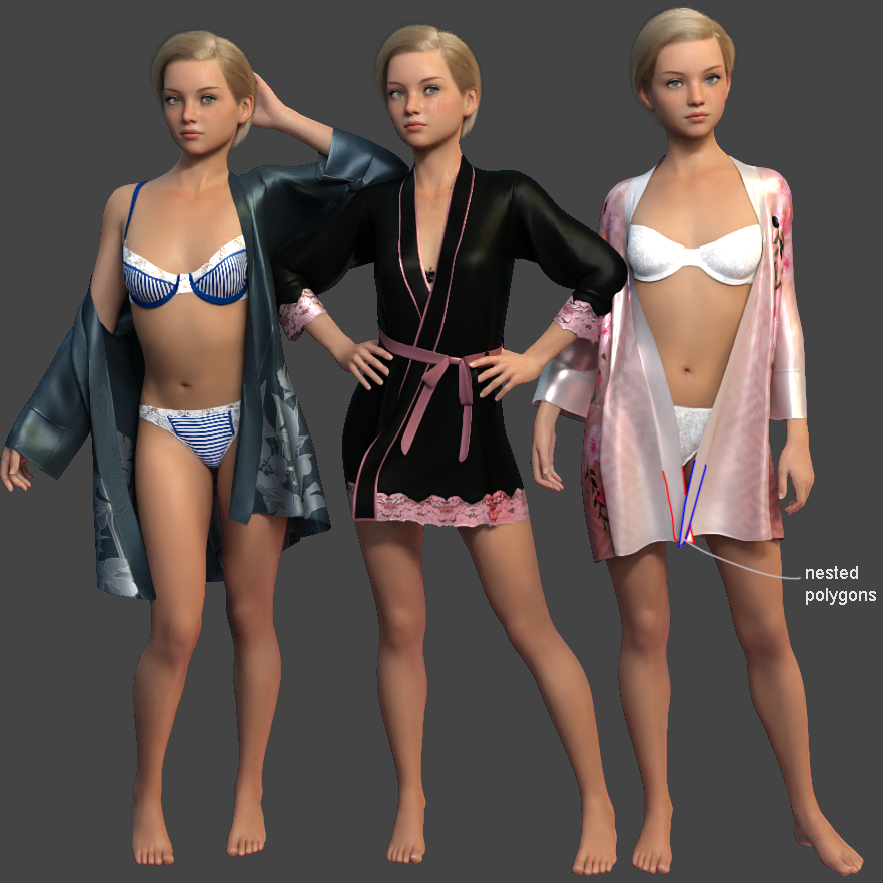
Unfortunately, 3D modeling of the robe's bottom part is crossed (nested polygons) and dForce being still barely able to untangle a tangled mesh (❛︵❛。) you'll have to play with dForce a bit (higher gravity for the scene, higher density + Self Collision set off for some Surfaces, reduced friction, a wind node from the back, etc.) to help the dress panels (aka trains ?) separate from one another. Or (better solution) make a custom morph for the bottom of the dress to untangle the geometry before simulation.
Looking for a face size morphI think Toon Generation also have face size morph . I remember when trying to make character more stylized and need to resize the face
problem Transfer UtilityIf what Richard suggests doesn't work, another option would be to create a custom morph. It should be just a case of taking the outright arm and the morphed figure into your modelling program. If you use the exact name of the genesis morph it should auto follow and use your custom morph when you dial the character in genesis. I do this all the time with clothing for a child morph I created. If you need any help message me and I'll try to walk you thru it.
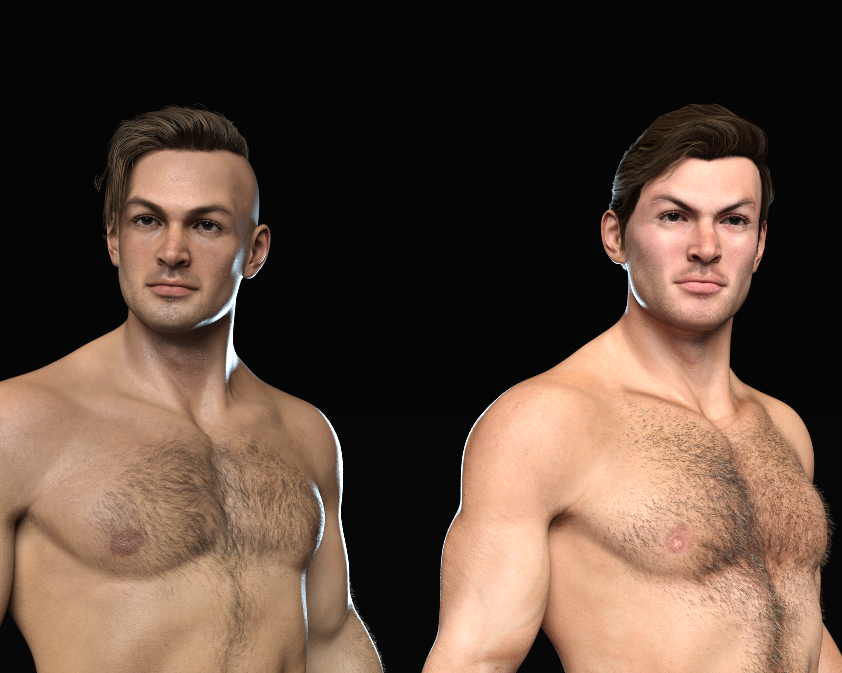
SereneNight’s Sci-Fi Fun Thread 3Honestly, after looking at the Noa HD promos, I decided to skip it. It looks like it mostly just provides skin details for portrait type renders and very little else, and I don't do a huge number of portraits, so I can wait for a deeper sale for that.
So I decided to run a couple thought experiments. I sent the M4 High Res textures through Texture Transformer and Map Transfer to get a G8.1 map, and then put the M4 High Res diffuse textures over Noa's underlayers. First image below. It seems very clear from this that they color corrected M4's head and put it on a different body -- understandably; the market would really not appreciate getting a texture as hairy as M4 today. I had to add some fibemesh hair to him because the texture hair was so weirdly shiny, in a way that clearly said that there wasn't actually any hair in the image at those locations.Noa is on the left, Michael 4 over Noa on the right. For some reason, M4 looks really angry about something; I didn't put any expression on his face, so that's just him.
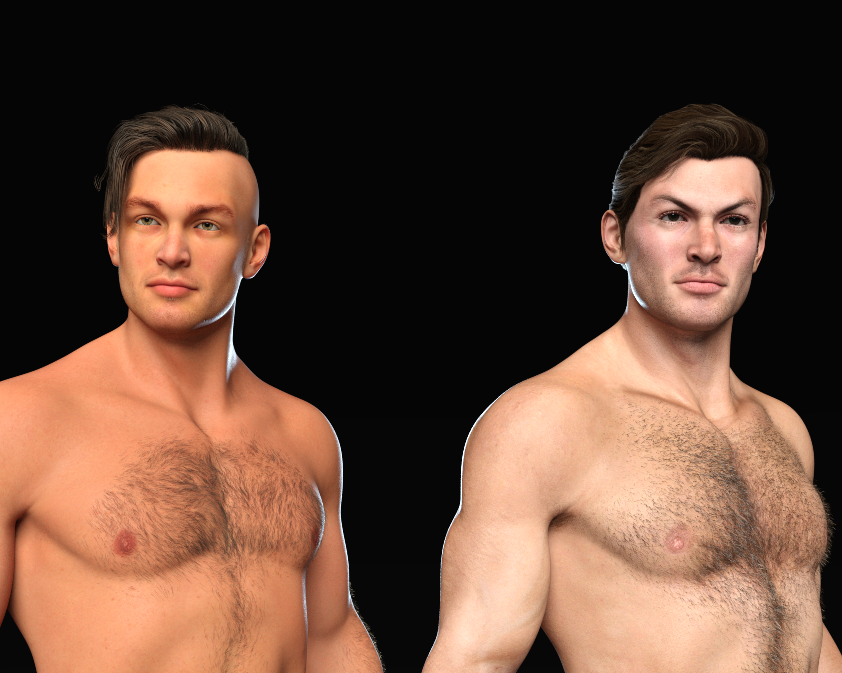
For the second image, as requested, Noa with a different texture, along with Noa Michael 4 on the right (because I just redid the texture in the same scene). The texture is the Deepsea 8.1 Merchant Resource. Not sure what the settings are -- I just used the default preset -- but it should be possible to make him a lot less orange with them. He does look quite a lot younger with that texture set.
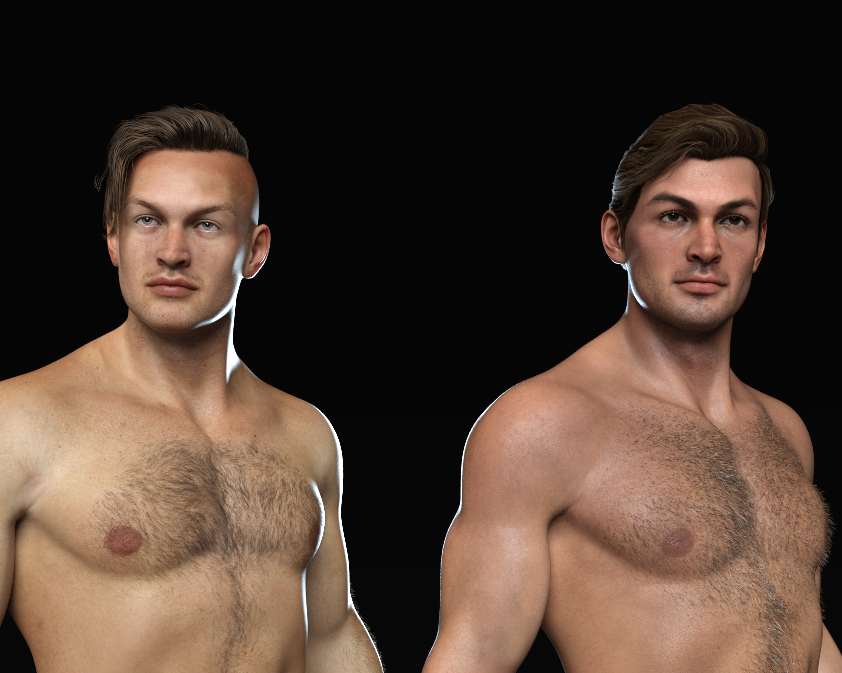
And finally with the RY Perfectly Imperfect resource on the left, and his own texture on the right. Honestly, I think the Raiya texture makes him look a little more ... surly pouty Greek demigod. And apparently permanently surprised brows are just his thing.
 hd morph dont work fine
andreas-christoph_1daaba1d46 said:
Is there a way to make a hd morph (sub dev level 2-3 ) in zbrush and bring it back to genesis 8 ?
Andreas
Yes. If you are a Published Artist here.
hd morph dont work fineIs there a way to make a hd morph (sub dev level 2-3 ) in zbrush and bring it back to genesis 8 ?
Andreas
DazToUnreal does not import FBX, only materials and texturesLooks like you're adding genetalia. Make sure you use the transfer utility prior to export otherwise it'll fail.
hd morph dont work finePlease put the Viewport into a non-textured Drawstyle if you are going to show a nude figure.
You cannot create true HD morphs, only PAs have that tool and only for use in creating content for the Daz Store
The issue with your morph is that you have changed the proportions, so the model no longer lines up with the rigging. Edit>Figure>Rigging>Adjust Rigging to Shape should fix that, then you need to do an ERC Freeze to link the adjustments to the morph (assuming you have not already used the Freeze function, in which case you will need to find the existing link in the Property Hierarchy pane, right-click on it, and ERC Bake to turn it back into raw values which can be frozen along with the joint adjustments).
hd morph dont work fineHello everyone together
I have created an hd Genesis 8 from the tutorial"How to create your own HD Morphs" unfortunately the figure deforms despite bones, what can I do to correct the error.
thank you very much for your help andreas
Naming convention for saving morphs ?Are you sure about the CTRL prefix being required?
Looking at the DSON for such a morph, one sees that a CTRL morph is just a morph with more than one output formula, both of which just refer to another morph's current value.
That is, they're just morphs like any other; they just need to be evaluate in a certain order. But all of that information is in the file itself, so I don't know why it would need a special prefixx.
By the way, I suggest that you simply crack open a few morph files and look at the DSON inside. I think things will become clearer when you can explicitly see:
A morph whose formula depends on another morph is an MCM
A morph whose formula depends on a bone's rotation is a JCM
A morph with more than one formula has been ERC frozen
A morph whose vertex count is less than the full vertex count is a partial
etc...
3D Community Challenge - Moving Meditations [Still a lot of time to submit!]Lunarlume said:
Senor_Monkey said:
Very cool! I finshed my entry a couple of days ago:
https://www.youtube.com/watch?v=rWHbVE5Qe_E
Really nice! What did you use for the water effects?
Everything was done in Unreal Engine. I used a plugin called UIWS. It's advertised as just click a button, but it wouldn't work until it random decided that it did. For the weather, it's another plugin (UDS), but the lightning was random, so I must have rendered the entire thing about 200 times to get a decent bolt at the right moment. One of the benefits of using Unreal is the realtime rendering. I was originally going to have a Daz character (The wanted poster on the wall was originally created using Daz), but I couldn't get anything to transfer into UE5 for some weird reason, and didn't have time to explore why.
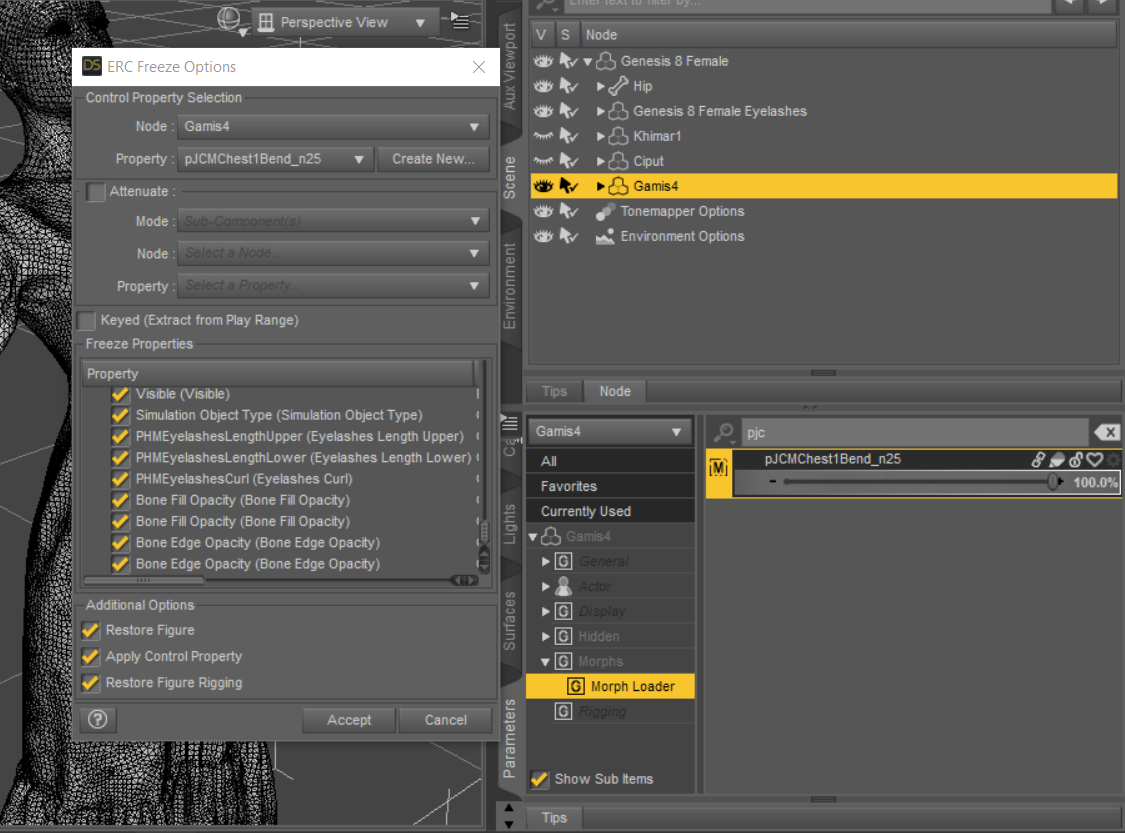
Can we see the list of things that has been ERC Freezed?I want to ERC freeze my JCM morph.
But why my JCM name doesn't appear on the ERC Freeze Options dialog boxes' property?
 Black Bear
If you have the HiveWire3D Big Dog, Sparky made a bear morph which include black, brown, and polar bears:
https://www.philosophersegg.com/shop/index.php?rt=product/product&product_id=199
Daz 3D is part of

Connect
DAZ Productions, Inc.
7533 S Center View Ct #4664
West Jordan, UT 84084Licensing Agreement | Terms of Service | Privacy Policy | EULA
© 2026 Daz Productions Inc. All Rights Reserved.