-
DS Cadichon - yay, donkey! But requirements?
daveso said:
AllenArt said:
Deepsea said:
Good day
Cadichon Needs FBM Donkey from Daz Horse pro Bundle.
Thanks
Is the donkey absolutely necessary? It looks like it will fit the regular horse as well.
then it won;t be a donkeybut a horse with donkey textures?
I can either use it on a horse exclusively or I'm sure I can create a mule morph myself. I already have textures that would do for an army mule I think.
New! Novica & Forum Members Tips & Product Reviews Pt 14Novica said:
vwrangler said:
Novica said:
Heaven (I looked it up so while I am there, here's her link. She's the adult in the scene.)There is a RN HD Judy Love 8.1 and there is no page for her anymore. Interesting! She's cute. My note, however, says I used VYK Judy for Girl 8 as a child.
Judy Love was by Rarestone, so is no longer in the store.
Ahh, makes sense. How do we find out who the Rarestone characters were? I've never been able to figure that out as you can't search by vendor if they aren't there.
Someone has been tracking what's available and where in this thread: https://www.daz3d.com/forums/discussion/527956/rarestone-gone-part-2-what-s-currently-available/p1
Some things have come back as Daz Originals, some things have come back at other stores under their new Ravenstone identity. You actually can do a search here under "rarestone" and get a number of results for the buyouts, but of course that's not going to give you results for the stuff that's no longer here. (And the results you get may be confusing. A couple of the morph sets only have "Daz Originals" as the PA, even though the main promo says "Rarestone Face Morphs". A couple things don't say anything that would lead you to understand why they're in the results, either on text or promos, but if you drill into the readme, the file list says "rarestone" in the paths. And for some reason, the search pulls in a merchant resource by Vyusur, and a morph set by Zev0 and Dogz,)
Missing Files Error Referencing Old dsf FileWhere all does Daz Studio store references to object dsf files?
Here's the scenario....
I am creating a custom outfit consisting of a number of different clothing items. First round through, I set everything up and saved out the support asset files, and everything was fine. But there were some issues with geometry and UVs of some of the items, so I went back to my modeler and tweaked them. Then I loaded the new objects back into Daz and set everything up again (transfer rigging, morphs, etc.). When these new items were ready, I deleted the item folders from the /data directory and saved new support assets, overwriting the existing duf files.
Now, when I load any of these items from the Content Library I get the Missing Files error dialog, and it shows a path to the old version of the item's dsf file under the data directory. I cannot find any reference to these old files. Why is Daz Studio still looking for them? Are these references cached somewhere? I have restarted Daz Studio, and I have even restarted my computer. Still get the missing files errors.
I have put so much work into this outfit, and I'm so close to being finished! Can anyone help me solve this issue?
Tim
Animation mesh distortion when scaling model down to 1%Catherine3678ab said:
No, not that familiar with Max.
So, is what you're after an in fact 1% figure BUT it reads as 100%? Well since the forum went 504 or whatever on us again, I tried to get a 1% being 100% figure BUT that does not work out well at all. Poor little thing looked like a porcupine with bones all over the place.
So, what I would suggest is making as detailed a report as you can, include pictures [actually they seem to like videos too], and submit the report to the Technical Support section of Customer Service. Now tickets to Technical Support do not get answered [necessarily] as quickly as those to Customer Service for money matters BUT they normally get around to them in a first come, first serve order. That being said, golly I gave up counting, how many YEARS one of my tickets would alleged still be waiting. It was back in the days of D/S3. Mind you when they came out with D/S4 that was such a big drastic improvement for making clothes it mattered not. Quite happy with the ways in which we can rig and morph clothing now. So hang in there ... the gaming field is a big deal so hopefully they'll be able to provide more/better help, either now and/or with improvements in the next or following edition of Daz Studio.
By the way, which gaming engine are you trying to get a 100% 1% figure into? Just curious.
The game engine is Assetto Corsa. I need to add animated figures to already finished race tracks. For that reason I cant change the surroundings scale.
Face Transfer - Custom 'base' textures?Catherine3678ab said:
Oh I think I reupped that {the one for Face Transer} ... will take a look for the link.
Here it is: https://sharecg.com/v/97598/view/3/PDF-Tutorial/Using-the-Face-Transfer-Plugin-%7Bin-Daz-Studio%7D
That tutorial link is broken now. Do you have the tutorial uploaded somewhere else?
DS Cadichon - yay, donkey! But requirements?Gordig said:
It's still possible that it's a mistake. I don't know how much the new morph relies on the pro bundle content. It might be an entirely new and independent morph.
I'm with you on the possible mistake idea.
If you own Daz Horse 2 and then look at the Pro bundle, the horse does not show as an already purchased itemDS Cadichon - yay, donkey! But requirements?It's still possible that it's a mistake. I don't know how much the new morph relies on the pro bundle content. It might be an entirely new and independent morph.
DS Cadichon - yay, donkey! But requirements?Gordig said:
Some content for the Horse 2 is only available in the pro bundle, including a donkey morph.
ah, thanks for the explaination. This kills this product for me then...
DS Cadichon - yay, donkey! But requirements?Some content for the Horse 2 is only available in the pro bundle, including a donkey morph.
Genesis 8 Anatomical LogoCravel said:
Thanks but there are no HD?
Oh this will be a teaser. I did notice at least "one" character sold in the store has a morph for G8F's gender anatomy HD.
All of my d-formers have suddenly been turned offdoibhil said:
Sven Dullah said:
doibhil said:
Sven Dullah said:
Maybe a stupid question, did you select the mask and check in the dFormer tab that the dFormer nodes are actually added to the mask?
Hi Sven, yes I did. When I click on the mask it shows that there are 7 d-forms applied to it, as seen in the attached image. Is that what you mean? I'm wondering if there's any way to re-add the weight maps to the base and field. Is there perhaps a way to copy it from the d-former itself, since it still has the weight map applied?
Yes that's what I meant. Well it was a long shot, admittedly;) Try creating a new deformer, parent it to the mask the same way as one of the non-working deformers and use copy/paste on each deformer component. If that works you just need to repeat it for all the deformers:) Also, you could try saving a deformer preset, delete all current ones and load the preset.
As you can see I really have no idea what's happening here;)
I'm not exactly clear on what you mean about the copy/paste part. Do you mean copy and paste the weight maps from the old d-formers to the new ones, or vice-versa? I'm so clueless as well, have been staring at this problem for days and just can't get anywhere. Would have been quicker to just redo all the d-formers, but I'm scared the same thing will just happen again.
Select the old deformer field, copy, select the new deformer field, paste. Repeat with the base and the dFormer. Check that the influence is copied properly. I do this when I make a left side dFormer and want to make a right side equivalent, using symmetry to swap sides.
It may be good practice to spawn to morph after you have made such "complex" stuff, much more stable. And you could save it as support asset/ morph asset so you don't have to load the morph every time you use the mask..
Edit: Corrected, sorry bout that!
Custom pJCM IgnoredThanks for the feedback. It turned out to be maybe a little bit of both. My custom morph ended up under the usual morph loader morphs, correct name and all. Of course, when posing G8F, the autogenerated one was used, not this stray one. Very odd. I deleted this extra one and used Morph Loader Pro again to get my custom morph. This time it worked exactly like all the others.
It occurs to me I should have examined the stray morph's name more carefully. Even though it looked correct at a glance, I bet there was something like a space at the end. That would have been enough to make it not match the JCM.
Tim
Eyelashes not lining up with eyes on Face Transfer characters.Pretty much what it says in the title. Is there a fix for it?
I'm running the Studio 4.20.0.17 (64 bit version) on a Windows 11 laptop.
Intel(R) Core(TM) i7-9750H CPU @ 2.60GHz w/ 32 GB RAM
NVIDIA GForce RTX 2060 running the 516.94 Studio drivers
Animation mesh distortion when scaling model down to 1%No, not that familiar with Max.
So, is what you're after an in fact 1% figure BUT it reads as 100%? Well since the forum went 504 or whatever on us again, I tried to get a 1% being 100% figure BUT that does not work out well at all. Poor little thing looked like a porcupine with bones all over the place.
So, what I would suggest is making as detailed a report as you can, include pictures [actually they seem to like videos too], and submit the report to the Technical Support section of Customer Service. Now tickets to Technical Support do not get answered [necessarily] as quickly as those to Customer Service for money matters BUT they normally get around to them in a first come, first serve order. That being said, golly I gave up counting, how many YEARS one of my tickets would alleged still be waiting. It was back in the days of D/S3. Mind you when they came out with D/S4 that was such a big drastic improvement for making clothes it mattered not. Quite happy with the ways in which we can rig and morph clothing now. So hang in there ... the gaming field is a big deal so hopefully they'll be able to provide more/better help, either now and/or with improvements in the next or following edition of Daz Studio.
By the way, which gaming engine are you trying to get a 100% 1% figure into? Just curious.
Animation mesh distortion when scaling model down to 1%Yes I had 'locked' the scale because I thought you wanted it staying at 1. So you want it at 1 in D/S then 100 in your game?
Try this one, all I did was change the true to false on the lock option:
No no, the game will only import the model if the scale in D/S is at 100%.
Thats why I scaled it down to 1% and imported its Morph only, so that the model is at the size I want with the slider marking 100%.
(If you are familiar with 3Ds Max, its similar to reseting Xform there)
[RESOLVED] Problem with characters G8 with DazStudio 4.20If I follow your instruction, I have something very strange, my characters become a baby. I think my asset TOON is the error problem.
Do you know how to remove morph/option on genesis ? (like aged, etc) ?
Thanks a lot for this advice.
I'll continu my test.
[RESOLVED] Problem with characters G8 with DazStudio 4.20It could also be that there was a non-zero-default morph present when the character was made and that it has since been fixed.
[RESOLVED] Problem with characters G8 with DazStudio 4.20One must understand, that the scene hardly contains any real geometry, but (mostly) only links to the installed assets - If the assets are changed, so is the scene, even if the scene has been unopened for years.
The Genesis 1 to 8.1 characters include dials for every 'character' and morph one has installed for those base characters at current time, and unfortunately, not all creators understand how the 'characters' and morphs should be distributed, causing the default figure to be morphed and therefore also all the other 'characters' to have those morphs activated - Does not matter if the character is in a scene saved years ago or if it's a new character loaded to a new scene.
To fix any ill-behaving (non-zero default value) morphs, do as follows; (Example for Genesis 8.1 Female)
1. Open DS and load "Genesis 8.1 Basic Female" (to an empty scene)
2. Right Click at Parameters Tab->Preferences->Choose "Show Hidden Properties" (part 3 zeroes only 'visible' dials)
3. Right Click at Parameters Tab->Zero->Zero Figure (Zeroes the value of all the 'visible' dials)
4. Right Click at Parameters Tab->Memorize->Memorize Figure (Sets the current value of all the dials as their default value)
5. Edit->Save As->Support Asset->Save Modified Assets (Writes the changed default value to the morph files that were changed)When saving "Modified Assets" DS shows a dialog and asks for confirmation;
"The following file(s) will be permanently modified:" - "Accept/Cancel" - Choose "Accept"[RESOLVED] Problem with characters G8 with DazStudio 4.20I can't imagine that a different version can change morphs.
I am more thinking that there is an unwanted morph.
If you load a new Bastian(, does he then look all right or has he the same problem?
If the same problem, then try to enable 'show hidden' in parameters, and with the character selected click 'currently used'. Then you should get all the morphs that are on your character.
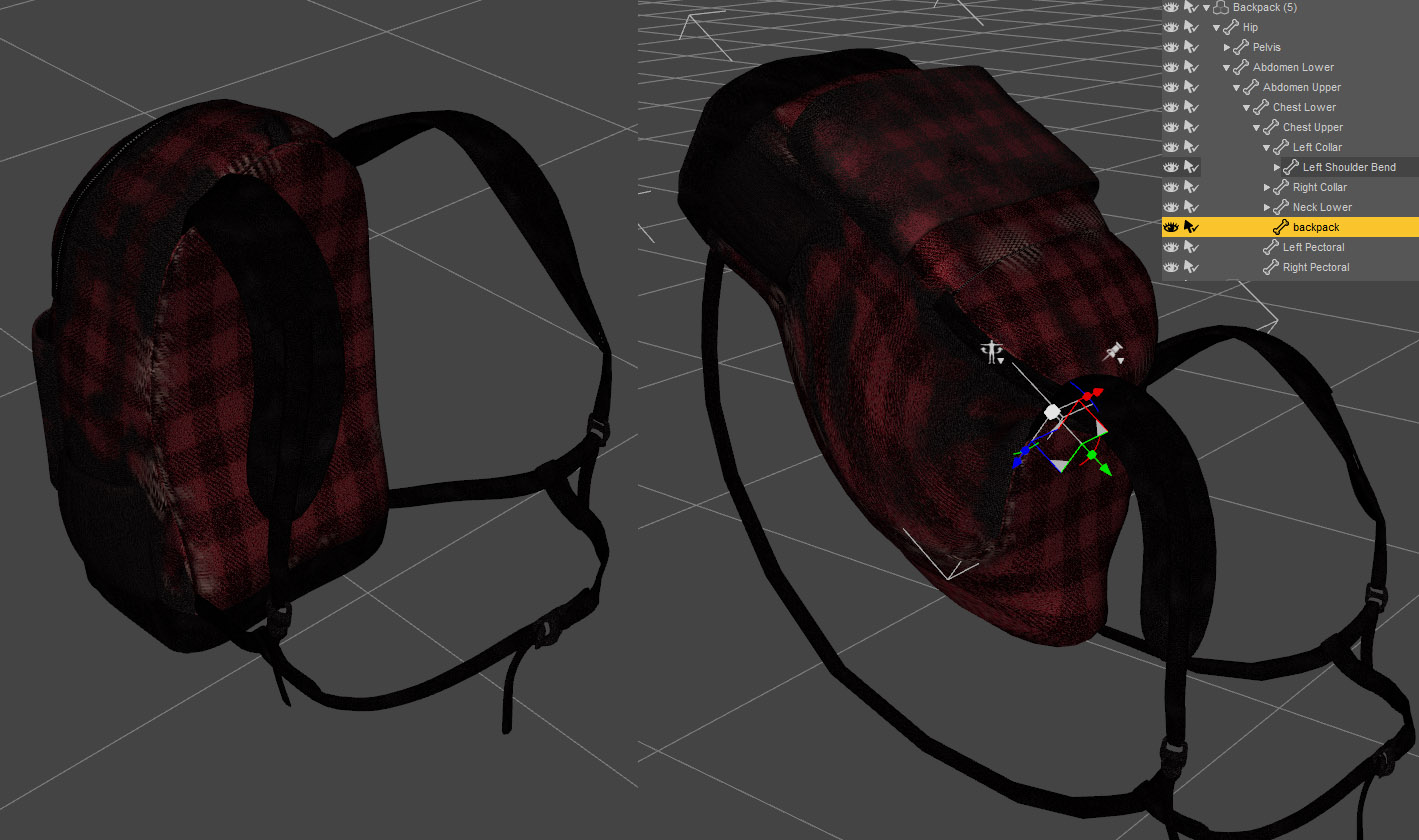
Moving assets after using Transfer UtilityIn the bundle : dForce Skate Punk with Skateboard for Genesis 8 Female(s)
The backpack seems to have been rigged using the Transfer Utility. But one can still select the backpack and, when rotating it, straps and bag deform which is pretty damn cool. I'm not sure I've seen that behavior with other assets before ?
Could someone please give me a hint, as the way it has been designed would open up a lot of possibilities for assets I am working on.
Thanks.
Daz 3D is part of

Connect
DAZ Productions, Inc.
7533 S Center View Ct #4664
West Jordan, UT 84084Licensing Agreement | Terms of Service | Privacy Policy | EULA
© 2026 Daz Productions Inc. All Rights Reserved.