-
Where/How to find Genesis content in Carrara?
Genesis, and all other Daz3D products,. should be installed into your (Public documents /My Daz3D Library )
to have compatibility with older products like V4, and earlier,. that folder also contains a folder called "Runtime"
So,. what you need to do,. is point Carrara's browser to the main MyDaz3D Library folder.
Creating Genesis has also added a new concept of "Smart Content" where instead of manually browsing through folders to locate Figures, clothing etc,. a Database running in the background displays content in the browser related to the item you have selected,. eg: select the figure in your scene,.and all of the items for that figure, show up in the browser.
The Postgre database should be avaliable in DIM if it's not installed,. please install it,. Carrara uses that database to display all "smart content"
Older content,. such as Victoria and Michael 1, 2, 3, 4 all use the older, manual system which was developed with Poser,. with the "Runtime" structure.
DIM installs your products into your "MyDaz3D Library" whether you have Daz3D Studio installed,.. or not.
Carrara doesn't need daz studio installed,. ..however,. it's free, and Daz3D's only child,. it does have some useful features,. such as converting objects modelled in carrara into conforming clothing items for genesis 2,. which can then be loaded back and used in carrara from the smart content browser.
Carrara can display all of your content,. you just need to point the Browser to your "MyDaz3D Lbrary" folder.
In Carrara's browser pane,. at the top right hand side,. there are a few little icons,. one of these allows you to "Add Runtime",. and "Add Folder"
Pic..
Where/How to find Genesis content in Carrara?I am going to ignore installation issues for a second and just focus on finding Genesis. You can find it in either of two places, the Content tab and the Smart Content tab. Both work. I am going to focus on the Content tab. Start a new empty medium size scene. At the bottom of the screen there will be a little handle. Click and drag the handle upwards to open the browser tray. You will see two tabs on the left of the tray, one called sequencer and one called Browser. Click the Browser tab and you will see a row of tabs across the top of the tray. It opens on the "Scenes" tab. Click on the "Content" tab. By default, you will see three subfolders. By default, they have My Daz3D in the name. *** My screenshots are little different because I did a custom install and installed Studio to "Stuff for Studio" *** By default, Genesis is in the 3rd folder. That folder is one of the two that do NOT have the word Runtime in the title. Click the folder to open the subfolders. Scroll down to the "People" subfolder. Click to open. Scroll down to the Genesis subfolder. Clik to open. A blank Genesis figure is on the top level. There are subfolders for characters and other features. Presets for Victoria 5, Michael 5, and other characters based on the Genesis mesh can be found there. If you just want to start with a blank Genesis, click and drag the Genesis icon from the top folder to the instances tray (box in lower right side of interface). Genesis will load at coordinates 0,0,0. Alternatively, you can click and drag one of the character presets from the subfolder to the instances tray.
Couple of notes for the future.
For this to work, Genesis must be installed properly, which will sometimes depend upon your setup so blanket statements are difficult. However, there is a thread stickied at the top of the forum for the release of Carrara 8.5. It has a number of issues and resolutions that came up for various people. If genesis needs to be initialized or is not recognizing morphs that you know you have, it may be an installation issue with solutions recorded in that thread. Also, ask in the forum. (Screenshots help people try to answer)
Some people prefer to load content from the Smart Content tab rather than the Content tab. I encourage them to chime in. You might prefer that as well. For one thing, it allows finding everything by its name, which can be very useful. However, for me, nothing good ever came from initiating the smart content database, but that may be because I have a custom installation.
The folder with RUNTIME in the title. Yes, it is important to pay attention if loading from the Content tab. The 1-4 generation figures are loaded from here. This includes Michael and Victoia 1-4, but also a lot of the props and other figures developed at the same time.
Purchase suggestions?Welp, I'm now a Platinum Member, and have Carrara 8.5 Pro registered! Managed to get it on the $45 deal, so all good there!
I like photo-realism, but I like stylized, cartoony, etc.. as well. I was just really impressed by how much detail they got on the Genesis 3 character, and was amused that the second one I linked looks like Vampire Tori Amos.
Can't type long here, gotta get ready for work, but just wanted to drop in and say that I've taken the plunge, and have my water wings on :p
Thanks for the info/advice!
Just my opinion (but I'm 100% right and anyone who disagrees obviously hates babies/worships Satan/eats their bread butter-side-down) but Genesis1 is the best all round figure out there, and best of all it comes with Carrara pro (along with Michael 5 and Victoria 5, which are Genesis1 shape morphs).
 So I wouldn't sweat it that you can't use Genesis3 natively with Carrara, and in fact you may not need to do a whole lot of searching among even Genesis2, as you can do pretty much anything with Genesis1, including put whatever clothes for any other figure on Genesis1 and have it fit (this takes either some of the clothing clones for the other figures, or alternately you can just pop the clothing into the Carrara modeling room and adjust it to fit Genesis1, then re-rig it in Studio so it works great on Genesis1; it's so easy even I can do it. I'm thinking of putting together a tutorial vid showing how, if I can ever find the time...)
Judging from the renders you linked, you may be into realism rendering, and yes Carrara can definitely do that. Those renders you pointed out were both done in Iray, which is an unbiased render engine. Carrara's native render engine is not unbiased, but with the correct settings you can get similar realism (and since Carrara has dynamic strand hair, you can actually get even better realism in some respects) but do remember that it is not an unbiased render engine. If it's really important to you to have an unbiased render engine like Iray, then there are plugin options for Carrara including Luxus, Luxcore, and Octane.
Purchase suggestions?Just my opinion (but I'm 100% right and anyone who disagrees obviously hates babies/worships Satan/eats their bread butter-side-down) but Genesis1 is the best all round figure out there, and best of all it comes with Carrara pro (along with Michael 5 and Victoria 5, which are Genesis1 shape morphs).
So I wouldn't sweat it that you can't use Genesis3 natively with Carrara, and in fact you may not need to do a whole lot of searching among even Genesis2, as you can do pretty much anything with Genesis1, including put whatever clothes for any other figure on Genesis1 and have it fit (this takes either some of the clothing clones for the other figures, or alternately you can just pop the clothing into the Carrara modeling room and adjust it to fit Genesis1, then re-rig it in Studio so it works great on Genesis1; it's so easy even I can do it. I'm thinking of putting together a tutorial vid showing how, if I can ever find the time...)Judging from the renders you linked, you may be into realism rendering, and yes Carrara can definitely do that. Those renders you pointed out were both done in Iray, which is an unbiased render engine. Carrara's native render engine is not unbiased, but with the correct settings you can get similar realism (and since Carrara has dynamic strand hair, you can actually get even better realism in some respects) but do remember that it is not an unbiased render engine. If it's really important to you to have an unbiased render engine like Iray, then there are plugin options for Carrara including Luxus, Luxcore, and Octane.
What's Been Your Favourite Purchase In The P.A. Sale So Far?For new items, it was Steakhouse Environment- it's practical and can be used for family friendly scenes. Also easy to light due to large windows.
I also really like Vidra Hair, (Good for females and males), Sakura for Aiko 7 (which I picked up for about $7 IIRC) and P3D Josina. I'm a Polish fan and scooped up the Oriental Breeze Pool.
If you want a lot of nice props Millionaire Private Office is super nice. The lighting is done for you and is very elegant, classy.
Below, Oriental Breeze Pool, night render.
 Purchase suggestions?
On the right track. Slight variation.
Long ago in tech time, Daz released human mesh figures to be used in the program Poser. These were called the millenium figures. The woman was Victoria and the man was Michael. In hindsight, they are now called V1 and M1 for Victoria 1 and Michael 1. These meshes were rigged so that they could be used in the Poser program, and thus the file system was Posers. The poseable figures were in a "character" folder. Static props were in a "prop" folder. There were folders for poses, expressions, hands.
Over time, Daz released improved generations of figure meshes. Each generation had its own Victoria and Michael. V1-4 and M1-4 were still designed to fit in Poser's file structure and work seamlessly in Poser. One of the updates of Carrara allowed for these generation 1-4 figures to load natively in Carrara using the Poser file structure.
Then Daz released the first Genesis figure mesh designed primarily for Daz Studio, and only able to be used in Poser with significant adjustment. Furthermore, the entire file structure was different. So, Genesis 1 is really the 5th generation of Daz figures. Thus, Genesis 1 includes Victoria 5 and Michael 5. Carrara was updated from C8.1 to C8.5 in order to allow Genesis figure meshes and rigging to work in Carrara. Genesis 2 (6th generation so includes Victoria 6 and Michael 6) also works in Carrara.
However, genesis 3 (Daz's 7th generation of figure meshes) uses a figure system that does not work in Carrara. Thus, Victoria 7 and Michael 7 will not work in Carrara natively.
So, when looking at figures and associated products, it can get confusing. For named figures, such as Stephanie, David, Michael, Victoria, etc. you can be reasonably confident that they will work in Carrara if numbered up to 6. If they are numbered 1 trough 4, they use the old Poser file structure and rigging system. If they are numbered 5 or 6, they use the genesis generation meshes and rigging systems.
Bottom line, Genesis 1 or 2 = OK, but Genesis 3 is not OK.
Named figures (Victoria/Michael) 1-6 = OK, but 7 is not OK.
Purchase suggestions?Sort of. :)
A quick summary:
Michael 1 through 4 and Victoria 1 through 4.2 all predate Genesis and were each stand-alone base figures that you could buy characters for (usually a combination of morphs and new skin materials). Michael 4 and Victoria 4 (really 4.2, since that was the last update to the figure) are still very popular and vendors on other sites continue to actively make clothing and new characters for them.
After their 4th generation figures they switched to Genesis. Genesis was a unisex base figure you could buy customized variations for (including Michael 5 and Victoria 5 and a whole bunch of other characters with "5" in the name). The great thing about Genesis was that since it was a single figure you could easily use the same clothing for both the male and female unlike earlier generations. Victoria 4 clothing cannot be used with Michael 4 for example. Genesis could also use the same UVs as the 4th generation so you could use all the old skin materials that so many of use had accumulated libraries full of with the new figures.
Genesis 2 they split back into two base figures (a male base and a female base) and you can get customized characters for each (including Michael 6 and Victoria 6 and a whole bunch more with "6" in the name). Via auto-fit you can use clothing for the male figure with the female (I think you may need to buy an additional add-on to do this? I can't remember for sure though) as well as most clothing from the 4th generation figures.
Genesis 3 is the latest, also split into two base figures (a male base and a female base again) that you can buy customized characters for (including Michael 7 and Victoria 7 and all the other "7's"). Genesis 3 changed a lot of things, including the weight mapping and UV maps, from prior generations that prevent it from working properly in Cararra at the moment. Debate continues on when we'll ever see this in Carrara; although at some point DAZ did say they were working on at least part of the problem, there is no ETA. You can still pose the characters in DAZ Studio and export them as .OBJ then import and render in Carrara but it's far from an ideal solution compared to the native-use of all the earlier generations.
It can be a litle confusing at times if you are late to the game since Genesis 1 is actually the fifth generation of DAZ figures. So your tree is essentially correct, except the "kits" for Genesis (1) would all be version 5, not version 1 (even when the character did not exist for previous generations, the 5 was usually added to the name so you knew it went with Genesis).
So your tree would look more like:
Genesis 1 (base)
|
|--- kit for Victoria 5
|
|--- kit for Michael 5
Genesis 2
|
|--- Genesis 2 Female (Base)
| |
| | - kit for Victoria 6
|
|--- Genesis 2 Male (Base)
|
|- kit for Michael 6But you had the basic idea.
Silent Sally for g3fyup - attached is victoria 7 texture
You can achieve much the same with just the G3F body morphs:
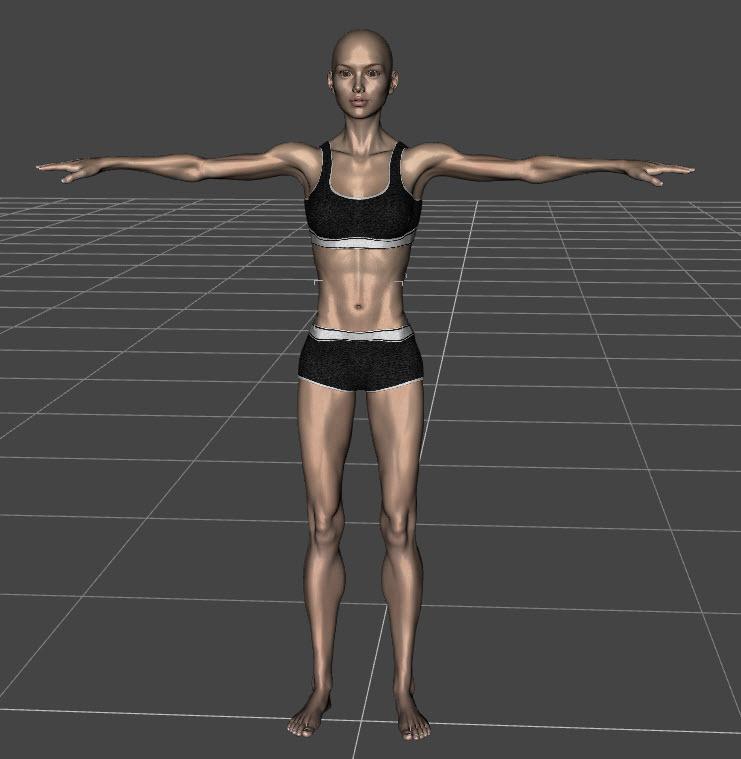 Silent Sally for g3f
yup - attached is victoria 7 texture
Excellent! Thank you! :) She has a very nice athletic body. I might pick her up. I'm happy to know that she doesn't have to go all "no face". lol That might give me nightmares.
No problem- here to help.
Questions about upgrading to a new computerWell, I'm not sure if I was doing something wrong, but I tried following the instructions given and both methods seem to only register what's under the "content library" tab, such as the basic Victoria/Michael characters, various props, and the presents provided for them or purchased from DAZ. The items I was mainly concerned about are not showing up, unless I'm missing something...
To Clarify my earlier post, the things I'm mainly worried about transferring are some custom shaping morphs and material settings I had done and saved for the above base characters. In verzion 4.6, they are the ones that show up under "unassigned" in the "shaping" and/or "surface color" tabs.
These were/are saved on the old computer as a "shaping preset" or "material preset", respectively. Should I have saved them in some other way, or are these things something that I'm just not going to be able to move from machine to machine? Sorry if I'm not grasping something obvious, but once again, all help is appreciated! Some of these custom shaping presets took quite some time to tweak to my satisfaction and I'd really hate to have to try and re-create them, if I ever could...
Thanks again,
Mark
Oh well, I didn't need to spend $100, anyway...It was late. I was going through the Catch-Up sale listings -- page by page. Selecting one item after another. After another. Toon Ghost? Why not? Ooooh, that M4 hair looks nice. And Victoria can always use some more pumps... Then, the silent hand of time struck! Silently and without warning, the $88 in my shopping cart -- a large but managemable number -- turned into a hideous, unspeakable MONSTER of $512! Ghhaaaaa! Time had run out.
Oh well... if there's an end-of month catch-up, I'll try to get started on my shopping earlier. If not... well, there's always another sale.
Silent Sally for g3fyup - attached is victoria 7 texture
Excellent! Thank you! :) She has a very nice athletic body. I might pick her up. I'm happy to know that she doesn't have to go all "no face". lol That might give me nightmares.
Silent Sally for g3fyup - attached is victoria 7 texture
Genesis 3Can you do the following, select the character in the scene tab, go to the shaping tab, and check under People if the character slider is there? If the character slider is there, then can you try sliding it and see if it does anything?
(Also, which character are you using, exactly? Some need other characters to look like in the promo image, like http://www.daz3d.com/fwsa-alysa-hd-for-victoria-7-and-lf-little-mystery she needs V7). Additional morph packages are only needed if they are stated in the "Required" section in the shop here; it can differ in other shops. Still, a morph should still work (even if it won't look exactly like the one in the promo), without the base character.
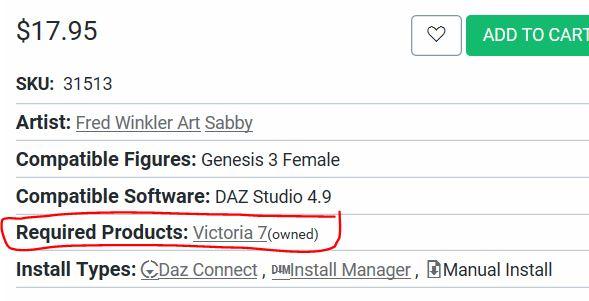
As for the extra morphs, they are recommended, as they allow you a much wider range for non-puchased character creations. But they are optional, really.
- http://www.daz3d.com/genesis-3-male-body-morphs
- http://www.daz3d.com/genesis-3-female-body-morphs
- http://www.daz3d.com/genesis-3-female-head-morphs
- http://www.daz3d.com/genesis-3-male-head-morphs-22924
- (also recommended) http://www.daz3d.com/200-plus-head-face-morphs-for-genesis-3-female-s
EDIT: I found her over at Rendo. According to the product Readme, she needs "Miss You for Genesis 3 Female(s)". It also has a file list, that says where all the files are supposed to be. Can you please check out if all the files are existing, and in the correct place? Here's the URL to the readme:
Mods: I hope it's okay to post to the Rendo Readme. If not, please delete the link.
Transferring Morphs from Genesis to G2M/G2F and from G2M/G2F to Genesis (Now with Clones!)Is there anything in the Victoria 4 for Genesis 2 Female product that can't be done just by following these tutorials?
UVset: Victoria 4 Compatible UV Set
Specialised clones: Victoria 4 Clone, more Compatible with Shoes and Victoria 4 Skirt Clone, more Compatible with Skirts
Despite Studio's Popularity, People Still See 'Poser Art'Given a lot of people here naturally do consider using DAZ/Poser as creating art, and thus are unhappy with comments from so called "Real Artists" that pour scorn on it, I wonder how many would consider the merits of art creation in an even more machine driven manner. I am refering to simply pressing the screen capture button whilst playing a 3D game, and then posting this as "Art" they created. I understand that in some 3D games like second life/fallout/skyrim etc (note I have not actually played any of these) you can upload your own assets, plus manually pose your characters, and thus can require some level of skill. However this is not the case with more traditional action games like GTA, Assassins creed etc. You can customize your characters in these games, and naturally you decide where they go and what they do, but the art creation part is little more than a button press. I guess you could argue that is no different than the art created by a photographer, but at least the photographer had to wander around in the real world and find an interesting scene/moment to snap.
I have seen a number of these game capture still art posted to Deviant Art, and other places, and I am curious as to what others consider to their merits to be called "Art".
Sounds like a completely different discussion seeing we're talking about Daz/Poser, and CG art in general. Daz/Poser is not quite at the level where you can simply "push a button" and the software does all the work for you. The fact that some skills are required and that there are levels to the skills that people have attained using those programs sets them miles beyond a screen capture. As a newbie, I can follow a tutorial and get a very pleasing image, but let's be real, I didn't really create anything; I followed a template. If you're going to call that art, then you also call a plaguerized book art as well. Sometimes we take things to a ridiculous extreme in order to try to be all inclusive; and you see examples of people making monkeys out of the public all the time because nobody is willing to, or scared to call them on their crap. Everything does not fall under the category of art as much as some people would like it to.
You can even make the distinction between good art and bad art, if the piece in question is, or is not elictiting the response that the creator intended. I've seen really good Daz artists on the deviant art site and I know that I would love my pieces to look like theirs so I can say without shame that their works are better than mine at this stage. If a person who wants to acheive a certain level can't admit that then how are you supposed to get better? A person who thinks everything they do is a masterpiece is never going to grow as an artist -- if that is what they truly want to be. Honestly a lot of people want to be considered artists, but they simply aren't willing to put in the work it takes to become masters at what they wish to do, and we've become a society that makes them feel compfortable with that.#1) You cannot define art. That is the cusp of where this goes. Art is what people make it out to be. If you want to talk about Daz, there are plenty of "Ready to Render" scenes set up by PA's for sale here. Load up your ready to render scene, load up your predefined figure with predefined poses, and hit the render button. How many clicks was that? Daz is indeed getting to that point where it is all one or two clicks away. And that is fine! So the question is...is that art? Well, yes, it still is.
#2) On the subject of screen shots in gaming. All games on PC can have screeshots taken. And pretty much most games on consoles can as well. The ps4 even has a "Share" button specfically for this, and the Xbox One has a similar function. Skyrim and other Besthesda made games have extremely vibrant communities. After all, 25 MILLION people have Skyrim just on PC. That's not counting consoles! And Skyrim has a very dedicated modding community. There are a lot of mods that basically beautify the game, as Bethesda's base is quite ugly (kind of like how Base Victoria 4 is kind of ugly.) You have to install all these improved textures and lighting packs to make the game look better (not unlike Victoria 4!!) Some dedicated modders have even created full camera and posing systems. Taking these screentshots is no simple task. You have to install them, and know how to work them. You have to know the game! You can't just dive in willy nilly and do it. You have to pose your actors, set the lighting (keep in mind the game has an active time system, time is always moving.) It frankly is not so different from Poser once you break it all down. I doubt many people here, even well trained Daz experts, would be able to just jump into the Skyrim scene and create great pictures right away. It takes just as much skill as it does for Poser/Daz. End of story. The only difference is the picture renders instantly. There are some freakishly good Skyrim pictures out there, pictures that can be confused with Poser or something else (sorry, Poser experts.) They certainly don't look like any ordinary game screenshot.
Even the other games you mention still require proper set up. Like GTA. Most pics in GTA require a LOT of planning. After all, it IS a video game, and it is going to take some know how in order to get a game to set things up. GTA is extremely random. If you want to create an interesting scene, you have to create it all. You want to create an explosion, you gotta make that explosion happen and time it just right! Sometimes online, this requires lots of people doing their own part.
Creating art from video games is very quickly becoming a thing. It has become so popular, that Nvidia created special software JUST FOR SCREENSHOTS with the release of its 1000 series. They call it Ansel. It allows you move the camera around and take a picture that vastly exceeds the resolution of your screen. You could even go up to 40,000 pixels. Try doing that with Iray! HA! And as gaming graphics get better and better, more and more people are doing this. You still have to line up your shot and consider the composition, just like you do in standard photography. It still requires planning. The tools are getting easier, yes, but that does not make and less of an art form.
To look down on gaming screenshot art, or XNA art, is no different than having a Maya user look down on Daz. And part of this comes down to ignorance. Neither of these posts are particularly well informed, I mean, the first didn't even play those games. Not trying to insult here, but it is easy to put down what you don't understand. Even as people jump to defend Poser/Daz, I see many posts still all too happy to define what they think is bad art, or a lesser art form. People who want to exclude others from their level. Lets not do that folks. This leads to my next point.
That "Poser Stigma" thing. This is no different than the so called "PC Master Race" of gamers looking down on "Console Peasants." It is Elitism, pure and simple. People who think they are better than somebody else just because of what they use or how they do it. They got the $800 software on the multi-thousand dollar machines. You can list all sorts of other reasons and excuses, from the skimpy clothes and style of art that sometimes defines Poser users, but at the end of the day it comes back to Elitism. Just like jocks might look down at lesser atheletic people, this is the geeky equivilant to that. Most people like to feel that they are better than others at something. Its kind of human nature.
Finally, I'll say that one of the things that drew me to Daz Studio was SKYRIM. That's right, without Skyim the video game, I wouldn't even be here. It was through Skyrim that I became inspired to look for something like this, like Daz. That is also why I believe Daz needs to court people who are doing that kind of art, the screenshot and the XNA crowd. There are people who already use Daz to render their XNA created scenes. These people are potential Daz customers!
Need help for a 3delight transmap with multi-tiled UVIt would be nice if the latest DAZ people UV material zones were divided with some practical usefullness... but anyways...
Here I've made a geoshell of Victoria 6 so I could place a fishnet stocking texture ( by Lilflame ) over the skinned V6 and we see the fishnet geoshell neckline material zone has a funky dividing line. So, I thought I'd just make a transmap to hide the neck area above that collar prop. But, in 3Delight, when a UV is tiled to a higher multiplier... here the UV is tiled up to 10 times... it unfortunately seems to mean that EVERYTHING is tiled. Where in Poser Firefly this is not a problem. The diffuse can be tiled up however you want it, and you connect a separate node to the transparency which is at original UV size. But there's a lot about the 3Delight surfacen window I think kicks Firefly's ass. I just need to figure out this conundrum.
So, 3Delight wizards I beg your assistance. How would you approach this problem? I need to keep the fishnet tiled to that size, yet hide the area above the collar prop.
Thanks for any help, suggestions, prayers :)
Need help for 2d license animation and the bookThat's right, with a limited exception for the Anne marie Goddard Digital Clone for Victoria 3 you can use and distribute 2D still images and animations as you wish under the basic EULA, granted when you buy from the store.
Pose and animation conversion for multiple generations of DAZ figuresThank you for responding. I'll try the first solution first.EDIT: When I tried the first method (applying the Girl pose to Aiko3, and then using the script to copy it to V4, I received this error message.
Copy Pose Script ''Scripts/SGApps/Posing/Fix Pose A3-V4'.{dsa,dsb,dse} was not found.
I did a search of my hard drive and I do not have that file.

Unfortunately, rsg didn't include that script, i.e. Fix Pose A3-V4.dsa, in the zip file. You could make one using the FixPoseGenerator.dsa script by following the instructions in the PDF file included in rsg's zip.
As you appear to have found out though, the differences between the generation 3 and generation 4 skeletons are small enough that you can get good results just applying the poses or animations directly on them.
I'll try applying the pose to V3, then copy to V4 later today.
EDIT 2: When I applied the pose to Victoria 3 and then tried to copy to Victoria 4 I received this error
Copy Pose Script ''Scripts/SGApps/Posing/Fix Pose UNSET-V4'.{dsa,dsb,dse} was not found.
It is strange that you're getting an UNSET when using Victoria 3.
I'll try editing the script later.
EDIT 3: I edited the script, applied the pose to The Girl, loaded Victoria 4.2, then ran the script.
I received this error message.
Copy Pose Script ''Scripts/SGApps/Posing/Fix Pose A3-V4'.{dsa,dsb,dse} was not found.
If you're seeing that message, then it is likely that you didn't install the SGApps/rsg scripts to the default location. When installing the rsg scripts from the sgapps-posing-scripts.zip file (downloaded from sharecg), you need to unzip the Scripts directory into your My Library directory. If you want to install them to a different place, you should edit my script and change the value of the copyScriptName variable on line 30.
EDIT 4: I feel so dumb. I just directly applied the pose to Victoria 4 (without using the script). The figure accepted the pose, but it required adjusting the arms and legs.
Been there, done that,
. Glad to see you've found a solution.Transferring Morphs from Genesis to G2M/G2F and from G2M/G2F to Genesis (Now with Clones!)Is there anything in the Victoria 4 for Genesis 2 Female product that can't be done just by following these tutorials?
Daz 3D is part of

Connect
DAZ Productions, Inc.
7533 S Center View Ct #4664
West Jordan, UT 84084Licensing Agreement | Terms of Service | Privacy Policy | EULA
© 2026 Daz Productions Inc. All Rights Reserved.