-
Daz to Blender Bridge - Meet the Team
Thank you so much for your detailed information. I beleve my error was not zero-ing the figure before I sent the content across to Blender. I had sent across a file with an animated timeline.
I used the figure and character morph at zero pose (character still applied), and the transfer is without distortion in the hands.
For reference, here aremy responses to your information requests
dzblenderbridge.dll
version 2022.1.9.30Daz Studio Pro
4.20.1.17Blender add-on
Import-Export : DazToBlender
version 2022.1.1Scene figure: Genesis 8 Male
Character morph and shader set: Yuzuru
Hair: Yuzuru hair
Lucidity clothing set: pants and shirt
Jasper Black clothing set: boots
Hippusuta clothing set: headphonesSteps prior to sending to Blender:
Set up scene with figure character and background props
Pose figure (noted should have been in zero default pose)
Save scene
Send To Daz To Blender
(See screenshots of options I selected)Steps inside Blender:
Open DazToBlender drawer tab
Import New Genesis Figure
(See screenshots)Genesis 8 model without facestem_athome אמר:
היה צריך לעשות מחזה.
צורת ראש זכר G8.
הייתי מפרסם את התבנית, אבל אני חושב שאסור, מכיוון שהוא כנראה יסווג כמתחרה במכירה בחנות.
I did not understand why not advertise in sales? The site also has no sales of independent creators and not just original DAZ products
Maybe you want to sell me this morph personally?
Daz to Blender Bridge - Meet the Teamibr_remote aka infinity10 said:
I used the Daz2Blender Bridge to import a commercial character of the Genesis 8 Male into Blender3D version 3.2 (nVidia Omniverse flavour).
I get these distorted hands when the file is transferred.
I know that if the problem occured inside Daz Studio, the fix is to Adjust Rigging To Shape inside DS.
However, the problem exists inside Blender3D, not DS. Inside DS, the morph character is fine.
Is there a setting inside Blender3D that I can use to fix the distorted hands ? Please advise me, thanks.
(Am using latest version of the DazToBelnder bridge with DS Pro 4.2
Please provide the following information so I can better understand and reproduce your problem:
- Full Version number of DazToBlender Bridge in the DazStudio Plugin, if you are using the latest version, it will show up in Advanced Settings tab
- Full Version number of the Blender Plugin, if you are using the latest version, it will show up in the Blender console
- Exact Character name and all hair, clothing and props used
- Exact steps you are performing prior to sending to Blender
- Steps you are performing once inside Blender
- Screenshots of all morph sliders and their values in Blender
Until I have the above information to figure out what is going on, here is some general advice:
- Make sure you are using the latest Bridge version, since there have been multiple fixes to the Morph export system: https://github.com/daz3d/DazToBlender/releases
- Try making sure that the character is Zero'ed to A-Pose in DS before you send it to Blender: Edit -> Zero -> Zero Figure Pose.
- Try setting the character morph shape that you want to use only in Daz Studio, then transfer only the custom character and not the morphs.
- If you need to be able to adjust morph character inside Blender, then make sure you click "Add Connected Morphs" in the Bridge Select Morphs dialog. This will help isolate the morphs that change bone length and skeleton size. In Blender, adjust only the morphs that do not affect bone length / skeleton size.
Hope this helps. Please do not forget to provide answers to above numbered list if you are still having problems. Good luck.
how to zero figure while still keeping all morph dial settingsEverything ok now, I searched through my genesis pose sets and tried some zero figure icons there, I found one that will zero all bones but not effect the face morph chances I had made so that works fine now
thanks Leana that is a good suggestion if all else had failed,
PerttiA, sorry for the confusion, I meant I needed genesis face morphs to not get deleted when putting genesis bones back to exact same coordinates, zero figure is the wrong term I guess the correct one would be zero the genesis bones (which would not effect morph changes to either the face or the body
I am a daz computer dummy often and probably a computer dummy in general - just an artist that was strongly attracted to daz due to the unbelieveable color depth of the Iray and 3dlite renders, though I have never been able to get close to the promo renders at least they have improved a lot, I would have not been able to get half as far without all the help people have given here on the forum so I want to say thank you to everyone for all the help!!
Normal import time for HD export using Diffeomorphic?Padone said:
It never happended to me to take over 3 hours to import a HD figure. May be your system is swapping ram if 32G aren't enough. What's the ram usage in the task manager ?
Also if you need the HD mesh only for baking then you could disable "add multires" and "add armature" in the global settings.
So I was able to solve load times but I have a few other questions. First of, with load times: I had my library for Daz on an HHD instead of an SSD. After moving everything over to an SSD, it cut the export time from Daz from 660 seconds to around 230 seconds. Importing into blender only took 10 mins. Importing the HD mesh though didn't create a multires modifier.
Now for my questions. Please correct me if I'm wrong.
1. Can I import the base genesis 8.1 character into blender, and import the morphs and then adjust the character there?
2. Say I've finished making adjustments to my character, (clothes, HD details, micropressures, horns), except for the pose, and I want to import all of that into blender but not use the HD export, I have use the HD Addon by Xin, correct?
2b. If my understanding is correct, Xin's addon will create a multires modifier and then take the HD details from Daz and add them to the (now high poly) mesh in blender?
2c. This is the important one for me, I can't figure out how to export the favorite morphs. According to the blog post I should save as a pose preset, but that doesn't create a json file that the Daz Importer addon requires.
Not sure what part of the documentation I'm missing but I'd really appreciate the guidance.
Face transfer unlimitedI have the Face transfer unlimited but when i open the pane it says i only have 3 saves left and
the watermark is present. I looked in the Plugins and it is there with the serial number included.
What else is needed?[Released] Bone Minion for Genesis Poses [Commercial]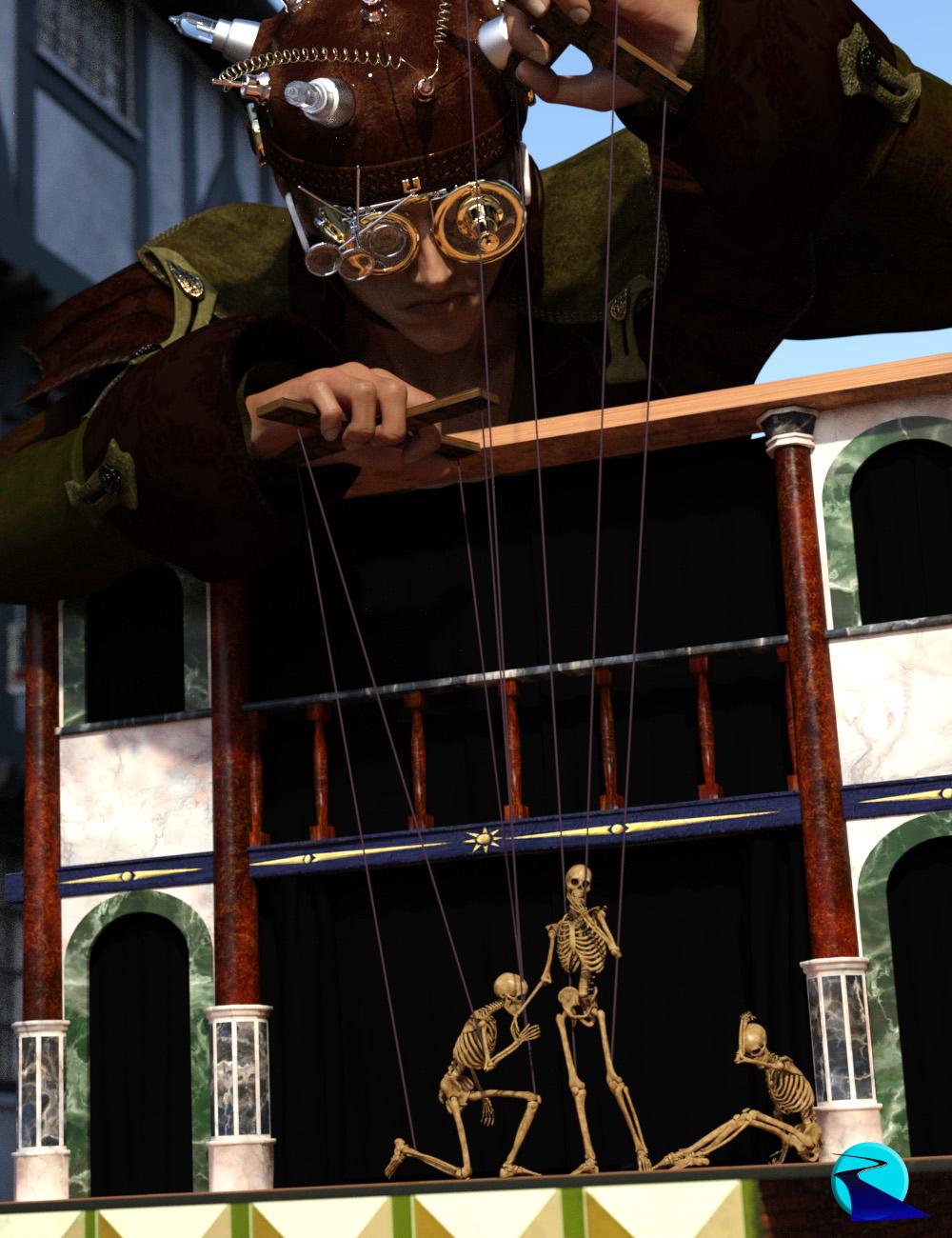 Introducing the revolutionary new way to use poses from different figure generations! Stop wasting time and hard drive space converting pose presets, just use them! With Bone Minion, you can directly use Genesis poses for other generations without first converting and saving them to a preset. Your Bone Minion will do the hard work for you by acting as a bone "catcher" for a Genesis pose and then transferring (and converting if necessary) the pose to its parent target figure*. Simply load the desired Bone Minion (i.e., Genesis Bone Minion for Genesis poses) on your target figure (Genesis 8.1 Male), select the Bone Minion, and start applying poses!
- On-the-fly conversion of poses to your Target Figure
- Directly convert from the Source generation to the Target generation without converting to intermediate generations (i.e., direct conversion from Genesis to G8F instead of Genesis to G2 to G3 to G8)
- Works with full poses, partial poses**, hierarchical poses***, and even Aniblocks
- Automatically applies full poses when they are loaded**
- Cross-gender pose conversion
- Use Pose Details on the Bone Minion to apply partial poses
Note that converted poses (and especially props if they are hierarchical poses) may not be perfect and may require tweaking. Facial Bones (i.e., expressions) except for the eyes are not transferred.
* Requires purchase of the correct Bone Minion product.
** Any pose that sets the hip of the Bone Minion will be automatically converted on the fly and applied to the target figure. Only 1 bone minion can be in automatic mode per figure (the first installed on a character). The Apply Changes script can be used to transfer any pose (including partial poses) on the Bone Minion to its target figure.
*** Hierarchical poses require the props loaded on both the Bone Minion and the target figure. The prop will be properly rotated for the pose but may need to be manually translated to the correct location.
 Oh, Misty, I forgot my Complaint Thread
...frustration vent.
Beginning to see the limitation of remaining with G3 as it just doesn't seem to have been as well supported as well as even G2, and certainly not to the extent G8 has been. While I still have a ways to go I have been compelled to slowly pick up G8 utilities during the various recent sales, sadly some of which were never released for G3. I guess my biggest disappointment was all the really cool and unique characters that were released for G8 that never were available for G3. Other than a couple fey, 3DU's child, and a few horror/fantasy themed characters, G3 was still primarily just the "Daz Stable" figures updated.
I thought of simply converting G8 ones to G3 but some custom morphs and all HD morphs don't transfer. Then there is the issue of hierarchical presets for poses and materials. In looking to go the other way, it seems there is an issue with X-Transfer (which transfers morphs and shapes from G3 to G8) in Daz 4.20 so transferring my custom G3 characters over to G8 is pretty much out unless i backtrack to an older version.
...and now we have new characters and content being released exclusively for G8.1 [insert a Charlie Brown "Auuuuuugh!" here].
One of my initial misgivings about G8 was the move to dForce clothing and hair, I find it has a serious impact on the workflow having to wait 15 - 20 min to run a sim on my system for each character and pose. I know it's more convenient (from what I heard) for the PAs but when you are on older hardware, it is a serious time sink. Even the "other store" has pretty much gone to dForce for Daz content.
With the old Poser there was only a small collection of "dynamic" clothing and hair, but Daz has seemed to reverse that approach with only an item here and there that isn't dForce (mostly medieval, cotemporary, and futuristic armour or anything that needs to stay rigid). I find it odd that clothing like jeans, slacks, and shirts are dForce when they have few if any "flowing" parts. I've also had some dForce clothing not work the way it was supposed to at all Supposedly some content is said to work as either fitted or dForce but that rarely is mentioned in the product description or even the readme so it's sort of a "crap shoot". Don't really feel like submitting a lot of refund tickets for items that end up not working without running a time consuming sim.
Yeah feel I'm at a bit of a watershed here. It seems similar to how cars are marketed in that every couple years it's time to trade in the old buggy for the latest adn greatst model. Unfortunately that cannot be done with 3D content.(at least after the 30 day refund period) so we jsut have to absorb the cost (in looking at y full expenditure since I got into this I am rather shocked at the einvestment evne adjusted for discounts and such).
Recently in the IM I saw a filter for Daz5.0 which likely will mean a new Genesis iteration, and here we go all over again. Finding it harder and harder to keep up with the Mikes and Vickies on the block.
how to zero figure while still keeping all morph dial settingsIf the expressions are made with custom morphs, there is no fundamental difference between a morph to create an expression that, say, makes a char smile as you have in expression packs, and a morph that shapes her nose to make it longer as you have in shape/figure packs, and DS has no way to make a difference between them. Generally expression packs have a way to reset all related morphs, but besides that you must either search manually the expressions in the parameter tabs or reset all the morphs with Zero>Zero figure.
If the expression is a pose that moves bones of the char face, Zero>Zero figure pose will reset it.
Best/Most Natural Expressions for Genesis 8.1?With 8.1 you have facial bones controls that allow you to make any expression you need out of the basic ones. It was making sense to purchase expressions for G3 and G8 if they were heavily morph based. Not so much for G 8.1.
If a character needs custom expressions, it likely comes with them. Anything else you can make out of basics.
Look at my Hair (LAMH) Official Thread: update 1.6.0.2 released...the "toonyness" could be dialled out with morphing. A number of people dialled in a bit of the Sphinx head morph which narrowed the head and face to look more normal.
Yeah I agree about dForce. It has really caused me to limit my purchases of clothing and hair. At least with Optitex, only a few items were dynamic. The majority of clothing was still fitted. Pretty much bought up what I liked of "standard" fit G8 clothing and it works fine on G3 as well (as long as there are no hierarchical presets).
Look at my Hair (LAMH) Official Thread: update 1.6.0.2 releasedReally? Probaby quite adjustable.
Much better rigged than most of the Daz. Has an actual Jaw bone instead of a morph, like most of AM's.
I would have gotten him if not for being dForce only. But he looks a bit "cartoony" was the other thing. I could have dealt with that, often much less noticable with slight angle tweeks.
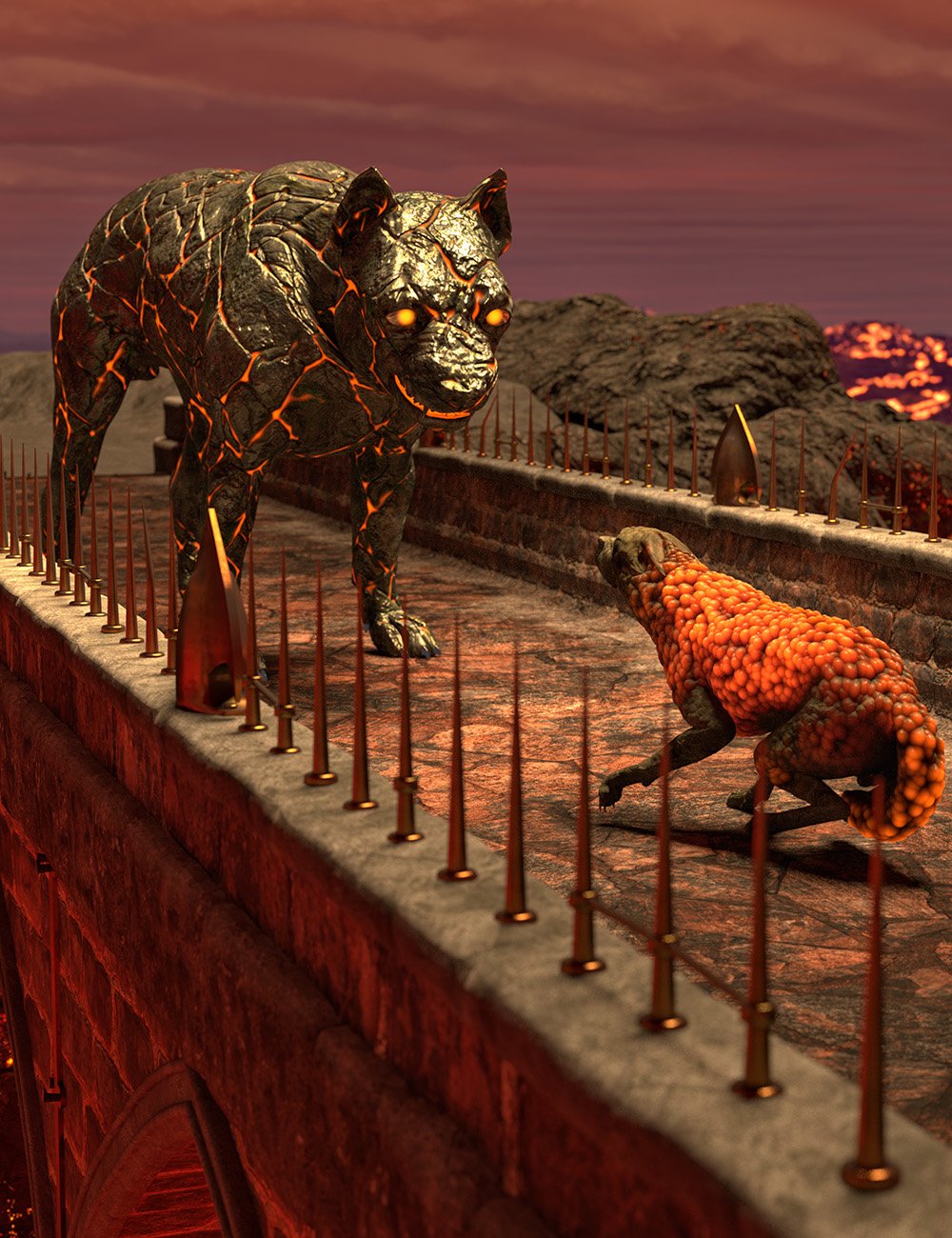
Lava/Molten Rock Skin for G8M?Does anybody know of a skin out there or skin shader out there that is like cracked molten rock/lava? For G8M? So like his skin has turned to stone that has emissive lava/molten cracks running throughout. So something like this, but obviously not with fur and not for a horse, lol -
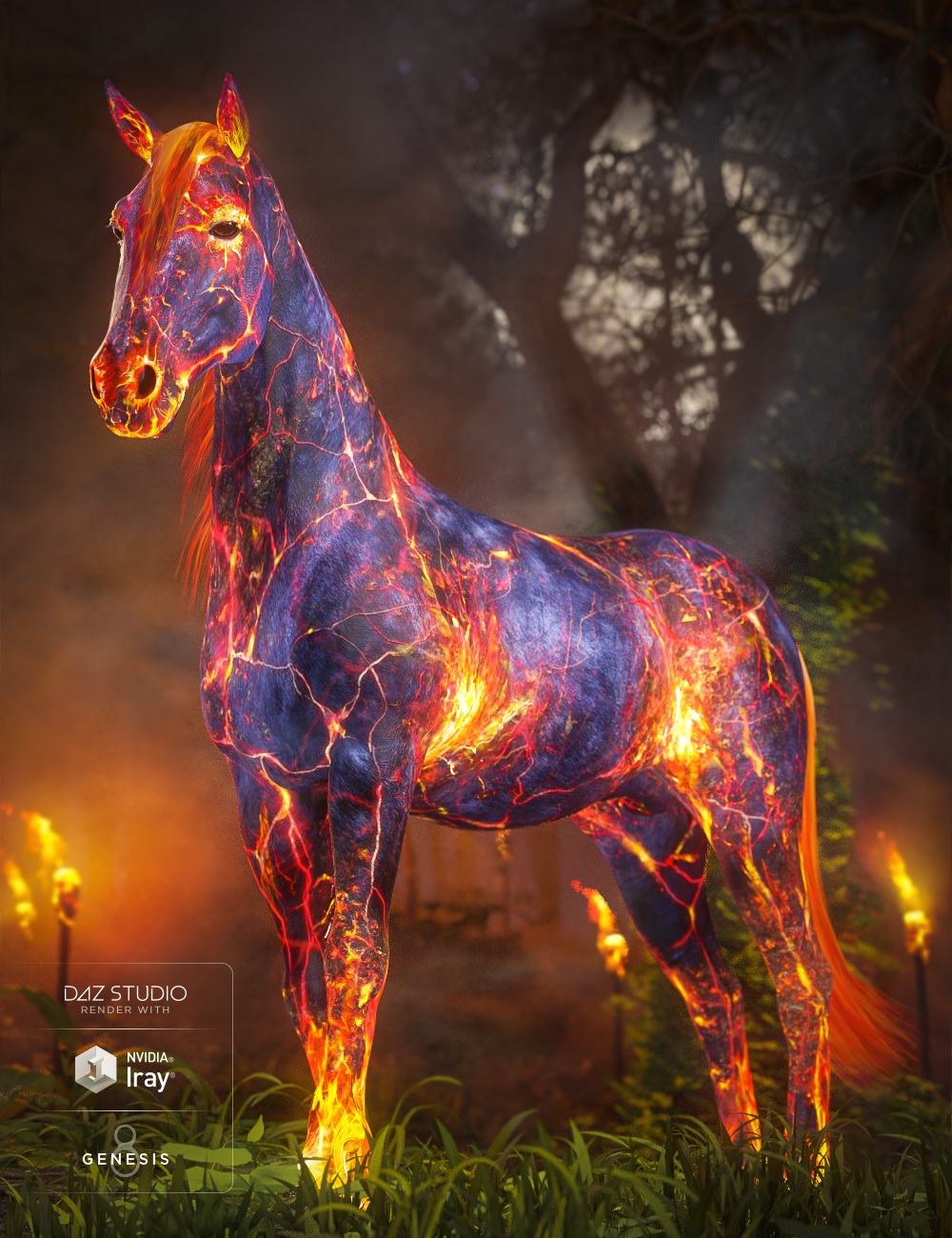
I'm not sure if something like this would work for a standard G8M, without buying the shaping morph? I just want the skin...but even here there really aren't enough lava cracks.
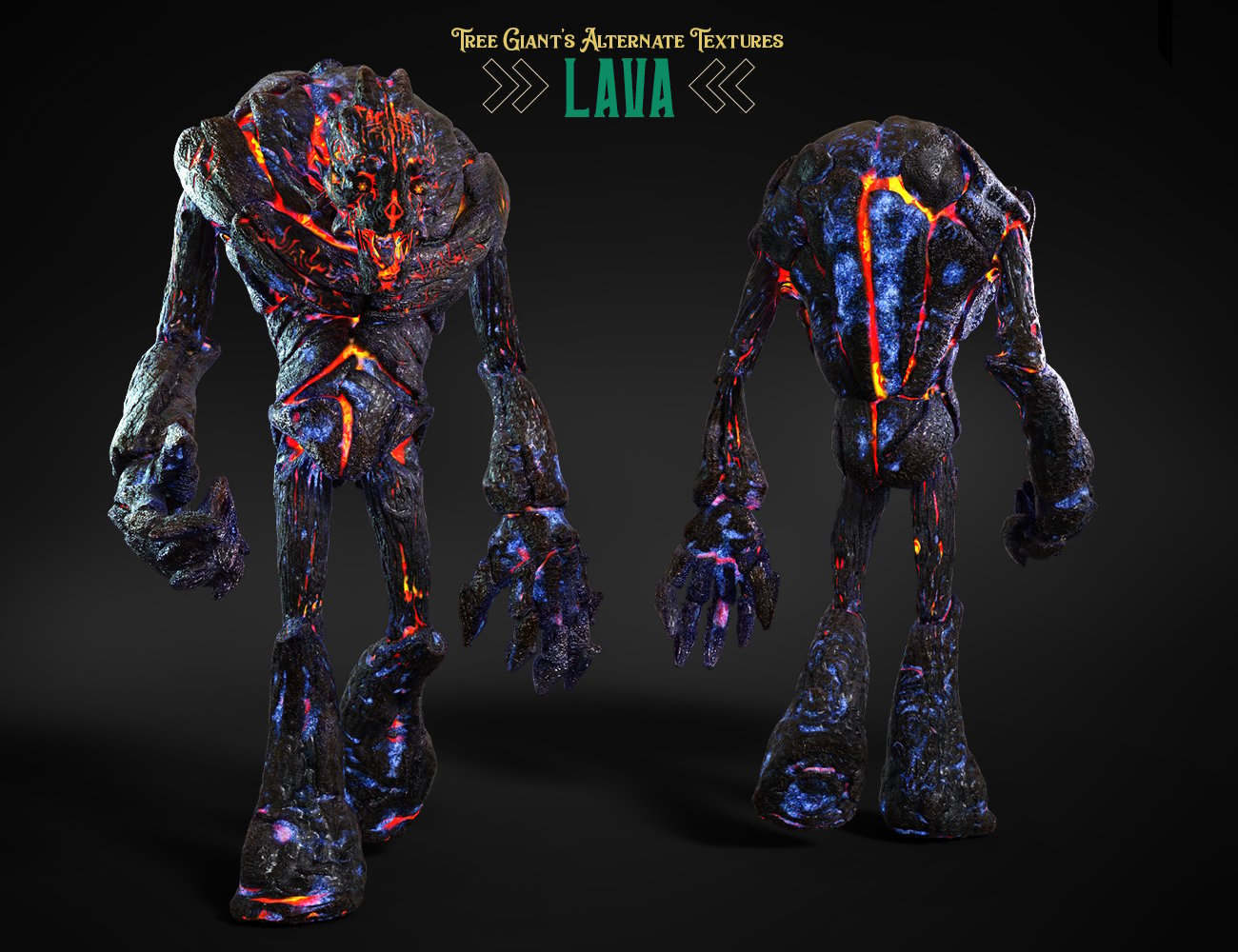
I want to be able to add it to a geoshell and create my own opacity mask because I want some of his original skin to peek through on the face, etc. So he hasn't been fully corrupted at this point.
This rock dog texture is another approximation for example -
 Show us more of your 3Delight renders
...yeah I found that same situation with GenX2. Morphs I had already loaded in an older version of Daz still apply but trying to load new ones doesn't. I wanted to transfer the HFS alien morphs (for G1 that I purchased years ago at Rendo) that I have to G3 but it won't let me do it. This was one of the other reasons I have been loathe to adopt G8, save for a few of the more "interesting" characters.
As I read somewhere here, XTransfer which transfers morphs and shapes from G3 to G8 is also borked in 4.20 which I normally would have used after transferring morphs/shapes to G3 with GenX2.
BTW excellent images. I feel you are giving Iray a run for its money.
My character turns into slender man when scene is reloadedI have never had this happen before. I have a G8F with dforce hair and dforce outfit that I ran dforce on and posed in a small scene.The character poses and looks correct until I save it and reload the scene at a later time. The most noticeable problem is that the arms all the way down to the fingers are stretched out like a slender man and are often behind her back in an unnatural way. I have some t-pose poses, and when I use one the character goes back to regular t-pose and "seems" fixed. If I use other poses that weird deformed freak returns and the arms are in the wrong pose.
I have discovered that if I 0 my custom-made character morph that was imported from blender, the character returns to normal. I have used this morph a lot for at least 6 months.
Is this a known issue? What can I do to fix it?
how to zero figure while still keeping all morph dial settingsYour request is not clear, but if you want to zero the pose while leaving the shape alone Edit>Figure>Zero>Zero Figure Pose.
However, if by "Face Morph" you mean expressions, those are poses.
how to zero figure while still keeping all morph dial settingshow to zero figure while still keeping all morph dial settings
I have reshaped the face with morph sliders but need sometimes put genesis back to zero in order to put on items from M4 or anything that wont conform good unless genesis starts out in zero pose,
anything I've tried so far to zero genesis also takes out the face morph sliders
thanks for the help
Retired item.Catherine3678ab said:
A little teaser ;-) A Quarter Bra [i.e. very useless for any practical purposes a bra might otherwise have]
Seems to be working well with dForce - add a dForce modifier and sim away.
Product will include a few morph poses for the Burlesque Dance poses for G8F.
Promos, right, here's the back ;-)
There is a set of "Free Lace Iray Shaders" by adarling97 at Renderosity. As well there are many shader presets available in the Daz3D store :-) [can never have too many]
Thank you for making these, not sure if I can use it for something but according to my daughters you can't have too many clothes.
As for shaders you could aso get the free Nvidia vMaterials shaders, it has over 900 free shaders.
Discussion and links are here[Released] Character Converter from Genesis 8 Female to Genesis 3 Female - Conv JCMs too[Commercial]Nekura2000 said:
RiverSoftArt said:
Nekura2000 said:
RiverSoftArt said:
Nekura2000 said:
RiverSoftArt said:
Nekura2000 said:
RiverSoftArt said:
Nekura2000 said:
I had to get a new hard drive so I reinstalled Daz Studio. When trying to convert my Generation 7 female characters to Generation 8, I'm getting a distorted face. I've uninstalled and reinstalled the program, even deleted the RSCloneGenesis3Female.obj file from the folder C:\Users\nekur\AppData\Roaming\DAZ 3D\Studio4\CharacterConverterMorphs, with no change. The Generation 7 character as well as Genesis 8 load without a flaw. Here's what I'm getting, attached or from https://www.deviantart.com/wow-creations/art/Converted-920761392. ; I just looked at the parameters for the character I converted, which was Agnes. It isn't showing an Agnes head or body for 8, just Agnes itself.
The clone is for a different Character Converter. Maybe it is pulling in the converted morphs twice? From your previous conversion on the old hard drive and a new conversion? What directories are specified in the content manager? You should check all the currently used morphs on the character and find the morphs. The Parameter Settings show the Asset File Path of the morph (and the [...] button shows the full path of the morph). Make sure the morphs are coming from where you think they should be coming.
I use two different drives when using software. I have the OS drive which I replaced and the data drive. I renamed the original Daz drive as “Daz 3D2 Old”, before installing the Daz Studio. When installing Daz Studio, I allowed it to keep the “Daz 3D” folder, but also use the new “My DAZ 3D Library” folder. I just remember to look at the Error Log when loading Agnes Genesis 8 and this is what I’m getting:
2022-06-29 07:16:21.449 [WARNING] :: ..\..\..\..\..\src\sdksource\fileinput\dzassetdaz.cpp(6903): Formula output property not found: Genesis8Female:/data/Daz%203D/Genesis%208/Female/Morphs/XTransfer/3D%20Universe/ToonGenerations2/Base/XT_CTRL3duToonGenerations2_AdjustAge.dsf#XTIDCTRL3duToonGenerations2_AdjustAge?value - in file: /data/Daz%203D/Genesis%208/Female/Morphs/Zev0/Shape%20Shift/Arm%20Length.dsf
2022-06-29 07:16:21.506 [WARNING] :: ..\..\..\..\..\src\sdksource\fileinput\dzassetdaz.cpp(6903): Formula output property not found: Genesis8Female:/data/DAZ%203D/Genesis%208/Female/Morphs/DAZ%203D/Head/Old/PHMEyesIrisSize.dsf#PHMEyesIrisSize?value - in file: /data/Daz%203D/Genesis%208/Female/Morphs/vyktohria/Meredith/VYK%20Meredith%20Head.dsf
2022-06-29 07:16:22.060 [WARNING] :: ..\..\..\..\..\src\sdksource\fileinput\dzassetdaz.cpp(6903): Formula output property not found: Genesis8Female:/data/DAZ%203D/Genesis%208/Female/Morphs/SickleYield2017/UniversalBreastHelper/PBMSYUBHGiantAll_proj.dsf#PBMSYUBHGiantAll_proj?value - in file: /data/Daz%203D/Genesis%208/Female/Morphs/SickleYield2017/UniversalBreastHelper/PBMSYUBHGiantAll.dsf
2022-06-29 07:16:22.125 [WARNING] :: ..\..\..\..\..\src\sdksource\fileinput\dzassetdaz.cpp(7134): Unsupported formula: /data/Daz%203D/Genesis%208/Female/Morphs/RiverSoft%20Art/Javeria%20for%20Victoria%207%20and%20Genesis%203/pJCMRSG3FVictoria7ThighBndFwdHDR.dsf
2022-06-29 07:16:22.155 [WARNING] :: ..\..\..\..\..\src\sdksource\fileinput\dzassetdaz.cpp(7134): Unsupported formula: /data/Daz%203D/Genesis%208/Female/Morphs/RiverSoft%20Art/Javeria%20for%20Victoria%207%20and%20Genesis%203/pJCMRSG3FVictoria7ThighBndFwdHDL.dsf
2022-06-29 07:16:22.628 [WARNING] :: ..\..\..\..\..\src\sdksource\fileinput\dzassetdaz.cpp(7134): Unsupported formula: /data/Daz%203D/Genesis%208/Female/Morphs/RiverSoft%20Art/FWSA%20Caterina%20for%20Victoria%207%20and%20Genesis%203/pJCMRSG3FVictoria7ShoulderBndFwd_110_R.dsf
2022-06-29 07:16:22.665 [WARNING] :: ..\..\..\..\..\src\sdksource\fileinput\dzassetdaz.cpp(7134): Unsupported formula: /data/Daz%203D/Genesis%208/Female/Morphs/RiverSoft%20Art/FWSA%20Caterina%20for%20Victoria%207%20and%20Genesis%203/pJCMRSG3FVictoria7ShoulderBndFwd_110_L.dsf
2022-06-29 07:16:22.769 [WARNING] :: ..\..\..\..\..\src\sdksource\fileinput\dzassetdaz.cpp(7134): Unsupported formula: /data/Daz%203D/Genesis%208/Female/Morphs/RiverSoft%20Art/FWSA%20Caterina%20for%20Victoria%207%20and%20Genesis%203/pJCMRSG3FVictoria7ShinBndBck_145_R.dsf
2022-06-29 07:16:22.806 [WARNING] :: ..\..\..\..\..\src\sdksource\fileinput\dzassetdaz.cpp(7134): Unsupported formula: /data/Daz%203D/Genesis%208/Female/Morphs/RiverSoft%20Art/FWSA%20Caterina%20for%20Victoria%207%20and%20Genesis%203/pJCMRSG3FVictoria7ShinBndBck_145_L.dsf
2022-06-29 07:16:22.895 [WARNING] :: ..\..\..\..\..\src\sdksource\fileinput\dzassetdaz.cpp(7134): Unsupported formula: /data/Daz%203D/Genesis%208/Female/Morphs/RiverSoft%20Art/FWSA%20Caterina%20for%20Victoria%207%20and%20Genesis%203/pJCMRSG3FVictoria7ForearmBnd_135_R.dsf
2022-06-29 07:16:22.935 [WARNING] :: ..\..\..\..\..\src\sdksource\fileinput\dzassetdaz.cpp(7134): Unsupported formula: /data/Daz%203D/Genesis%208/Female/Morphs/RiverSoft%20Art/FWSA%20Caterina%20for%20Victoria%207%20and%20Genesis%203/pJCMRSG3FVictoria7ForearmBnd_135_L.dsf
2022-06-29 07:16:31.020 [WARNING] :: ..\..\..\..\..\src\sdksource\fileinput\dzassetdaz.cpp(6903): Formula output property not found: Genesis8Female:/data/DAZ%203D/Genesis%208/Female/Morphs/DAZ%20Originals/data/DAZ%203D/Genesis%208/Female/Morphs/Fred%20Winkler%20Art%2CSabby%2CDAZ%20Originals/FW%20Frankie%20HD%20for%20Victoria%207/CTRL-RSC-Frankie.dsfCFred%20Winkler%20Art/data/DAZ%203D/Genesis%208/Female/Morphs/Fred%20Winkler%20Art%2CSabby%2CDAZ%20Originals/FW%20Frankie%20HD%20for%20Victoria%207/CTRL-RSC-Frankie.dsfCSabby/FWSA%20Agnes%20HD%20for%20Lilith%207/PHMMouthRealismHD.dsf#PHMMouthRealismHD?value - in file: /data/DAZ%203D/Genesis%208/Female/Morphs/Fred%20Winkler%20Art%2CSabby%2CDAZ%20Originals/FW%20Frankie%20HD%20for%20Victoria%207/CTRL-RSC-Frankie.dsf
2022-06-29 07:16:31.020 [WARNING] :: ..\..\..\..\..\src\sdksource\fileinput\dzassetdaz.cpp(6903): Formula output property not found: Genesis8Female:/data/DAZ%203D/Genesis%208/Female/Morphs/DAZ%20Originals/data/DAZ%203D/Genesis%208/Female/Morphs/Fred%20Winkler%20Art%2CSabby%2CDAZ%20Originals/FW%20Frankie%20HD%20for%20Victoria%207/CTRL-RSC-Frankie.dsfCFred%20Winkler%20Art/FW%20Brooke%20HD%20for%20Victoria%207/FHMVictoria7.dsf#FHMVictoria7?value - in file: /data/DAZ%203D/Genesis%208/Female/Morphs/Fred%20Winkler%20Art%2CSabby%2CDAZ%20Originals/FW%20Frankie%20HD%20for%20Victoria%207/CTRL-RSC-Frankie.dsf
2022-06-29 07:16:31.021 [WARNING] :: ..\..\..\..\..\src\sdksource\fileinput\dzassetdaz.cpp(6903): Formula output property not found: Genesis8Female:/data/DAZ%203D/Genesis%208/Female/Morphs/DAZ%20Originals/data/DAZ%203D/Genesis%208/Female/Morphs/Fred%20Winkler%20Art%2CSabby%2CDAZ%20Originals/FW%20Frankie%20HD%20for%20Victoria%207/CTRL-RSC-Frankie.dsfCFred%20Winkler%20Art/FW%20Brooke%20HD%20for%20Victoria%207/FBMVictoria7.dsf#FBMVictoria7?value - in file: /data/DAZ%203D/Genesis%208/Female/Morphs/Fred%20Winkler%20Art%2CSabby%2CDAZ%20Originals/FW%20Frankie%20HD%20for%20Victoria%207/CTRL-RSC-Frankie.dsf
2022-06-29 07:16:32.694 [WARNING] :: ..\..\..\..\..\src\sdksource\fileinput\dzassetdaz.cpp(6969): Formula target property not found: Genesis8Female:/data/DAZ%203D/Genesis%208/Female/Morphs/DAZ%203D/Olympia%208/FBMOlympia8.dsf#FBMOlympia8_Test?value - in file: /data/Daz%203D/Genesis%208/Female/Morphs/fabiana/KillerLegsG8/1FK-Olympia8BaseFix.dsf
2022-06-29 07:16:40.096 [WARNING] :: ..\..\..\..\..\src\sdksource\fileinput\dzassetdaz.cpp(7134): Unsupported formula: /data/Daz%203D/Genesis%208/Female/Morphs/DAZ%203D%2CHeysun%20Oh/Olympia%207%20HD%20Add-On/pJCMRSG3FOlympia7ForeArmBndHD_n100L.dsf
2022-06-29 07:16:40.261 [WARNING] :: ..\..\..\..\..\src\sdksource\fileinput\dzassetdaz.cpp(7134): Unsupported formula: /data/Daz%203D/Genesis%208/Female/Morphs/DAZ%203D%2CHeysun%20Oh/Olympia%207%20HD%20Add-On/pJCMRSG3FOlympia7ForeArmBndHD_100R.dsf
2022-06-29 07:16:40.986 [WARNING] :: ..\..\..\..\..\src\sdksource\fileinput\dzassetdaz.cpp(7134): Unsupported formula: /data/Daz%203D/Genesis%208/Female/Morphs/DAZ%203D%2CHeysun%20Oh/Mei%20Lin%207%20HD%20Add-On/pJCMRSG3FMeiLin7ShinBndBck_95R.dsf
2022-06-29 07:16:41.152 [WARNING] :: ..\..\..\..\..\src\sdksource\fileinput\dzassetdaz.cpp(7134): Unsupported formula: /data/Daz%203D/Genesis%208/Female/Morphs/DAZ%203D%2CHeysun%20Oh/Mei%20Lin%207%20HD%20Add-On/pJCMRSG3FMeiLin7ShinBndBck_95L.dsf
2022-06-29 07:16:41.322 [WARNING] :: ..\..\..\..\..\src\sdksource\fileinput\dzassetdaz.cpp(7134): Unsupported formula: /data/Daz%203D/Genesis%208/Female/Morphs/DAZ%203D%2CHeysun%20Oh/Mei%20Lin%207%20HD%20Add-On/pJCMRSG3FMeiLin7ShinBndBckR.dsf
2022-06-29 07:16:41.494 [WARNING] :: ..\..\..\..\..\src\sdksource\fileinput\dzassetdaz.cpp(7134): Unsupported formula: /data/Daz%203D/Genesis%208/Female/Morphs/DAZ%203D%2CHeysun%20Oh/Mei%20Lin%207%20HD%20Add-On/pJCMRSG3FMeiLin7ShinBndBckL.dsf
2022-06-29 07:16:43.828 [WARNING] :: ..\..\..\..\..\src\sdksource\fileinput\dzassetdaz.cpp(7134): Unsupported formula: /data/Daz%203D/Genesis%208/Female/Morphs/DAZ%203D%2CHeysun%20Oh/Karen%207%20HD%20Add-On/pJCMRSG3FKaren7ShldrFwd_n90L.dsf
2022-06-29 07:16:44.007 [WARNING] :: ..\..\..\..\..\src\sdksource\fileinput\dzassetdaz.cpp(7134): Unsupported formula: /data/Daz%203D/Genesis%208/Female/Morphs/DAZ%203D%2CHeysun%20Oh/Karen%207%20HD%20Add-On/pJCMRSG3FKaren7ShldrFwd_90R.dsf
2022-06-29 07:16:44.191 [WARNING] :: ..\..\..\..\..\src\sdksource\fileinput\dzassetdaz.cpp(7134): Unsupported formula: /data/Daz%203D/Genesis%208/Female/Morphs/DAZ%203D%2CHeysun%20Oh/Karen%207%20HD%20Add-On/pJCMRSG3FKaren7ShinBndBck_90R.dsf
2022-06-29 07:16:44.369 [WARNING] :: ..\..\..\..\..\src\sdksource\fileinput\dzassetdaz.cpp(7134): Unsupported formula: /data/Daz%203D/Genesis%208/Female/Morphs/DAZ%203D%2CHeysun%20Oh/Karen%207%20HD%20Add-On/pJCMRSG3FKaren7ShinBndBck_90L.dsf
2022-06-29 07:16:44.669 [WARNING] :: ..\..\..\..\..\src\sdksource\fileinput\dzassetdaz.cpp(7134): Unsupported formula: /data/Daz%203D/Genesis%208/Female/Morphs/DAZ%203D%2CHeysun%20Oh/Karen%207%20HD%20Add-On/pJCMRSG3FKaren7ForearmBnd_n85L.dsf
2022-06-29 07:16:44.910 [WARNING] :: ..\..\..\..\..\src\sdksource\fileinput\dzassetdaz.cpp(7134): Unsupported formula: /data/Daz%203D/Genesis%208/Female/Morphs/DAZ%203D%2CHeysun%20Oh/Karen%207%20HD%20Add-On/pJCMRSG3FKaren7ForearmBnd_85R.dsf
2022-06-29 07:16:56.769 [WARNING] :: ..\..\..\..\..\src\sdksource\fileinput\dzassetdaz.cpp(7134): Unsupported formula: /data/Daz%203D/Genesis%208/Female/Morphs/-Yannek-%2CDAZ%203D%2CHeysun%20Oh/Gia%207/pJCMRSG3FGia7ForeArmBnd_n135L.dsf
2022-06-29 07:16:57.067 [WARNING] :: ..\..\..\..\..\src\sdksource\fileinput\dzassetdaz.cpp(7134): Unsupported formula: /data/Daz%203D/Genesis%208/Female/Morphs/-Yannek-%2CDAZ%203D%2CHeysun%20Oh/Gia%207/pJCMRSG3FGia7ForeArmBnd_135R.dsf
2022-06-29 07:17:00.107 [WARNING] :: ..\..\..\..\..\src\sdksource\fileinput\dzassetdaz.cpp(7134): Unsupported formula: /data/Daz%203D/Genesis%208/Female/Morphs/-Yannek-%2CDAZ%203D%2CHeysun%20Oh/Arabella%207%20HD%20Add-On/pJCMRSG3FArabella7ForeArmBnd_n135L.dsf
2022-06-29 07:17:00.418 [WARNING] :: ..\..\..\..\..\src\sdksource\fileinput\dzassetdaz.cpp(7134): Unsupported formula: /data/Daz%203D/Genesis%208/Female/Morphs/-Yannek-%2CDAZ%203D%2CHeysun%20Oh/Arabella%207%20HD%20Add-On/pJCMRSG3FArabella7ForeArmBnd_135R.dsf
2022-06-29 07:17:02.981 [WARNING] :: ..\..\..\..\..\src\sdksource\fileinput\dzassetdaz.cpp(5962): Parent for modifier not found: TMLI Lashes 06.
2022-06-29 07:17:02.981 [WARNING] :: ..\..\..\..\..\src\sdksource\fileinput\dzassetdaz.cpp(1712): Modifier not prepared: TMLI Lashes 06!
2022-06-29 07:17:02.981 [WARNING] :: ..\..\..\..\..\src\sdksource\fileinput\dzassetdaz.cpp(1729): Modifier not created: TMLI Lashes 06!
Here’s an image of my Content Directory Manager.
What looks bad in your Content Directory is that you have no user library in the Daz Studio Formats. That means the character converter would be writing morphs (and possibly deleting morphs if the overwrite option is checked) in the Daz content folder. You will get bad/weird results from that. I am afraid you might have hosed your morphs folder at this point. You need something a user content folder as the first folder in the Daz Studio Formats section. Then, this folder would be used to write out morphs from the conversions and would not overwrite your Daz content library.
I'm sorry, but from what I can see I have a Content Directory in the Daz Studio Format. Could you give a step by step solution in solving this problem. I've used Daz Studio for several years, along with Character Converter, but I think I'm missing something based on what you're seeing and I'm trying to interpret.
Usually what you will see in Daz Studio Formats is something like this:
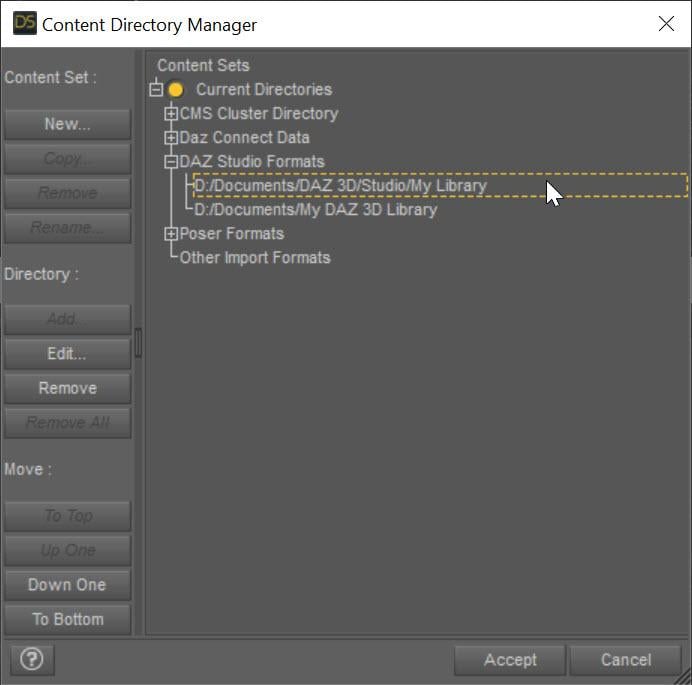
The SECOND entry points to My Daz 3D Library which has all of your installed content. The FIRST entry points to all of YOUR content, whether stuff you create or is created for you by converters. This ensures that everything you create never overwrites the installed content causing problems. Mostly, Daz Studio treats these two content directories as one big content directory, for example the morphs in D:\Documents\My Daz 3D Library\data\DAZ 3D\Genesis 8\Female\Morphs AND in D:\Documents\DAZ 3D\Studio\My Library\data\DAZ 3D\Genesis 8\Female\Morphs are both loaded and available as morphs for Genesis 8 Females. However, Daz Studio saves all the morphs and other data ONLY in the FIRST directory when a conversion occurs, ensuring that converted morphs do not overwrite installed content morphs. However, you are missing that first entry and your converters have been saving into the installed content folder, more than likely corrupting installed content.
I fixed my Daz Studio folders like the image. I even manually downloaded the converter program and copied the files into my "My Daz 3D Library" folder. However, I'm still getting the same result, however the male converter program is working fine. Any other ideas?
What do you mean that you copied the files into "My Daz 3D Library" folder? What files? None of the converted morphs should go in there. I would uninstall and reinstall Essentials so you get back the original morphs from Daz. Load a figure and make sure it is fixed. Then with the Daz Studio folders fixed, re-convert and make sure the morphs are showing up in your "My Library" folder and not "My Daz 3D library" folder.
This may or may not be important, I use the Daz Install Manager. I uninstalled the Genesis 3 and 8 Essentials, converter 3 to 8 female, along with Victoria 7. I then reinstalled them . Before I tried the conversion on Victoria 7, I removed the morph folder in the "M:\NZXT Storage\Documents\DAZ 3D\My Library\data\DAZ 3D\Genesis 8\Female\Morphs" folder for Victoria 7. I also made certain to remove the folder that was created by the converter for Victoria 7 from the "M:\NZXT Storage\Documents\My DAZ 3D Library\data\DAZ 3D\Genesis 8\Female\Morphs" folder, from my previous conversions. However, I'm still getting the same problem. The morphs are going into the "M:\NZXT Storage\Documents\DAZ 3D\My Library\data\DAZ 3D\Genesis 8\Female\Morphs" folder. I reset the settings on the converter and I've verified that they are the same for the female as the male (which is working), but I'm still getting the same problem. It's making me wonder if there are another set of files that need to be deleted, to make this thing work.
When the converter converts something, its morphs will go in M:\NZXT Storage\Documents\DAZ 3D\My Library\data\DAZ 3D\Genesis 8\Female\Morphs. However, BEFORE you converted anything, was the vanilla G8F correct? If not, there are some bad morphs in your installed morphs folder: M:\NZXT Storage\Documents\My DAZ 3D Library\data\DAZ 3D\Genesis 8\Female\Morphs
[Released] Character Converter from Genesis 8 Female to Genesis 3 Female - Conv JCMs too[Commercial]RiverSoftArt said:
Nekura2000 said:
RiverSoftArt said:
Nekura2000 said:
RiverSoftArt said:
Nekura2000 said:
RiverSoftArt said:
Nekura2000 said:
I had to get a new hard drive so I reinstalled Daz Studio. When trying to convert my Generation 7 female characters to Generation 8, I'm getting a distorted face. I've uninstalled and reinstalled the program, even deleted the RSCloneGenesis3Female.obj file from the folder C:\Users\nekur\AppData\Roaming\DAZ 3D\Studio4\CharacterConverterMorphs, with no change. The Generation 7 character as well as Genesis 8 load without a flaw. Here's what I'm getting, attached or from https://www.deviantart.com/wow-creations/art/Converted-920761392. ; I just looked at the parameters for the character I converted, which was Agnes. It isn't showing an Agnes head or body for 8, just Agnes itself.
The clone is for a different Character Converter. Maybe it is pulling in the converted morphs twice? From your previous conversion on the old hard drive and a new conversion? What directories are specified in the content manager? You should check all the currently used morphs on the character and find the morphs. The Parameter Settings show the Asset File Path of the morph (and the [...] button shows the full path of the morph). Make sure the morphs are coming from where you think they should be coming.
I use two different drives when using software. I have the OS drive which I replaced and the data drive. I renamed the original Daz drive as “Daz 3D2 Old”, before installing the Daz Studio. When installing Daz Studio, I allowed it to keep the “Daz 3D” folder, but also use the new “My DAZ 3D Library” folder. I just remember to look at the Error Log when loading Agnes Genesis 8 and this is what I’m getting:
2022-06-29 07:16:21.449 [WARNING] :: ..\..\..\..\..\src\sdksource\fileinput\dzassetdaz.cpp(6903): Formula output property not found: Genesis8Female:/data/Daz%203D/Genesis%208/Female/Morphs/XTransfer/3D%20Universe/ToonGenerations2/Base/XT_CTRL3duToonGenerations2_AdjustAge.dsf#XTIDCTRL3duToonGenerations2_AdjustAge?value - in file: /data/Daz%203D/Genesis%208/Female/Morphs/Zev0/Shape%20Shift/Arm%20Length.dsf
2022-06-29 07:16:21.506 [WARNING] :: ..\..\..\..\..\src\sdksource\fileinput\dzassetdaz.cpp(6903): Formula output property not found: Genesis8Female:/data/DAZ%203D/Genesis%208/Female/Morphs/DAZ%203D/Head/Old/PHMEyesIrisSize.dsf#PHMEyesIrisSize?value - in file: /data/Daz%203D/Genesis%208/Female/Morphs/vyktohria/Meredith/VYK%20Meredith%20Head.dsf
2022-06-29 07:16:22.060 [WARNING] :: ..\..\..\..\..\src\sdksource\fileinput\dzassetdaz.cpp(6903): Formula output property not found: Genesis8Female:/data/DAZ%203D/Genesis%208/Female/Morphs/SickleYield2017/UniversalBreastHelper/PBMSYUBHGiantAll_proj.dsf#PBMSYUBHGiantAll_proj?value - in file: /data/Daz%203D/Genesis%208/Female/Morphs/SickleYield2017/UniversalBreastHelper/PBMSYUBHGiantAll.dsf
2022-06-29 07:16:22.125 [WARNING] :: ..\..\..\..\..\src\sdksource\fileinput\dzassetdaz.cpp(7134): Unsupported formula: /data/Daz%203D/Genesis%208/Female/Morphs/RiverSoft%20Art/Javeria%20for%20Victoria%207%20and%20Genesis%203/pJCMRSG3FVictoria7ThighBndFwdHDR.dsf
2022-06-29 07:16:22.155 [WARNING] :: ..\..\..\..\..\src\sdksource\fileinput\dzassetdaz.cpp(7134): Unsupported formula: /data/Daz%203D/Genesis%208/Female/Morphs/RiverSoft%20Art/Javeria%20for%20Victoria%207%20and%20Genesis%203/pJCMRSG3FVictoria7ThighBndFwdHDL.dsf
2022-06-29 07:16:22.628 [WARNING] :: ..\..\..\..\..\src\sdksource\fileinput\dzassetdaz.cpp(7134): Unsupported formula: /data/Daz%203D/Genesis%208/Female/Morphs/RiverSoft%20Art/FWSA%20Caterina%20for%20Victoria%207%20and%20Genesis%203/pJCMRSG3FVictoria7ShoulderBndFwd_110_R.dsf
2022-06-29 07:16:22.665 [WARNING] :: ..\..\..\..\..\src\sdksource\fileinput\dzassetdaz.cpp(7134): Unsupported formula: /data/Daz%203D/Genesis%208/Female/Morphs/RiverSoft%20Art/FWSA%20Caterina%20for%20Victoria%207%20and%20Genesis%203/pJCMRSG3FVictoria7ShoulderBndFwd_110_L.dsf
2022-06-29 07:16:22.769 [WARNING] :: ..\..\..\..\..\src\sdksource\fileinput\dzassetdaz.cpp(7134): Unsupported formula: /data/Daz%203D/Genesis%208/Female/Morphs/RiverSoft%20Art/FWSA%20Caterina%20for%20Victoria%207%20and%20Genesis%203/pJCMRSG3FVictoria7ShinBndBck_145_R.dsf
2022-06-29 07:16:22.806 [WARNING] :: ..\..\..\..\..\src\sdksource\fileinput\dzassetdaz.cpp(7134): Unsupported formula: /data/Daz%203D/Genesis%208/Female/Morphs/RiverSoft%20Art/FWSA%20Caterina%20for%20Victoria%207%20and%20Genesis%203/pJCMRSG3FVictoria7ShinBndBck_145_L.dsf
2022-06-29 07:16:22.895 [WARNING] :: ..\..\..\..\..\src\sdksource\fileinput\dzassetdaz.cpp(7134): Unsupported formula: /data/Daz%203D/Genesis%208/Female/Morphs/RiverSoft%20Art/FWSA%20Caterina%20for%20Victoria%207%20and%20Genesis%203/pJCMRSG3FVictoria7ForearmBnd_135_R.dsf
2022-06-29 07:16:22.935 [WARNING] :: ..\..\..\..\..\src\sdksource\fileinput\dzassetdaz.cpp(7134): Unsupported formula: /data/Daz%203D/Genesis%208/Female/Morphs/RiverSoft%20Art/FWSA%20Caterina%20for%20Victoria%207%20and%20Genesis%203/pJCMRSG3FVictoria7ForearmBnd_135_L.dsf
2022-06-29 07:16:31.020 [WARNING] :: ..\..\..\..\..\src\sdksource\fileinput\dzassetdaz.cpp(6903): Formula output property not found: Genesis8Female:/data/DAZ%203D/Genesis%208/Female/Morphs/DAZ%20Originals/data/DAZ%203D/Genesis%208/Female/Morphs/Fred%20Winkler%20Art%2CSabby%2CDAZ%20Originals/FW%20Frankie%20HD%20for%20Victoria%207/CTRL-RSC-Frankie.dsfCFred%20Winkler%20Art/data/DAZ%203D/Genesis%208/Female/Morphs/Fred%20Winkler%20Art%2CSabby%2CDAZ%20Originals/FW%20Frankie%20HD%20for%20Victoria%207/CTRL-RSC-Frankie.dsfCSabby/FWSA%20Agnes%20HD%20for%20Lilith%207/PHMMouthRealismHD.dsf#PHMMouthRealismHD?value - in file: /data/DAZ%203D/Genesis%208/Female/Morphs/Fred%20Winkler%20Art%2CSabby%2CDAZ%20Originals/FW%20Frankie%20HD%20for%20Victoria%207/CTRL-RSC-Frankie.dsf
2022-06-29 07:16:31.020 [WARNING] :: ..\..\..\..\..\src\sdksource\fileinput\dzassetdaz.cpp(6903): Formula output property not found: Genesis8Female:/data/DAZ%203D/Genesis%208/Female/Morphs/DAZ%20Originals/data/DAZ%203D/Genesis%208/Female/Morphs/Fred%20Winkler%20Art%2CSabby%2CDAZ%20Originals/FW%20Frankie%20HD%20for%20Victoria%207/CTRL-RSC-Frankie.dsfCFred%20Winkler%20Art/FW%20Brooke%20HD%20for%20Victoria%207/FHMVictoria7.dsf#FHMVictoria7?value - in file: /data/DAZ%203D/Genesis%208/Female/Morphs/Fred%20Winkler%20Art%2CSabby%2CDAZ%20Originals/FW%20Frankie%20HD%20for%20Victoria%207/CTRL-RSC-Frankie.dsf
2022-06-29 07:16:31.021 [WARNING] :: ..\..\..\..\..\src\sdksource\fileinput\dzassetdaz.cpp(6903): Formula output property not found: Genesis8Female:/data/DAZ%203D/Genesis%208/Female/Morphs/DAZ%20Originals/data/DAZ%203D/Genesis%208/Female/Morphs/Fred%20Winkler%20Art%2CSabby%2CDAZ%20Originals/FW%20Frankie%20HD%20for%20Victoria%207/CTRL-RSC-Frankie.dsfCFred%20Winkler%20Art/FW%20Brooke%20HD%20for%20Victoria%207/FBMVictoria7.dsf#FBMVictoria7?value - in file: /data/DAZ%203D/Genesis%208/Female/Morphs/Fred%20Winkler%20Art%2CSabby%2CDAZ%20Originals/FW%20Frankie%20HD%20for%20Victoria%207/CTRL-RSC-Frankie.dsf
2022-06-29 07:16:32.694 [WARNING] :: ..\..\..\..\..\src\sdksource\fileinput\dzassetdaz.cpp(6969): Formula target property not found: Genesis8Female:/data/DAZ%203D/Genesis%208/Female/Morphs/DAZ%203D/Olympia%208/FBMOlympia8.dsf#FBMOlympia8_Test?value - in file: /data/Daz%203D/Genesis%208/Female/Morphs/fabiana/KillerLegsG8/1FK-Olympia8BaseFix.dsf
2022-06-29 07:16:40.096 [WARNING] :: ..\..\..\..\..\src\sdksource\fileinput\dzassetdaz.cpp(7134): Unsupported formula: /data/Daz%203D/Genesis%208/Female/Morphs/DAZ%203D%2CHeysun%20Oh/Olympia%207%20HD%20Add-On/pJCMRSG3FOlympia7ForeArmBndHD_n100L.dsf
2022-06-29 07:16:40.261 [WARNING] :: ..\..\..\..\..\src\sdksource\fileinput\dzassetdaz.cpp(7134): Unsupported formula: /data/Daz%203D/Genesis%208/Female/Morphs/DAZ%203D%2CHeysun%20Oh/Olympia%207%20HD%20Add-On/pJCMRSG3FOlympia7ForeArmBndHD_100R.dsf
2022-06-29 07:16:40.986 [WARNING] :: ..\..\..\..\..\src\sdksource\fileinput\dzassetdaz.cpp(7134): Unsupported formula: /data/Daz%203D/Genesis%208/Female/Morphs/DAZ%203D%2CHeysun%20Oh/Mei%20Lin%207%20HD%20Add-On/pJCMRSG3FMeiLin7ShinBndBck_95R.dsf
2022-06-29 07:16:41.152 [WARNING] :: ..\..\..\..\..\src\sdksource\fileinput\dzassetdaz.cpp(7134): Unsupported formula: /data/Daz%203D/Genesis%208/Female/Morphs/DAZ%203D%2CHeysun%20Oh/Mei%20Lin%207%20HD%20Add-On/pJCMRSG3FMeiLin7ShinBndBck_95L.dsf
2022-06-29 07:16:41.322 [WARNING] :: ..\..\..\..\..\src\sdksource\fileinput\dzassetdaz.cpp(7134): Unsupported formula: /data/Daz%203D/Genesis%208/Female/Morphs/DAZ%203D%2CHeysun%20Oh/Mei%20Lin%207%20HD%20Add-On/pJCMRSG3FMeiLin7ShinBndBckR.dsf
2022-06-29 07:16:41.494 [WARNING] :: ..\..\..\..\..\src\sdksource\fileinput\dzassetdaz.cpp(7134): Unsupported formula: /data/Daz%203D/Genesis%208/Female/Morphs/DAZ%203D%2CHeysun%20Oh/Mei%20Lin%207%20HD%20Add-On/pJCMRSG3FMeiLin7ShinBndBckL.dsf
2022-06-29 07:16:43.828 [WARNING] :: ..\..\..\..\..\src\sdksource\fileinput\dzassetdaz.cpp(7134): Unsupported formula: /data/Daz%203D/Genesis%208/Female/Morphs/DAZ%203D%2CHeysun%20Oh/Karen%207%20HD%20Add-On/pJCMRSG3FKaren7ShldrFwd_n90L.dsf
2022-06-29 07:16:44.007 [WARNING] :: ..\..\..\..\..\src\sdksource\fileinput\dzassetdaz.cpp(7134): Unsupported formula: /data/Daz%203D/Genesis%208/Female/Morphs/DAZ%203D%2CHeysun%20Oh/Karen%207%20HD%20Add-On/pJCMRSG3FKaren7ShldrFwd_90R.dsf
2022-06-29 07:16:44.191 [WARNING] :: ..\..\..\..\..\src\sdksource\fileinput\dzassetdaz.cpp(7134): Unsupported formula: /data/Daz%203D/Genesis%208/Female/Morphs/DAZ%203D%2CHeysun%20Oh/Karen%207%20HD%20Add-On/pJCMRSG3FKaren7ShinBndBck_90R.dsf
2022-06-29 07:16:44.369 [WARNING] :: ..\..\..\..\..\src\sdksource\fileinput\dzassetdaz.cpp(7134): Unsupported formula: /data/Daz%203D/Genesis%208/Female/Morphs/DAZ%203D%2CHeysun%20Oh/Karen%207%20HD%20Add-On/pJCMRSG3FKaren7ShinBndBck_90L.dsf
2022-06-29 07:16:44.669 [WARNING] :: ..\..\..\..\..\src\sdksource\fileinput\dzassetdaz.cpp(7134): Unsupported formula: /data/Daz%203D/Genesis%208/Female/Morphs/DAZ%203D%2CHeysun%20Oh/Karen%207%20HD%20Add-On/pJCMRSG3FKaren7ForearmBnd_n85L.dsf
2022-06-29 07:16:44.910 [WARNING] :: ..\..\..\..\..\src\sdksource\fileinput\dzassetdaz.cpp(7134): Unsupported formula: /data/Daz%203D/Genesis%208/Female/Morphs/DAZ%203D%2CHeysun%20Oh/Karen%207%20HD%20Add-On/pJCMRSG3FKaren7ForearmBnd_85R.dsf
2022-06-29 07:16:56.769 [WARNING] :: ..\..\..\..\..\src\sdksource\fileinput\dzassetdaz.cpp(7134): Unsupported formula: /data/Daz%203D/Genesis%208/Female/Morphs/-Yannek-%2CDAZ%203D%2CHeysun%20Oh/Gia%207/pJCMRSG3FGia7ForeArmBnd_n135L.dsf
2022-06-29 07:16:57.067 [WARNING] :: ..\..\..\..\..\src\sdksource\fileinput\dzassetdaz.cpp(7134): Unsupported formula: /data/Daz%203D/Genesis%208/Female/Morphs/-Yannek-%2CDAZ%203D%2CHeysun%20Oh/Gia%207/pJCMRSG3FGia7ForeArmBnd_135R.dsf
2022-06-29 07:17:00.107 [WARNING] :: ..\..\..\..\..\src\sdksource\fileinput\dzassetdaz.cpp(7134): Unsupported formula: /data/Daz%203D/Genesis%208/Female/Morphs/-Yannek-%2CDAZ%203D%2CHeysun%20Oh/Arabella%207%20HD%20Add-On/pJCMRSG3FArabella7ForeArmBnd_n135L.dsf
2022-06-29 07:17:00.418 [WARNING] :: ..\..\..\..\..\src\sdksource\fileinput\dzassetdaz.cpp(7134): Unsupported formula: /data/Daz%203D/Genesis%208/Female/Morphs/-Yannek-%2CDAZ%203D%2CHeysun%20Oh/Arabella%207%20HD%20Add-On/pJCMRSG3FArabella7ForeArmBnd_135R.dsf
2022-06-29 07:17:02.981 [WARNING] :: ..\..\..\..\..\src\sdksource\fileinput\dzassetdaz.cpp(5962): Parent for modifier not found: TMLI Lashes 06.
2022-06-29 07:17:02.981 [WARNING] :: ..\..\..\..\..\src\sdksource\fileinput\dzassetdaz.cpp(1712): Modifier not prepared: TMLI Lashes 06!
2022-06-29 07:17:02.981 [WARNING] :: ..\..\..\..\..\src\sdksource\fileinput\dzassetdaz.cpp(1729): Modifier not created: TMLI Lashes 06!
Here’s an image of my Content Directory Manager.
What looks bad in your Content Directory is that you have no user library in the Daz Studio Formats. That means the character converter would be writing morphs (and possibly deleting morphs if the overwrite option is checked) in the Daz content folder. You will get bad/weird results from that. I am afraid you might have hosed your morphs folder at this point. You need something a user content folder as the first folder in the Daz Studio Formats section. Then, this folder would be used to write out morphs from the conversions and would not overwrite your Daz content library.
I'm sorry, but from what I can see I have a Content Directory in the Daz Studio Format. Could you give a step by step solution in solving this problem. I've used Daz Studio for several years, along with Character Converter, but I think I'm missing something based on what you're seeing and I'm trying to interpret.
Usually what you will see in Daz Studio Formats is something like this:
The SECOND entry points to My Daz 3D Library which has all of your installed content. The FIRST entry points to all of YOUR content, whether stuff you create or is created for you by converters. This ensures that everything you create never overwrites the installed content causing problems. Mostly, Daz Studio treats these two content directories as one big content directory, for example the morphs in D:\Documents\My Daz 3D Library\data\DAZ 3D\Genesis 8\Female\Morphs AND in D:\Documents\DAZ 3D\Studio\My Library\data\DAZ 3D\Genesis 8\Female\Morphs are both loaded and available as morphs for Genesis 8 Females. However, Daz Studio saves all the morphs and other data ONLY in the FIRST directory when a conversion occurs, ensuring that converted morphs do not overwrite installed content morphs. However, you are missing that first entry and your converters have been saving into the installed content folder, more than likely corrupting installed content.
I fixed my Daz Studio folders like the image. I even manually downloaded the converter program and copied the files into my "My Daz 3D Library" folder. However, I'm still getting the same result, however the male converter program is working fine. Any other ideas?
What do you mean that you copied the files into "My Daz 3D Library" folder? What files? None of the converted morphs should go in there. I would uninstall and reinstall Essentials so you get back the original morphs from Daz. Load a figure and make sure it is fixed. Then with the Daz Studio folders fixed, re-convert and make sure the morphs are showing up in your "My Library" folder and not "My Daz 3D library" folder.
This may or may not be important, I use the Daz Install Manager. I uninstalled the Genesis 3 and 8 Essentials, converter 3 to 8 female, along with Victoria 7. I then reinstalled them . Before I tried the conversion on Victoria 7, I removed the morph folder in the "M:\NZXT Storage\Documents\DAZ 3D\My Library\data\DAZ 3D\Genesis 8\Female\Morphs" folder for Victoria 7. I also made certain to remove the folder that was created by the converter for Victoria 7 from the "M:\NZXT Storage\Documents\My DAZ 3D Library\data\DAZ 3D\Genesis 8\Female\Morphs" folder, from my previous conversions. However, I'm still getting the same problem. The morphs are going into the "M:\NZXT Storage\Documents\DAZ 3D\My Library\data\DAZ 3D\Genesis 8\Female\Morphs" folder. I reset the settings on the converter and I've verified that they are the same for the female as the male (which is working), but I'm still getting the same problem. It's making me wonder if there are another set of files that need to be deleted, to make this thing work.
Daz 3D is part of

Connect
DAZ Productions, Inc.
7533 S Center View Ct #4664
West Jordan, UT 84084Licensing Agreement | Terms of Service | Privacy Policy | EULA
© 2026 Daz Productions Inc. All Rights Reserved.