-
A lot of products are missing in smart content
hillside3d said:
Leana said:
Maybe they will be added progressively.
I hope so.
Leana said:
We were told that creating metadata for them all was not practical due to the volume of products transfered.
Yes I read that aswell, however I think that's a poor excuse. I highly doubt that this is a process which cannot be automated.
How would it be automated?
Leana said:
In the mean time, you can either categorize them yourself, or use content wizard to do it for you
Hey thanks for the tip.
Sadly I would have to pay $40.95 to fix a problem that shouldn't exist in the first place.
A lot of products are missing in smart contentLeana said:
Maybe they will be added progressively.
I hope so.
Leana said:
We were told that creating metadata for them all was not practical due to the volume of products transfered.
Yes I read that aswell, however I think that's a poor excuse. I highly doubt that this is a process which cannot be automated.
Leana said:
In the mean time, you can either categorize them yourself, or use content wizard to do it for you
Hey thanks for the tip.
Sadly I would have to pay $40.95 to fix a problem that shouldn't exist in the first place.memcneil70 said:
This is a video on YouTube by one of our past PAs SloshWerks who made this 11 years ago.
Hey thanks, thats good to know.
A lot of products are missing in smart contentAlso early products sold by DAZ3d did not have metadata until sometime in Genesis 2 era. So you can find some items with and without metadata up to that period. Also, like Renderosity, a large number of products were brought over from RuntimeDNA without metadata and their SKUs are in the 20000s. So when you buy older products or a RuntimeDNA or one recently received you will need to assign your own metadata.
This is a video on YouTube by one of our past PAs SloshWerks who made this 11 years ago. It is old but he was very good at clearly explaining what he is doing. There are other videos as well and threads where people discuss this in the forums. Content Wizard is a life saver though.
Edit. Helps to add the link.
A lot of products are missing in smart contentYes, there are products in the store which don't have metadata.
Most "regular releases" do have them nowadays, but products which were transfered from Renderosity this year usually don't. We were told that creating metadata for them all was not practical due to the volume of products transfered. Maybe they will be added progressively.
In the mean time, you can either categorize them yourself, or use content wizard to do it for you
A lot of products are missing in smart contentRecently I noticed that a lot of products are missing in smart content.
So I asked google and the daz forum for advice...and I couldn't believe what I saw.Appearantly a lot of products found in the official daz store don't have the necessary metadata to work properly with their own software.
What's baffling me, is that daz isn't adressing this issue.This wouldn't bother me if it would only be a few products. But in the last purchase I made, almost half the products I bought were affected. And I bought a lot.
Does the community just accept this?
[Released] Bone Minion Batch Converter for Genesis 8 Poses [Commercial]Submitted an update
- Fixed bug for getting content type of pose presets when metadata is not found
Note: I plan to support Daz Studio 2025 eventually. However, converting my scripts is turning out to not be trivial so it is not in this update.
Batch generate keywords/tags for files without them from filenameHey folks,
We all know that when a file is saved the first time, Daz automatically generates keywords/tags for it by parsing the filename.
But what if you have tens of thousands of files that were manually installed from sources, and thus never saved nor supplied metadata?- Is there a way to tell Daz to go through a target folder/library and run that keyword parsing operation?
- Possibly on a similar vein, is there a way to edit metadata (Content DB Editor) for multiple folders, or all the subfolders nested within a folder, at once using the Edit Metadata functionality?
Skyrim-like Mage robes in DAZ?I had to try didn't I
Ugh nooooooooo this took me long enough and very limited poses without distortion, Dforce just forget it

Skyrim mesh exported using NifSkope
I separated the poncho with the geometry editor as too hard to weightpaint
whats left underneath is worrying, game meshes are very lowpoly, I had to hide all his body underneath
and just getting it the same pose and size as Genesis 9 was a job in itself
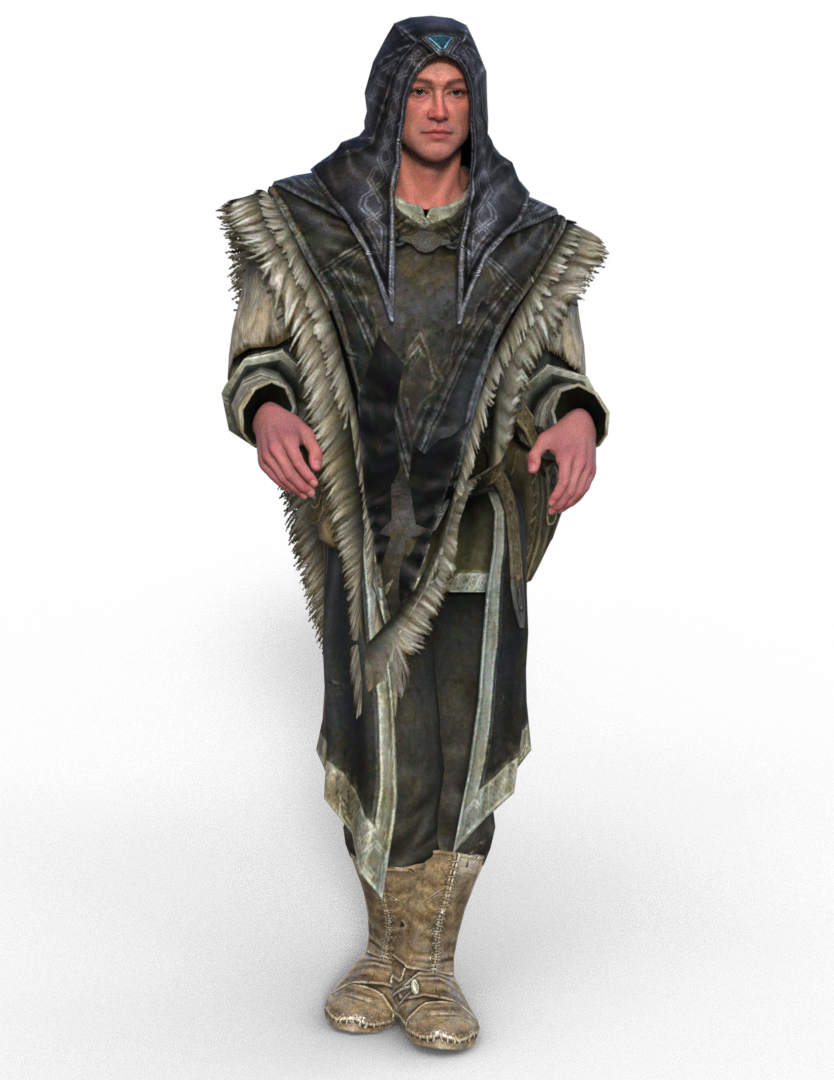
I would import it into Zbrush and Zremesh it is I really want it and Zproject the texture onto the new mesh but I am honestly not that keen

addded some poses to show how messed it gets
Decimator Plug-Incheers @wsterdan, I've already done that but thank for chiming in! It's definitely the usual grey box that is completely missing - fresh install, older install worked but SSD failed, but rather than tranasfer the data with all the metadata mix-ups from daz connect - i installed fresh from DIM on a brand new SSD, mostly everthing I've used so far across all apps so far works fine, but this is missing - typically I noticed when I went to use it!
MIA PRODUCTIf you can find it in your content library, yu can create metadata for it yourself.
MIA PRODUCTIf you can install it, you got what you paid for. The problem is all those "Welcome to Daz" products (and that is one) do not have any metadata, provided by Daz, so it will not show up in Smart Content no matter how many times you re-install it. Sorry, but you will have to make your own metadata. Daz was quick to welcome the artists, but was not prepared to process their products to Daz standards.
Good CLOTHING simulation tutorial for Blender?Padone said:
Thank you Donald for your excellent work that you share with us. SBH support is good news and Sagan is certainly a wonderful tool to import daz animations including dforce. Personally I don't use it just because I prefer to animate in blender, so Diffeomorphic is more my tool.
Thanks for your kind words, @Padone
Developing for DAZ Studio is a thankless endeavor, so comments like yours, especially considering your own contributions, are an actual currency.
And soon(ish) I hope to make animating in DS and animating in Blender the same thing, heh heh :)
Newly Bought Product Not Showing CorrectlyYou could report it as a possible bug, though it sounds as if t is purely metadata so they may not do anything unless/until there is a more substantial update.
I do find the Show Asset in trick useful for other things too - anything that requires applying things n stages, such as some material sets or modular kits, is likely to be easier to handle from the folder structure than from a category-based view.
Looking for a loose braid@zoro_d is offering a free braided hair with enough bones on the braided part to pose freely, either over the shoulder or on the back:
https://www.renderosity.com/freestuff/items/88062/candy-braids-hair-for-genesis-8-females
Edit: if you're using Smart Content, I think they are basic metadata included, but I created some myself and can share them if it's useful.
Good CLOTHING simulation tutorial for Blender?Thank you Donald for your excellent work that you share with us. SBH support is good news and Sagan is certainly a wonderful tool to import daz animations including dforce. Personally I don't use it just because I prefer to animate in blender, so Diffeomorphic is more my tool.
Good CLOTHING simulation tutorial for Blender?update. Medieval Outfit.
Works fine here. There's a little caveat that diffeomorphic doesn't recognize the weightmap for the sleeves, so I had to assign them by hand, now reported to Thomas for the fix. For the various dforce pieces I decided to join them into a single cloth, so self collision takes care of everything. You could also assign different collision collections but seems overcomplicated in this case.
https://bitbucket.org/Diffeomorphic/import_daz/issues/2511/g9-bones-can-be-all-deform-bones
steps:
- import the scene
- I had to assign the sleeves weighmap by hand, this will be fixed by Thomas
- join the various dforce pieces into a single one: object > join
- select the dforce piece and the figure then "make dforce simulation", this will create the cloth and collision modifiers
- increase the cloth quality and set self collision, until Thomas fixes it
- bake and run the simulation
update. The sleeves weightmap is fixed in the last commit.
Good CLOTHING simulation tutorial for Blender?update. Camilla Gown.
Well I tried the Camilla gown and didn't find any issue it worked just fine out of the box. Only caveat is I had to set the cloth quality to 16 that was the default but it seems the addon lost it. Now reported to Thomas. Let me know if you have any trouble but should work fine.
https://bitbucket.org/Diffeomorphic/import_daz/issues/2508/regression-dforce-quality
steps:
- import the scene
- select the Camilla Gown and G8F then "setup > simulation > make dforce simulation", this will create the cloth and collision modifiers
- go to the cloth modifier and set the quality to 16, also enable self collision, hopefully this will be fixed soon by Thomas
- bake and run the simulation
update. The dforce quality is fixed in the last commit.
Leg holster identificationYou might be able to use the geometry editor to hide the parts you don't want.
I've not used it at all really, but there is a thread here that gives a bit of a start on how to use it here: https://www.daz3d.com/forums/discussion/146436/geometry-editor-tool-tutorial-anywhere? I'd select the facets I didn't want on the other side and apply a new surface to them, then make that surface transparent/hidden. That way the facets would still be there to correct any errors if I managed to select the wrong ones and needed to restore them to the main model.
Have to confess the main reason I've not used geometry editor much is because in these situations I export an obj model, edit it to delete unwanted facets in a modeller and then re-import and convert to a piece of clothing again. The way to do this is to:
- Zero the figure and harness.
- Unparent the harness from the figure.
- Make sure the harness is at base resolution.
- Ensure that the haness root X, Y and Z translations & rotations are zero.
- Hide everything in the scene except the harness.
- Export the Harness at 100% scale as an obj file using menu option File| Export.
- Edit the harness obj file in a modeller.
- Save the modified harness as an obj file from the modeller at 100% scale.
- In DS import the modified harness model at 100% using menu option File| Import
- Use menu option Edit| Object | Convert to Figure and select 'General Weight Mapped' rigging when the popup dialogue box appears.
- The new harness will now have a scene tree name of 'Figure: <obj filename>'. Change the name in the scene tree now if you want.
- Then use the transfer utility to copy across the original harness rigging to the modified harness. The way to do this is use menu option Edit| Figure| Transfer Utility . Here you select the old harness as the source figure, the new harness as the destination figure and set it running.
- Copy materials from the old harness to the new one.
- Now your altered harness is ready to use.
Sounds long winded, and it is, but then you'll have your own unique harness which can be saved as a library part or simply fitted to your character.
Regards,
Richard
[Released] Bone Minion Batch Converter for Genesis 8 Poses [Commercial]RiverSoft Art said:
Pax Asteriae said:
It's a nice product, when I can get it to work. But it thinks probably a solid 80% of my pose collection for G8M aren't actually poses.
09:03:23 GMT+0100 (GMT Daylight Time): SKIPPING unknown "preset_pose" file: E:/3D Runtimes/My DAZ 3D Library/People/Genesis 8 Male/Poses/Adama Poses for M8/Adama Pose 01.duf
09:03:23 GMT+0100 (GMT Daylight Time): SKIPPING unknown "preset_pose" file: E:/3D Runtimes/My DAZ 3D Library/People/Genesis 8 Male/Poses/Adama Poses for M8/Adama Pose 02.duf
09:03:23 GMT+0100 (GMT Daylight Time): SKIPPING unknown "preset_pose" file: E:/3D Runtimes/My DAZ 3D Library/People/Genesis 8 Male/Poses/Adama Poses for M8/Adama Pose 03.duf[...]
09:03:45 GMT+0100 (GMT Daylight Time): SKIPPING unknown "preset_pose" file: E:/3D Runtimes/My DAZ 3D Library/People/Genesis 8 Male/Poses/Aerial Combat Poses/Aerial Combat G8M 01.duf
09:03:45 GMT+0100 (GMT Daylight Time): SKIPPING unknown "preset_pose" file: E:/3D Runtimes/My DAZ 3D Library/People/Genesis 8 Male/Poses/Aerial Combat Poses/Aerial Combat G8M 02.duf
09:03:45 GMT+0100 (GMT Daylight Time): SKIPPING unknown "preset_pose" file: E:/3D Runtimes/My DAZ 3D Library/People/Genesis 8 Male/Poses/Aerial Combat Poses/Aerial Combat G8M 03.duf[...]
09:17:34 GMT+0100 (GMT Daylight Time): SKIPPING unknown "preset_pose" file: E:/3D Runtimes/My DAZ 3D Library/People/Genesis 8 Male/Poses/Anniekicks/Kyokushin Karate/Kata/KK Back Stance Double Knife Hand Block Left.duf
09:17:34 GMT+0100 (GMT Daylight Time): SKIPPING unknown "preset_pose" file: E:/3D Runtimes/My DAZ 3D Library/People/Genesis 8 Male/Poses/Anniekicks/Kyokushin Karate/Kata/KK Back Stance Double Knife Hand Block Right.duf
09:17:34 GMT+0100 (GMT Daylight Time): SKIPPING unknown "preset_pose" file: E:/3D Runtimes/My DAZ 3D Library/People/Genesis 8 Male/Poses/Anniekicks/Kyokushin Karate/Kata/KK Bow Pose 1.dufAnd so on and so forth.
Is there a way I can convince it to recognise all these poses too, or am I doomed to failure?
Your Daz database must not be reporting the metadata for files. I tried to write a fallback where the script is looking inside the files and use that, but it looks like there is a bug. I will work on that.
In the meantime, uncheck "Check Content Type When Adding Files" will allow you to add any file
I just tried it and it didn't work... so I took a closer look at the hover text and it doesn't include adding by directory. *facepalm* So I guess I have a very long and boring conversion journey ahead...
EDIT: Strangely though, doing it this way seems to make it convert the poses much faster, which is weird but nice.
[Released] Bone Minion Batch Converter for Genesis 8 Poses [Commercial]Pax Asteriae said:
It's a nice product, when I can get it to work. But it thinks probably a solid 80% of my pose collection for G8M aren't actually poses.
09:03:23 GMT+0100 (GMT Daylight Time): SKIPPING unknown "preset_pose" file: E:/3D Runtimes/My DAZ 3D Library/People/Genesis 8 Male/Poses/Adama Poses for M8/Adama Pose 01.duf
09:03:23 GMT+0100 (GMT Daylight Time): SKIPPING unknown "preset_pose" file: E:/3D Runtimes/My DAZ 3D Library/People/Genesis 8 Male/Poses/Adama Poses for M8/Adama Pose 02.duf
09:03:23 GMT+0100 (GMT Daylight Time): SKIPPING unknown "preset_pose" file: E:/3D Runtimes/My DAZ 3D Library/People/Genesis 8 Male/Poses/Adama Poses for M8/Adama Pose 03.duf[...]
09:03:45 GMT+0100 (GMT Daylight Time): SKIPPING unknown "preset_pose" file: E:/3D Runtimes/My DAZ 3D Library/People/Genesis 8 Male/Poses/Aerial Combat Poses/Aerial Combat G8M 01.duf
09:03:45 GMT+0100 (GMT Daylight Time): SKIPPING unknown "preset_pose" file: E:/3D Runtimes/My DAZ 3D Library/People/Genesis 8 Male/Poses/Aerial Combat Poses/Aerial Combat G8M 02.duf
09:03:45 GMT+0100 (GMT Daylight Time): SKIPPING unknown "preset_pose" file: E:/3D Runtimes/My DAZ 3D Library/People/Genesis 8 Male/Poses/Aerial Combat Poses/Aerial Combat G8M 03.duf[...]
09:17:34 GMT+0100 (GMT Daylight Time): SKIPPING unknown "preset_pose" file: E:/3D Runtimes/My DAZ 3D Library/People/Genesis 8 Male/Poses/Anniekicks/Kyokushin Karate/Kata/KK Back Stance Double Knife Hand Block Left.duf
09:17:34 GMT+0100 (GMT Daylight Time): SKIPPING unknown "preset_pose" file: E:/3D Runtimes/My DAZ 3D Library/People/Genesis 8 Male/Poses/Anniekicks/Kyokushin Karate/Kata/KK Back Stance Double Knife Hand Block Right.duf
09:17:34 GMT+0100 (GMT Daylight Time): SKIPPING unknown "preset_pose" file: E:/3D Runtimes/My DAZ 3D Library/People/Genesis 8 Male/Poses/Anniekicks/Kyokushin Karate/Kata/KK Bow Pose 1.dufAnd so on and so forth.
Is there a way I can convince it to recognise all these poses too, or am I doomed to failure?
Your Daz database must not be reporting the metadata for files. I tried to write a fallback where the script is looking inside the files and use that, but it looks like there is a bug. I will work on that.
In the meantime, uncheck "Check Content Type When Adding Files" will allow you to add any file
Daz 3D is part of

Connect
DAZ Productions, Inc.
7533 S Center View Ct #4664
West Jordan, UT 84084Licensing Agreement | Terms of Service | Privacy Policy | EULA
© 2026 Daz Productions Inc. All Rights Reserved.