-
Filament Renders
You can go to Render settings and change the render Engine (at the top) to viewport. If your viewport is filament, it will render as that when you click the render button.
Edit: I don't know about the quality of this render, but it does seem to use the exact image from my Filament preview in the new window and allows me to save it.
Filament Rendersfelis said:
If you set your viewport to Filament, you can then set render engine to viewport.
OK. I will try that.
Update: All that did was render the preview in a new window.
Is there a Filmanent Render Engine plug-in for DAZ?
There is no "Filament" choice in the Fender Engine dropdown, only Iray or OpenGL
Filament RendersIf you set your viewport to Filament, you can then set render engine to viewport.
Filament RendersI have a question about rendering in Filament.
https://www.daz3d.com/atmosphere-for-filament
I've purchased this product today, and want to test it on a scene to compare to an Iray render of the same scene.
But how do you render in Filament?
There is a Filament viewport preview but I have no idea how to change the actual final rendering to Filament.
There is no "Filament" choice in the Render Engine dropdown, only Iray or OpenGL.
Is there a Filmanent Render Engine plug-in for DAZ?
characters disappear from viewportIt looks like you have filament mode enabled for the viewport and textured preview in the aux one so differences are to be expected. Not played around with filament much but it looks like your lighting/exposure is wrong for that render mode and/or you have your figures set to be hidden in renders?
Can't get my backdrop to showOh, you are using Filament! No, the Backdrop doesn't display for me in Filament, either. I don't know if that is a bug or by design.
Can't get my backdrop to showHuh, looking at the screenshot, I can't imagine why the Backdrop isn't working. I use that feature somewhat regularly and it looks to be set up correctly. The only thing I can't speak to is use of Filament as the Draw Style... Does the Backdrop show if you change to Textured Shaded or Iray?Can't get my backdrop to showI assume you mean Daz Studio 4.20.x.x? Version numbers are not decimals, so the trailing zeroes count. However, I don't understand what you mean - are you using the Environment pane set to backdrop or are you using the environment map in Render Settings? If its in render Settings are you in Iray or Filament Drawstyle, and is the Draw Dome option on?
Remixing your art with AI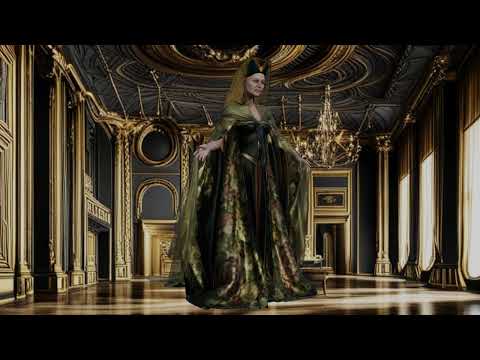
me too
Filament render with AI backgrounds
Kindred Arts Interior Speed lights HELPI also have bought these 2 products, so maybe using the camera from
https://www.daz3d.com/interior-light-pro-for-filament-and-iray
will fix the problem for the time being.
Amazing results: Daz + Stable DiffusionThe best way to use the two together is to use Daz Face Transfer with Stable Diffusion. Start with a base G8 model with 3 directional lights. One light at the default parameters, one at -75 rotation on the Y, and another at 75 rotation on the Y (the goal is to get even lighting with as little shadow as possible. Render a straigh- on headshot. Use that headshot with ControlNet in Stable Diffusion, with the Lineart and Tile models, a CFG of 0.9 and a denoiser strength of 0.7. Put in some prompts, and pick out an image with the best symmetry. Use that for a Daz Face Transfer. If you are serious about using Face Transfer, you should have Face Transfer Shapes too.
Now, put the new character, with the new textures and morphs in a scene and do some renders. The renders don't have to be perfect, you can even use filament renders. Bring a few different renders of the same character back into Stable Diffusion. Use the same ControlNet models, but change the Denoiser Strength to somewhere between 0.2 to 0.5. Use the same prompts you used for the image you used for the Face Transfer. If your Face Tranfer looked good, you're basically just using Stable Diffusion to make the renders look better now. For animation, I use 0.2 to avoid flicker. A denoise strength of 0.5 creates richer images.
A couple other notes. 1. It is best to do separate renders for the background and the character if doing animations. The flicker ends up being much worse if the background is part of the Daz renders. 2. My best results are when I do Canvases of the character's clothing and hair and add those back to the characters after I use Stable Diffusion. So I basically do nude and bald renders in Daz. When I do that, Stable Diffusion usually gives me the best results, especially when I render the hair separately. If you do this, you can use a Denoiser strength up to 0.65 and get some really amazing images with the same character. You may have to go in and do some post work to clean up inconsistencies though (Stable likes to add things when shadows and angles confuse it, like nose rings, belly button rings, moles and freckles.
Kindred Arts Interior Speed lights HELPmding said:
kindred arts also created a culling camera for https://www.daz3d.com/interior-light-pro-for-filament-and-iray
There the culling slider is under parameters - camera or currently used. I have both, but it is wierd, i can't find a culling slider in the speed lights camera.
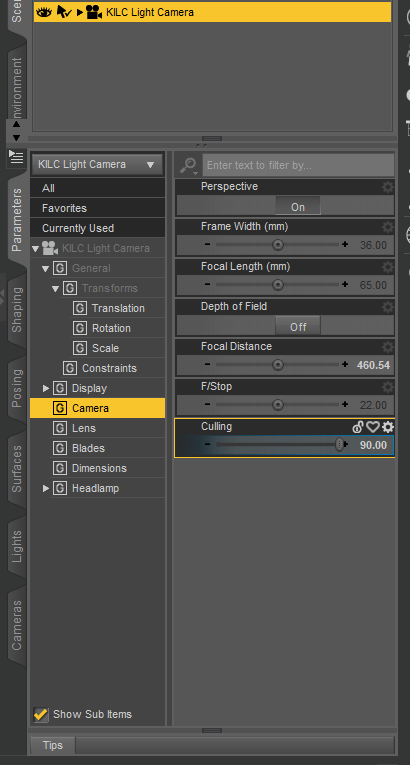
I don't mind buying the other one, but the product page doesn't list it as required. I might get the other one just to have more options.
Kindred Arts Interior Speed lights HELPkindred arts also created a culling camera for https://www.daz3d.com/interior-light-pro-for-filament-and-iray
There the culling slider is under parameters - camera or currently used. I have both, but it is wierd, i can't find a culling slider in the speed lights camera.
Where do I find Filament?felis said:
In your viewport, upper right corner, you have a menu. Left of that a square button where you can select 'perspective view', 'cammera' etc, and left of that a small icon called drawstyle. There you can select Filament.
I would suggest to also Create > New Filament Draw Options Node, so you can adjust some settings.
That’s assuming you're using Windows, as Filament is not yet available in the Mac version (the Qt framework upgrade which will be included in DS5 is required for Filament to work on a Mac)
Where do I find Filament?In your viewport, upper right corner, you have a menu. Left of that a square button where you can select 'perspective view', 'cammera' etc, and left of that a small icon called drawstyle. There you can select Filament.
I would suggest to also Create > New Filament Draw Options Node, so you can adjust some settings.
Where do I find Filament?Hi all, I just discovered there is another render engine called Filament, but I can't find where it is or how to use it, and the link to the tutorial doesn't work. Can someone point me in the right direction, please? Thanks!
What is an "Avatar" node, can I create one?Filament renderer has this "Draw Avatars" option where certain things like cameras, guides, nulls and other objects are shown/hidden. Is there a way to create or tag an object as an avatar so that they behave the same way?
Basically I would like to create some helper objects, (with geometry, nulls wont do) that will behave the same way.
Thanks.
What's the difference between "Diffuse color", "specular color", "ambiant color", etc...crosswind said:
Sven Dullah said:
crosswind said:
yuyu.atem said:
Thank you very much!
 Could you also tell me what's the difference between reflection color", "refraction color" and "line preview color"?
Thank you in advance!
Reflection Color is RSL only, it only works when Reflection Active is on and you have to set other parameters to make a colorized 'fake reflection' (mirroring). Refraction Color relates to refraction and works when Refraction Color is Active and it's on both RSL and MDL but you could only get real refraction with Nvidia Iray engine. If you turn off Share Glossy Inputs on iray Uber shader, you can define Refraction Color separately.
Line Preview Color is maily for wireframe draw style. For instance, if you define a red color on it and presse Ctrl + 8, the wireframe will be highlighted in red. Still suggest you learn and experiment Iray MDL shader other than RSL... better start from Genesis 8.
Look, I don't want to interfere or confuse things further, but I don't care much for this fake talk, to be honest. Of course 3Delight is capable of handling true raytraced reflection/refraction. You should really check your "facts" before posting them.
I know there're always arguments about this. I don't want to fight back with quoting lots of theories and renders to comment about a 'biased' engine, however, facts are facts... they will not disappear on account of your or my preferences.
Pls search 'fake' in here - https://blog.daz3d.com/whats-the-difference-between-iray-3delight-and-filament-in-daz-studio/ , and argue with Daz... I 'just learnt from there' though I tested a lot before...
Yup I've seen it. But they don't mention the built in path tracer, do they? Or the fact that, with DS standard shaders, you just remove the reflection color map and you'll have raytraced reflections. In fact I doubt there are many devs left that actually know much about RSL, and what they actually have in there...
As a 3DL user it's obviously up to you to fix all those things and more, starting with turning on RT shadows, you get the drift?
I don't mind you calling 3DL fake, as everything 3D is fake to me. I just don't see why refraction in 3DL would be more fake than in IRay? And I don't wish to argue about it. The main point is: Yes, 3Delight does reflections and refraction and emission, LOL.!
That said, it is true that you can fake a lot of stuff in 3DL, one of the strengths of a biased renderer
 What's the difference between "Diffuse color", "specular color", "ambiant color", etc...
Sven Dullah said:
crosswind said:
yuyu.atem said:
Thank you very much!
Could you also tell me what's the difference between reflection color", "refraction color" and "line preview color"?Thank you in advance!
Reflection Color is RSL only, it only works when Reflection Active is on and you have to set other parameters to make a colorized 'fake reflection' (mirroring). Refraction Color relates to refraction and works when Refraction Color is Active and it's on both RSL and MDL but you could only get real refraction with Nvidia Iray engine. If you turn off Share Glossy Inputs on iray Uber shader, you can define Refraction Color separately.
Line Preview Color is maily for wireframe draw style. For instance, if you define a red color on it and presse Ctrl + 8, the wireframe will be highlighted in red. Still suggest you learn and experiment Iray MDL shader other than RSL... better start from Genesis 8.
Look, I don't want to interfere or confuse things further, but I don't care much for this fake talk, to be honest. Of course 3Delight is capable of handling true raytraced reflection/refraction. You should really check your "facts" before posting them.
I know there're always arguments about this. I don't want to fight back with quoting lots of theories and renders to comment about a 'biased' engine, however, facts are facts... they will not disappear on account of your or my preferences.
Pls search 'fake' in here - https://blog.daz3d.com/whats-the-difference-between-iray-3delight-and-filament-in-daz-studio/ , and argue with Daz... I 'just learnt from there' though I tested a lot before...
What's the difference between "Diffuse color", "specular color", "ambiant color", etc...@OP: You're talking about RSL shader (Renderman Shader Language) which is based on 3Delight engine. Ambient Color does not work unless you switch Engine to 3Delight (RSL) in Render Settings pane - Advanced tab... If you own a Nvidia Card, suggest you use Iray Uber (MDL) shader, and render with engine of NVIDIA Iray.
3Delight is a biased render engine ( as Richard mentioned above - 'fake' ) while Nvidia Iray is an unbiased physically based render engine. You may learn some essentials from -: https://blog.daz3d.com/whats-the-difference-between-iray-3delight-and-filament-in-daz-studio/
Daz 3D is part of

Connect
DAZ Productions, Inc.
7533 S Center View Ct #4664
West Jordan, UT 84084Licensing Agreement | Terms of Service | Privacy Policy | EULA
© 2026 Daz Productions Inc. All Rights Reserved.