-
Hulk and She-Hulk for Genesis 8.1
You could use the morph dials to create your own, or start with Biggun or Rampage. I think there are also some muscle-enhancing morphs in the store, like SimonWM's SWOLE products, with male and female versions.
Is there something else I can do to fix the metadata?Recently, I got a new computer, so I installed DIM, DS, plugins and the required features to make it work. However, instead of downloading all my content over again, I transferred it all from the old computer to the new computer (I hope I got it all), and pointed DIM and DS to the new content folders. DIM recognizes all my content, and shows everything that was installed before (even things that I knew weren't like DS and plugins that I removed from DIM to install them). All the content directories are the same as before except the drive letter changed from E on the old PC to D on the new PC. After resetting the DS database, and re-importing all the metadata, I'm still getting errors in the log saying it can't find files that are related to the metadata. I've even uninstalled and reinstalled some of the products it's listing in the log, and it still can't find all the files even though I can go to the directory and see them there. There's a lot it has found, just not all of it. Is there something else I can do to fix the metadata? The log file is attached.
There's another odd thing I've noticed in DIM since the transfer as well. When I've uninstalled some content to reinstall it, I get a notice that there's no uninstaller, and it asks me if I want to continue. Yet, many others have uninstalled without any such warning. Wouldn't all of the uninstallers for each product be in the same directory?
.Your help is appreciated.
Fangtastic not showing anything but "reset" optionsThose thumbnails in the Smart Content are often to reset (0%), or eventually apply (100%) a morph.
Morph dials are often prefered by vendors as they enable fine control over which moprh and how much of it is applied. Dials enable users to apply modifications progressively from 0% to 100%.
In the promo pics of Fangtastic, you can see screenshots of those dials names. Simply search for one one those dials from your parameters tab, by typing for example : Fangs.
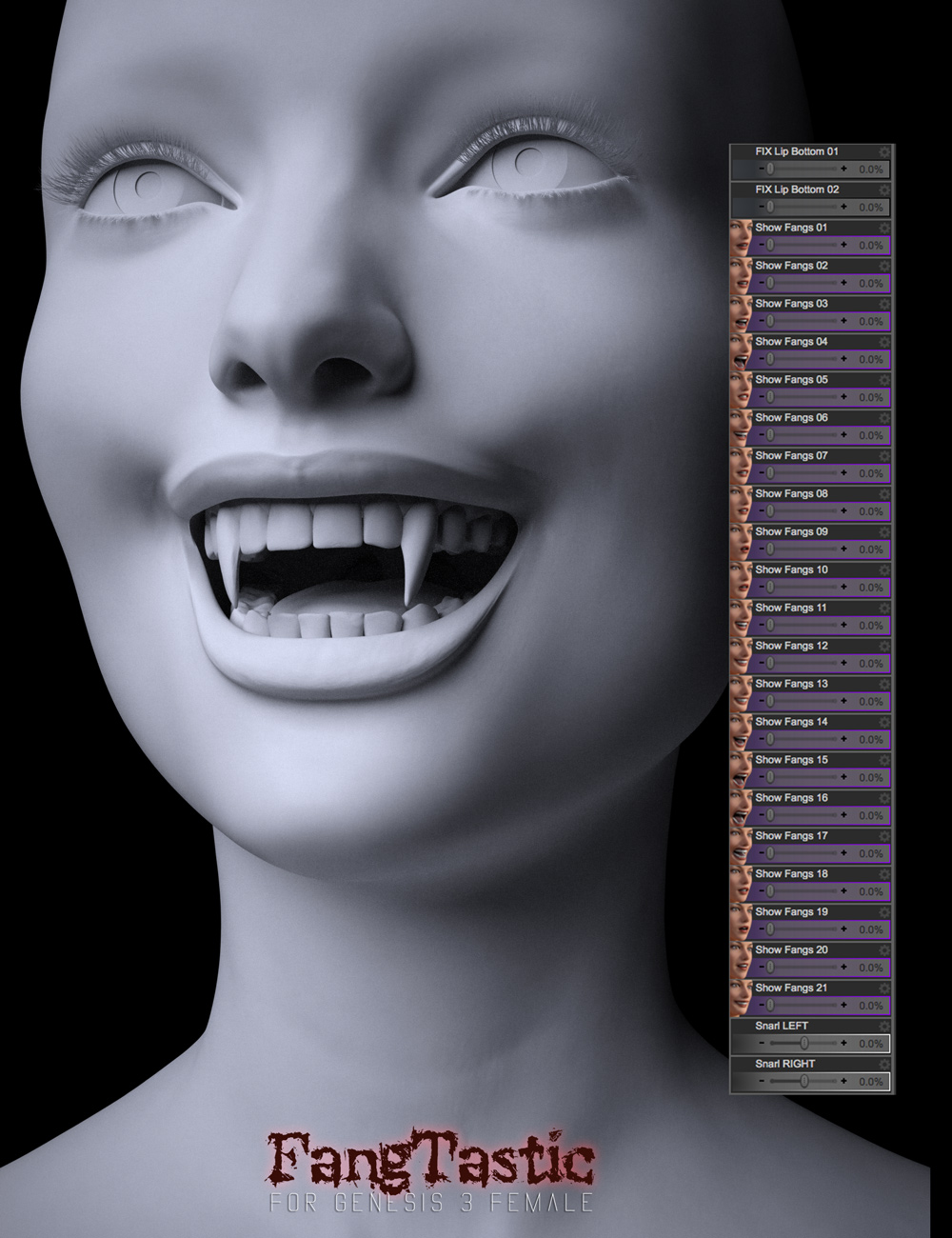
What's highlighted in the parameters list will indicate you in which subfolder are the sliders :
Parameters Tab (All) > Genesis 3 Female > Pose Controls > Head > Mouth > FangTastic
(It sure would have been better to put that in Actor rather than Pose Controls).
Backing up DS customisationfrank0314 said:
nicstt said:
I save the settings in App Date (see image, called App Data), usually just the Studio4PublicBuild as that is what i almost always use.
... Then:
I also save the Regestry entry (WARNING: mess with the Registry at your peril. It does NOT have a Save Button, a change is saved automatically.) Doing what I have describe involves no risk; but when you are in there and you mess with something accidentally, then it's a different matter.
Windows Key + R to get the Run command popup (1 in image), then enter regedit
> navigate to Daz info (key at 2 in the image)
> Select the Daz App type (public or relase - 3 in the image)
> Export by right clicking on it (4 in image) and save ( i usually do it to desktop then move.)
WARING! When you restore a registry component, Double-Click works, then that can be where another risk comes from - export the wrong thing OR too much, then you're in a world of pain.
Or you're PC is an expensive Paper Weigth that reinstalling might be the only way to fix it.
... But saving those is a minute's work. Restoring about the same.
I use DIM to install, and I have the manifest files (as well as everything else I can) away from C drive, making it easier to recover from issues or transfer; they are also backed up to various places too... But that is another story.
I would save a restore point before even entering the registry, just in case. Things can get deleted on accident very easily then the user is in for a lot of possible issues.
good point
I've been known to forget to do it too.
I've not yet managed to mess up the registry, but then if im trying anyting other than copying, I test in an install on a VM first.
Plus, it's worth having a look at the file you've backed up.
Take the image, I've uploaded, none of the paths should start with anyting other than: HKEY_CURRENT_USER\SOFTWARE\DAZ
If they do, I wouldn't restore em.
If you want to look at them, use something like notepad ++ (or microsoft visual studio or code), but notepad++ is exellent for things like this.
dForce Gentleman Suit for G8MThere are some figure morphs in the file list, and one to make the collar go up or down I guess, but I'm not seeing much else. Especially no hand-in-pocket morph. Quite disappointing.
Diffeomorphic DAZ Importer version 1.6.0 releasedIf the teeth use HD morphs as is common for most figures then you have to export HD. Or disable the HD morph on the teeth before exporting.
As for HD figures usually they are more resource intensive, depending on the subd level they use. Also some HD meshes may not come in right because blender gets limits with the multires modifier, in this case yo uget a warning on import that the HD mesh can't be unsubdivided aka multires.
Looking for realistic short hair for g8mThank you for the suggestions and sorry for the late response, just come back from work and eating a slice before getting back at it.
I see the hair of the character that I am looking for, to fit into a "Victorian" period.
BTW, if anyone knows of a morph that can cause the wingtip collar to be in an "up" position, so as to reinforce the "Victorian" look, then I would appreciate that as well
Think male Victorian period
This hair comes close - https://www.daz3d.com/aegeus-hair-for-genesis-8-and-3-males
And this butler outfit solves the wingtip collar issue - https://www.daz3d.com/dforce-victorian-butler-for-genesis-8-males
GenX backwards conversion - G3F to G2FCan't help with that, Sven...
@lagrange, I tried a reverse from G3F to G2F, no problem. I used G3F Talisken, who has a few, how shall I say, pronounced morphs, especially in the face. Normal and Una heads are almost flawless. With the G3 UV conversion kit for G2, I can barely tell them apart when textured.
As @donovancolbert said, less is more. I have most of my morphs disabled using Turbo Loader, and only transfer the character or morphs in question.
EULA Update & Editorial Licenses Coming to DazN-RArts said:
Sorry, my head is spinning. Can someone please answer two questions, in plain English:
Will I need a license to create still renders of my characters along with game characters, and be able to post them to the internet (or keep them for personal use) WITHOUT a license?
Of course you do. You always did.
Did you or did you not agree to abide by the EULA? https://www.daz3d.com/eula#general_license
It is right in there! In plain text!
"Terms of Use. Two-Dimensional Works. Subject to the terms and conditions of this Agreement, User may (i) access, use, copy and modify the Content in the creation and presentation of two-dimensional animations and renderings, (ii) incorporate two-dimensional images (including two-dimensional images that simulate motion of three-dimensional objects) derived by User from the Content in User's other works, and (iii) publish, market, distribute, transfer, sell or sublicense User's two-dimensional animations, renderings and other works; provided that User may not in any case publish, market, distribute, transfer, sell or sublicense any renderings, animations, software applications, data or any other product from which any Content, or any part thereof, or any substantially similar version of the Content can be separately exported, extracted or de-compiled into any re-distributable form or format."
Will I need a license to 3D Print Daz models?
Of course you do. You always did. Read the EULA. It's right in there.
Backing up DS customisationnicstt said:
I save the settings in App Date (see image, called App Data), usually just the Studio4PublicBuild as that is what i almost always use.
... Then:
I also save the Regestry entry (WARNING: mess with the Registry at your peril. It does NOT have a Save Button, a change is saved automatically.) Doing what I have describe involves no risk; but when you are in there and you mess with something accidentally, then it's a different matter.
Windows Key + R to get the Run command popup (1 in image), then enter regedit
> navigate to Daz info (key at 2 in the image)
> Select the Daz App type (public or relase - 3 in the image)
> Export by right clicking on it (4 in image) and save ( i usually do it to desktop then move.)
WARING! When you restore a registry component, Double-Click works, then that can be where another risk comes from - export the wrong thing OR too much, then you're in a world of pain.
Or you're PC is an expensive Paper Weigth that reinstalling might be the only way to fix it.
... But saving those is a minute's work. Restoring about the same.
I use DIM to install, and I have the manifest files (as well as everything else I can) away from C drive, making it easier to recover from issues or transfer; they are also backed up to various places too... But that is another story.
I would save a restore point before even entering the registry, just in case. Things can get deleted on accident very easily then the user is in for a lot of possible issues.
GenX backwards conversion - G3F to G2FI'm sure if you installed JUST DAZ3D, just GenX and the modules, and JUST the character you are trying to transfer - that would solve the problem. DAZ3D is like Windows - the more you use it, the more things that get added to the mix - the less likely things are to work as they should.
Backing up DS customisationI save the settings in App Date (see image, called App Data), usually just the Studio4PublicBuild as that is what i almost always use.
... Then:
I also save the Regestry entry (WARNING: mess with the Registry at your peril. It does NOT have a Save Button, a change is saved automatically.) Doing what I have describe involves no risk; but when you are in there and you mess with something accidentally, then it's a different matter.
Windows Key + R to get the Run command popup (1 in image), then enter regedit
> navigate to Daz info (key at 2 in the image)
> Select the Daz App type (public or relase - 3 in the image)
> Export by right clicking on it (4 in image) and save ( i usually do it to desktop then move.)
WARING! When you restore a registry component, Double-Click works, then that can be where another risk comes from - export the wrong thing OR too much, then you're in a world of pain.
Or you're PC is an expensive Paper Weigth that reinstalling might be the only way to fix it.
... But saving those is a minute's work. Restoring about the same.
I use DIM to install, and I have the manifest files (as well as everything else I can) away from C drive, making it easier to recover from issues or transfer; they are also backed up to various places too... But that is another story.
AOBB's head morph Princess (v1,v2 and v3) for G8.1F based on Grace Kelly. No materials or textures.Excellent morph AOBB and thank your for sharing this with us.
One of my dreams is to make likeness sculpts, maybe one day...
Keep on the artwork !
Morph Loader Pro - my custom preset is not shownAs the video shows, you need to right-click on the morph with the options you wish to make a preset.
WIP - coming attractions: Grace KellyGrace Kelly's head morph is ready for upload and your rendering pleasure!:
Have fun!
AOBB
AOBB's head morph Princess (v1,v2 and v3) for G8.1F based on Grace Kelly. No materials or textures.Edit (5/16/2023): Please download Princess v3 instead of the first two versions of Princess that are posted immediately below. Princess v3 is a much improved version of the likeness of Grace Kelly. You will find her several posts down in this thread (look for the new promo images to find the head morph fast). Cheers, AOBB
Hi,
As promised - here she is: Grace Kelly later known as Princess Grace of Monaco. I hope I did her justice, even if the head morph is not a dead-on likeness. I think I came pretty close though. It would be great if I could find a "classic wave" style hair for her to use in the promos. Marisandra hair comes closest but it now looks too fake to use. Anyway - hint, hint...

Noncommercial use only!
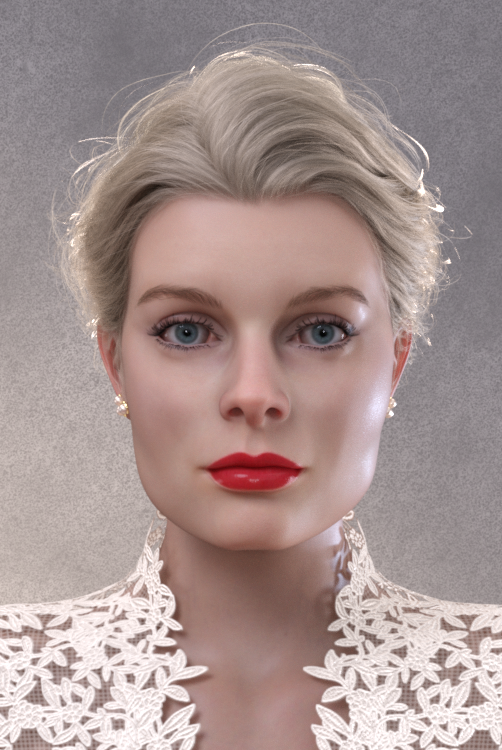

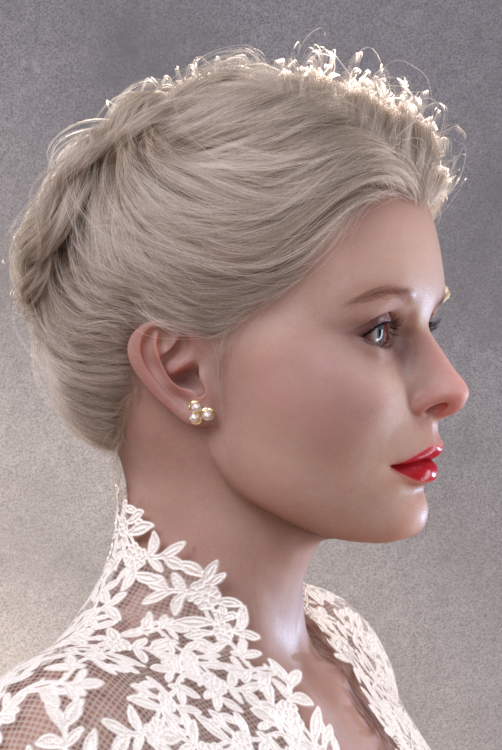
Assets used in the promo images:
Dailey Hair for G8.*F
Rain HD for G8.1F (skin material)
Mina for G8.1F (lip material)
Everyday Lashes for G8.1F
Beautiful Brows II for G8.*F (Brow1)
Natural Eyes for G8.*
dForce Trumpet Dress for G3,8F
Pearl, Pearls, Pearls for G8.*F
BOSS Pro Light Set
Please remember - noncommercial use only.
I'll love to see your renders with Princess posted in this thread! Please keep them coming!


Most of all - Enjoy!
AOBB
Edit: Here is the improved version of Princess - Princess v2. She looks younger and more similar to Grace Kelly. Enjoy!
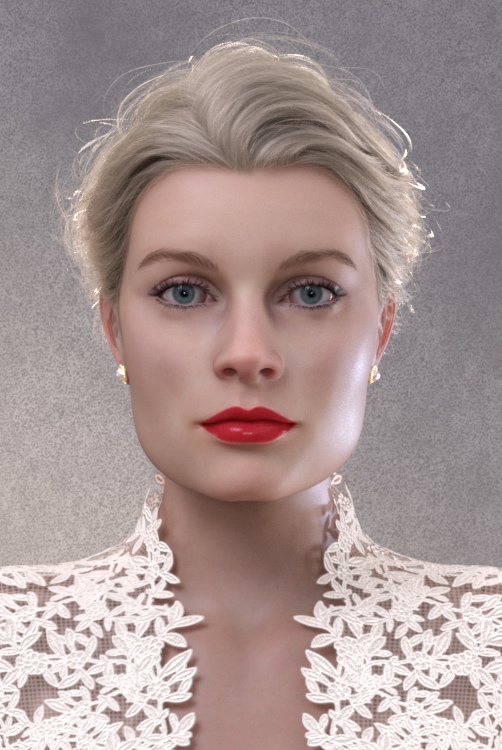 WIP - coming attractions: Grace Kelly
Your enthusiasm and speed with this is infectious! I'm going to try tackling some of my projects a little faster than a snail now...

AOBB said:
I received today the lifecast of Grace Kelly's head. With the help of my wonderful husband I "scanned" it and tried to adjust the shape of the sculpt I made based on photo references to that of the lifecast scan. Well, I wasn't impressed with the results. Somehow the "fixed" sculpt didn't look right to me. I came to the conclusion that it is a good idea to create the scan and use it to decide what needs to be adjusted in the sculpt and then implement those changes not looking at the scan. The outcome feels much more natural to me, even if I ended up using some artistic license.
My version of Princess Grace is finished and is ready to be packaged as a head morph and uploaded if not today then tomorrow.
Stay tuned!
AOBB
This makes a lot of sense even if I can't say exactly why. An artist's artistic license is probably what lets something come to life - I'm glad you're trusting your judgement!
Looking for a Gen 8 female shaped like a Gen 2. Any options out there?In my efforts to convert between a bunch of software, I'm running into issues jumping between Gen 2 and 8.
My clothing designer (CLO) will only work properly with an imported Gen 8 model.
I make the clothes on that and export to Daz just fine.Poblem is, my end product is designed to work with Gen 2. I need to import with Gen 2 dimensions and the Gen 2 T-Pose.
I've worked out getting a Gen 8 model into the correct T-Pose, but the body dimensions are still off. If I had a Gen 8 model in the shape of a Gen 2, I could fit the clothing to that and export just fine.
So rather than me sitting there with overlapped models tweaking morph by morph to try to get it close, I though I'd see if anything like this exists, or if anyone has other ideas?
3D Art Freebie Challenge June+July 2022 - "The secret life of ..." - Main Thread Only3D Art Freebie Challenge June-July 2022 "The secret life of ..."
Here's my first entry for this month, not sure if there's enough time for a second. So many ideas, so little time...
"(The secret life of ...) Masataka and Walther"
[Best watched at full size for details.]Starring: Masataka and Walther
The tale: (Entirely fictional)
None of Walther's friends, acquaintances, or co-workers know that he's a ventriloquist, not even his girlfriend, because he's afraid they won't think he's so cool anymore. He practices when she is not at home and every now and then he performs in small venues, while, because he has been a ventriloquist since childhood, he is very good and could perform well in very large venues.
Masataka: "Can you believe this guy? You all know he locks me up in that filthy old suitcase? Well he does! And I wasn't allowed to tell anyone about it, but I do it anyway 'cause he can't stop me from doing that! I am not a child anymore, what is he thinking! I think it's time to start living on my own..."
Walther is both amazed and stunned, how is it possible that Masataka can speak on his own?
Non-Motion Picture Soundtrack:
Queen - A Kind of Magic (© 1986) https://www.youtube.com/watch?v=0p_1QSUsbsM
COUNTABLE FREEBIES: (Alphabetic order)#01! 33 Eyes Materials for the Genesis 8 + 8.1 people by LevKornowska
https://www.renderosity.com/freestuff/items/88372/33-eyes-materials-for-the-genesis-8-81-people **#02! Bear Ring by kalhh
https://www.deviantart.com/kalhh/art/Bear-Ring-853733610 **#03! Drinks by klausdbg
https://www.sharecg.com/v/74240/gallery/5/3D-Model/Summer-IV-Drinks **#04! ED's Brick Shader (Iray) by Edheldil3D
https://www.deviantart.com/edheldil3d/art/Freebie-ED-s-Brick-Shader-Iray-788871766 **#05! Free Table and Stool for Daz by Digi-Dotz
http://www.digi-dotz.com/index.php/free-poses/props/14-free-table-and-stool-for-daz#06! G8M Walther 2.0 by Ruslanomar
https://sharecg.com/v/97276/gallery/21/DAZ-Studio/G8M-Walther-2.0 **#07! Genesis 2 Female Short Skirt & Jumper by Wilmap's Digital Creations
https://www.wilmapsdigitalcreations.co.uk/view_product.php?id=217 **#08! Iray car related shader presets 'megapack' by Tom2099
https://www.deviantart.com/tom2099/art/Iray-car-related-shader-presets-megapack-539622361 **#09! Kiara Interior HDRI by Poly Haven
https://polyhaven.com/a/kiara_interior#10! Leon Noir For G8M by Shinteo
https://www.patreon.com/posts/leon-noir-for-31685639#11! Lights for Daz Studio w/ Iray by DrBoots
https://www.deviantart.com/drboots/art/Freebie-Lights-for-Daz-Studio-w-Iray-579993105 **#12! Maddy for GF8 Charakter Shape by MysticArtDesign
https://sharecg.com/v/98461/browse/21/DAZ-Studio/Maddy-for-GF8-Charakter-Shape **
[LIE Blush Make up & freckles, customized, used on G8M]#13! Masataka for Walther 2.0 by Ruslanomar
https://sharecg.com/v/99056/browse/21/DAZ-Studio/Masataka-for-Walther-2.0 **#14! New Walther 2.0 tanned skin + hair system by Ruslanomar
https://sharecg.com/v/98463/browse/21/DAZ-Studio/New-Walther-2.0-tanned-skin-%2B-hair-system **#15! mcjJapaneseStyleScreens by mCasual Jacques
https://sites.google.com/site/mcasualsdazscripts9/mcjjapanesestylescreens
[Wood texture]#16! MIC Set by MDP Download
https://sites.google.com/site/mdp6gdl/ (item 11)#17! MicCable Set by MDP Download
https://sites.google.com/site/mdp6gdl/ (item 13)#18! MicStand Set by MDP Download
https://sites.google.com/site/mdp6gdl/ (item 12)#19! Morphing Pillow by TrekkieGrrrl
https://trekkiegrrrl.dk/mpp3.htm (item 1)#20! Mystics Floor & Backplanes by MysticArtDesign
https://sharecg.com/v/94620/browse/21/DAZ-Studio/Mystics-Floor-Backplanes **#21! Old Suitcase by hypnagogia
https://sharecg.com/v/82975/gallery/5/3D-Model/Old-Suitcase **#22! Pd-Soft Leather Daz Studio Shaders for Iray by Parrotdolphin (Janet)
https://sharecg.com/v/80223/gallery/7/Material-and-Shader/Pd-Soft-Leather-Daz-Studio-Shaders-for-Iray **#23! Realistic Curtains by Cherubit
https://www.renderosity.com/freestuff/items/83637/realistic-curtains **#24! Shimmery Sheer Fabrics II by AllenArt
https://sharecg.com/v/95898/gallery/21/DAZ-Studio/Shimmery-Sheer-Fabrics-II **#25! Simple Glasses for Genesis 8 Male/Female by GEOmetalics
https://www.renderosity.com/freestuff/items/85459/simple-glasses-for-genesis-8-male-female **#26! Spotlight Prop by DrBoots
https://www.deviantart.com/drboots/art/Freebie-Daz-3D-Studio-Iray-Spotlight-Prop-582958157 **#27! Stage Speaker by woodkz71
https://www.renderosity.com/freestuff/items/78116/stage-speaker **#28! "STRONG" for G8M Character Morph & Pose by Mar3D
https://www.renderosity.com/mod/freestuff/strong-for-g8m-character-morph-amp-pose/82833 **#29! SuitWell Watch G8M - FREE by SdeB
https://www.sdebstore.com/collections/free-stuff/products/suitwell-watch-g8m-free **#30! SY 200 Morphs for Genesis 8 Head and Body by SickleYield
https://sharecg.com/v/91888/view/21/DAZ-Studio/SY-200-Morphs-for-Genesis-8-Head-and-Body **
NO-COUNT ITEMS:--- Iray Satin Shaders by AllenArt
--- Scene Lights for Iray by Lali Kamala (The Holiday Loyalty Sale 2021 Free Item)
--- Sneakers for G3F by TabPURCHASED/PAID FOR ITEMS: None 100% Freebies
*1 E-mail address required
** Registration required
#x! Countable Items (Bold ones are used by me for the first time I think.)
--- No longer available freebies
++ Free with DAZ Studio (or the Essentials)
$x. Purchased/Paid For Item
Rendered with DAZ Studio 4.10.0.123 (nVidia Iray)Other free software used: GIMP v2.10.30 and Irfanview 4.60
Postwork: used the AltaLux Image Enhancement Filter (Effect) by Stefano Tommesani that comes with Irfanview and some filters (oa) that come with GIMP. Also used mcjDenoise (https://sites.google.com/site/mcasualsdazscripts9/mcjdenoise) and mcjLut by mcasual (https://sites.google.com/site/mcasualsdazscripts9/mcjlut) with the free RocketStock LUTs (Neon 770.CUBE).
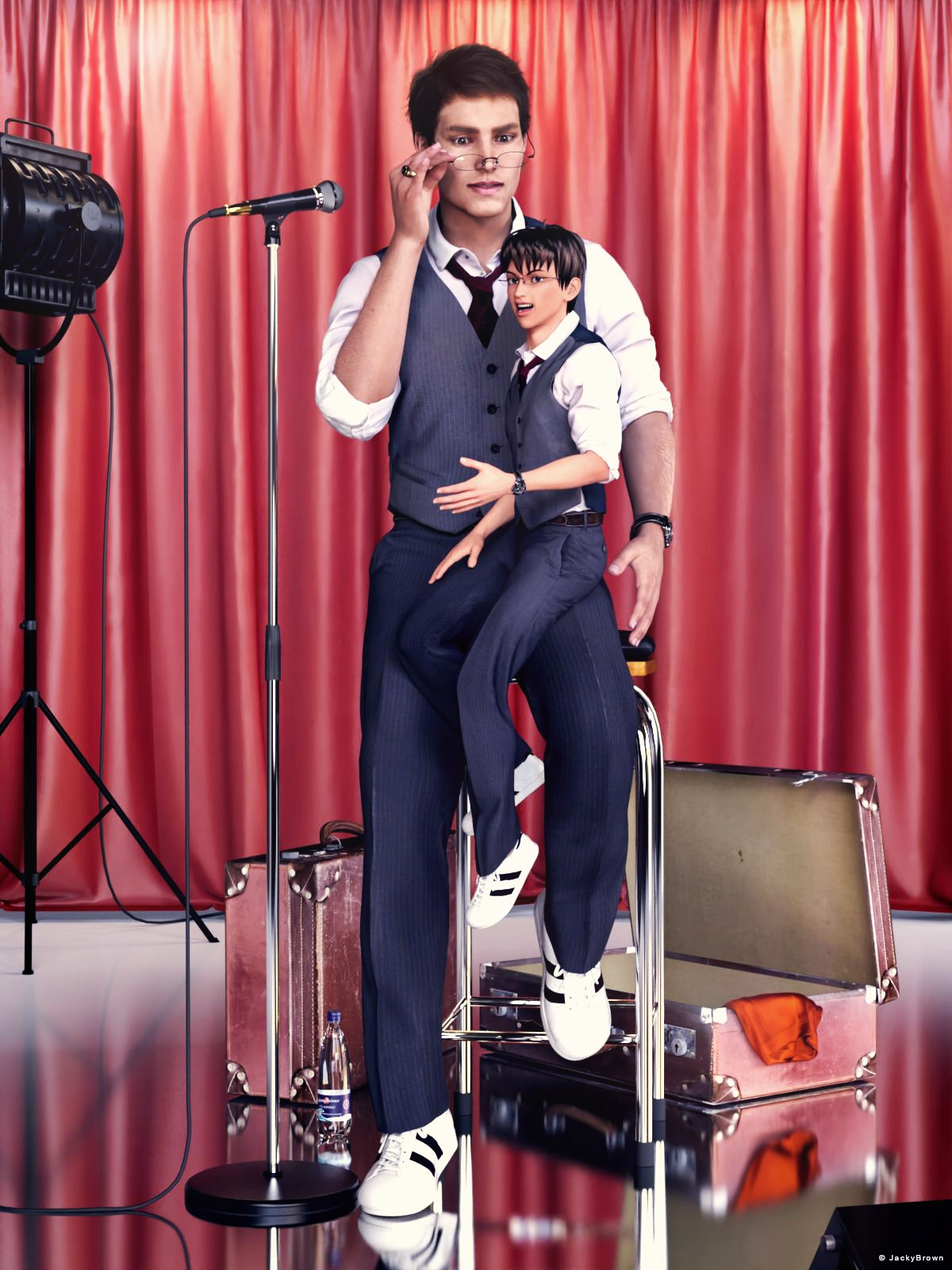
"(The secret life of ...) Masataka and Walther"
Morph Loader Pro - my custom preset is not shownHello guys,
It is supposed to be very simple but obviously I am doing something wrong here. I open Morph Loader Pro. I click "Choose Morph Files" and load my OBJ file. I change some setting (e.g. Reverse Deformation). Then I click the button "Save Preset".So far so good. My new preset is saved. When I expand the menu "From" at the top, I can see my freshly saved preset there. BUT... when I try to open the menu "Preset" in the middle of the picture, I cannot do it. The only option I see is "None". So I have to change manually the options like Reverse Deformationon on each opened OBJ file. Again and again and again. What am doing wrong? Can you help?

Daz 3D is part of

Connect
DAZ Productions, Inc.
7533 S Center View Ct #4664
West Jordan, UT 84084Licensing Agreement | Terms of Service | Privacy Policy | EULA
© 2026 Daz Productions Inc. All Rights Reserved.