-
Smart Content Not Working After Moving DAZ Library to D:\ Drive – PostgreSQL Issue?
You may need to describe the issue in a bit more detail, perhaps with screenshots showing what the problem is. Other than the BasePaths the CMS data uses relative paths rather than absolute paths and so providing you have removed the old library path(s) and added the new one(s) I think it should still work.
If you are confident that everything is correctly linked under Content Library and you cannot see any other issues then you can try reimporting the metadata. Click the corner menu under Smart Content tab, select "Content DB Maintenance", Check "Re-Import Metadata" and click accept. The next window should show all products from your correctly-mapped basepaths pre-checked - if all looks good click continue and then wait while the data is reimported.
Chevybabe's Dforce SBH Hair Threadchevybabe25 said:
Thank you Barbult :)
It's been a very long time since I had tried to import and export those hairs. Blender was at that time, the only one that could see those lines well. Is that still true?I don't know. I don't have any other modeler. I used Blender.
Chevybabe's Dforce SBH Hair ThreadThank you Barbult :)
It's been a very long time since I had tried to import and export those hairs. Blender was at that time, the only one that could see those lines well. Is that still true?Blender Beginner -- Help needed with Expressions and Auto Lip Syncwolf359 said:
Padone said:
Diffeomorphic a python script so it runs both on windows and mac/linux. In the global settings there's an option for case sensitive paths. Apart FACS you can also use papagayo for lipsync with audio files, it's runtime > facial animation > import moho, that's more similar to what you're asking for. For the full features you have to get the three modules import + mhx + bvh.
Ok good to know, I had mistakenly assumed that Diffeo was windows only based on another Linux & Mac user’s posts here detailing his various challenges.
indeed if @wsterdan
can import genesis figures via Diffeo on his silicone Mac, then all he needs is the 64 bit version of Papagayo and he can use his audio files to create the Moho.dat files to lipsinc his characters in Blender.https://www.lostmarble.com/papagayo/
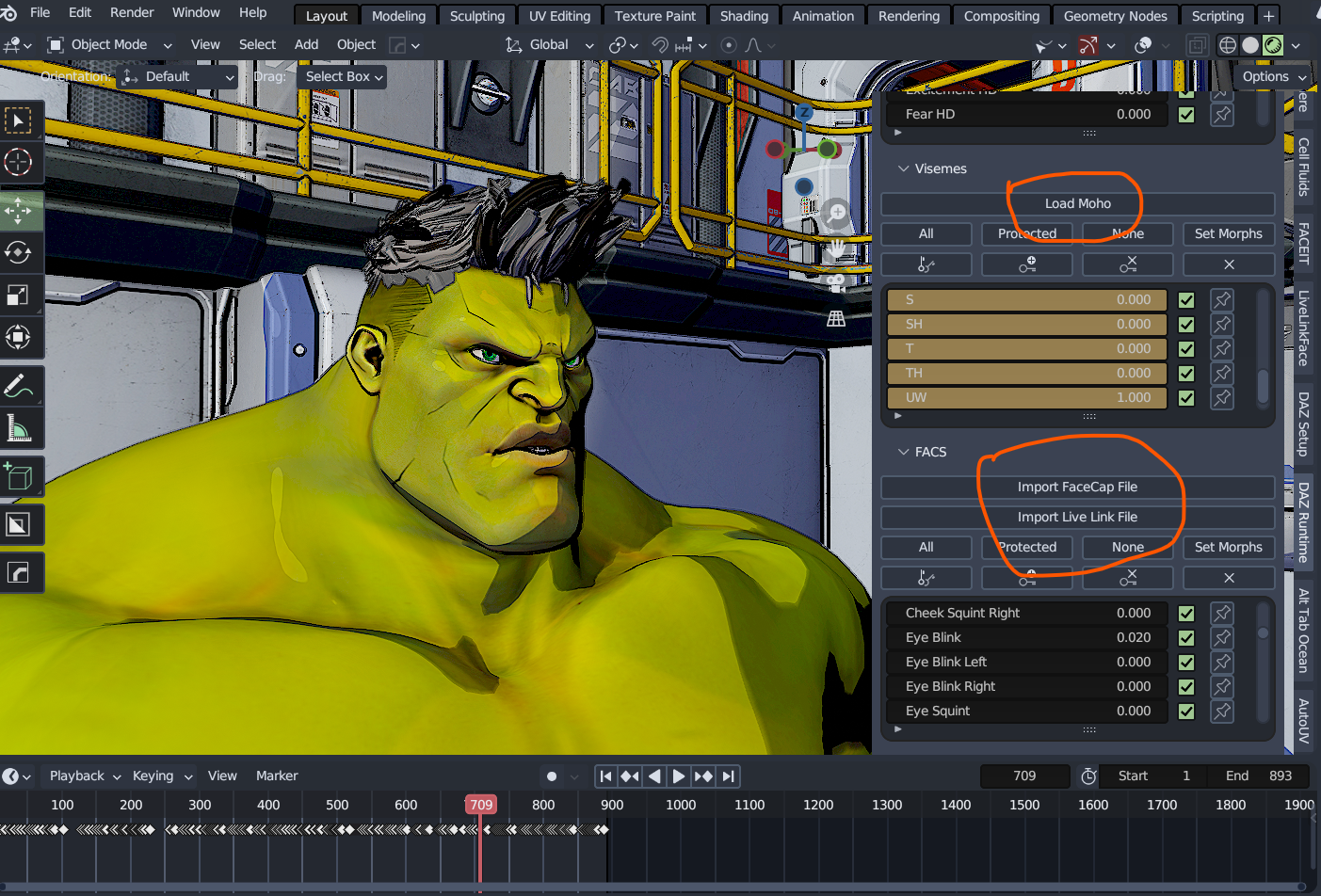
Just saw your edit, fantastic! Thanks for the update, it looks like the way I'll probably be going.
The Mac FAQMy primary reason for buying the M4 Mac Mini was to replace my 2013 iMac which had an Nvidia 660. That was the first computer I had installed D|S on in 2016, version 4.7, but within a week or so, 4.8 was released. I was okay but had no clue what I was doing with D|S then. That computer was used for business and editing with Office 365. Then the 660 was dropped by Nvidia and in my ignorance I tried to force an update and destroyed my OS. I ended up taking the iMac to the Apple store and they reinstalled the OS, but I lost everything that had been on it, except a few files on a stick. So D|S went onto Windows computers. I had used two HP monitors with the iMac. One is now on the Mac Mini and the other is attached to my MacBook Pro M2.
But my iMac has been dying gradually the past few years and I have been saving for an upgrade. So I jumped on the Mac Mini M4 Pro and the Studio Display. (I have cataracts forming in both eyes now, so I need really good monitors.) At first my own confusion gave me some fits, but Totte helped me. Poor man, I really drive him crazy.
The Mini's hardrive is 4Tb and I have my old iMac files and program files on that. Still have 3.11 Tb free. I will download other programs later here.
I have a 24Tb external hard drive where I installed my Daz Studio product files. I am still installing from DIM my products, limited by an allotment of 1.29Tb/monthly that I share with a flatmate, cats who watch YouTube, and my streaming. So far, only filled up 5.68 Tb and have 18.32 Tb left. I now have over 24,000 products with 2.8Tb installed, and 2.2Tb left to pick out what I want to install still. I restrict myself to 30 - 40GBs a day. Edit to add: I have barely started to add my other store purchases and freebies.
I haven't had much time to play with Daz on the computer, most of my time is spent fixing metadata, thumbnails, and inspecting each item as it is installed or has gone missing. I have been having problems with DIM crashing in the past week and losing track of products I thought were installed, to find them back in Ready to Download. I tried to do something in US2 the other night and found I had forgotten how to do anything again. Will have to go over the tutorial again. Along with many others.
What I have found, DIM works really nice generally. Downloads of course depends on interactions with the web and DAZ servers, but with the file downloaded, the installation of a 1 or 2 GB file goes super fast. I made a purchase of multiple items today that totalled 1Gb and flicked my eyes away and back and it was done. Time of day helps too.
I am being selective on installing characters/morphs that I own, so loading up a character does not take a long time. I have installed the Genesis Core characters and a few PA characters/morphs that I love and main morph packs. Same for pose packs, realism counts and with Bone Minion no generation is restricted to one only. I am picking my wardrobe with more realistic clothing, leaving all the skimpwear/fantasy uninstalled. Shaders and sets are a love and I have many. That is what is taking so long now, especially with the PBR materials. Scripts, plugins, key morphs are done.
Scripts use are a challenge, but that is my learning curve again. Before setting up this computer I had just finished setting up a Win 11 laptop with Daz Studio. So it has been almost nine months of installations without fun or lengthy use. I learn by doing repeatedly. But I am making headway there with everyone's advice and help.
Compared to my MacBook Pro M2, the Mac Mini Pro M4 is faster, but compared to the Win 11 with Nvidia RTX 4080, not so much as my test showed. And of course, no filament. I love filament.
And it is small and light. But that monitor, I can barely lift it. In the box, I can't. Security had to carry it from the Apple store to my van, and my flatmate to our 2nd story apartment. I can barely lift the empty box. Seriously bad lower back. That monitor should come with a warning label. I could carry the iMac in its case. The MacBook Pro was bought because I needed a computer I could carry to other locations to work on my editing. Gaming computers are too heavy now for me to carry easily in a backpack. Aging is a pain, not just for computers.
Mary
Blender Beginner -- Help needed with Expressions and Auto Lip SyncPadone said:
Diffeomorphic a python script so it runs both on windows and mac/linux. In the global settings there's an option for case sensitive paths. Apart FACS you can also use papagayo for lipsync with audio files, it's runtime > facial animation > import moho, that's more similar to what you're asking for. For the full features you have to get the three modules import + mhx + bvh.
Thanks for the suggestions, I'll look into them later today. Much appreciatd.
What's the single most annoying issue about Daz prevent you from using it more often?Try having a Mac and never knowing what new OS or DAZ update will create a new crash type. When I try to save DB Maintenance work, multiple crashes for a week or so, then no crashes. New OS update last night, will see what happens today.
But what aggravates me to no end, new products, besides older ones without thumbnails or missing metadata. And not being able to fix metadata where it is wholesale dumped into one category instead of someone taking the time to place the props/sets into their respective places. Even when I do the work I am still left with the dumped category messing up my Smart Content. Thumbnails are easy, but it is still sloppy to release a product today without a .jpg or .png.
Blender Beginner -- Help needed with Expressions and Auto Lip SyncPadone said:
Diffeomorphic a python script so it runs both on windows and mac/linux. In the global settings there's an option for case sensitive paths. Apart FACS you can also use papagayo for lipsync with audio files, it's runtime > facial animation > import moho, that's more similar to what you're asking for. For the full features you have to get the three modules import + mhx + bvh.
Ok good to know, I had mistakenly assumed that Diffeo was windows only based on another Linux & Mac user’s posts here detailing his various challenges.
indeed if @wsterdan
can import genesis figures via Diffeo on his silicone Mac, then all he needs is the 64 bit version of Papagayo and he can use his audio files to create the Moho.dat files to lipsinc his characters in Blender.https://www.lostmarble.com/papagayo/
Blender Beginner -- Help needed with Expressions and Auto Lip SyncDiffeomorphic a python script so it runs both on windows and mac/linux. In the global settings there's an option for case sensitive paths. Apart FACS you can also use papagayo for lipsync with audio files, it's runtime > facial animation > import moho, that's more similar to what you're asking for. For the full features you have to get the three modules import + mhx + bvh.
Blender Bridge: Send to Blender Decimated characterHi all,
I purchased the Decimator plugin to create a low poly version of a Genesis figure. I've accomplished this to my satisfaction, and created a LOD which I can switch to in the "Resolution Level" dropdown in the character's parameters. However, when I use Blender Bridge to "Send to Blender", I see the character switch to its base resolution before being exported, and when I import it in Blender, I see the original version, not the decimated one. I can't see any options in the Blender Bridge dialog to choose which LOD to export, but I hoped the one I currently had selected would be used.
Can anyone help at all please?
Thanks so much
"Daz could note find the 72071 product"Deleted, or uninstalled? Uninstalling will also remove the metadata used by Smart Content, deleting will only remove the content.
High Resolution Blender MorphsYou firstly check if the clothing is with High Resolution level or not in DS... if it's not, convert it to SubD firstly. Users have no way to export / import Mesh with High Resolution when making morphs, but sculpting / modeling the mesh with Base Resolution in Blender is quite enough for 99.9%+ clothing items ~~
Redownloading everything after switching PCs?Did you copy the old database across (with DS and DIM closed)? if so, point to the folder that holds the ContentCluster folder; otherwise it doesn't matter, but you will need to reimport metadata to use the database driven views. To reimport metadata, open the Content Library option menu (the lined/hmaburger button in the top corner)>ContentDB Maintenance, select Reimport Metadata, click Accept, then seelct all in the next dialogue.
Smart Content brokenSofaCitizen said:
You may have to post some screenshots as I am not sure it's 100% clear what situation you have ended up in. If you have two "copies" of each of your folders in Content Library then you'd need to address that first. I am not sure it's possible to add the same folders twice (but perhaps it is). Fix that part so you have each folder listed once under "Daz Studio Formats" - having the same folder listed again under "Power Formats" is fine. If you somehow have libraries within libraries then that must be fixed ASAP since it will break the asset loading regardless of anything else.
It's fine to have multiple seperate libraries linked to Daz. For instance I have three configured: the normal "My DAZ 3D Library" that DIM installs products to, "My Library" for anything I have created (renders, custom textures etc) and a "Third Party Library" for products from other stores. Daz copes with this with no issue. It has been said that perhaps if you have more than 10 then you may start to see a little bit of a slow down in some instances when loading assets but again that would probably be hardware-dependant.
The issue is that DS checks each path in turn when trying to resolve relative references - that is potentially a lot of checks, so if files are in the later directories the process can slow down enormously.
Once you are happy that you have resolved the library mappings under COntent Library then you can fix the Smart Content. To do that go to the tab and select "Content DB Maintenance" from the corner menu. In the popup window you want "Reimport Metadata". This will scan all your libraries (hence the need to fix that first) and read in avery dsx file under runtime/support (including any previously-exported metadata). You'll see a list of all products it found with everything checked by default - you can look over this list if you like to make sure everything looks fine - then hit the button to continue and it will re-import all the metadata to the CMS database. It can take quite a while (20 mins the last time I did it) depending on the amount of assets you have and your hardware setup.
Smart Content brokenMy Library and My Daz 3d Library are just default names, they have no functional significance - if you have two folders of each name connected then that is fine, if confusing for the human user. Most likely you don't have or have not imported metadata for the alrger library and that is why its files are not showing in Smart Content (or other database-driven views). If you open the Content Library option menu, the lined/hamburger button in the top corner, and select Content DB Maintenence then check Reimport Metadata and click Accept you will get another dialogue in which you can batch or individually pick products to reload the metadata for.
Smart Content brokenYou may have to post some screenshots as I am not sure it's 100% clear what situation you have ended up in. If you have two "copies" of each of your folders in Content Library then you'd need to address that first. I am not sure it's possible to add the same folders twice (but perhaps it is). Fix that part so you have each folder listed once under "Daz Studio Formats" - having the same folder listed again under "Power Formats" is fine. If you somehow have libraries within libraries then that must be fixed ASAP since it will break the asset loading regardless of anything else.
It's fine to have multiple seperate libraries linked to Daz. For instance I have three configured: the normal "My DAZ 3D Library" that DIM installs products to, "My Library" for anything I have created (renders, custom textures etc) and a "Third Party Library" for products from other stores. Daz copes with this with no issue. It has been said that perhaps if you have more than 10 then you may start to see a little bit of a slow down in some instances when loading assets but again that would probably be hardware-dependant.
Once you are happy that you have resolved the library mappings under COntent Library then you can fix the Smart Content. To do that go to the tab and select "Content DB Maintenance" from the corner menu. In the popup window you want "Reimport Metadata". This will scan all your libraries (hence the need to fix that first) and read in avery dsx file under runtime/support (including any previously-exported metadata). You'll see a list of all products it found with everything checked by default - you can look over this list if you like to make sure everything looks fine - then hit the button to continue and it will re-import all the metadata to the CMS database. It can take quite a while (20 mins the last time I did it) depending on the amount of assets you have and your hardware setup.
About face group names in Blendercrosswind said:
If you want to define "Face Groups" in Blender rather than in DS then import them into DS by using OBJ format, you should define "Face Groups" as Vertex Groups in Data panel. When exporting to OBJ, tick Vertext Group under Grouping as well as Materials.
After importing OBJ into DS, you'll get Surfaces and Face Groups with correct labels as expected.
Thanks for the advice.
I was mistaken.
I thought that DS face groups were Blender material names.
I didn't know that DS face groups were Blender vertex group names.
This was very helpful.
Thank you.Help with setting up DAZ3DYou have to firstly copy cluster folder from default location on C drive to the target folder on D drive before configuring the Cluster path and Port in F2, i.e.: %appdata%\DAZ 3D\cms\ContentCluster > D:\Daz 3D\cms
(If you've not installed any product with default cluster folder on C drive, better install a couple of Starter Essentials beforehand... That was what I recalled ~~)
cmscfg.json file is used by DIM rather than Daz Studio, so after you make the new path work with DS, you need to configure the same settings in DIM > Advanced Settings > Installation tab
Edit: If you have DS Public Build (beta version) installed, you must do the same configuration ! as the metadata synchronization will be problematic ~~
Yellow plug-in general discussionRichard Haseltine said:
nonesuch00 said:
paulawp (marahzen) said:
I think this has been addressed elsewhere, but does signing in to do this cause product issues like signing in to Daz historically has? I have not signed in to Daz in - if not years, then many months at least - since the last time i had to clean up mangled products in my content. Isn't there a setting now to prevent it from trying to do that sort of thing?
I had to sign in to DAZ 3D for my Premierr benefits and yes, I got rewarded with DAZ Connect up dating my metadata in way I did not want and re-downloading quite a long list, a couple of hundred, of products I had had long installed via DIM. Also there are 2 products in DAZ Connect that simply won't install and so remain in DAZ Connect as Available to Install, listed even though those 2 products have been installed via DIM too.
You need to update metadata to get the Premier exclusive content, not to use the plug-ins or other application features. Even then, you won't be forced to reinstall anything - and the current beta in fact hides the available to install through Connect marker for products already installed through DIM.
True I didn't have to install the 200 some odd products DAZ Connect listed as available to install, even though they had already been installed via DIM prior, I did to get them out of that Available list. I would like for them to clean up that data causing than but I'll be buying a 4TB SSD soon enough so it's not that big a deal.
Separate Smart Content Libraries for Multiple Projects?Edit>Preferences (Daz Studio>Prefrencs on a Mac), in the Content tab click Content Directory Manager. Slect the Current set and copy it, so you have a restore point, then create three new sets - one per project - give each its own paths (including a unique Content Cluster path). If you install through Daz Studio that is all you need, or if you install manually and then import metadata, but if you install through DIM I would suggest setting up a new account for each project, with the same path settings (but they can share a common Downloads folder).
Daz 3D is part of

Connect
DAZ Productions, Inc.
7533 S Center View Ct #4664
West Jordan, UT 84084Licensing Agreement | Terms of Service | Privacy Policy | EULA
© 2026 Daz Productions Inc. All Rights Reserved.