-
GENERAL FREEBIE REQUESTS part 3
Can you not take the HDD out of the dead laptop and put it in a USB caddy to transfer the files over? We did that 3 years ago from a 2001 dated laptop.
Regards,
Richard.
3D Art Freebie Challenge June+July 2022 - "The secret life of ..." - Main Thread OnlyBronzeDragon said:
I did figure out something, but I think it's a bit to close to old granny's pictures, sorry about that.
Old Girl's Secret Life Party Time
From the time she was a little girl Granny always did like to party, often to excess. When she married a stuffy old bugger she had to settle down, or so we thought. Now that the Old Goat is gone, and after she retired things kinda got way out of control. She sits around the nursing home moaning about him going before his time, but when she can sneak out (way to often) things really get wild. Party, party, party, and because of her newest interest, her "clients" thought it was a good idea, so they gave her a whip. But, in the mornings it's back to the nursing home and a very long sleep in. After that she sits around and bitches most of the afternoon about the old goat, then after lights out, it's here we go again.
NO COUNT ITEMS
1. Basic Starter for G8.1F - https://www.daz3d.com/genesis-8-starter-essentials
2. Wood floor - Floor - Aeon Soul - appears not to be available any more on Deviantart, Aeon Soul has moved elsewhere and it's not there (was free before)
3. Whip - can't find itPAID FOR ITEMS
1. Costume - https://www.daz3d.com/mystique-for-genesis-8-females
2. Skin textures - https://www.daz3d.com/mabel-8FREE ITEMS
1. Earrings - https://www.renderosity.com/freestuff/items/89697/earring-props
2. Mirror - https://www.renderosity.com/freestuff/items/90778/art-deco-style-mirrors
3. Hair - https://www.deviantart.com/mysticartdesign/art/Iro-878463798
4. Makeup - https://www.renderosity.com/freestuff/items/90999/dark-makeup
5. Back Tat - https://www.sharecg.com/v/89843/browse/21/DAZ-Studio/Winged-Tattoo-LIE-for-Genesis-8-Female
6. Chest Tat - https://www.renderosity.com/freestuff/items/89402/tribute-to-ceres-asteroid-belt-tattoos-for-genesis-8-female
7. Character - https://www.daz3d.com/forums/discussion/575716/aobb-s-sweetheart-and-v2-head-morph-for-g8-1f-inspired-by-marilyn-monroe-no-materials-or-textures/p1 (about half way down the page)
8. Curtain - https://www.renderosity.com/freestuff/items/91787/repost-of-old-sharecg-with-new-features-that-are-no-longer-available-there
all freebies check out, hurry up and post it to the entries!
Trouble With Braids On OOT's Double Tails Hair for Genesis 3 and 8 FemaleFound this post while searching for a solution. Turns out while I found none here, I found a workaround while messing around since in the same product there's also the "longtails" you can load in and these works correctly. I loaded both the longtails and the braids on the same figure then used the transfer utility and used the longtails as the source and the braids as the target, now the braids follow the pose of the head and you can use the sliders of the longtails to pose the braids, works good enough for what I had to do. Maybe there's a way to transfer the bones from the longtails to the braids but I don't know how to do that. You can compare the bones of these using the joint editor and you can see the problem, but I don't know how to fix it.
3D Printing Licences - What?brimstoneomega said:
Usually, there isn't a quantity number for commercial 3D printing but either a timed one (as long as you pay this this month, you can sell whatever you have for that month or you can sell for x amount of time-) or an unlimited one. Which is probably the better way to go. Limited numbers per license sound terrible to me.
Not because of the costs though, at ten cents a print($2=20prints), you'll make money (that said, the full no discount price is a bit outrageous). Big company minis are sold for like $10-60 on average. So after the cost of resin, postage, licenses, etsy/ebay fees, PayPal fees, packaging, fuel costs to transport, your time/energy/electric bill... yeah, there are a lot more costs associated with a 3d print shop than initially would seem. But still, ship only on one or two days a week, buy packaging in bulk, and sell your mini for $7-10 and you'll get there, but being large volume type sellers, you'll need a lot of licenses.
I imagine the biggest market for 3D printed Daz stuff would be stuff like that; D&D players looking for character minis or Warhammer players looking for army proxies, scalled at 28mm or 32mm.
You could do big statues, but those get complicated to finish and have a lot of labor needed to look nice. Maybe one aspect could be cosplay props, actually printing out wardrobe or prop articles and making 1-1 replicas. But again, that's a lot of work. You would be selling these items for hundreds each, due to the labor involved.
What I'm saying is that to be profitable won't be that hard (won't be easy either, unless you know what you're doing), either way, but we are talking about wildly different possible use case scenarios. I personally never buy a printing license unless it's a lifetime one. Too much to keep track of. I like to print the little things. I print big stuff sometimes too, but, as I said, that's too much work to do in any volume.
I don't know what I'm even getting at, but I'll take the free licenses and maybe sell a model or two, but this is going to get out of hand fast if you try to do any kind of volume and way too much work to keep on top of if there is such a limit of 20 per license. That's just asinine for something like this where WE will be setting up characters, hairs, outfits, poses, props- basically doing an entire scene with like 5-20 products (say your character is based off Anne for Victoria 8. That's at least 4 licenses right there; Anne, Victoria 8, Genesis 8, and a morph pack. Now dress her, kit her out, ext we're talking a lot of random licenses. Give her a different gun or hairstyle, and you're down two of your character's set of licenses, but only one on the sword or gun.
Much easier to go to Patreon or Kickstarter and get your licenses there. Both from a workload and a bookkeeping standpoint.
That said, there is a very real draw to take the dive into this and make my two hobbies and passions cross; modeling and rendering. I would love to have a go at buying licenses and printing Daz models.
With one small caveat;
A number limit to the licenses would be an absolute deal breaker for me, and that's coming from someone that might actually do something with these licenses.
P.S.
Sorry if that was inchoherant, was kinda train of thoughting that post.
Yes, those prices were totally thrown out there, but theyre basically based on the idea of doing small figures as promotional items that go with a larger ticket purchase or as part of an incentive package for something on Patreon or Kickstarter. Basically one model would be printed, cleaned up, and resculpted as necessary, with the result then being broken down again and re-cast using more traditional techniques, with the final products being finished in a factory on an assembly line that specializes in things like Hot Toys.
question for licenceUsing the figure in commercial animations and stills should fall under the normal licence.
So I think you don't need the interactive licence for a video.
See also the general licence agreement:
https://www.daz3d.com/eula#general_license
- Terms of Use. Two-Dimensional Works. Subject to the terms and conditions of this Agreement, User may (i) access, use, copy and modify the Content in the creation and presentation of two-dimensional animations and renderings, (ii) incorporate two-dimensional images (including two-dimensional images that simulate motion of three-dimensional objects) derived by User from the Content in User's other works, and (iii) publish, market, distribute, transfer, sell or sublicense User's two-dimensional animations, renderings and other works; provided that User may not in any case publish, market, distribute, transfer, sell or sublicense any renderings, animations, software applications, data or any other product from which any Content, or any part thereof, or any substantially similar version of the Content can be separately exported, extracted or de-compiled into any re-distributable form or format.
Morphs management, paths, Label names, Morphs names, etcI don't really see a question here, but it seems that you might require some assistance for your product.
Since you stated that you have sold some product with morphs included, I will assume that you have some basic knowledge of how this all works.
However, It appears you are being tripped up by the order of how you are supposed to save your product/morphs with correct naming conventions, and are running into problems because of your saving and re-naming habit.
First, and foremost, before you try to add any morphs to your product you need to make sure the product is set; Meaning, you have to save your hair asset first with no planned changes in naming or location. This means to actually save as a final content data and library product/asset -- Not a saved scene DUF that you are working in to complete the product.
When this is completed, check your work by loading a fresh scene and make sure your product works as expected.
Second, once you have established that your hair asset is secure in the asset data/library, then move onto the adding of the morphs to the product.
As you are using MLP, here is where you can set your path location ("Actor > Front > etc") for the Parameters Tab and changing the morph name if you don't want it the same as the OBJ name (but why are you naming your OBJ morphs a different name than the wanted final name?).
Next, you can move on to the Parameters adjustments if so desired; Change the user front-facing 'Label' name, change both colors for slider, change path location if you changed your mind where you want it to show, etc. Do not change the morph (internal) 'name' -- You should have already set your final morph internal name using MLP already.
Now, once all your morphs are set; Save them using the save morph assets function. Do Not Keep re-saving your "Figure Asset again" over, and over. Do not do a save "Figure Asset" during the adding morphs stage at all.
When this is all complete, start with a fresh scene again and reload your hair product to test all your morphs are working correctly. If you have any issues, this is where you will have to make corrections/edits, and re-save the 'problem' morphs only.
And, just to add, the morph management in DS is quite straight forward. morph data (.dsf) goes into the data folder created by the saved figure asset, and you can make any Parameter changes in the GUI, including setting up JCM's with ERCfreeze and resaving the morph data again. Just do not change the internal name of the morph, nor try to change it's data location from the parent product DSF file that links with the library DUF file.
I hope you have understood all of this, and that it helps. Try again fresh and see if you can get your product completed without issues.
If you run into specific issues, just let us know, and someone will come along and help (mostly)...
*EDIT: I checked out your DeviantArt page (nice looking hairs), and I see that you use Blender -- I am working on a scripted bridge for morph target work on assets to make all this easier for content creators, but am still aways from completion.
See these threads :
https://www.daz3d.com/forums/discussion/385796/blender-bridge-for-daz-studio
https://www.daz3d.com/forums/discussion/comment/7376416/#Comment_7376416
https://www.daz3d.com/forums/discussion/comment/6389836/#Comment_6389836
Waist/Torso Issues Genesis 8 Female - NEED HELPWell I'm not sure all what the developer's gaming license allows for, or not. And as for rendering images, um, pardon but does that little bit of difference really matter? It's not like the end user in the game is likely to notice.
At any rate, I have noticed with purchased morphs on my computer, that some trigger "fixes" -- so maybe either you or your Developer friend there have some additional morphs that get triggered into play for certain poses.
If you get a screen shot from your friend's computer as to exactly all what they have installed in the Daz3D morph folders for the concerned figure ... and make sure that you too have only those same products installed {please buy your own copies, they do put food on some tables you know - and if this is a job the idea is to pass the bill on ;-) } then the scene files should work better for you, possibly.
Another possible 'cause' would be camera angles, info, and there's a big difference between say a 'front' view and what we think might be a front view via the Perspective view. I have found, the few times I've tried, that copying cameras accurately to be something of a PITA.
3D Printing Licences - What?Usually, there isn't a quantity number for commercial 3D printing but either a timed one (as long as you pay this this month, you can sell whatever you have for that month or you can sell for x amount of time-) or an unlimited one. Which is probably the better way to go. Limited numbers per license sound terrible to me.
Not because of the costs though, at ten cents a print($2=20prints), you'll make money (that said, the full no discount price is a bit outrageous). Big company minis are sold for like $10-60 on average. So after the cost of resin, postage, licenses, etsy/ebay fees, PayPal fees, packaging, fuel costs to transport, your time/energy/electric bill... yeah, there are a lot more costs associated with a 3d print shop than initially would seem. But still, ship only on one or two days a week, buy packaging in bulk, and sell your mini for $7-10 and you'll get there, but being large volume type sellers, you'll need a lot of licenses.
I imagine the biggest market for 3D printed Daz stuff would be stuff like that; D&D players looking for character minis or Warhammer players looking for army proxies, scalled at 28mm or 32mm.
You could do big statues, but those get complicated to finish and have a lot of labor needed to look nice. Maybe one aspect could be cosplay props, actually printing out wardrobe or prop articles and making 1-1 replicas. But again, that's a lot of work. You would be selling these items for hundreds each, due to the labor involved.
What I'm saying is that to be profitable won't be that hard (won't be easy either, unless you know what you're doing), either way, but we are talking about wildly different possible use case scenarios. I personally never buy a printing license unless it's a lifetime one. Too much to keep track of. I like to print the little things. I print big stuff sometimes too, but, as I said, that's too much work to do in any volume.
I don't know what I'm even getting at, but I'll take the free licenses and maybe sell a model or two, but this is going to get out of hand fast if you try to do any kind of volume and way too much work to keep on top of if there is such a limit of 20 per license. That's just asinine for something like this where WE will be setting up characters, hairs, outfits, poses, props- basically doing an entire scene with like 5-20 products (say your character is based off Anne for Victoria 8. That's at least 4 licenses right there; Anne, Victoria 8, Genesis 8, and a morph pack. Now dress her, kit her out, ext we're talking a lot of random licenses. Give her a different gun or hairstyle, and you're down two of your character's set of licenses, but only one on the sword or gun.
Much easier to go to Patreon or Kickstarter and get your licenses there. Both from a workload and a bookkeeping standpoint.
That said, there is a very real draw to take the dive into this and make my two hobbies and passions cross; modeling and rendering. I would love to have a go at buying licenses and printing Daz models.
With one small caveat;
A number limit to the licenses would be an absolute deal breaker for me, and that's coming from someone that might actually do something with these licenses.
P.S.
Sorry if that was inchoherant, was kinda train of thoughting that post.
Merging Geograph from Daz character with DiffeomorphicHere's the tutorial for how to use Diffeomorphic and HD Morphs plugin to merge geograft, generate HD mesh, and transfer geograft shape keys to HD mesh:
Tutorial: https://streamable.com/pdj3b3
( Blender version: 2.93LTS / Diffeomorphic version: 1.6.1 stable / HD Morphs plugin: Blender 2.93 branch downloaded here: https://gitlab.com/x190/daz-hd-morphs/-/branches )
Instructions:
-> Install Diffeomorphic and run the scripts in Daz to save the Daz file path.
-> In Blender load the Daz file path in Diffeomorphic Global Settings. Import base Daz mesh with Diffeomorphic importer Import DAZ, select the geograft, Import Custom Morphs, then Save Favorite Morphs, and then discard the current blender file and start a new file, this step is just to save Favorite Morphs.
-> Import base Daz mesh with Diffeomorphic importer Easy Import DAZ.(both body and geograft should be subdivision 0 in Daz, must not have multires modifier when exported) Using Easy Import DAZ to merge rigs, import morphs with Favorite Morphs checked, but don't merge geograft yet. (Because vertex order must be intact for use with HD Morphs plugin)
-> Create a copy of the base body mesh and base geograft meshes just before merge.
-> Merge one set of body-geografts meshes with import_daz, as usual. Assume the merged mesh is called “merged”.
-> Open HD Morphs plugin side panel, and generate geograft file with the Geograft operator: select the body mesh, then the geograft meshes and finally the “merged” mesh, which should be the active one. Click the button. A .json file will be generated in the working directory.
-> If you ever want to use the “merged” mesh as a “base mesh” with this addon (for example, to create a rigged HD merged mesh from it), you need to also specify the generated file above in this addon’s main settings for the morphs to work properly.
-> Select Base Mesh in the Main settings panel, and a Working directory.
-> Go to HD mesh → HD mesh generation. Select the number of subdivisions, and select either Rigged HD or Unrigged HD, then press Generate HD mesh to create an HD mesh that can have HD shape keys imported to it.
-> To import the shape keys on the newly created mesh, go to the HD shape key panel, press the + button to add morph files,
(The number in the first column in the Morph Files list is the “group”. All files in each group are imported as if they were a single morph mixture according to their weights (number in the second column). So, if you want to import 5 morphs separately, you would add the 5 files, then make sure that the group is different for each file, then make sure that the weight is 1.0 for each one. The “Component” option (third column) defines whether the base mesh deformation of the morph is imported, or if only the HD deformation of the morph should be imported (subdivisions 1+). This is useful if the base mesh already had base morphs “baked” on it upon import with import_daz, in which case you don’t want to import the base deformations of the corresponding morphs again.)
-> Finally, in “HD mesh” select the mesh created in HD mesh generation, then press “Generate shape keys on HD mesh”.(The instructions were collected and edited from Xin's posts on Bitbucket and merged into the whole process https://bitbucket.org/Diffeomorphic/import_daz/issues/357/blender-addon-to-generate-rigged-hd-meshes)
When generating HD mesh the auto transferred shape keys from base mesh genitals do not work on the generated HD mesh, but all body shape keys excluding some drivers work well on the HD mesh. The bug with HD Morphs plugin leads to array index out of boundary and not copy the geograft morphs (or it's not a bug but because that its morph transfer function only works with Daz vertex order and not have additional geograft support).
To use shape keys made for genitals currently have to use Diffeomorphic generated base mesh. I tried to manually add the genital shapekeys using the method as shown in the attached image below (change the base mesh morph applying one genital morph, then copy that morph into a new shape key for the HD mesh), but the new genital shapekeys still do not morph the HD mesh. (to solve this use the MeshDataTransfer Plugin: https://mmemoli.gumroad.com/l/tOKEh)
Switched to Diffeomorphic 1.6.2.1090 and Blender 3.21, as the new Diffeomorphic update solves Blender no responding issue when importing hundreds of morphs, new version correctly imports Genesis8.1 materials, and the Blender Send to Unreal plugin works with Blender 3.21.
Tested the new Diffeomorphic version currently does not work with HD Morphs plugin, but the Diffeomorphic generated base mesh merged with geografts and HD materials looks good enough in Unreal.
Morphs management, paths, Label names, Morphs names, etcI recently created about 35 morphs for a new Hair figure of mine.
I used Morph loader pro wich worked well, the morphs sliders doing their job as expected.
I found the sliders under (Parameters Tab) My Hair figure > Morphs> Morph Loader.
I saved the scene for the night and reloaded it the next morning, everything seemed to be OK.
Then I went to the parameters settings of each morph to rename them (Name and Label) and give some coherent colors to the sliders. Saved my Figure Asset.
I created new paths in order to have my morphs in a nice hierarchical pathway, like: Actor > Front > Front Left > (my front left morphs). Saved my Figure Asset again
Then I went in Edit Mode, and did the usual ERC Freeze, Accept, Save as Morph Asset, Actor, Front, Front Left and check the current morph as usual.
Saved my Hair figure as Support Asset / Figure/Prop Asset / My Hair figure name.
Closed DazStudio for the night
Relaunched DazStudio, loaded my "My Hair" and I found a real mess:
Some morph sliders are missing altough I can find the files in my product data, wich went to another mess: some morphs DUF files are in the Product Folder, some in the Base folder...
Some morph sliders loosed their new Label name and some were named as I did rename them.
Some morph sliders went to the "Actor > Front > etc" path but
A new path was created: "Actor > Morphs > Morph Loader > Front > Front Left...
Another new path appearead: "Actor > Morph Sculpt wich contains "pJCMNeckFwd_35". Should I delete this propertyfrom that path?
I obviously misunderstand the morphs paths management and I feel stupid.
I encountered the same problems while working on 2 precedent Hair figures and happily found a way to release clean files, wich are quite nicely sold in the "other store".
The "other store" testers examinate strictly your files before they allow your product to be released. That's why I don't want to be a Daz3D Published Artist.
But I do not understand how, why, and ***! the morphs paths management is so tricky in DazStudio.
Sorry for my bad english...AOBB's Sweetheart (and v2)head morph for G8.1F inspired by Marilyn Monroe. No materials or textures.Shadowchaser-Nightwind said:
Not quite sure I did AOBB's morph justice, but I gave it my best shot...
It looks great! And Oh! Oh! What hair is that? It could work for Liz in black!
How do I create a keyboard shortcut for the chain "File - Save As - Support Asset - Morph Asset"Richard Haseltine said:
Edit>Workspace>Customise, find Save Filter(s)>Morph Asset(s) in the action list on the left, right-click on it>Change keyboard Shortcut, and then hit the desired combo. I don't see a way to assign an alt+letter option to dynamic sub-menus like Save As, that might be a good feature request.
Thank!. That is same as F3 option. I am very supprised that they hide it here!
Convert a G8.1 character to a G8 ... Is it possible ?PerttiA said:
Making the G8 base expressions (and any expressions that are using them) work on G8.1 requires removing dummy/placeholder expressions that are installed to G8.1 morph folders - These dummy/placeholder expression files have no other function than to prevent the base G8 expressions from loading.
The dummy/placeholder files are located in;
...\Data\DAZ 3D\Genesis 8\Female 8_1\Morphs\Daz 3D\Base Pose Head\ (255 files, can be more if you have additional DAZ expression packs)
...\Data\DAZ 3D\Genesis 8\Female 8_1\Morphs\Daz 3D\Expressions\ (24 files, can be more if you have additional DAZ expression packs)
...\Data\DAZ 3D\Genesis 8\Male 8_1\Morphs\Daz 3D\Base Pose Head\ (255 files, can be more if you have additional DAZ expression packs)
...\Data\DAZ 3D\Genesis 8\Male 8_1\Morphs\Daz 3D\Expressions\ (24 files, can be more if you have additional DAZ expression packs)Please make sure you are removing the files from G8.1 morph folders and not G8 morph folders.
Note 1; If you are logging in to DS and letting DAZ Connect (within DS) to install/update your content, you may have these also in an other location that has "\Data\Cloud\" in it's path
Note 2; Do not remove any files from "FACS" or "FACSExpressions" foldersAs strange as it is for me, it worked !!
I deleted those files and now the faces expressions for G8 works on my G8.1 so that's all that matters ! Thanks a lot for this clear explanation !
Have a good day ! :)
AOBB's Sweetheart (and v2)head morph for G8.1F inspired by Marilyn Monroe. No materials or textures.Not quite sure I did AOBB's morph justice, but I gave it my best shot...
Genesis 8 Female Slow Loading - DIM Doesn't Fully Delete Figures.Catherine3678ab said:
jukingeo said:
.... edited ...I had attempted what you instructed above, however, when I navigate to that specific folder, I had only found one morph in the morph folder, so it has been stored elsewhere. BTW, my main file storage isn't on the C drive, it is on a separate drive and yes, I did use that drive letter to navigate to the location you show above and the morphs aren't there. So I don't know what is going on. I just know that characters that I have (attempted) to delete using the DIM, didn't work. Annissa was one of the characters I deleted and I had navigated to the Belladonna folder (the character's creator), and it shows that isn't there, yet the morphs show up when I load a Genesis 8 character and they operate shaping the figure to the Annissa body and head. So that is telling me it wasn't deleted. Any advice on how to proceed from here?
Thanks,
Geo
My content is not on the C drive either.
You will have to find where the morphs really were installed. When DIM uninstalls products, it is only checking the folders where it would have put them. If Daz Connect for example, put them somewhere else, DIM wouldn't know that.
If you manually download any particular folder, unzip it, then you can see all the files it contains. Look for them in your real content's location, and delete them. n.b. all the smart content meta tags would also need to be cleared up. [check in the Support folder under Runtime as well as DIM's meta data].
Also there is this folder, a cache, that requires to be manually dumped now and then:
C:\Users\16132\AppData\Roaming\DAZ 3D\dson\cache\data
n.b. I hope you realized that "content" and "My Library" refer to the same folder. The Company changes the name it uses over the years. So where I was saying "My Library" because in the setup here, it is indeed "My Library" - maybe it's "Content" on your computer?
For the character you mentioned these are the places to check through:
\Content\People\Genesis 8 Female\Characters
\Content\data\Belladona
\Content\data\DAZ 3D\Genesis 8\Female\Morphs\Belladona\Annissa
\Content\data\DAZ 3D\Genesis 8\Female Eyelashes\Morphs\Belladona
\Content\data\DAZ 3D\Genesis 8\Female Genitalia\UV Sets\Zev0\Skin Builder 8
And also the Manifest.dsx and Supplement.dsx [meta data that tells DIM its status]
\Content\Runtime\Textures\BelladonaHello,
Sorry I didn't get back to you soon on this, but yeah, I have been discovering that my daz downloads are all over the place. It was first on the c drive when I realized that it was quickly filling up. Then it was moved to the D drive, then from there I bought a new hard drive and it went to the H drive. Now it is going back to "D" as I installed a new larger hard drive for D and E. While I have moved the files over completely, as you have said, the name changed. So I have both a My Library and also a Daz 3D Library folder. So the data folder was duplicated and that is about a 100gig of stuff there. So that was one problem. Then I have noticed that if you create your own morph, it loads a TON of other morphs in my own folder that I created. Just one full body morph took up about 6 gig of info. Of course no one warned me about that when I created it. So I got rid of that.
I had to manually delete a lot of stuff, but yet it only freed up about 20 gig on my hard drive. I am very much contemplating on blasting the entire install of Daz on my system and starting over. I just don't know of a good way to do that as I do use Daz every day. But it is running very slow, especially when loading Genesis 8 female figures.
Thanks,
Geo
Convert a G8.1 character to a G8 ... Is it possible ?Making the G8 base expressions (and any expressions that are using them) work on G8.1 requires removing dummy/placeholder expressions that are installed to G8.1 morph folders - These dummy/placeholder expression files have no other function than to prevent the base G8 expressions from loading.
The dummy/placeholder files are located in;
...\Data\DAZ 3D\Genesis 8\Female 8_1\Morphs\Daz 3D\Base Pose Head\ (255 files, can be more if you have additional DAZ expression packs)
...\Data\DAZ 3D\Genesis 8\Female 8_1\Morphs\Daz 3D\Expressions\ (24 files, can be more if you have additional DAZ expression packs)
...\Data\DAZ 3D\Genesis 8\Male 8_1\Morphs\Daz 3D\Base Pose Head\ (255 files, can be more if you have additional DAZ expression packs)
...\Data\DAZ 3D\Genesis 8\Male 8_1\Morphs\Daz 3D\Expressions\ (24 files, can be more if you have additional DAZ expression packs)Please make sure you are removing the files from G8.1 morph folders and not G8 morph folders.
Note 1; If you are logging in to DS and letting DAZ Connect (within DS) to install/update your content, you may have these also in an other location that has "\Data\Cloud\" in it's path
Note 2; Do not remove any files from "FACS" or "FACSExpressions" foldersAA Donyale and the eyes
I got this character recently. but it's been out for some months now.https://www.daz3d.com/aa-donyale-hd-and-her-outfit-for-genesis-81-female
In another thread:
it's been brought up how, mmm, lax to put it kindly, QA is in sussing out issues with new products in particular.
Case in point:
I export all my Daz assets, so I always suspect something on my end first when there's a problem. But after triple checking my settings & still having the issue, I went back to the Daz source character, and sure enough, the problem is with the original rig and the position of the Eye bones.
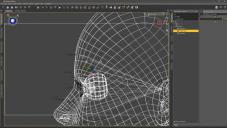
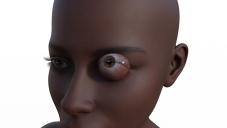
Doesn't affect the morph sliders, and probably why it hasn't been pointed out before, but if you're trying to do something "exotic", such as an eye target, ...
Shoddy, shoddy, shoddy.
Fortuately, I can easily fix this after export, and maybe it's easy to fix in Daz but I wouldn't know.
The point is one shouldn't have to either way.
Mid-way through 2022 a new Sales Thread:Report Issues Here "There's Always Another Sale™"Richard Haseltine said:
leemoon_c43b45a114 said:
scott_f838faecb5 said:
barbult said:
maikdecker said:
The single component pages for dForce Girls Baseball Style Outfit for Genesis 8 and 8.1 Females, dForce Sport Suit Outfit for Genesis 8 and 8.1 Females and AJC College Times Outfit for Genesis 8 and 8.1 Males produce a "Ooops, page not found" error, probably because we will them only tomorrow in a seperate deal?!?
If you go to the readme file for AJC College Times Outfit for Genesis 8 and 8.1 Males, it calls it a bundle. Look at the Files List, it doesn't even show those individual clothing items as being part of the product. It only shows a preset to load the outfit and some outfit material presets. TIhere aren't even any data files in this product. I can't see how it can be used at all.
I Purchased it (AJC College Times Outfit). I regret it, but for other reasons I will get to. But you do get all the components, they are split out as Individual products, as seems to be the trend here lately with originals.
As for the regret? I jumped the gun. Been wanting a decent set of modern skinny/slim fit jogger pants for awhile. I primarily make male art. My males are all anatomically correct. These pants have some adjustment morphs, but not one for the uh..."package". Ok, many pants don't. Sometimes turning on smoothing is enough to fit... oops that blew up the mesh somehow? It did not even smooth properly, but ballooned the scene file from 600kb to 600MB!!! Alright restart try again... get out fit control. What the? Any relevant morph turns the front of the pants to a blocky, choppy, mess. I don't know what is going on here, but I have used 100s of pants/shorts/etc without running into this. Even pants made for V4 didn't distort this badly with fit control. I also tried removing the gens entirely, loading pants again... oops still distortion where the legs meet. I am not happy with this purchase at all, and its too bad, they look wonderful in the promos (don't they all). Jacket/Shoes/Shirt *might* be fine, but it was the pants that made me buy this set.
I've had the AJC College TImes Outfit for Genesis 8 and 8.1 Males in my cart since the day it appeared in.the store. After reading that the product was downloadable even with the individual store pages missing, I purchased the product a few minutes ago.
I now regret that decision. There are NO product files showing up in DIM, nor in my account Product Library page. All the other products in my cart appeared in DIM and installed, just nothing at all for AJC College Times Outfit.
I've submitted a sales support ticket asking that this be resolved rapidly.
Are there issues with the product that is keeping it from being released? If so, why is it still up on the store?
I'm a very disappointed customer today. Shady store antics! :(
Lee
It lists only Daz Connect as an install method, which usually means it actually has no files associated. I will send in a query.
Please do so I have both the male and the female set bought the Sporty Styles Bundle
Everything has DIM downloads except as you said the AJC College TImes Outfit for Genesis 8 and 8.1 Males set doesn't
Mid-way through 2022 a new Sales Thread:Report Issues Here "There's Always Another Sale™"Richard Haseltine said:
leemoon_c43b45a114 said:
scott_f838faecb5 said:
barbult said:
maikdecker said:
The single component pages for dForce Girls Baseball Style Outfit for Genesis 8 and 8.1 Females, dForce Sport Suit Outfit for Genesis 8 and 8.1 Females and AJC College Times Outfit for Genesis 8 and 8.1 Males produce a "Ooops, page not found" error, probably because we will them only tomorrow in a seperate deal?!?
If you go to the readme file for AJC College Times Outfit for Genesis 8 and 8.1 Males, it calls it a bundle. Look at the Files List, it doesn't even show those individual clothing items as being part of the product. It only shows a preset to load the outfit and some outfit material presets. TIhere aren't even any data files in this product. I can't see how it can be used at all.
I Purchased it (AJC College Times Outfit). I regret it, but for other reasons I will get to. But you do get all the components, they are split out as Individual products, as seems to be the trend here lately with originals.
As for the regret? I jumped the gun. Been wanting a decent set of modern skinny/slim fit jogger pants for awhile. I primarily make male art. My males are all anatomically correct. These pants have some adjustment morphs, but not one for the uh..."package". Ok, many pants don't. Sometimes turning on smoothing is enough to fit... oops that blew up the mesh somehow? It did not even smooth properly, but ballooned the scene file from 600kb to 600MB!!! Alright restart try again... get out fit control. What the? Any relevant morph turns the front of the pants to a blocky, choppy, mess. I don't know what is going on here, but I have used 100s of pants/shorts/etc without running into this. Even pants made for V4 didn't distort this badly with fit control. I also tried removing the gens entirely, loading pants again... oops still distortion where the legs meet. I am not happy with this purchase at all, and its too bad, they look wonderful in the promos (don't they all). Jacket/Shoes/Shirt *might* be fine, but it was the pants that made me buy this set.
I've had the AJC College TImes Outfit for Genesis 8 and 8.1 Males in my cart since the day it appeared in.the store. After reading that the product was downloadable even with the individual store pages missing, I purchased the product a few minutes ago.
I now regret that decision. There are NO product files showing up in DIM, nor in my account Product Library page. All the other products in my cart appeared in DIM and installed, just nothing at all for AJC College Times Outfit.
I've submitted a sales support ticket asking that this be resolved rapidly.
Are there issues with the product that is keeping it from being released? If so, why is it still up on the store?
I'm a very disappointed customer today. Shady store antics! :(
Lee
It lists only Daz Connect as an install method, which usually means it actually has no files associated. I will send in a query.
Thank you so very much, Richard! I appreciate your help, as always!! :)
Lee
Duplicate formulasAny issue like these will affect all instances of the figure when loaded, including the base.
The deformation may indicate that when you (I assume) removed one of the morphs with the same name you didn't do a full uninstall of the product and have loose modifiers thata re now triggering when they shouldn't. Either that or you removed the morph that was loading, leaving the previously locked morph with the same name free to load and it is defective with an over-active corrective morph.
Daz 3D is part of

Connect
DAZ Productions, Inc.
7533 S Center View Ct #4664
West Jordan, UT 84084Licensing Agreement | Terms of Service | Privacy Policy | EULA
© 2026 Daz Productions Inc. All Rights Reserved.