-
Anatomical Elements and Foreskin
nemesis10 said:
Well, Soto's Maxx has a "foreskin rolled" morph in the Daz store. I think Tempestra's gen morphs at Renderosity might suit your needs with circumcised, uncircumcised, and "halfway" morphs.
Yes (Maxx)! used it in my deviant works.
Genesis 8 Female Slow Loading - DIM Doesn't Fully Delete Figures.jukingeo said:
RiverSoftArt said:
If you are just worried about the slow loading of G8 figures (and not how much space they are taking), you should check out my product: https://www.daz3d.com/turbo-loader-for-genesis-8-and-81
I took a look at your product today and I do say that I am impressed. More so, I am curious as to you how you figured everything out like that. I am looking at my system and there is just stuff all over the place. Worse, I had changed hard drives (and will do so again soon) and that just made the issue even more complex. However, in doing some research, there seemed to be big changes when I changed from version 4.12 to 4.15 and Daz moved things around. But worse, they left the old directories in place and that is taking up space on my hard drive. With my lack of understanding on where everything is, I accidentally deleted an important group of files which I thought were not necessary and hence why I posted the explanation above as to why Daz seems to be putting all saved morph data in the data/DAZ 3D/jukingeo folder. I figured this was stored in the "scenes" folder where I had created the .duf file for every figure (or scene) I create.
I am not sure if you offer your product on sale as I had already overspent for this month. I do intend to get it though, but if you don't mind my picking your brain to help me understand what is going on more in terms of the Daz Studio file structure, I certainly would appreciate that. As of now, a good number of my figures (characters) are damaged. I did manage to fix some problems, but there are many that still remain.
Thank you,
Geo
No problem. TL looks under every directory listed in the Content Directory Manager (CDM) and builds a list of applicable morphs. If you delete a directory in CDM (or it is not on your new system setup), TL will not find any morphs for those directories. If you install stuff via Daz Connect, morphs can be in a ton of directories.
Anatomical Elements and ForeskinWell, Soto's Maxx has a "foreskin rolled" morph in the Daz store. I think Tempestra's gen morphs at Renderosity might suit your needs with circumcised, uncircumcised, and "halfway" morphs.
Is there a shortcut or bottom that can zero out multiple morph slider at one time?PerttiA said:
It would help if we knew, what you are trying to achieve. Talking about a shortcut makes me think, you are not talking about zeroing just some random morphs.
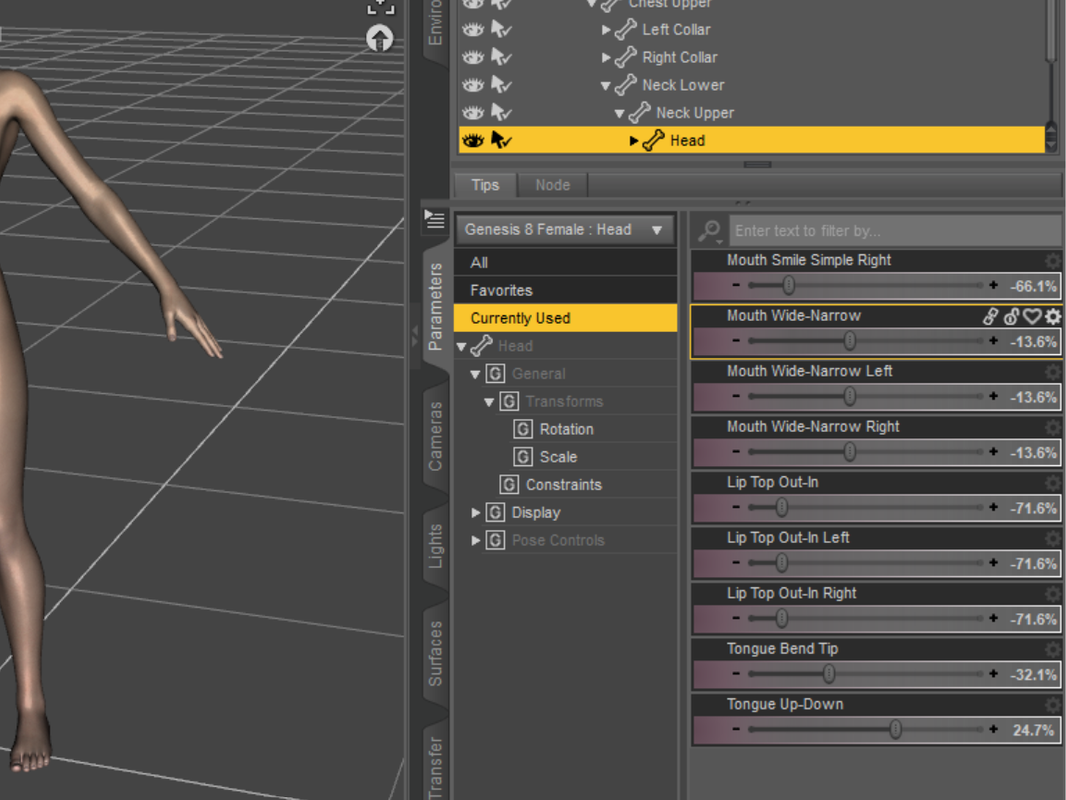
This is what I meant. On the RHS you get a list of changed morph sliders and I want to change all of them to zero but it is tedious to set each of them to zero one by one.
Doesn't Daz Studio have any build-in tools for sculpting figures(or any add-on package in shop)?tayloranderson2047 said:
DustRider said:
Hexagon 2.5 might be another option (it's free in the DAZ3D store). There is a bridge from DS to Hexagon (and back) that makes working with it to create quick morphs fairly easy. With that said, I find Mesh Grabber really easy to work with and ideal for quick little treaks to the geometry. Much better than dFormers IMHO.
I haven't used Hexagon before... but isn't Hexagon still requiring an export and import process like Blender or Zbrush?
Good day, Hexagon does require export / import ... but it works very smoothly with Daz Studio and will automatically make a slider for the morph you create there, which is a nice feature. However, it will only export / import at base resolution ... no HD morphs.
As I understand it, some additional tools (like HD morph capabilities) do exist ... but they are only available for the PA's.
Is there a shortcut or bottom that can zero out multiple morph slider at one time?One can use ctrl or shrift to select multiple morph sliders at one time. I guess there must be a way to set the value of each of them at zero... Is there a shortcut or bottom that can zero out multiple morph slider at one time?
[Released] Turbo Loader for Genesis 8 and 8.1 [Commercial]I just want to second the request for a method to add a product in the morph list to the filtered list without needing to manually retype the name. Especially since it's case sensitive, I've been having a very frustrating time with that. "Oh, it's female(s) not female. Oh, the with is capitalised. Oh..."
I'd also like the option to completely exclude a content library.Otherwise, still figuring out my best workflows with Turbo Loader but desperately need it. I have 37000+ morphs for Gen 8 female, Turbo Loader tells me, and only about 10k less for Gen8 male, and it can be pretty much impossible to work sometimes. (About 25 minutes this morning to load an bog standard Genesis 8 Basic Female.)
Not remotely Turbo Loader's fault but I find it somewhat disheartening to find random products that Turbo Loader finds as 'included' in a scene that I definitely did NOT dial up on a figure (such as that completely out of the box Genesis 8 Female this morning). Daz quality control is... better than some other sites out there, but it's not everything it's supposed to be, clearly.
DAZ to Poser for a specific itemWhen using Victoria 4 in Poser you need to run the Updater on initial installation anda fter uinstalling new morph packs - there should be a desktop shortcut, or use /Runtime/Libraries/!DAZ/CraeteExPFiles-v4 (.bat for windows, or the Command file for a Mac).
Which Genesis? Assumignit's one or two you need to instal both the base product and the Poser Companion Files.
CARRARA CHALLENGE #63: There be Dragons..... WIPJust for Fun - Not an Entry
Dragon head morph Genesis
 Inject HD Shape By Xin (Steps Please?)
Padone said:
As for geografts, for HD figures the geograft has to be exported as a separate mesh. That is, you have to enter the geometry editor in daz studio before exporting.I'll try exporting geograft as separate mesh and test HD Morphs plugin again. If it works would capture a new video of the process later.
Update: The HD Morphs plugin still can't work with Diffeomorphic using this approach, the test results were the same as before, I'm quite convinced this is the limitation of HD Morphs plugin that it can't generate morphs for genitals. (Blender 3.2.1 / Diffeomorphic1.6.2.1108 / HD Morphs0.82.3)
Understand that it has to enter the geometry editor in daz studio before exporting, because when entering geometry editor mode, the Daz viewport virtual vertices change and it separates the geograft geometry. I've tested merging geograft to the virtual HD mesh using "Export HD To Blender" and it works, this is the simpler and prefered method to merge geograft for virtual HD meshes / Multires modified meshes in Blender. Here's the several minutes video capture using this method and showing the complete workflow from Daz to Blender to Unreal, how to merge geograft to HD meshes, transfer morphs to clothes, render images in Blender, import mocap file for quick animation making, and using Send To Unreal bridge or FBX to export to Unreal: https://streamable.com/hf528h
Oops the tutorial was removed by streamable.com because of porn staff lol, but Diffeomorphic has complete documentation that users can refer to, amazing plugin that is a must have to get the best of Daz characters. HD Morphs plugin works very well to generate true HD characters with HD morphs though geograft morphs are not supported. That does not matter too much the geograft morphs can be transferred by other plugins.
More Non-photorealistic Renders (NPR III)3Diva said:
Wow! These are awesome! Care to share your shader settings? I've not been able to get nice results like this from Octane and I'd love to know your process. Oh and I really like the render with the girl! I love the untied shoe, is that foreshadowing? Is she going to trip? Will she be ok and escape that scary shadow thing? You've really painted a great "story" in just this single image. It makes one want to know more and is a great way to draw in your audience. Excellent work!
The settings for the Toon shader itself are simple. Here's the basic shader settings for the character's face, but for each body part or piece of clothing I tweak the outline thickness to suit. Certain pieces that I want to use highlights on I'll set the lighting mode to Camera Lighting:

Most of the magic though comes down to pairing it with a suitable texture and morph to sell the look. I avoid anything that uses complicated transparency maps (hair in particular) as they just don't suit the toon look in my opinion. I also replace all textures with flat colours and then add in necessary detail.
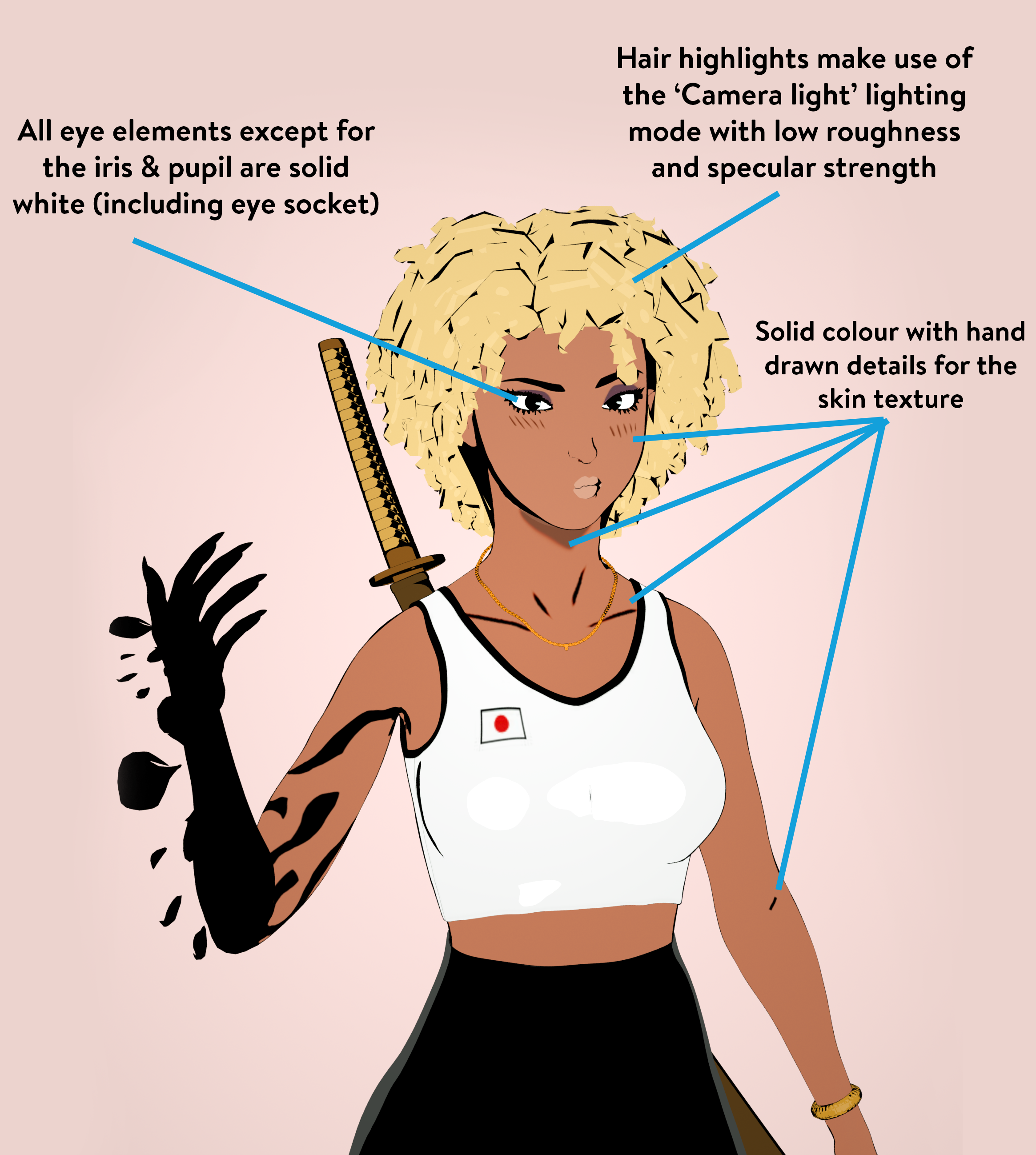
What you will note however is that whether the lighting mode is set to Toon Lighting or Camera Lighting only really effects the specular highlight. Neither option seems to cast a shadow (for example the hair doesn't cast a shadow onto the face). In fact, lights in the scene don't seem to do anything at all, apparently this setting is only really for Octane Standalone. For the style I'm going for though, this isn't important and I can manually add a shadow onto the texture (like under the chin) if needed. The Camera Light setting does add some nice highlights out of the box most of the time however.
Here's another render with all outlines turned off so you can see what's actually powered by the texture
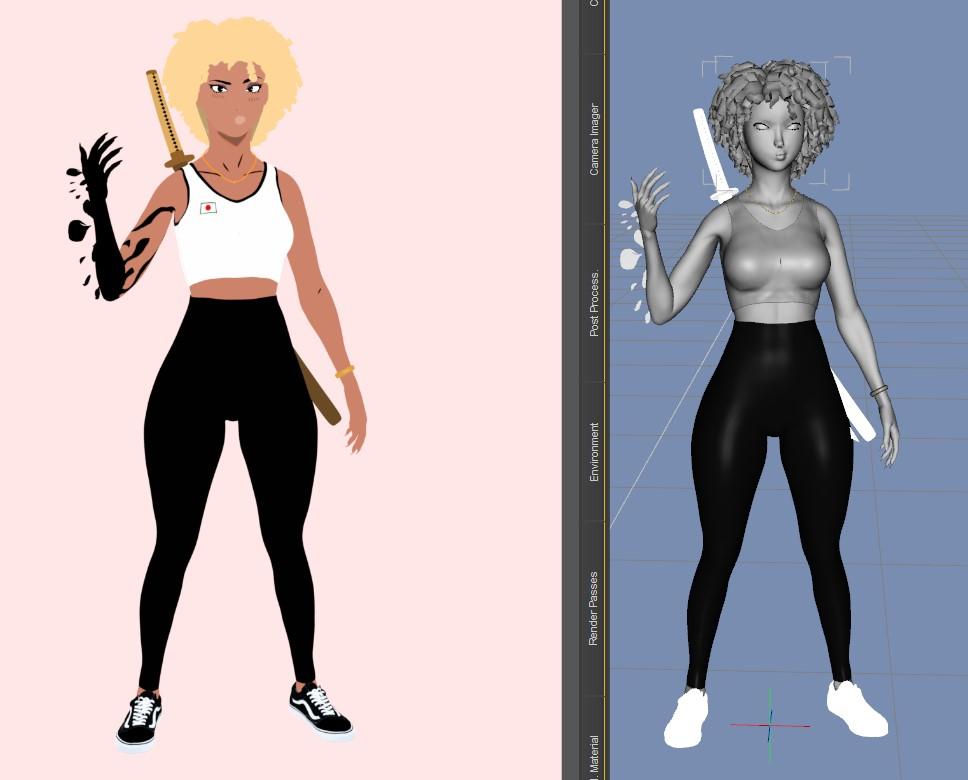
Hope that helps!
Is there a way to read the contents of a .duf fileWith "Morph Asset" it doesn't have to be a character morph either, any morph or even an empty CTRL asset, if they select everything rather than drilling down through the layers to find and select just their dial, then DS will save a copy of everything in the Morphs folder to the new "Product" folder.
If it's not caught early then you get left with a cluster**** for a data folder, and fixing it can be a nightmare even for someone with my knowledge.
Daz Studio Pro BETA - version 4.21.0.5! (*UPDATED*)Just have to say the morphing/erc system - DS has - is just beyond compare, the more time spent with it. Is like A+.
Had another awesome find yesterday (doing a bit differently than the inherited poser legacy systems that DS uses for morph/erc management) .Keeping up to date with DS-changelog shows improving FBX support for 'other 3d-softwares pipeline' is still alot of current focus. That said, was nice to see an improvement to aniMate.
Just not easy for any users, like me, who prefer DS for creativity, and not spending time moving assets and compromising with this/that, and learning that software too. Already have enough other 3d apps to know, like Photoshop, Vegas, MD and other.
But everything takes lotsa time to do well (and almost always - lots of money - to do professionally.)Deleting part of a model persistently and distributing a scene that uses itbarbult said:
dgatwood said:
If anybody runs into this problem, Blender has a really annoying open bug:
https://developer.blender.org/T68058
where by default, it destroys the vertex order both during import AND export. So you have to explicitly open a "Geometry" disclosure triangle and tell it to keep the vertex order during import, then check a checkbox to preserve it on export. Otherwise, your morphs will be garbage.
Now that I've figured that out, I have a working approach. Basically, I morph the undesirable bits into a tiny ball about a millimeter across and hide it inside one of the parts that I want to keep.
That's not an open bug. It is over a year old, is on an old version of Blender, is closed and archived, and isn't even a bug at all. It is just how Blender works. It uses the options YOU select for import and export. If you select Keep Vertex Order, it does. If you don't, it doesn't.My bad. It is closed. That's even more depressing. It violates pretty much every set of human interfaces guidelines ever written, because it is a destructive behavior (the ordering of vertexes is permanently lost) that is entirely silent. It is not obvious when you import it that the vertex order changed, there is no warning message, and the default option is not the non-destructive option. As a result, it is very easy to import something into Blender, spend an hour or more working on it, and only discover at the very end of the process that your effort was wasted because you forgot to check that checkbox on import an hour earlier.
That checkbox should have been turned on by default. Or better, it should be called "Optimize vertex order", and should be off by default. Make the same of the setting give some hint about why you would check it, and make the default behavior be nondestructive.
The new experimental importer apparently does the right thing by default, so I guess this will eventually be fixed when that becomes non-experimental. *sigh*
Some pose presets suddenly stop working on G8.1F characterSo I loaded a fresh G8F into a fresh scene. It worked then as expected. But the log says that a bunch of morph deltas also loaded following the loading of the asset (the actual wearable). But in the instances where the pose fails, those morph deltas never load, according to the log. But I don't know why.
Genesis 8 Female Slow Loading - DIM Doesn't Fully Delete Figures.RiverSoftArt said:
If you are just worried about the slow loading of G8 figures (and not how much space they are taking), you should check out my product: https://www.daz3d.com/turbo-loader-for-genesis-8-and-81
I took a look at your product today and I do say that I am impressed. More so, I am curious as to you how you figured everything out like that. I am looking at my system and there is just stuff all over the place. Worse, I had changed hard drives (and will do so again soon) and that just made the issue even more complex. However, in doing some research, there seemed to be big changes when I changed from version 4.12 to 4.15 and Daz moved things around. But worse, they left the old directories in place and that is taking up space on my hard drive. With my lack of understanding on where everything is, I accidentally deleted an important group of files which I thought were not necessary and hence why I posted the explanation above as to why Daz seems to be putting all saved morph data in the data/DAZ 3D/jukingeo folder. I figured this was stored in the "scenes" folder where I had created the .duf file for every figure (or scene) I create.
I am not sure if you offer your product on sale as I had already overspent for this month. I do intend to get it though, but if you don't mind my picking your brain to help me understand what is going on more in terms of the Daz Studio file structure, I certainly would appreciate that. As of now, a good number of my figures (characters) are damaged. I did manage to fix some problems, but there are many that still remain.
Thank you,
Geo
Diffeomorphic cloth does not follow?Hi Every one,
I am trying to switch to blender for rendering, which I am not very familiar with. I used diffeomorphic to transfer my character with cloth to blender. In blender, I can see both my character and cloth have bones and they can move with them. However, If I move bones of the character, the cloth does not follow.
Again I am new in blender. So sorry if this is a stupid question. But I tried to search and did not find an answer to this problem. Anyone know how to fix it?
Thanks!
Filtering Morphs in Shaping TabI've got a lot of morphs so it takes a while to search through them sometimes, unless I memorise the names of everything.
Is there any way to filter these by artist or the product they're a part of?
For example, Rarestone's Face Morph Collection, contains memorable morph names such as 'rs cleidomastoid sharpen'.
I'm not going to remember that (or even be able to spell it), obviously I can put 'RS' into the filter but is there a way I can specifically filter to only show the morphs (and all the morphs) from that product in my shaping tab?
Announcing: Daz Deals Browser Add-on IIAti said:
tombraider4ever said:
tombraider4ever said:
I just donated 50$ + the fee to cover the transfer for a pro 1 year subscription
 , I hope you got it, and see that I have paid, I have the text: You are subscribed until ! but no expiration date, so I'm guessing you are still working on getting the paypal subcription date to show correctly. If it's possible, could you check that the transfer went through correctly and that I'm listed as as a 1 y pro subcription? so I know, until the date is fixed. If the date shows later it would be great so I know in good time when it's time to pay again, can't stand a single day without daz deals
 .
. It still says you are subscribed until w no date, please, could you just confirm, until the date if fixed, that you recieved the 50$ and I'm listed as that I have payed for one years subscription? I need to know that you have me listed as 1 years subcription payed. I realise that you are very busy with getting this to work for everyone and I very much appreciate the work you do for us all!
. I just don't think it's too much to ask to just get this confirmed, no date and you could have me listed for just one month paid. Thanks in advance if you can let me know that everything worked as it should! @Overdrawn will be the one who can answer this—that's why I haven't responded to these messages.
Thanks for the reply, I hope Overdrawn will see this and have the time to answer this soon, would just be a relief to know that it worked, that u got my 50$ and that u got me listed for payed 1 y. If the date will show the correct one later, it's no date at the moment, it would be even better
. Announcing: Daz Deals Browser Add-on IItombraider4ever said:
tombraider4ever said:
I just donated 50$ + the fee to cover the transfer for a pro 1 year subscription
, I hope you got it, and see that I have paid, I have the text: You are subscribed until ! but no expiration date, so I'm guessing you are still working on getting the paypal subcription date to show correctly. If it's possible, could you check that the transfer went through correctly and that I'm listed as as a 1 y pro subcription? so I know, until the date is fixed. If the date shows later it would be great so I know in good time when it's time to pay again, can't stand a single day without daz deals . It still says you are subscribed until w no date, please, could you just confirm, until the date if fixed, that you recieved the 50$ and I'm listed as that I have payed for one years subscription? I need to know that you have me listed as 1 years subcription payed. I realise that you are very busy with getting this to work for everyone and I very much appreciate the work you do for us all!
. I just don't think it's too much to ask to just get this confirmed, no date and you could have me listed for just one month paid. Thanks in advance if you can let me know that everything worked as it should! @Overdrawn will be the one who can answer this—that's why I haven't responded to these messages.
Daz 3D is part of

Connect
DAZ Productions, Inc.
7533 S Center View Ct #4664
West Jordan, UT 84084Licensing Agreement | Terms of Service | Privacy Policy | EULA
© 2026 Daz Productions Inc. All Rights Reserved.