-
[closed] Expressions for Little Ones a no show
ronake said:
Thank you, Chezjuan. I'll try that.
I just realized that there are some considerations for the above work-around. In some cases the dials in a set work different in different ways, which would change if and how my earlier advice works.
The underlying reason is that you need to have the same morphs available for both Genesis 3 and Genesis 8 for the shape to load properly.
- In some cases, dials in expression packs just change other dials, providing a quick way to make a change. For example, a smile dial might change the brow, eyes, cheeks, jaw, nose and mouth. In cases like that, the above will work as long as you have the same dials available for the Genesis 8 figure.
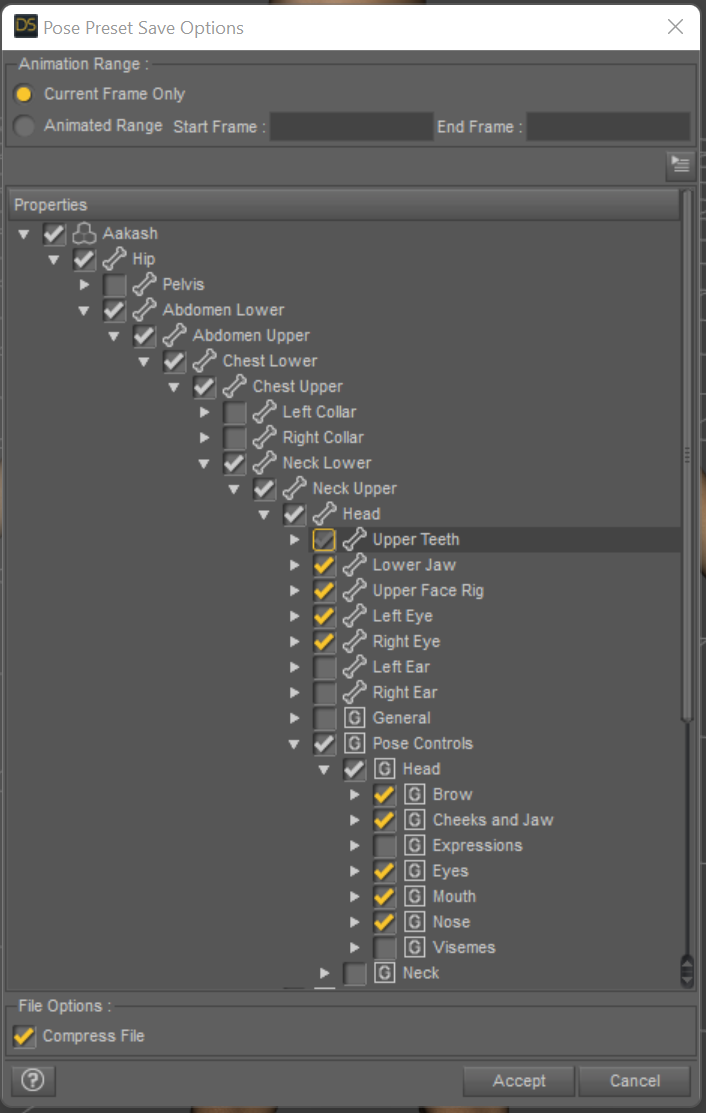
- In other cases, the dials change the transform settings on the individual bones (similar to poses). For that, you actually need to save the figure's transforms for the bones in the head. In thinking more about this, I discovered remenbered that you can save the transforms and pose controls for the figure in the same place. See the screenshot below.
- Other dials use custom morphs and load them. If custom morphs are used and are not available for the other generation, then you cannot save the pose preset.
Based on the above, I would recommend saving the transforms and pose controls as it would cover the first two bullets in one go. You need to be choosy about what you select if the character has other transforms or pose settings. For example, if you set the characters eyes to look to the left, but load a pose preset that has the eyes looking forward, the eyes will change to the preset's setting. I have had some poorly saved poses do things like turn the head or even set the rest of the character back to a zero pose. That last one was with a "shoe fitting" pose - applying it set the feet but zeroed out the character because the vendor saved the entire body, and had set the foot pose on a zeroed character.
The screenshot below is an example of what I would generally select to save a dialed-in expression if it did not load a custom morph.
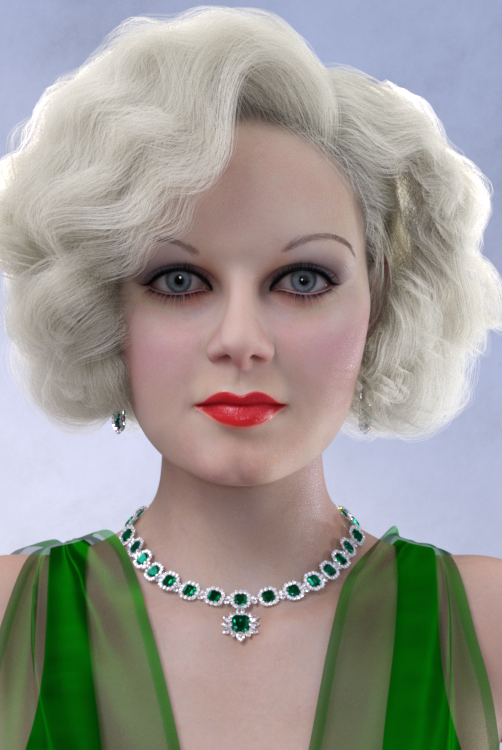
 Elizabeth earrings and necklace for G8FAOBB's Babyface for G8.1F head morph based loosely on Jean Harlow. No materials nor textures.
This is my admittedly failed attempt at creating a Jean Harlow head morph as requested by perlk. I really wished to repay perlk handsomely for the jewelry she created for "my" characters yet the task proved more complicated than I expected. Still, a head morph is made and I feel like sharing it despite its shortcomings in the likeness department. I hope perlk will accept this token of my gratitude. Thank you perlk for you beautiful work.


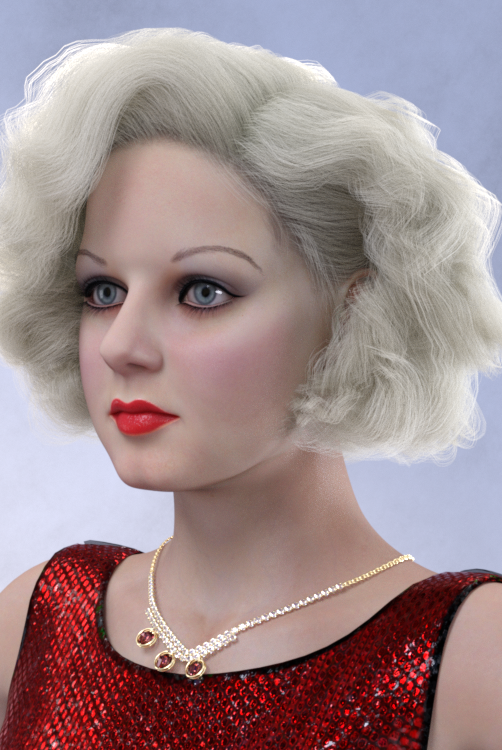
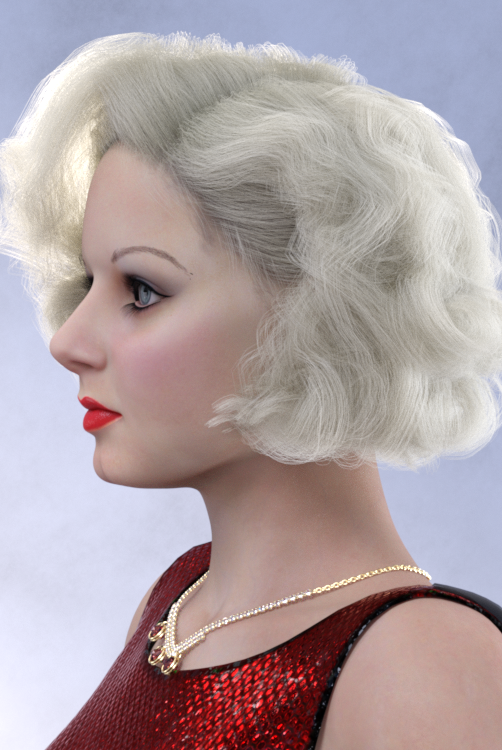
You will find attached the colorized photo of Jean Harlow early in her career (early 1930s probably). I tried to emulate Harlow's more natural look she had before she shaved off completely her brows and drew with a pencil high arches on her forehead - a look I couldn't get over and decided not to copy.
Assets in promo images:
Ultimate PBR Shader Makeup G8.1F
MSO Mina HD G8.1F (lipstick and blush)
Vo Hataru G8.1F (skin material modified)
dForce Whitney Outfit G8.1F (necklace)
dForce State Dinner Dress G8F
dForce Ingrid Hair G3,8F
Ultimate Eyebrows G8F (Fine Brow 04)
Lashes Utilities G2,3,8
Noncommercial use only please.
If you decide to use this morph please consider posting your Babyface art in this thread. I always love to see your work!
Cheers,
AOBB
Cartoonized is awesomeThere sure is a dedicated morph slider.
Adding Dual Quaternion support to UnrealEngine4 (Images inside)Oh, and I'm thinking of doing a pull request to the official UE5 branch to get at least the math DQ changes added. They're just math functions and don't need to be maintained. I just have to find how they run their unit tests if they have any.
Anyways, the goal of that is that right now changing the math code affects everything. But if it's already in the official build, it would only be one or 2 dll's and some shaders that change to get DQS to work. I could maybe create a patch install for official releases. So you'd install the official release, then the patch and you have DQS. Problem there is forcing the shaders to rebuild but I think I can fix that too.
Also, the more stuff is in the official build, the likelier it is that they would include full DQS eventually.
Once I get the option to turn on/off DQS and fix the morph issues with it, I think I'll try a pull request on the main ue5 branch. The worst that can happen is they say no. If they say yes, then we're all set.
SOLVED! G3F vs. G8F (Why is G8F so ugly?)Thank you once again, Wendy. And thank you, Daventaki, as well. It turns out that every time I loaded a G8F character, there was an additional character morph loading from some freebie I downloaded when I first started. It was set to 100% default, so it wasn't showing up as one of the "Currently Used" morphs. I just happened upon it out of sheer dumb luck while I was messing around with another G8F character. But I wouldn't have been able to fix it without your helpful instructions, Daventaki. So, thanks once again. This opens up a whole new world of possibilities! Lol
Oh, Misty, I forgot my Complaint ThreadRezca said:
Charlie Judge said:
Complaint: After over a week I still have not gotten the 15% discount tor spending over $50 on 31 July and there has been no response to my ticket that I filed on 3 August. I guess I may soon be leaving DAZ as I do not wish to deal with a company with business practices like that. Oh well, think of all the money I will save.
Wait, There are other companies like Rendo and CGTrader; so maybe my money will go there instead and I won't be saving afterall.
I feel that way with the Bridges xD
Last time I asked support about them I did get a ticket back but it was to tell me they aren't actually supported by DAZ so no support will be given (Then, why advertise them on your site?) and it feels like the few times a team comes along to work on them they vanish not long later. Or at least with the C4D Bridge. I don't recall Morph Export ever really working. The last team to come in updated it and it became a 30/70 sort of deal where sometimes they'd export *to an extent* but most of the time they didn't. It's back to about 10/90 now - I've exported dozens of figures and exactly two exported with morphs, the rest throw an IMPORT FAILED at me instead.
Sometimes joints are oriented properly, most of the time they're not. Weighting issues exist in every figure that certainly aren't present in D|S or Poser, etc. Now a new problem has been introduced where the models import with the joints in one pose but the mesh zaps into a default pose that's different and the joints don't follow, resulting in a lot of fussing around to fix it (Or just using a Collada export...)
Regardless, I hope the current team can make some progress - even if it has been a while since their last message :<
...at lleast they don't cost anything. Would be a real pain if they did.
SOLVED! G3F vs. G8F (Why is G8F so ugly?)No post work or anything G8F should not be looking like an ugly duckling.
Some premade characters load in at 100%. Load a new G8F in a new scene, in the Scene tab make sure the character is selected then in Parameters click on the "Currently Used" option and see what shows up.
Fix, Quoted from PerttiA:
She's a G8 figure, so a quick fix;
1. Open DS and load "Genesis 8 Basic Female" (to an empty scene)
2. Right Click at Parameters Tab->Preferences->Choose "Show Hidden Properties" (part 3 zeroes only 'visible' dials)
3. Right Click at Parameters Tab->Zero->Zero Figure (Zeroes the value of all the 'visible' dials)
4. Right Click at Parameters Tab->Memorize->Memorize Figure (Sets the current value of all the dials as their default value)
5. Edit->Save As->Support Asset->Save Modified Assets (Writes the changed default value to the morph files that were changed)When saving "Modified Assets" DS shows a dialog and asks for confirmation;
"The following file(s) will be permanently modified:" - "Accept/Cancel" - Choose "Accept"Close DS and wait -> Open DS again and the issue should be fixed.
Daz loading/saving is slow, single-threaded, and doesn't cache enoughPerttiA said:
dgatwood said:
Richard Haseltine said:
By links I meant things like the link between a full body shape adn the ehad and body shapes, or between those and corrective morphs for bends and other morphs.CG
Ah. Got it. Connections between bones in a wall that has an attached door, for a non-figure example. Presumably each one is a separate object that has to be constructed, with a parent-child relationship to the owning object. But with only 887 total nodes, that's not a lot of work, I wouldn't think. Same with the morphs. If they take a fraction of a second to construct from an obj file source, I'd expect them to take a fraction of a second to parse out of the .duf file, too.
What Richard is referring to is the interdepencies which the morph dials have between other morph dials, some dials are changing values on number of other dials as well a number of other dials is changing the value of the dial one is looking at - Determining these interdependencies at loading time is something that takes time.
Today, I learned that joint-controlled and morph-controlled morphs and similar exist. Wow, that's amazing. But no, I'm not using anything like that. This is just a building. The only active morphs in this scene are Morph Loader morphs, one per simple, boneless, jointless object, so none of that is happening in this case. There are a bunch of wall segments that have morphable ends, but all the morph dials are set to zero. I assume those don't impact performance at all, being inactive and all.
Make hands independentRichard Haseltine said:
You could use the Geometry Editor to select all of the mesh save one hand (use the + buttons in the Tool Settings pane), right-click>Geometry Visibility>Hide Selection, right-click>Geometry Editing>Delete Hidden, export as OB, Import (using the same preset) and use the transfer utility to rig - butt hat would be hollow, if you want to cap the wrist you'd need to take the exported OBJ into some kind of modeller.
I'm thinking this may no longer apply in 2022 since what you described isn't available.
I was hoping to take advantage of importing a body part into Procreate (definitely won't open a full G8 obj ; 2019 32gb non pro version). Procreate can now import 3d models. Then I can manipulate the model with one hand and paint on a layer using the apple pencil and then export.
a. With the Geometry Editor pane open then looking at Face Groups
b. Use the Add + to add Abdomen, Chest, Head, etc to make body part selections.
c. Then right click the only options are Assign Selected Face to Group and Remove Selected Group(s)
I must be missing something that isn't readily made visible or somethign drastically changed.
Would it be possible for you to refresh the current steps if you wouldn't mind please?
SOLVED! G3F vs. G8F (Why is G8F so ugly?)if that character is not looking the same on G8 as on G3, I would say you accidentally saved a morph on the base figure
you can check with it by looking under currently used on the default load
Oh, Misty, I forgot my Complaint ThreadCharlie Judge said:
Complaint: After over a week I still have not gotten the 15% discount tor spending over $50 on 31 July and there has been no response to my ticket that I filed on 3 August. I guess I may soon be leaving DAZ as I do not wish to deal with a company with business practices like that. Oh well, think of all the money I will save.
Wait, There are other companies like Rendo and CGTrader; so maybe my money will go there instead and I won't be saving afterall.
I feel that way with the Bridges xD
Last time I asked support about them I did get a ticket back but it was to tell me they aren't actually supported by DAZ so no support will be given (Then, why advertise them on your site?) and it feels like the few times a team comes along to work on them they vanish not long later. Or at least with the C4D Bridge. I don't recall Morph Export ever really working. The last team to come in updated it and it became a 30/70 sort of deal where sometimes they'd export *to an extent* but most of the time they didn't. It's back to about 10/90 now - I've exported dozens of figures and exactly two exported with morphs, the rest throw an IMPORT FAILED at me instead.
Sometimes joints are oriented properly, most of the time they're not. Weighting issues exist in every figure that certainly aren't present in D|S or Poser, etc. Now a new problem has been introduced where the models import with the joints in one pose but the mesh zaps into a default pose that's different and the joints don't follow, resulting in a lot of fussing around to fix it (Or just using a Collada export...)
Regardless, I hope the current team can make some progress - even if it has been a while since their last message :<
[Released]: Novak Revisited HD for Genesis 8.1 Male [Commercial]Thank you so much Choppski, bohemian3 and adria

Choppski: Yeah, the materials are different but this version is built over the original Novak base to keep his resemblance (but not required). The morph is a restructure, better anatomy for the head specially and add extra high definition with real HD morphs. The texture work was more focused on bringing more detail to the skin, adapting to g8.1 new maps, changing to PBR material, and giving more options to play with. And well, yeah, Genesis 9 was going to come someday, hehe
bohemian3 thanks for the support :) Yeah, some poses are coming next, I'm taking a brief break from creating a character after Conrad and Novak, hehe.
adria I know what you mean! I had the same struggle, that's why Novak is using a G3M Hair :) is one of the styles that comes with this product: https://www.renderosity.com/rr/mod/bcs/short-cropped-hair-for-genesis-3-male-and-females/119775Diffeomorphic: convert to rigify errorHi everyone,
I heard rigify was very powerful and want to test it (I'm not really familiar with rigify). So I used diffeomorphic to transfer a character into blender and clicked convert to rigify button. However, I got some error:
Then, if I move the bones, the character does not follow:
I tried to search the forum but could not find much useful info about this. Anyone can help? Thanks a lot!
Big Cats 2 & Transfer UtilityMy guess is the tiger is just a morph for Big Cat 2 and you have to tick anywhere the "reverse deformation" thing. Otherwise the transfer utility thinks it is for the base model. It is often better to model accessories for the base. Then it will go with the morphs automatically...
Are there morphs for G8F that can adjust the depth of the lines of belly muscle in a feminine way?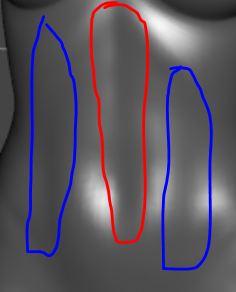

Are there morphs for G8F that can adjust the depth of the verticle lines of belly muscle (red and blue lines, separated or not) in a feminine way (like in the photo on the right)?
By feminine I mean the morph shouldn't affect the horizontal belly muscle lines, namely it won't make the belly look like

Please let me know if there are any packages containing such morphs
Big Cats 2 & Transfer UtilityHello everyone, this is my first post.
I created a partial face mask in Blender 3.5 for a zero-position tiger (Big Cats 2). I did this by importing a zeroed tiger from Daz as a .obj then I created the face mask around the tiger mannequin. I then exported it to Daz and it fits great. I used the transfer utility as I have with human figures. (Change the object to a figure then use transfer utility). However, in the case of the tiger, it did not sit properly on the head. Am I missing something or is there another way to make this work? I was planning on doing something similar with the paws. A cybernetic tiger is the plan.
Thanks
Are there any G8F/G8M morphs (in any packages) that can make eyes thinner along Y direction?rosseliani said:
tayloranderson2047 said:
Are there any G8F/G8M morphs (in any packages) that can make eyes thinner only along Y direction but at the same time, do not change the length of eyes along X direction (or any other places)?
If so, please let me know if any packages contain such a morph
I tried to make a quick "eyes Y size" morph. It doesn't seem to affect the eyes Pose Controls too much.
You can find the slider in Parameters>Morphs>Morph Loader.
Have a nice day!
I will try! Really appreciate it!
[Released]: Novak Revisited HD for Genesis 8.1 Male [Commercial]Thank your for the clarifications in the thread. I love all your products (including the awesome pose sets--more please), but was debating because I have Novak already. I love the new morph, but if you say the materials are also updated, I will likely give it a go.
Though I am still wrapping my head around the fact you said genesis 9. I am not sure my bank accounts can survive that.
Auto Muscle Enhancer HD [Commercial]Atán said:
Hi all; I know this has been asked before, but what's the exact process to apply AME to G8F models? I've been looking all over the thread and read a few posts, but I didn't find them all that clear. Could somebody help?
There is no way to apply AME to the G8/8.1 Female platform, that product was never released. The only work around is to use a G8F clone on the G8M, then use the Transfer Utility tool to layer the desired G8F character morphs onto the G8/8.1 M Platform. Instructions on this process are discussed on P.28, 35, and 37 primarily. I also recently posted some Transfer Utility work over on this forum:
If Michael and Victoria had a kid, or how to transfer head morphs between G8F & G8M? - Daz 3D Forums
The PDF there is a visual walkthrough on using the transfer utility between figures. There are associated challenges with textures, clothing and hair. These can all be overcome, but it is not fast or simple. Sorry that's not the answer you were looking for, but many of us have desperately wanted the G8F version, but it may never be released. TD
Daz 3D is part of

Connect
DAZ Productions, Inc.
7533 S Center View Ct #4664
West Jordan, UT 84084Licensing Agreement | Terms of Service | Privacy Policy | EULA
© 2026 Daz Productions Inc. All Rights Reserved.