-
Genesis 8 or 8.1 shapes on genesis 9?
terry_duquette said:
Richard Haseltine said:
franky85 said:
There's a freebie script at rendo here that takes a currently loaded G8F pose and applies it to a G9 character.
Also here https://www.daz3d.com/forums/discussion/598316/g8f-m-pose-transfer-to-g9#latest
Thanks, I have been leaving an invisible G8F in the scene, apply the pose I want, then use your script, works great! TD
That's a different, and much more useful, Richard.
Genesis 8 to genesis 9 v8 to v9 shape morph and/textures converters?I'm pretty sure that we have been told a PA is working on a tool for using Genesis 8 textures on Genssi 9, but it is possible to use an external application to convert textuers and morphs can actually be converted with the Transfer Utility (I think a guide has been posted for Genesis 9, but if not the base method is the same as for previous generations)
Ok, So this is Gen 9I think you can morph/model every shape you want with every mesh. You just have to have a bit of patience. It are only polygons after all. This took my like15 minutes in Zbrush.
Growing Up for Genesis 9 (Commercial)Zev0 said:
Your path needs to be saved as Content\data\DAZ 3D\Genesis 9\Base\Morphs\Frinkky
Right now it is Content\data\DAZ 3D\Genesis 9\Morphs\Frinkky
Also it needs to be rigged.
Thank you. The path was my bad when packaging it up. I did adjust rigging to shape for the morph and nothing changed. I have done again for the eye translation. File updated.
Whose characters for G9 you're expecting?Correct, I have enough characters to populate a scene. I need morph resources and nice skin shaders and materials.
An artists at the HUB has already made a very very stunning one. But it is $65 so I wait for something cheaper (even if the product offers G9 tweak at core, this price is not for me).
Genesis 9 we are back in the game Carrara usersEyes - error then success
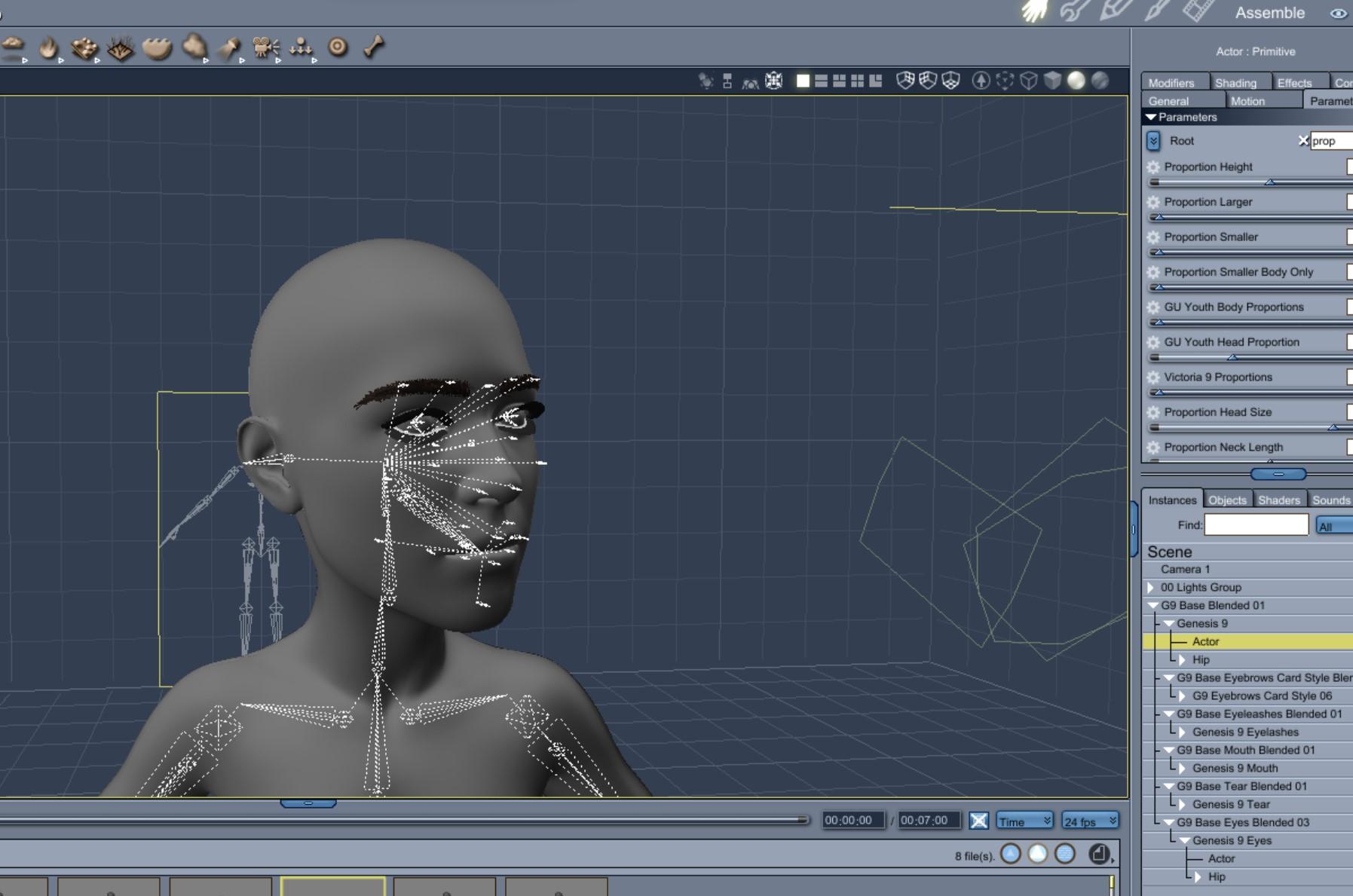
I got the same error as Wendy when I tried to convert eyes that had loaded with the Genesis 9 default load. I was able to convert and use eyes that I loaded separately from the anatomy folder.
The error I got from the default load looks like the below.
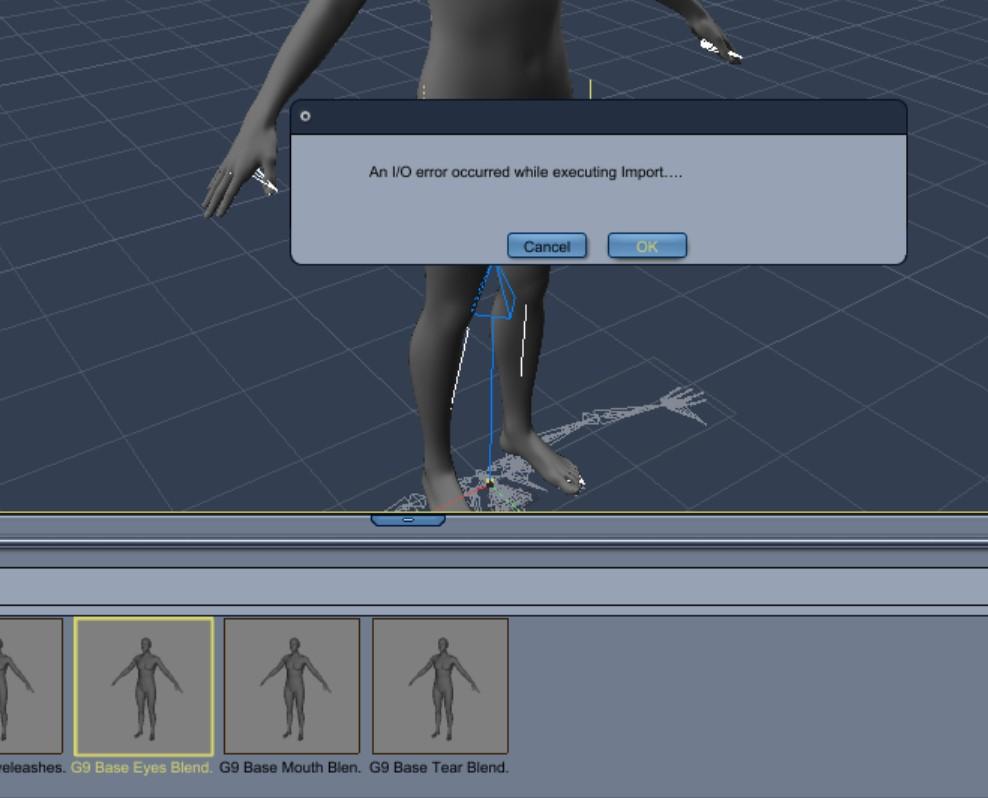
My successful eye conversion was loaded in Daz Studio without the G9 figure. I found the eyes in the anatomy folder.
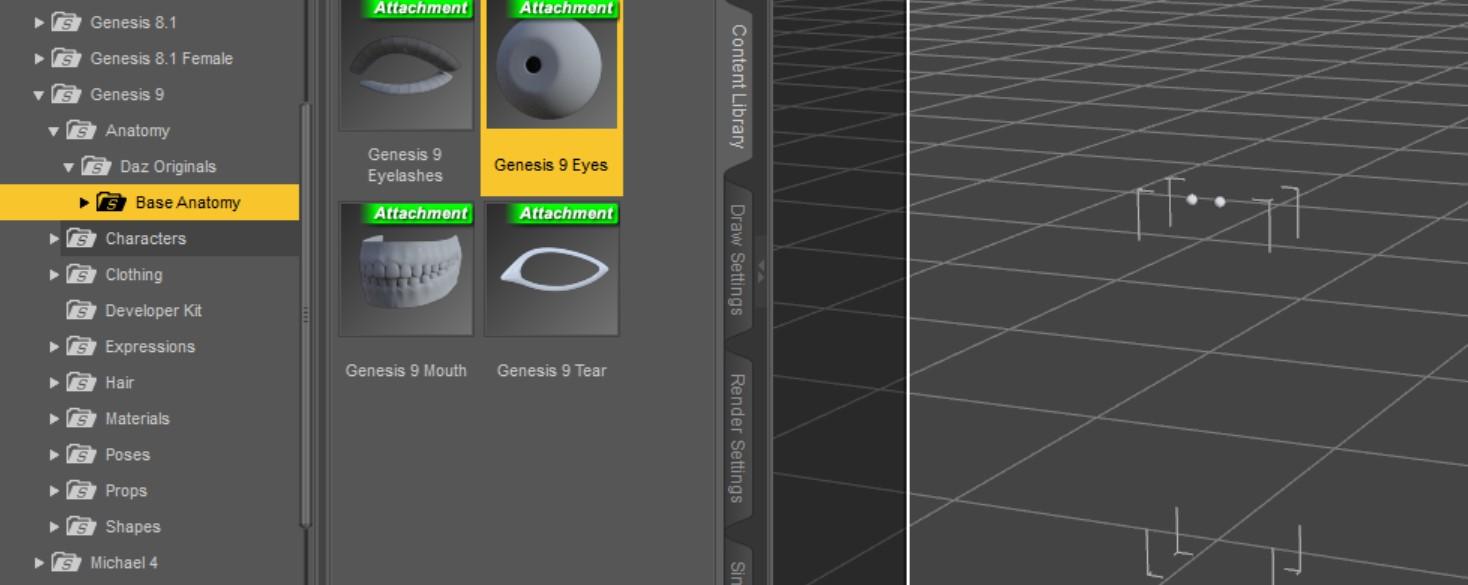
The independently converted eyes load in Carrara for me without error and then fit to, follow, and morph with the head.
 Genesis 8 or 8.1 shapes on genesis 9?
Richard Haseltine said:
franky85 said:
There's a freebie script at rendo here that takes a currently loaded G8F pose and applies it to a G9 character.
Also here https://www.daz3d.com/forums/discussion/598316/g8f-m-pose-transfer-to-g9#latest
Thanks, I have been leaving an invisible G8F in the scene, apply the pose I want, then use your script, works great! TD
Whose characters for G9 you're expecting?Serene Night said:
I think I'm going to have to be choosy about the things I buy since genesis 9 is likely to have double the morph problems with load times as gen 8 due to being unisex . So I'm not going to buy all figures on release like before or it's going to be super slow using them
I will stick to favorites such as Soto, Changeling Chick and others.
a lot of the best PAs like soto and d.master seem to be MIA. Which seems like a waste of talent.
Gen 9 will only be as good as the PAs making content for it, which sort of makes me apprehensive. Hopefully some PAs will rise to the occasion to replace them.
I guess having a unisex base, means some of the PAs who mostly focus on female content will be inclined to support males more, since it is slightly less work for them to do so.
Mid-way through 2022 a new Sales Thread:Report Issues Here "There's Always Another Sale™"Cris Palomino said:
You shouln't need to use this utility.
Sorry - did you try to use the base poses that are coming with the Starter Essentials?
Even when they are showing sneakers in the thumbnails, some of them are high-heels poses (looking quite interesting with the male morph and the G9 Base Pose 13 Walking G9M ... for example).
Whose characters for G9 you're expecting?I think I'm going to have to be choosy about the things I buy since genesis 9 is likely to have double the morph problems with load times as gen 8 due to being unisex . So I'm not going to buy all figures on release like before or it's going to be super slow using them
I will stick to favorites such as Soto, Changeling Chick and others.
Whose characters for G9 you're expecting?lilweep said:
anyone that actually looks like a person would be nice. mostly just making my own morphs these days.
Correct, I have enough characters to populate a scene. I need morph resources and nice skin shaders and materials.
Mid-way through 2022 a new Sales Thread:Report Issues Here "There's Always Another Sale™"HoMart said:
arks0ng said:
I don't understand why Daz is still selling currently-unuseable characters...?? For the many that aren't aware it's due to the non-listed requirement of an unavailable morph pack, they're going to assume it's a product issue, and as has been mention, causing major damage to the PAs.
Why don't they just add a disclaimer to the description text at least??? "This product requires blah blah"
(On another note, I've never seen quite so many flash sales as has happened since Vic9's release. No speculation here, of course...)
Another thing I don´t get is for
https://www.daz3d.com/dforce-iris-outfit-for-genesis-9
It contains a pair of flat shoes but almost all the promos are made with highheeled poses.
Isn´t it possible to change the feet pose after selecting a initial pose with the new Genesis 9 figure?
The set, from what I see, has no included poses, so the promo maker simply applied poses that show her on tip toe. They do show her on flat feet as well, somthere should be no trouble using the shoes as most of us would think intended.
Mid-way through 2022 a new Sales Thread:Report Issues Here "There's Always Another Sale™"HoMart said:
arks0ng said:
I don't understand why Daz is still selling currently-unuseable characters...?? For the many that aren't aware it's due to the non-listed requirement of an unavailable morph pack, they're going to assume it's a product issue, and as has been mention, causing major damage to the PAs.
Why don't they just add a disclaimer to the description text at least??? "This product requires blah blah"
(On another note, I've never seen quite so many flash sales as has happened since Vic9's release. No speculation here, of course...)
Another thing I don´t get is for
https://www.daz3d.com/dforce-iris-outfit-for-genesis-9
It contains a pair of flat shoes but almost all the promos are made with highheeled poses.
Isn´t it possible to change the feet pose after selecting a initial pose with the new Genesis 9 figure?
Don't you know women prefer to walk on their toes

If you after posing her find the foot bone (left and right) in the scene tab you can adjust the bend. <Alt> left-click in the parameters will set the value to default.
I find it uterly ridicoulus that the poses are set for high heels. If they wanted to support that they could have included a seperate foot pose.
Mid-way through 2022 a new Sales Thread:Report Issues Here "There's Always Another Sale™"arks0ng said:
I don't understand why Daz is still selling currently-unuseable characters...?? For the many that aren't aware it's due to the non-listed requirement of an unavailable morph pack, they're going to assume it's a product issue, and as has been mention, causing major damage to the PAs.
Why don't they just add a disclaimer to the description text at least??? "This product requires blah blah"
(On another note, I've never seen quite so many flash sales as has happened since Vic9's release. No speculation here, of course...)
Another thing I don´t get is for
https://www.daz3d.com/dforce-iris-outfit-for-genesis-9
It contains a pair of flat shoes but almost all the promos are made with highheeled poses.
Isn´t it possible to change the feet pose after selecting a initial pose with the new Genesis 9 figure?
Diffeomorphic DAZ Importer version 1.6.0 releasedIf you use the mouth HD morph you have to export as HD, or disable mouth HD.
Growing Up for Genesis 9 (Commercial)Zev0 said:
Here you go. New update package with that morph added back in.
https://drive.google.com/file/d/1GI9WpgYEBTjb1bpbbnbZcKxTdGaX4bpQ/view?usp=sharing
Thank you. For reference, this is the additional 'fix' I put in place. I'm not sure how best to control the eyes yet, but it doesn't seem to break anything. This also smooths out some geometry around the eyes and adds back in a little thickness. The eye socket mesh still intersects the eye ball a little, which I should fix... https://1drv.ms/u/s!Ar1raAXeQTgPmPFbIWAaz8rQcqbo-g?e=HuTvmB
Genesis 9 Character Essentialsoutrider42 said:
Honestly it isn't a problem that the gen props are in this Character Essentials. After all, you no longer need to buy a "Pro" bundle or whatever they decide to call them. You don't need to buy any core character, ever. You can just buy characters that come with the gen texture.
The problem is the communication. If people do not read the forums, how will they ever locate the gen props? I wonder how many people bought the Victoria 9 bundle thinking it would come with this prop? I suppose somebody will spout out the standard "Well they can get refunds", but refunds are still a hassle. Refunds are a failure to meet a customer's expectations.
The even bigger problem is that even though Genesis 9 has double the polygons of 8, they designed this thing in a way so that the belly button and nipple will not show at all until you subdivide several times. This might not seem like a big deal, but a common strategy for large scenes with lots of people is to reduce the subdivision to save memory. Say you have some background characters in a scene, if some are baring their navels, that poses a problem because the model will not have a belly button at all.
It is such a strange design choice. You could still have used quads if you really really wanted, but you could have used more of them in these key areas.
Rather, anyone not rendering at a high subdivision will have to rely on normal maps. But here's the thing, because Iray is a PBR engine, most PAs have stopped baking in hard details like a deep belly button. It just wasn't necessary. So even a normal map will not get the job done. If by chance a PA makes a normal map that creates a deep belly button, well now that effect gets exaggerated if the user does use a higher subdivision and you get a giant hole in the belly.
I am not sure Daz really thought this through. It just seems to me that somebody would have brought this up during testing while G9 was in development.
I was lucky and found out that the anatomical elements was a separate purchase this time and it saved me soime money. After looking at the V9 bundle, I was going to pass on V9 at least until another bundle came out to get the anatomical elements. Just glad I did not have to buy the bundle. I got the $10.00 off coupon and bought V9, the V9 makeup, and the expressions alacart and picked up Zeddicus's Volupoulous morph and poses and the the character essentials too. Now I am on hold until the head and body morphs are released.
The missing toe joint on Genesis modelsSkyewolf said:
There is a bone for every joint in every toe you just have to select them from the Scene hierarchy not the viewport. The single "toes" joint is strictly for usability but if you want to bend the toes individually you can certainly do that. Just select the individual toe bones from the Scene tab.
ETA: Also, "bones" in 3D is representative of muscle groups not actual 'bones', which is the reason for the "missing" third bone you are seeing.
That isn't what I was referring to. rosseliani above has the right idea.
Tynkere said:
Yes, I do occasional beach or surf render and feet in Genesis (and earlier Mikes & Vickys) do look a bit odd. Be nice if they had a morph to adjust width of foot. Once I get to looking at them, they remind me of wide duck feet.
Maybe an enterprising PA will make a morph product for G9. ; )
There are definitely morphs for foot width with the earlier Genesis models up to Genesis 8, at least, for females. I'm sure someone will make one for Genesis 9 as well.
Genesis 9 clothing questions & answersHere's a quick rundown - most are self explanatory and will give info when you click on them
Select Morph Verts
Put parameters window into edit mode, select a morph and then run the script - it will select all the vertices used in that morphClear Morph Verts
Dial up the morph, select it and then use clear morph deltas and it will delete those vertices from the morphClear HD Morphs
N/A for usersRemove empty morphs
If you have empty morphs that came across from templates you can select them in the parameter window and run the script. It will remove all empty morphs.
Resave with a new folder name so DS create a new data folder without those morphs included. If you simply resave in the same folder those morphs are already in there and will simply reload next time.Get Morph Delta Info
Select a figure/clothing/prop and click the button - If you have no morph selected it gives you a list of everything. If you select any amount of morphs it limits it to the selectionTexture Convert : Single UDIM to Multiple
The script is for texture artists...it was easier for our texture artists to work on a single 16k or 8k image so they would export G9 with the single UDIM, texture it, then once they are done they run this script on their images and it breaks them back out into multiple images for use with the multi UDIM UVAdjust Eye Rigging
If your head morph moves the eyes somehow you dial up the morph and select it on G9 with the eyes loaded, then run this script and it will adjust the eye bone position to fit the shapeSet G9 to Shape
Select G9, run script and then select the shape you want for base.
Create follower
Quickly set up a follower from obj
Update Follower Base shape
Select base and run script to change base shapeSave current pane info
Saves the position and size of the floating paneMid-way through 2022 a new Sales Thread:Report Issues Here "There's Always Another Sale™"I don't understand why Daz is still selling currently-unuseable characters...?? For the many that aren't aware it's due to the non-listed requirement of an unavailable morph pack, they're going to assume it's a product issue, and as has been mention, causing major damage to the PAs.
Why don't they just add a disclaimer to the description text at least??? "This product requires blah blah"
(On another note, I've never seen quite so many flash sales as has happened since Vic9's release. No speculation here, of course...)
Daz 3D is part of

Connect
DAZ Productions, Inc.
7533 S Center View Ct #4664
West Jordan, UT 84084Licensing Agreement | Terms of Service | Privacy Policy | EULA
© 2026 Daz Productions Inc. All Rights Reserved.