-
Smooth Out Imperfections in Clothing When Posed?
n.aspros123 said:
crosswind said:
If you fix the deformation with Hexagon, check this thread: https://www.daz3d.com/forums/discussion/comment/9021201/#Comment_9021201
If you fix it with Blender, suggest you not do it with Daz to Blender bridge though it works for DS 4.22 / 4.24... because it'll make the process a bit cumbersome.
Just directly export to OBJ and fix it with Blender. Then import OBJ with Morph Loader Pro, with the settings in below screenshot.
Thanks for your input @crosswind
Just need to ask: Do I save just the G8F in posed form, dForced and the tank top, as an .obj? Nothing else?
Yup, Ctrl + Select the posed G8F and the wearable, with the settings in Export. (screenshot 1). Nothing else. G8F will be used as the reference when fixing deformation on the wearable. In Blender or other applications, just make fix on the wearable and then export wearable to OBJ.
Or do I save G8F and Top as separate .objs in Base Resolution? Reason I'm asking is Jay Versulis has a youtube video and he sends the genesis and clothes separtely.
Not necessary at all. Export them together as above-mentioned. And yes, setting Resolution Level to Base Resolution on the wearable or setting View SubD Level as 0 is a must .. before exporting.
Smooth Out Imperfections in Clothing When Posed?crosswind said:
If you fix the deformation with Hexagon, check this thread: https://www.daz3d.com/forums/discussion/comment/9021201/#Comment_9021201
If you fix it with Blender, suggest you not do it with Daz to Blender bridge though it works for DS 4.22 / 4.24... because it'll make the process a bit cumbersome.
Just directly export to OBJ and fix it with Blender. Then import OBJ with Morph Loader Pro, with the settings in below screenshot.
Thanks for your input @crosswind
Just need to ask: Do I save just the G8F in posed form, dForced and the tank top, as an .obj? Nothing else?
Or do I save G8F and Top as separate .objs in Base Resolution? Reason I'm asking is Jay Versulis has a youtube video and he sends the genesis and clothes separtely.
Smooth Out Imperfections in Clothing When Posed?If you fix the deformation with Hexagon, check this thread: https://www.daz3d.com/forums/discussion/comment/9021201/#Comment_9021201
If you fix it with Blender, suggest you not do it with Daz to Blender bridge though it works for DS 4.22 / 4.24... because it'll make the process a bit cumbersome.
Just directly export to OBJ and fix it with Blender. Then import OBJ with Morph Loader Pro, with the settings in below screenshot.
A Few Questions for Substance 3D Painter UsersThat utility looks very useful for setting things up between the two progams, so I'll take a closer look when I come to needing to import/export etc. Looks handy although it wouldn't have helped in my case since I refer to the internal way it works, not just the setup,.but thanks for the suggestion, much appreciated.
Thankfully I've figured-out the second issue. I was making the mistake of trying to sync across layers, not just channels.
Victoria 4 crashes Daz StudioBejaymac said:
How are you loading it ?
EXP based figures have two problems in DS4.
First is Power Loader, it hasn't worked right since DS4.0, the problem is that it is meant to read the PZ2 files in the runtime folder, instead it heads into the data folder looking for DSF files, and will load anything it finds in there instead of the PZ2 files. We first learned of this issue when people complained about not being able to load the Sub Dragon, instead they got the LE that's part of the Genesis Starter Essentials, the remedy from DAZ was for users to delete the DSB script file and to stop using Power Loader.
Second issue is that since 4.12 they all generate over a dozen circular link errors, this is due to changes made to the Poser Import plugin when the IK system was added to DS4.
AFAIK there have been no fixes for either issue,
I am not seeing any sign of these issues in a vanilla Victori 4.2 and shapes++, at least.
Daz Studio and LinuxGiven the same DUF scene, my cursory tests show that the Wine set up is loading and rendering faster than the Bottles one. Has anyone noticed this too? I do prefer the Bottles framework as it's UI easily lets me configure environment settings and file paths.
I stuck with Bottles rather than plain vanilla Wine and after months of usage I found one likely fix to the slow loading times.
In my Bottles (51.24) setting I have two choices for the Wine compatibility layer, called Runner: sys-wine-10.0 and soda-9.0.1. All along I've used Soda, and the I/O performance leaves a lot to be desired. The CMS phase, when Daz3D starts the persistent storage and goes online to communicate with Daz server, is slow; once I load a DUF scene file, the process of reading and getting the initial render (Filatment or Cartoon Shaded) is also glacial.
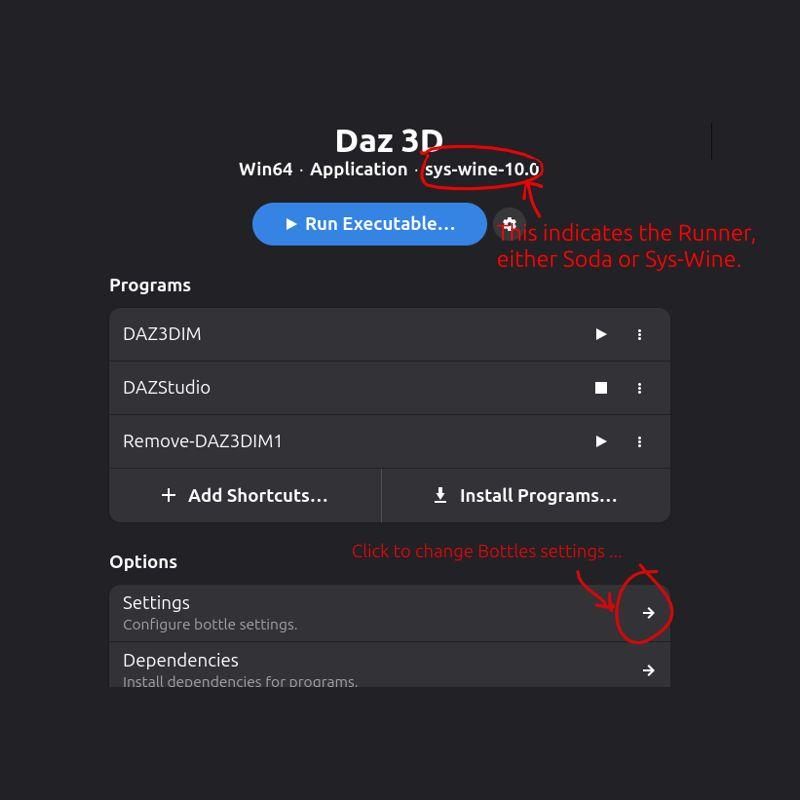
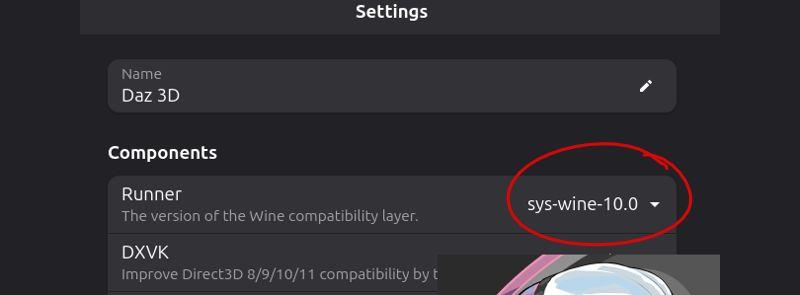
By switching the Runner from Soda to Sys-Wine, this initialization steps run much faster. Updating the settings was simple; however, the switch appears to reset the Daz3D settings as, once again, I had to enter my credentials for my Daz account; the DIM directories also reset to their default. Now, evertime I load a DUF scene I've used before, I see Daz3D rebuilding its metadata, as if populating its data structures anew. The switch from Soda to Sys-Wine comes with a cost, but with the run time speed up it appears to be worth it.
I'm still evaluating the outcome of the change.
--- Update ---
That part about "Daz3D rebuilding its metadata" wan't exactly as I expected. I needed to manually kick off this step.
How did I know this was necessary? One big indicator is that the Smart Content pane displays all products grayed out, even though DIM reports separately that these have been installed. Conceptually there's a disconnect in how DIM sees the database contents and how Daz3D does; hence the need to re-sync the Daz3D content library metadata.
(This is a simplified view of things. If, as in my case, Bottles deployed Windows guest in one branch of the Linux file system -- my home directory -- and the content library files are saved to another sub directory, then the Daz3D Content Directory Manager settings need to be updated beforehand. Only then will the following metadata refresh work.)
To properly rebuild the metadata in Daz3D:
- Bring up the Content Library panel.
- Right click on the panel tab and select Content Database Maintenance.
- In the new pop up window, select Re-Import Metadata and click Accept.
The metadata re-sync took less than two minutes for me. For good measure, i restarted Daz3D and now it sees every asset that I've installed via DIM.
Cheers!
Victoria 4 crashes Daz StudioBejaymac said:
How are you loading it ?
EXP based figures have two problems in DS4.
First is Power Loader, it hasn't worked right since DS4.0, the problem is that it is meant to read the PZ2 files in the runtime folder, instead it heads into the data folder looking for DSF files, and will load anything it finds in there instead of the PZ2 files. We first learned of this issue when people complained about not being able to load the Sub Dragon, instead they got the LE that's part of the Genesis Starter Essentials, the remedy from DAZ was for users to delete the DSB script file and to stop using Power Loader.
Second issue is that since 4.12 they all generate over a dozen circular link errors, this is due to changes made to the Poser Import plugin when the IK system was added to DS4.
AFAIK there have been no fixes for either issue,
PowerLoader works as expected on my side. I can choose to load various group of morphs in the PowerLoader dialogue. All pz2 files are loaded with no issue ~~ Then I don't know about the circular link errors. I didn't find any error or warning messages in DS log... where to identify the error ?
Besides, I don't thing either of the above "issues" shoud lead to a DS crash.
[Released] RSSY Clothing Converter from Genesis 8 to Genesis 9 [Commercial]Joe.Cotter said:
Is this thread still being monitored?
I have a situation where something broke where the product will not function at all. It starts, I can import files but not folders, and when I select convert or force convert, it runs through the list of files as if it is working and then ends up with 0 converts after x minutes. The log file just says "skipping." I have tried to uncheck all of the recommened check boxes but that didn't help. I then tried to uninstall and reinstall and still nothing. It seems to have a cache issue but I have no idea what that file(s) would be or where to find it/them if exists
It sounds like the metadata broke in your Daz Studio. Try selecting one of the checked items and clicking Force Convert. If that works, multi-select the items and try Force Convert
Victoria 4 crashes Daz StudioHow are you loading it ?
EXP based figures have two problems in DS4.
First is Power Loader, it hasn't worked right since DS4.0, the problem is that it is meant to read the PZ2 files in the runtime folder, instead it heads into the data folder looking for DSF files, and will load anything it finds in there instead of the PZ2 files. We first learned of this issue when people complained about not being able to load the Sub Dragon, instead they got the LE that's part of the Genesis Starter Essentials, the remedy from DAZ was for users to delete the DSB script file and to stop using Power Loader.
Second issue is that since 4.12 they all generate over a dozen circular link errors, this is due to changes made to the Poser Import plugin when the IK system was added to DS4.
AFAIK there have been no fixes for either issue,
[Released] RSSY Clothing Converter from Genesis 8 to Genesis 9 [Commercial]Is this thread still being monitored?
I have a situation where something broke where the product will not function at all. It starts, I can import files but not folders, and when I select convert or force convert, it runs through the list of files as if it is working and then ends up with 0 converts after x minutes. The log file just says "skipping." I have tried to uncheck all of the recommened check boxes but that didn't help. I then tried to uninstall and reinstall and still nothing. It seems to have a cache issue but I have no idea what that file(s) would be or where to find it/them if exists
DAZ > Blender > Unity?i am running into the same thing, also a noob. Im running into this using the Golden Palace addon, and its probably similar where the face structure is based on bones and not normal morphs, so they wont load. no matter what I do, I cant get Golden Palace morphs to load into unity unless they are baked, and i want to animate morphs from GP.
Ive spent 3 straight days working on this, and AI keeps having me do sometimes contradictory steps to fix it. Ive tried daz to untiy bridge, daz export, daz export to obj and then import to blender, nothing.
it apparently has to do with how unty handles bones vs morphs. it is fn annoying to not just work.Show us your Daz AI Studio ImagesThese are wonderful! Here are some good ones I did back in May. I lost some files on a different hard drive after formatting C:, so I don't have the prompts any more. So sad your partner got greedy and stopped providing the AI. Could you consider putting an AI on your local machine and training it on your data? There are plenty on GitHub and I've downloaded several. AI tells me how and writes code, but my higher-end machine isn't enough to run an image generator yet, though there is a version of Stable Diffusion that connects online with daily tokens. I've been having AI write code for me because I never learned programming except Access 2003, and I've been away from that for quite a few years. It writes Python or Javascript and I test. So far I've had good results with trying to embed many science fiction story metadata in ChromaDB, a vector database. I started with AnythingLLM which requires no code and is great for beginners. Now, I'm trying to learn LangChain. Fun stuff!
Anyone know of an AI project like DAZ that gets permission to train on its artwork? Right now I'm in GIMP massively altering some cartoons I generated with CoPilot in my drawing style, so I won't infringe on the poor artist's rights before I make my video for YouTube.
Meanwhile, I found these in Amazon Photos so the quality isn't as good as original. Hope you enjoy them. BTW, you can't copyright AI-generated art if you don't alter it, so have fun with these. They are public domain [US Copyright Law]. Enjoy!
Series 1 I tried to get the girl pulling a full hand truck up the stairs but got these. The picture I Frankensteined together in GIMP from old photos and the file boxes in the last one is on this blog post https://www.tumblr.com/danniswrites/775584343217373184/deadly-job-136-file-boxes-by-myself?source=share ; I do love the stair pictures I got! And Victoria is awesome, if only the AI knew what a hand truck looks like. It's hard to find pictures on the Web, too, because they come in many different kinds. Sorry to send you to my blog but I can't find the final photo.
Series 2 is Victoria and Michael in a train station. These came out great!
A Few Questions for Substance 3D Painter UsersJust hoping to pick the brains of any Substance 3D Painter users on here, cause there's a couple of things ...
The first quesiton is regards compatibility with Daz Studio, which of course I know it is capable of doing perfectly, but I'm just wondering if there's some sort of Daz Studio configuration preset to import into the project and export settings to set it all up perfectly for working with Daz Studio. Basically, something that sets-up Substance Painter specifically for using material workflow and channel formats expected by Daz Studio. At the moment I'm still just playing around with getting used to the program itself, but eventually I'm going to have to look into this stuff and thought, well, no point me trying to figure it all out if it's already being done a million times so there's no doubt a known set-up and procedure for it.
The second question is regards working in Substance Painter itself. To be fair to myself here, I think I'm picking it up pretty quick, and for the most part it all works as I would expect it too (which is nice). But there's something very basic that's puzzling me! Say, for example, I drag the "3D Voronoi" texture into the Layers area. It asks me which material channel I'd like to use it in, and indeed it then effects that channel. So I first off all drop it into the "Base Colour" channel, and then repeat the procedure, this time dropping it into the "Height" channel. It does exactly as expected, and I dropped it into those channels because I want the exact same texture to effect both the "Base Colour" and "Height" channels.
But the problem comes when I then start adjusting the parameters for the texture (in this example 3D Voronoi). Obviously, if I adjust the parameters of the "3D Voronoi" that is sitting in the "Base Colour" channel then it does effect it, but the problem is that the "3D Voronoi" that is sitting in the "Height" channel is not following those same parameter changes. So what I'm getting at is, how on earth are we meant to maintain parameter sync of the parameters between the channels, so that when, as in this example, I want exactly the same "3D Voronoi" texture parameters in both the "Base Colour" and "Height" channels.
It seems like something that should be very obvious, but I have to admit it's got me really baffled that one has!Importing DAZ Decals into Blender?Thanks Crosswind, I'll see if I can get Make Decal to work for me.
And thanks to you, Padone.
I can see that Diffeo considered the decal upon import, it just doesn't show on the figure for some reason.
Enjoy your vacation! 8^)Importing DAZ Decals into Blender?Diffeomorphic is capable to import decals and they were improved some time ago, but I suspect the support is limited compared to what daz studio can do. Unless there's a regression. I'm on holidays will look at this the next week and let you know what I find.
https://bitbucket.org/Diffeomorphic/import_daz/issues/792/better-decals
Daz Studio 6 Beta - version 6.25.2026.19821! (Updated July 23, 2026)jbowler said:
Richard Haseltine said:
The headlamp is part of the camera, it is not separately selectable, so it should be hidden when the camera is - and hiding lights turns them off. You can disagree, but you can't call it a bug.
I can't recall, which Drawstyle is this using? None of the other light types you list has ever shown in Texture Shaded (except for domes made of scene lights, up to the - low - maximum number of lights that can be drawn).
Scene lights didn't show in 4.23.0.4. I attached a scene (created in 4.23.0.4, uncompressed) for your perusal. It's a sphere, a camera and a point light. All headlights are disabled; I admit this is not normal with Studio but I don't like headlights, they make light balance difficult. Note that the "preview lights" option must be turned off for this repro; it's always on (aargh).
In that scene I can toggle the pointlight "visible" and the "visible in viewport" on and off and this has no effect. Likewise for the camera; **the headlight is not being used**; I always turn headlights off!
It's like I said before, "texture shaded" in 4 is a weird, really weird, but most of the time convenient and fast way to do editing; it's the equivalent of Word "Normal view" from the bad old days when Word couldn't render fast enough to allow proper page editing.
With DS6 loading exactly the same scene the sphere does appear, even though the **camera** has no headlight; just like DS4. However the sphere goes "black" if I make the camera invisible in either the viewport or globally. Since the camera is not providing any light that doesn't make any sense, particularly as the "pointlight" is still there. Swapping to "Universal" (what that is) does not help but "Filament" shows the sphere because it is using the scene lighting. In my example DUF the pointlight ends up contributing nothing of import; the light comes from something else. I don't know enough about Filament to fathom where it is coming from.
John Bowler
I noticed the other day that with Filament, in a scene I had which had an environment dome which lite the scene as well as lights, that the lights didn't show, but the dome, environment lighting did.
I have no problems with Filament and cameras, whether visible or not, but the texture shaded mode is very annoying. I shouldn't have to make a camera visible to see through it. It's not IMPORTANT to hide or show camera lights in TEXTURE SHADED mode as we won't be RENDERING in that mode! It is use solely for setting up the scene and so, as it ALWAYS HAS, it should show everything when I look through it so I can adjust what is needed. Even in an IRAY render, without the camera lights YOU STILL SEE THE SCENE LIT UP with something else! So stating that everything going BLACK as being normal is the response of a person who refuses to admit when he was wrong (Richard).
Daz Studio 6 Beta - version 6.25.2026.19821! (Updated July 23, 2026)Richard Haseltine said:
The headlamp is part of the camera, it is not separately selectable, so it should be hidden when the camera is - and hiding lights turns them off. You can disagree, but you can't call it a bug.
I can't recall, which Drawstyle is this using? None of the other light types you list has ever shown in Texture Shaded (except for domes made of scene lights, up to the - low - maximum number of lights that can be drawn).
Scene lights didn't show in 4.23.0.4. I attached a scene (created in 4.23.0.4, uncompressed) for your perusal. It's a sphere, a camera and a point light. All headlights are disabled; I admit this is not normal with Studio but I don't like headlights, they make light balance difficult. Note that the "preview lights" option must be turned off for this repro; it's always on (aargh).
In that scene I can toggle the pointlight "visible" and the "visible in viewport" on and off and this has no effect. Likewise for the camera; **the headlight is not being used**; I always turn headlights off!
It's like I said before, "texture shaded" in 4 is a weird, really weird, but most of the time convenient and fast way to do editing; it's the equivalent of Word "Normal view" from the bad old days when Word couldn't render fast enough to allow proper page editing.
With DS6 loading exactly the same scene the sphere does appear, even though the **camera** has no headlight; just like DS4. However the sphere goes "black" if I make the camera invisible in either the viewport or globally. Since the camera is not providing any light that doesn't make any sense, particularly as the "pointlight" is still there. Swapping to "Universal" (what that is) does not help but "Filament" shows the sphere because it is using the scene lighting. In my example DUF the pointlight ends up contributing nothing of import; the light comes from something else. I don't know enough about Filament to fathom where it is coming from.
John Bowler
[Solved] Problems Creating Morph for OOT's Dark Ponytail Hairbarbult said:
crosswind said:
barbult said:
You can also select to delete unused vertices when exporting.
That won't work... because the unused vertices are still on the hair, you'll still get the "mismatch error" when importing OBJ with no unused vertices ~~
It has always worked for me, but I'm generally using decimated clothing rather than hair. Daz Decimator leaves extra vertices. If I export with the option to remove unused vertices, I can import and make a morph with MLP. If I export without checking that box, I get the geometry mismatch in MLP. Why would hair be different?
Oh, I understand what you are saying now.and what I am doing differently.Ah, Decimator... I got what you meant as well.
Daz2Blender Issue - suddenly larger scale and error on importRecently I've had great success transferring two of my Daz G8F/Sakura8 characters into Blender, but when I tried a third the other day I was greeted with a different larger scale than before, visible bones and an error (screencap attached).
The only possible cause I can currently think of seems unrelated - in between my successful imports and this morning's failure, I did "export to .obj" and "export to .fbx" in an attempt to learn how shape keys work in Blender. I know I changed the scale and axis presets in "export to obj" due to issues, as well as trying different presets. The "export to fbx" options were left at defaults. Would changing settings in these Daz dialogs change the way "Send To Blender" handles the export to Blender? I assumed the various kinds of exports were separate, but I did notice that there are FBX options in the D2B dialog. Did it inherit the settings changes when I was exporting the Shape Key models?
[Solved] Problems Creating Morph for OOT's Dark Ponytail Haircrosswind said:
barbult said:
You can also select to delete unused vertices when exporting.
That won't work... because the unused vertices are still on the hair, you'll still get the "mismatch error" when importing OBJ with no unused vertices ~~
It has always worked for me, but I'm generally using decimated clothing rather than hair. Daz Decimator leaves extra vertices. If I export with the option to remove unused vertices, I can import and make a morph with MLP. If I export without checking that box, I get the geometry mismatch in MLP. Why would hair be different?
Oh, I understand what you are saying now.and what I am doing differently.Daz 3D is part of

Connect
DAZ Productions, Inc.
7533 S Center View Ct #4664
West Jordan, UT 84084Licensing Agreement | Terms of Service | Privacy Policy | EULA
© 2026 Daz Productions Inc. All Rights Reserved.