-
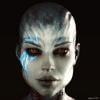
[Released!] EcVh0's People - Katarina HD For Genesis 8 Female [Commercial]
Looks great!
Please include a no brows option so we can use the Victoria 8 eyebrows.
Will do! Working on it right now :)
[Released!] EcVh0's People - Katarina HD For Genesis 8 Female [Commercial]Looks great!
Please include a no brows option so we can use the Victoria 8 eyebrows.
How Do You "Bake" Character Morphs?https://www.daz3d.com/forums/discussion/6483/tutorial-creating-a-genesis-g2f-g2m-g3m-g3m-full-body-morph-for-daz-studio-pro-4-6-by-rkane-1/p1
That's what you want to know.
Specifically, the parts that answer yout questions pick arounds step 7. Not, the advice in step 6 about using odd letters to name yor morph is a bit unnecessary. Rather, especially if you are trying to make pro character, you would preplan the names of your morphs. Probably they would all have part of their name in common. If you character is called "Joe" you'd probably want all the morphs to have the word "Joe" in them somewhere. Knowing all your morps for the figure are names Joesomething or somethingJoe or SomethingJoesomething, you can just use the search box in the properties menu to filter out all morphs that don't have Joe in them.
Planning would mean doing this BEFORE importing (or even starting) to be sure that there's not already a character in you figure named Joe. Also, searching the Rendo and Daz Stores for charaters named Joe for your target figure, to make sure you aren't picking a name that has too many products attached to it already, and to plane how, if you choose to use Joe even if there are others, how you will name the figure so that it is recognizably your Joe, as opposed to someone else's.
Also, Step 23 for some reasone says "enter [...] an unique name for this morph as the product name." That's not how think about this. The product name is just what is says on the tin. The name of the product a group of assets belongs to. Victoria 8 is a Product. FHMVictoria8 would be a morph's name (or some such. BTW, that pattern is saying something like Full Head Morph, back to nonesuch's point about separate head and body morphs). Once you start saving bits of the character you are trying to sell, the important point is to always enter the SAME Vendor and Product names when asked. Again, plan ahead. Just like planning amorph name in advance, you'd plan out what you want the prodct to be called. You'd have it all writen down. Documented, if you will. This is no different from any other professional activity. You get much better results with a plan of action that at least covers the high points, possibly with a few notes to remind yourself why you maked the choices you made (in case the sitatuion changes and you realize those reasons no longer apply).Why is Victoria 7's Leg doing this?This one has calf fixes for less extreme knee bends as seen in the promo:
https://www.daz3d.com/ultimate-natural-bend-morphs-for-victoria-7
It's on my wishlist.
New (Better) computer renders slower than old one.I don't see anything about iray legacy? I selected a new Victoria 7 character and it loads in with it rendered with the gray tint. So I must be missing something.
New (Better) computer renders slower than old one.Ah i see! Thanks.
Would love to use 4.9, but characters like victoria 7 and Michael 7 have weird "gray" tint skin. Is there any way to fix this? Reason why I use 4.8. It doesn't affect it.
G3 to G8 body MorphsSo I bought all G8 stuff I could including G8 Female Body Morphs and G8 Female Head Morphs. Since I got the Victoria 8 Pro Bundle I got the Victoria 7 and other Pro bundles with lots of content. I'm returning to Daz3d after years of not having it even installed and I got a lot of good but old stuff. OK, so I want to use my old body morphs on G8 and tweak them.
There's a way to do it but it's not user-friendly. Making new folders, renaming files and so on. The point of using DAZ3D is the ease of use of the program and a way to get 3d art done fast and easy. The thing I need is an add-on, script or program that will make a new icon of my G3 morph that will show in the Smart Content tab when I have selected any G8 figure.
Thanks.
ps: G and G2 morphs to G8 also appreciated but G3 is more important, at least for me.
July 2017 - Daz 3D New User Challenge - Portrait RenderingAwful quiet in here so far, so I guess I'll throw my hat in the ring.
I'm a old-new-user or maybe a new-old-user... I've been playing around with 3D off and on for years as a hobby, but probably have less than a few months of experience collectively. I typically do 1 or 2 complete renders per year. Sad, I know.
This is not neccessarily your classic portrait, but I put a lot of work into getting the lighting and pose just right. My major focus was to get Cherry oozing personality with as little facial expression as possible and to keep her body laungauge natural and purposeful. "Hold on Tight" was the first title that popped into my head as I put the final touches on the image... I'd swear I actually heard her say it.

Vast majority of the work (lighting, pose, etc.) was done in Daz Studio using only Daz store resources. I wrapped up with maybe 5 minutes in Adobe Lightroom to get the contrast, saturation, and general lighting/shadow balance where I wanted. I'm also a photographer, so it seems natural to treat my render like a IRL portrait and Lightroom is my tool of choice for tuning my photography.
I'm posting a link to my gallery image as well as the inline image... I'd really appreciate a click-over and thumbs up on my gallery if you think the image is worth it. [EDIT] Just read the contest rules... hopefully posting to my DAZ3D gallery doesn't violate rule #7. The image was created for the contest and has only been posted here and in my gallery.
"Hold on Tight"
Daz Studio (all 3d work, lighting)
Lightroom (minor post tuning)https://www.daz3d.com/gallery/images/389691

Nice work friend. Just one question, where did you get her crome? (Her cyborg leg.)
Thanks! The chrome is a boot from the Sci-Fi Samurai outfit that came with my Victoria 8 Pro Bundle. https://www.daz3d.com/sci-fi-samurai-for-genesis-8-female-s
Victoria 4.2 bundle with no V4.2 actor base figure.If actually it work so, you are really lucky guy, daz miss offer you. I feel,, but any way, how you install contents first? if you use DIM, you can check your installed package and file path, , and which file are included in downloaded package. and may better use DIM un-install them once. install somethign by DIM ,then install manually same package, may often course problem.
eg,, my purchased Victoria 4 pro bundle was appendix of Carrara which I bought long time before. (I do not clear remember, when I got them with witch package)
but I can serch Victoria 4 contents which I bought for daz studio by DIM. then it show clear which files are included in separate package. and where hose files are installed.
if your package include Victoria5 or Victoria6, it means daz offer wrong bundle I think. or you need to check your "order" from your account of daz shop.
then check which product are actually offered.
Free Hair and Hair related Items ListI'm looking for REALLY OLD hair. Like, for Possette, Dork (P4F & P4M) and Victoria 1. In other words, hair suitable for use in Poser 4 and earlier.
https://poserdazfreebies.miraheze.org/wiki/Victoria_1-2/Hair
http://www.morphography.uk.vu/dlhair.html
https://ladyfyre-graphics.com/post/
http://digitaldreams.bbay.com/strip_hair_combined.zip
https://www.sharecg.com/v/29906/
http://lab108.x0.com/lab108/hair.html
https://www.renderosity.com/mod/freestuff/?item_id=69517
http://www.comm.unt.edu/~ktaylor/downloads.htm
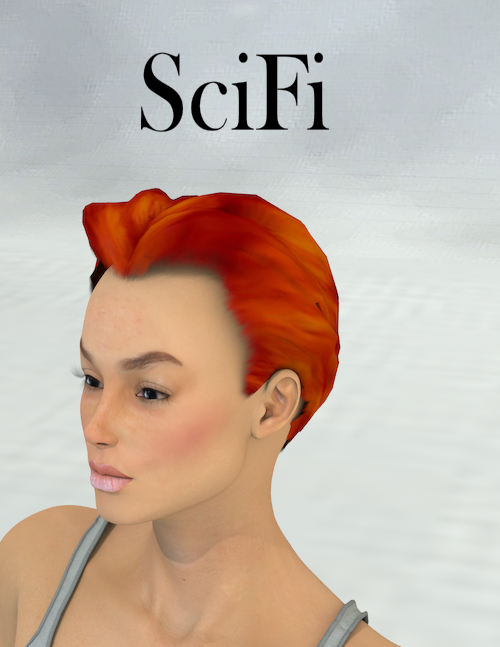
I would add Mylochka's hair for V3 to that list. https://poserdazfreebies.miraheze.org/wiki/Freebies_by_Mylochka#Hair like Rapunzel or Scifi. They have the change of topgraphy to make things interesting but only have one transmap for interfacing between hair and head.
 Victoria 4.2 bundle with no V4.2 actor base figure.
Thanks for your response. I looked in the poser content. I searched the rest of the libraries as well. There is, under poser format- figure-Daz victoria, various additions ,such as clothes. But there is no Vicotria V4.2 base figure anywhere. I agree that the Victoria 5 and 6 would come from a seperate purchase. However, I have never have made a spcific purchae for either of these two figures, but they did appeared in my smart content as actors after I installed the V 4.2 pro bundle.
I tryed to install the Visctoria 4.2 base figure content manually into the Poser Library, and the Daz 3D library without sucess. Furthermore, the IM has the V4.2 base figure ready to install. But reads " failed to install" when I try to intall it using the IM. I'm clouless why a Vicoria 4.2 pro bundle, that shuld obviously include the V4.2 base figure, has instead possily provided me with both the Victoria 5 and 6 figures, but failed to install the intended purchase of victoria 4.2 base figure.
Dynamic Tunics and Sashes for Genesis 3 and/or Genesis 8One of the most useful products I've purchased are the dynamic tunics and sashes of Medieval Fantasy – Dynamic Clothes for Genesis and Genesis 2. The tunics and sashes of this product can be used in a number of different renders. They can be used as costumes in Medieval, Greek, Roman, Middle Eastern, and Fantasy renders. Daz released a set of these tunics and sashes for Michael 4 and Victoria 4 in 2011, and Daz released Medieval Fantasy – Dynamic Clothes for Genesis and Genesis 2 in 2014. Since Daz has created versions of these tunics and sashes for generations 4, 5, and 6, I was hoping they would create new versions of these tunics and sashes for generation 7 figures. Even though Daz has already released Generation 8, I still want to suggest a set of new tunics and sashes, with Iray and 3Delight materials, for generation 7 figures. If Daz doesn't create versions of these tunics and sahses for generation 7 figures, perhaps they can be made for generation 8 figures. I've attached a render of these tunics below.
I want a ... lacking a better term ... Frankenstein toolI want to be able to take the head of any model ... lee 6, victoria 8 whatever and stick it on
any body I choose, like a base gen 2 body. The app would smooth out the neck connection
and the 2 figures would be grouped in a way to appear as 1 model.
It would be a super powerful tool
any outfit for any figure...want a certain character but want a dress that only works on
a gen 2 body NOT PROBLEM - stick the models head onto a gen 2 body....done
I would so buy that app
peace
Why is Victoria 7's Leg doing this?Yes... didn't help.
This problem seems to stem from the Victoria 7 body.... A new Vic 7 has it when loaded fresh as soon as I bend the knee joint... (not sure about other models, but the stock gen3F doesn't seem to be anywhere near as bad... from the little i've tested it...)
I can reduce it quite a bit by changing the camera angle.... but I need that camera angle for the shot...
Seems this angle of camera / lighting isn't jiving well her calf flexing.Why is Victoria 7's Leg doing this?I'm getting this strangeness on the lower leg (calf / shin) showing up on Vic 7 with HD add-on... I've been looking through her surfaces, but haven't been able to find the cause yet.
It's looking a strange mix of cellulite and bruising.... Is there a simple way to smooth it out more?Michael 8I hope he's out sooner than November. LOVE what I'm seeing with G8F but I'm one of those "always wanting more men" people. Most of my renders show it. But regardless I know he's coming obviously. It took me a half day to decide if I wanted Victoria 8 but I love her natural look. There's something mature about her face and build and she looks...motherly? I'm really excited to see what Michael 8 looks like. Michael in all his incarnations has always been my favorite.
This made me laugh. In polite opposition to the Genesis Female/Victoria-heaviness of the Daz world, my renders also tend to point more to the male end of the spectrum. Like how some painters work in oils, I paint in Leos, Dariuses and Giannis. LOL. I love Vic's new look too (beautiful without being a Barbie doll) and can't wait to see what Michael 8 looks like.
Line running through arms of V8 skinThose come usually when the wrong UVs are chosen for a particular texture set. I also have seen them on textures sets that have been converted but converted using the wrong UVs.
I know what you mean. I have had this happen with G3 and the different UVs. However, this is V8 skin and there is only one base figure for to choose from for all G8 characters. One thing I did do is load the G8 character and then applied the V8 skin to it rather than loading Victoria 8 as a character.
EDIT: I did another test using the same pose and similar lighting. This time I loaded V8 from scratch vie smart menu, so there is no morphs or nothing just a DAZ default Victoria 8 load. I also tested out another skin and a different pose but the results are the same. This seems to be a G8 figure/shape issue rather than a skin issue.
Victoria 4.2 bundle with no V4.2 actor base figure.Victoria 5 and 6 are not aprt of the Victoria 4 bundle, they will be separate purchases. Victoria 4 is Poser format, so look to see if the abse figure in in the Content Library pane under Poser Formats>folder isntalled to>Figures>DAZ People.
Victoria 4.2 bundle with no V4.2 actor base figure.I recently Bought the V4.2 bundle. I was provided with V5 and V6 actors. But there is no V4.2 in the mix. I purchase the product to be able to use V4 clothing. It clearly stated that the bundle is a V4.2 product, and said nothing about including V5 and V6 . What's up with this? Did Daz providd me the V5 And V6 figures because the V 4.2 figure is no longer available ? Does anyone have this issue.
Show Us Your Iray Renders. Part VIVictoria 8 - About to have some relaxing time in the Jacuzzi.

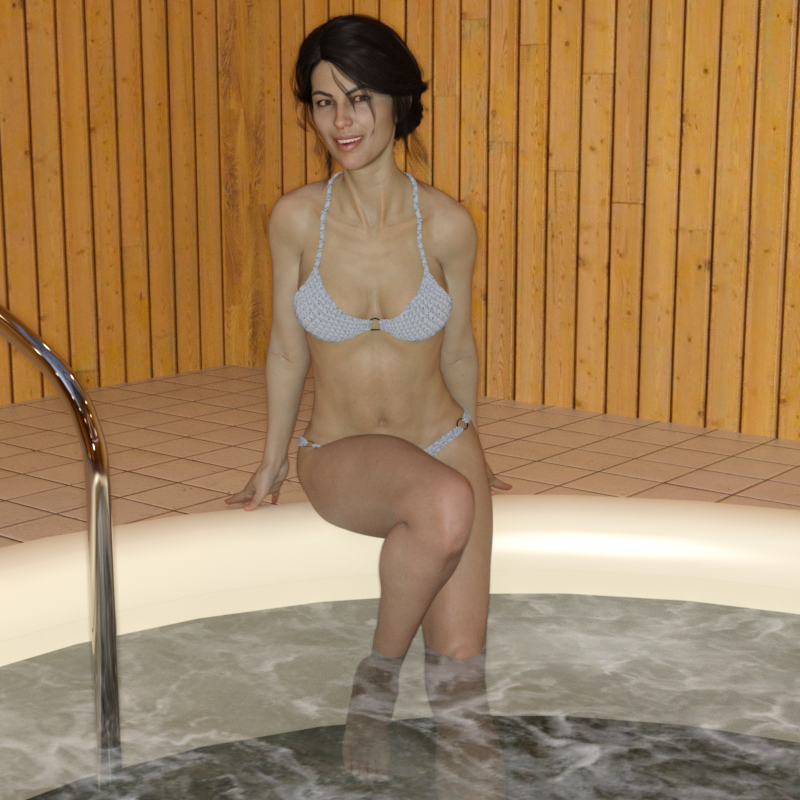
Nice one Diva, I like the lighting
I found the Jaccuzi room's lighting a little too good. There are so many default light sources that there was no shadows or contrast to speak of. Depends on what you are going for, I guess.
Daz 3D is part of

Connect
DAZ Productions, Inc.
7533 S Center View Ct #4664
West Jordan, UT 84084Licensing Agreement | Terms of Service | Privacy Policy | EULA
© 2026 Daz Productions Inc. All Rights Reserved.