-
Mesh grabber for Daz 2025 Alpha?
Has anyone found a reliable solution for this? I can't get the export/import approach to work, and I don't think there's a premier alpha version yet?
Diffeomorphic Add-ons Version 5.2.0 ReleasedHi. When I import a Gen 9 character I get lots of Python errors when on the Mac. I don't get any morphs imported either (I am using the Gen 9 preset). When I try with Gen 8 everything works fine. When I try this on the PC everything works fine. I'm using latest 4.5 stable and latest blender 4.5.1 LTS.
I've tried removing scripts & addons and re-installing but cannot get it to work. All DAZ content is installed via DIM and root dirs set up properly.Could there be some cached/hidden files left over that I'm not removing before a re-install? I'm at a loss to know what to try. The errors are python tracebacks and I can work around the morph issue by importing them afterwards but I'm not sure what else my be broken broken. I don't want to work on the PC as it's old and has a limited content install, so I'd like to get it working on the mac.
UPDATE: Well, I went through all my DAZ and Blender folders in my ~Library and deleted everything to do with Diffeomorphic. Then downloaded the latest dev build and installed that, as well as the scripts and Whoop-de-Doop! It's working perfectly.. There was some old stuff from 2022 in there so I guess that was the issue.
CheersHow to morph new hair modelsxueyt9518 said:
crosswind said:
Certainly they're strand-based hair (SBH). The base geometry of an SBH is polyline. ZB is not able to import polyline.
Well, you can manipulate polylines with Blender. Firstly, activate Geometry Editor tool in DS, export SBH to OBJ file. Import OBJ into Blender and deform polylines as you wish (in Edit mode).
Then export to OBJ, import OBJ in DS with Morph Loader Pro to create morphs on SBH ~~
Oh thank you so much! I think I need to learn some blender now XD
No problem ~
 How to morph new hair models
crosswind said:
Certainly they're strand-based hair (SBH). The base geometry of an SBH is polyline. ZB is not able to import polyline.
Well, you can manipulate polylines with Blender. Firstly, activate Geometry Editor tool in DS, export SBH to OBJ file. Import OBJ into Blender and deform polylines as you wish (in Edit mode).
Then export to OBJ, import OBJ in DS with Morph Loader Pro to create morphs on SBH ~~
Oh thank you so much! I think I need to learn some blender now XD
How to morph new hair modelsCertainly they're strand-based hair (SBH). The base geometry of an SBH is polyline. ZB is not able to import polyline.
Well, you can manipulate polylines with Blender. Firstly, activate Geometry Editor tool in DS, export SBH to OBJ file. Import OBJ into Blender and deform polylines as you wish (in Edit mode).
Then export to OBJ, import OBJ in DS with Morph Loader Pro to create morphs on SBH ~~
How to morph new hair modelsFor some older hair models, I could import them into ZBrush and then use GoZ to import them into DAZ for hair shape adjustments to accommodate specific poses. However, with newer hair models, I get an "error encountered while importing a file" message when importing into ZBrush, and they appear as a cube, making adjustments impossible. I’d like to ask about these new hair models (likely not strand-based hair). They are the kind with PS Hair and PR Hair (sorry if my terminology isn’t precise, as I’m not very familiar with this). How can I adjust the shape of such hair models? Thank you so much!
Importing DAZ Decals into Blender?update. The decal bugs have been fixed in the last commit. Then I proposed a limited implementation for uvw decals, once it's done should be fine to import the Dega wounds and eventually other similar uvw decals.
[Released] Bone Minion for Genesis 8 and 8.1 Poses [Commercial]inquire said:
OK, thank you. I got it solved, actually before I read this message. I worked on it yesterday. I just wanted to double check it this morning to see that it works out. Briefly, I uninstalled and then reinstalled DS. I uninstalled and then reinstalled one of your bone minion products. I think that brought the correct folder back into DS. I rebuilt the database, and re-imported the backed-up metadata. Everything seems to be working fine now.
I am not by any means of techie, so this was difficult for me. But I'm glad I got it worked out. I do think that bone minon products are wonderful. I hope you'll continue producing more of them. Thanks for spending time with me on what was for me a very difficult issue.
You're very welcome! I am so glad you got it solved.
Hair rendered in Cycles lacking shine and lusteWell diffeomorphic is a daz importer, so of course it also tries its best to import the daz hairs. However in general most daz hairs don't really fit to blender, as they are extremely heavy both in geometry and texture size. If possible it is much better to import a daz figure without hair then use some blender native hair, which will look better and also render much faster.
https://joseconseco.github.io/HairTool_3_Documentation/hair_library/
The general concept here is that not all the daz content fits to blender. Extensive corrective morph sets are another example, which imports in blender hundreds of morphs thus making the figure extremely heavy. As blender users we should rather take from daz what works and discard the rest, especially when blender has better native options.
PostgreSQL IssuePostgreSQL is used for anything that relies on metadata - presets tabs in settings pane, Smart content, the products and categories containers in the Content Library pane, and the various type and group tags that appear on thumbnails.
Exactly what is DIM showing as installed? What security software ar you using? Is this a clean ionstall or did you copy across a database from the old system?
[Released] Bone Minion for Genesis 8 and 8.1 Poses [Commercial]OK, thank you. I got it solved, actually before I read this message. I worked on it yesterday. I just wanted to double check it this morning to see that it works out. Briefly, I uninstalled and then reinstalled DS. I uninstalled and then reinstalled one of your bone minion products. I think that brought the correct folder back into DS. I rebuilt the database, and re-imported the backed-up metadata. Everything seems to be working fine now.
I am not by any means of techie, so this was difficult for me. But I'm glad I got it worked out. I do think that bone minon products are wonderful. I hope you'll continue producing more of them. Thanks for spending time with me on what was for me a very difficult issue.
[Released] FAST Animation Studio Tools!!! Official support thread [Commercial]Hey there—first off, I’m really sorry for not getting back to you sooner. I’m building out documentation (lots of folks have asked for it), working on a Mac version, fixing a few add-on errors, and recording another tutorial for the DAZ store page. Would you mind shooting me a quick email at [email protected] to double the efforts here? I’m going to do my best—every time I get a forum message I’ll put it where I’ll always see that I’m currently communicating with someone. I also want to say I’m a bit new to this kind of thing, so thank you for your patience.
OK, about this part—can you tell me if it exports those too like Diffeomorphic? We bundle the Diffeomorphic add-on so you have full capabilities of that add-on.
And we’re not opposed to writing code to give you a better effect. For instance, with the L4N4 model that you get from DAZ—that robot that you get—it wasn’t looking right in Blender because our import system wasn’t importing it with the shells, so we wrote some code and now it does. So we could likely do that if you come up with some sort of way we could improve our geograft experience.
And I do want to clarify that I assumed that you were asking if our add-on exports geografts like Diffeomorphic. But essentially, our add-on is like four add-ons in one: you have our main FAST add-on that has 600 buttons that improve literally everything in Blender; then you have the full Diffeomorphic add-on, which has 300 buttons and all the capabilities of that; then you have a pro version of the Mixamo add-on, which we upgraded to Blender 3.6 when Adobe didn’t, and which is more reliable and adds more features like a bulk Mixamo downloader—so you have all the capabilities of a pro version of Mixamo; and also we bundle R OK OK add-on, but we turned it into a Mixamo to DAZ retargeting panel. So you see, you get all these features. And just to note, we bundled the Diffeomorphic add-on because they offer an API, which means a way to call their functions easily in programming code, so we bundle the Diffeomorphic add-on so we could do that easily.
[email protected] and again this email address we check it all the time i'm getting better at checking this forum page so trust you'll get a better experience in the future I'll make sure to answer your questions right away.. I have a special file where I have notes and then every time I get a message here from now on I'll leave a little note in that file because I check it all the time that I'm still discussing something with somebody on the forum.
Request for a super simple pluginMoved to Product Suggestions as the scripting forum if for people wanting help in writign scripts, not for requests. Note that a script is not a plug-in (platform-specific, written in C++ using the SDK).
The first part would be trivial - just DzFileDialog - but for the second yopu would either need to check the metadata or parse the file and check the type it was saved as (either of which could fail in various ways).
Metadata missingContent Wizard will take care of a lot but if you only have a limited number of products to fix, you can fix them by hand.
This video is a bit old, but should give you the basics of how to add metadata using the default tool included with Daz Studio if you want to do them manually (the default tool is an acquired taste, but it does the job):
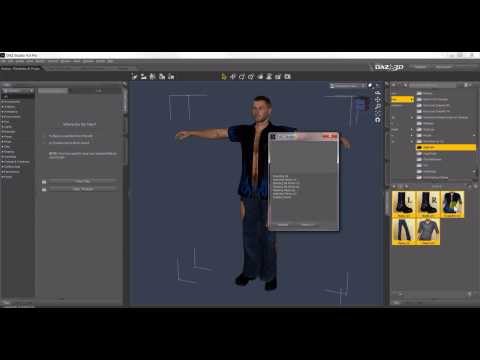
Once you have the basics, it's a good idea to look at how similar products sold on Daz3D.com have their metadata set, to find what types, categories, compatibilities and compatibility base were chosen.
In the case of that swimsuit, to give you some pointers without repeating too much what the video said:
General Metadata for the product:
While you can simply edit the barebone metadata automatically create by DIM when you installed the product (it's the fastest way), if at one point in the future you want to share you metadata, it may apparently cause some problems.
So if you're thinking of sharing it one day, here's my suggestions (I'll assume that you have chosen this path, but it won't change a lot in the rest of the metadata, you'll, off the top of my head, still have to create a new compatibility base):
- Product name: I suggest 'dForce Slingshot Swim for Genesis 8 Female(s)', which is how Daz would have named it if the product was not transfered from another store. I suggest to also use that as the name when creating the new compatibility base.
- Author: Chris Cox
- Store: DAZ3D
- Token: 95638
Doing so will create brand new metadata files located in your 'DAZ 3D/Studio/My Library/Runtime/Support' folder (I don't know where it's located on Windows, I'm creating all my metadata on MacOS and on MAc, it's in ~/Documents/DAZ 3D/Studio/My Library/Runtime/Support).
Metadata for the slingshot:
- Type: Follower/Wardrobe/Full-Body
- Categories: Default/Wardrobe/Swimwear/Full-Body
- Compatibility Base: you need to have create the Compatibility Base before (see the video), which should be, if you used the product name I suggested, something like 'dForce Slingshot Swim for Genesis 8 Female(s)/Slingshot' (it may be different than 'Slingshot', but if you have followed the video, you should only have one sub Compatibility Base parented to the root compatibility base 'dForce Slingshot Swim for Genesis 8 Female(s)', so just select it)
- Compatibilities: 'Genesis 8/Female' is the minimum but you can also add 'Genesis 8.1/Female' (beware that you may have a product that created a 'Genesis 8 Female/Female' Compatibility Base and it will not work with a Genesis 8 Female character).
Metadata for the material presets:
- Type: Preset/Materials/MDL
- Categories: Default/Materials/Iray/Wardrobe
- Compatibility Base: NONE.
- Compatibilities: Here, it must be the same as the what you have chosen for the Compatibility Base of the Slingshot (so something like 'dForce Slingshot Swim for Genesis 8 Female(s)/Slingshot')
Metadata for the shader presets:
- Type: Preset/Shader/MDL
- Categories: Default/Shaders/Iray (they are multiple sub categories like Fabric, Gem, Metal, etc but without knowing how what each shader does, I can't comment).
- Compatibility Base: NONE.
- Compatibilities: Daz uses /AnySurface as the Compatibilities for shader presets.
I don't think it's the case for the shaders for the Slingshot but I have at least one product where shader presets were not made to be use on anything else than a specific surface of that product (I think they should have been saved as Material Presets instead, but I'm not a PA) so in case Chris Cox did the same (and only in this case), you'll have to set the Compatibilities of these shaders made for a specific surface in mind with the same Compatibilies as material presets.
Looking at the readme on Renderosity, they are dForce Presets but I don't know if they are material presets (if it's the case, create the exact same metadata as for the various Material Presets) or Simulation settings, in which case, their metadata should be something like this:
- Type: Preset/Simulation-Settings
- Categories: Default/Simulation-Settings
- Compatibility Base: NONE.
- Compatibilities: something like 'dForce Slingshot Swim for Genesis 8 Female(s)/Slingshot'.
Edit: I forgot, but if you followed my advices, you'll not have an icon. Just check if Daz provided one, it should be in My DAZ 3D Library/Runtime/Support and its name should start with 'DAZ_3D_95638'.
If you followed the whole process and chose to use the whole name, at that point, if the picture exists, duplicate the file then rename it as DAZ_3D_95638_dForce_Slingshot_Swim_for_Genesis_8_Female(s).png and you should have a proper icon.
If none is provided, take a promo render and crop it to get a 10:13 picture. Content Wizard suggest a 380x494 picture, which is what I use.
If you edited the barebone metadata, just rename that cropped and resized promo render using the same name of the .dsa file starting by DAZ_3D_95638 (name of the file will also be visible in the main windows of the metadata editor).
Metadata missingYou usually won't find any mention of it on the product page here, as the description was imported automatically from the old product page. I remembered that this vendor was part of the "welcoming new artists" sales so I checked by googling the product name + Renderosity and found the old product page there.
There's a list of artists which were part of this sale in this thread: https://www.daz3d.com/forums/discussion/comment/8824416/#Comment_8824416That can give you an idea of vendors which may have some products without metadata.
For the record, you can add metadata yourself or use content wizard to create them: https://www.daz3d.com/content-wizard (it's currently heavily discounted as part of the "Classic Top 200" sale)
Metadata missingWhich product is that? Most items which have been transferred from Renderosity won't have metadata for example.
Metadata missingI've asked for this before, but lately this has been happening to me far more often. I get a product and there is no metadata assigned to it so it's practically useless since I will forget I have it after a month or two. If Daz, not the artist is supposed to be adding the metadata, why has the isntances of this gone up 800% recently and no one has done anything about it? I took a look at my lost and found and has more items in than my unfiltered materials folder do which SHOULD be my largest folder. does anyone else have else have Slightshot Swim G8F and is it missing it's metadata?
maybe it's not metadata... maybe that's the wrong term, but it doesn't associate with character models, materials, or wardrobe.copying keyframessadly you need someone with AniLip, I don't own it either, the regular lipsync saves keyframes as does PoseRecorder but I have no idea what Anilip does
I even looked at it today in the 80% off for 2 sale and passed on it

I can do all the microsoft TTS voices with Balabolka and a Registry hack and use them in Lipsync so never saw the need
and with the new FBX import I can even import my iClone6 bespoke retargetted bone based expression editor animations
The New Mac FAQI uninstalled and then reinstalled DS 4.24.0.3 to get Bone minion to work. But I hit a snag. If anyone has the time to help, please go to the link above and read my post and look at the files I uploaded. I did keep the "cms" and replaced it in my ~ Library after reinstallation; and I did go to the "content library" pane, where I clicked the menu icon and chose "Content DB Maintenance," after which I clicked the "Re-import Metadata." I thought that was all I needed to do.
I'm stuck. Hope someone can help. This is the first time I've tried uninstalling and then reinstalling DS. I did not describe the whole thing that's at the link above, so I don't think this is a double post. I am just trying to attract MacIntosh users who could help. Maybe windows people could just as well, but I don't know.
Will DAZ ever improve animating?I really hope that either GoFigure themselves make aniMate 2 compliant for Daz Studio 2025, or that Daz 3D buys aniMate 2 from GoFigure so that they can tool it into Daz Studio 2025 permanently.
Check the DS 2025 Alpha “evergreen” thread
AniMate 2 for DS alpha is listed as pending.The Upper Tier Physics tools are where its at if you want to really get into this stuff - interactions between two or more figures, interacting with objects, ragdoll or not... this stuff is Insanely Awesome!
You should really have a look at the Auto tweening feature in the latest build
its like magic!!
What is most amazing this software is how it manages to be useful to nearly every Character animation ecosystem.
I recently migrated over to the toon shaded VROID “V-tuber” anime figures ,that I Import to Blender (via a free addon), for NPR anime style production.
As Cascadeur is strongly geared towards realtime video game animation all I have to do is export to a game rig format
(unity or UE)
and my characters rigging is auto recognized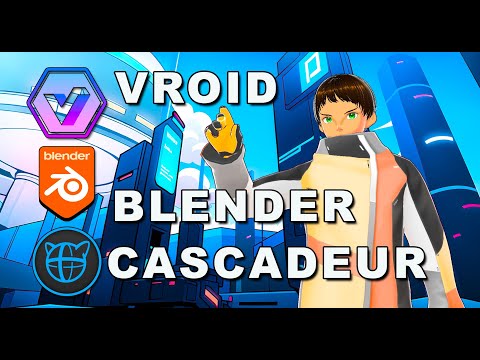
Also Cascadeur addresses many of the long time problems with Iclone's motion clip system.specifically the issue of sharp 90 degree turns ,while moving ,always looking robotic by default.
But a quick round trip to Cascadeur’s Autophysics fixes that as well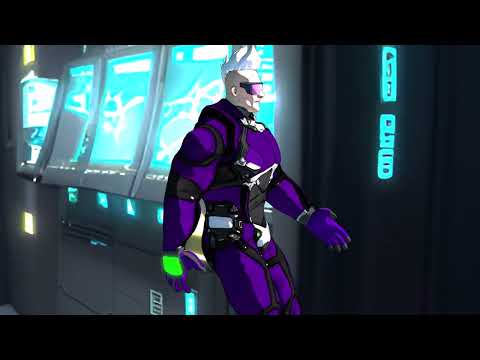
Daz 3D is part of

Connect
DAZ Productions, Inc.
7533 S Center View Ct #4664
West Jordan, UT 84084Licensing Agreement | Terms of Service | Privacy Policy | EULA
© 2026 Daz Productions Inc. All Rights Reserved.