-
Transfer Tool Crashing
So, let me walk this through. I made and modeled a tunic-style swim coverup for G9F in Hexagon, and UV mapped it in Blender. Brought it into D|S, and it looks great. I loaded the DEV G9, and applied the base feminine morph. THen went to transfer utility, set the source as G9 and "current," then the coverup as the target. I did use the bodysuit projection template. It gets about halfway done, but D|S keeps crashing on the base_masculine_bs_...dsf file. If I could attach pictures or more information, it would be much more useful. Anyone have ideas? I'm going to try a G3/G8 item to see if it keeps happening.
Thanks, -David
DAZ Horse 3 - will there actually be any support this time?AlmightyQUEST said:
The rodent base was a more neutral base not quite like any of the animals it would morph into, so fingers crossed that's the plan here.
Unfortunately, there never was a diverse set of future morphs for the rodent base. We got the original squirrels, and then I think there was a porcupine, much later. Then it was abandoned. I hope that doesn't happen with the Horse 3.
Transfer Tool CrashingI don't know if this is due to the whole G9 "gender-bender" setup, but the Transfer tool keeps crashing, no matter how I go about trying to set this up. Eventually, this will be a dForce item, but not sure why the crash. I've attached the screenshots below. For some reason, this has hung up on the masculine, feminine, and some other .dsf files. Does anyone have a clue what's going wrong here? DIdn't have this issue with G3/G8, so not sure if G9 or not.
DAZ achieves new lows in customer support (but appears to have ambitions to go lower still)NylonGirl said:
Panzer Emerald said:
You know, I'm legitimately surprised that after all this time and with all the advances that've happened with plug-ins that no one has really stepped up to the plate to do their take on the GenX line as a spiritual successor. There was X-Transfer, but iirc that only worked between Gen3 and Gen8 and even that was highly unreliable and prone to frequent crashes from my experience.
Sorry to get off topic, but it's a thought that I sometimes have when this subject comes up every so often.
I think a big part of the problem is a lack of documentation, or that it is not organized very well. Even somebody who is good at programming would have a hard time figuring out how it's done in DAZ. I'd say the only thing less informative is the documentation for creating a plugin for Kodi.
The most frustrating thing for me about DAZ is this: They offer a native C++ SDK that gives essentially unoccluded access to everything DS can do. But they don't document any of it in any meaningful way.
If there were some sort of official technical support, or even a paid option, so that any enterprising nerd could implement his/her vision, we woud have many more cool plugins to do all sorts of things. As it stands, figuring things out just takes too long for the majority of people who develop for DS in between work and family.
I think that instead of wishing for DAZ to implement certain features when they give every sign of not having sufficient dev resources, we should be wishing for quality documentation so that the community of programmers here (whose numbers are probably several times that of the DS dev team) can become engaged and be productive. Other render engines? Check. Working IK? Check. Gen X version 9? Check.
More documentation = more cool stuff. That's what we should be asking for, not specific features, assuming what the users want has any effect at all, which is another debate to be had.
DAZ Horse 3 - will there actually be any support this time?The rodent base was a more neutral base not quite like any of the animals it would morph into, so fingers crossed that's the plan here.G8.1 tear clipping with the eyesoutrider42 said:
You can add a smoothing modifier to the tear prop, and your clipping problem will go away. It works so well that I am surprised it is not applied by default.
In the scene tab, highlight the tear prop and click the drop down menu in the scene tab.
Edit>Geometry>Add Smoothing
If you make your morph the same, then it will work the same. Many pro morphs will contain hidden corrective morphs which allow them to work better when posing. You can find these in the data folder itself for the product. You can also look up the readme page for that product, which lists all files it includes. You will probably find a number of items that have MCM or JCM in their file name. These are the correctives. As your morph gets further from the default base Genesis shape, the more important these corrective morphs become.
Thank you so, so much! I will try it as soon as I get back to the PC!
Dannie's eyes move a long way, so I can now understand exactly how that is accounted for in the actual product but not in my simple obj export / import.
DAZ Horse 3 - will there actually be any support this time?I guess it would make sense if the DH3 is the odd shape it is because it's a base model to morph breeds and other beasts like the reindeer from, but it definitely doesn't show the horse to its best potential if that's the case.
King’s Son Clothing Item?I'm looking for the clothing that is shown on the King's Son sales images.
https://www.daz3d.com/the-kings-son-hd-for-genesis-8-male
The outfit is nowhere to be found in the morph and none of the related links go to the outfit. Has anyone seen this for sale somewhere?
Thanks!
Saving morph for Magnolia Hair?felis said:
I have never tried to export dForce hair (using the dForce hair engine) but I tried now.
My assumption is that one should only export the hair, and not the cap, in order to make a morph.
But after I got the same error, geometry didn't match, I took the exported hair into blender to look at it. And the exported obj does not look like the hair object I try to export, and neither does it match with the vertex count. The exported hair had much fewer vertexes - and still looked different from the original.
I tried to change Lime tesselation. With a line tesselation of 3 the exported hair looked like the original, but then it was 6 mio vertexes.
So essentially I couldn't find a setting that seemed appropriate for making a morph.
Thanks for testing that. So it seems that this hair might not be morphable. That's frustrating.
Saving morph for Magnolia Hair?Pickle Renderer said:
Funny, I had this exact problem a few hours ago. My solution was to export the thing as .obj, then load it back in as .obj and not bother with the morph. Parent to the head. I don't know if there's an "official" way of doing it on hair with guides rather than polygon strips.
I would but the reason I want the morph is to re-simulate the hair from th position, starting upside down in this case.
Saving morph for Magnolia Hair?I have never tried to export dForce hair (using the dForce hair engine) but I tried now.
My assumption is that one should only export the hair, and not the cap, in order to make a morph.
But after I got the same error, geometry didn't match, I took the exported hair into blender to look at it. And the exported obj does not look like the hair object I try to export, and neither does it match with the vertex count. The exported hair had much fewer vertexes - and still looked different from the original.
I tried to change Lime tesselation. With a line tesselation of 3 the exported hair looked like the original, but then it was 6 mio vertexes.
So essentially I couldn't find a setting that seemed appropriate for making a morph.
Saving morph for Magnolia Hair?Funny, I had this exact problem a few hours ago. My solution was to export the thing as .obj, then load it back in as .obj and not bother with the morph. Parent to the head. I don't know if there's an "official" way of doing it on hair with guides rather than polygon strips.
DAZ Horse 3 - will there actually be any support this time?Jonstark said:
nonesuch00 said:
AllenArt said:
Here are some of the horses side by side. You decide ;)

My ranking:
1) DAZ Horse 2
2) Hivewire Horse
3) Linday Morph
4) DAZ Horse 3
+1 That's exactly the way I see it too. However glancing at the rest of the thread, seems the majority prefer the Hivewire Horse as #1. That said, the Hivewire one looks pretty great to me too, I just like Horse2 better.
Horse3 ought to be down at number 49, if only there were more entries... Green horses on mars would be freaked out if you showed them Horse3 :) Even the horses that the Nazgul rode would say,
"Damn what the hell is that ugly thing?!" :)
LOL, well the poor thing is not as far gone as it seems to be but number 5 as out of 4 seems right. Part of it's very odd look is it's a chesnut coloring in bright lights at an awkward angle and background in the render. The muscle anatomy needs fixed though. I'm wondering what they used as source picture to model it.
I'm not returning the bundle though in any case. I expect fixes.
dFroce SimulationsI found the best solution is to simulate the compression of the matress to it's fullest, add the final frame as a morph, then I can just use the slider to adjust the morph for each frame of the compression/return to normal of the sequence.
[Released] Ultimate Pose Converter Bundle for Genesis 9 [Commercial]kyoto kid said:
...oops almost made an error as I thought that the G8 bundle was to G8 from all the listed Generations not the other way around. So to transfer from all four older generations to G8, I would need to purchase a separate one for each, correct?
That is correct.
Saving morph for Magnolia Hair?Hi, I'm trying to make an upside down morph for this hair https://www.daz3d.com/dforce-sweet-magnolia-hair-for-genesis-3-and-8-female
Unlike other dforce hairs I have, this loads a 'cap' fitted to the figure, and the hair is fitted to the cap.
The loaded resolution is always base. I simulate the hair upside down, and I try to export it as OBJ, but when I attempt to load it with MorphLoaderPro, it always says that the mesh does not match.
Can I make morphs with this hair? Do I need to unfit the hair from the cap? Or do I need to save both the cap and hair as one file? I'm stuck because I haven't encountered this kind of dforce hair before and I'm not sure what components to save or how to do it.
Typically I can export the hair just fine and have myself the morph, but this case just won't work so far. Any help appreciated, thank you.
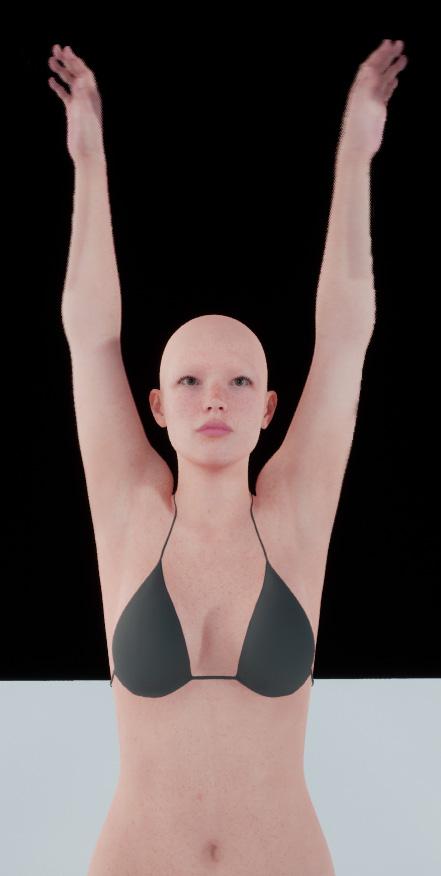
Experimenting with ML Deformer in UE5.1I updated my Houdini asset to support processing of Genesis 9 figures.
This figure is 129,728 polygons with the clothing.
Trained with the Vertex Delta Model on default settings. Took about 20 minutes for the training to complete.
On a somewhat related note, I'm not sure where Daz are going with Genesis 9. In some ways it's a step forward but in other ways it seems to be quite a few steps backwards.
For example, moving the twist bones to be leaf bones rather than inline is a good step forward, although I'm not convinced they needed two twist bones per joint. I think one would have been enough.
However, the face rig now seem to have far fewer bones, meaning they're relying on morphs a lot more to achieve good facial poses, rather than relying more on bones, with the morphs just performing minor corrections.
But the really odd thing, and someone please correct me if I'm wrong, is that the Genesis 9 figure has all these muscle flex morphs, but they don't seem to be connected to any joints. For example, when the forearm bends, the bicep flex morph doesn't trigger automatically. I looks like you have to add it manually but adjusting the slider yourself. This seems very strange to me.
This is going to make creating a training animation for Genesis 9 figures much more complicated.
Presumably it's also going to mean that the offocial Daz to Unreal bridge will need to include many more morph targets for Genesis 9 figures if they want to have realistic muscle deformations.
On the plus side, I've worked out that I can unpack the Alembic cache in Houdini, modify it and repack it without breaking things in terms of the ML training. This has some interesting implications. For example, you could import a single character with clothing into Houdini, separate the character and it's clothing out into different streams and export each separately. Which might be useful for having a character with changable clothing. That is, you can training the character mesh and the clothing separately.
Another thing that would be possible is to automatically delete the polygons on the character mesh that are obscued by the clothing, which could be a useful optimisation step.
Anyway, the next thing I'm going to look into is adding morphs for facial animations.
DAZ achieves new lows in customer support (but appears to have ambitions to go lower still)NylonGirl said:
Panzer Emerald said:
You know, I'm legitimately surprised that after all this time and with all the advances that've happened with plug-ins that no one has really stepped up to the plate to do their take on the GenX line as a spiritual successor. There was X-Transfer, but iirc that only worked between Gen3 and Gen8 and even that was highly unreliable and prone to frequent crashes from my experience.
Sorry to get off topic, but it's a thought that I sometimes have when this subject comes up every so often.
I think a big part of the problem is a lack of documentation, or that it is not organized very well. Even somebody who is good at programming would have a hard time figuring out how it's done in DAZ. I'd say the only thing less informative is the documentation for creating a plugin for Kodi.
Is that a new development, though? I'm relatively new to Daz, so if there was a time when better documentation was available, I wasn't around for it.
How to save Face Transfer after the fact?No my tutorials do not cover very specific problems such as the one you're mentioning unless it's a common problem which I also encountered. The scene subset that Face Transfer saves is a unit to its self. The morph is only in that file. It is not usable in other figures and I also realized that in making changes and resaving that scene subset - the changes would not stick.
I do save scene subsets through Face Transfer as a backup. I send the morphed figure over to Hexagon, in D/S load a fresh figure and then bring back the morphed figure to make a morph like one would normally make a morph. Zero and save that new morph. Then either load the new textures that were made in Face Transfer for the scene subset or the fixed textures [if you fixed them] or whichever skin set you want to use on your new character, and then save out a file as you please [scene subset or character preset for eg.].
n.b. Face Transfer scene subsets must be saved through the plugin for them to work correctly.
DAZ achieves new lows in customer support (but appears to have ambitions to go lower still)Panzer Emerald said:
You know, I'm legitimately surprised that after all this time and with all the advances that've happened with plug-ins that no one has really stepped up to the plate to do their take on the GenX line as a spiritual successor. There was X-Transfer, but iirc that only worked between Gen3 and Gen8 and even that was highly unreliable and prone to frequent crashes from my experience.
Sorry to get off topic, but it's a thought that I sometimes have when this subject comes up every so often.
I think a big part of the problem is a lack of documentation, or that it is not organized very well. Even somebody who is good at programming would have a hard time figuring out how it's done in DAZ. I'd say the only thing less informative is the documentation for creating a plugin for Kodi.
Daz 3D is part of

Connect
DAZ Productions, Inc.
7533 S Center View Ct #4664
West Jordan, UT 84084Licensing Agreement | Terms of Service | Privacy Policy | EULA
© 2026 Daz Productions Inc. All Rights Reserved.