-
GoZ, ZBrush, DAZ Studio
Steps
1. Goz must be installed properly (try with a cube)
2. When sending figure to Zbrush mesh reolution must be set to base. sub divisions lowest level(0)
3 When in Zbrush make sure that figure is selected in ztools.
4.MOST INPORTANT YOU CANNOT ADD OR SUBTRACK POLYGONS, AT THE MOMENT YOU DO THIS YOU HAVE, IN ESSENCE,
CREATED A NEW FIGIRE!!!
5.iF YOU ARE SUCCESSFUL THE DAZ PROGRAM WILL SHOW A SIGN ASKING YOU TO CREATE NEW MORPH
6.AFTER NEW MORPH IS APPLIES YOU CAN REDO MESH
7. Again.....most important ....while in Zbrush you cannot add or subtract polygons at all
(In Zbrush there is a folder called C/users/public/pixologic/gozprojects/default.....make sure to delete the old files they build up and
sometimes cause problems.....use a lot of memory also!!!!!
Luck!!!!
What character ?I have asked the author about this model (in the product "Red Seraphim Suit for Genesis 8 and 8.1 Female"), some months ago.
The answer was: "Its some girl morph dialed from Sangriart".
I suppose it is Sangriart's character "Gertha for G8 and G8.1 Females".
Commission for a simple mask with morphkuro_neko said:
Llola Lane said:
Gordig said:
kuro_neko said:
Gordig said:
JoeQuick made a Spiderman suit for M4 that includes a mask you can pull up (shown in the second promo). I've fit it to a G8M and retextured it in an image I can't remotely post on the forums.
Hello Grodig,
Thank you for the suggestion! I already saw that suit and downloaded it. But I have no idea how to convert/fit it to G8M and make the morph work.
"Fit" is maybe the wrong word, because it's just a matter of scaling it to be approximately the right size.
There must be some trick... I can't get it to 'fit' to G8M... Maybe I need to buy a converter?
I found this product:
https://www.daz3d.com/sy-victoria-4-and-michael-4-clones-for-genesis-8I have no clue about the older generations or poster models. But it sounds like it's the right one.
wishlisted ;) thanks.
Blender 3.4 Import/Export OBJ settingslilweep said:
^ that works provided you import to daz at 100%
Yes, I checked Morph Loader and it is 100% (although that has nothing to do with my mathematical skills - pure trial and error I think).
Demon Legs Morph for Genesis 9
Heya, folks! I finally got my demon character Innalech mostly ported over to G9, so I'm throwin' his feets out here. I'm still very nervous about sharing stuff, and this is nowhere near perfect, but I figured if it was me I'd want it anyway. Please let me know if there are any errors and I'll do my best to fix them!
Caveats/Tips/Etc.:
- I recommend locking the bend dial on the foot and toe bones before applying poses, and then unlocking them afterward for adjustments. The character will basically be standing like they're wearing high heels--except their foot is about as long as their forearm--so locking will help prevent distortions. It's fixable with posing if it happens, it's just annoying.
- This morph has very little impact above the shin, if any, because I wanted it to be usable with multiple body morphs. It looks more balanced with some weight and/or muscle mass in the thighs.
- Knee bends at more than 120% or so will put the entire shin inside the thigh. I think it would take a custom bend morph to correct and I'm not confident enough to try that yet.
- Full-body character morphs will change the shape of the hooves if they have a unique foot shape. This usually isn't super noticeable, but you can see it some in the character with the teal and red legs above.
- This morph was made for my version of demons as a fantasy species, so while I used animal legs as reference they're not really intended to be accurate to any particular type of real thing.
- If you want to use it as part of a character for sale or free at all just throw me credit in your ReadMe or something and we're good. There should be more demons. Also show me your demons because I want to see them. :V
Blender 3.4 Import/Export OBJ settingslilweep said:
marble said:
Jeez - now it works!
I really don't know what I changed but I decided to take screen shots to show my settings (see attached) and in doing so I created a test morph and it just worked fine with the new OBJ importer/Exporter.
I must have changed something before but I went over the settings and I have no idea what it was. Anyhow, here are my screen shots.
Ah, wouldn't you know it - the crappy forum image attach is not working again. I'll try later.
while forum not working, you can just upload them to your gallery as a draft gallery (dont publish) and then past the image links here or embed the images.
I've never used the Gallery so I'll need to check whether I actually have access. I tried to do as you suggest only using Google Drive but can't get the image links to work (I did check permissions, etc.). The file attachment feature of this forum has been on and off for several days now and I, for one, will be happy when they finally abandon this awful forum software in favour of something that works.
Yes, the Gallery links do work, thanks.

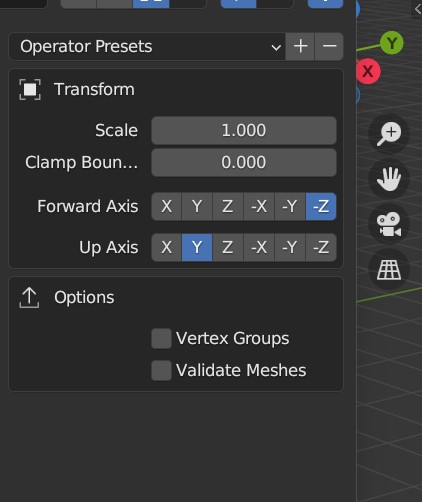
 Blender 3.4 Import/Export OBJ settings
Richard Haseltine said:
lilweep said:
Richard Haseltine said:
You don't need to calculate the scales - just use 1 in Blender, save a preset (if you aren't using an existing one) in the OBJ Export dialogue in DS, and make sure you use the same preset on import or morph loading - DS will then handle all the needed adjustments for you.
If you arent using an existing preset, i think you will have to save the Export preset and then also have saved a corresponding Import preset for it separately.
But thats only if you are using custom preset. I guess there are already so many existing default presets where 1 unit = 1m (e.g., the 3DSMax one), so no need to make a custom one for Blender anyway
No, you save the preset from either the export or an import and DS will then invert it correctly to go in the other direction.
oh i have several old and new export presets saved but they dont show up for me in import dialogue box as options
Blender 3.4 Import/Export OBJ settingslilweep said:
Richard Haseltine said:
You don't need to calculate the scales - just use 1 in Blender, save a preset (if you aren't using an existing one) in the OBJ Export dialogue in DS, and make sure you use the same preset on import or morph loading - DS will then handle all the needed adjustments for you.
If you arent using an existing preset, i think you will have to save the Export preset and then also have saved a corresponding Import preset for it separately.
But thats only if you are using custom preset. I guess there are already so many existing default presets where 1 unit = 1m (e.g., the 3DSMax one), so no need to make a custom one for Blender anyway
No, you save the preset from either the export or an import and DS will then invert it correctly to go in the other direction.
Blender 3.4 Import/Export OBJ settingsmarble said:
Jeez - now it works!
I really don't know what I changed but I decided to take screen shots to show my settings (see attached) and in doing so I created a test morph and it just worked fine with the new OBJ importer/Exporter.
I must have changed something before but I went over the settings and I have no idea what it was. Anyhow, here are my screen shots.
Ah, wouldn't you know it - the crappy forum image attach is not working again. I'll try later.
while forum not working, you can just upload them to your gallery as a draft gallery (dont publish) and then past the image links here or embed the images.
Blender 3.4 Import/Export OBJ settingsRichard Haseltine said:
You don't need to calculate the scales - just use 1 in Blender, save a preset (if you aren't using an existing one) in the OBJ Export dialogue in DS, and make sure you use the same preset on import or morph loading - DS will then handle all the needed adjustments for you.
If you arent using an existing preset, i think you will have to save the Export preset and then also have saved a corresponding Import preset for it separately.
But thats only if you are using custom preset. I guess there are already so many existing default presets where 1 unit = 1m (e.g., the 3DSMax one), so no need to make a custom one for Blender anyway
GoZ, ZBrush, DAZ StudioI've been trying to get GoZ to work ever since I upgraded to DS 4.21 last fall. BLUF is the transition changes the characters topology, So when I "GoZ" back to DS from ZBrush, it loads a new, 2nd version of the character, not a morph. The new version has a different geometry, so none of the materials or morphs for the character I was trying to morph on ZBrush will work.
Daz Studio Pro BETA - version 4.22.0.15! (*UPDATED*)takezo_3001 said:
I have to disagree with ya there, as I heavily use puppeteer to essentially store entire scenes worth of poses, light setups, and props/scene elements, puppeteer is much, much more useful than one would think, or have the patience for…
I mean, there are a LOT of cool settings within studio, just crack it open and take a look, and experiment with it more if they're able that is…
But then again, I put an extraordinary amount of time tinkering and learning Studio's quirks, that I sometimes forget, that not everyone has the time.
The Daz users that use Puppeteer have every right to want it to work with timeline, and has so many uses.
If i gave a bad impression, it was not meant at all.
But still stand by my opinion that Puppeteer has less users and is as such more secondary unlike morph dials which are primary in DAZ, including timeline manip.
But for those that use it, hearing it's less popular and less unspported is probably not cool. Maybe wrong? Maybe with these posts DAZ will offer more support for Puppeteer users on timeline?
So again, I don't use Puppeteer cos it does seem less popular IMO, though very good. Which is why i detailed my workaround. Not as variable or quick as Puppeteer. But it's an adaptaptation with DAZ's apparent resource size IMO.
Blender 3.4 Import/Export OBJ settingsJeez - now it works!
I really don't know what I changed but I decided to take screen shots to show my settings (see attached) and in doing so I created a test morph and it just worked fine with the new OBJ importer/Exporter.
I must have changed something before but I went over the settings and I have no idea what it was. Anyhow, here are my screen shots.
Ah, wouldn't you know it - the crappy forum image attach is not working again. I'll try later.
Blender 3.4 Import/Export OBJ settingsRichard Haseltine said:
You don't need to calculate the scales - just use 1 in Blender, save a preset (if you aren't using an existing one) in the OBJ Export dialogue in DS, and make sure you use the same preset on import or morph loading - DS will then handle all the needed adjustments for you.
There you go - I thought that was what I was doing. I do set my DAZ export scale to 1 [EDIT - sorry I see you said in Blender] as you can see in the screen shots above. It works for the Blender Legacy OBJ import/exporter but not for the new one. As for import back to DS, I do that using Morph Loader Pro and I don't touch anything to do with scale (leave it at 100%). However, as you can also see from my screen shots, in the Blender Legacy export I have the scale set to 100 (not sure whether that is default or not as I am not at my PC right now). So are you saying this should work for the new Blender import/export?
Export hair from DAZ3D to ZBrushHey,
I have such a problem. I would like to transfer hair from Daz3D to ZBrush. Likewise, I know they need to be exported using a plugin, but every time I do it, the hair in ZBrush looks like it's made up of dozens of individual strips. Is there any way to export them as one cohesive whole?
This is how it looks now:
 Blender 3.4 Import/Export OBJ settings
You don't need to calculate the scales - just use 1 in Blender, save a preset (if you aren't using an existing one) in the OBJ Export dialogue in DS, and make sure you use the same preset on import or morph loading - DS will then handle all the needed adjustments for you.
Deepsea Baby HD Looks like stewie on steroids why?Please put your question in the post body and the title
I would expect any Genesis 8.1 Male, and possibly any Genssi 8 male, to do the same. If so it's a character that has been saved with a non-zero value for its morph, so it loads applied unless the file used to load it has explicitly zeroed that property. The first thing to do is check that you have any updates released for your characters (with Daz content, assuming your downloaded through Daz Studio, Central, or Install manager, updates will be flagged - other stoe content and freebies you will need to check for yourself).
[Released] Character Converter from Genesis 2 Male to Genesis 8 Male [Commercial]RiverSoftArt said:
Eboshijaana said:
So I had trouble converting Bearlord Transformed from Ghostofmacbeth. Every time I tried, the arms would become squiggly and malformed.
Until I tested the method used in this video: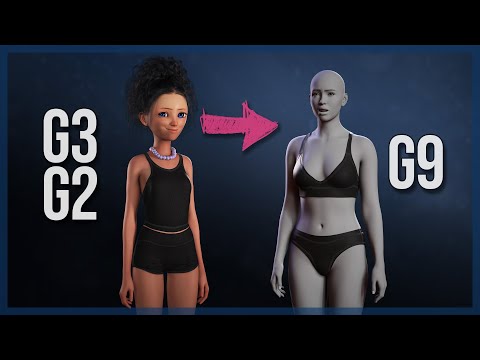
I could convert the transformed bearlord with -very- minimal distortion to genesis 8. So I figured I'd share this here in case it will be useful for you, Riversoft.
I appreciate you sharing the link. I have tried that method for G8-G9 and was not 100% satisfied with the results (eyes not great, pose baked into morph, all the morphs converted together).
Could the way the G2 is made to fit into g9/g8 and the baking of it into that shape might be useful, thought?
[Released] Character Converter from Genesis 2 Male to Genesis 8 Male [Commercial]Eboshijaana said:
So I had trouble converting Bearlord Transformed from Ghostofmacbeth. Every time I tried, the arms would become squiggly and malformed.
Until I tested the method used in this video:
I could convert the transformed bearlord with -very- minimal distortion to genesis 8. So I figured I'd share this here in case it will be useful for you, Riversoft.
I appreciate you sharing the link. I have tried that method for G8-G9 and was not 100% satisfied with the results (eyes not great, pose baked into morph, all the morphs converted together).
DAZ achieves new lows in customer support (but appears to have ambitions to go lower still)...same here. GenX saved me a tonne of zlotys in the long run as it allowd me to build and extensive "gene pool". for charcter development. I can transfer GenX morphs from G3 to G8 but it means one more step amd G8 is the end of the line.
Daz 3D is part of

Connect
DAZ Productions, Inc.
7533 S Center View Ct #4664
West Jordan, UT 84084Licensing Agreement | Terms of Service | Privacy Policy | EULA
© 2026 Daz Productions Inc. All Rights Reserved.













