-
Problems for fitting G8M loafers on G9 [Solved!]
felis said:
Go to Edit > Object > Transfer Utility
Sorce Scene Item is the G9 character, Target Scene Item is the shoes, all others can be left as default.
That's it.
The requirement for this to work is the target (shoes) fits the base character in default pose.
It is essentially this method you will use if you have (an unrigged) new clothing item, and after import you want to get it rigged to a character.
Yes, it worked!! Thank you so much! :) I leave this solution in case someone else has the same issue.
Problems for fitting G8M loafers on G9 [Solved!]Go to Edit > Object > Transfer Utility
Sorce Scene Item is the G9 character, Target Scene Item is the shoes, all others can be left as default.
That's it.
The requirement for this to work is the target (shoes) fits the base character in default pose.
It is essentially this method you will use if you have (an unrigged) new clothing item, and after import you want to get it rigged to a character.
dForce Master - HairForce MEGA Thread [Commerical]Well i was able to get see the Read Me. The update is to fix the Metadata.
A lot of products are missing in smart contenthillside3d said:
Leana said:
Maybe they will be added progressively.
I hope so.
Leana said:
We were told that creating metadata for them all was not practical due to the volume of products transfered.
Yes I read that aswell, however I think that's a poor excuse. I highly doubt that this is a process which cannot be automated.
How would it be automated?
Leana said:
In the mean time, you can either categorize them yourself, or use content wizard to do it for you
Hey thanks for the tip.
Sadly I would have to pay $40.95 to fix a problem that shouldn't exist in the first place.
A lot of products are missing in smart contentLeana said:
Maybe they will be added progressively.
I hope so.
Leana said:
We were told that creating metadata for them all was not practical due to the volume of products transfered.
Yes I read that aswell, however I think that's a poor excuse. I highly doubt that this is a process which cannot be automated.
Leana said:
In the mean time, you can either categorize them yourself, or use content wizard to do it for you
Hey thanks for the tip.
Sadly I would have to pay $40.95 to fix a problem that shouldn't exist in the first place.memcneil70 said:
This is a video on YouTube by one of our past PAs SloshWerks who made this 11 years ago.
Hey thanks, thats good to know.
A lot of products are missing in smart contentAlso early products sold by DAZ3d did not have metadata until sometime in Genesis 2 era. So you can find some items with and without metadata up to that period. Also, like Renderosity, a large number of products were brought over from RuntimeDNA without metadata and their SKUs are in the 20000s. So when you buy older products or a RuntimeDNA or one recently received you will need to assign your own metadata.
This is a video on YouTube by one of our past PAs SloshWerks who made this 11 years ago. It is old but he was very good at clearly explaining what he is doing. There are other videos as well and threads where people discuss this in the forums. Content Wizard is a life saver though.
Edit. Helps to add the link.
A lot of products are missing in smart contentYes, there are products in the store which don't have metadata.
Most "regular releases" do have them nowadays, but products which were transfered from Renderosity this year usually don't. We were told that creating metadata for them all was not practical due to the volume of products transfered. Maybe they will be added progressively.
In the mean time, you can either categorize them yourself, or use content wizard to do it for you
A lot of products are missing in smart contentRecently I noticed that a lot of products are missing in smart content.
So I asked google and the daz forum for advice...and I couldn't believe what I saw.Appearantly a lot of products found in the official daz store don't have the necessary metadata to work properly with their own software.
What's baffling me, is that daz isn't adressing this issue.This wouldn't bother me if it would only be a few products. But in the last purchase I made, almost half the products I bought were affected. And I bought a lot.
Does the community just accept this?
[Released] Bone Minion Batch Converter for Genesis 8 Poses [Commercial]Submitted an update
- Fixed bug for getting content type of pose presets when metadata is not found
Note: I plan to support Daz Studio 2025 eventually. However, converting my scripts is turning out to not be trivial so it is not in this update.
Batch generate keywords/tags for files without them from filenameHey folks,
We all know that when a file is saved the first time, Daz automatically generates keywords/tags for it by parsing the filename.
But what if you have tens of thousands of files that were manually installed from sources, and thus never saved nor supplied metadata?- Is there a way to tell Daz to go through a target folder/library and run that keyword parsing operation?
- Possibly on a similar vein, is there a way to edit metadata (Content DB Editor) for multiple folders, or all the subfolders nested within a folder, at once using the Edit Metadata functionality?
Skyrim-like Mage robes in DAZ?I had to try didn't I
Ugh nooooooooo this took me long enough and very limited poses without distortion, Dforce just forget it

Skyrim mesh exported using NifSkope
I separated the poncho with the geometry editor as too hard to weightpaint
whats left underneath is worrying, game meshes are very lowpoly, I had to hide all his body underneath
and just getting it the same pose and size as Genesis 9 was a job in itself
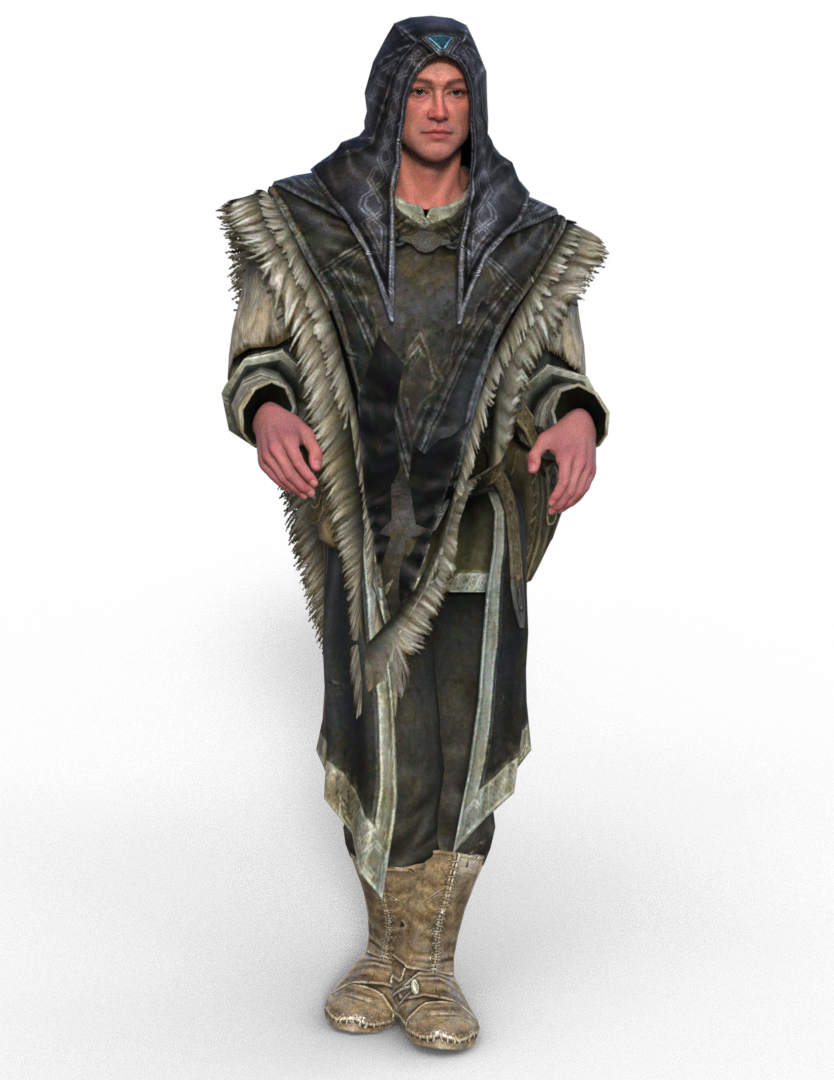
I would import it into Zbrush and Zremesh it is I really want it and Zproject the texture onto the new mesh but I am honestly not that keen

addded some poses to show how messed it gets
Decimator Plug-Incheers @wsterdan, I've already done that but thank for chiming in! It's definitely the usual grey box that is completely missing - fresh install, older install worked but SSD failed, but rather than tranasfer the data with all the metadata mix-ups from daz connect - i installed fresh from DIM on a brand new SSD, mostly everthing I've used so far across all apps so far works fine, but this is missing - typically I noticed when I went to use it!
MIA PRODUCTIf you can find it in your content library, yu can create metadata for it yourself.
MIA PRODUCTIf you can install it, you got what you paid for. The problem is all those "Welcome to Daz" products (and that is one) do not have any metadata, provided by Daz, so it will not show up in Smart Content no matter how many times you re-install it. Sorry, but you will have to make your own metadata. Daz was quick to welcome the artists, but was not prepared to process their products to Daz standards.
Good CLOTHING simulation tutorial for Blender?Padone said:
Thank you Donald for your excellent work that you share with us. SBH support is good news and Sagan is certainly a wonderful tool to import daz animations including dforce. Personally I don't use it just because I prefer to animate in blender, so Diffeomorphic is more my tool.
Thanks for your kind words, @Padone
Developing for DAZ Studio is a thankless endeavor, so comments like yours, especially considering your own contributions, are an actual currency.
And soon(ish) I hope to make animating in DS and animating in Blender the same thing, heh heh :)
Newly Bought Product Not Showing CorrectlyYou could report it as a possible bug, though it sounds as if t is purely metadata so they may not do anything unless/until there is a more substantial update.
I do find the Show Asset in trick useful for other things too - anything that requires applying things n stages, such as some material sets or modular kits, is likely to be easier to handle from the folder structure than from a category-based view.
Looking for a loose braid@zoro_d is offering a free braided hair with enough bones on the braided part to pose freely, either over the shoulder or on the back:
https://www.renderosity.com/freestuff/items/88062/candy-braids-hair-for-genesis-8-females
Edit: if you're using Smart Content, I think they are basic metadata included, but I created some myself and can share them if it's useful.
Good CLOTHING simulation tutorial for Blender?Thank you Donald for your excellent work that you share with us. SBH support is good news and Sagan is certainly a wonderful tool to import daz animations including dforce. Personally I don't use it just because I prefer to animate in blender, so Diffeomorphic is more my tool.
Good CLOTHING simulation tutorial for Blender?update. Medieval Outfit.
Works fine here. There's a little caveat that diffeomorphic doesn't recognize the weightmap for the sleeves, so I had to assign them by hand, now reported to Thomas for the fix. For the various dforce pieces I decided to join them into a single cloth, so self collision takes care of everything. You could also assign different collision collections but seems overcomplicated in this case.
https://bitbucket.org/Diffeomorphic/import_daz/issues/2511/g9-bones-can-be-all-deform-bones
steps:
- import the scene
- I had to assign the sleeves weighmap by hand, this will be fixed by Thomas
- join the various dforce pieces into a single one: object > join
- select the dforce piece and the figure then "make dforce simulation", this will create the cloth and collision modifiers
- increase the cloth quality and set self collision, until Thomas fixes it
- bake and run the simulation
update. The sleeves weightmap is fixed in the last commit.
Good CLOTHING simulation tutorial for Blender?update. Camilla Gown.
Well I tried the Camilla gown and didn't find any issue it worked just fine out of the box. Only caveat is I had to set the cloth quality to 16 that was the default but it seems the addon lost it. Now reported to Thomas. Let me know if you have any trouble but should work fine.
https://bitbucket.org/Diffeomorphic/import_daz/issues/2508/regression-dforce-quality
steps:
- import the scene
- select the Camilla Gown and G8F then "setup > simulation > make dforce simulation", this will create the cloth and collision modifiers
- go to the cloth modifier and set the quality to 16, also enable self collision, hopefully this will be fixed soon by Thomas
- bake and run the simulation
update. The dforce quality is fixed in the last commit.
Daz 3D is part of

Connect
DAZ Productions, Inc.
7533 S Center View Ct #4664
West Jordan, UT 84084Licensing Agreement | Terms of Service | Privacy Policy | EULA
© 2026 Daz Productions Inc. All Rights Reserved.