-
Daz Studio 6 Beta - version 6.25.2026.19821! (Updated July 23, 2026)
jbowler said:
ATM my best recovery is to delete the entrie CMS database and rebuild it from scratch using DIM. For me this is a multi-week experience.
You do know that you can rebuild the CMS database in DS itself, using the Reset and then Re-Import. You can also after deleting the original database, just do a Re-Import.
Daz Studio 6 Beta - version 6.25.2026.19821! (Updated July 23, 2026)horse1412000 said:
DoctorJellybean said:
horse1412000 said:
So I don't know if anyone else has been having this issue but ever since I updated to Daz 6, almost all of my shape morphs have disappeared from the shaping tab.
Also "Filter by context" doesn't work anymore. I have reimported metadata, and restarted Daz many many times, but the issue remains.
Anyone had this problem and found a fix for it? Thank you, much appreciated!
I assume your content paths for 6 is the same as for 4?
Apparently my secondary drive was deleted from the content directory and that was how the shapes weren't showing up. I was told this is a bug that happens whenever you force close DAZ 6.
However, the filter by context is still not working.
Forve quitting any version of DS could damage the database, which might be the issue with Filter By Context though that seems unliekly to me, but it wouldn't affect content directory settings since they aren't part of the session layout or CMS database
Daz Studio 6 Beta - version 6.25.2026.19821! (Updated July 23, 2026)DoctorJellybean said:
horse1412000 said:
So I don't know if anyone else has been having this issue but ever since I updated to Daz 6, almost all of my shape morphs have disappeared from the shaping tab.
Also "Filter by context" doesn't work anymore. I have reimported metadata, and restarted Daz many many times, but the issue remains.
Anyone had this problem and found a fix for it? Thank you, much appreciated!
I assume your content paths for 6 is the same as for 4?
Apparently my secondary drive was deleted from the content directory and that was how the shapes weren't showing up. I was told this is a bug that happens whenever you force close DAZ 6.
However, the filter by context is still not working.
Daz Studio 6 Beta - version 6.25.2026.19821! (Updated July 23, 2026)horse1412000 said:
So I don't know if anyone else has been having this issue but ever since I updated to Daz 6, almost all of my shape morphs have disappeared from the shaping tab.
Also "Filter by context" doesn't work anymore. I have reimported metadata, and restarted Daz many many times, but the issue remains.
Anyone had this problem and found a fix for it? Thank you, much appreciated!
I assume your content paths for 6 is the same as for 4?
Daz Studio 6 Beta - version 6.25.2026.19821! (Updated July 23, 2026)So I don't know if anyone else has been having this issue but ever since I updated to Daz 6, almost all of my shape morphs have disappeared from the shaping tab.
Also "Filter by context" doesn't work anymore. I have reimported metadata, and restarted Daz many many times, but the issue remains.
Anyone had this problem and found a fix for it? Thank you, much appreciated!
Diffeomorphic - Shoes or Footwear Tutorial Anywhere?Yeah, I give up. lol
I can't Change Armature until I Apply Rest Pose or the shoes deform, which means I can't create a Pose Asset out of it for the shoes.. and I'm missing something during the change armature where the feet don't fit the footwear like they do on the straight import into Blender. Again, I'm sure I'm missing something.. but since I use custom shaders, eyes and Hair, I was trying to avoid having to completely set up each clothed model from scratch. So I've modified my toolbox to save out all my custom shader settings from my main model so I can at least load that preset to get matching skin on the new clothed import. I'll have to work on automating as much of the eye replacement and hair attachment as I can. (I also just realized that if I adjust the model's skeleton BEFORE converting to MHX, it's super easy to set floor height. I was struggling to adjust the MHX floor height because of the additional eyes and hair objects not following the skeleton when I adjusted it.)
Long story short: It's more accurate to just make seperate models for each outfit and deal with the extra manual labor of re-attaching Hair and Eyes. (IMHO)
Thank you as always for you help!
An annoyanceA Group's transform values are calculated based on the holistic bounding box of all of its 1st level children nodes, i.e. the exact center of the lowest position of the "whole bounding box". If just Grouping a G9, the data is only calculated based on that G9's bounding box.
However, a bounding box per se is calculated based on the node's geometry, i.e. the vertex positions. So better not touch any DSF / DUF by modifying the related XYZ values (actually they're all 0...) ~
So, if you DO want to "fix the issue" from an experimental perspective, a simple way is to set XYZ values on Ally 9 (in OP's case) by adopting the negative values from the Group's XYZ, export Ally 9 to OBJ, zero Ally 9's XYZ, import OBJ as a delta morph with Morph Loader Pro, ARtS. Then group her again, Group's XYZ will be all 0 ~~
Edit: Ctrl to Hide is already a good way on a single figure with children nodes, IMO ~
Is there a helpful tutorial on converting non-DAZ characters to G8?blender uses meter as units, while Daz Studio uses cm, so you have to change the scale either on export or import.
Star Trek Builders Unite 8: THE REBOOTnightwolf1982 said:
For .pz3 scenes, in 4.24 you have to use File > Import.
Oooh, success!
It's interesting that PTrope's .pz3's just work, and these others didn't. Also interesting that file-import saw a .pp2 file,s not a .pz3. Well, I don't pretend to know how D|S works under the hood.
Star Trek Builders Unite 8: THE REBOOTVagabond Elf said:
Howdy, all! It's been a minute for me. I recently discovered FilaToon was a thing and I've been having fun playing aorund with it. Some examples are attached. The Delphi is kitbashed from STL files, converted to OBJ and coloured with simple shaders. The characters in the profiles are all G9, wearing the Space Explorers outfits with home-made textures.
One question I've got. Does anyone have a source for the "portable" TOS Computers:
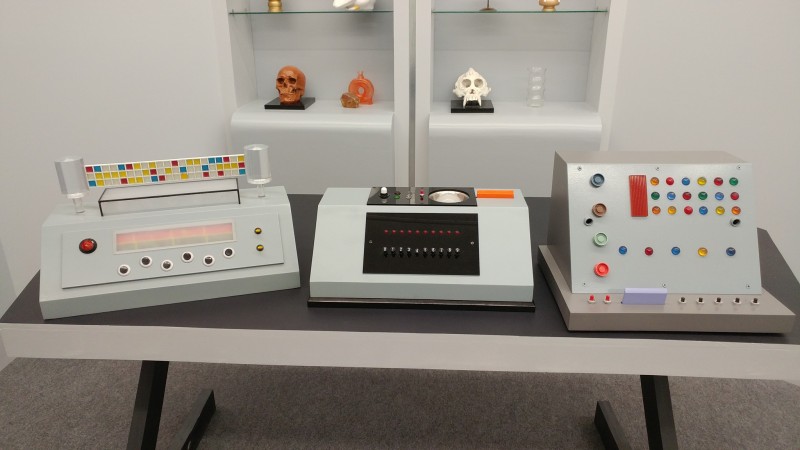
I've got the fourth style, which is hidden in PTrope's Breifing Room, but I'm not finding the others.
I did go re-download Mylochtka's old Commodore's Office and Computer Room from XCalPro, hoping they'd be in there, but the .pz3 files won't open in my copy of D|S. So I'm wondering if folks have other sources.
Or advice on how to get the .pz3's to open, that would work too.
Thanks!For .pz3 scenes, in 4.24 you have to use File > Import.
Is there a helpful tutorial on converting non-DAZ characters to G8?barcgwcc said:
Hi,
A non-DAZ modeling site recently had a great sale so I picked up a nice set. The items are in fbx, obj, and blend. However, whenever I import either fbx or obj rigged A-pose characters, the bones are separated from the body mesh (which is laying 90° off the bone rig). And the bones can not be selected or tranformed. I'd really like to use these characters for G8 in DS. The collection that I bought has a dozen or so pre-posed sets for each character as well, but when I import them, there are no bones at all that are imported with them. Is there a way to successfully import them into DS.
1. OBJ format figures have no bones with which you can pose them.
2. FBX format figures have bones, but depending on the software / the way that the content creators used when they exported FBX files, the imported figure in DS may vary.
The common way is to wrap a non-Daz figure with a G8 base mesh, then creating a head and body morph. Better take a look at these tutorials to understand the typical workflow first of all:R3DS Wrap: from Body Scan to Genesis 8
But if you don't want to go for the more complex workflow to get a final result of G8 + morphs, well FBX figures can still work well in DS esp. if they were made with Blender. Better post a screenshots of how they look in DS and Blender.
PS, I tried importing them into Blender (both fbx and obj as well) and then back out but that didn't work (but I'm not a blender guy, so I just accepted the defaults for both the import and export).
You mentioned they have blend files... so you should've opened the blend files firstly for a try. Usually the figures work well as expected in Blender.
{Diffeomorphic} HD Import Results in Blender Not Responding, More Often Than NotPadone said:
In blender HD is disabled in the viewport for perfomance reasons, it works in rendering. When exporting you have to set the daz viewport to the desired HD level as HD is baked from the viewport. Other than that it should work.
p.s. Anyway you don't want HD to go further than 3 as it would be too heavy in blender. Plus a high HD level of course also affects the import export time.
p.s. When exporting geografts with a HD figure be sure to enter the geometry editor to separate geografts from the figure. This is not necessary for base resolution.
https://github.com/Diffeomorphic/import_daz/wiki/HD_Tools
p.s. If the figure provides displacement maps or normal maps they're usually a fair and fast substitute to HD.
Ok, so those level 4 subd morphs are too resource intensive for Blender?
Have I mentioned how much I appreciate you and the tools you've given us? I am enjoying my hobby like I have not done in a good long while... all these new things to learn and play with!
Is there a helpful tutorial on converting non-DAZ characters to G8?Hi,
A non-DAZ modeling site recently had a great sale so I picked up a nice set. The items are in fbx, obj, and blend. However, whenever I import either fbx or obj rigged A-pose characters, the bones are separated from the body mesh (which is laying 90° off the bone rig). And the bones can not be selected or tranformed. I'd really like to use these characters for G8 in DS. The collection that I bought has a dozen or so pre-posed sets for each character as well, but when I import them, there are no bones at all that are imported with them. Is there a way to successfully import them into DS.
PS, I tried importing them into Blender (both fbx and obj as well) and then back out but that didn't work (but I'm not a blender guy, so I just accepted the defaults for both the import and export).
[Released] Content Wizard [Commercial]Depa3D said:
I'm getting this, or similar logs every product I try to install.
I unzip, analyze, install, install smart content. Errors, it tells me it already exists, which it doesn't, and asks if I want to modify, I say yes. Then I get the generic error "There were errors"
07:55:55 GMT-0400 (Eastern Daylight Time): Extracting files from E:\Staging\4th sector quadrant 1 for daz studio.zip...
07:56:00 GMT-0400 (Eastern Daylight Time): ...Success
07:56:01 GMT-0400 (Eastern Daylight Time): Scanning "Environments" directory...
07:56:01 GMT-0400 (Eastern Daylight Time): scene_subset File: C:/Users/tommy/AppData/Roaming/DAZ 3D/Studio4/temp/SCI/Environments/808State/4thSectorQuadrant1/4th Sector Quadrant 1.duf
07:56:01 GMT-0400 (Eastern Daylight Time): .png File: C:/Users/tommy/AppData/Roaming/DAZ 3D/Studio4/temp/SCI/Environments/808State/4thSectorQuadrant1/4th Sector Quadrant 1.duf.png
07:56:01 GMT-0400 (Eastern Daylight Time): .png File: C:/Users/tommy/AppData/Roaming/DAZ 3D/Studio4/temp/SCI/Environments/808State/4thSectorQuadrant1/4th Sector Quadrant 1.tip.png
07:56:01 GMT-0400 (Eastern Daylight Time): scene_subset File: C:/Users/tommy/AppData/Roaming/DAZ 3D/Studio4/temp/SCI/Environments/808State/4thSectorQuadrant1/4th Sector Quadrant 1 Objects/4th sector combined sidewalk trash plane 1.duf
07:56:01 GMT-0400 (Eastern Daylight Time): .png File: C:/Users/tommy/AppData/Roaming/DAZ 3D/Studio4/temp/SCI/Environments/808State/4thSectorQuadrant1/4th Sector Quadrant 1 Objects/4th sector combined sidewalk trash plane 1.duf.png
07:56:01 GMT-0400 (Eastern Daylight Time): scene_subset File: C:/Users/tommy/AppData/Roaming/DAZ 3D/Studio4/temp/SCI/Environments/808State/4thSectorQuadrant1/4th Sector Quadrant 1 Objects/4th sector combined sidewalk trash plane 2.duf
07:56:01 GMT-0400 (Eastern Daylight Time): .png File: C:/Users/tommy/AppData/Roaming/DAZ 3D/Studio4/temp/SCI/Environments/808State/4thSectorQuadrant1/4th Sector Quadrant 1 Objects/4th sector combined sidewalk trash plane 2.duf.png
07:56:01 GMT-0400 (Eastern Daylight Time): scene_subset File: C:/Users/tommy/AppData/Roaming/DAZ 3D/Studio4/temp/SCI/Environments/808State/4thSectorQuadrant1/4th Sector Quadrant 1 Objects/4th sector combined sidewalk trash plane 3.duf
07:56:01 GMT-0400 (Eastern Daylight Time): .png File: C:/Users/tommy/AppData/Roaming/DAZ 3D/Studio4/temp/SCI/Environments/808State/4thSectorQuadrant1/4th Sector Quadrant 1 Objects/4th sector combined sidewalk trash plane 3.duf.png
07:56:01 GMT-0400 (Eastern Daylight Time): scene_subset File: C:/Users/tommy/AppData/Roaming/DAZ 3D/Studio4/temp/SCI/Environments/808State/4thSectorQuadrant1/4th Sector Quadrant 1 Objects/4th sector combined sidewalk trash plane 4.duf
07:56:01 GMT-0400 (Eastern Daylight Time): .png File: C:/Users/tommy/AppData/Roaming/DAZ 3D/Studio4/temp/SCI/Environments/808State/4thSectorQuadrant1/4th Sector Quadrant 1 Objects/4th sector combined sidewalk trash plane 4.duf.png
07:56:01 GMT-0400 (Eastern Daylight Time): scene_subset File: C:/Users/tommy/AppData/Roaming/DAZ 3D/Studio4/temp/SCI/Environments/808State/4thSectorQuadrant1/4th Sector Quadrant 1 Objects/4th sector combined street trash plane 1.duf
07:56:01 GMT-0400 (Eastern Daylight Time): .png File: C:/Users/tommy/AppData/Roaming/DAZ 3D/Studio4/temp/SCI/Environments/808State/4thSectorQuadrant1/4th Sector Quadrant 1 Objects/4th sector combined street trash plane 1.duf.png
07:56:01 GMT-0400 (Eastern Daylight Time): scene_subset File: C:/Users/tommy/AppData/Roaming/DAZ 3D/Studio4/temp/SCI/Environments/808State/4thSectorQuadrant1/4th Sector Quadrant 1 Objects/4th sector combined street trash plane 2.duf
07:56:01 GMT-0400 (Eastern Daylight Time): .png File: C:/Users/tommy/AppData/Roaming/DAZ 3D/Studio4/temp/SCI/Environments/808State/4thSectorQuadrant1/4th Sector Quadrant 1 Objects/4th sector combined street trash plane 2.duf.png
07:56:01 GMT-0400 (Eastern Daylight Time): scene_subset File: C:/Users/tommy/AppData/Roaming/DAZ 3D/Studio4/temp/SCI/Environments/808State/4thSectorQuadrant1/4th Sector Quadrant 1 Objects/4th sector combined street trash plane 3.duf
07:56:01 GMT-0400 (Eastern Daylight Time): .png File: C:/Users/tommy/AppData/Roaming/DAZ 3D/Studio4/temp/SCI/Environments/808State/4thSectorQuadrant1/4th Sector Quadrant 1 Objects/4th sector combined street trash plane 3.duf.png
07:56:01 GMT-0400 (Eastern Daylight Time): scene_subset File: C:/Users/tommy/AppData/Roaming/DAZ 3D/Studio4/temp/SCI/Environments/808State/4thSectorQuadrant1/4th Sector Quadrant 1 Objects/4th sector combined street trash plane 4.duf
07:56:01 GMT-0400 (Eastern Daylight Time): .png File: C:/Users/tommy/AppData/Roaming/DAZ 3D/Studio4/temp/SCI/Environments/808State/4thSectorQuadrant1/4th Sector Quadrant 1 Objects/4th sector combined street trash plane 4.duf.png
07:56:01 GMT-0400 (Eastern Daylight Time): scene_subset File: C:/Users/tommy/AppData/Roaming/DAZ 3D/Studio4/temp/SCI/Environments/808State/4thSectorQuadrant1/4th Sector Quadrant 1 Objects/4th sector garbage bags.duf
07:56:01 GMT-0400 (Eastern Daylight Time): .png File: C:/Users/tommy/AppData/Roaming/DAZ 3D/Studio4/temp/SCI/Environments/808State/4thSectorQuadrant1/4th Sector Quadrant 1 Objects/4th sector garbage bags.duf.png
07:56:01 GMT-0400 (Eastern Daylight Time): scene_subset File: C:/Users/tommy/AppData/Roaming/DAZ 3D/Studio4/temp/SCI/Environments/808State/4thSectorQuadrant1/4th Sector Quadrant 1 Objects/4th sector layout ANIMOID ROW vendors bazaar 2.duf
07:56:01 GMT-0400 (Eastern Daylight Time): .png File: C:/Users/tommy/AppData/Roaming/DAZ 3D/Studio4/temp/SCI/Environments/808State/4thSectorQuadrant1/4th Sector Quadrant 1 Objects/4th sector layout ANIMOID ROW vendors bazaar 2.duf.png
07:56:01 GMT-0400 (Eastern Daylight Time): scene_subset File: C:/Users/tommy/AppData/Roaming/DAZ 3D/Studio4/temp/SCI/Environments/808State/4thSectorQuadrant1/4th Sector Quadrant 1 Objects/4th sector layout ANIMOID ROW vendors bazaar 3.duf
07:56:01 GMT-0400 (Eastern Daylight Time): .png File: C:/Users/tommy/AppData/Roaming/DAZ 3D/Studio4/temp/SCI/Environments/808State/4thSectorQuadrant1/4th Sector Quadrant 1 Objects/4th sector layout ANIMOID ROW vendors bazaar 3.duf.png
07:56:01 GMT-0400 (Eastern Daylight Time): scene_subset File: C:/Users/tommy/AppData/Roaming/DAZ 3D/Studio4/temp/SCI/Environments/808State/4thSectorQuadrant1/4th Sector Quadrant 1 Objects/4th sector layout ANIMOID ROW vendors bazaar.duf
07:56:01 GMT-0400 (Eastern Daylight Time): .png File: C:/Users/tommy/AppData/Roaming/DAZ 3D/Studio4/temp/SCI/Environments/808State/4thSectorQuadrant1/4th Sector Quadrant 1 Objects/4th sector layout ANIMOID ROW vendors bazaar.duf.png
07:56:01 GMT-0400 (Eastern Daylight Time): scene_subset File: C:/Users/tommy/AppData/Roaming/DAZ 3D/Studio4/temp/SCI/Environments/808State/4thSectorQuadrant1/4th Sector Quadrant 1 Objects/4th sector streets.duf
07:56:01 GMT-0400 (Eastern Daylight Time): .png File: C:/Users/tommy/AppData/Roaming/DAZ 3D/Studio4/temp/SCI/Environments/808State/4thSectorQuadrant1/4th Sector Quadrant 1 Objects/4th sector streets.duf.png
07:56:01 GMT-0400 (Eastern Daylight Time): scene_subset File: C:/Users/tommy/AppData/Roaming/DAZ 3D/Studio4/temp/SCI/Environments/808State/4thSectorQuadrant1/4th Sector Quadrant 1 Objects/ANIMOID ROW.duf
07:56:01 GMT-0400 (Eastern Daylight Time): .png File: C:/Users/tommy/AppData/Roaming/DAZ 3D/Studio4/temp/SCI/Environments/808State/4thSectorQuadrant1/4th Sector Quadrant 1 Objects/ANIMOID ROW.duf.png
07:56:01 GMT-0400 (Eastern Daylight Time): scene_subset File: C:/Users/tommy/AppData/Roaming/DAZ 3D/Studio4/temp/SCI/Environments/808State/4thSectorQuadrant1/4th Sector Quadrant 1 Objects/bank bldg.duf
07:56:01 GMT-0400 (Eastern Daylight Time): .png File: C:/Users/tommy/AppData/Roaming/DAZ 3D/Studio4/temp/SCI/Environments/808State/4thSectorQuadrant1/4th Sector Quadrant 1 Objects/bank bldg.duf.png
07:56:01 GMT-0400 (Eastern Daylight Time): scene_subset File: C:/Users/tommy/AppData/Roaming/DAZ 3D/Studio4/temp/SCI/Environments/808State/4thSectorQuadrant1/4th Sector Quadrant 1 Objects/bookstore bldg.duf
07:56:01 GMT-0400 (Eastern Daylight Time): .png File: C:/Users/tommy/AppData/Roaming/DAZ 3D/Studio4/temp/SCI/Environments/808State/4thSectorQuadrant1/4th Sector Quadrant 1 Objects/bookstore bldg.duf.png
07:56:01 GMT-0400 (Eastern Daylight Time): scene_subset File: C:/Users/tommy/AppData/Roaming/DAZ 3D/Studio4/temp/SCI/Environments/808State/4thSectorQuadrant1/4th Sector Quadrant 1 Objects/Eyeworks.duf
07:56:01 GMT-0400 (Eastern Daylight Time): .png File: C:/Users/tommy/AppData/Roaming/DAZ 3D/Studio4/temp/SCI/Environments/808State/4thSectorQuadrant1/4th Sector Quadrant 1 Objects/Eyeworks.duf.png
07:56:01 GMT-0400 (Eastern Daylight Time): scene_subset File: C:/Users/tommy/AppData/Roaming/DAZ 3D/Studio4/temp/SCI/Environments/808State/4thSectorQuadrant1/4th Sector Quadrant 1 Objects/Fish stand.duf
07:56:01 GMT-0400 (Eastern Daylight Time): .png File: C:/Users/tommy/AppData/Roaming/DAZ 3D/Studio4/temp/SCI/Environments/808State/4thSectorQuadrant1/4th Sector Quadrant 1 Objects/Fish stand.duf.png
07:56:01 GMT-0400 (Eastern Daylight Time): scene_subset File: C:/Users/tommy/AppData/Roaming/DAZ 3D/Studio4/temp/SCI/Environments/808State/4thSectorQuadrant1/4th Sector Quadrant 1 Objects/garbage bag 1.duf
07:56:01 GMT-0400 (Eastern Daylight Time): .png File: C:/Users/tommy/AppData/Roaming/DAZ 3D/Studio4/temp/SCI/Environments/808State/4thSectorQuadrant1/4th Sector Quadrant 1 Objects/garbage bag 1.duf.png
07:56:01 GMT-0400 (Eastern Daylight Time): scene_subset File: C:/Users/tommy/AppData/Roaming/DAZ 3D/Studio4/temp/SCI/Environments/808State/4thSectorQuadrant1/4th Sector Quadrant 1 Objects/garbage bag 2.duf
07:56:01 GMT-0400 (Eastern Daylight Time): .png File: C:/Users/tommy/AppData/Roaming/DAZ 3D/Studio4/temp/SCI/Environments/808State/4thSectorQuadrant1/4th Sector Quadrant 1 Objects/garbage bag 2.duf.png
07:56:01 GMT-0400 (Eastern Daylight Time): scene_subset File: C:/Users/tommy/AppData/Roaming/DAZ 3D/Studio4/temp/SCI/Environments/808State/4thSectorQuadrant1/4th Sector Quadrant 1 Objects/garbage bag 3.duf
07:56:01 GMT-0400 (Eastern Daylight Time): .png File: C:/Users/tommy/AppData/Roaming/DAZ 3D/Studio4/temp/SCI/Environments/808State/4thSectorQuadrant1/4th Sector Quadrant 1 Objects/garbage bag 3.duf.png
07:56:01 GMT-0400 (Eastern Daylight Time): scene_subset File: C:/Users/tommy/AppData/Roaming/DAZ 3D/Studio4/temp/SCI/Environments/808State/4thSectorQuadrant1/4th Sector Quadrant 1 Objects/garbage can.duf
07:56:01 GMT-0400 (Eastern Daylight Time): .png File: C:/Users/tommy/AppData/Roaming/DAZ 3D/Studio4/temp/SCI/Environments/808State/4thSectorQuadrant1/4th Sector Quadrant 1 Objects/garbage can.duf.png
07:56:01 GMT-0400 (Eastern Daylight Time): scene_subset File: C:/Users/tommy/AppData/Roaming/DAZ 3D/Studio4/temp/SCI/Environments/808State/4thSectorQuadrant1/4th Sector Quadrant 1 Objects/parking meter.duf
07:56:01 GMT-0400 (Eastern Daylight Time): .png File: C:/Users/tommy/AppData/Roaming/DAZ 3D/Studio4/temp/SCI/Environments/808State/4thSectorQuadrant1/4th Sector Quadrant 1 Objects/parking meter.duf.png
07:56:01 GMT-0400 (Eastern Daylight Time): scene_subset File: C:/Users/tommy/AppData/Roaming/DAZ 3D/Studio4/temp/SCI/Environments/808State/4thSectorQuadrant1/4th Sector Quadrant 1 Objects/sidewalk 1.duf
07:56:02 GMT-0400 (Eastern Daylight Time): .png File: C:/Users/tommy/AppData/Roaming/DAZ 3D/Studio4/temp/SCI/Environments/808State/4thSectorQuadrant1/4th Sector Quadrant 1 Objects/sidewalk 1.duf.png
07:56:02 GMT-0400 (Eastern Daylight Time): scene_subset File: C:/Users/tommy/AppData/Roaming/DAZ 3D/Studio4/temp/SCI/Environments/808State/4thSectorQuadrant1/4th Sector Quadrant 1 Objects/sidewalk 2.duf
07:56:02 GMT-0400 (Eastern Daylight Time): .png File: C:/Users/tommy/AppData/Roaming/DAZ 3D/Studio4/temp/SCI/Environments/808State/4thSectorQuadrant1/4th Sector Quadrant 1 Objects/sidewalk 2.duf.png
07:56:02 GMT-0400 (Eastern Daylight Time): scene_subset File: C:/Users/tommy/AppData/Roaming/DAZ 3D/Studio4/temp/SCI/Environments/808State/4thSectorQuadrant1/4th Sector Quadrant 1 Objects/sidewalk 3.duf
07:56:02 GMT-0400 (Eastern Daylight Time): .png File: C:/Users/tommy/AppData/Roaming/DAZ 3D/Studio4/temp/SCI/Environments/808State/4thSectorQuadrant1/4th Sector Quadrant 1 Objects/sidewalk 3.duf.png
07:56:02 GMT-0400 (Eastern Daylight Time): scene_subset File: C:/Users/tommy/AppData/Roaming/DAZ 3D/Studio4/temp/SCI/Environments/808State/4thSectorQuadrant1/4th Sector Quadrant 1 Objects/sidewalk 4.duf
07:56:02 GMT-0400 (Eastern Daylight Time): .png File: C:/Users/tommy/AppData/Roaming/DAZ 3D/Studio4/temp/SCI/Environments/808State/4thSectorQuadrant1/4th Sector Quadrant 1 Objects/sidewalk 4.duf.png
07:56:02 GMT-0400 (Eastern Daylight Time): scene_subset File: C:/Users/tommy/AppData/Roaming/DAZ 3D/Studio4/temp/SCI/Environments/808State/4thSectorQuadrant1/4th Sector Quadrant 1 Objects/street 1.duf
07:56:02 GMT-0400 (Eastern Daylight Time): .png File: C:/Users/tommy/AppData/Roaming/DAZ 3D/Studio4/temp/SCI/Environments/808State/4thSectorQuadrant1/4th Sector Quadrant 1 Objects/street 1.duf.png
07:56:02 GMT-0400 (Eastern Daylight Time): scene_subset File: C:/Users/tommy/AppData/Roaming/DAZ 3D/Studio4/temp/SCI/Environments/808State/4thSectorQuadrant1/4th Sector Quadrant 1 Objects/street 2.duf
07:56:02 GMT-0400 (Eastern Daylight Time): .png File: C:/Users/tommy/AppData/Roaming/DAZ 3D/Studio4/temp/SCI/Environments/808State/4thSectorQuadrant1/4th Sector Quadrant 1 Objects/street 2.duf.png
07:56:02 GMT-0400 (Eastern Daylight Time): scene_subset File: C:/Users/tommy/AppData/Roaming/DAZ 3D/Studio4/temp/SCI/Environments/808State/4thSectorQuadrant1/4th Sector Quadrant 1 Objects/street 3.duf
07:56:02 GMT-0400 (Eastern Daylight Time): .png File: C:/Users/tommy/AppData/Roaming/DAZ 3D/Studio4/temp/SCI/Environments/808State/4thSectorQuadrant1/4th Sector Quadrant 1 Objects/street 3.duf.png
07:56:02 GMT-0400 (Eastern Daylight Time): scene_subset File: C:/Users/tommy/AppData/Roaming/DAZ 3D/Studio4/temp/SCI/Environments/808State/4thSectorQuadrant1/4th Sector Quadrant 1 Objects/street 4.duf
07:56:02 GMT-0400 (Eastern Daylight Time): .png File: C:/Users/tommy/AppData/Roaming/DAZ 3D/Studio4/temp/SCI/Environments/808State/4thSectorQuadrant1/4th Sector Quadrant 1 Objects/street 4.duf.png
07:56:02 GMT-0400 (Eastern Daylight Time): scene_subset File: C:/Users/tommy/AppData/Roaming/DAZ 3D/Studio4/temp/SCI/Environments/808State/4thSectorQuadrant1/4th Sector Quadrant 1 Objects/streetlight.duf
07:56:02 GMT-0400 (Eastern Daylight Time): .png File: C:/Users/tommy/AppData/Roaming/DAZ 3D/Studio4/temp/SCI/Environments/808State/4thSectorQuadrant1/4th Sector Quadrant 1 Objects/streetlight.duf.png
07:56:02 GMT-0400 (Eastern Daylight Time): scene_subset File: C:/Users/tommy/AppData/Roaming/DAZ 3D/Studio4/temp/SCI/Environments/808State/4thSectorQuadrant1/4th Sector Quadrant 1 Objects/subway area.duf
07:56:02 GMT-0400 (Eastern Daylight Time): .png File: C:/Users/tommy/AppData/Roaming/DAZ 3D/Studio4/temp/SCI/Environments/808State/4thSectorQuadrant1/4th Sector Quadrant 1 Objects/subway area.duf.png
07:56:02 GMT-0400 (Eastern Daylight Time): scene_subset File: C:/Users/tommy/AppData/Roaming/DAZ 3D/Studio4/temp/SCI/Environments/808State/4thSectorQuadrant1/4th Sector Quadrant 1 Objects/upper levels.duf
07:56:02 GMT-0400 (Eastern Daylight Time): .png File: C:/Users/tommy/AppData/Roaming/DAZ 3D/Studio4/temp/SCI/Environments/808State/4thSectorQuadrant1/4th Sector Quadrant 1 Objects/upper levels.duf.png
07:56:02 GMT-0400 (Eastern Daylight Time): Analysis Complete.
07:56:04 GMT-0400 (Eastern Daylight Time): Installing Product to Daz Studio...
07:56:04 GMT-0400 (Eastern Daylight Time): Version Number 1.2
07:56:04 GMT-0400 (Eastern Daylight Time): Verifying "4th Sector Quadrant 1" product does not exist already
07:56:04 GMT-0400 (Eastern Daylight Time): Found existing product in Daz Studio: 4th Sector Quadrant 1
07:56:04 GMT-0400 (Eastern Daylight Time): Product: 4th Sector Quadrant 1
07:56:04 GMT-0400 (Eastern Daylight Time): Description:
07:56:04 GMT-0400 (Eastern Daylight Time): URL: 1234234
07:56:04 GMT-0400 (Eastern Daylight Time): Artists:
07:56:04 GMT-0400 (Eastern Daylight Time): Store: LOCAL USER
07:56:04 GMT-0400 (Eastern Daylight Time): Vendor: false
07:56:04 GMT-0400 (Eastern Daylight Time): GUID: d2f3305f-ec5b-47e7-9d0a-dced733abdc0
07:56:04 GMT-0400 (Eastern Daylight Time): Date Installed: Mon Aug 03 2026 07:53:11 GMT-0400 (Eastern Daylight Time) (Currently Installed: true)
07:56:04 GMT-0400 (Eastern Daylight Time): Date Released: Mon Aug 03 2026 07:53:11 GMT-0400 (Eastern Daylight Time)
07:56:04 GMT-0400 (Eastern Daylight Time): Copy: false, Delete: true, Insert: false, Modify: true, Rename: true
07:56:04 GMT-0400 (Eastern Daylight Time): Number of Assets: 0
07:56:04 GMT-0400 (Eastern Daylight Time): Number of Child Containers: 0
07:56:06 GMT-0400 (Eastern Daylight Time): Building product metadata...
07:56:06 GMT-0400 (Eastern Daylight Time): Unable to open file for writing: E:/Runtime 2024/Combined - New/Runtime/Support/LOCAL_USER_1234234_4th_Sector_Quadrant_1.dsx
07:56:06 GMT-0400 (Eastern Daylight Time): Error creating metadata for Daz Studio import: E:/Runtime 2024/Combined - New/Runtime/Support/LOCAL_USER_1234234_4th_Sector_Quadrant_1.dsx
07:56:06 GMT-0400 (Eastern Daylight Time): There were errors during installation.
Make sure the E:/Runtime 2024/Combined - New/Runtime/Support/ folder exists.
[Released] Content Wizard [Commercial]I'm getting this, or similar logs every product I try to install.
I unzip, analyze, install, install smart content. Errors, it tells me it already exists, which it doesn't, and asks if I want to modify, I say yes. Then I get the generic error "There were errors"
07:55:55 GMT-0400 (Eastern Daylight Time): Extracting files from E:\Staging\4th sector quadrant 1 for daz studio.zip...
07:56:00 GMT-0400 (Eastern Daylight Time): ...Success
07:56:01 GMT-0400 (Eastern Daylight Time): Scanning "Environments" directory...
07:56:01 GMT-0400 (Eastern Daylight Time): scene_subset File: C:/Users/tommy/AppData/Roaming/DAZ 3D/Studio4/temp/SCI/Environments/808State/4thSectorQuadrant1/4th Sector Quadrant 1.duf
07:56:01 GMT-0400 (Eastern Daylight Time): .png File: C:/Users/tommy/AppData/Roaming/DAZ 3D/Studio4/temp/SCI/Environments/808State/4thSectorQuadrant1/4th Sector Quadrant 1.duf.png
07:56:01 GMT-0400 (Eastern Daylight Time): .png File: C:/Users/tommy/AppData/Roaming/DAZ 3D/Studio4/temp/SCI/Environments/808State/4thSectorQuadrant1/4th Sector Quadrant 1.tip.png
07:56:01 GMT-0400 (Eastern Daylight Time): scene_subset File: C:/Users/tommy/AppData/Roaming/DAZ 3D/Studio4/temp/SCI/Environments/808State/4thSectorQuadrant1/4th Sector Quadrant 1 Objects/4th sector combined sidewalk trash plane 1.duf
07:56:01 GMT-0400 (Eastern Daylight Time): .png File: C:/Users/tommy/AppData/Roaming/DAZ 3D/Studio4/temp/SCI/Environments/808State/4thSectorQuadrant1/4th Sector Quadrant 1 Objects/4th sector combined sidewalk trash plane 1.duf.png
07:56:01 GMT-0400 (Eastern Daylight Time): scene_subset File: C:/Users/tommy/AppData/Roaming/DAZ 3D/Studio4/temp/SCI/Environments/808State/4thSectorQuadrant1/4th Sector Quadrant 1 Objects/4th sector combined sidewalk trash plane 2.duf
07:56:01 GMT-0400 (Eastern Daylight Time): .png File: C:/Users/tommy/AppData/Roaming/DAZ 3D/Studio4/temp/SCI/Environments/808State/4thSectorQuadrant1/4th Sector Quadrant 1 Objects/4th sector combined sidewalk trash plane 2.duf.png
07:56:01 GMT-0400 (Eastern Daylight Time): scene_subset File: C:/Users/tommy/AppData/Roaming/DAZ 3D/Studio4/temp/SCI/Environments/808State/4thSectorQuadrant1/4th Sector Quadrant 1 Objects/4th sector combined sidewalk trash plane 3.duf
07:56:01 GMT-0400 (Eastern Daylight Time): .png File: C:/Users/tommy/AppData/Roaming/DAZ 3D/Studio4/temp/SCI/Environments/808State/4thSectorQuadrant1/4th Sector Quadrant 1 Objects/4th sector combined sidewalk trash plane 3.duf.png
07:56:01 GMT-0400 (Eastern Daylight Time): scene_subset File: C:/Users/tommy/AppData/Roaming/DAZ 3D/Studio4/temp/SCI/Environments/808State/4thSectorQuadrant1/4th Sector Quadrant 1 Objects/4th sector combined sidewalk trash plane 4.duf
07:56:01 GMT-0400 (Eastern Daylight Time): .png File: C:/Users/tommy/AppData/Roaming/DAZ 3D/Studio4/temp/SCI/Environments/808State/4thSectorQuadrant1/4th Sector Quadrant 1 Objects/4th sector combined sidewalk trash plane 4.duf.png
07:56:01 GMT-0400 (Eastern Daylight Time): scene_subset File: C:/Users/tommy/AppData/Roaming/DAZ 3D/Studio4/temp/SCI/Environments/808State/4thSectorQuadrant1/4th Sector Quadrant 1 Objects/4th sector combined street trash plane 1.duf
07:56:01 GMT-0400 (Eastern Daylight Time): .png File: C:/Users/tommy/AppData/Roaming/DAZ 3D/Studio4/temp/SCI/Environments/808State/4thSectorQuadrant1/4th Sector Quadrant 1 Objects/4th sector combined street trash plane 1.duf.png
07:56:01 GMT-0400 (Eastern Daylight Time): scene_subset File: C:/Users/tommy/AppData/Roaming/DAZ 3D/Studio4/temp/SCI/Environments/808State/4thSectorQuadrant1/4th Sector Quadrant 1 Objects/4th sector combined street trash plane 2.duf
07:56:01 GMT-0400 (Eastern Daylight Time): .png File: C:/Users/tommy/AppData/Roaming/DAZ 3D/Studio4/temp/SCI/Environments/808State/4thSectorQuadrant1/4th Sector Quadrant 1 Objects/4th sector combined street trash plane 2.duf.png
07:56:01 GMT-0400 (Eastern Daylight Time): scene_subset File: C:/Users/tommy/AppData/Roaming/DAZ 3D/Studio4/temp/SCI/Environments/808State/4thSectorQuadrant1/4th Sector Quadrant 1 Objects/4th sector combined street trash plane 3.duf
07:56:01 GMT-0400 (Eastern Daylight Time): .png File: C:/Users/tommy/AppData/Roaming/DAZ 3D/Studio4/temp/SCI/Environments/808State/4thSectorQuadrant1/4th Sector Quadrant 1 Objects/4th sector combined street trash plane 3.duf.png
07:56:01 GMT-0400 (Eastern Daylight Time): scene_subset File: C:/Users/tommy/AppData/Roaming/DAZ 3D/Studio4/temp/SCI/Environments/808State/4thSectorQuadrant1/4th Sector Quadrant 1 Objects/4th sector combined street trash plane 4.duf
07:56:01 GMT-0400 (Eastern Daylight Time): .png File: C:/Users/tommy/AppData/Roaming/DAZ 3D/Studio4/temp/SCI/Environments/808State/4thSectorQuadrant1/4th Sector Quadrant 1 Objects/4th sector combined street trash plane 4.duf.png
07:56:01 GMT-0400 (Eastern Daylight Time): scene_subset File: C:/Users/tommy/AppData/Roaming/DAZ 3D/Studio4/temp/SCI/Environments/808State/4thSectorQuadrant1/4th Sector Quadrant 1 Objects/4th sector garbage bags.duf
07:56:01 GMT-0400 (Eastern Daylight Time): .png File: C:/Users/tommy/AppData/Roaming/DAZ 3D/Studio4/temp/SCI/Environments/808State/4thSectorQuadrant1/4th Sector Quadrant 1 Objects/4th sector garbage bags.duf.png
07:56:01 GMT-0400 (Eastern Daylight Time): scene_subset File: C:/Users/tommy/AppData/Roaming/DAZ 3D/Studio4/temp/SCI/Environments/808State/4thSectorQuadrant1/4th Sector Quadrant 1 Objects/4th sector layout ANIMOID ROW vendors bazaar 2.duf
07:56:01 GMT-0400 (Eastern Daylight Time): .png File: C:/Users/tommy/AppData/Roaming/DAZ 3D/Studio4/temp/SCI/Environments/808State/4thSectorQuadrant1/4th Sector Quadrant 1 Objects/4th sector layout ANIMOID ROW vendors bazaar 2.duf.png
07:56:01 GMT-0400 (Eastern Daylight Time): scene_subset File: C:/Users/tommy/AppData/Roaming/DAZ 3D/Studio4/temp/SCI/Environments/808State/4thSectorQuadrant1/4th Sector Quadrant 1 Objects/4th sector layout ANIMOID ROW vendors bazaar 3.duf
07:56:01 GMT-0400 (Eastern Daylight Time): .png File: C:/Users/tommy/AppData/Roaming/DAZ 3D/Studio4/temp/SCI/Environments/808State/4thSectorQuadrant1/4th Sector Quadrant 1 Objects/4th sector layout ANIMOID ROW vendors bazaar 3.duf.png
07:56:01 GMT-0400 (Eastern Daylight Time): scene_subset File: C:/Users/tommy/AppData/Roaming/DAZ 3D/Studio4/temp/SCI/Environments/808State/4thSectorQuadrant1/4th Sector Quadrant 1 Objects/4th sector layout ANIMOID ROW vendors bazaar.duf
07:56:01 GMT-0400 (Eastern Daylight Time): .png File: C:/Users/tommy/AppData/Roaming/DAZ 3D/Studio4/temp/SCI/Environments/808State/4thSectorQuadrant1/4th Sector Quadrant 1 Objects/4th sector layout ANIMOID ROW vendors bazaar.duf.png
07:56:01 GMT-0400 (Eastern Daylight Time): scene_subset File: C:/Users/tommy/AppData/Roaming/DAZ 3D/Studio4/temp/SCI/Environments/808State/4thSectorQuadrant1/4th Sector Quadrant 1 Objects/4th sector streets.duf
07:56:01 GMT-0400 (Eastern Daylight Time): .png File: C:/Users/tommy/AppData/Roaming/DAZ 3D/Studio4/temp/SCI/Environments/808State/4thSectorQuadrant1/4th Sector Quadrant 1 Objects/4th sector streets.duf.png
07:56:01 GMT-0400 (Eastern Daylight Time): scene_subset File: C:/Users/tommy/AppData/Roaming/DAZ 3D/Studio4/temp/SCI/Environments/808State/4thSectorQuadrant1/4th Sector Quadrant 1 Objects/ANIMOID ROW.duf
07:56:01 GMT-0400 (Eastern Daylight Time): .png File: C:/Users/tommy/AppData/Roaming/DAZ 3D/Studio4/temp/SCI/Environments/808State/4thSectorQuadrant1/4th Sector Quadrant 1 Objects/ANIMOID ROW.duf.png
07:56:01 GMT-0400 (Eastern Daylight Time): scene_subset File: C:/Users/tommy/AppData/Roaming/DAZ 3D/Studio4/temp/SCI/Environments/808State/4thSectorQuadrant1/4th Sector Quadrant 1 Objects/bank bldg.duf
07:56:01 GMT-0400 (Eastern Daylight Time): .png File: C:/Users/tommy/AppData/Roaming/DAZ 3D/Studio4/temp/SCI/Environments/808State/4thSectorQuadrant1/4th Sector Quadrant 1 Objects/bank bldg.duf.png
07:56:01 GMT-0400 (Eastern Daylight Time): scene_subset File: C:/Users/tommy/AppData/Roaming/DAZ 3D/Studio4/temp/SCI/Environments/808State/4thSectorQuadrant1/4th Sector Quadrant 1 Objects/bookstore bldg.duf
07:56:01 GMT-0400 (Eastern Daylight Time): .png File: C:/Users/tommy/AppData/Roaming/DAZ 3D/Studio4/temp/SCI/Environments/808State/4thSectorQuadrant1/4th Sector Quadrant 1 Objects/bookstore bldg.duf.png
07:56:01 GMT-0400 (Eastern Daylight Time): scene_subset File: C:/Users/tommy/AppData/Roaming/DAZ 3D/Studio4/temp/SCI/Environments/808State/4thSectorQuadrant1/4th Sector Quadrant 1 Objects/Eyeworks.duf
07:56:01 GMT-0400 (Eastern Daylight Time): .png File: C:/Users/tommy/AppData/Roaming/DAZ 3D/Studio4/temp/SCI/Environments/808State/4thSectorQuadrant1/4th Sector Quadrant 1 Objects/Eyeworks.duf.png
07:56:01 GMT-0400 (Eastern Daylight Time): scene_subset File: C:/Users/tommy/AppData/Roaming/DAZ 3D/Studio4/temp/SCI/Environments/808State/4thSectorQuadrant1/4th Sector Quadrant 1 Objects/Fish stand.duf
07:56:01 GMT-0400 (Eastern Daylight Time): .png File: C:/Users/tommy/AppData/Roaming/DAZ 3D/Studio4/temp/SCI/Environments/808State/4thSectorQuadrant1/4th Sector Quadrant 1 Objects/Fish stand.duf.png
07:56:01 GMT-0400 (Eastern Daylight Time): scene_subset File: C:/Users/tommy/AppData/Roaming/DAZ 3D/Studio4/temp/SCI/Environments/808State/4thSectorQuadrant1/4th Sector Quadrant 1 Objects/garbage bag 1.duf
07:56:01 GMT-0400 (Eastern Daylight Time): .png File: C:/Users/tommy/AppData/Roaming/DAZ 3D/Studio4/temp/SCI/Environments/808State/4thSectorQuadrant1/4th Sector Quadrant 1 Objects/garbage bag 1.duf.png
07:56:01 GMT-0400 (Eastern Daylight Time): scene_subset File: C:/Users/tommy/AppData/Roaming/DAZ 3D/Studio4/temp/SCI/Environments/808State/4thSectorQuadrant1/4th Sector Quadrant 1 Objects/garbage bag 2.duf
07:56:01 GMT-0400 (Eastern Daylight Time): .png File: C:/Users/tommy/AppData/Roaming/DAZ 3D/Studio4/temp/SCI/Environments/808State/4thSectorQuadrant1/4th Sector Quadrant 1 Objects/garbage bag 2.duf.png
07:56:01 GMT-0400 (Eastern Daylight Time): scene_subset File: C:/Users/tommy/AppData/Roaming/DAZ 3D/Studio4/temp/SCI/Environments/808State/4thSectorQuadrant1/4th Sector Quadrant 1 Objects/garbage bag 3.duf
07:56:01 GMT-0400 (Eastern Daylight Time): .png File: C:/Users/tommy/AppData/Roaming/DAZ 3D/Studio4/temp/SCI/Environments/808State/4thSectorQuadrant1/4th Sector Quadrant 1 Objects/garbage bag 3.duf.png
07:56:01 GMT-0400 (Eastern Daylight Time): scene_subset File: C:/Users/tommy/AppData/Roaming/DAZ 3D/Studio4/temp/SCI/Environments/808State/4thSectorQuadrant1/4th Sector Quadrant 1 Objects/garbage can.duf
07:56:01 GMT-0400 (Eastern Daylight Time): .png File: C:/Users/tommy/AppData/Roaming/DAZ 3D/Studio4/temp/SCI/Environments/808State/4thSectorQuadrant1/4th Sector Quadrant 1 Objects/garbage can.duf.png
07:56:01 GMT-0400 (Eastern Daylight Time): scene_subset File: C:/Users/tommy/AppData/Roaming/DAZ 3D/Studio4/temp/SCI/Environments/808State/4thSectorQuadrant1/4th Sector Quadrant 1 Objects/parking meter.duf
07:56:01 GMT-0400 (Eastern Daylight Time): .png File: C:/Users/tommy/AppData/Roaming/DAZ 3D/Studio4/temp/SCI/Environments/808State/4thSectorQuadrant1/4th Sector Quadrant 1 Objects/parking meter.duf.png
07:56:01 GMT-0400 (Eastern Daylight Time): scene_subset File: C:/Users/tommy/AppData/Roaming/DAZ 3D/Studio4/temp/SCI/Environments/808State/4thSectorQuadrant1/4th Sector Quadrant 1 Objects/sidewalk 1.duf
07:56:02 GMT-0400 (Eastern Daylight Time): .png File: C:/Users/tommy/AppData/Roaming/DAZ 3D/Studio4/temp/SCI/Environments/808State/4thSectorQuadrant1/4th Sector Quadrant 1 Objects/sidewalk 1.duf.png
07:56:02 GMT-0400 (Eastern Daylight Time): scene_subset File: C:/Users/tommy/AppData/Roaming/DAZ 3D/Studio4/temp/SCI/Environments/808State/4thSectorQuadrant1/4th Sector Quadrant 1 Objects/sidewalk 2.duf
07:56:02 GMT-0400 (Eastern Daylight Time): .png File: C:/Users/tommy/AppData/Roaming/DAZ 3D/Studio4/temp/SCI/Environments/808State/4thSectorQuadrant1/4th Sector Quadrant 1 Objects/sidewalk 2.duf.png
07:56:02 GMT-0400 (Eastern Daylight Time): scene_subset File: C:/Users/tommy/AppData/Roaming/DAZ 3D/Studio4/temp/SCI/Environments/808State/4thSectorQuadrant1/4th Sector Quadrant 1 Objects/sidewalk 3.duf
07:56:02 GMT-0400 (Eastern Daylight Time): .png File: C:/Users/tommy/AppData/Roaming/DAZ 3D/Studio4/temp/SCI/Environments/808State/4thSectorQuadrant1/4th Sector Quadrant 1 Objects/sidewalk 3.duf.png
07:56:02 GMT-0400 (Eastern Daylight Time): scene_subset File: C:/Users/tommy/AppData/Roaming/DAZ 3D/Studio4/temp/SCI/Environments/808State/4thSectorQuadrant1/4th Sector Quadrant 1 Objects/sidewalk 4.duf
07:56:02 GMT-0400 (Eastern Daylight Time): .png File: C:/Users/tommy/AppData/Roaming/DAZ 3D/Studio4/temp/SCI/Environments/808State/4thSectorQuadrant1/4th Sector Quadrant 1 Objects/sidewalk 4.duf.png
07:56:02 GMT-0400 (Eastern Daylight Time): scene_subset File: C:/Users/tommy/AppData/Roaming/DAZ 3D/Studio4/temp/SCI/Environments/808State/4thSectorQuadrant1/4th Sector Quadrant 1 Objects/street 1.duf
07:56:02 GMT-0400 (Eastern Daylight Time): .png File: C:/Users/tommy/AppData/Roaming/DAZ 3D/Studio4/temp/SCI/Environments/808State/4thSectorQuadrant1/4th Sector Quadrant 1 Objects/street 1.duf.png
07:56:02 GMT-0400 (Eastern Daylight Time): scene_subset File: C:/Users/tommy/AppData/Roaming/DAZ 3D/Studio4/temp/SCI/Environments/808State/4thSectorQuadrant1/4th Sector Quadrant 1 Objects/street 2.duf
07:56:02 GMT-0400 (Eastern Daylight Time): .png File: C:/Users/tommy/AppData/Roaming/DAZ 3D/Studio4/temp/SCI/Environments/808State/4thSectorQuadrant1/4th Sector Quadrant 1 Objects/street 2.duf.png
07:56:02 GMT-0400 (Eastern Daylight Time): scene_subset File: C:/Users/tommy/AppData/Roaming/DAZ 3D/Studio4/temp/SCI/Environments/808State/4thSectorQuadrant1/4th Sector Quadrant 1 Objects/street 3.duf
07:56:02 GMT-0400 (Eastern Daylight Time): .png File: C:/Users/tommy/AppData/Roaming/DAZ 3D/Studio4/temp/SCI/Environments/808State/4thSectorQuadrant1/4th Sector Quadrant 1 Objects/street 3.duf.png
07:56:02 GMT-0400 (Eastern Daylight Time): scene_subset File: C:/Users/tommy/AppData/Roaming/DAZ 3D/Studio4/temp/SCI/Environments/808State/4thSectorQuadrant1/4th Sector Quadrant 1 Objects/street 4.duf
07:56:02 GMT-0400 (Eastern Daylight Time): .png File: C:/Users/tommy/AppData/Roaming/DAZ 3D/Studio4/temp/SCI/Environments/808State/4thSectorQuadrant1/4th Sector Quadrant 1 Objects/street 4.duf.png
07:56:02 GMT-0400 (Eastern Daylight Time): scene_subset File: C:/Users/tommy/AppData/Roaming/DAZ 3D/Studio4/temp/SCI/Environments/808State/4thSectorQuadrant1/4th Sector Quadrant 1 Objects/streetlight.duf
07:56:02 GMT-0400 (Eastern Daylight Time): .png File: C:/Users/tommy/AppData/Roaming/DAZ 3D/Studio4/temp/SCI/Environments/808State/4thSectorQuadrant1/4th Sector Quadrant 1 Objects/streetlight.duf.png
07:56:02 GMT-0400 (Eastern Daylight Time): scene_subset File: C:/Users/tommy/AppData/Roaming/DAZ 3D/Studio4/temp/SCI/Environments/808State/4thSectorQuadrant1/4th Sector Quadrant 1 Objects/subway area.duf
07:56:02 GMT-0400 (Eastern Daylight Time): .png File: C:/Users/tommy/AppData/Roaming/DAZ 3D/Studio4/temp/SCI/Environments/808State/4thSectorQuadrant1/4th Sector Quadrant 1 Objects/subway area.duf.png
07:56:02 GMT-0400 (Eastern Daylight Time): scene_subset File: C:/Users/tommy/AppData/Roaming/DAZ 3D/Studio4/temp/SCI/Environments/808State/4thSectorQuadrant1/4th Sector Quadrant 1 Objects/upper levels.duf
07:56:02 GMT-0400 (Eastern Daylight Time): .png File: C:/Users/tommy/AppData/Roaming/DAZ 3D/Studio4/temp/SCI/Environments/808State/4thSectorQuadrant1/4th Sector Quadrant 1 Objects/upper levels.duf.png
07:56:02 GMT-0400 (Eastern Daylight Time): Analysis Complete.
07:56:04 GMT-0400 (Eastern Daylight Time): Installing Product to Daz Studio...
07:56:04 GMT-0400 (Eastern Daylight Time): Version Number 1.2
07:56:04 GMT-0400 (Eastern Daylight Time): Verifying "4th Sector Quadrant 1" product does not exist already
07:56:04 GMT-0400 (Eastern Daylight Time): Found existing product in Daz Studio: 4th Sector Quadrant 1
07:56:04 GMT-0400 (Eastern Daylight Time): Product: 4th Sector Quadrant 1
07:56:04 GMT-0400 (Eastern Daylight Time): Description:
07:56:04 GMT-0400 (Eastern Daylight Time): URL: 1234234
07:56:04 GMT-0400 (Eastern Daylight Time): Artists:
07:56:04 GMT-0400 (Eastern Daylight Time): Store: LOCAL USER
07:56:04 GMT-0400 (Eastern Daylight Time): Vendor: false
07:56:04 GMT-0400 (Eastern Daylight Time): GUID: d2f3305f-ec5b-47e7-9d0a-dced733abdc0
07:56:04 GMT-0400 (Eastern Daylight Time): Date Installed: Mon Aug 03 2026 07:53:11 GMT-0400 (Eastern Daylight Time) (Currently Installed: true)
07:56:04 GMT-0400 (Eastern Daylight Time): Date Released: Mon Aug 03 2026 07:53:11 GMT-0400 (Eastern Daylight Time)
07:56:04 GMT-0400 (Eastern Daylight Time): Copy: false, Delete: true, Insert: false, Modify: true, Rename: true
07:56:04 GMT-0400 (Eastern Daylight Time): Number of Assets: 0
07:56:04 GMT-0400 (Eastern Daylight Time): Number of Child Containers: 0
07:56:06 GMT-0400 (Eastern Daylight Time): Building product metadata...
07:56:06 GMT-0400 (Eastern Daylight Time): Unable to open file for writing: E:/Runtime 2024/Combined - New/Runtime/Support/LOCAL_USER_1234234_4th_Sector_Quadrant_1.dsx
07:56:06 GMT-0400 (Eastern Daylight Time): Error creating metadata for Daz Studio import: E:/Runtime 2024/Combined - New/Runtime/Support/LOCAL_USER_1234234_4th_Sector_Quadrant_1.dsx
07:56:06 GMT-0400 (Eastern Daylight Time): There were errors during installation.
[Diffeomorphic] an you change the name of a morph's categorywhat the tittle says, lets say that I load a series of morphs and I accidentally misspell the name of the category and want to fix it, or I import some custom morphs into a new character but I want to change the name of the imported categories to fit with the new character, can that be done?
JAF Pear incomplete zip?The readme confirms that the package has only the textues (and metadata) so we will let Daz know.
FBX ConversionDepending on the models complecity as well as how the they were made, rigging automotives / planes etc. can be a bit challenging... the workload may also vary. If you just need to use them as static objects, you don't need to rig them. Import FBXs, convert them to props and/or figures, assign the texture maps, then save as Scene Subset.
If you do need to rig them for tranlating / rotating the parts of them, you may take a look at this product : https://www.daz3d.com/rigging-vehicles-and-mechs-in-daz-studio I ever learnt a lot from them. There're some simple tutorials on youtube, you may search there.. e.g. https://youtu.be/NH6sg-pMppU?si=ROvFOaNqwAbALI2a
https://www.youtube.com/watch?v=VIxH2Ilf9D8&list=PLPcx_LSSGfZfhDCty973OQjnXLugQtoEE
Edit: Rigging process is not difficult but most of the time just tedious ~~
{Diffeomorphic} HD Import Results in Blender Not Responding, More Often Than NotIn blender HD is disabled in the viewport for perfomance reasons, it works in rendering. When exporting you have to set the daz viewport to the desired HD level as HD is baked from the viewport. Other than that it should work.
p.s. Anyway you don't want HD to go further than 3 as it would be too heavy in blender. Plus a high HD level of course also affects the import export time.
p.s. When exporting geografts with a HD figure be sure to enter the geometry editor to separate geografts from the figure. This is not necessary for base resolution.
https://github.com/Diffeomorphic/import_daz/wiki/HD_Tools
p.s. If the figure provides displacement maps or normal maps they're usually a fair and fast substitute to HD.
Daz studio 6 to blender 5.1.2 to flutterHi all,
Have been using Daz Studio6 laura for genesis9, added some features and then exported with fbx and imported into blender 5.1.2 as there isnt a bridge option i know of.
Chasing issues all the way, mesh stretching eyes, eyelashes and brows not moving with body etc.
Let me say i have no idea, this is my first project and i wanted to do it myself so i understand whats involved for future contract work
If anyone has the means to import my daz file into blender would be much appreciated.
Ultimate goal is to have characture in flutter, maybe via utility that looks human, talks and acts human like too.
Daz 3D is part of

Connect
DAZ Productions, Inc.
7533 S Center View Ct #4664
West Jordan, UT 84084Licensing Agreement | Terms of Service | Privacy Policy | EULA
© 2026 Daz Productions Inc. All Rights Reserved.