-
FaceGen vs Face Transfer vs Headshop 12. Pros & Cons?
info_b3470fa520 said:
Catherine3678ab said:
For those considering trying out HeadShop any number, it is expected that the installation of Daz Studio will be at some default location - not a user defined location. HeadShop2023 does not work on W11Pro with my D/S being at a user defined location.
Catherine, as long as you know where your DAZ Studio is located (hint; anywhere, but inside a folder that also contains "DAZStudio4" folder, which contains Studio and plugins), you can install HeadShopPRO 2023 to that folder. Unlike you, some users really don't know where they installed their working DAZ Studio or have multiple copies of DAZ Studio installed at various locations. In my experience 99.9% of the install issues are caused by this. Thanks for clarifying this.
Laslo
Sadly no Laslo, we've been through all this. It does not work over here. As best I can determine, something is either hardwired in HS "or" in W11Pro which prevents HS from functioning.
Just a thought, could be a request, for to make HS into a separate program like FaceGen is; so then it would not matter where one installed it either. FaceGen makes and saves the morphs, we then open D/S, load the figure and dial in the morphs. FaceGen does have to be told where the content folder is of course, and that is done by the user - it doesn't presume it is located at some mysterious location.
HeadShop HelpIs it possible that HeadShop cannot handle a German Windows version?
FaceGen vs Face Transfer vs Headshop 12. Pros & Cons?Catherine3678ab said:
For those considering trying out HeadShop any number, it is expected that the installation of Daz Studio will be at some default location - not a user defined location. HeadShop2023 does not work on W11Pro with my D/S being at a user defined location.
Catherine, as long as you know where your DAZ Studio is located (hint; anywhere, but inside a folder that also contains "DAZStudio4" folder, which contains Studio and plugins), you can install HeadShopPRO 2023 to that folder. Unlike you, some users really don't know where they installed their working DAZ Studio or have multiple copies of DAZ Studio installed at various locations. In my experience 99.9% of the install issues are caused by this. Thanks for clarifying this.
Laslo
FaceGen vs Face Transfer vs Headshop 12. Pros & Cons?For those considering trying out HeadShop any number, it is expected that the installation of Daz Studio will be at some default location - not a user defined location. HeadShop2023 does not work on W11Pro with my D/S being at a user defined location.
FaceGen vs Face Transfer vs Headshop 12. Pros & Cons?info_b3470fa520 said:
bnstone_stone said:
I'm a FaceGen, FaceXfer kinda guy, but I'm about to purchase HS Pro. I favor FG, but I get several images and create two or three versions of a model, then apply at reduced percentages to achieve a decent result. I have HS 13 but found it to be very user unfriendly and a bit of a pain to get good results. Still, I'm game to try again after reading other comments here. Just would have been nice to get a better discount for being a prior purchaser (HS13 is not my first try at it).
UPDATE: so I followed the instalation instructions and keep getting this error: no .jason config files found!
Why is this program so hard to install all the time?
Any ideas what to do here? I sent an email to support at Abalon
We answered your support email and also ready to have a skype call/screen share which works best. The reason why HeadShop installation are different hinges with the fact that HeadShop is a DAZ Studio plugin and it needs to be installed similar/same place as the to other DAZ plugins. Since FaceGen is not a plugin and does not work inside DAZ Studio, it can be installed any which way.
We provided tons of info on how to install HeadShop which has its own installer. There's a README step-by-step in the installer, there's an install video https://youtu.be/QACNeyStmT0 and there are detail instructions in the 80-page manual: https://printahead.net/wp-content/uploads/HeadShopPRO-2023.pdf.
While 99% of our users follow these guides, there some that do not take time to read instructions.
So no reason to be insulting about reading the instructions there, chap. I did exstensive reading and installing of this program, yet again am having issue with it and G8/G8.1. Have not tried G9 but G3 does work fine.
With that said, and the uncalled for insult about following instructions, the program appears to have been installed correctly. I have check my emails daily without any response, so let's try sending another email so maybe I can solve the G8 issues and feel my money was well spent here, shall we?
FaceGen vs Face Transfer vs Headshop 12. Pros & Cons?bnstone_stone said:
I'm a FaceGen, FaceXfer kinda guy, but I'm about to purchase HS Pro. I favor FG, but I get several images and create two or three versions of a model, then apply at reduced percentages to achieve a decent result. I have HS 13 but found it to be very user unfriendly and a bit of a pain to get good results. Still, I'm game to try again after reading other comments here. Just would have been nice to get a better discount for being a prior purchaser (HS13 is not my first try at it).
UPDATE: so I followed the instalation instructions and keep getting this error: no .jason config files found!
Why is this program so hard to install all the time?
Any ideas what to do here? I sent an email to support at Abalon
We answered your support email and also ready to have a skype call/screen share which works best. The reason why HeadShop installation are different hinges with the fact that HeadShop is a DAZ Studio plugin and it needs to be installed similar/same place as the to other DAZ plugins. Since FaceGen is not a plugin and does not work inside DAZ Studio, it can be installed any which way.
We provided tons of info on how to install HeadShop which has its own installer. There's a README step-by-step in the installer, there's an install video https://youtu.be/QACNeyStmT0 and there are detail instructions in the 80-page manual: https://printahead.net/wp-content/uploads/HeadShopPRO-2023.pdf.
While 99% of our users follow these guides, there some that do not take time to read instructions.
FaceGen vs Face Transfer vs Headshop 12. Pros & Cons?Facegen Artist is the version of FG that works with Genesis. It has been updated recently as well. This is noteworthy because Daz Face Transfer has NEVER been updated in its entire existence. So while FG is very old, it is indeed still getting support all these years later. You cannot say the same about Face Transfer. As for Head Shop, it always has promise but I have been let down too many times by it. To its credit, HeadShop 2023 is the only one that supports Genesis 9. At some point Facegen probably will. Considering that Face Transfer has never been updated at all, I am very doubtful that it will ever support Genesis 9. However, just looking at the tutorial for HS2023, it looks like the app struggles to create proper morphs for the G9 eyes and teeth. I have a feeling that any face generator will have a big problem with G9.
The new FG has automatic dot placement like the others do, so now FG is more user friendly. You can still manually place dots if you wish, too, so it still has that freedom. Another thing I noticed is that the newest FG appears to do a better job blending the face into the texture than it did before. So if you have not updated Facegen in a while, you should do so. The latest update just dropped days ago.
Somebody asked about the cut off point of the photo blend. This is where using a side profile photo helps.
They all still have their issues. The head shapes can be really comical looking. If you are looking for a bunch of random background characters, I would use Face Randomizer and combine it with textures from Facegen. At a distance, FG characters can look pretty convincing. You can create unlimited randomized faces from an AI Art Generator to use in Facegen. You can easily adjust the attributes so the AI faces are bald and not smiling, which removes the biggest issues these apps have.
HeadShop 2023 Photo-to-3D supports Genesis 9, in Store 4/24 (Commercial)HeadShop has been supporting photo-to-3D conversions for DAZ figures since 2007. We have continuously updated our product to keep up with the development of new DAZ features and figures. This is one of the times when DAZ made major changes in Genesis 9. adding great new capabilities for the new figure. HeadShopPRO stepped up to the challenge to support Genesis 9. The result is HeadShopPRO 2023.
HeadShopPRO 2023 is the latest version of the HeadShop family, replacing HeadShopPRO, with some important additions.
- HeadShopPRO 2023 fully supports the new Genesis 9 figure(s). Genesis 9 is a huge milestone for DAZ, as it dramatically increases the flexibility and realism of the figure. Unfortunately this also means that it is NOT compatible with earlier models (15% smaller, separate “Eyes” and “Mouth”, different head-shape that includes neck, etc.
- HeadShopPRO now also includes some new 3D mesh libraries that enables users to create 3D printable busts, either monochrome or full-color sandstone statues.
In addition
- We further improved our “AutoSculpt” libraries. Most 3D heads lack realism if they ignore the unique “topography” of each head, such as different shapes of noses, chins, creases and so on. We developed over 120 shapes with sliders to help users individually change the shapes one-by-one or mix-and-match, which is a different way than competing approaches by others, because it works like a police “sketch artist”, basing portrait on the description of individual elements (-how was the lip – narrow, fleshy, straight, zig-zag) and similar.
- We also feature retouch tools in the “Color” tab in case there are imperfections in the texture or leftovers from hair or other artifacts.
- HeadShop is NOT installing with DAZ Central or Install Manager but comes with its own installation. Please follow the easy steps in the README before installing all 4 folders.
-
Please watch our new HeadShopPRO 2023 video here: https://youtu.be/L-wZLeR2l7o
Anyone else using AI generated faces for FaceGen/Face Transfer/Headshop?The question of the day is: What site do you source your images from?
I have used Artbreeder since - well, since before I was even using Daz. My whole original purpose in learning to use Daz was to use FaceGen to create characters from Artbreeder portraits. I have nearly three years of files - entire groups of related characters - at Artbreeder that as of sometime in the last week and a half got dumped, presumably as a result of recent changes at the site. Not a single thing I have ever created is still left there, including something I created 10 days ago. I'm inquiring, but I have to assume that everything is lost.
In recent times, thispersondoesnotexist.com also disappeared. There is another site I know, Generated.photos, which creates decent images but is a pay-only model.
I just tried out a few other sites and am generally not excited about the output, very little of which is suitable for the purpose.
If I have to start over from scratch, I figured I'd at least ask around and see if anyone else is doing this and find out what their site(s) of choice are.
March 19: First Ever HeadShopPRO at DAZ! (Commercial)UPDATE. After another look at the troubleshooting info I guessed that HSP is incompatible with DAZ Studio multi-instance convention; I closed all (all 4) instances of DS that I had running and started one from the default shortcut; from there the HSP mostly works, in that I can get through it to the point of putting a face on a figure in DS.
===================
This program simply does not work on the current version of DAZ Studio.
Start with a new G8.1 female figure selected in an otehrwise empty secen. Click the HSP menu item and the initial dialog opens as expected and I can pick the three list items.
Becauwe later steps failed, when I tried a second time, I clicked the button to Save Figure Settings. That fails with an error message "Unable to write to surface configuration file", but the error in the DS log file suggests possibly something different:
2023-03-18 10:11:29.878 [WARNING] :: Object::connect: No such signal QButtonGroup::clicked(int) in dzfacemorphloaderdlg.cpp:190<br /> 2023-03-18 10:11:29.878 [WARNING] :: Object::connect: (receiver name: 'DzFaceshopMorphLoaderDialog')Anyway, press on and click "Accept" anyway. HS opens and I can get to the main window,...
[NB at this point the program is hopeless if you have windows display scaling at 150%, which is normal for a 4k monitor... the labels and buttons on the HSP window are all overlapping, the buttons cannot be reached to click them, and nothing moves when the window is resized. The program cannot be used at all until I set display scaling down to 100%; which of course leaves most text unreadable.]
...find a photo I want to work with, and drag it onto the "Single Image" box with Genesis 8.1 Basic Figure selected. HSP finds the face and displays it with its array of blue dots showing the feature points it located. But it also pops up a message box saying "DAZ model not found.". It only offers "OK". Click ok. Clcik apply... a Pleas wait" progress bar is diplayed but an "unhandled exception" over top of that (see below).
This is quite frustrating as the analysis of the face looks good to that point and I would really like to get it into DS.
It would be nice if the program worked.
/t
See the end of this message for details on invoking <br /> just-in-time (JIT) debugging instead of this dialog box.************** Exception Text **************<br /> System.ArgumentNullException: Value cannot be null.<br /> Parameter name: fileName<br /> at System.IO.FileInfo..ctor(String fileName)<br /> at RH.Core.Render.Obj.ObjLoader.LoadObjFile(String filePath, Boolean needExporter, Boolean isOpenSmile) in D:\projects\headshop\source\headshop\RH.Core\Render\Obj\ObjLoader.cs:line 53<br /> at RH.Core.Render.Controllers.PickingController.AddMehes(String path, MeshType type, Boolean fromDragAndDrop, GenesisType genesisType, ManType manType, String animationPath, Boolean needExporter, Boolean isOpenSmile) in D:\projects\headshop\source\headshop\RH.Core\Render\Controllers\PickingController.cs:line 234<br /> at RH.Core.Render.Controllers.PickingController.AddMehes(String path, MeshType type, Boolean fromDragAndDrop, GenesisType genesisType, ManType manType, Boolean needExporter, Boolean isOpenSmile) in D:\projects\headshop\source\headshop\RH.Core\Render\Controllers\PickingController.cs:line 227<br /> at RH.Core.Render.ctrlRenderControl.LoadProject(Boolean newProject, RectangleAABB aabb) in D:\projects\headshop\source\headshop\RH.Core\Render\ctrlRenderControl.cs:line 550<br /> at RH.Core.frmMain.UpdateProjectControls(Boolean newProject, RectangleAABB aabb) in D:\projects\headshop\source\headshop\RH.Core\frmMain.cs:line 2851<br /> at RH.Core.Controls.frmNewProject4PrintAhead.CreateProject() in D:\projects\headshop\source\headshop\RH.Core\Controls\frmNewProject4PrintAhead.cs:line 758<br /> at RH.Core.frmMain.frmMain_Load(Object sender, EventArgs e) in D:\projects\headshop\source\headshop\RH.Core\frmMain.cs:line 408<br /> at System.Windows.Forms.Form.OnLoad(EventArgs e)<br /> at System.Windows.Forms.Form.OnCreateControl()<br /> at System.Windows.Forms.Control.CreateControl(Boolean fIgnoreVisible)<br /> at System.Windows.Forms.Control.CreateControl()<br /> at System.Windows.Forms.Control.WmShowWindow(Message& m)<br /> at System.Windows.Forms.Control.WndProc(Message& m)<br /> at System.Windows.Forms.ScrollableControl.WndProc(Message& m)<br /> at System.Windows.Forms.ContainerControl.WndProc(Message& m)<br /> at System.Windows.Forms.Form.WmShowWindow(Message& m)<br /> at System.Windows.Forms.Form.WndProc(Message& m)<br /> at System.Windows.Forms.Control.ControlNativeWindow.OnMessage(Message& m)<br /> at System.Windows.Forms.Control.ControlNativeWindow.WndProc(Message& m)<br /> at System.Windows.Forms.NativeWindow.Callback(IntPtr hWnd, Int32 msg, IntPtr wparam, IntPtr lparam)************** Loaded Assemblies **************<br /> mscorlib<br /> Assembly Version: 4.0.0.0<br /> Win32 Version: 4.8.9139.0 built by: NET481REL1LAST_B<br /> CodeBase: file:///C:/Windows/Microsoft.NET/Framework/v4.0.30319/mscorlib.dll<br /> ----------------------------------------<br /> Rh.HeadShop<br /> Assembly Version: 1.0.0.0<br /> Win32 Version: 1.0.0.0<br /> CodeBase: file:///C:/Program%20Files/DAZ%203D/HeadShop%20plugin/Rh.HeadShop.exe<br /> ----------------------------------------<br /> System.Windows.Forms<br /> Assembly Version: 4.0.0.0<br /> Win32 Version: 4.8.9075.0 built by: NET481REL1LAST_C<br /> CodeBase: file:///C:/WINDOWS/Microsoft.Net/assembly/GAC_MSIL/System.Windows.Forms/v4.0_4.0.0.0__b77a5c561934e089/System.Windows.Forms.dll<br /> ----------------------------------------<br /> RH.Core<br /> Assembly Version: 1.0.0.0<br /> Win32 Version: 1.0.0.0<br /> CodeBase: file:///C:/Program%20Files/DAZ%203D/HeadShop%20plugin/RH.Core.DLL<br /> ----------------------------------------<br /> System<br /> Assembly Version: 4.0.0.0<br /> Win32 Version: 4.8.9139.0 built by: NET481REL1LAST_B<br /> CodeBase: file:///C:/WINDOWS/Microsoft.Net/assembly/GAC_MSIL/System/v4.0_4.0.0.0__b77a5c561934e089/System.dll<br /> ----------------------------------------<br /> System.Drawing<br /> Assembly Version: 4.0.0.0<br /> Win32 Version: 4.8.9032.0 built by: NET481REL1<br /> CodeBase: file:///C:/WINDOWS/Microsoft.Net/assembly/GAC_MSIL/System.Drawing/v4.0_4.0.0.0__b03f5f7f11d50a3a/System.Drawing.dll<br /> ----------------------------------------<br /> System.Configuration<br /> Assembly Version: 4.0.0.0<br /> Win32 Version: 4.8.9032.0 built by: NET481REL1<br /> CodeBase: file:///C:/WINDOWS/Microsoft.Net/assembly/GAC_MSIL/System.Configuration/v4.0_4.0.0.0__b03f5f7f11d50a3a/System.Configuration.dll<br /> ----------------------------------------<br /> System.Core<br /> Assembly Version: 4.0.0.0<br /> Win32 Version: 4.8.9139.0 built by: NET481REL1LAST_B<br /> CodeBase: file:///C:/WINDOWS/Microsoft.Net/assembly/GAC_MSIL/System.Core/v4.0_4.0.0.0__b77a5c561934e089/System.Core.dll<br /> ----------------------------------------<br /> System.Xml<br /> Assembly Version: 4.0.0.0<br /> Win32 Version: 4.8.9032.0 built by: NET481REL1<br /> CodeBase: file:///C:/WINDOWS/Microsoft.Net/assembly/GAC_MSIL/System.Xml/v4.0_4.0.0.0__b77a5c561934e089/System.Xml.dll<br /> ----------------------------------------<br /> Accessibility<br /> Assembly Version: 4.0.0.0<br /> Win32 Version: 4.8.9032.0 built by: NET481REL1<br /> CodeBase: file:///C:/WINDOWS/Microsoft.Net/assembly/GAC_MSIL/Accessibility/v4.0_4.0.0.0__b03f5f7f11d50a3a/Accessibility.dll<br /> ----------------------------------------<br /> FaceSDK.NET<br /> Assembly Version: 6.2.0.0<br /> Win32 Version: 6, 2, 0, 0<br /> CodeBase: file:///C:/Program%20Files/DAZ%203D/HeadShop%20plugin/FaceSDK.NET.DLL<br /> ----------------------------------------<br /> msvcm90<br /> Assembly Version: 9.0.30729.9635<br /> Win32 Version: 9.00.30729.9635<br /> CodeBase: file:///C:/WINDOWS/WinSxS/x86_microsoft.vc90.crt_1fc8b3b9a1e18e3b_9.0.30729.9635_none_508ff82ebcbafee0/msvcm90.dll<br /> ----------------------------------------<br /> OpenTK<br /> Assembly Version: 1.1.0.0<br /> Win32 Version: 1.1.1536.5788<br /> CodeBase: file:///C:/Program%20Files/DAZ%203D/HeadShop%20plugin/OpenTK.DLL<br /> ----------------------------------------<br /> RH.MeshUtils<br /> Assembly Version: 1.0.0.0<br /> Win32 Version: 1.0.0.0<br /> CodeBase: file:///C:/Program%20Files/DAZ%203D/HeadShop%20plugin/RH.MeshUtils.DLL<br /> ----------------------------------------<br /> RH.AssimpNet<br /> Assembly Version: 3.2.0.0<br /> Win32 Version: 3.2<br /> CodeBase: file:///C:/Program%20Files/DAZ%203D/HeadShop%20plugin/RH.AssimpNet.DLL<br /> ----------------------------------------<br /> OpenTK.GLControl<br /> Assembly Version: 1.1.0.0<br /> Win32 Version: 1.1.1536.5788<br /> CodeBase: file:///C:/Program%20Files/DAZ%203D/HeadShop%20plugin/OpenTK.GLControl.DLL<br /> ----------------------------------------<br /> PresentationCore<br /> Assembly Version: 4.0.0.0<br /> Win32 Version: 4.8.9139.0 built by: NET481REL1LAST_B<br /> CodeBase: file:///C:/WINDOWS/Microsoft.Net/assembly/GAC_32/PresentationCore/v4.0_4.0.0.0__31bf3856ad364e35/PresentationCore.dll<br /> ----------------------------------------<br /> WindowsBase<br /> Assembly Version: 4.0.0.0<br /> Win32 Version: 4.8.9139.0 built by: NET481REL1LAST_B<br /> CodeBase: file:///C:/WINDOWS/Microsoft.Net/assembly/GAC_MSIL/WindowsBase/v4.0_4.0.0.0__31bf3856ad364e35/WindowsBase.dll<br /> ----------------------------------------<br /> Emgu.CV.World<br /> Assembly Version: 3.3.0.2824<br /> Win32 Version: 3.3.0.2824<br /> CodeBase: file:///C:/Program%20Files/DAZ%203D/HeadShop%20plugin/Emgu.CV.World.DLL<br /> ----------------------------------------************** JIT Debugging **************<br /> To enable just-in-time (JIT) debugging, the .config file for this<br /> application or computer (machine.config) must have the<br /> jitDebugging value set in the system.windows.forms section.<br /> The application must also be compiled with debugging<br /> enabled.For example:<configuration><br /> <system.windows.forms jitDebugging="true" /><br /> </configuration>When JIT debugging is enabled, any unhandled exception<br /> will be sent to the JIT debugger registered on the computer<br /> rather than be handled by this dialog box.Face TransferCatherine3678ab said:
https://www.daz3d.com/face-transfer-shapes-for-genesis-8 was made to work with Face Transfer to help with the head shapes. [It is not a merchant resource]
FaceGen is the only other face shaper which works with most of the Genesis figures [if you get the Artist Pro edition]. You can download a free trial [and purchase] from their website, or buy it from Daz3D and return it if it doesn't do what you want to accomplish. [returns have to be made within 30 days of purchase last I heard]
n.b. for any 'perfect' textures to be had, extra work using an image editor will be necessary. IMHO, for the speed and accuracy, Face Transfer is the best of the bunch as far as the textures go. For getting a similar character available for most of the Genesis clans, FaceGen is the way to go.
HeadShop also supports Gen 3, Gen 8 and Gen 8.1 - and we are working on Genesis 9 compatibility, coming soon.... We are happy to solve problems, OP should send an email to [email protected] and we can do a tech support/screenshare in Skype (works 100% of the time). Also, watch many how-to videos:
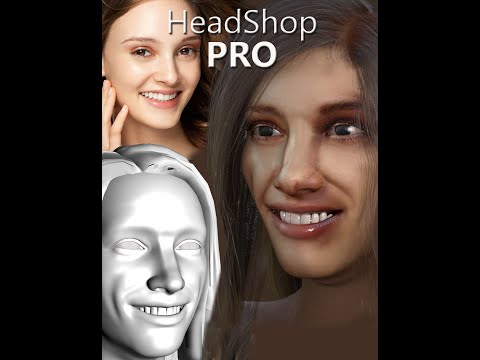 Face Transfer
Hello, are there other programs out there that do an incredible job with face transfer detail? I'm using the DAZ version, which does the job, but I feel like it can be better. I've also purchased the Headshop software, but am not getting the results I hoped for. Any links or suggestions would be most appreciated! - Ski
Cleanly Re-installing Daz Studio - Installing HeadshopEureka! Headshop works in Daz Studio.
I received great tech support from Laslo Vespremi at Abalone (https://printahead.net/)
We went over the installation of all the essential files. Changed screen resolution to 1920 x 1080. Still no Headshop. It appeared in Installed Plugins in the Help menu. But how to start it!
What was the secret?
When we switched to the City Limits Layout, the Headshop Plugin finally appeared in the Edit Menu!!!
(Window/Workspace/Select Layout).
Cleanly Re-installing Daz Studio - Installing HeadshopBut my new problem is that there is no "apply" button in headshop 14 "create new project" window. Posted a thread here no "apply" button in headshop 14 "create new project" window - Daz 3D Forums
no "apply" button in headshop 14 "create new project" windowIn headshop 14, there is supposed to be an "apply" button in the right bottom corner which is missing from my application. Does anyone know the reason and how to fix it?
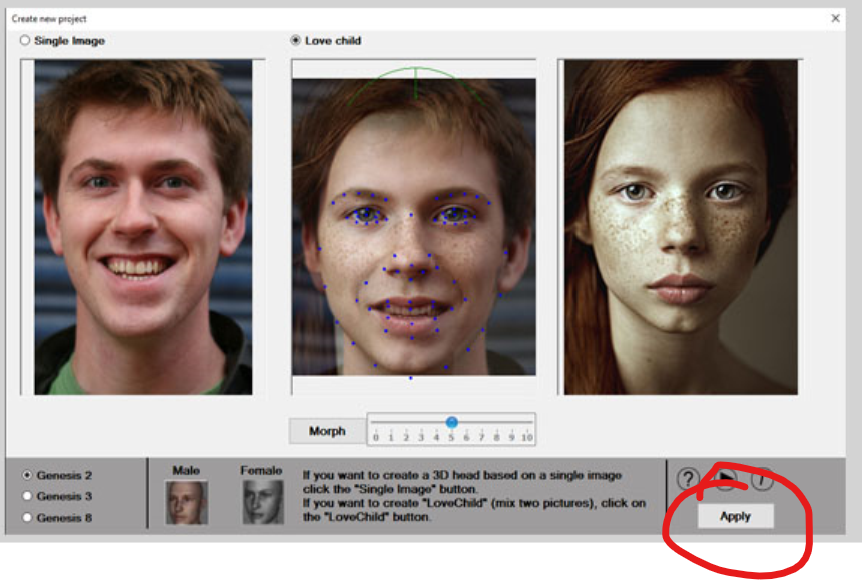
My headshop 14 window where "apply" botton as well as other items are missing. Maixmazing the window or changing the resolution of my screen don't work.
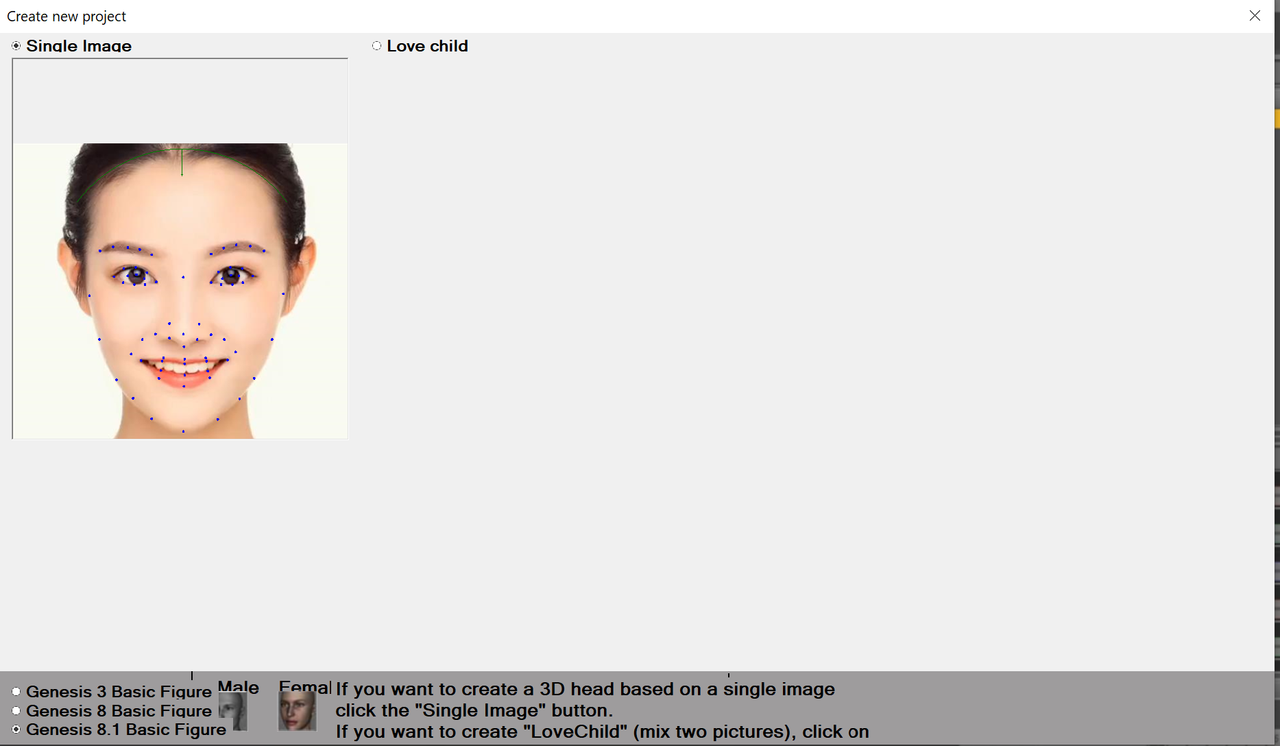 Cleanly Re-installing Daz Studio - Installing Headshop
I had a similar issue with it. But then I no longer followed their installation tutorial and I tried different folders to move the installed headshop plugin folder around, and eventually I made it!
The following screenshots are where I put my folders in.
The file abaloneHeadShopLoader.dll is put into the folder C:\Daz 3D\Applications\64-bit\DAZ 3D\DAZStudio4\plugins
and the folder headshop plugin is in C:\Daz 3D\Applications\64-bit\DAZ 3D
Cleanly Re-installing Daz Studio - Installing HeadshopThe video above (Headshop plugin EZ install to DAZ Studio) has 2 parts.
I changed the default location for Daz and installed Daz Studio to C:DAZ 3D/Applications/DAZ 3D. This got rid of the embedded default locations for the plugins (left over from previous installations of Daa. (Found in About Installed Plugins.)
I ran the Headshop 12 installer and checked all the file locations in the pdf (and video). I copied all the morpher files to the Headshop plugin directory.
Sorry to say, still no Headshop plugin in DAZ.
I did not go on to the second part of the video. What exactly is a publishing build?
Cleanly Re-installing Daz Studio - Installing Headshopkatherine_4a0d2c0d5e said:
I can't install Headshop on my desktop computer, which is where I want to work. BUT I did successfully install Headshop on a laptop, so I know how to do it. I want to reset Daz Studio completely. I tried uninstalling and re-installing it.
I used the desktop computer to go through the Masterclass tutorials and played with content directories. I see that, in the list of installed plugins, the directories I chose have survived the uninstalling and reinstalling process. So my guess is that this is preventing the installation of Headshop. So, I would like to reset Daz Studio to its brand-new default state.
Obviously, there is some other step besides uninstalling and reinstalling.
Please let me know what the secret is. How to get Daz Studio back to the squeaky clean state.
I'm interested in the upgrades to Headshop, but only once I solve this. I have the HS13 upgrade, but it requires HS12 to be installed.
DAZ changed Studio default install location from Program Files to C:DAZ 3D/Applications/DAZ 3D. Please confirm that this is the actual location of your active DAZ Studio.
Also watch how-to-install HeadShop here:

Laslo
Cleanly Re-installing Daz Studio - Installing HeadshopThanks. I'll try it.
Headshop is a plugin that lets you use photos to shape a character's face.
I think the problem has to do with settings that survive the re-installation because Headshop works fine on computers that have never had Daz on them before.
Cleanly Re-installing Daz Studio - Installing HeadshopRe-installing software is about the dumbest thing to do (no offense intended) because it won't change anything. See: software installers only focus on program files, but it's the settings that determine the state your software is in. And more than not those are always left alone during (re)installation procedures.
Instead of wasting time try moving those settings out of the way.
"%AppData%\DAZ 3D\Studio4"
^ that folder contains all your settings. Want to reset Daz Studio? Try renaming "Studio4" to "Studio4.old" (don't delete it, by renaming it you can always undo these actions). Once renamed fire up Daz Studio again.
Now... I have no idea what "headshop" is supposed to be but ... I'm not too sure that this is the right way to go. When products refuse to install there's usually something else happening / involved. Just remove & delete may not necessarily remove those issues.
Daz 3D is part of

Connect
DAZ Productions, Inc.
7533 S Center View Ct #4664
West Jordan, UT 84084Licensing Agreement | Terms of Service | Privacy Policy | EULA
© 2026 Daz Productions Inc. All Rights Reserved.