-
[Released] Rupert HD for Genesis 9 [Commercial]
plasma_ring said:
He's gorgeous, and definitely has the mix of unsettling and charismatic that I love to see in character designs. In the promos, I think the one where he's just walking wearing a hooded jacket is interesting; it's such a normal image but his expression and features give him an otherwordly look.
I picked him up last night and he ended up being exactly what I needed for the G9 update to my Joker model. He does blend really well with other characters.
If you end up doing a lips morph set for G9 or an update to Unique Smiles (probably one of the products I used most on G8), I'll buy them the second I see them. One of the first things I noticed when mixing him with other characters is that his lip shape is really striking even when his morph isn't fully dialed in, and it helps a lot in making the face look like a finished design. (Also, thank you for including textures for both anatomy grafts!)
Omg Thank you so much!
I'm so happy that he gives off that vibe. He might be your guy next door but something's up with him hahaha
And I will always include both sets of gens textures .( Criminal the PA'S who don't)
And I will always include the gens shapes as well.I wasn't planning on making "Unique Smiles for G9" but honestly that is a great idea as the g9 smiles are so undetailed and flat.
New! Novica & Forum Members Tips & Product Reviews Pt 14galien said:
@barbult, I also have an open support ticket for this item. In addition to the issue with the lapel, I reported texture issues at the bottom of the front zip and an issue where it loads at the wrong resolution. Interestingly, none of the promo images on the product page show any of these issues, but the promo for the bundle shows all of them.
Yes, I also noticed that the sweater loaded at Base resolution, not the High Resolution that it comes with. Base Resolution looks terrible unless the character is very small and far away in the scene. I rendered mine at High Resolution SubD 2.
The texture stretching at the bottom center is caused by mesh stretching and also strange UV mapping in that area, I think. It looks like the mesh was smoothed in that area, spreading out the vertices. I made an attempt to adjust the mesh in Blender today, but the UV mapping is still an issue, and the Base Shape Matching smoothing in Daz Studio tries to push my modified mesh back to the original bad shape. So my morph is only partially effective. To really fix this product, Daz needs to release the version which was used to create the good product previews.
Daz Studio Pro 4.22(.0.x) - Highlights4.21.1.29 (January 20, 2023)
- NVIDIA Iray
- Integrated Iray 2022.1.2 (363600.1913); see this thread for more detail
- REQUIRES:
- NVIDIA Driver 526.67 (R525) on Windows
- NVIDIA Driver 526.98 (R525) on Windows in order to retain OpenCL/dForce compatibility
- See NVIDIA Driver Downloads
- NVIDIA recommends installing Studio Drivers (SD)
- SSSE3 enabled CPU is a minimum requirement on macOS/x86
- REQUIRES:
- Removed support for the "Blend" renderer from the NVIDIA Iray DrawStyle
- In accordance with the removal of the "Blend" renderer from the Iray 2022.1.0 beta (363600.482) SDK
- Integrated Iray 2022.1.2 (363600.1913); see this thread for more detail
- dForce Hair
- Addressed the cause of "patchiness" in Genesis 9 facial hair at higher resolutions
- Transfer Utility
- Added a "Remove Original Target (Prop)" option
- Addresses a regression where the "Target > Scene Item" was no longer automatically being removed if it was a simple object
- This option is only enabled when the "Target > Scene Item" is a simple object
- The popup menus for "Source > Scene Item" and "Target > Scene Item" in the "Transfer Utility" dialog now display the associated icon for listed nodes
- Added a "Remove Original Target (Prop)" option
- Support Asset Saving
- Saving new figure/prop, morph, and/or UV support assets now automatically assigns a unique URI ID
- Serves to aid in avoiding collisions when non-unique names are chosen
- Saving new figure/prop, morph, and/or UV support assets now automatically assigns a unique URI ID
- ...
- Scripting API
- Made additions in various areas; see the Change Log for more detail
- Fixed bugs and/or made improvements in various areas; see the Change Log for details
Male and Female Anatomical Elements maps for G9 - Which Figures Have Them?RawArt said:
Most of my characters have Gen Maps...they are not that difficult to make.
I don't know why daz edited my "whats included" to not list that, but they are there and I have a ticket in to get that fixed
i find it difficult to transfer/project torso across the genitalia boundary. There's always a lot of manual cleanup when doing this method. When supporting two different genitalia grafts, the workload is doubled.
would be nice to hear your easy process.
Creating partial geometry shell?I don't think I understand what you are trying to do.
But to create a partial geoshell, you can export a geoshell and in a modeller delete the unwanted parts.
Then import in DS, run transfer rigging to the character, and if parented to the character act as a partial geoshell.
Male and Female Anatomical Elements maps for G9 - Which Figures Have Them?
Just joking around really. I'm all for all combinations of... everything. Creating male gens would be a bit more work though, since I cannot just transfer from my torso texture.lilweep said:
bluejaunte said:
Why would I give my girls a penis texture? What are you naughty people doing

um are you suggesting girls cannot have penis. careful, people have been cancelled for less.
New! Novica & Forum Members Tips & Product Reviews Pt 14barbult said:
MelanieL said:
barbult said:
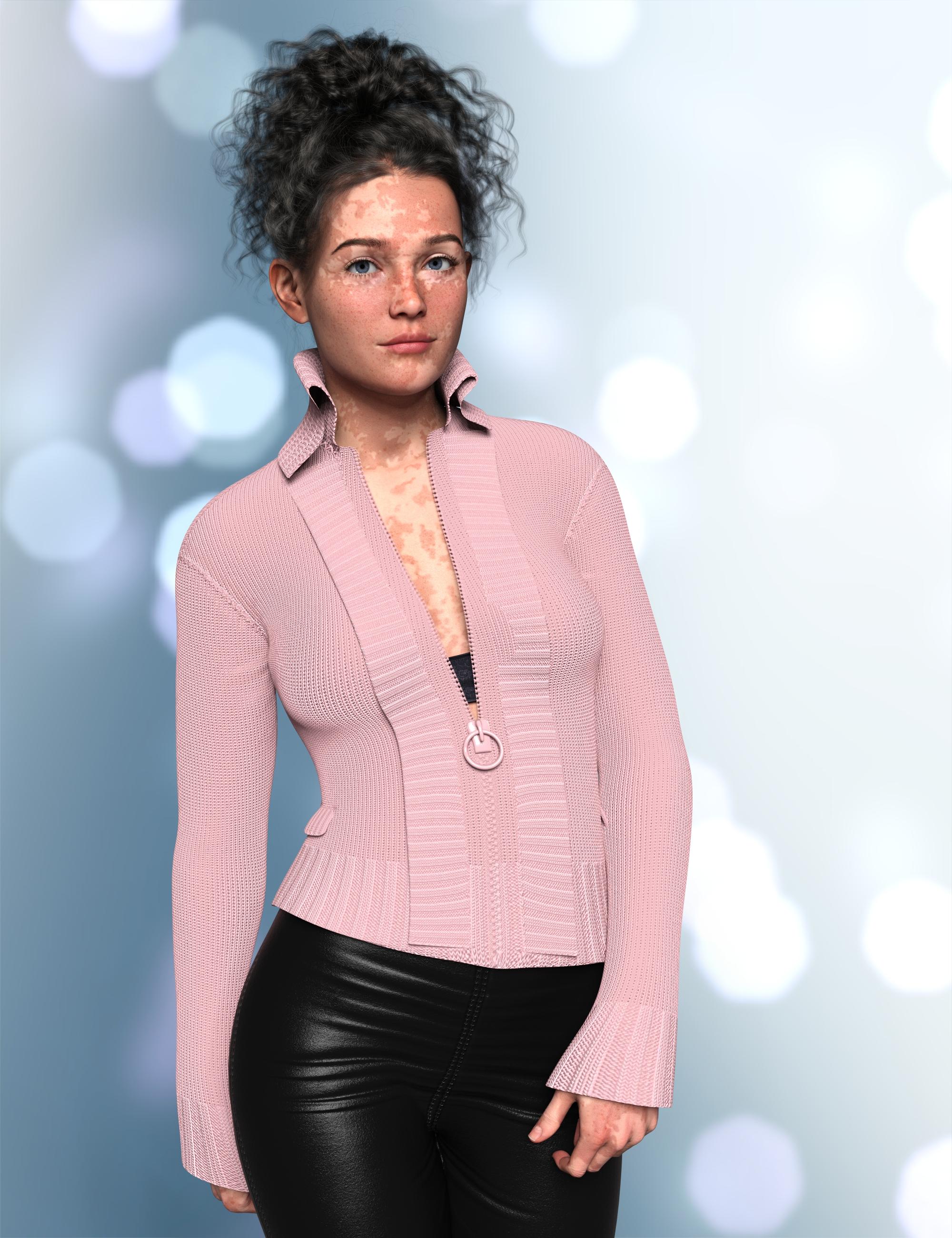
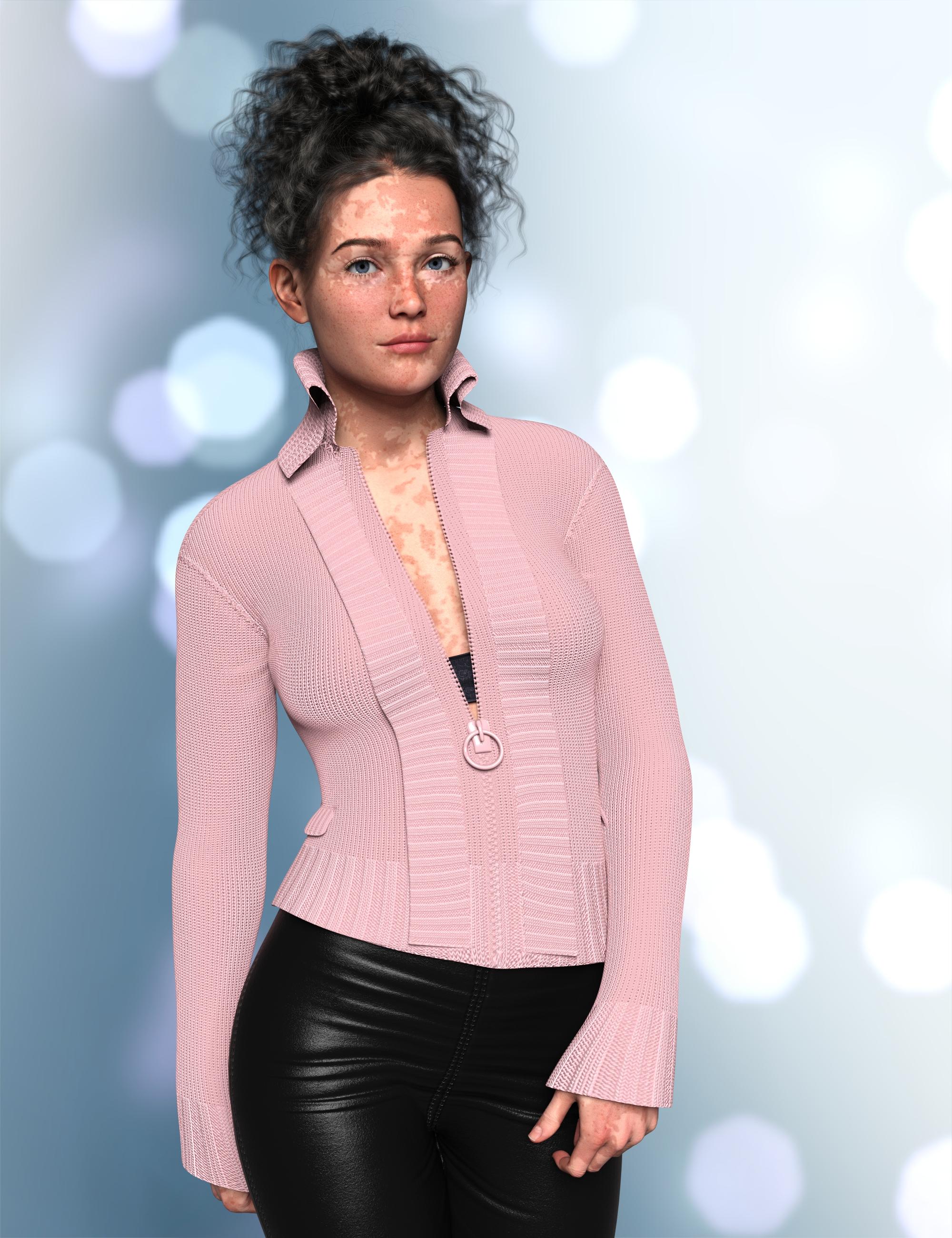
Remember when I griped about the error in the X Fashion Style for Fall sweater back in November 2022? I gave up on Daz ever fixing it, so I took in into Blender and fixed the intersecting mesh myself. Here is the morph I created. If you want to use it, just unzip the Content.zip file and merge the data folder with the data folder in your Daz library. I set the default to 100%, so that the fix is always dialed in, because I never want to load the broken sweater without the fix. I thought about just updating the base mesh, but then I couldn't share it. If Daz ever issues an update, you can just delete my morph.
Aaargh, I remember I was supposed to be checking that sweater after your first post back in November! Sorry, I completely forgot. I guess the fault is proven to be a general one by now.
Thank you very much for the fix too

It would be interesting to know if you see the same error, though. Although Customer Service reproduced the problem when I submitted my bug report, so, I guess you don't really need to.
@barbult, I also have an open support ticket for this item. In addition to the issue with the lapel, I reported texture issues at the bottom of the front zip and an issue where it loads at the wrong resolution. Interestingly, none of the promo images on the product page show any of these issues, but the promo for the bundle shows all of them.
New! Novica & Forum Members Tips & Product Reviews Pt 14Here's an example of the unfixed sweater.
Ane here's the fixed sweater (my morph applied).
 New! Novica & Forum Members Tips & Product Reviews Pt 14
MelanieL said:
barbult said:
Remember when I griped about the error in the X Fashion Style for Fall sweater back in November 2022? I gave up on Daz ever fixing it, so I took in into Blender and fixed the intersecting mesh myself. Here is the morph I created. If you want to use it, just unzip the Content.zip file and merge the data folder with the data folder in your Daz library. I set the default to 100%, so that the fix is always dialed in, because I never want to load the broken sweater without the fix. I thought about just updating the base mesh, but then I couldn't share it. If Daz ever issues an update, you can just delete my morph.
Aaargh, I remember I was supposed to be checking that sweater after your first post back in November! Sorry, I completely forgot. I guess the fault is proven to be a general one by now.
Thank you very much for the fix too
It would be interesting to know if you see the same error, though. Although Customer Service reproduced the problem when I submitted my bug report, so, I guess you don't really need to.
New! Novica & Forum Members Tips & Product Reviews Pt 14barbult said:
Remember when I griped about the error in the X Fashion Style for Fall sweater back in November 2022? I gave up on Daz ever fixing it, so I took in into Blender and fixed the intersecting mesh myself. Here is the morph I created. If you want to use it, just unzip the Content.zip file and merge the data folder with the data folder in your Daz library. I set the default to 100%, so that the fix is always dialed in, because I never want to load the broken sweater without the fix. I thought about just updating the base mesh, but then I couldn't share it. If Daz ever issues an update, you can just delete my morph.
Aaargh, I remember I was supposed to be checking that sweater after your first post back in November! Sorry, I completely forgot. I guess the fault is proven to be a general one by now.
Thank you very much for the fix too
[Released] Rupert HD for Genesis 9 [Commercial]He's gorgeous, and definitely has the mix of unsettling and charismatic that I love to see in character designs. In the promos, I think the one where he's just walking wearing a hooded jacket is interesting; it's such a normal image but his expression and features give him an otherwordly look.
I picked him up last night and he ended up being exactly what I needed for the G9 update to my Joker model. He does blend really well with other characters.
If you end up doing a lips morph set for G9 or an update to Unique Smiles (probably one of the products I used most on G8), I'll buy them the second I see them. One of the first things I noticed when mixing him with other characters is that his lip shape is really striking even when his morph isn't fully dialed in, and it helps a lot in making the face look like a finished design. (Also, thank you for including textures for both anatomy grafts!)
New! Novica & Forum Members Tips & Product Reviews Pt 14barbult said:
Remember when I griped about the error in the X Fashion Style for Fall sweater back in November 2022? I gave up on Daz ever fixing it, so I took in into Blender and fixed the intersecting mesh myself. Here is the morph I created. If you want to use it, just unzip the Content.zip file and merge the data folder with the data folder in your Daz library. I set the default to 100%, so that the fix is always dialed in, because I never want to load the broken sweater without the fix. I thought about just updating the base mesh, but then I couldn't share it. If Das ever issues an update, you can just delete my morph.
Barb - you are the BEST!!! Thank you for sharing your work (again) with the community!!! - Ray
CG Trader Clothing to DAZHi guys,
I'm really new with DAZ.
I bought this clothing : https://www.cgtrader.com/3d-models/character/clothing/male-costume-outfit-33-jacket-shirt-pants-footwearIn the description of the product, the seller attaches a quick workflow to adapt the garment to the Genesis Male 8 :
How to fit the clothing to DAZ characters:
- Dial Genesis 8 Male Arms Up-Down to -45% and Legs Spread to -5% in Parameters
- Go into bone edit mode, and when bones are visible select one, right click and go edit -> bake joint rotations
- Use the transfer utility, set source item shape to current and add a smoothing modifier.
- Save the clothing to your library.
- Clear the scene, add G8 Male again and add the outfit, it should now fit the zero-posed character.
But at the end of the process ( step 5 ), my clothing doesn't fit with the zero-posed character at all ( see attached file )
If someone can help me ...
( Thing to know : my final idea is export to CC4 )Tutorial: How to Fix Oneirosrosseliani said:
My method to fix Oneiros:
Export to Blender
Create the missing faces
Tweak the UV until the joints match
Export to Daz
Copy the surfaces from the original Oneiros to the fixed one
Use the Transfer Utility to retrieve the bones
Done!
Unfortunately, i am too much of a beginner to do that. What you just wrote may be easier, but i couldn't even try to follow your steps, because i lack the knowledge. That is why i created that tutorial, so others, who are in a similar situation can get access also to oneiros.
Tutorial: How to Fix OneirosMy method to fix Oneiros:
Export to Blender
Create the missing faces
Tweak the UV until the joints match
Export to Daz
Copy the surfaces from the original Oneiros to the fixed one
Use the Transfer Utility to retrieve the bones
Done!
Color picker samplingEvery graphics software has the color picker in the UI (no obscure keyboard shortcut like Blender), should be quick to implement and can be useful.
Anyway base color wasn't working well to fix the skin. I used GIMP at the end with GMIC and a Color Transfer filter to have something that resemble the color of the rest of the skin.
Maybe... a color transfer tool integrated in DS?
New! Novica & Forum Members Tips & Product Reviews Pt 14Remember when I griped about the error in the X Fashion Style for Fall sweater back in November 2022? I gave up on Daz ever fixing it, so I took in into Blender and fixed the intersecting mesh myself. Here is the morph I created. If you want to use it, just unzip the Content.zip file and merge the data folder with the data folder in your Daz library. I set the default to 100%, so that the fix is always dialed in, because I never want to load the broken sweater without the fix. I thought about just updating the base mesh, but then I couldn't share it. If Daz ever issues an update, you can just delete my morph.
[Misconception] DAZ Studio: Lazy morph loading (built-in) ->?generalgameplaying said:
Richard Haseltine said:
If this is because of the slow loading of heavily laden figures then what you ask is what it does - the actual morph data (the deltas, chnages in shape) is not loaded uintil needed - it's building the list of properties that is taking time, because of the ay they interconnect.
Ah, so for a part, some parts of the suggestion are already implemented. Though if a plugin can make loading faster, it means that in theory even the gathering of the properties could as well be made faster.
E.g. if it had to interpret whole files instead of just headers or metadata files, just for checking and creating the properties list. In any case, results could in theory be cached, though. Not recommending more random things, which don't apply anyway here...
There is a cache - see Edit>Preferences.
Filtering morphs by selected products could make sense, though i assume that's actually possible with a script, buttons for scripts are possible too. I guess detecting morphs is possible, also for animations, and across multiple scenes. So in the end i could battle stuff with meta data linking between studio and whatever application on the other side, using script/plugin (partly to be written), in case too many morphs get exported. At least the interlinking question towards export has been a (quick) misconception of mine then.
Turbo Loader can selectively disable morphs, but theya re then not at all available until reenabled..
So perhaps, i should gather more experience and we assume this to be resolved in terms of what makes sense to ask.
Ivar 9 Mega Bundlehe would definitely be great as a G9F morph
Ivar 9 Mega BundleTimbales said:
I also took advantage of the coupon and bought Ivar 9. Here's a first pass with different eyebrows and some changes to his features.

Nice job. I don't have a G9 Adam's Apple morph yet.
Daz 3D is part of

Connect
DAZ Productions, Inc.
7533 S Center View Ct #4664
West Jordan, UT 84084Licensing Agreement | Terms of Service | Privacy Policy | EULA
© 2026 Daz Productions Inc. All Rights Reserved.