-
New! Novica & Forum Members Tips & Product Reviews Pt 14
barbult said:
Remember when I griped about the error in the X Fashion Style for Fall sweater back in November 2022? I gave up on Daz ever fixing it, so I took in into Blender and fixed the intersecting mesh myself. Here is the morph I created. If you want to use it, just unzip the Content.zip file and merge the data folder with the data folder in your Daz library. I set the default to 100%, so that the fix is always dialed in, because I never want to load the broken sweater without the fix. I thought about just updating the base mesh, but then I couldn't share it. If Das ever issues an update, you can just delete my morph.
Barb - you are the BEST!!! Thank you for sharing your work (again) with the community!!! - Ray
CG Trader Clothing to DAZHi guys,
I'm really new with DAZ.
I bought this clothing : https://www.cgtrader.com/3d-models/character/clothing/male-costume-outfit-33-jacket-shirt-pants-footwearIn the description of the product, the seller attaches a quick workflow to adapt the garment to the Genesis Male 8 :
How to fit the clothing to DAZ characters:
- Dial Genesis 8 Male Arms Up-Down to -45% and Legs Spread to -5% in Parameters
- Go into bone edit mode, and when bones are visible select one, right click and go edit -> bake joint rotations
- Use the transfer utility, set source item shape to current and add a smoothing modifier.
- Save the clothing to your library.
- Clear the scene, add G8 Male again and add the outfit, it should now fit the zero-posed character.
But at the end of the process ( step 5 ), my clothing doesn't fit with the zero-posed character at all ( see attached file )
If someone can help me ...
( Thing to know : my final idea is export to CC4 )Tutorial: How to Fix Oneirosrosseliani said:
My method to fix Oneiros:
Export to Blender
Create the missing faces
Tweak the UV until the joints match
Export to Daz
Copy the surfaces from the original Oneiros to the fixed one
Use the Transfer Utility to retrieve the bones
Done!
Unfortunately, i am too much of a beginner to do that. What you just wrote may be easier, but i couldn't even try to follow your steps, because i lack the knowledge. That is why i created that tutorial, so others, who are in a similar situation can get access also to oneiros.
Tutorial: How to Fix OneirosMy method to fix Oneiros:
Export to Blender
Create the missing faces
Tweak the UV until the joints match
Export to Daz
Copy the surfaces from the original Oneiros to the fixed one
Use the Transfer Utility to retrieve the bones
Done!
Color picker samplingEvery graphics software has the color picker in the UI (no obscure keyboard shortcut like Blender), should be quick to implement and can be useful.
Anyway base color wasn't working well to fix the skin. I used GIMP at the end with GMIC and a Color Transfer filter to have something that resemble the color of the rest of the skin.
Maybe... a color transfer tool integrated in DS?
New! Novica & Forum Members Tips & Product Reviews Pt 14Remember when I griped about the error in the X Fashion Style for Fall sweater back in November 2022? I gave up on Daz ever fixing it, so I took in into Blender and fixed the intersecting mesh myself. Here is the morph I created. If you want to use it, just unzip the Content.zip file and merge the data folder with the data folder in your Daz library. I set the default to 100%, so that the fix is always dialed in, because I never want to load the broken sweater without the fix. I thought about just updating the base mesh, but then I couldn't share it. If Daz ever issues an update, you can just delete my morph.
[Misconception] DAZ Studio: Lazy morph loading (built-in) ->?generalgameplaying said:
Richard Haseltine said:
If this is because of the slow loading of heavily laden figures then what you ask is what it does - the actual morph data (the deltas, chnages in shape) is not loaded uintil needed - it's building the list of properties that is taking time, because of the ay they interconnect.
Ah, so for a part, some parts of the suggestion are already implemented. Though if a plugin can make loading faster, it means that in theory even the gathering of the properties could as well be made faster.
E.g. if it had to interpret whole files instead of just headers or metadata files, just for checking and creating the properties list. In any case, results could in theory be cached, though. Not recommending more random things, which don't apply anyway here...
There is a cache - see Edit>Preferences.
Filtering morphs by selected products could make sense, though i assume that's actually possible with a script, buttons for scripts are possible too. I guess detecting morphs is possible, also for animations, and across multiple scenes. So in the end i could battle stuff with meta data linking between studio and whatever application on the other side, using script/plugin (partly to be written), in case too many morphs get exported. At least the interlinking question towards export has been a (quick) misconception of mine then.
Turbo Loader can selectively disable morphs, but theya re then not at all available until reenabled..
So perhaps, i should gather more experience and we assume this to be resolved in terms of what makes sense to ask.
Ivar 9 Mega Bundlehe would definitely be great as a G9F morph
Ivar 9 Mega BundleTimbales said:
I also took advantage of the coupon and bought Ivar 9. Here's a first pass with different eyebrows and some changes to his features.

Nice job. I don't have a G9 Adam's Apple morph yet.
[OUT NOW] Celebrity Red Carpet Environment [Commercial]Out NOW! Celebrity Red Carpet: https://www.daz3d.com/celebrity-red-carpet
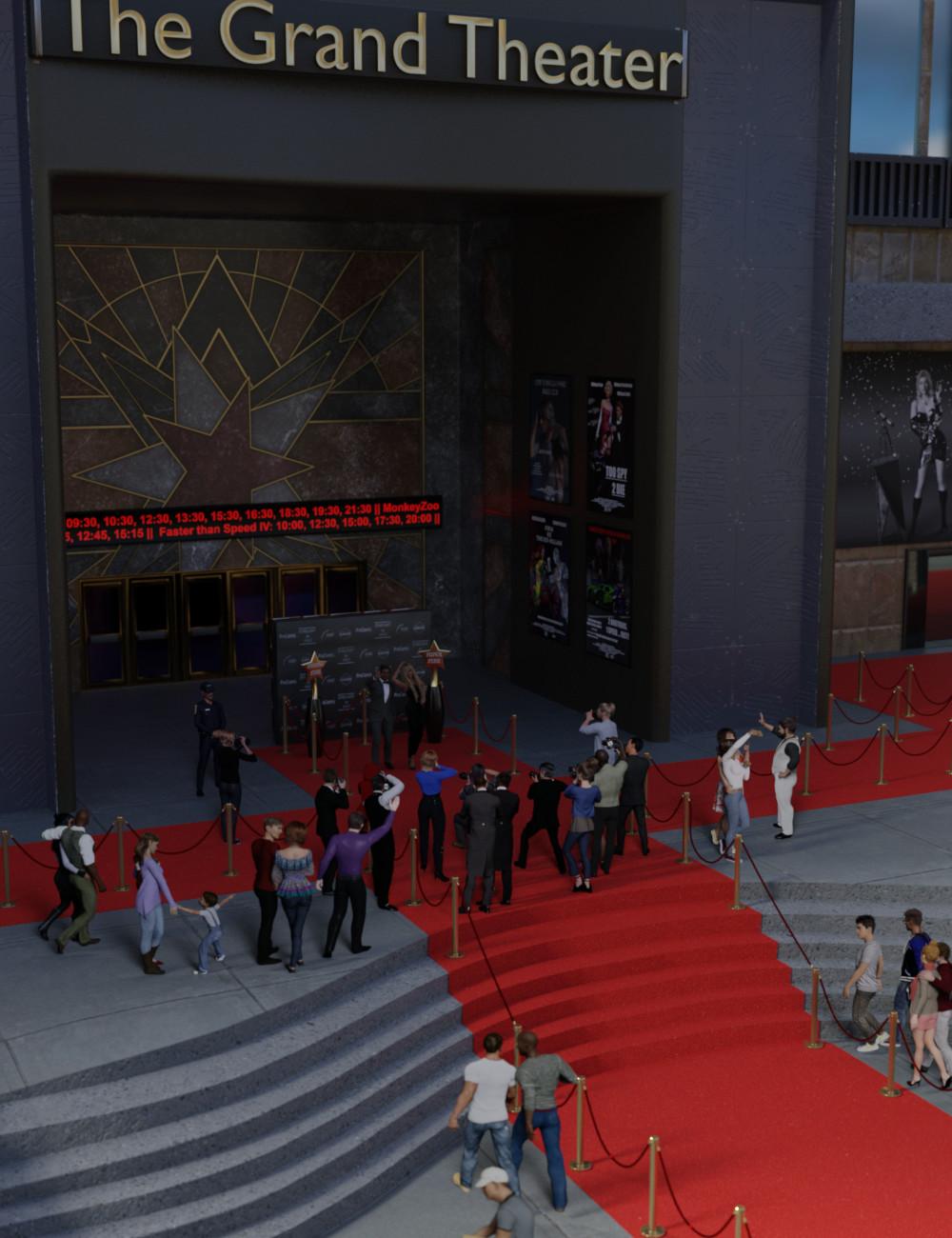
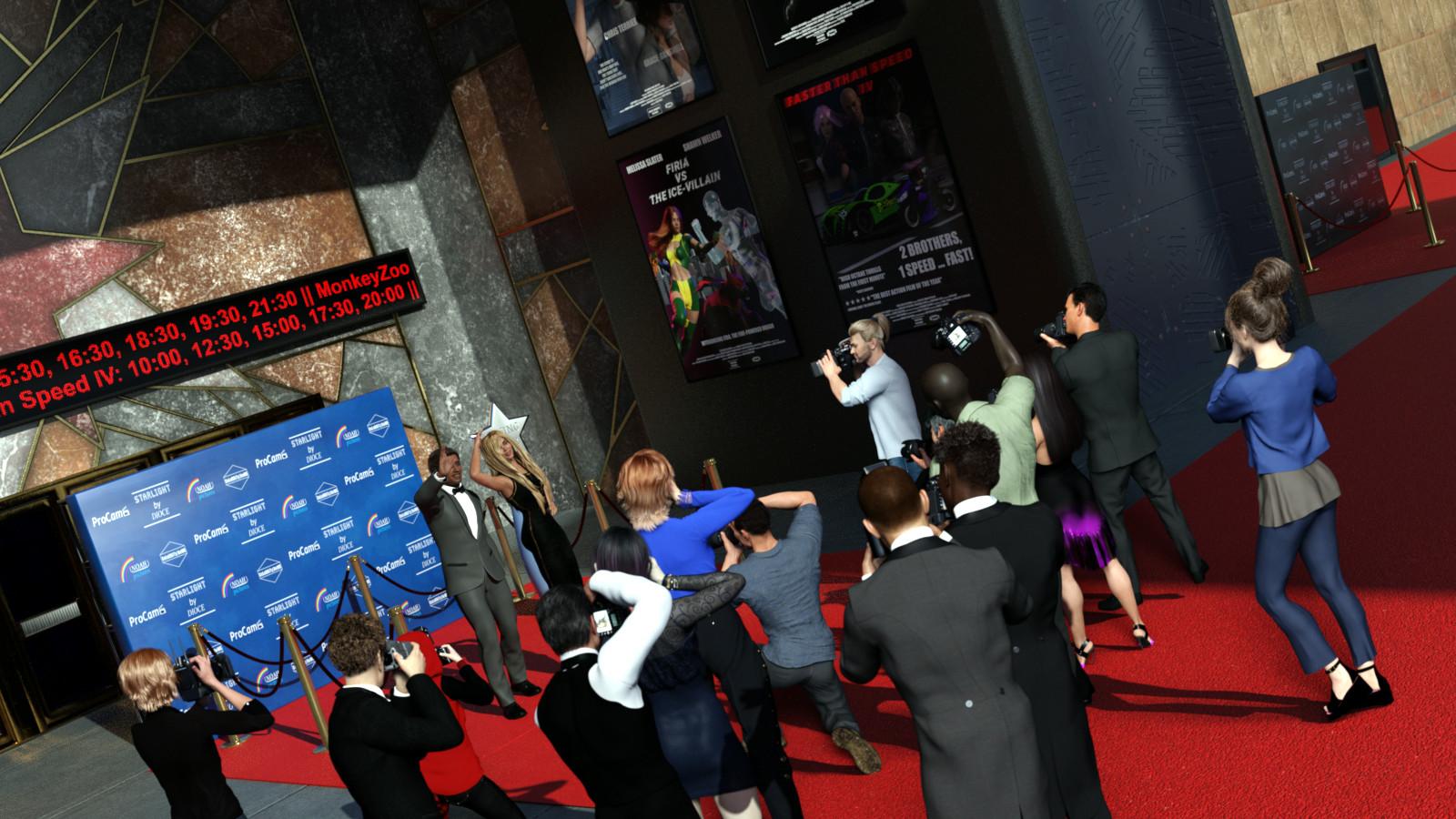
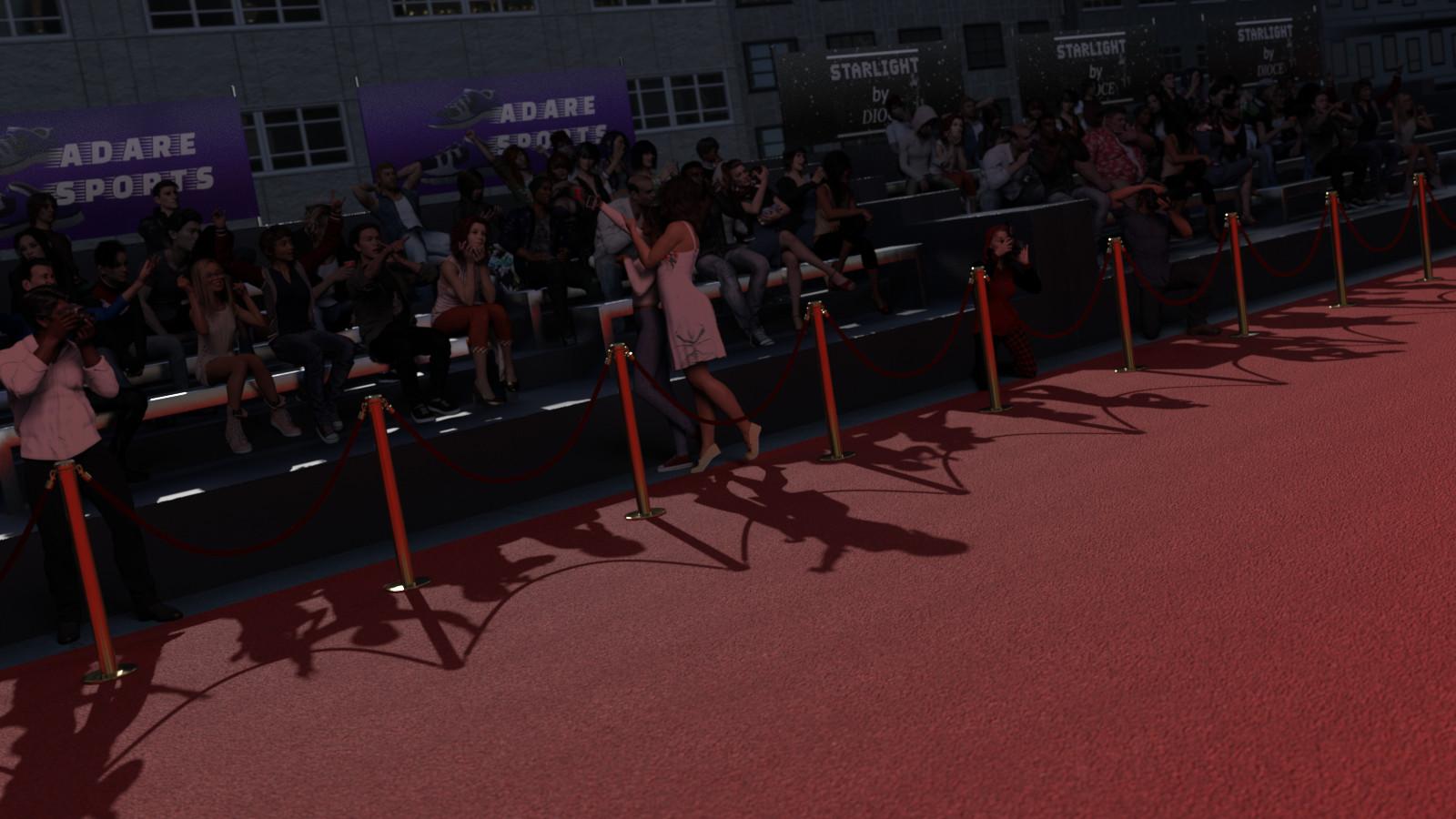
It's 'awards season' with the Golden Globes, Oscars, etc around this part of the year. As the movie stars, fashion models and music icons step out onto the red carpet, the flashes from the cameras and the cheers from the fans fill the scene with the glitz and glamour of celebrity. Celebrity Red Carpet is a complete exterior environment for Daz Studio.
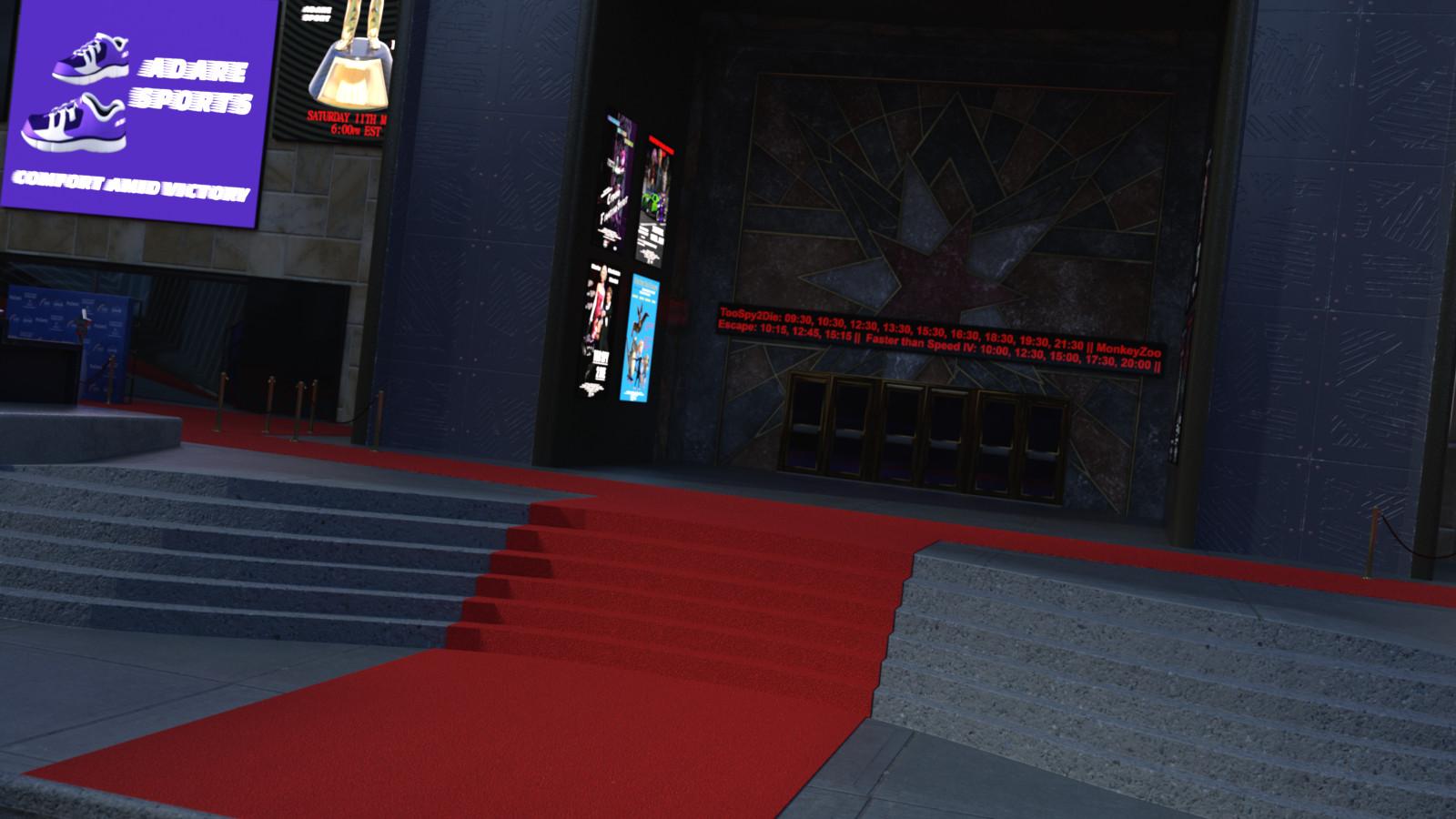
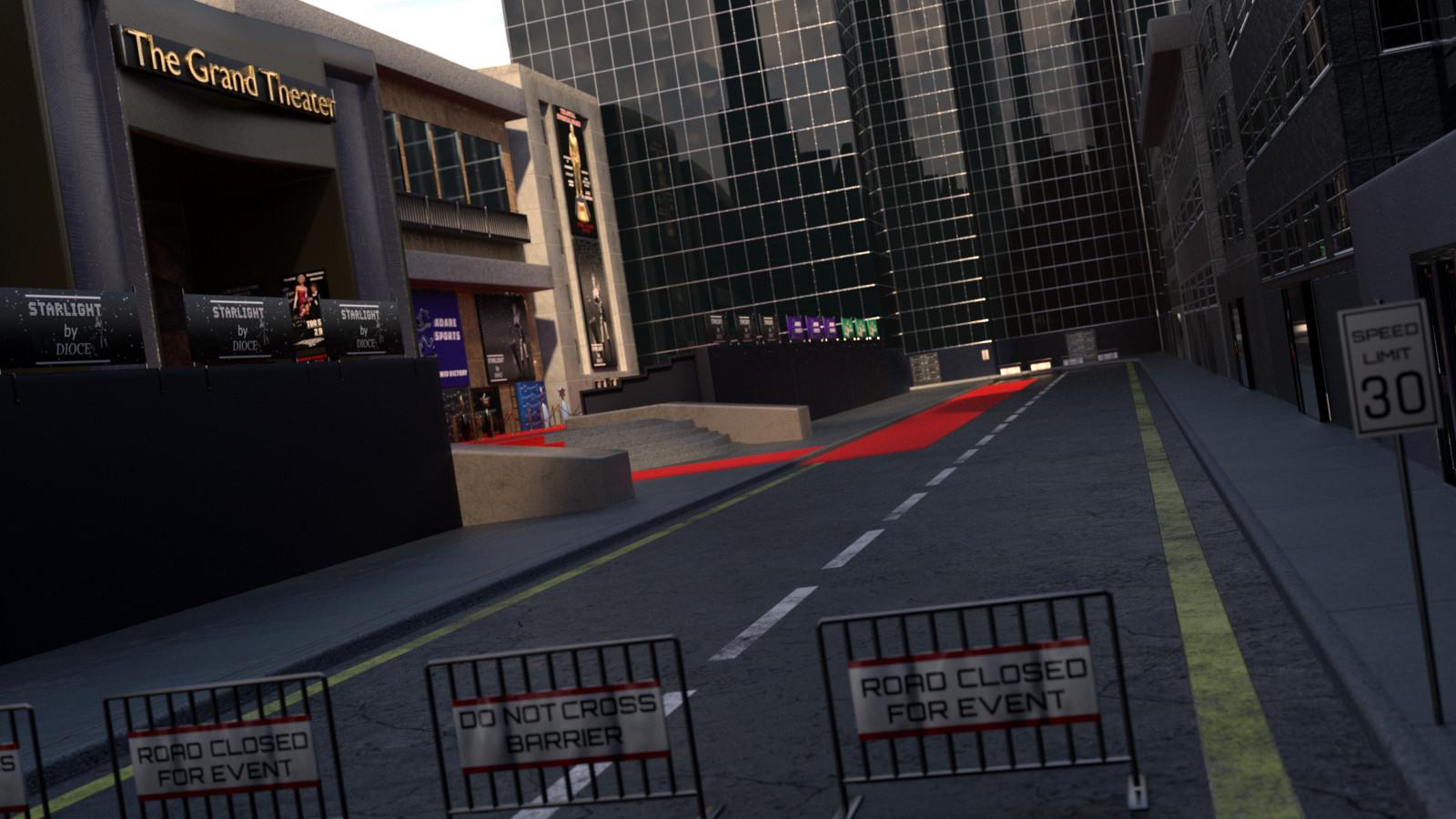
Celebrity Red Carpet comes with a street scene, centered around the steps to The Grand Theater. The carpet sections that run the length of the road, the steps and the pedestrian area can be removed if needed. The set comes with a variety of decorative props, including a backdrop for the stars to pose against with 'Star Pot' prop (2 texture options each), a movie poster (6 texture options), Billboard ad (5 texture options and a 'dimensions' morph), Seating banner ad (3 texture options), seating area with bench (bench has height morph) - See promo pictures for examples.
There is a pole with a static rope for normal use and also a rigged rope for special circumstances (3 poses for the rigged rope are included). There are a variety of 'Carpet Pieces' in different shapes and sizes so you can use them to expand this set or use with other sets. See promos for illustration. The carpet pieces have preloads with or without the poles and ropes.
The full set preload has 2 versions. One makes use of Daz Studio instances (so is lighter on resources in Studio), whereas the other does not (making it easier to customize individual parts).
Some promo pics below :)
 [Misconception] DAZ Studio: Lazy morph loading (built-in) ->?
Richard Haseltine said:
If this is because of the slow loading of heavily laden figures then what you ask is what it does - the actual morph data (the deltas, chnages in shape) is not loaded uintil needed - it's building the list of properties that is taking time, because of the ay they interconnect.
Ah, so for a part, some parts of the suggestion are already implemented. Though if a plugin can make loading faster, it means that in theory even the gathering of the properties could as well be made faster.
E.g. if it had to interpret whole files instead of just headers or metadata files, just for checking and creating the properties list. In any case, results could in theory be cached, though. Not recommending more random things, which don't apply anyway here...
Filtering morphs by selected products could make sense, though i assume that's actually possible with a script, buttons for scripts are possible too. I guess detecting morphs is possible, also for animations, and across multiple scenes. So in the end i could battle stuff with meta data linking between studio and whatever application on the other side, using script/plugin (partly to be written), in case too many morphs get exported. At least the interlinking question towards export has been a (quick) misconception of mine then.
So perhaps, i should gather more experience and we assume this to be resolved in terms of what makes sense to ask.
*** SOLVED*** Genesis 9 Open Mouth Morph???I must be completely missing something, but I can't figure out how to open the mouth on Genesis 9 figures. In the previous generations, there was an "open mouth" morph, but I can't find anything like that for Genesis 9. I found a "close mouth" morph, but nothing to open the mouth. I've been using DAZ for years and never had a problem figuring out how to do things like this, but this one is stumping me. I'm sure everyone else has already figured this out and here I am, scratching my head over it.
Texture editing and MAT Zone questionRichard Haseltine said:
felis said:
Proportional editing is a move tool, so you do not change number of verteces with that. That is why you can use it as a morph.
The only disadvantage of doing it that way is the texture will be more compressed in the lower part of the skirt than in the top, so if you use a pattern it might look odd.
You could split it inmto two surfaces and reduce the vertical tiling in the lower section, or you could redo the UVs as a new, short skirt set..
Are you talking about splitting surfaces in Blender or with the DAZ Studio Geometry Editor?
Again, this is getting into areas that I'm not really comfortable with - UV mapping and Material Zone creation. In fact I've never created a UV map for anything and it is the one thing that puts me off making clothing (or props) from scratch. I know there are applications (including Blender) that create the maps but I get lost quickly when I try to follow tutorials.
Texture editing and MAT Zone questionfelis said:
Proportional editing is a move tool, so you do not change number of verteces with that. That is why you can use it as a morph.
The only disadvantage of doing it that way is the texture will be more compressed in the lower part of the skirt than in the top, so if you use a pattern it might look odd.
You could split it inmto two surfaces and reduce the vertical tiling in the lower section, or you could redo the UVs as a new, short skirt set..
A similar way of scaling, is to select the top row of verteces, and place the 3d cursor at selected. And then set pivot point to 3d cursor. Then select all and scale in Z-direction. That will although make your hem a little smaller.
Missing content, textures, and geometriesI took a break from daz3d for a while, when I recently returned after downloading 2 third party morphs i tried to load a scene. Every figure I've ever worked on now has missing textures, geometry, clothes, everything. I'm also missing certain things in my content library for example all my stuff under poser formats are gone, as well as all of my 3rd party downloaded morph dials which are now missing from the parameter pane with the exception of a few custom morphs. Basically Daz cant find anything whatsoever, even though everything is in the correct places. All of my data is in the data folder within my library, same for the runtime folder and the people folders for mydaz3d library. Everything was working fine, I haven't messed with anything, moved anything, or deleted anything, only downloaded those 2 morphs and that was it. I've downloaded 3rd party content before with no trouble so idk what could be causing daz to be in this unusable state. Any and all help will be very much appreciated!Texture editing and MAT Zone questionfelis said:
Proportional editing is a move tool, so you do not change number of verteces with that. That is why you can use it as a morph.
The only disadvantage of doing it that way is the texture will be more compressed in the lower part of the skirt than in the top, so if you use a pattern it might look odd.
A similar way of scaling, is to select the top row of verteces, and place the 3d cursor at selected. And then set pivot point to 3d cursor. Then select all and scale in Z-direction. That will although make your hem a little smaller.
You clearly use the edit tools in Blender wheras I tend to use the sculpt tools. I should really play with editing as well though because there are some things that might be easier to achieve by mesh edits.
I have adjusted cloth length using the sculpt tools but this time I started with the opacity map but the trim made it tricky. Maybe I should just ignore that and go with Blender.
Tutorial: How to Fix OneirosOneiros is a beautiful and versatile product but for whatever reason geometry has been lost at 2 places.
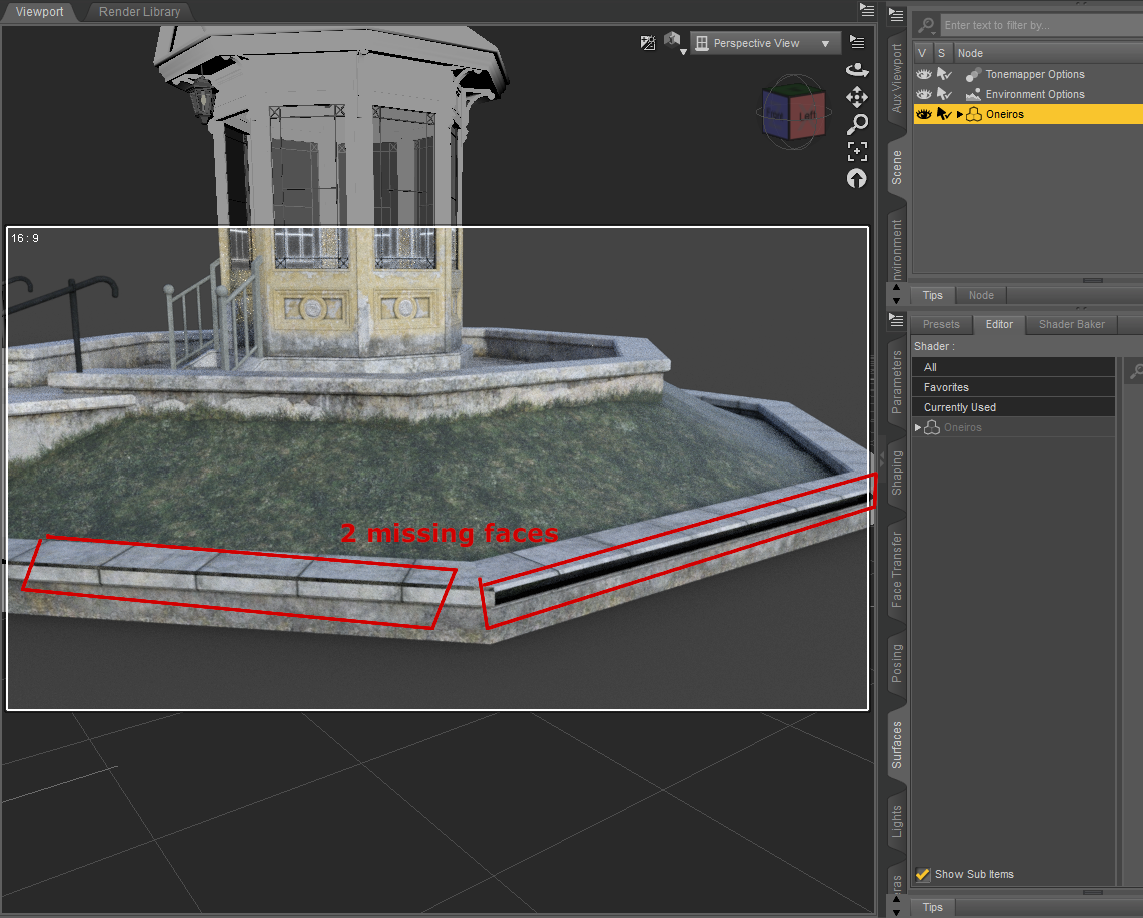
If you can’t wait until it gets fixed by DAZ and lack the knowledge to do it yourself, here is a step by step solution for those who may need it:
You need Hexagon installed on your computer which is free in DAZ, but you don’t need any further knowledge.
In DAZ Studio:
1. Load the Prop Oneiros in DAZ.
2. Click on Oneiros in the Scene Tab to select it (yellow)
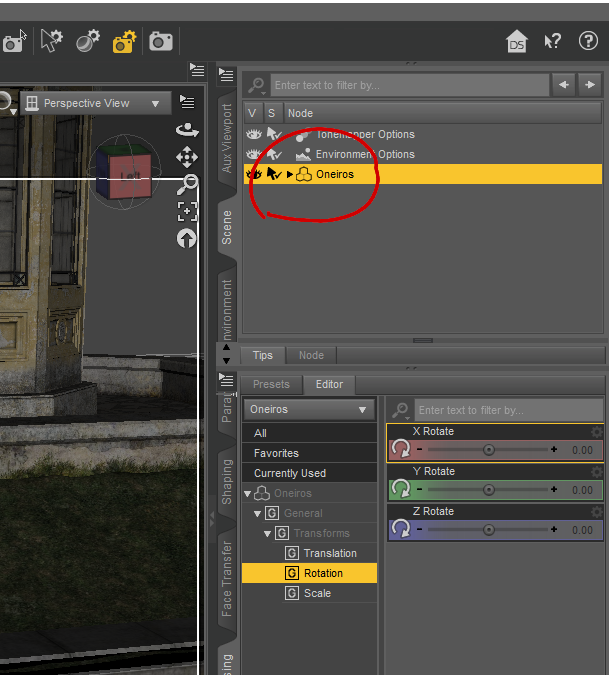
3. Click „Send to Hexagon“
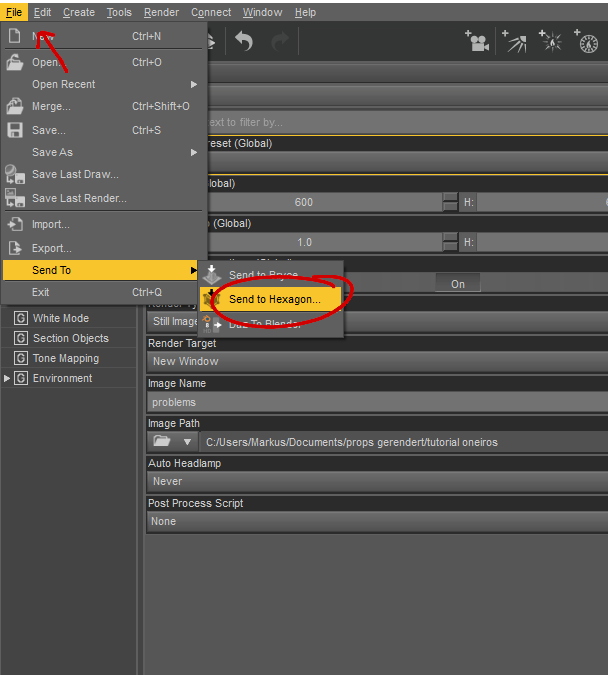
In Hexagon:
4. Click „ok“ on the Hexagon News Window
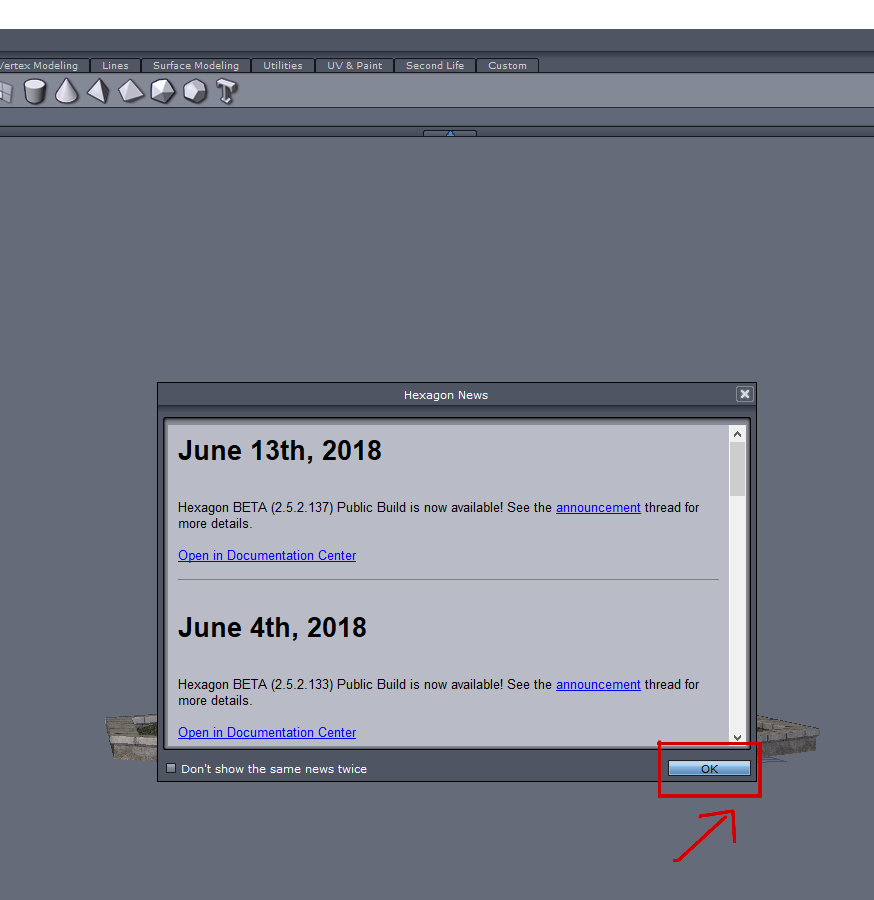
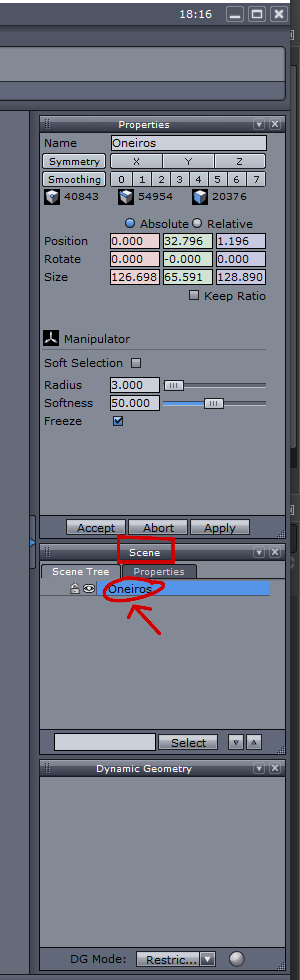
5. Click on „Oneiros“ in the Scene Tab (it turns blue)
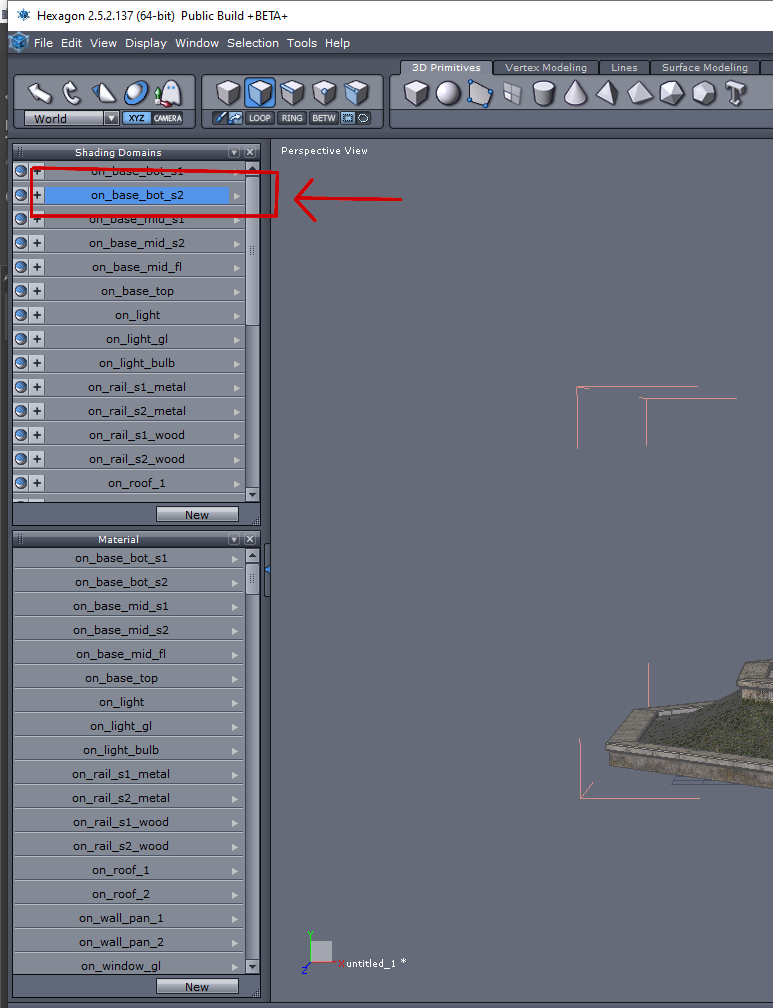
6. Click on „on_base_bot_s2“, that is the second entry in the Shading Domains Tab (it also turns blue).
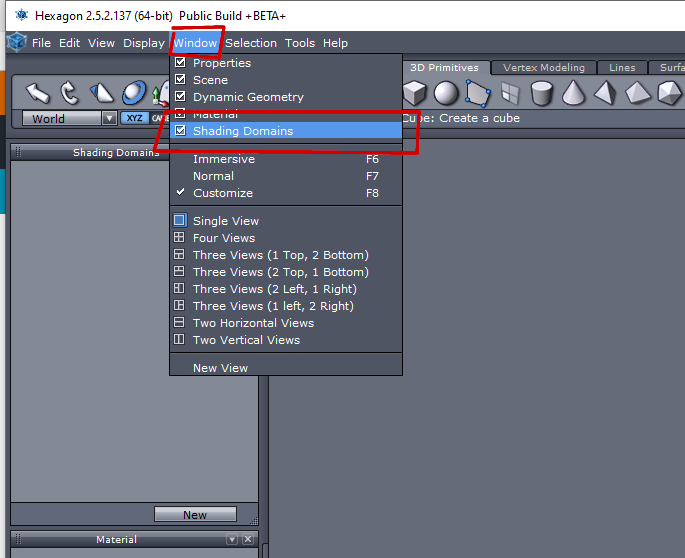
If you can't find the shading domains tab you can activate it in the WINDOWS menu:
7. Now Click „Cut“ (ctrl+x) and after that „Paste“ (ctrl+v) in the EDIT Menu.
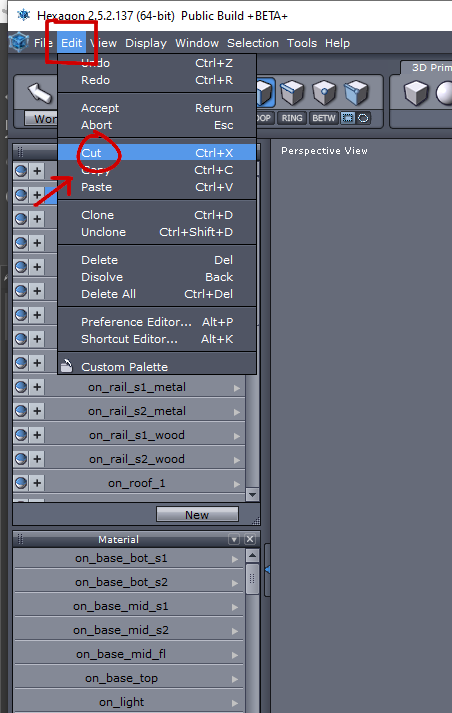
In the Scene Tab appears now the second entry „Form1“ and it has turned blue (which means „selected“)
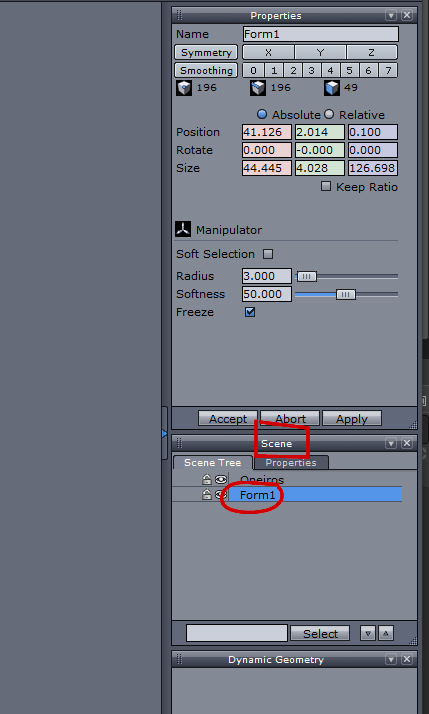
8. Now in the „scene tab“, to the left of the first entry „oneiros“ click on the eye symbol
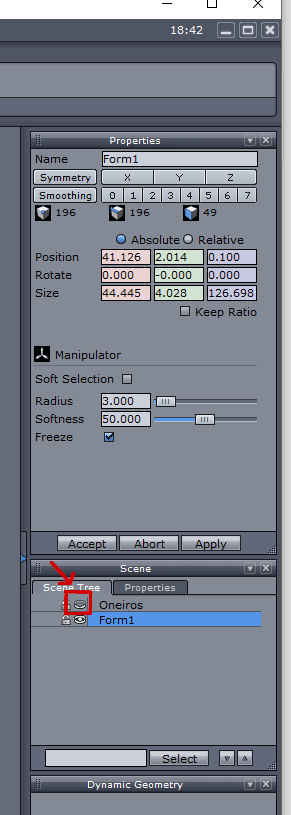
the main part of the prop is now invisible:
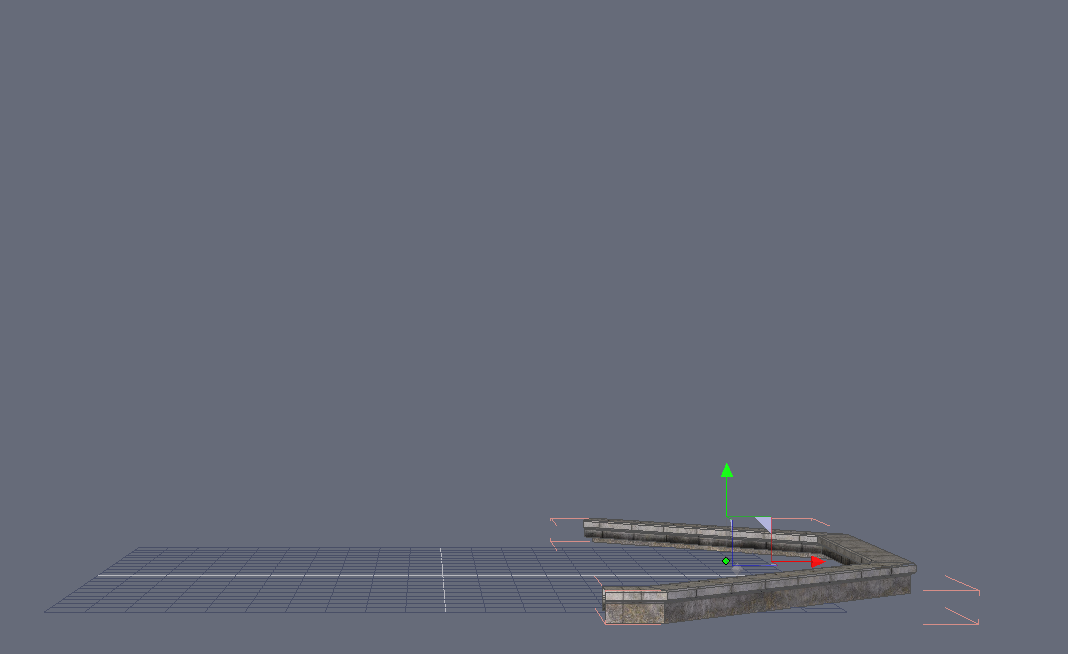
9. In the Viewport click on „Perspective View“ and then choose „Top View“
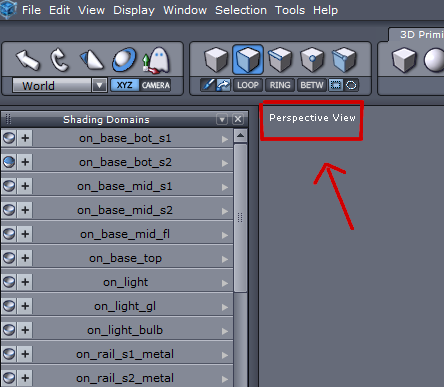
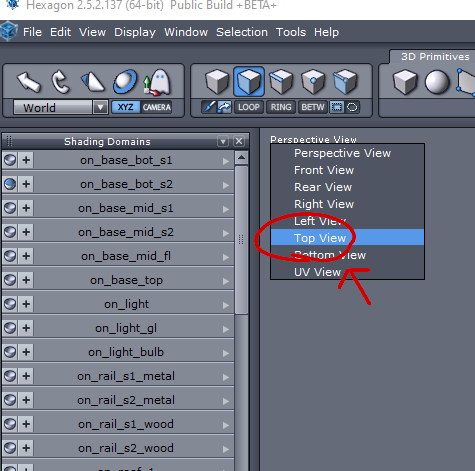
You see the Prop now from above:
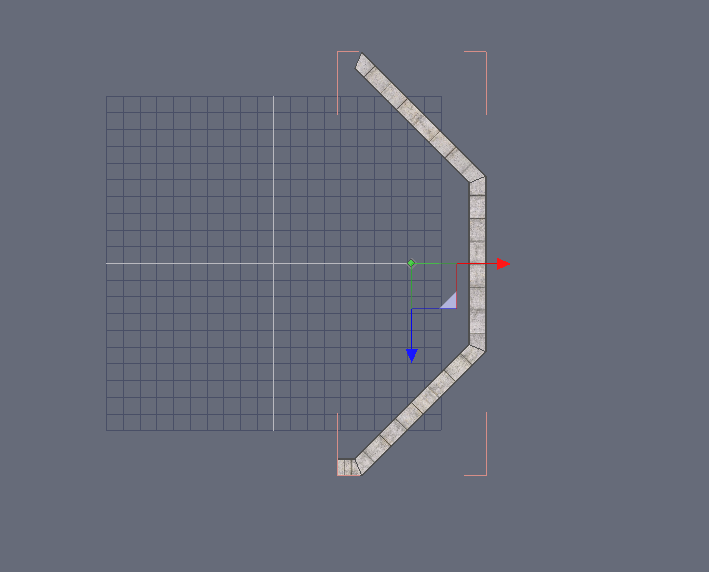
10.In the Viewport Utility Bar click on „Wireframe“

The prop looks like this now:

11. Press F2 (OR click on „Select Faces“ in the "Selection Type Bar")
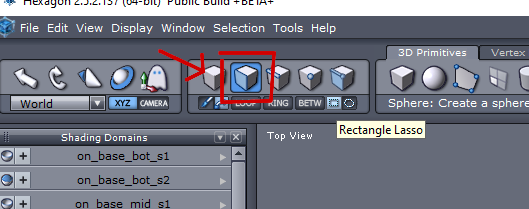
12. Click on „Rectangle Lasso“: This Lasso selects only the parts which are completely inside of its‘ borders.
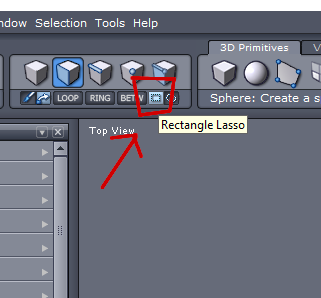
13. The Prop consists of 4 parts, a tiny one and 3 long ones:
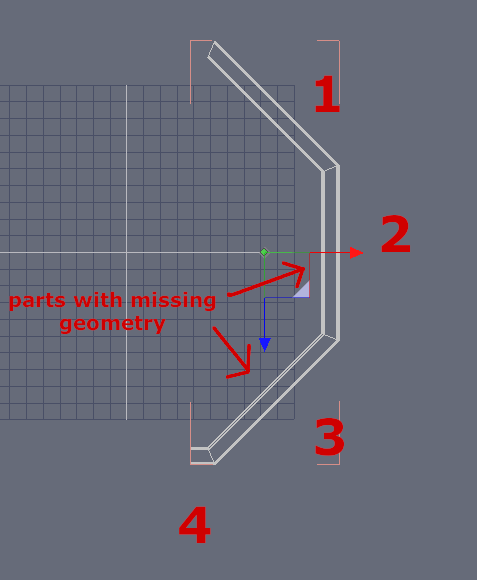
With the scroll wheel of your mouse you can zoom in and out.
With the right mouse button you start the selection.
You have to select the first two long parts with the missing geometry ("3" and "2" in the screenshot above) by placing the rectangle around them and avoiding to place the other two parts completely inside that rectangle. Start from the bottom like so:
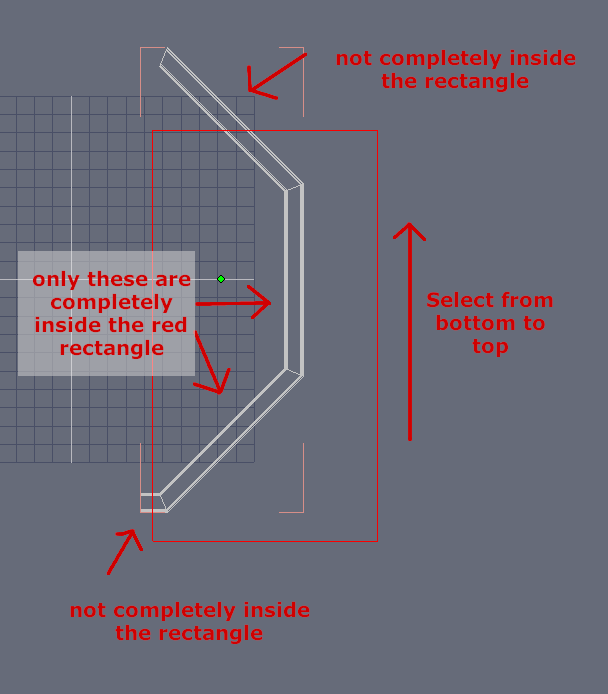
14. Now both broken parts are selected.
15. Hit Delete (NOT Backspace) .The selected parts have been deleted
16. In the same way select the tiny part, choose cut and then paste in the Edit Menu.
17. EDIT: forgot to delete this step before posting, so please ignore.
18. In the Scene Tab you can see now
„oneiros“ = invisible rest of the prop,
„Form1“ = larger part and
„Form2“= tiny part
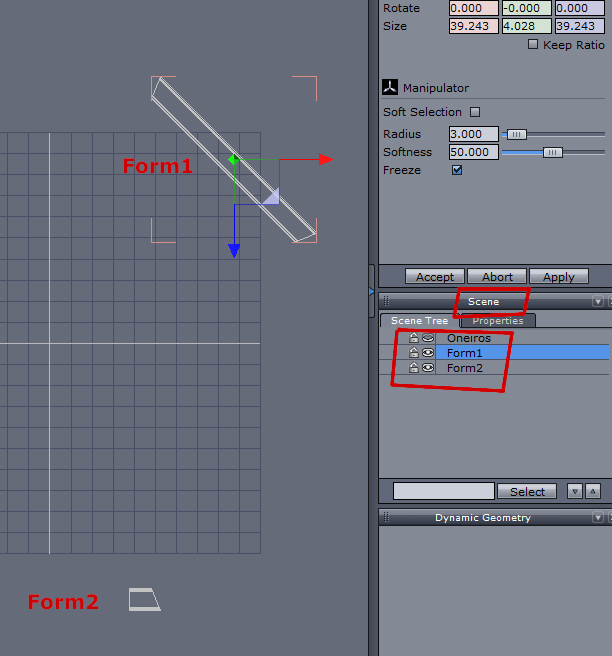
19. With „Form1“ selected, type ctrl+c (copy) and ctrl+v (paste). A new „Form1“ has been created and selected.
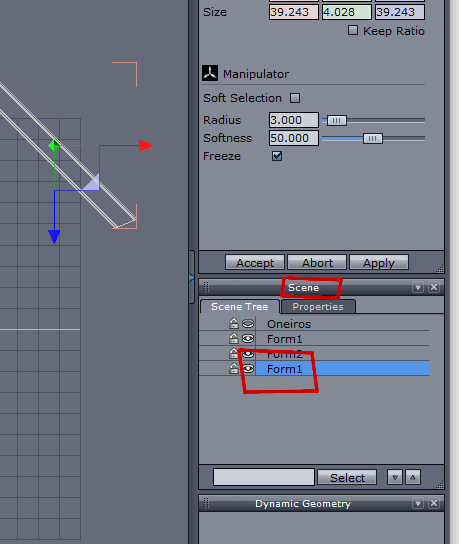
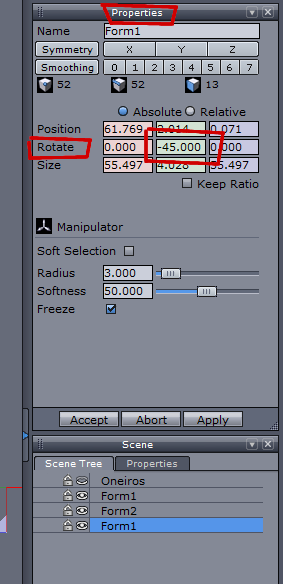
20. Inside the „Properties“ Tab, in the green column, in the „rotate“ row enter „–45“.
Your scene looks now like so:
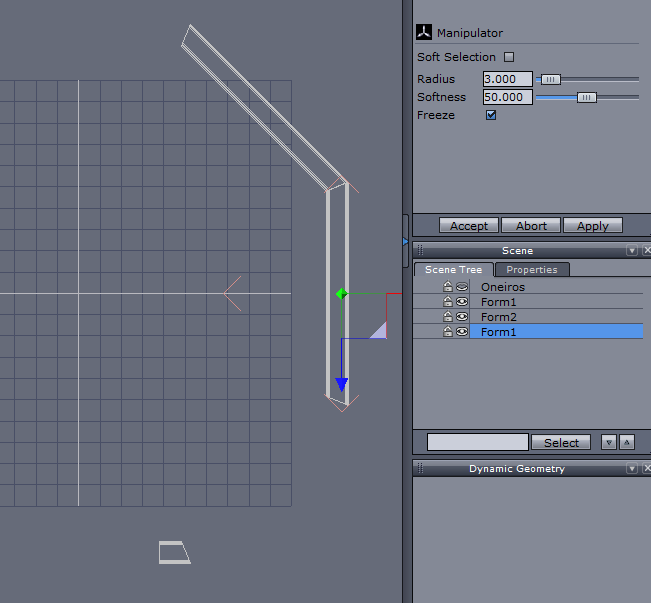
21. With the new „Form1“ still selected copy and paste again (like in step 19) and enter into the same place like in step 20 the value „-90“. Your scene looks now like so:
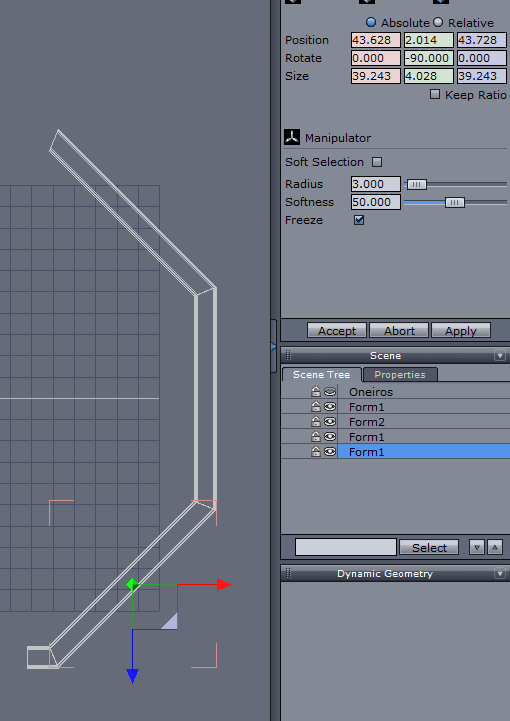
22. Select the second "Form1"…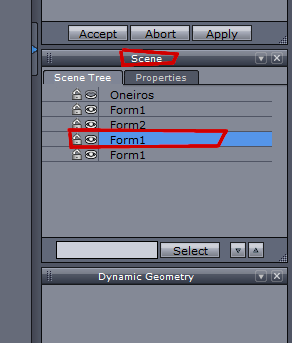
23. ...and change from "Top View" to "UV View":
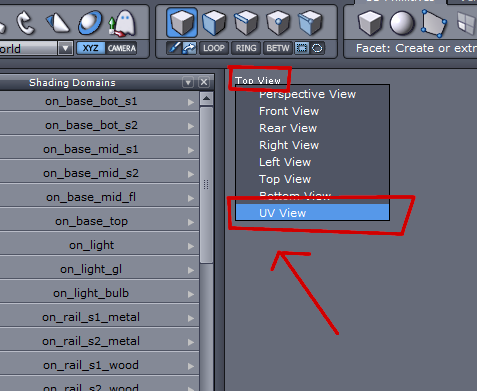
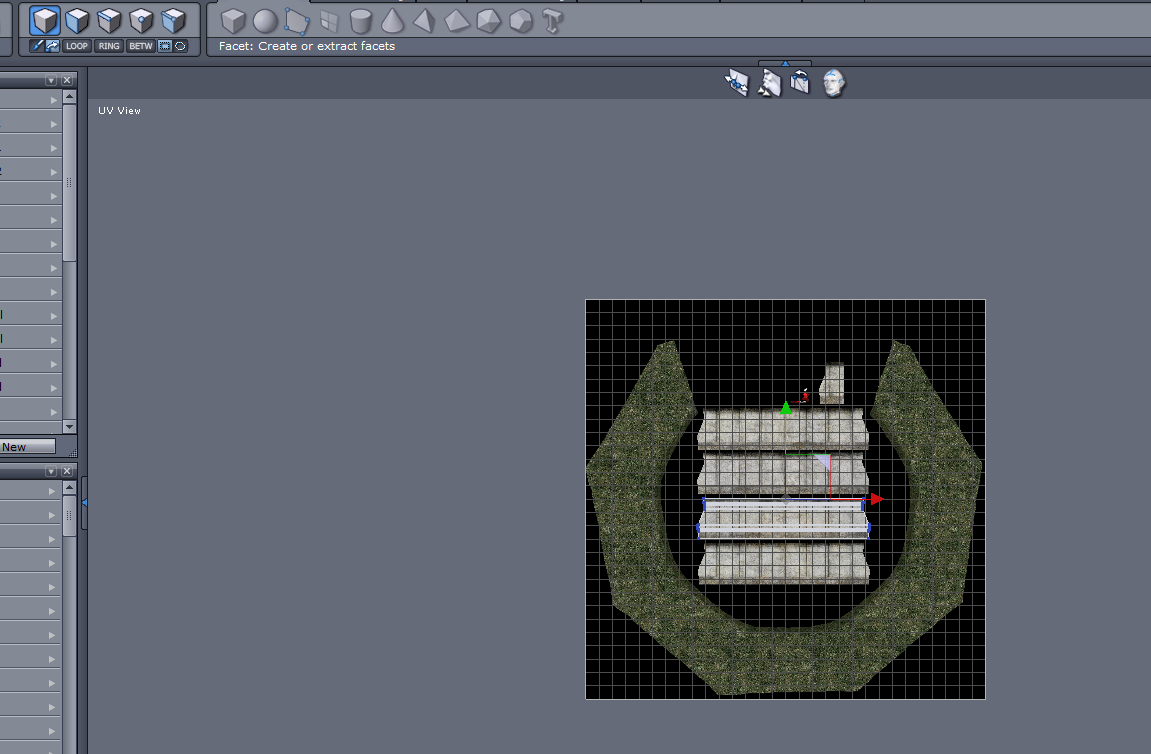
24. With the scroll wheel of you mouse zoom in a bit to better recognize the selected area („uv island“)
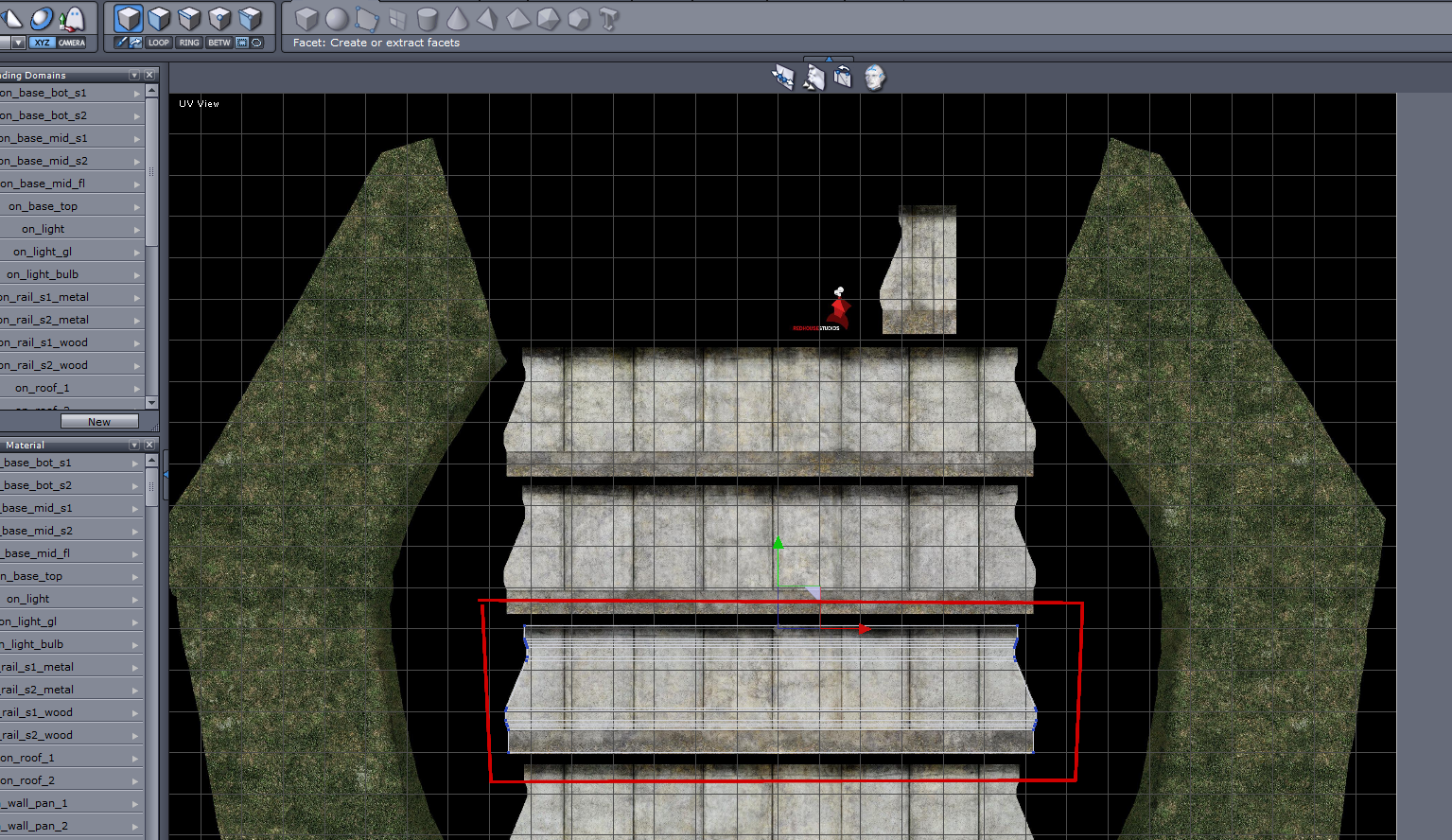
25. Hit F2 to choose Face Selection…
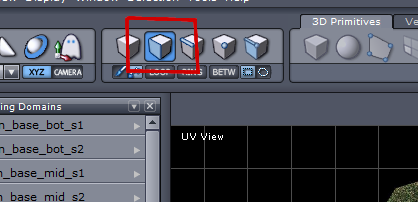
26. …and with right click (holding) select the selection (uv island) completely
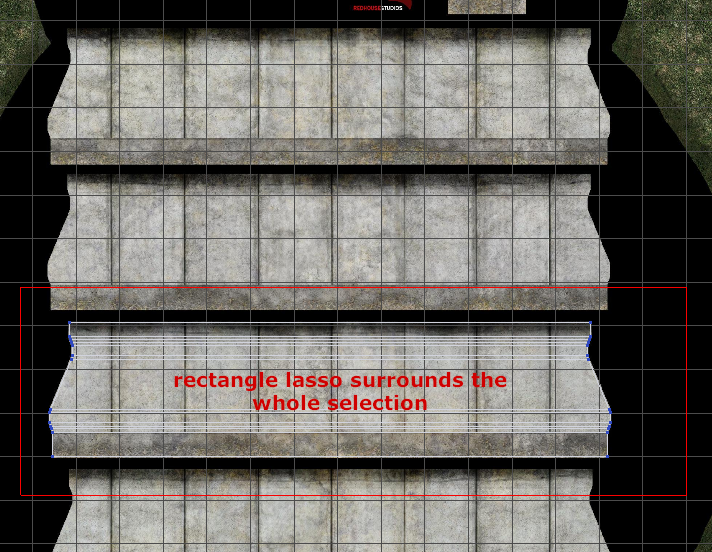
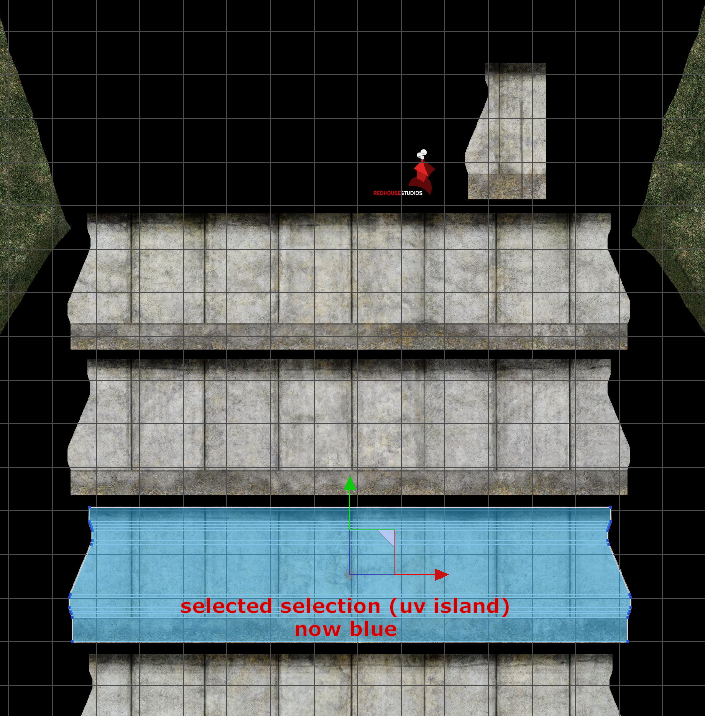
27. Hold ctrl, then left - click (hold) on the green arrowhead and with the mouse move the selected area onto the texture part right above the previous one
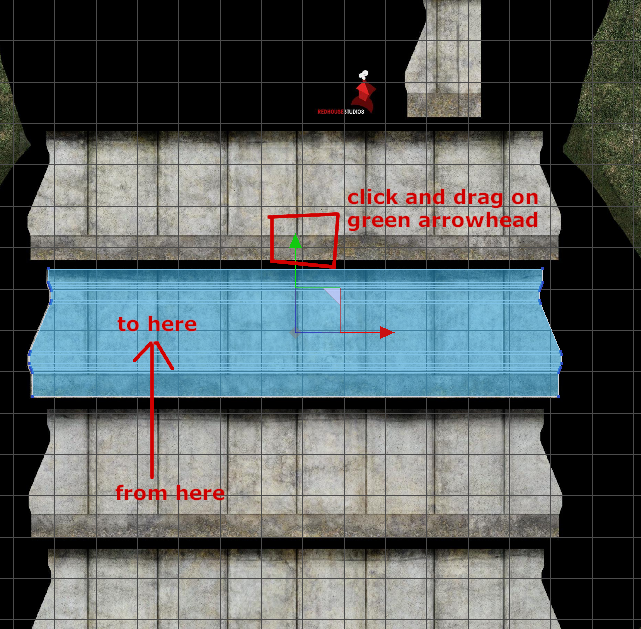
28. Click on the last „Form1“ in the Scene Tab
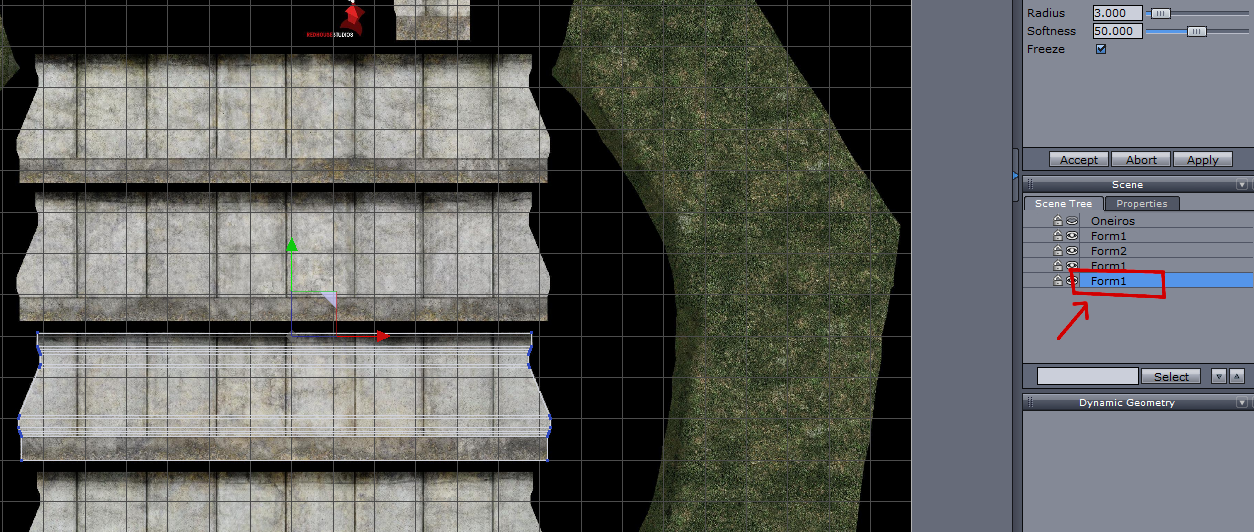
29. Select the „uv island“ as in step 26 and move it this time to the texture above the one chosen in step 27
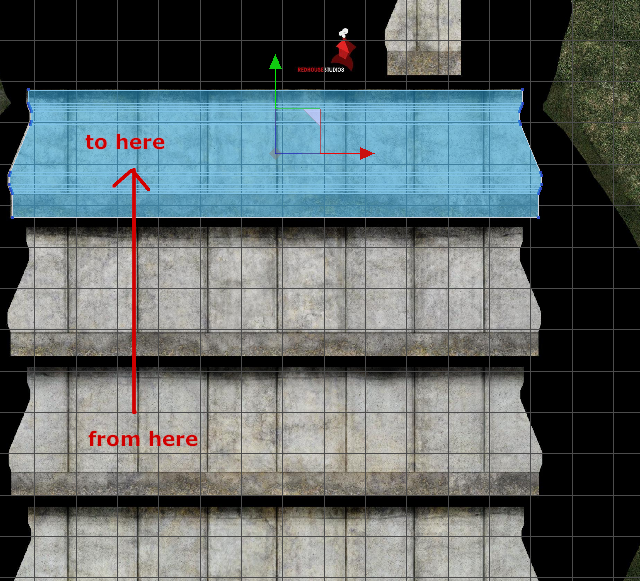
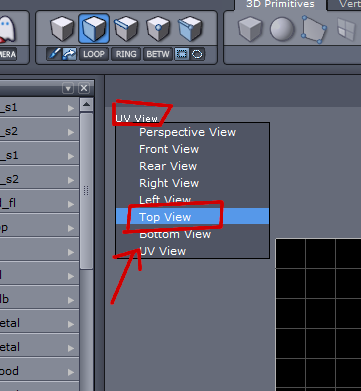
30. Choose again the „Top View“
31. Click on the eye symbol of oneiros
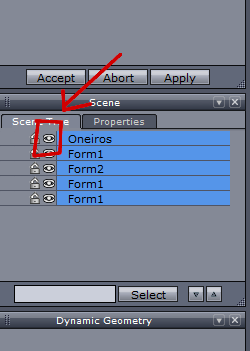
32. Select all nodes in the scene tab
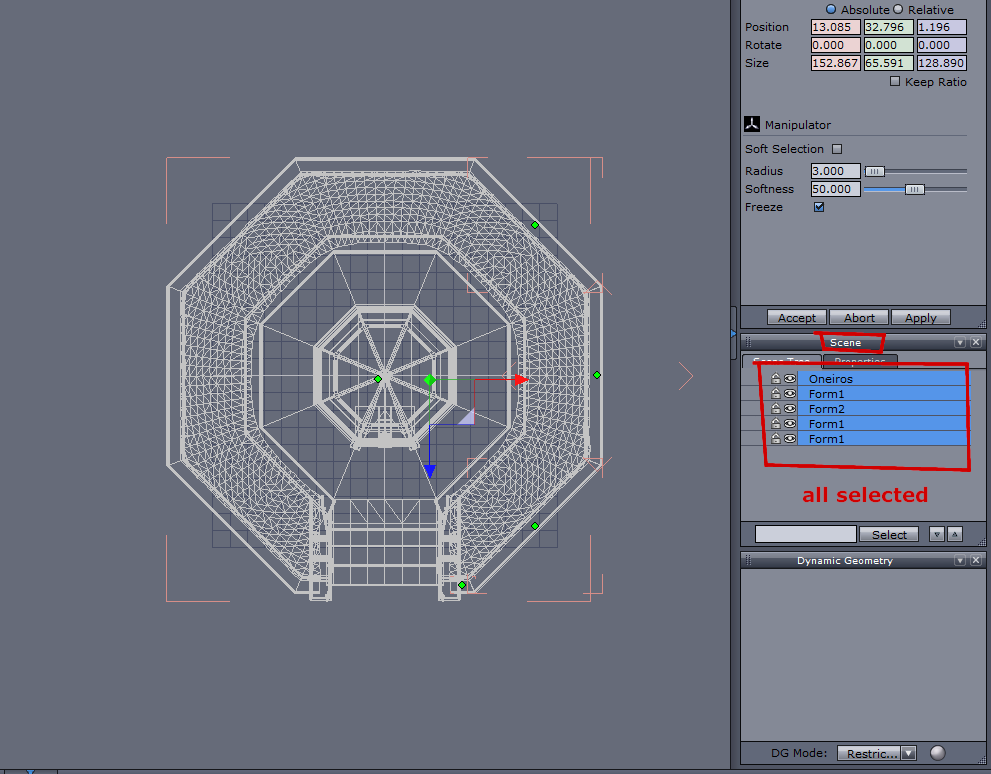
33. Click „Send to DAZ Studio“
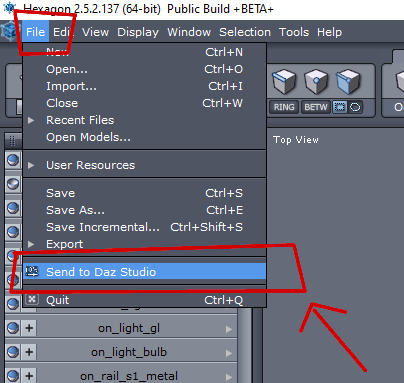
Back in DAZ Studio:
34. Click on „Create a morph“ and choose „Create a prop“ in the forthcoming menu and hit „Accept“
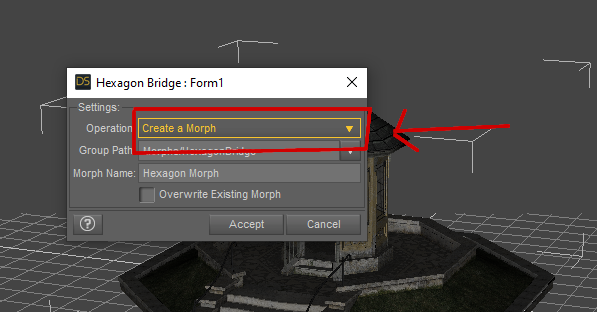
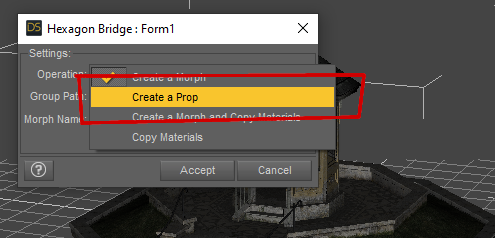
35. Repeat with the next dialogboxes until all parts have been processed
36. Delete the original oneiros prop in the scene tab
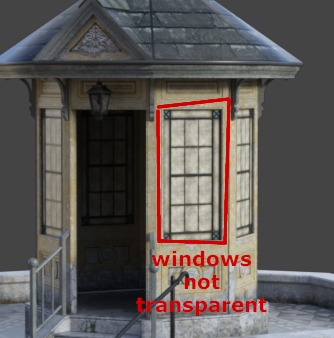
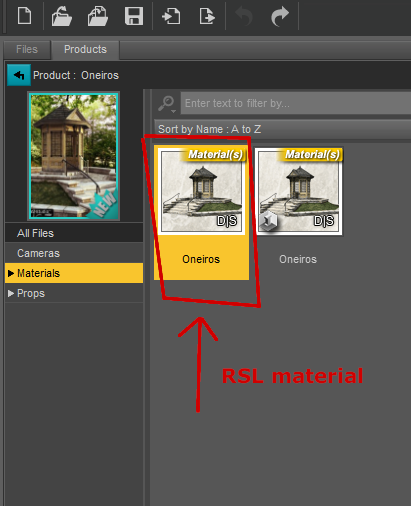
37. Select „oneiros (2)“ in the scene tab and load the RSL material onto it. This is necessary, as the IRAY material is broken concerning the windows.
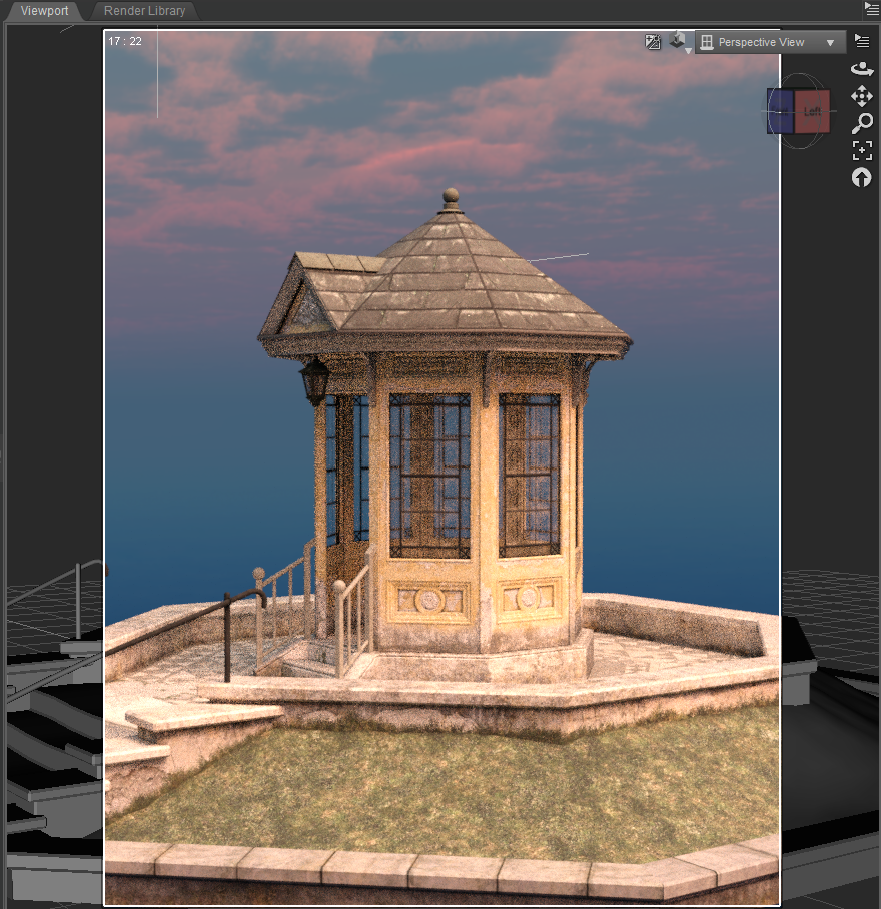
38. Oneiros now ready to be further adapted to your scene.
 KuJ dForce Medieval Dress for Genesis 9
There didn't seem much point me giving this ago seeing as someone with much more experience has already found not one but two fixes. However, I thought I would look anyway and can atleast confirm that the dress does behave incredibly oddly - I have never seen clothing implode due to a pose before, nor a dress shrink-wrap itself under default dforce conditions.
Not managed to figure out how to "unlock" the Projection Template drop-down in the Transfer Utility yet but the first solution that barbult posted did greatly improve the behaviour.
Texture editing and MAT Zone questionProportional editing is a move tool, so you do not change number of verteces with that. That is why you can use it as a morph.
The only disadvantage of doing it that way is the texture will be more compressed in the lower part of the skirt than in the top, so if you use a pattern it might look odd.
A similar way of scaling, is to select the top row of verteces, and place the 3d cursor at selected. And then set pivot point to 3d cursor. Then select all and scale in Z-direction. That will although make your hem a little smaller.
Texture editing and MAT Zone questionfelis said:
If you want to make it shorter but keep the hem, you could make the lower part one material zone you can remove with cut-out oppacity.
And above that make a new hem surface.
But your old hem texture would not fit that, as it is on another place in the UV map. That could be adjusted in an image editor.
I think my suggestion instead is to make a morph. If you in blender select the bottom row (the hem) of polygons, enable proportional editing, and adjust the influence size. Then move it upwards, and maybe scale in a bit if to your liking.
Yes, I'd like to do that in Blender but I don't want to mess with the vertex count (by shortening the length) otherwise I end up with a whole new prop instead of the original skirt. Then it gets into areas that I know nothing about like rigging and UV Mapping - I may as well make a new skirt from scratch.
Daz 3D is part of

Connect
DAZ Productions, Inc.
7533 S Center View Ct #4664
West Jordan, UT 84084Licensing Agreement | Terms of Service | Privacy Policy | EULA
© 2026 Daz Productions Inc. All Rights Reserved.