-
The I Miss the Old Days Complaint Thread
...so learned that Chrome will cease support for Windows 7 and 8.1 come February (not sure if that also affects Gmail as I really don't want to set up a whole new mail account). This means no new updates which would include "zero day" fixes to thwart ransom- and other malware attacks. Unfortunately to move to W11 Pro (said my peace on W10 previously) also requires a major system upgrade that means replacing over decade old components with more up to date ones like the Motherboard, CPU, and memory. The full cost (including and OEM of W11 Pro) is just under 1,000$, something I will not be able to save by the deadline. While I'm not looking at the latest and greatest (Zen 4 and DDR5 memory), even though I'm on a fixed income, also not into wasting money on a cheap "stopgap" that will likely be obsolete in short order.
The components I settled on are Motherboard: Asus PRIME X570-PRO ATX AM4. CPUL: AMD Ryzen 9 5900X 3.7 GHz 12-Core, Memory (I still also use Carrara and 3DL): Corsair Vengeance LPX 64 GB (2 x 32 GB) DDR4-3200 CL16, and a new more capable CPU cooler: ARCTIC Freezer 34 eSports DUO.
I already have an RTX 3060 12 GB and will also be keeping my current drives as (SATA III SSDs and a 2 TB storage HDD). This leaves some room for expansion, such as memory and adding an M2 SSD to transfer the boot drive to. The Titan-X will likely go to supporting the displays with the 3060 dedicated to rendering and dForce so there will be no more crashes of my display driver when running sims.
Sadly short of hitting 5 of 6 numbers on the Megabucks Lotto (which would be enough to cover the cost) don't think I'll make the deadline. I can keep running Chrome but again but it means dealing with higher security risks.
DAZ Studio Clothing on Metahuman?Hi, I wanted to ask, has anyone tried to put or transfer Daz Studio clothing onto Metahumans?
Is that possible?Dimensional Scaling of BonesPickle Renderer said:
I would strongly recommend not doing any non-uniform scaling on any rig, ever. It's almost guaranteed to mess up animation, morphs and so on. Uniform scaling is usually OK. Far better to do a morph to shorten the fingers than a non-uniform scale. If you aren't sure how to do that, it would be a good skill to learn (Blender, for example).
One of the reasons is non-uniform scaling breaks batching (in game engines at least). The matrix math can also make weird things happen in the renderer, especially to surface normals.
First of all, I wasn't planning on using this for animation, only for rendering 2D static images.
Second, when you say "shorten the fingers," are you aware that I already said I don't want to shorten the third finger joint? If so, then I don't think I follow you. You seem to be saying that I should "make my own morph" (as opposed to using an existing morph asset) in a manner which does not use the dimensional scaling sliders but effectively achieves the same result; in which case, why? Why is using the sliders bad, but making a "morph" that does the same thing isn't?
To put that another way, the G8 Body Morphs "Finger Length" morph appears to have an effect similar to applying a non-uniform scale (in length and not thickness) to all three finger joints equally, for each finger. Apart from involving more steps, why is one of these actions better than the other?
Masterstroke said:
So, do all the scaling you need, then ERC-freeze command and save this morph asset. This works even a little bit better than morph targets, for there are less unwanted distrortions.
Is ERC-freeze something I need to do any time I'm saving a new morph, or only when using non uniform scaling? If the latter, why?
Also, I'm not sure I understand what you mean by "morph targets" in this context.
Daz Studio Pro BETA - version 4.22.0.15! (*UPDATED*)Imago said:
New beta, old bugs... Still impossible move root keyframes in the timeline, copy-paste keyframes, filter parameters sliders in the graph pane, frame props in the workspace, save aliases and custom moprhs in the puppeteer dots, save changes and custom actions in the Scripts menu... Just to name few!
I wonder if DAZ3D even cares about animators, it's since version 4.12.0.86 that almost all animation tools are broken beyond usability. Devs should know that animations isn't just about downloading a BVH from Mixamo and applying it to figures.
Is getting really painful work only on DAZ Studio 4.12, especially when you try to make a living out of your works.
Totally agree animation need more attention.
But will also agree that DAZ has it hands full with implementing G9 (and all its features) and speed regressions and Ghost-lights, etc. etc.That said, have a few questions/explanations.
(1) copy-paste keyframes. How are you wanting to do this?
In timeline keyframe area, left click and drag over key(s) to select them, right click near yellow highlighted keys - select copy selected keys, and then move timeline to spot where want new keys to start to appear and right click anywhere in timeline active area and select paste keyframes.
(2) the first keyframe stores everything, ie root, as you say. It takes so long to copy/paste cos tons of data there. Couldn't you timeline-render from Key 1, or later? and just use Key 0 as your reference point that you don't render?
Yes there are times when changing the root would be good.
But flipside is see it more as your root pose must be chosen carefully.So current option seems If you don't like start new anim with new root pose. Means more pre-planning and more start-overs. But get faster with this process?
Just not sure how with single thread anims and all the huge amounts of data that DAZ offers each user to change, that they can easily be moved.(3) Custom Morphs
Using visual menus to save various custom morph presets.
Yes Puppeteer is pretty nice, but always saw it as a more secondary posing mechanism, cos less people seemed to use it.
So maybe a workaround? I don't use.Whereas saved custom morph presets are basic to DAZ.
So in this case custom morphs saved as shaping preset auto-added as key in timeline as soon as you change value from zero and you graph-interp line moving as soon as you add.Think main point am trying to make is adjusting your anim-activities to what DS features are more basic and more supported.
Just don't see DAZ as having enough resources to do ENOUGH that animators all want.Ashendun Hair issue.Found the problem. It's not the version of Studio, it's not the hair. It's the Growing Up morph and Autofit. On any character, you reduce the age, then the problem occurs. I use that a lot because of the unrealistic size of G8 (and G7, G5, etc...)
The only answer is to avoid Autofit and manually fit the hair. I have to admit, I have gotten used to it after all the years of fitting hairs on characters all the way back to Victoria 2.
..Joe
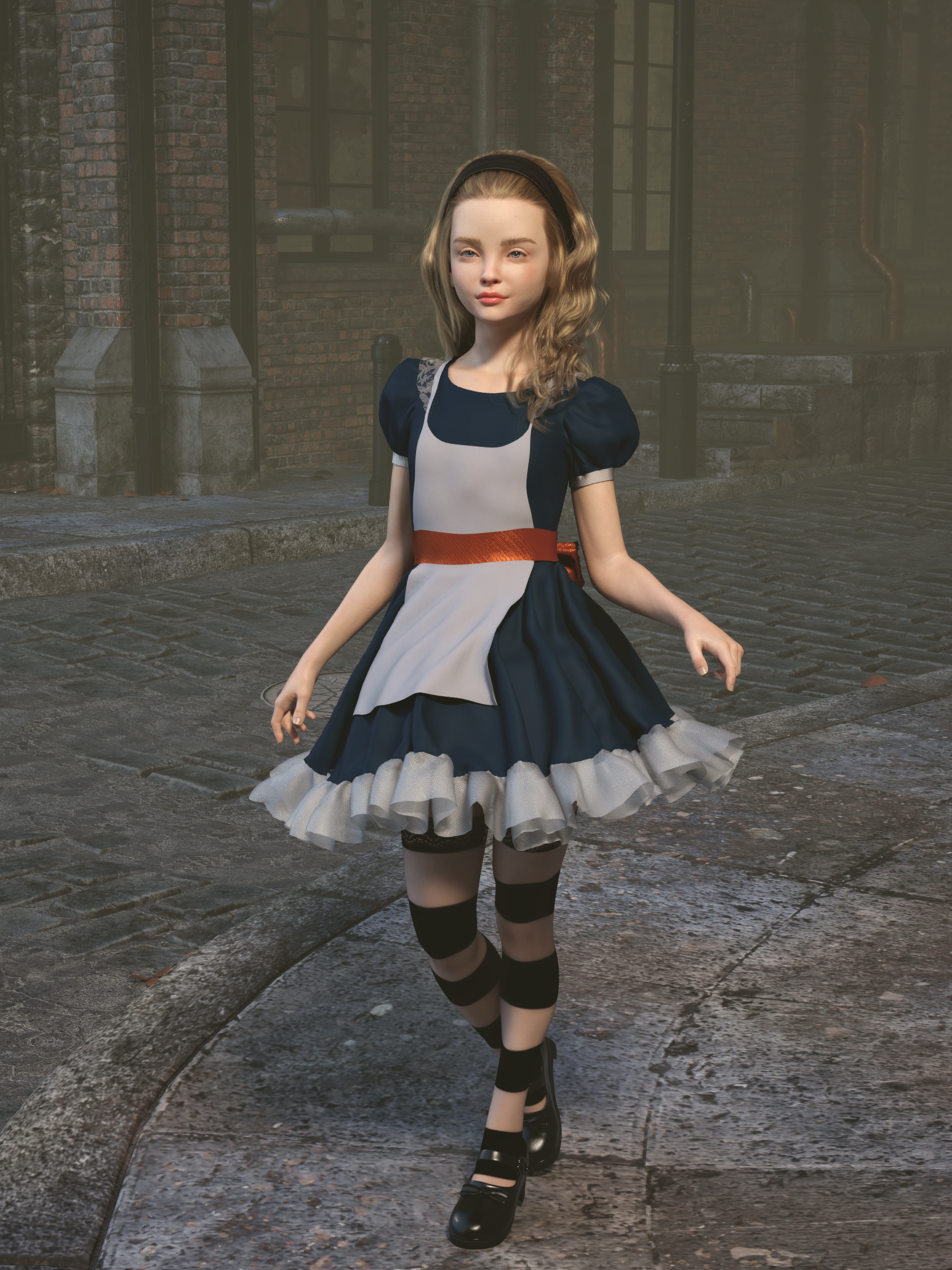
The Cute Kids ThreadI used a bunch of morph sliders on Alice. She was included with the dress. I used so many morphs to make her look like a middle schooler and used the Growing Up morph and a lot of face morphs. I used an orange fabric shader over her waist ribbon since it's complimentary to blue
 Deformations between higher res HD Morph and Geograft figure need advise for better transition
It does look as if it might be related to morph projection, though I am not certain.
Splice HD Morph for Genesis 8 Females by DaveyabboI just saw it and it is just out today.
This is really fantastic!!!
I love it!!!!
Wow, he sure has a way with unique cyborg type beings. They often have a feel of "vulnerability", danger, and pathos. "Vulnerability" you might question but for me they often, almost always, suggest a back story of tragedy, of things gone wrong in terrible ways.
Anyway, I am so glad to see this new character of his.
Thank you so much.
Randy
Importing a suit from Blender. Need help with transfer utility.That sounds as if your Import/Export setings need adjusting. makes sure that Blender is doing nothing, open the OBJ export in DS and note the preset used (if it'ss et to Custom then save that as a preset) and apply the same preset in the Import dialogue. Transforms applied in DS will not be used by the Transfer Utility.
Genesis 8 Male Deforms on PosingNiffgor said:
I have the Problem with G8 / 8.1 Female: as soon as I bend a joint, it will deform.
When I check the hidden JCMS of the Genesis Base figure, I have JCMs of 9 different Figures there (none of them recently puchased).
Any suggestions how to fix that?
Take screenshots of the offending JCMs and contact support (assuming all the figures are from Daz: https://helpdaz.zendesk.com/hc/en-us). You will need to uninstall those figures until a fix is uploaded by the PA.
It is possible to fix this yourself but it can be fiddly... refer to the attached image.
First back up the figure morphs from, for example:
data\DAZ 3D\Genesis 8\Female\Morphs\ vendor name \ product name
OR data\DAZ 3D\Genesis 8\Female 8_1\Morphs\ vendor name \ product name
Then load up the base figure the figure was made for (Genesis 8 X OR Genesis 8.1 X). If you save a G8 morph on a G8.1 base figure, it will become a G8.1 morph...
A figure specific JCM should only fire when that figure is dialled in. To do this, there are two controllers - one for the joint to correct and the second is usually the master morph for that part of the character (FBM - full body morph for a body or limb joint, FHM - full head morph for a head or face JCM). Alternatively, if there is only one slider to dial in the figure, it will be that one. This second slot is a multiplier - if the listed slider is not dialled in, even partially, the JCM will not fire.
In your situation the PA has neglected to put in that second multiplier. You can do this yourself. In the parameters tab, right-click and click Edit Mode. Right-click on the JCM and click 'Show in Property Hierarchy'. Expand the entry and expand the Controllers section. It is the 2nd Stage (Multiply/Divide) you want - expand it and it is probably empty. Find the appropriate controlling morph in the Parameters tab and carefully drag and drop it on to this slot. You should see the JCM has deactivated in the viewport and Parameters tab. Repeat this for any other JCMs for that character. Ensure under Attributes that Save With: is set to the JCM name.
When done, zero the figure. Go to File > Save As > Support Asset > Morph Asset(s)
In the window that appears click the arrow to the right of Vendor Name - select the vendor for the figure
Underneath click the arrow by Product Name - select the appropriate product name.
(If you can't find either the vendor or the product, you've got the wrong base figure loaded: G8.1 instead of G8).
In the list below find and tick all JCMs you've edited and click save. Test by loading a new base figure. If ok, repeat for each broken figure.
script not finding the model in the scene私も同じ問題を抱えていました。
私は解決策を見つけました。
スクリプトの問題ではありません。
3DStorobist のコードは一文字たりとも間違っていません。
まず、前提として FBX to Mixamo を作成しておく必要があります。
次に、アニメーションを Genesis2 から Genesis8 に転送できます。
ここからが本題です。
みなさん、共同編集に切り替えてスクリプトを適用していますか?
これは私たち全員が陥る罠です。
ほとんどの人はそれをユニバーサルにしてスクリプト化します。
共同エディターでスクリプトを実行してみましょう。(Edited by mod to add translation)
i had the same problem. i found a solution. It's not a script issue. 3DStorobist's code is not a single letter wrong. First, you need to create FBX to Mixamo as a prerequisite. Then you can transfer the animation from Genesis2 to Genesis8. Here is the main issue. Have you all switched to co-authoring and applied scripts? This is a trap we all fall into. Most people make it universal and script it. Let's run the script in co-editor.
Importing a suit from Blender. Need help with transfer utility.I'm trying to import a suit from Blender. First, I imported a Gen 8 Female body to Blender and made the "suit" to comform to the body. Then, I exported the suit to FBX (and OBJ as well). The FBX one fit right away when I imported to Daz, but the OBJ one needed some transforms (i.e. scaling, moving, etc). When I used the transfer utility, I was expecting the suit to be somewhat fitted to the Gen 8 female body. But instead, it just fell on the floor. I noticed that the hierarchy got messed up (see image. "helmetTorso" was the original name of "suit" before I renamed it). It looks like it tried to map part of the suit to some other part of the body. I'm not sure what's going on here. Any tips? Thanks.
(Image removed by mod due to nudity. Please refer to https://www.daz3d.com/forums/discussion/3279/acceptable-ways-of-handling-nudity#latest )
Experimenting with ML Deformer in UE5.1Just an update after some more testing.
I originally said above that the number of frames in the training animation didn't seem to make much difference, but it turns out that it does is some situations.
It's deceptive when you're just looking at the tests in the ML Deformer setup as everything looked good, but it's obvious when looking at the character with a "real" animation.
Using the knee as an example, I was originally training with just the knee straight and the knee bent, with no inbetween poses, but the inbetween poses are absolutely necessary it turns out.
Now, I'm using 30 frames inbetween each pose in the training animation and getting much better results.
Another thing I've notived is that training with the vertex delta model is generally giving me better results than training with the neural morph model, both on default settings. The Nearest Neighbour model doesn't seem to work at all but to be fair, it does warn you that's it still very experimental.
I'll post my final training model for genesis 9 once I've fixed it up a little.
how to make genesis 9 EYES works ( eye look up/down and eye loop side/side)Hello!
Please i have a super important question, watched tons of videos but they all hide the fact that once you import a morph with morph loader pro, the eye look up/down and eye loop side/side original genesis 9 doesn't work properly anymore.
any idea please?
thank you so much!
Old .daz scene can't find empty morphs - how to locate or recreate? [SOLVED]I'm trying to load an old .daz scene, probably saved out from Daz Studio 3.1 or earlier, from a PC long ago retired. I have a copy of most of the data, but apparently missed a few key files.
I'm working from a newer PC, with relatively fresh installs, including I think all the relevant assets. For simplicity, I'm working only with a very simple scene that was basically just Victoria 4.2, with a texture and some unmodified morphs injected, as that was my starter scene that most of the rest are based on.
It failed to load correctly when I attempted to load it into Daz Studio 4.21, so I installed Daz Studio 3.1 again to try my luck there. That also fails with similar errors. The key error messages seem to be related to some missing empty morph files, such as:
Unable to find file for storable: data/blMilWom_v4b_68498/hip/modifiers/morphs/EMPTY-HipsCrest_0.dsd'
I've done a ton of experimentation and scouring the internet for solutions, but nothing I've found yet seems to quite fix this. I've read that somehow you can use DS 3.1 to regenerate missing .dsd and other files for the data folder. Is that what I need to do here, and if so how?
Deformations between higher res HD Morph and Geograft figure need advise for better transitionI have tried adding the subD property to my geograft. It still seems to have an odd line of deformity that seems to be the same line that is used for creating the geograft. I have tested this myself using Genesis 9 with the Victoria 9 HD morphs on and a geograft I created as a replacement for the arm. Its the same arm geometry I just made it into a geograft instead to be used as an example.
I'm having trouble uploading the images to the forum for some reason.
The line is even more pronounced with higher levels of subdivision. I had suspected that it is due to the way that the HD Morphs are deforming the mesh in a different way than the Geograft geometry since the Geograft Geometry doesn't have an HD Morph to it. Or maybe I need to do something else to accomodate the higher resolutions?
Steps taken
Export G9 at base resolution with Zeroed shape in obj and import to blender.
Remove all polygons except for the arm and export to obj.
Import the arm as obj and apply subD to the imported arm.
Use transfer utility to transfer rigging from G9 to the arm.
Go into geometry tools and select the geograft faces on G9 corresponding to the faces that will be replaced by the arm's edge and assign for grafting.
Add the faces for the rest of the arm for hiding and assign for auto hiding.
Unfit and fit the arm to G9 figure.
Apply the PBR Skin shader to the Arms surfaces.
Copy the G9 surfaces to the Arm figure.
Apply Victoria 9 HD Morph
You should be able to see the line deformation that happens to align with faces used for the grafting.
This should allow you to reproduce the issue, but hopefully others may provide some more suggestions on how to fix this or how to mitigate this. Crossing fingers that someone in the forum might know.
Diffeomorphic DAZ Importer version 1.6.0 released.Figured out how to save the pose and import it into Daz, by using the option in the Blender add-on for Daz importer section.
EDIT: I noticed that the ankle, wrist is not able to be bent nicely in Blender, but when its imported into Daz, it looks smoother and much better, I wonder how do we fix this in Blender, with the Genesis 9? Could it be the HD morph thing? As thats what I think might be the issue, that we don't have HD morph in the Blender importer addon?
Dimensional Scaling of BonesPickle Renderer said:
I would strongly recommend not doing any non-uniform scaling on any rig, ever. It's almost guaranteed to mess up animation, morphs and so on. Uniform scaling is usually OK. Far better to do a morph to shorten the fingers than a non-uniform scale. If you aren't sure how to do that, it would be a good skill to learn (Blender, for example).
One of the reasons is non-uniform scaling breaks batching (in game engines at least). The matrix math can also make weird things happen in the renderer, especially to surface normals.
Well, I disagree. I do non-uniform scaling all the time, in order to set proportions for my character. The trick is to control all these scalings with one master dial.
So, do all the scaling you need, then ERC-freeze command and save this morph asset. This works even a little bit better than morph targets, for there are less unwanted distrortions.Will metamixer work across Genesis 8 and 9 figures?RexRed said:
Hello Barbult, I thougth metamixer used muscle groups instead of morphs.
As one can see in the file lists of the metamixer addons, the head morphs are divided into almost 70 partial morphs which the metamixer is using
Sample: http://docs.daz3d.com/doku.php/public/read_me/index/85092/file_listIn principle, one could dial these morphs even from the Parameters Tab, without the Metamixer Toolkit, they may be hidden but they are there, adding to the character's morph load.
Custom Morphs for Anatomical Elements GeoshellsYou can't morph a geoshell, as a geoshell is a copy of the underlying mesh with an offset.
As far as I know you can displace the geoshell.
Daz 3D is part of

Connect
DAZ Productions, Inc.
7533 S Center View Ct #4664
West Jordan, UT 84084Licensing Agreement | Terms of Service | Privacy Policy | EULA
© 2026 Daz Productions Inc. All Rights Reserved.