-
slow down gen 8 fam
That means you have a character (Devious Dolls' Vivi) that has an additional moprh associeated with it to improve the look or avoid issues when used with the body miorphs Breasts Cleavage. Since you don't have the body morphs installed (apparently) then the attempt to make the link fails, but that doesn't matter as you don't need to corrective morph. Sometimes it may be an issue, if it is failing to find a property that should be there, and it is certainly useful trouble-shooting information if you are creating your own morphs, but that doesn't apear to be the case here. In general if a message starts Warning it is pointing something out that might be a reflection of an issue (e.g. a naming issue or saving issue if you were creating your own morphs) but isn't an ouright error.
Free Flexion Enhancement for G8/8.1F. Also SWM Flex Vein Controlwindli3356 said:
RenderPretender said:
windli3356 said:
terry_duquette said:
I don't see any attached picture, but it sounds like you didn't download/install the other file, there is the SWM Control, and the main one is the Duq7 Flexion, that is where all the missing sliders would be. TD
I think DAZ forum seem to have problem posting screenshot this morning, and yes you were right! I missed 1 file, now I have everything intact! and just wow~ what can I say, this is the best bicep morph solution for G8F period. I can never thank you enough friend :D Can't wait to see what you can do with G9
Looks great! Is that a native G8F in the pic with TD's sliders?
Yup~ that's a native G8F with @terry_duquette's slider, normally would take me huge effort to look like that by converting G8M to G8F
Looks fantastic! Shortly, I'll post some images of my most recent dabblings into TD's dials, and I'll try to share my settings.
can you conform only part of a boot or shoe?The deformation comes from the fact that the conformed item is trying to accomodate the figure's morph automatically.
If you look at the "currently used" morphs with the shoes selected (after enabling "show hidden morphs" in the tabs properties if it's not already), you should see morphs corresponding to those you used on the figure. You can zero those morphs to go back to the original shape.
Free Flexion Enhancement for G8/8.1F. Also SWM Flex Vein ControlRenderPretender said:
windli3356 said:
terry_duquette said:
I don't see any attached picture, but it sounds like you didn't download/install the other file, there is the SWM Control, and the main one is the Duq7 Flexion, that is where all the missing sliders would be. TD
I think DAZ forum seem to have problem posting screenshot this morning, and yes you were right! I missed 1 file, now I have everything intact! and just wow~ what can I say, this is the best bicep morph solution for G8F period. I can never thank you enough friend :D Can't wait to see what you can do with G9
Looks great! Is that a native G8F in the pic with TD's sliders?
Yup~ that's a native G8F with @terry_duquette's slider, normally would take me huge effort to look like that by converting G8M to G8F
Vo Yonina for G9 mouth morph is always active.FSMCDesigns said:
jd641 said:
Heh, that was it!
I edited the morph in notepad and changed a 1 to a 0 and that solved the problem. I have no idea why FSMC's friend doesn't have the same issue, it's the same files and there shouldn't be anything that I can think of that would modify a morph file to default at 100% but at least I know how to fix this on my own until DAZ has a fix.
That is odd. I had her check again and also check the mouth morph and the mouth morph doesn't really change much when activated. I had her load the character from characters and then look at the active morphs and thuis is what she had
Haha man this makes no sense!
The "Vo Yonina Mouth" morph won't actually show up in the currently used shaping morphs for some reason even thought it's set to 100%, my list looked exactly like your friends did. I had to go into Mouth > Morphs where I find the offender as the only entry there.
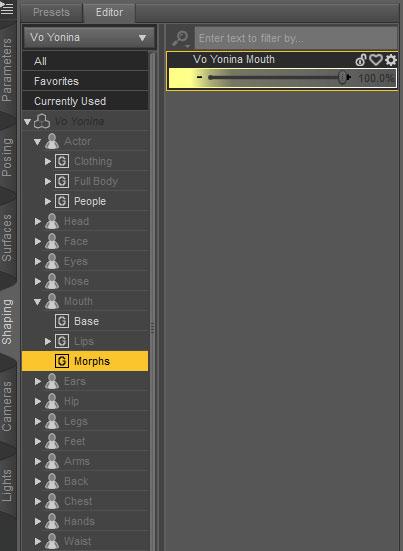
After I edited the morph to default to 0% it no longer activates at all unless I manually use the slider, it will also show up in the used morphs list when done manually.
AIUTO...CHI CONOSCE L’ITALIANO? PARTE TREDICITiziano said:
Peccato che queste siano in un formato che non posso usare.
^_^;
Che formato è? Spesso e volentieri Carrara o Blemder possono aiutarti. E poi trovi bizzeffe di servizi gratuiti di conversione online, basta cercare "3D format conversion" e sei a posto. Essendo un semplice prop non devi preoccuparti di rig o morph.
Vo Yonina for G9 mouth morph is always active.jd641 said:
Heh, that was it!
I edited the morph in notepad and changed a 1 to a 0 and that solved the problem. I have no idea why FSMC's friend doesn't have the same issue, it's the same files and there shouldn't be anything that I can think of that would modify a morph file to default at 100% but at least I know how to fix this on my own until DAZ has a fix.
That is odd. I had her check again and also check the mouth morph and the mouth morph doesn't really change much when activated. I had her load the character from characters and then look at the active morphs and thuis is what she had
Vo Yonina for G9 mouth morph is always active.Heh, that was it!
I edited the morph in notepad and changed a 1 to a 0 and that solved the problem. I have no idea why FSMC's friend doesn't have the same issue, it's the same files and there shouldn't be anything that I can think of that would modify a morph file to default at 100% but at least I know how to fix this on my own until DAZ has a fix.
Vo Yonina for G9 mouth morph is always active.Serene Night said:
It's pretty common I find for morphs and correctives to remain active in unrelated characters. Qa doesn't seem to catch them or even look. I stopped reporting it, since it rarely gets corrected. I would put a ticket in and then find the morph and chuck it for now. The rest of the character should be usable.
Can I just delete the morph without any issues?
I took a look at the morphs settings and saw that the default was 100%, is that how simple the issue is? Can I just edit the morph file so that it's set to 0% when not in use?
 Scale & Move Daz Character Imported Into Maya?
Looks like there has been some improvements since I last used the Daz to Maya bridge, which I appreciate. I can now move the entire figure in Maya by selecting the root locator (Character1_Ctrl_Reference) and moving that. I also really appreciate the 1-click button to convert all the materials to Arnold materials.
Still can't scale the figure without crazy, unwanted deformations, which is unfortunate. But my Maya scene uses the same units as in Daz and I can scale in Daz first if I don't want a 6' tall person. But then this leads to a mismatch in size of the skeleton and the mesh/skin (see screenshot), though manipulating the joints seems to still manipulate the character as I would want, so even though the skeleton is a different size it's still usable, but not ideal. It would be awesome if scaling could be improved in a future update of the Maya bridge.
Edit: Looks like the Daz 'Height' morph works as expected after the figure is in Maya (recommandation from tunde.famakinwa_5d565f45cc) and the skeleton and mesh match in size, but this is not ideal as the Height morph basically scales the figure vertically and not in any other dimension, which can result in the character looking a bit too wide and stout.
Vo Yonina for G9 mouth morph is always active.It's pretty common I find for morphs and correctives to remain active in unrelated characters. Qa doesn't seem to catch them or even look. I stopped reporting it, since it rarely gets corrected. I would put a ticket in and then find the morph and chuck it for now. The rest of the character should be usable.
Is Limbstick the IK tool Daz has been missing?I now use Limbstick quite a lot but there are times when it becomes difficult to adjust anything in the animation once Libstick has been run. I think this is because the keyframes it creates are applied to the whole figure, not just the limbs (hands and/or feet). I just had a scene where I wanted the hand to rest on a couch for the whole animation. After I had rendered the animation I saw there was something wrong (the glutes had a gap to the couch seat) so I went back to the timeline and applied a posing morph to close the gap. However, I found that didn't work for the whole timeline because Limbstick had created keyframes that are applied to the whole figure every couple of frames along the timeline.
Am I missing a trick here? Also, is there a way to reverse (remove) the keyframes created by the Limbstick script?
Vo Yonina for G9 mouth morph is always active.FSMCDesigns said:
It is just you, or due to something else you have installed. I asked a friend who has her to check and she has no issues like that
I removed the product via DIM, reinstalled and it still gave me the same issue. I don't know what could cause that one single morph to activate. All I have installed for g9 are the essientials, Vicky9, HID Nao and Vo Yonina.
Diffeomorphic performancein daz studio: edit > figure > morph loader
Face Transfer on Genesis 9Face transfer for Gen 9 please... Just bought it and can't use it...
HH Belle for Genesis 9 [Commercial]HH Belle for Genesis 9 [Commercial]
Link: HH Belle for Genesis 9 | Daz 3D
Update 01 (Live in your DIM)
- Update 01: Fixes nails, mouth, skin artifacts
Update 02 (Live in your DIM, but file is not correct - trying to get resolved)
- Update 02: Fixes tail artifact, adds cards to morph dials
Update 03 (Pending review) Get all 3 here now! (one file, self-install)
- Update 03: Fixes neck bend issue.
I've been working on this one for quite awhile and glad to finally announce my next product. I will be having a collection of wearable products to follow that directly support this character. Also, my Dark Ascension High Heels, that released last month, already support HH Belle and are used in these promos.

HH Belle is a goddess full of glamour and details and comes with a wide variety of cosmetic options, including cyberpunk lines and tattoos.
Outside of many makeup and eye color options, Belle comes with a variety of brow fillers, mascara options, levels of tanned skin, and cyberpunk eyes, and you can make her skin appear sweaty or oily.
She also comes with many HD morphs that activate/deactivate when you pose her to give her a more natural and realistic look, tailored just for her figure. These special morphs only work when her body morph is dialed up.
Includes F Gen mat and morph.
Purchase HH Belle today and bring an unparalleled level of beauty and elegance to your renders!
Here's more:


 Vo Yonina for G9 mouth morph is always active.
Sevrin said:
I don't own Yonina, but something similar happened to me with VO Carin by the same PA. It was confirmed by Daz CS, but nothing has been updated yet.
Put in a ticket with a screenshot of the paramaters to get the ball rolling. Or else uninstall and request a refund. The fix will probably take a while.
That's a great suggestion and I submitted a ticket along with screen shots of the morph being set when loading the g9 dev figure. Maybe since there's so few g9 character morphs they'll actually take care of this, if not I'll ask for a refund but from now on I'll make use to avoid VOOTW as a vendor suggest to others to do the same.
Vo Yonina for G9 mouth morph is always active.Vo Yonina for G9 mouth morph is always active. It doesn't matter if I use the dev rig or standard g9, the Vo Yonina Mouth morph is set to 100% on every character newly loaded or not, if anyone has this product, could you please confirm that this alway happens and it's not just me? Thanks!
M4/V4 skeleton inside Genesis 3/8I did do M4 skeleton into G8F, image below called 'An Unexpected Meeting' after I hid the G8F character:

To do it, I loaded the skeleton and base G8F. I used a G8F to V4 pose transfer script to put the skeleton in the default G8F pose (script here https://www.daz3d.com/forums/discussion/450206/g8f-pose-transfer-to-v4-a4.). Then, starting at the hips with a semitransparent G8F, I scaled and posed each part of the skeleton body to fit inside the right place in the G8F base character. Next I deleted the G8F and exported the skeleton as an obj file. Then in a modeller I deleted the handles that come with the skeleton. Saved the obj file, and imported back into DS. I re-loaded G8F. Converted the skeleton to a figure, then used the Transfer Utility to transfer the rigging from G8F to the skeleton. Then parented the skeleton to G8F and finally saved it as a wearable preset.
Once as a wearable preset, the skeleton will change to match new G8F character's shapes and follow the poses too. Problems: The teeth are welded, because the bottom teeth fall within the top jaw rigging zone. Problem could be avoided, probably, by having the jaw a little open when the rigging is transferred . Everything else works reasonably well. Same method probably works with G3, G8 & G9. Not perfect, but OK if not too much precision is needed.
In the image above, I made G8F transparent after fitting the hair and clothing.
Hope it helps generate some ideas.
Another silly image called 'My Head Hurts':

The full skeleton is inside the G8F character, I just hid the head and deleted the hair, adding a limb cap on the neck.
Regards,
Richard
A problem with Morph Loader Pro and SubDSo you have two figures loaded and overlapping, one with the morph and one without? Or both with but differeing in some other way?
Daz 3D is part of

Connect
DAZ Productions, Inc.
7533 S Center View Ct #4664
West Jordan, UT 84084Licensing Agreement | Terms of Service | Privacy Policy | EULA
© 2026 Daz Productions Inc. All Rights Reserved.