-
Using my purchased characters in a virtual world uploaded through the unity game engine
Hey, I am playing in a virtual world called sinespace and I bought Victoria and Lanie to use as my primary avatars there. Since I have to upload them through Unity Game engine would that be ok?
V4.2 morph content not loadingCan you post a screenshot of your Content Directory Manager showing the Poser-formats?
If you have more than content folder, make sure only one has a "Runtime:Libraries:!DAZ:Victoria 4" folder.
Which Way Do I Go, Which Way Do I Go?Hi! I have been away from cg for awhile and am starting to get back into it. I have tons of Victoria 4 stuff. When I got out of it a few years back, V4 was astandard and the Genesis line was just coming out. What I am seeing now looks like a disorganized, horrid mess. Genesis 8, Victoria this and that, just stuff all over the map with little idea how it interrelates, what goes with what, etc. Initially, I stuck with V4 becasue it was pretty straightforward (and easy to use in Poser), but now, it seems like trying to decipher an unknown language.
My question is this; Is there any publication or resource that explains the various figures and how they relate? Mostly, it's about content. I have tons of V4 stuff that I payed tons of money for. I have no intention of spending another ton of money to upgrade to better figures without understanding the way the system currently works. A resource that gives a fairly detailed description of all the Daz figures and how thet are related would do the job. Does something like this exist?
Thanks!
Fitting V4 Skeleton to Genesis 3Hello Everyone,
As you probably know, there is no skeleton figure for Genesis 3 so I'm trying to make the Victoria 4 Skeleton (https://www.daz3d.com/v4-skeleton) fit to it unless there is a better option. I was wondering if there was a way to make the Victoria 4 Skeleton fit to Gensis 3 without warping the skeleton. I've tried using the autofit feature and selection Victoria 4 as the original figure, but the skeleton ends up getting warped. Does anyone have any recommendations on how to do this?
ZDG random Daz Studio discoveries and questions.I've been rather quiet for the past few months about this new Generation 8 thing, and for good reason. I don't have a lot for generation 8 that I can use is the first side of things.
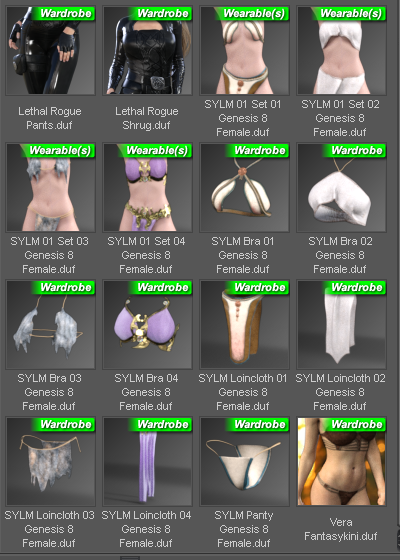
The other side is I have zero faith that anything in the pro bundles actually works for the same reason that stuff from the Victoria 7 through six months later also did not work on G3F figures. I am well aware of how long it takes to make outfits and submit them to daz, we are talking months after the outfit came out of the 3D modeling program. And the final shape for G3F was not finalized up till the last few days before launch. So there is just no way in hell the outfits will ever work without FBMs for each and every figure shape. I get the feeling that generation 8 was no different with the shape of G8F/V8 not being finalized up to " 'T'-minus seconds" before launch. So you can probably guess how that will work out with stuff submitted before the final shape of the figure was settled on.
 (Apollo 1 flashbacks)
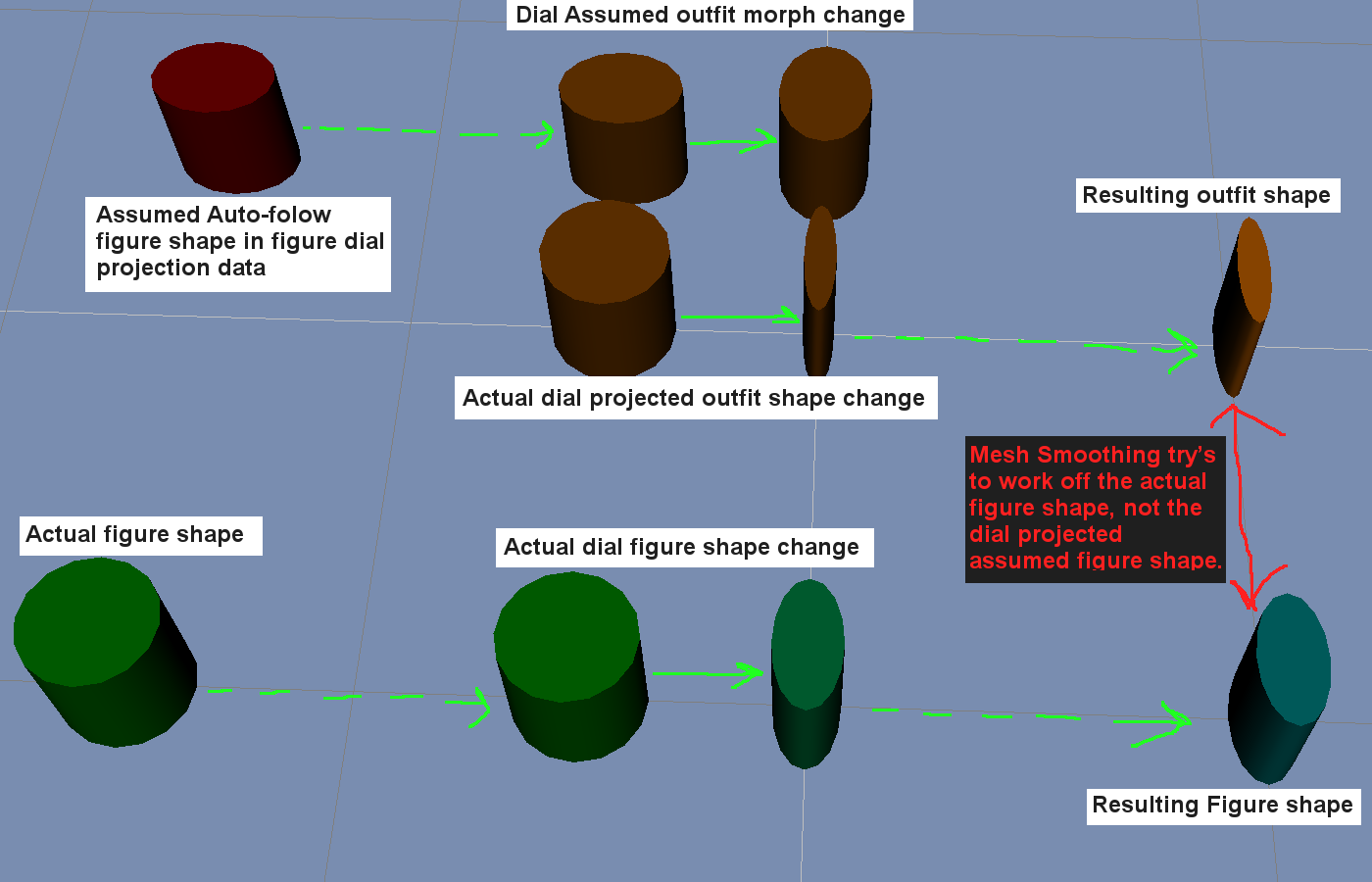
So I've been biting my tongue on the matter. I'm sure eventually PA's will start to have stuff that came out of the 3D modeling programs made from scratch to fit the final G8F shape, tho that will take some time to filter through QA to the Daz Store.
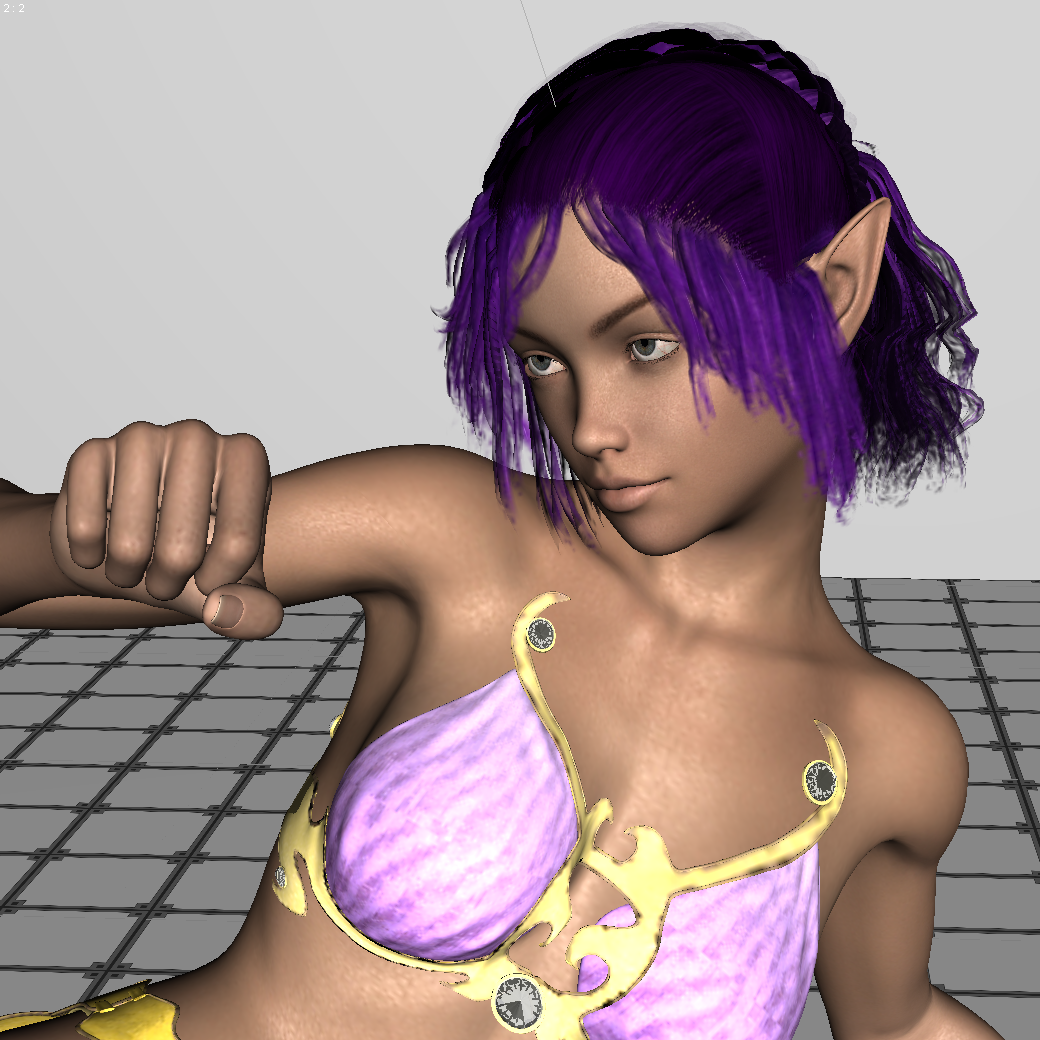
I will inject, simply because it's in the former screen-cap, I do not see any major problems with SY Fantasy Wear, tho my collection of gen8 poses does leave a lot to be desired, lol. I just got that hair and figure last night and have yet to look into them much at this point. The outfit does appear to miraculously be close enough to the final launch G8F shape that it appears to work well with autofollow, and that is far better than Pro Bundle stuff released over six months after the launch of G3F. I think Sickleyield has a time machine or something, lol.
Ghastly's Ghastly Freebees. (Ghastly's Gizmo-trons)Hi, just wondering if there are any plans to convert some of these Lolo Hai outfits to other figures. They are awesome! Those Gerudo inspired outfits would look great on my Victoria 7.
Iray for idiots?Lets keep is simple for the first step
You change render settings to NVIDIA Iray,
Your G8 Male loads with Iray materials as standart, for starters just let him stand there as the creators made him ;)
now, you don't need any lights you usually need: in your reder setting tab there is a selectable called Environment select either sun sky only (draw dome on and further down draw ground on) hit render : there he stands on a grey plane and the background is some offwhite blue
or you select Dome only or dome and scene (draw dome on adn draw ground on) hit render: similar but the background is some blurry colours in grey green yellow blue.
If you want to go further some checks at surfaces will be necessary. Latest DS will turn all your surfaces to Iray material while rendering but its faster if you tell it in advance to make it Iray.
You can do that by chosing your Item (lets say trousers) in the scene tab, choose them as well in the surface tab and then find the shader presets in your content library, there is the Iray /DAZuber select the uppermost !Iray Uberbase and apply to the trousers ( and everything welse that doesn't come with the blueisch styled surface sliders
Lights, for starters forget about them and use the lights from the environmetal sun ( there is a dial in the Environment showing the time of the day and you can rotate the dome to get the light from a different direction.
Happy trying!
Thanks, I'm sure others will profit from this but it's too complicated for me now. For example: What's an "environmenal sun"? What's a "shader preset", what's a "DAZuber". I'm old school DAZ (since Version 1). I've got a DAZ original spotlight, a G8 male (nude), no floor, no props, no scenery and mild curiosity but no real interest in Iray until and if I outlive my current hardware.
When you are ready to mke the leap, we would all be glad to help you. Some of this things will be obvious to you when you see them in context. 3delight is a lot like lighting a stage set and a little like painting; while IRay is a bit more like photography. iF you went out in the middle of the day and took a photo, you would expect that there would be ambient light outside; iRay replicates this. A shader preset is a preset that changes color and texture of something; loosely, I think of shaders as the generic such as bronze metal while a material as the combination of a shader applied to a specific geometry such as bronze arrowhead. Daz Uber shaders are as old as Michael and Victoria 4 (I think); they give attributes like translucence, light emission etc... Iray's are very sophisticated with normal maps, and all sort of cool things. The best thing about them is that they are physically based which means that you can derive new shaders by understanding the old ones since they follow set rules. An opal texture in 3Delight is a complex thing since some physical effects have to fudged or fake; in Iray, you can figure out the physical principles of an opal from an engineering text and just set it up.
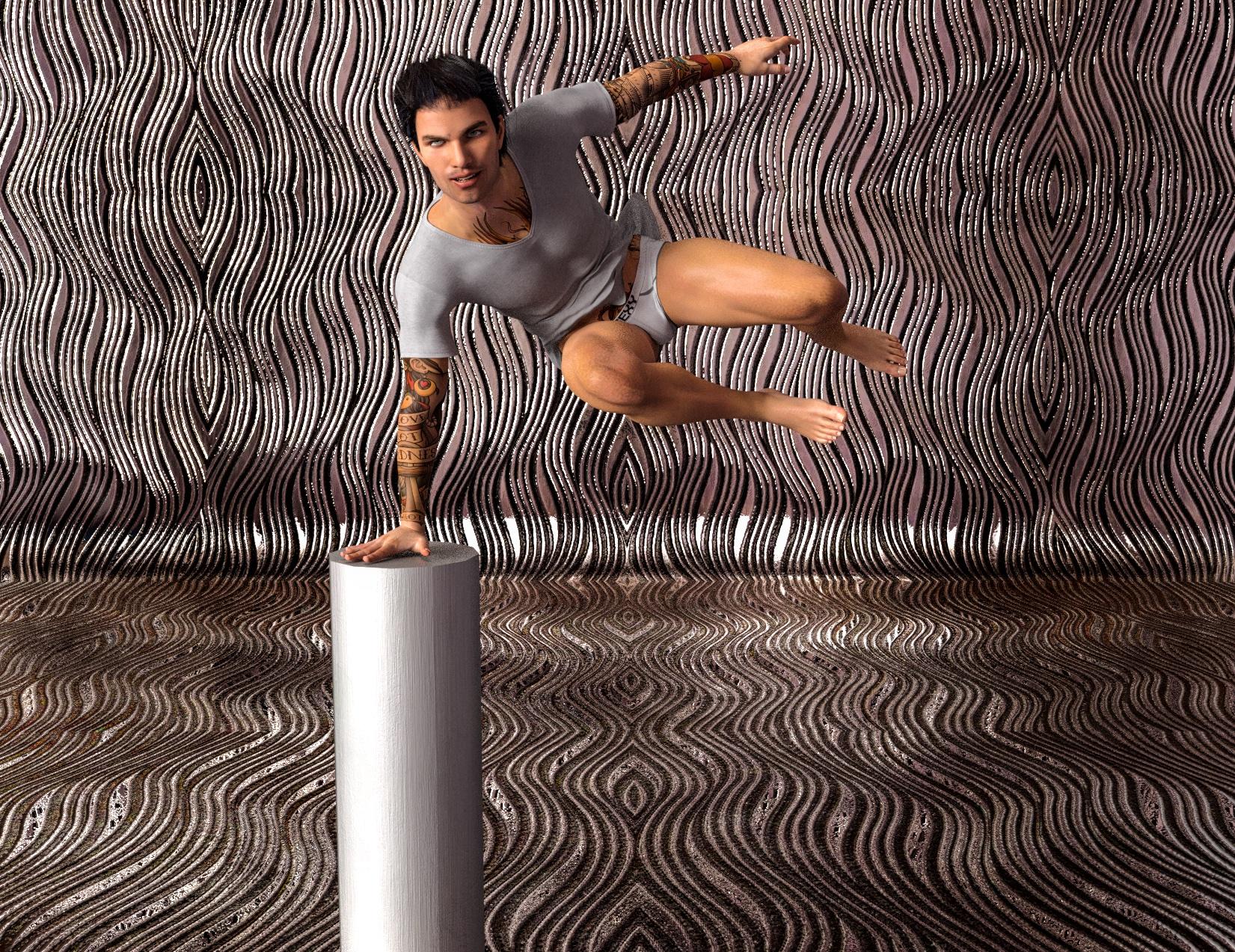
I decided to do a quick render to see how simple it could be. I created a new scene, added a Micharl 8 character from the store, Marcelo, dressed him, added hair, added a pose and primitive, added a backdrop prop, added textures to the backdrop and primitive by selecting the surfaces and applying a shader, added a HDRI background to the enviroment (the HDRI is a multicolored abstract pattern that adds a faux skydome that produces both diffuse and highligt lights. All of this took all of 7 minutres and I told the computer to render.
 Morphs from G3 to G8
I never planned on making a general tool for converting single morphs. Rather I had a particular issue in mind when I started thinking of doing this. That is, a good Body morph has a lot of helper morphs it needs. Most of those helpers should work fairly well with G8, because similar geometry. Some won't because A pose, but I'd guessed they would be rare.
There might be dozens of such morphs, so the problem I was aiming to solve was "how to quickly transfer all of them." I had discuvered a way using the Transfer Utility, but it was tedious, still, in that you had to be able to find all of the morphs in parameters, and that's even harder than it sounds. I had hoped, then, to exploit the fact that Studio automatically know where all the morphs are, because they are conntected. All the helper morphs for Victoria are connected to Victoria so that they will turn on when, and to the same degree that, Victoria is activated. But it turns out that isn't clearly exposed in the API. I could get the system to admit THAT the connections existed, but not to ID the actualy property.
The final solution was that I figured out how to reliable get Studio to return the file location of any one morph, regardless. Since a properly configured product will have that morph either in the root product folder or a sub folder, I had a way of finding all of the morphs associated with a particular product. This was actually an advantage. Because I might make a morph that has a controller that changes how a root element of the figure behaves, and trying to use the links to do the copy might lead to parts of G8 getting overwritten with G3 files. This way, only the files for that product will be copied.
However, there are downsides:
First, not all vendors do things right. The latest Studio makes it much harder to do it wrong, but it's not impossible. I can't predict how all the files are stored so there may be some morphs that the script doesn't handle well. If it's anything major, I expect I'll hear about it.
Second, GenX pust everything in the same folder.
You can actually tell it not do that, and make folders on a case by case basis. But it defaults to one folder. It might or might not make subfolders on the fly. Basically, if you use GenX defaults, the script will transfer all the GenX stuff it finds, which will probably be a lot.
I will stay it is not impossible to make something that does a single morph, but I won't, for now. Largely because that would mean maintaining 4 scripts instead of two. If I ever learn how to add a UI control to script, I will revisit that, because then it can just be an option, rather than separate script. But my present goal is to make enough money that I can eat next week, so I'm not thinking too much about figuring out DzWidget. To the extent I am pondering changes, I'm thinking of how to merge the two scripts back down to one, reliably. I just need a figure detection loop. It's only the two file process loops that differ. Everything else is the same between them.New to DAZ3D - Moving Content to diff HDDaz content at least should already install to People/Genesis #/Hair (or clothing, or character). Poser format content, as for Victoria 4 etc., is another matter.
DIM can use multiple content directories, you ust need to remember to select the right one for each installation.
One thing to be aware of is that the Content Management System on the machine you didn't install from won't know about your content - you can reimport metadata, from the Content Library option menu>Content DB Maintenance, but your own categories and saved fiels won't be added unless you use the same dialogue to export user data on the other machine. You could also set the Content Cluster to be on the portable drive for each machine.
Mix and match products from various levels?There is no Genesis 4. If you meant Genesis 8 than the answer is yes as Victoria 8 is a morph for Genesis 8 Female.
Mix and match products from various levels?Can you mix and match products from different lovels, i.e. use morphs designed for Genesis 4 on Victoria 8, kinda stuff. Sorry if that's a dumb question, but I'm totally new to all this.
LJ Studios - Art Work and TipsLight Fixation
Victoria 2, Rendered in iRay
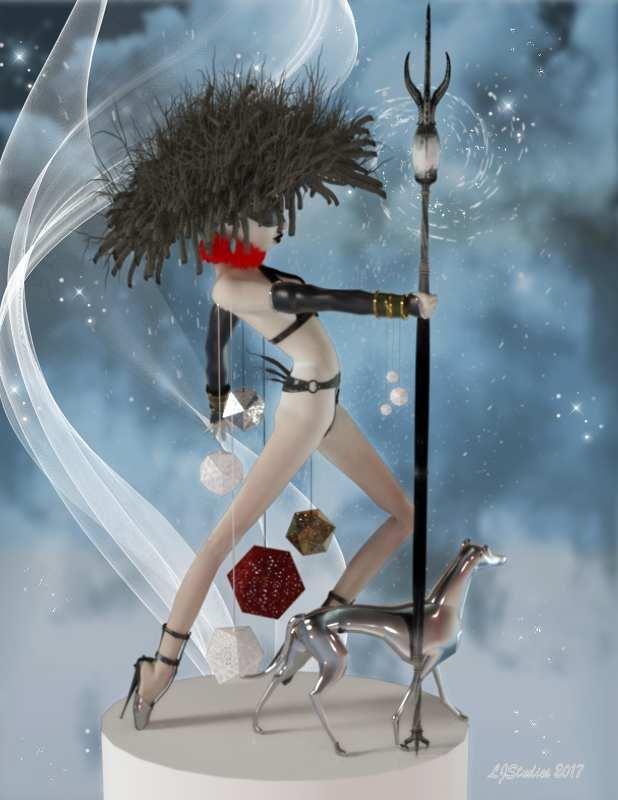
Dog 3Zi Glass Dog by sannzi.
Environment: Background # xmas Surprise by Capelito.
Environment: Lighting # FWSA Soft Light Probes by Forbidden Whispers.
Postwork * Ron's Particles by deviney.
Postwork * Ron's Wisps by deviney.
Postwork * Ron's Angel Dust by deviney.
Shader: Clothing * Mec4d PBS Shaders vol.1 for Iray by Mec4d.
Shader: Clothing * Mec4d PBS Shaders vol.2 for Iray by Mec4d.
Shader: Clothing * Pd-Daz Studio Soft Leather Shaders by Parrotdolphin.
Shader: Dog # Ultra Genesis Studios - Ornamats by Ultra Genesis Studios.
Warrior: clothing: Arm Cuffs * V3-Warrior-Character+outfit by A::DP.
Warrior: clothing: Blind fold # RDNA V Implants by Traveler.
Warrior: clothing: Earring * Stonez4All by janimatrix.
Warrior: clothing: Geodiscs Luster Quasar rontonton 15 N291216 by Alex.
Warrior: clothing: Gloves # RDNA V Hunter by Traveler.
Warrior: clothing: Neck Ruff * Renaissance Ruffs for V4 by Rosemaryr.
Warrior: clothing: Pants Kj Pant for Victoria 2 and Stephanie by aerysoul. 13th row fourth column
Warrior: clothing: Shoes * Fetish Pumps V4 by Reiko-Kano.
Warrior: clothing: Staff # Galeara's Claw Staff by Arki.
Warrior: clothing: Top Magical Vest for V2 by aerysoul.
Warrior: Hair * Beaver Den Freebie by Alessandro_AM.
Warrior: Poses Hand Pose Vol. 1 for Victoria by HarpoonVolt. Hand poses
Warrior: Textures Serenity and Death by FrogLace Studios. Non-Commerical* - Free Registration is required to obtain the freebie
# - No longer available.Rendered with iRay. I used Victoria 2 with my Art Doll morph applied. The pose was created for her body using an image of an art doll I found on pinerest and then applied the hand poses listed in the product list. Used my go to shaders by MEC4D for the metal surfaces. The image was post worked using Ron's fabulous brushes (see list for the particulars).
Genesis 8 Male Anatomical Elements?True. I just wished they offered more than one Pro bundle for Genesis 8. Like maybe one that includes the Head morphs, Body morphs and Facial expressions and have the naughty bits available in it too.
Genesis 1 had this:
https://www.daz3d.com/genesis-michael-victoria-combo-bundle
which is close to what you asked for, but none of the latter releases had a similar bundle
Morphs from G3 to G8This is strangely convenient ... but what on earth happened?
So, what I did was I got it so that the script takes that one morph youare instructed to mark favorite, and it finds out what folder it is in. It then scans the folder and subfolders for all the files. If the file ends in png, it copies it. If it ends in dsf it processes it, changing all the relevant data in the file to apply to G8.
Oh, OK. I misunderstood what the script was supposed to do.
[...] It's worth noting that GenX shapes usually have a helper shape of the base figure. Like a Genesis shape transfered to G3 needs the Genesis bas shape to look right. THis will apply to G8 as well, and GenX may or may not have placed those the shapes in the same folder as your transfered shapes. In your case, it sounds like it did, so that's why M4 came over. But for others, this is something to keep in mind.Actually, it didn't, as far as M4 is concerned. The shape it pulled over -- and all of the G2M DAZ figure shapes, as far as I can tell -- were from Slosh's Legacy Shapes. (See below.)
Looking at the directory structure, the GenX shapes actually are in the top level of the DXD Gen X folder. As far as I can tell, it looks like your script doesn't parse above the directory it's concerned with, if you see what I mean. The shape I was asking it to move was in the Genesis 2 Male folder, so it pulled that entire folder over. For reasons that I don't know at the moment, copies of the Slosh shapes are in the DXD Gen X/Genesis 2 Male folder, which explains why they came along. (At a guess, a failed transfer or some such.) But the helper shapes that GenX requires definitely did not get pulled over. And I don't think I'll try that one right now, since it might well result in pulling the entire GenX tree structure along and, well, that's a lot. I had planned to be a bit more careful this time through, since I had enough morphs in G3M that his loading time got VERY slow.
I was thinking of trying a couple of the actual DAZ shapes. That seems like it might make the script try to pull over the entire morphs folder; is that what would happen, do you know?
That behavior is a fairly accurate description.
If you have:Folder Subfolder Morph.dsf SubSubfolderThe script will find that the morph is in Subfolder. It will then find all other files in Subfolder and SubSubfolder but not Folder.
IIRC, Daz figures are in Morphs/Daz 3D/Product Name. As such, moving one the script will take anything under Product Name, but not look above that at Daz 3D. So it should be perfectly safe.
This does lead to one possible issue. Some Rendo vendors put stuff in the Vendor folder and also in product folders under it. So if you happen to choose a morph they they put in their vendor folder, while they have separate products in product folders, the script will move everything for that vendor. OTOH some vendors put morps in subfolders. Like "All MCMs in their own folder under the product." If you happen to chose one such MCM only that part of the product will transfer.
Usually, the safest way to do this is to look for a root property. Like Victorias usually have a head morph, body morph, and a Victoria silder that controls both. The Victoria slider is the best target because that one is usually in the most effect place to get a proper transfer. Unfortunately, I can't think of a safe way to allow the script to account for the whims of the vendors.V4.2 morph content not loadingWhen loading the Victoria 4.2 model I am pleagued with countless error interuptions asking to manually hunt down specific channels files:
It takes forever to track down these coutnless files and basically makes this mode unusable. So maddening!
So how do I "Make sure that the Poser content directories are set up correctly"??!!?! so these errors stop and actually load the content permanently?
Is this fixable in DS 4.9 for Mac Sierra?
Thanks
Black characters for M8??Wow, this Albino girl is gorgeous. Is this character out there or did you make her yourself. The features and the skin, lovely.Thank you, ALLIEKATBLUE! TMI warning: I morph dialed her using (probably) elements from every morph pack available for G3F along with judicious usage of percentages of 2 or 3 purchased characters including GenX2 (usually avoiding Victoria 7 in order to bypass the sameness that results). Skin is Brooklyn, by Raiya of course.
With DO Head Morphs, 200 Head Morphs, all of Thorne's Head Morph Kits, and Fantasy Creature Creator HD (yes, but in small amounts) I never found myself in a situation where I needed to change a facial feature but couldn't because there was no morph that did it, as would happen with Genesis 2. With Zev0 burning the midnight oil and Thorne's announcement that their G3 morph kits were all being ported over to G8, and RareStone's pack that does a lot of special things, including ears, nostril shapes, multiple fine tuners of lacrimals, 35 brow parameters!, etc., I should be in similar shape with G8F by October, although I may not have scores of premade full head morphs from which to draw. Unless I finally implement Sickleyield/Redz/SingularBlues (and whoever else helped)'s G3toG8 morph directions, but hopefully someone will write a script and automate the process.
But back to black characters for M8: Bringing over from G3M every black/brown character head morph available (in both stores) would still give only a few more than twenty. But with that variety plus DO G8M Head Morphs and the soon-to-be-released 200 Head Morphs for G8M, there will be plenty of power to dial up black men to your heart's desire. I have found, though, that men are much more difficult for me to morph satisfactorily than women. When I make a funny-looking girl/woman, she's still a female. But when I make a funny-looking male, he's just funny-looking.
(Released) EcVh0 Pale Skin Shader for Genesis 8 Female [Commercial]Just a quick tip for everyone who has this. If you have gotten the Olympia 8 pro or Beginners pack the character Sharah comes with SSS maps that can be used with this shader with no alteration, and she comes with her make up baked into the SSS maps too so you don't have to mess with them either. Plus they all come in Brow and No Brow options. So it really is as easy as plugging in her SSS maps into the Translucency Chanel and perhaps changing the Specular map for her own to have another skin for this shader with no extra work. You can use it with the original shader EcVh0 has as well. This example shows the differences you get with Olympia 8's SSS (Face), Sharah's (Torso) and Victoria 8's SSS maps as well (Legs) with the original shader but the arms show how Shara's work with the pale shader too. Sorry for the crappy render it was just a viewport proof of concept test that I screen captured to save time.
This is the closes posting I have seen that explains how to use the Pale Skin. Can you explain EXACTLY what goes where and how, if you are not using olympia. I am using SC Chloe/Vic8. Thank you!
Yet Another What Character Is That Thread [solved]That is just Victoria 7Fiddling with Iray skin settings...I am a total Iray newbie, having spent all my time with 3Delight. I have a few questions:
QUESTION 1:
I have some characters with fantasy skin colors, i.e. soft gray, green, blue, or creating golden tan, etc. In 3Delight, all I needed to do was play with the Diffuse Color, Subsurface Color and Specularity to make this change on normal fair human skin. Same thing with eye color. There are some lovely eye sets for Victoria 4 which add subtle changes to Diffuse Color to create more options for a single map, such as this product:
There are several ways you can alter skin color in Iray. The easiest being altering the color in one or all of these: Base Color, Translucency Color, SSS Reflectance Tint, Glossy Color, or Glossy Specular. Or of course you can alter the diffuse map in photoshop or similar.
QUESTION 2:
In 3Delight, I would hide individual surfaces by setting the opacity to zero. I use this technique often in kitbashing. Is there a way to do this in Iray?
Thanks! This is a great thread.
In Iray it is called Opacity Cutout - set it to zero, and the material will be invisible.
Hope this helps!
Fiddling with Iray skin settings...I am a total Iray newbie, having spent all my time with 3Delight. I have a few questions:
QUESTION 1:
I have some characters with fantasy skin colors, i.e. soft gray, green, blue, or creating golden tan, etc. In 3Delight, all I needed to do was play with the Diffuse Color, Subsurface Color and Specularity to make this change on normal fair human skin. Same thing with eye color. There are some lovely eye sets for Victoria 4 which add subtle changes to Diffuse Color to create more options for a single map, such as this product:
https://www.daz3d.com/sg-frosty-gaze
How do I do this in Iray? Can I change this via surfaces or do I need to make changes to the maps in Photoshop?
QUESTION 2:
In 3Delight, I would hide individual surfaces by setting the opacity to zero. I use this technique often in kitbashing. Is there a way to do this in Iray?
Thanks! This is a great thread.
Daz 3D is part of

Connect
DAZ Productions, Inc.
7533 S Center View Ct #4664
West Jordan, UT 84084Licensing Agreement | Terms of Service | Privacy Policy | EULA
© 2026 Daz Productions Inc. All Rights Reserved.